

Purchase requisitions, purchase orders, vendor management, trade agreements, and budget control — the upstream discipline that determines whether your AP team is managing commitments or just cleaning up after them.
The Fundamental Shift: Commitment Accounting vs. Cash Accounting
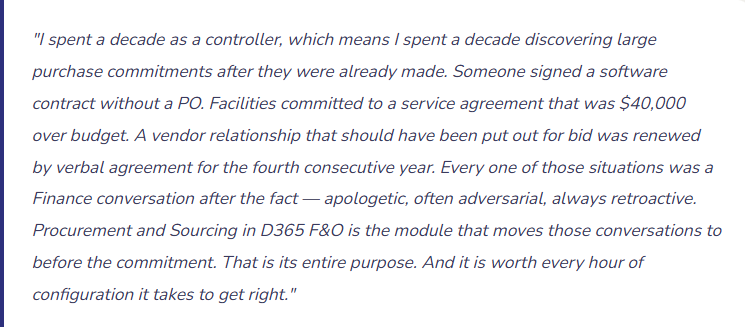
Before we get into the specific features, let’s establish the mindset that Procurement and Sourcing is built around — because it’s different from how most Finance teams think about spending until they’ve worked with a mature procurement process.
In a reactive AP process, Finance sees spending when invoices arrive. The commitment was made weeks or months ago, the goods or services have already been received, and the invoice is now sitting on someone’s desk awaiting approval. Finance’s job at that point is to process the payment, not to evaluate the decision. The decision was made without them.
In a proactive procurement process — which D365 F&O’s Procurement and Sourcing module enables — Finance sees spending when the commitment is made. A purchase requisition is submitted before the order is placed. A purchase order is created and approved against an active vendor contract. Budget checking happens at the requisition and PO stage, not at the invoice stage. By the time an invoice arrives, Finance has already approved the underlying commitment. Invoice processing becomes a matching exercise, not a spending review.
The shift from reactive to proactive requires upstream configuration, upstream training, and upstream management support. It also produces materially better spend visibility, more defensible audit trails, and a Finance team that stops being surprised by what lands in their AP queue.
The Procurement Lifecycle in F&O

Not every organization needs every stage. A small company with a trusted vendor base might skip the RFQ process and go straight from requisition to PO. An organization with well-established vendors and stable pricing might skip requisitions for routine purchases below a threshold. What matters is understanding the full arc so the stages you do use are connected deliberately, not assembled by accident.
Purchase Requisitions — The Request Before the Commitment
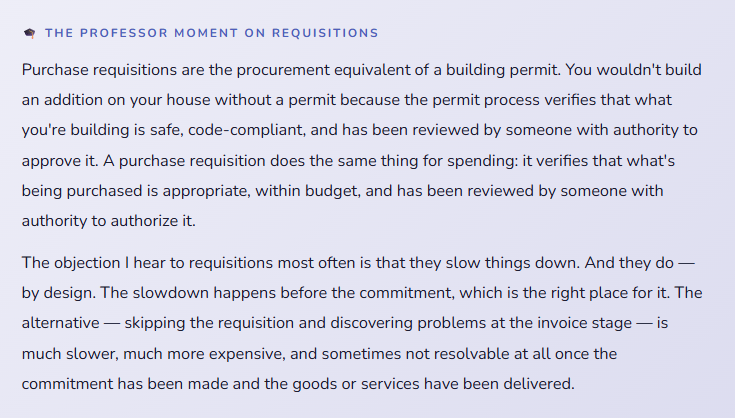
A purchase requisition in D365 F&O is an internal request to purchase something — submitted by the person who needs it, routed through an approval workflow before a purchase order is ever created. The requisition is not a commitment to a vendor. It’s an internal authorization request. Only after it’s approved does it become the basis for a purchase order.
This two-step sequence is the heart of spend control. The requester says “I need this.” Approval workflow says “you can have this — or you can’t, and here’s why.” Then and only then does anyone contact a vendor. The sequence protects against unauthorized spending, creates a documented need-justification trail, and gives Finance visibility into what’s coming before it arrives.
What a Purchase Requisition Contains
The fields that drive routing, budget checking, and PO creation
A requisition in F&O captures the item or service being requested, the quantity and estimated price, the delivery date, the financial dimensions that will be charged, and — critically — the requester and the “requested for” entity, which determines whose budget is being drawn against and who is responsible for the purchase.
The financial dimensions on the requisition line are the most important fields from Finance’s perspective. If someone requests $15,000 of IT equipment and codes it to the wrong cost center, that error has to be caught at the requisition stage — not six weeks later when the invoice arrives and cost center managers are reconciling actuals to budget. Build dimension validation into your requisition process: required fields, default values from the requester’s employee record where possible, and manager review that includes dimension confirmation as part of the approval.
The purchasing policy attached to the requesting organization determines what rules apply to this requisition — whether it requires manager approval, whether it’s subject to budget checking, whether direct purchase is permitted or competitive sourcing is required. Purchasing policies in F&O are assigned to legal entities and operating units, which means different rules can apply to different parts of the organization while all flowing through the same system.
Requisition Configuration Decisions
- Define which procurement categories require competitive sourcing (RFQ) versus allowing direct vendor selection
- Decide whether financial dimensions are required on requisition lines — and enforce it at submission, not at PO creation
- Determine whether requisitions auto-convert to POs after approval or require a Purchasing team step
- Configure the “requested by” default from the logged-in user’s employee profile — eliminates manual entry and reduces the coding-to-wrong-person error
Requisition Approval Workflow — Where the Control Lives
The sequence that turns a request into an authorization
Requisition approval workflows in F&O can be configured with significant sophistication — routing to the requester’s direct manager for amounts below threshold, to a department head for mid-range amounts, to Finance for amounts above a certain level, and to the CFO for exceptional amounts. The routing logic is defined once and applies consistently to every requisition that flows through it, without anyone having to remember who should approve what size of request.
The approval workflow also supports budget checking integration — if budget checking is enabled, the workflow can be configured to automatically reject a requisition that would exceed the available budget for the relevant cost center or project. No manual budget lookup required. The system either passes or flags the requisition based on the real-time budget position at the moment of approval.
One configuration detail that is consistently missed: delegation and absence management. The requisition workflow is only as good as its coverage when approvers are unavailable. Configure delegation rules — who covers for whom when an approver is traveling, on leave, or has left the organization — before go-live, not when the first blocked requisition surfaces during someone’s vacation.
Workflow Configuration Checklist
- Define approval thresholds that match your actual authorization policy — not generic tiers that don’t reflect how decisions are made
- Configure escalation rules for requisitions that sit unapproved beyond a time limit
- Set up delegation for every approver before go-live — the first time it matters will be when you least expect it
- Test the workflow with actual employee records and purchase amounts that span every threshold tier
Purchase Orders — The Formal Commitment Document
A purchase order in D365 F&O is the formal commitment to a vendor — the document that authorizes a specific purchase at a specific price from a specific supplier. In F&O, POs can originate from approved purchase requisitions (the controlled path), from manual creation by the purchasing team (for routine or urgent purchases where the requisition step is bypassed by policy), or from planned orders generated by MRP if your organization uses supply chain planning.
01 Standard Purchase Order
The most common type — a one-time order for a specified quantity of goods or services at a fixed price. Creates a commitment in the system, enables product receipt matching, and is the basis for three-way invoice matching.
02 Purchase Agreement / Blanket Order
A long-term commitment to a vendor — “we will purchase up to $500,000 of this material from you over the next 12 months at a negotiated price.” Individual release orders draw against the blanket. Preserves negotiated pricing and vendor relationship terms without a new PO for every transaction.
Business Case: Volume contracts, repeat suppliers
03 Intercompany Purchase Order
Created when one legal entity in your organization purchases from another. F&O’s intercompany automation can generate the corresponding intercompany sales order on the selling entity automatically, eliminating the double-entry manual coordination that intercompany purchasing otherwise requires.
Business Case: Multi-entity organizations
04 Project Purchase Order
A PO linked to a project in D365 Project Operations — costs flow directly to the project and appear in project cost reporting. Required when project-based organizations need to track procurement costs at the project level for billing, profitability, or capitalization purposes.
Business Case: Project-based businesses
05 Return Purchase Order
Used when goods are being returned to a vendor — creates a negative PO that properly reverses the original receipt and triggers vendor credit management. Using credit memos alone without a return order leaves the receipt quantity uncorrected in inventory.
Business Case: Vendor returns
06 Direct Delivery PO
Linked simultaneously to a sales order — the vendor ships directly to the customer. F&O manages the linking between the sales order and the purchase order, so receipt and shipment confirmation triggers both the purchase receipt and the sales delivery in a single posting flow.
Business Case: Drop-ship fulfillment models
PO Approval Workflow — The Control That Protects Your Commitments
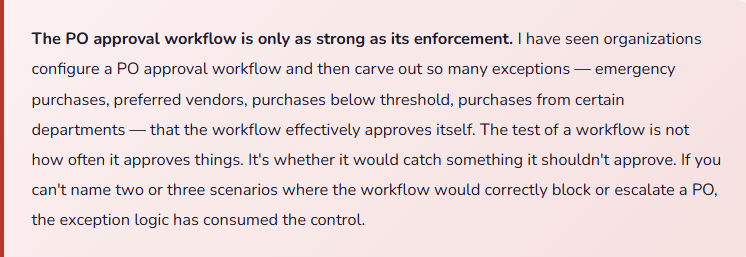
If requisitions are the request layer, PO approvals are the commitment layer — the final authorization before a vendor receives an official order document. In many organizations, POs are generated by a purchasing team that has already reviewed requisitions, which means the PO approval is a second validation rather than a first. In others, POs are created directly without requisitions for routine purchases, and the PO workflow is the primary control.
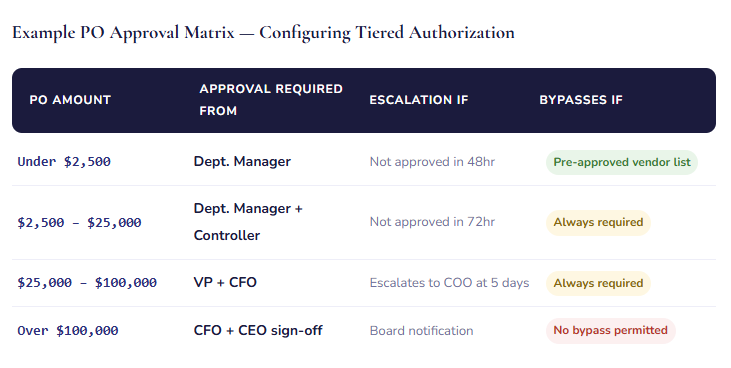
The matrix above is an example — your thresholds and routing will reflect your organization’s actual authorization policy. The key principle is that the matrix should exist as a documented policy first, then be translated into F&O workflow configuration. A workflow built without a documented authorization policy is just buttons and routing rules — it’s not a control, it’s an inconvenience. A workflow that enforces a known, approved policy is a genuine governance mechanism.
Vendor Management — The Master Data Behind Every Transaction
We covered vendor setup in the AP post, but Procurement and Sourcing adds a layer that pure AP configuration doesn’t reach: vendor qualification, vendor evaluation, and the trade agreements that make your negotiated pricing automatically available at order entry.
01 Vendor Qualification and Approval
Controlling who your organization can purchase from
D365 F&O supports an approved vendor list at the item or procurement category level. When this is configured, purchase orders for specific items can only be raised against vendors who have been approved for that item — the system prevents routing business to an unapproved supplier, regardless of who creates the PO.
Vendor qualification can go further with the Vendor Collaboration portal, which gives external vendors limited, controlled access to their open purchase orders in your system — they can confirm POs, view forecasted demand, and submit invoices directly. This is a more sophisticated integration than most mid-market organizations set up at go-live, but it’s worth knowing it exists as a maturity-path option once the core procurement process is stable.
For organizations with compliance requirements — government contractors, healthcare organizations, financial services — the vendor qualification framework in F&O can enforce required certifications, insurance documentation, and contract status checks as conditions for vendor approval. A vendor whose insurance lapsed automatically loses approved status for new orders, which prevents the scenario where procurement continues with an uninsured vendor because nobody updated a spreadsheet.
Vendor Qualification Considerations
- Define which procurement categories require approved vendor lists — not everything needs one, but strategic and high-risk categories usually do
- Assign a vendor qualification renewal schedule — approvals that never expire don’t protect you as vendor circumstances change
- Assign ownership of the approved vendor list maintenance — Purchasing team, not Finance alone, should own ongoing vendor status management
02 Vendor Performance Evaluation
The data-driven basis for sourcing decisions
F&O’s vendor evaluation module allows you to rate vendors across multiple criteria — delivery performance, quality, responsiveness, price competitiveness — and aggregate those ratings into a vendor scorecard that informs future sourcing decisions. The evaluation data lives in the system alongside the transaction history, so when it’s time to select a vendor for a new contract, the decision is informed by actual performance data rather than intuition or relationship history.
Vendor performance evaluation is one of those features that most organizations intend to configure and then don’t, because it requires both initial setup and ongoing operational discipline to generate meaningful scores. If your organization is ready to invest in it, the payoff is genuinely better sourcing decisions over time. If you’re not ready, don’t let the gap block your core procurement go-live — note it as a Phase 2 item with a specific owner and timeline, not as an open-ended “someday.”
Trade Agreements — Negotiated Pricing in the System, Not in a Spreadsheet
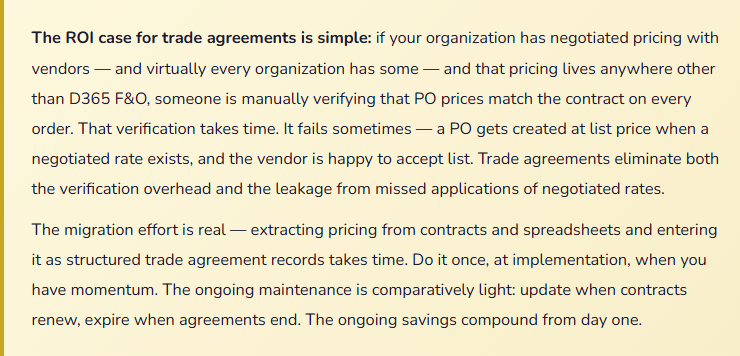
One of the highest-value configuration items in Procurement and Sourcing that most organizations underutilize: trade agreements. A trade agreement in D365 F&O is a record of a negotiated price or discount — with a vendor, for a specific item or category, effective between specific dates, possibly subject to minimum quantities. Once entered, trade agreements automatically populate the negotiated price on purchase order lines when the vendor and item combination match. Your purchasing team doesn’t look up prices. They don’t check a contract spreadsheet. The system applies the negotiated price automatically.
01 Vendor-Specific Price
A fixed price for a specific item from a specific vendor — for example, $24.80 per unit for Part #A1042 from Supplier X, effective through December 31. Any PO for that item from that vendor automatically uses $24.80, regardless of who creates the order.
02 Volume-Based Pricing
Tiered pricing based on quantity — $24.80 per unit for quantities 1-99, $22.50 for 100-499, $20.00 for 500+. The system selects the right tier based on the PO quantity automatically. Your purchasing team doesn’t calculate tiers manually. Saves money and saves time simultaneously.
03 Date-Effective Pricing
Prices with effective and expiration dates — when a vendor contract renews at a new price, you enter the new trade agreement with the new effective date and the system transitions automatically on that date. No manual price updates on individual items. No pricing lag between contract and system.
04 Discount Agreements
A percentage or fixed discount off list price, rather than a fixed unit price. Common for organizations that use vendor price lists as the base and negotiate percentage reductions. Trade agreements support this structure — the system calculates the discounted price from the list price automatically.
Requests for Quotation — Competitive Sourcing in the System
When a purchase is large enough, specialized enough, or strategically important enough to justify competitive bidding, D365 F&O’s Request for Quotation (RFQ) process manages the sourcing event — sending the solicitation to multiple vendors, capturing and comparing their responses, and converting the winning response to a purchase order.
| RFQ Stage | What Happens in F&O | What Finance Should Know |
|---|---|---|
| Create RFQ | Purchasing creates the solicitation — item or service, specifications, required delivery date, response deadline. Invited vendors are added; they can be existing vendors or new suppliers being evaluated for the first time. | The estimated value of the RFQ triggers budget availability checking if budget control is active. A sourcing event for a $200,000 capital purchase should confirm budget availability before solicitations go out, not after a vendor is selected. |
| Send to Vendors | F&O generates RFQ documents for each invited vendor. If the Vendor Collaboration portal is configured, vendors can respond directly in the system. Otherwise, responses come by email or paper and are entered by the purchasing team. | Track which vendors responded and which declined — the response rate is a vendor relationship signal. A vendor who consistently declines to quote may not want your business at the prices you’re targeting, which is useful sourcing intelligence. |
| Record Vendor Replies | Vendor quotations are entered against the RFQ — price, delivery date, terms. F&O stores all replies alongside the original solicitation, creating a complete record of the competitive event. | This is the audit record for the sourcing decision. If a sourcing decision is ever challenged — why was Vendor A selected over Vendor B who submitted a lower price — the RFQ record provides the documented basis for the decision. |
| Compare and Award | F&O’s RFQ comparison view displays all vendor responses side by side — price, delivery, terms. The purchasing team selects the winning bid and rejects the others. Rejected vendors can optionally receive a rejection notification. | If the selected vendor is not the lowest price, document the reason on the RFQ before awarding — quality, delivery timeline, strategic relationship, total cost of ownership. That documentation is the governance record that explains the decision. |
| Convert to PO | The accepted reply converts directly to a purchase order, pre-populated with the vendor’s quoted price and delivery terms. The RFQ is linked to the resulting PO, so the sourcing history is accessible from the order. | The PO that results from an RFQ process has a stronger audit position than a directly created PO — it’s backed by documented competitive evaluation. For capital expenditures and strategic purchases, this documentation matters significantly in audits and board reviews. |
Budget Control — The Feature That Changes the Finance-Procurement Relationship
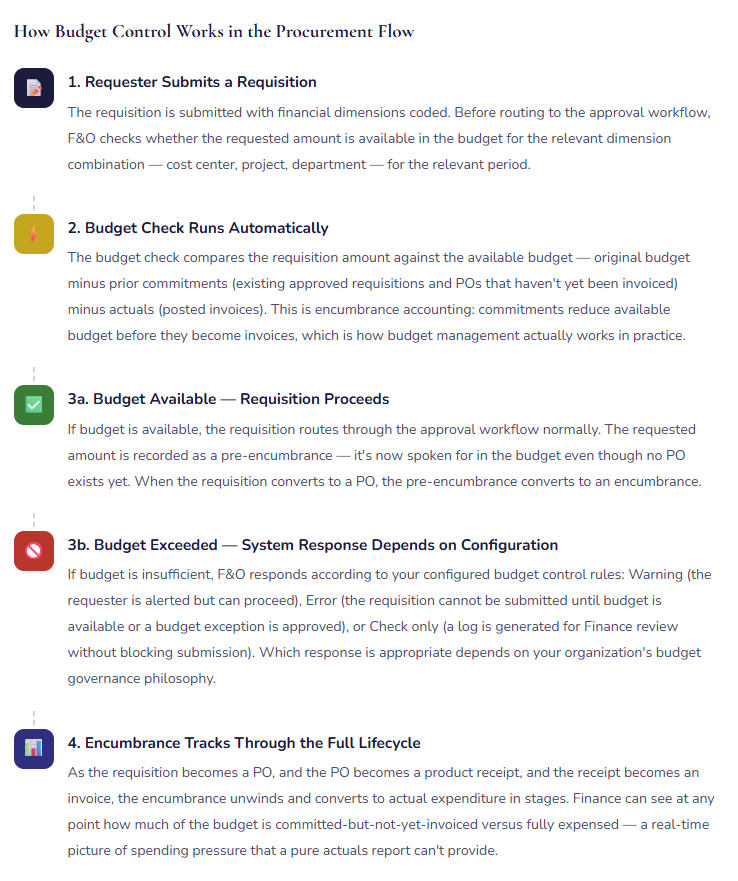
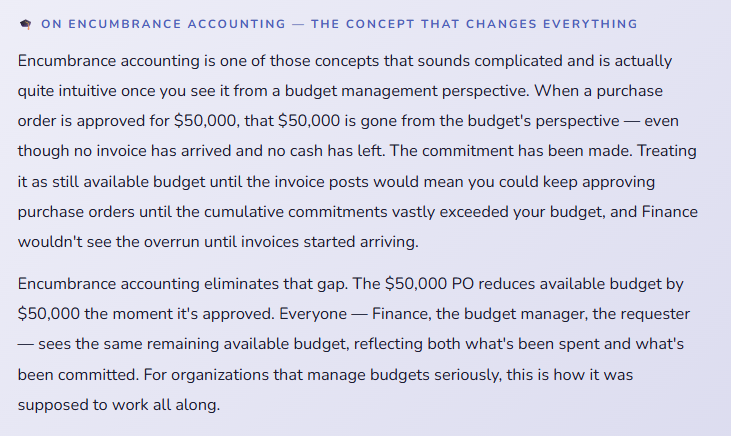
Budget control in D365 F&O is the integration point between your financial plan and your procurement activity — and it is the single feature in this module that most changes how Finance and Operations interact around spending. When budget control is active and properly configured, budget availability is checked at the time of purchase requisition and purchase order entry, not at the time of invoice payment.
Vendor Evaluation Criteria — Measuring More Than Just Price
01 On-Time Delivery
Measured against the promised delivery date on the purchase order. F&O can calculate this automatically from receipt dates versus PO promised dates. A vendor with a 65% on-time rate for a critical component is a supply chain risk, regardless of their price competitiveness.
02 Quality / Acceptance Rate
The percentage of received goods that pass inspection without rejection or return. Requires quality management configuration to track formally, but even a simple rejection rate tracked in notes is better than no quality visibility at all.
03 Price Competitiveness
How do this vendor’s prices compare to market rate and to competing bids on equivalent items? Trade agreements and RFQ history in F&O provide the data foundation for this comparison across time and sourcing events.
04 Invoice Accuracy
The percentage of vendor invoices that match their purchase orders without discrepancy. A vendor whose invoices routinely differ from the PO — quantity, price, or terms — generates AP processing overhead and matching exception reviews on every transaction.
05 Responsiveness
How quickly does the vendor respond to RFQs, order acknowledgments, and issue resolution requests? A vendor who is excellent on price and delivery but takes three days to respond to a problem creates a hidden cost in relationship management.
06 Compliance / Certifications
Current status on required certifications, insurance, and contract compliance. Tracked in the vendor qualification framework and linked to approved vendor list status — a lapsed certification is an automatic flag, not a missed manual check.
The Mistakes That Undermine Procurement Controls
⚠️ Requisition Bypass — “We Needed It Yesterday”
The most common procurement control failure is the emergency bypass. Someone needs something urgently, they don’t want to wait for requisition approval, so they ask Purchasing to create a PO directly and deal with the paperwork later. “Later” frequently never comes. The purchase is made, the goods arrive, the invoice is paid, and the requisition that was supposed to precede it never gets created. The control was present in the system. It simply wasn’t used. When this pattern is frequent enough, the requisition-to-PO workflow becomes a formality for low-urgency purchases rather than a control on all purchases.
→ Define what constitutes a legitimate procurement emergency and what the approved bypass process looks like — it should involve at least one phone call and a retroactive documentation requirement, not simply skipping the step. Track bypass frequency by department and by manager. Presented to leadership quarterly, the bypass rate data usually generates the management support needed to reduce it. What gets measured in this process gets managed.
⚠️ Trade Agreements Not Loaded — Negotiated Pricing Never Applied
This one costs organizations real money quietly over time. Contracts are negotiated. Prices are agreed. The contracts live in a filing cabinet or a contract management system. Nobody enters the pricing into D365 F&O as trade agreements. Purchase orders get created at the catalog or list price. The vendor receives and processes them. Finance pays the invoices. The negotiated price was never applied because it was never in the system to apply. The delta between list and negotiated accumulates across every PO for every vendor with an existing contract.
→ Treat trade agreement entry as a procurement go-live deliverable. Extract existing vendor pricing from contracts, price lists, and supplier communications. Enter them as trade agreements in F&O before go-live, with appropriate effective dates. Build a process for Purchasing to enter new trade agreements when contracts are executed — not as an afterthought but as part of the contract finalization workflow. The entry effort is a one-time cost; the savings are ongoing.
⚠️ Budget Control Configured as Warning-Only — Nobody Reads the Warnings
Budget control in warning mode generates a warning when a requisition or PO would exceed available budget — and then allows the transaction to proceed anyway. This is better than no budget checking at all, but not by as much as it sounds. In practice, requesters learn quickly that the warning doesn’t block anything, and the warnings become checkbox items that nobody investigates. Finance receives warning reports that nobody acts on. Budget overruns happen anyway, just slightly more visibly than without the feature enabled.
→ Configure budget control as Error mode for budget categories where hard limits are genuinely intended, and provide a formal budget override request process for exceptions — a Finance approval step that creates a documented exception record when a budget limit is exceeded intentionally. This structure maintains the control while providing a legitimate path for genuine exceptions, instead of letting every overrun become a quiet warning that nobody addresses.
⚠️ PO Created After Goods Already Received — the “After the Fact PO”
The retroactive purchase order is a close cousin of the requisition bypass. The goods or services arrive. Receiving posts the product receipt. Then someone creates the PO — either because the PO was forgotten until the invoice arrived, or because the order was placed verbally before anyone remembered to create a formal document. The system now shows a PO that was “created” before the receipt but actually existed in the system afterward. Three-way matching technically passes but the control was never real. The commitment was made without system authorization and reconstructed after the fact.
→ Establish and enforce a policy: no product receipt is posted against a PO that wasn’t created and approved before the goods arrived. Implement a receiving policy that requires a valid PO number before the warehouse team accepts delivery. Track after-the-fact POs by department in a regular report — the pattern usually reveals specific individuals or departments that need targeted training or process intervention rather than a system-wide problem.
⚠️ Purchasing Policy Configured Once and Never Revisited
Purchasing policies in F&O define the rules for your procurement process — thresholds, sourcing requirements, approval routing. These policies are configured during implementation to reflect the organization at that point in time. Then the organization changes: new business units are added, spending authority rules are updated, new compliance requirements emerge, reporting structures change. The purchasing policies in the system don’t automatically update with organizational changes. Two years after go-live, the configured policies may not reflect the actual authorization structure or the actual sourcing requirements of the business.
→ Schedule an annual purchasing policy review as a standing calendar item — Procurement and Finance together, reviewing the configured policies against the current organization structure and authorization matrix. Any organizational change that affects spending authority — new department, new management level, new compliance requirement — should trigger a purchasing policy review as part of the change management process, not months later when someone notices the policy doesn’t match reality.
⚠️ Vendor Master Data Managed Without a Governance Process
Vendor master data in F&O — payment terms, approved status, banking details, tax information — is high-stakes information that should be tightly controlled. In organizations without a formal vendor data governance process, vendor records get updated casually: someone changes a bank account number in response to a vendor email without verification, payment terms get modified to accommodate a one-time exception and never reset, new vendors are added by multiple people with inconsistent data quality. The result is a vendor master that’s difficult to trust and periodically generates payment errors or, in fraud scenarios, payments to fictitious vendors.
→ Designate a vendor master data owner — usually Accounts Payable or Procurement — with exclusive authority to make changes to vendor banking details, payment terms, and approved status. Establish a request-and-authorization process for vendor data changes, and implement a segregation of duties control: the person who creates or modifies a vendor record should not be the same person who processes payments to that vendor. These controls are basic, widely recognized, and consistently absent from organizations that haven’t thought about them explicitly.
Quick Reference: Do’s and Don’ts
✓ Do This
- Document your authorization policy before configuring approval workflows — workflows enforce policy, they don’t create it
- Configure delegation for every approver in the requisition and PO workflows before go-live
- Load trade agreements for all existing vendor contracts before go-live — treat it as a required deliverable
- Build a new trade agreement entry step into your contract finalization process
- Configure budget control in Error mode for categories with hard spending limits
- Provide a formal, documented exception process for budget overrides
- Establish a no-receipt-without-valid-PO receiving policy and train warehouse accordingly
- Schedule an annual purchasing policy review with Procurement and Finance
- Define a formal vendor master data governance process with a designated owner
- Segregate vendor data change authority from payment processing authority
- Track bypass rates by department and present them to leadership quarterly
- Use RFQ for capital expenditures and strategic sourcing events — and retain the documentation
✗ Don’t Do This
- Build approval workflows without a documented authorization policy as the foundation
- Allow “emergency” PO creation to become a routine bypass of requisition controls
- Leave trade agreements unconfigured and allow list prices to apply to negotiated suppliers
- Configure budget control as warning-only and assume warnings will be acted on
- Create POs after goods are received and treat it as normal purchasing practice
- Allow vendor bank account updates without a verification and authorization step
- Let the same person create vendors and process their payments
- Configure purchasing policies during implementation and never review them again
- Skip the RFQ process for large purchases to save time — the documentation is the control
- Treat procurement as an Operations responsibility that Finance doesn’t need visibility into
- Assume workflow escalation rules are in place without testing them with real scenarios
The honest framing for leadership conversations about procurement controls: the question is never whether to have controls on spending. The question is when in the process those controls apply. Reactive controls — invoice approval after the commitment is made — are easier to implement and harder to enforce meaningfully. Proactive controls — requisition approval, budget checking, vendor qualification before the order is placed — require more upfront investment in configuration and change management, and they produce materially better outcomes: fewer surprises, lower overspend rates, better audit trails, and a Finance team that knows what’s coming before it arrives.
If the argument against implementing procurement controls is that they slow things down — that’s true. They slow down the commitment process, which is exactly where the slowdown belongs. The alternative, where commitments happen at speed and Finance scrambles to manage the downstream consequences, is not actually faster for the organization. It just feels faster to the person who got what they needed without going through a process.
Up Next:
We’ve covered the spend side of the financial platform — AP, procurement controls, and the commitment accounting that connects the two. Next, we’re moving to a module that doesn’t get nearly enough attention in implementation conversations: Cash and Bank Management in D365 F&O — bank accounts, bank reconciliation, liquidity management, the cash flow forecast, and the configuration decisions that determine whether your treasury function runs smoothly or requires constant manual intervention. If you’ve ever had a month-end where book cash and bank cash didn’t agree and nobody could explain why, that post is going to be useful.
Until then — load your trade agreements, configure your delegation, and please audit how many purchase orders in your system were created after the product receipt was already posted.
— Bobbi
D365 Functional Architect · Recovering Controller
Leave a Reply