

Ledger period management, the close sequence that matters, subledger reconciliations, the year-end close transaction, and how to build a month-end process that runs the same way every month — without heroics, without surprises, and without the 11 PM email asking if the books are ready.
Ledger Periods and Period Status — The Control Mechanism
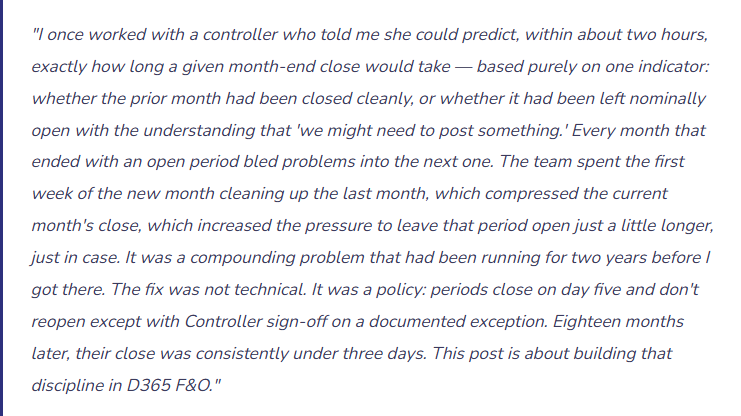
In D365 F&O, every posting period has a status — and that status determines whether transactions can be posted to it. Understanding and actively managing period statuses is the foundational close control. Without it, the close date is aspirational rather than enforced.
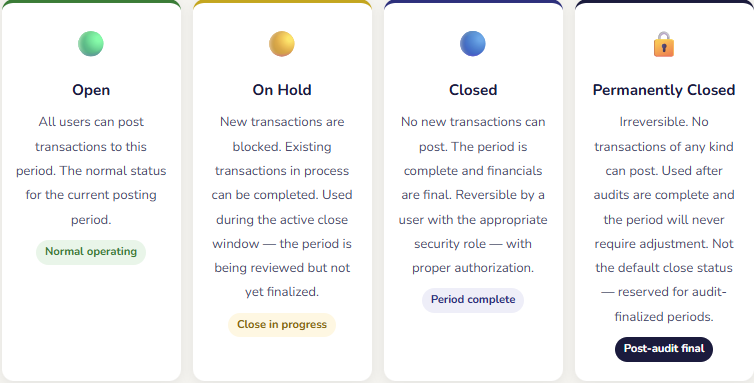
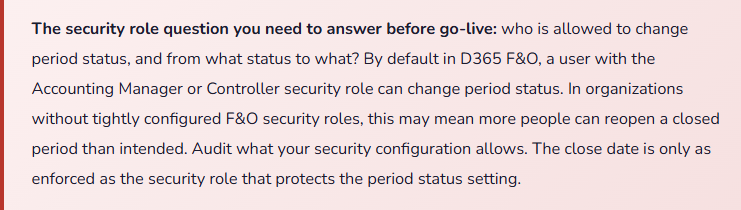
Period status in D365 F&O is managed in the Ledger Calendar configuration, accessible through General Ledger → Ledger Setup. Status can be set globally (for all users) or by module — which means you can close Accounts Payable for a period while leaving General Ledger open for accruals, or close Accounts Receivable while leaving Cash and Bank open for bank statement processing. This module-level control is powerful when used intentionally and confusing when it isn’t — we’ll come back to it in the close sequence section.
The Close Sequence — Order Matters More Than Speed
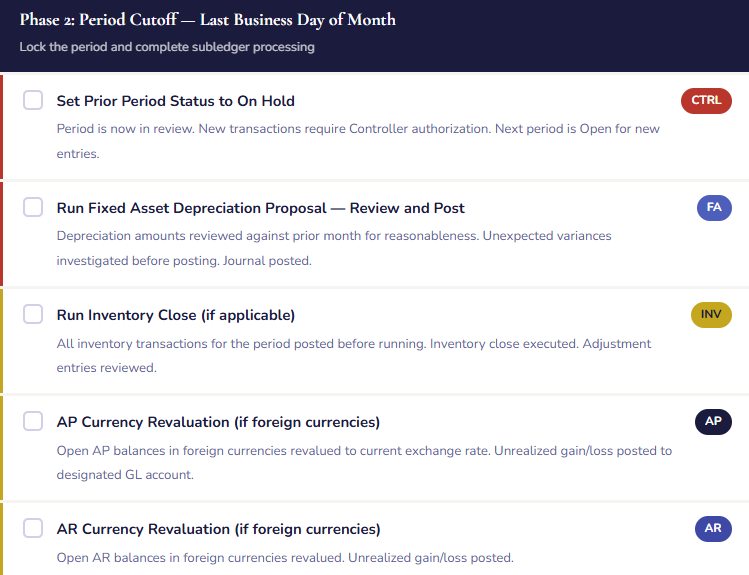
The most common month-end problem I see is not that teams don’t work hard enough during close — it’s that they work in the wrong sequence, which means they finish one step, discover it requires something from a prior step they skipped, and have to loop back. The close sequence isn’t arbitrary. It reflects genuine dependencies: you can’t finalize the GL until the subledgers are reconciled; you can’t run financial statements until the GL is finalized; you can’t close the period until the financial statements are reviewed and signed off. Respecting the sequence is how a close finishes in three days instead of ten.
The Close Sequence in D365 F&O — Dependencies Drive the Order
- Set the Prior Period to On Hold
- Block new transactions to the closing period while the review begins. Transactions already in process can complete; new entries require Controller authorization. This is day one of close, not the last step. Running close with the period fully open means transactions can post while you’re reviewing — your numbers are a moving target.
- Process All Subledger Transactions
- AP: match and post all vendor invoices for the period, run and post the currency revaluation if applicable. AR: confirm all customer invoices are posted, post any pending cash receipts. Fixed Assets: run and post the depreciation proposal. Inventory: post all pending inventory transactions, run inventory close if applicable. These modules feed the GL — they must be complete before the GL reconciliation begins.
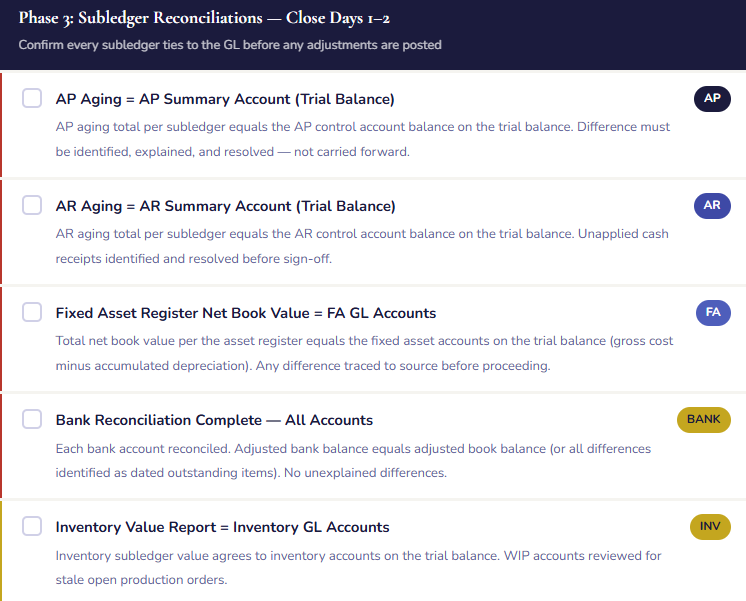
- Reconcile Each Subledger to the GL
- AP aging = AP summary account on the trial balance. AR aging = AR summary account on the trial balance. Fixed asset register net book value = fixed asset accounts on the trial balance. Bank reconciliation = cash accounts on the trial balance. Inventory value report = inventory accounts on the trial balance. Each reconciliation must agree before moving forward. A reconciling difference at this stage is an open item that must be resolved — it cannot be closed over.
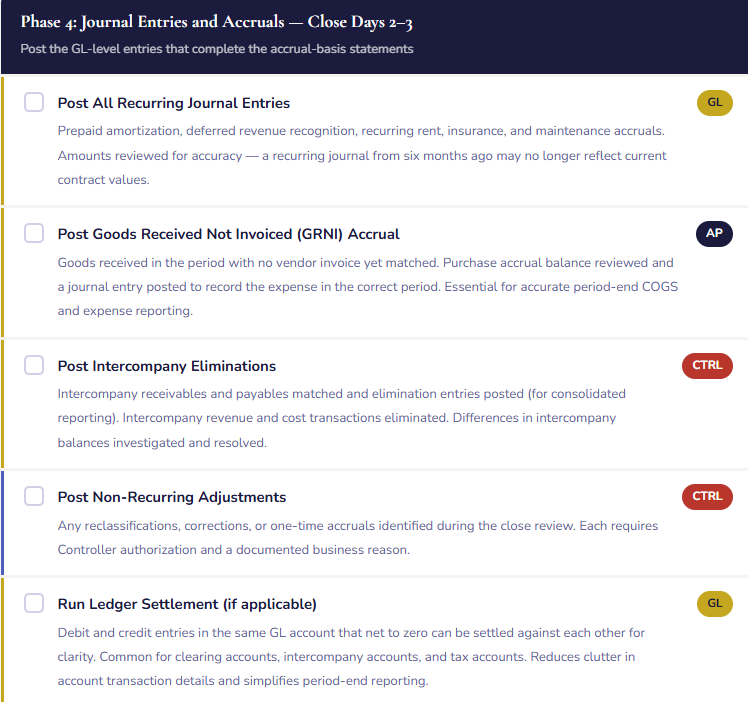
- Post All Period Accruals and Adjustments
- Recurring accruals (prepaid amortization, deferred revenue, recurring maintenance), non-recurring adjustments identified during close review, reclassifications, elimination entries for intercompany transactions. These are the GL-level entries that don’t flow from a subledger — they’re the Controller’s judgment entries that bring the financial statements from transactional to accrual-basis completeness.
- Run the Foreign Currency Revaluation
- If your organization has transactions or balances in foreign currencies, the currency revaluation process adjusts open AR, AP, and bank balances to the current exchange rate and posts the unrealized gain or loss. This step must run before the financial statements are generated — an unrevaluated foreign currency balance understates or overstates both the balance sheet and the income statement by the amount of the unrealized gain or loss.
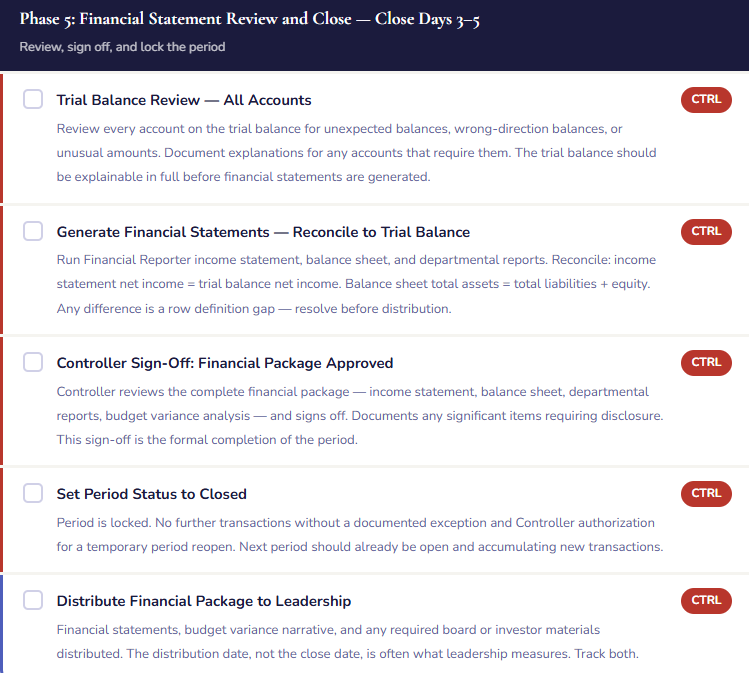
- Review the Trial Balance — Final Pre-Statement Check
- Run the trial balance for the period and review every account. Expected balances in expected direction — no credit balances in asset accounts, no debit balances in liability accounts unless there’s a documented explanation. Unusual or unexpected balances investigated and explained. No account posting errors visible. When the trial balance is clean, the financial statements will be clean.
- Generate and Review Financial Statements
- Run the Financial Reporter income statement, balance sheet, and any required segment reports. Verify net income ties to the trial balance. Verify the balance sheet balances. Review variances against budget and prior period — prepare the narrative that will accompany the package to leadership. This is the quality control review of the financial output, not just a report generation step.
- Controller Sign-Off and Period Close
- The Controller reviews and signs off on the financial statements. Change the period status from On Hold to Closed. Open the next period. The close is complete. Document the sign-off date, who reviewed, and any significant items requiring disclosure or further investigation in the subsequent period.
The Month-End Close Checklist — Built for D365 F&O
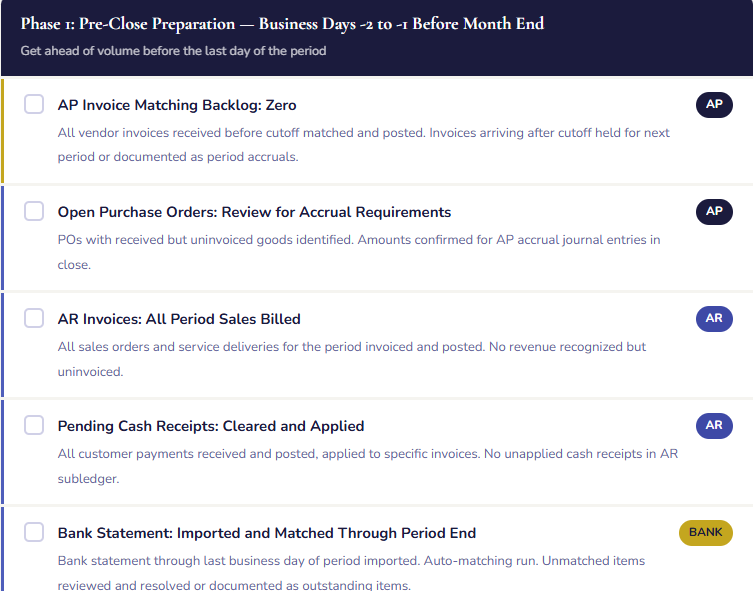
The sequence above is the architecture. The checklist is the operating document — the specific tasks, owners, and completion criteria that turn the sequence into a repeatable process. What follows is a starting-point checklist that should be customized to your organization’s specific modules, volume, and staffing. Every item has an owner. Every item has a completion standard. No item is “done” until its completion standard is met.
The GRNI Accrual — The Close Entry That Everyone Forgets Until They Don’t
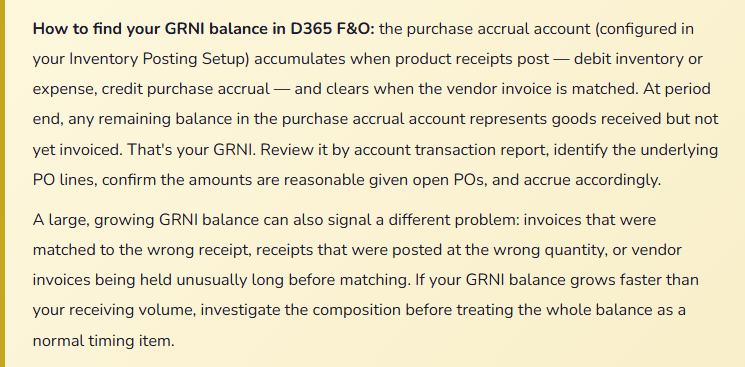
Goods Received Not Invoiced — GRNI — is one of those close concepts that sounds simple and causes outsized problems when mishandled. Here’s the situation it addresses: you receive goods on October 28th. The vendor’s invoice doesn’t arrive until November 5th. Under accrual accounting, the expense belongs in October — that’s when you received value. But without a closing entry, your October financials show no expense for those goods, and your November financials show double — the delayed invoice plus normal November activity.
In D365 F&O, the purchase accrual account — the AP clearing account that the product receipt posts to — represents exactly this: goods received but not yet invoiced. At period end, the balance in this account is your GRNI balance. For most accrual-basis organizations, you should accrue this amount as an expense in the period the goods were received, with a reversing entry at the start of the next period when the invoice will post normally.
Currency Revaluation — The Step That Never Makes Sense Until It’s Missing
For organizations with foreign currency transactions, the period-end currency revaluation is a required close step that is consistently underimplemented, inconsistently run, and usually not discovered to be missing until an auditor asks why the balance sheet reflects exchange rates from three months ago.
The concept is straightforward: when you have an open AR balance denominated in euros, a change in the USD/EUR exchange rate between invoice date and period end creates an unrealized gain or loss. That unrealized amount belongs on the income statement in the period it arises — not when the customer pays. The revaluation process in D365 F&O calculates the difference between the carrying value (at the original transaction exchange rate) and the current value (at the period-end rate) and posts the difference to the unrealized gain/loss account.
Three things must be configured correctly for this to work: the exchange rate types loaded with current rates through period end, the main accounts for unrealized gains and losses configured in your Ledger setup, and the revaluation process scheduled in your close checklist for every period where foreign currency balances exist. If any of these is missing, the process either fails silently or posts to the wrong account.
Module-Level Period Control — A Precision Tool, Not a General Setting
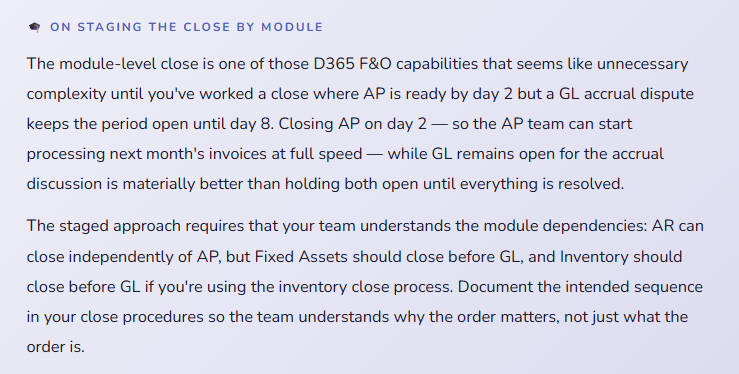
Most finance teams know they can close the general ledger period in D365 F&O. Fewer realize that period status can be set independently by module — you can close AP while GL remains open, close AR while AP remains open, or hold any module independently. This granularity enables a staged close that reflects the reality of how different teams finish their work at different times.
| Module | When to Close It | What “Closed” Prevents |
|---|---|---|
| Accounts Payable | After all vendor invoices for the period are matched and posted, GRNI accrual is posted, and AP aging reconciles to the GL. Typically day 3–4 of close. | New vendor invoices posting to the prior period. Ensures AP activity is complete before the GL is reviewed. |
| Accounts Receivable | After all customer invoices are posted, cash receipts applied, and AR aging reconciles to the GL. Often closes before AP since revenue cutoff is typically cleaner. | New AR transactions posting to the prior period, including customer payments and credit memos. |
| Fixed Assets | After depreciation proposal is run and posted for the period. Can close on the last day of the month once depreciation is complete. | New asset transactions — acquisitions, disposals, adjustments — posting to the prior period. |
| Inventory Management | After inventory close process runs and all inventory transactions are posted. For organizations using inventory close, this must happen before the GL can be finalized. | New inventory transactions — receipts, issues, adjustments — posting to the prior period. |
| General Ledger | Last to close — after all subledgers are closed and reconciled, all accrual journals are posted, financial statements are reviewed, and Controller sign-off is complete. | All manual journal entries and any transactions that route through the GL. The final lock on the period. |
Year-End Close — What’s Different and What to Plan For
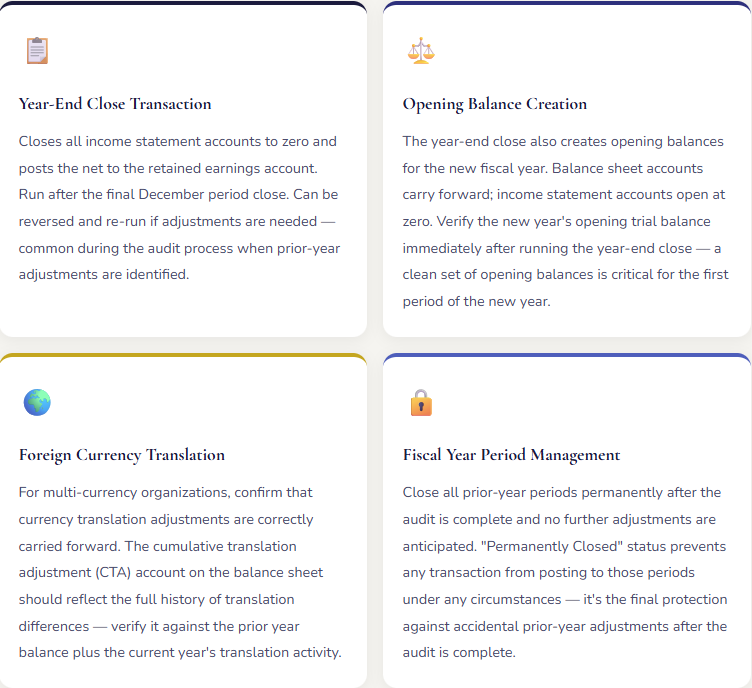
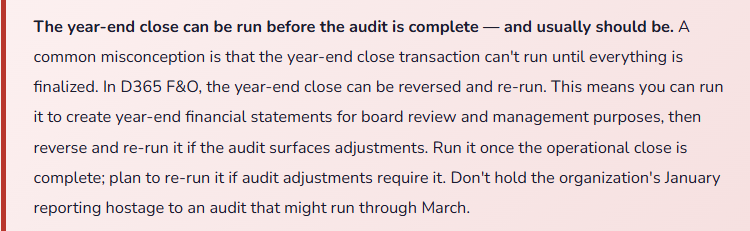
Year-end close in D365 F&O has one significant additional step that monthly close doesn’t: the Year-End Close transaction, which transfers the net income for the fiscal year from the income statement accounts to the retained earnings account on the balance sheet. This doesn’t happen automatically. You run it deliberately, as a scheduled process, after the full-year financials are finalized.
Building the Close That Runs on Time Every Month
The checklist I showed earlier is a starting point. The process that actually works is the one that’s customized to your organization, owned by specific people, tracked in a visible way, and reviewed after every close to identify what took longer than expected and why. Here are the disciplines that separate organizations that close in three days from organizations that close in ten.
Assign every checklist item to a person, not a team. “AP is responsible for invoice matching” is a policy. “Sarah is responsible for confirming the invoice matching backlog is zero by 4 PM on the last business day of the month” is an accountability. Teams diffuse accountability. Individuals create it. Every task on your close checklist should have a name next to it.
Track close status visibly. A shared spreadsheet or a project management tool that shows which items are complete, which are in progress, and which are blocked is worth the fifteen minutes it takes to maintain daily during close. The Controller’s daily close meeting — fifteen minutes, status review only, escalate anything blocked — keeps the team coordinated and surfaces dependencies before they become delays.
Define “done” for every item. “AP matching is complete” is not a done definition. “AP aging total equals AP summary account on the trial balance, with zero unapplied entries, confirmed by AP manager sign-off” is a done definition. The second definition can’t be satisfied until the work is actually complete. The first one can be satisfied by anyone who is tired and wants to move on. Build completion standards that require proof, not just assertion.
Review the close after every cycle. Fifteen minutes at the close of each month-end: what took longer than expected, what was discovered at the last minute that could have been addressed earlier, what should be added to the pre-close preparation checklist to prevent a recurrence. Close processes improve when they’re reviewed. They stagnate when they’re treated as fixed.
The Mistakes That Make Every Month-End Feel Like the First One
⚠️ Periods Left Open “Just In Case” — The Compounding Problem
This is the root cause of a large percentage of close problems I see. The period nominally closes, but someone — often a well-meaning Controller who anticipates a late invoice or a possible adjustment — leaves it in “On Hold” rather than “Closed,” reasoning that it’s easier to post something if it comes in than to reopen a closed period. The period sits in On Hold for ten days. Then fifteen. Then the team starts the next month’s close and realizes they’re still looking at the prior period as an open reconciling item. Transactions get posted to the wrong period because users see it as still open. The AP team starts the next month’s matching against a still-open prior period. The close date stops meaning anything.
→ Close the period on the close date. If a late item arrives after close, it posts to the current period — which is how accrual accounting should work. If the item is material enough to require a prior-period adjustment, that’s a documented exception requiring Controller authorization. The exception process for a genuinely material late item is much better than a policy of keeping periods open indefinitely for items that may or may not arrive. “We might need to post something” is not a sufficient reason to leave a period open past its close date.
⚠️ No Written Close Checklist — Every Month-End Reinvented
In organizations without a documented close checklist, every month-end close is implicitly reinvented by whoever is running it that month. Institutional knowledge lives in people’s heads rather than documented procedures. The experienced team member who “knows what to do” goes on leave, and the person covering discovers the close process on the fly, missing steps that were obvious to the absent colleague. Dependencies are discovered mid-close rather than anticipated. The close takes twice as long because sequencing decisions are made reactively instead of proactively.
→ Document the close checklist and treat it as a living operational document — reviewed and updated after every close, owned by the Controller, accessible to the full finance team. The level of detail matters: “run depreciation” is not enough; “run Fixed Asset Depreciation Proposal for the period, review for reasonableness versus prior month, post the journal, and confirm depreciation expense appears on the trial balance in the expected range” is a checklist item that survives staff turnover and cross-training requirements.
⚠️ Subledger Reconciliations Skipped Under Time Pressure
When the close is running late and the pressure to distribute financial statements is high, subledger reconciliations — which are time-consuming and sometimes produce inconvenient differences that require investigation — are the first step that teams consider skipping. “We’ll reconcile next month.” The problem is that a subledger difference that goes uninvestigated for one period becomes a two-period difference the next month, then three months of accumulated discrepancy that’s exponentially harder to trace. The financial statements distributed without subledger reconciliation may be materially wrong in ways that aren’t visible until the next audit.
→ Non-negotiable: every subledger reconciles before financial statements are distributed, every month, without exception. If a reconciliation reveals a difference that will take two days to investigate, distribute the financial statements as “preliminary — subject to reconciliation completion” and issue final statements when the reconciliation is resolved. That framing is legitimate. Distributing statements as final when subledgers haven’t reconciled is not. Your reputation as a financial reporting function rests on the accuracy of what you sign off on.
⚠️ Recurring Journals Not Reviewed — Stale Accruals Running for Months
Recurring journals in D365 F&O are powerful time-savers — you set up the entry once and it posts automatically each period. They’re also a source of stale accruals when the underlying contracts or amounts change and nobody updates the journal. A prepaid insurance amortization journal set up at the start of the year at $4,200 per month continues posting at $4,200 per month after a policy renewal increases the premium — until someone notices the prepaid balance doesn’t agree to the current policy amount. By then, six months of entries are wrong and require correction.
→ Review all recurring journals at the start of each fiscal year and at any time a contract, subscription, or underlying arrangement changes. Include “recurring journal review and validation” as a step on your month-end checklist — not just a set-and-forget operation. The review takes fifteen minutes when done monthly. Finding and correcting six months of stale accruals takes hours.
⚠️ Intercompany Balances Not Eliminated — Consolidated Financials Overstate Both Sides
For organizations with multiple legal entities, intercompany transactions — entity A sells to entity B, entity B buys from entity A — create both a receivable at one entity and a payable at the other that don’t represent external economic activity. In consolidated financial statements, these need to be eliminated. When they’re not, the consolidated balance sheet overstates both assets and liabilities by the intercompany balance, and the consolidated income statement overstates both revenue and cost of sales. The overstatement is perfectly offsetting so it doesn’t affect net income — which is exactly why it goes unnoticed until an auditor catches it.
→ Build intercompany elimination as a step on the close checklist with its own completion standard: intercompany AR at entity A equals intercompany AP at entity B (in the same currency), and the difference is zero. If it’s not zero, there’s a timing difference or a posting error that needs to be investigated. Run the elimination entries for consolidated reporting, and confirm the consolidated balance sheet shows no intercompany balances in the final package.
Quick Reference: Do’s and Don’ts
✓ Do This
- Set the period to On Hold at the start of the close window — not on the last step
- Close the period on the close date and manage exceptions through a documented reopen process
- Document the close checklist with named owners and completion standards for every item
- Reconcile every subledger to the GL before distributing financial statements
- Run currency revaluation every period where foreign currency balances exist
- Close modules in sequence — AP and AR before Fixed Assets before GL
- Post the GRNI accrual journal every period for material goods received not invoiced
- Review recurring journals at the start of every fiscal year and after any contract change
- Reconcile intercompany balances to zero before consolidated reports are generated
- Run the year-end close transaction promptly after December close — plan to re-run if needed
- Hold a brief daily status meeting during the close window to surface blocked items early
- Review the close after every cycle: what took longer than expected, what can move to pre-close preparation
✗ Don’t Do This
- Leave periods in On Hold past the close date on the grounds that something might arrive later
- Distribute financial statements before subledger reconciliations are complete
- Assign close tasks to “the AP team” — assign them to a named individual
- Run the close without a documented checklist and call it a process
- Skip currency revaluation and accept that balance sheet foreign currency balances are approximate
- Post recurring journals without reviewing them for current accuracy
- Treat the GRNI balance as immaterial without reviewing its composition
- Close the GL before all subledgers are closed and reconciled
- Allow intercompany eliminations to accumulate period-over-period without monthly matching
- Hold the year-end close transaction until the audit is complete — it can be re-run
- Permanently close periods before the audit is final and no further adjustments are anticipated
- Accept an unreconciled subledger difference because “it’s probably just timing” — trace it
The closing thought — and what this series has been building toward: every post in this series has been about one thing: building a financial platform you can trust. Trust in a financial system isn’t a function of the software — it’s a function of how the software is configured, how transactions are processed, how the data is reconciled, and how the period is closed and locked. The chart of accounts post was about building a clean foundation. The posting profiles post was about ensuring that foundation is populated correctly. The AP, AR, collections, treasury, and procurement posts were about ensuring every transaction flows through the right process. The fixed assets and reporting posts were about turning that data into information.
This post — the close process — is where all of it comes together. A period close that runs correctly is evidence that every upstream process ran correctly. A period close that requires extensive investigation and correction is evidence that something upstream broke down. Build the upstream processes well, and the close becomes what it’s supposed to be: a confirmation exercise, not an investigation. A routine event, not a crisis. A three-day procedure, not a ten-day ordeal. That’s what a mature D365 F&O financial operation looks like — and it’s entirely achievable for organizations willing to invest in building it correctly.
What’s Next:
We’ve completed the financial module arc — from the chart of accounts all the way through the period close. The next set of posts moves into the Supply Chain modules: Warehouse Management in D365 F&O — location management, receiving and putaway, picking and shipping, cycle counting, and the warehouse-to-finance interface that Finance teams need to understand to make sense of their inventory accounts. If you’ve ever wondered what the warehouse team does that generates the inventory transactions you reconcile every month, this is the post that answers that question from both sides.
Until then — close your periods on the close date, reconcile your subledgers before you distribute your statements, and review your close checklist after every cycle. Your future self, at the next audit, will be grateful.
— Bobbi
D365 Functional Architect · Recovering Controller
Leave a Reply