

Your chart of accounts is not just a list of numbers. It is the architecture of every financial conversation your organization will have for as long as this system is live.
This One Is Different From Business Central — And That Matters
If you read my Business Central COA post, some of this will feel familiar — because the fundamentals of sound chart of accounts design are the same regardless of which platform you’re on. But D365 Finance & Supply Chain Management adds layers of complexity that Business Central doesn’t have to deal with. And if you go into the F&SCM COA conversation with a BC mindset, you will hit walls.
The biggest difference? In F&SCM, your chart of accounts is shared across all your legal entities. One COA. Multiple companies. Which means the design has to work for every entity in your organization — not just the one you’re thinking about today. That single architectural fact changes almost everything about how you approach the design conversation.
It also means that if your COA design is wrong, it’s wrong everywhere, all at once. Which is exactly why this conversation cannot be rushed, cannot be delegated to a single entity’s finance team, and cannot happen without someone in the room who has the authority to make cross-organizational decisions.
You were warned. Now let’s build something great.
How the COA Actually Works in F&SCM
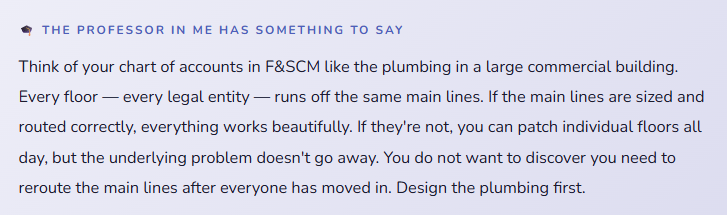
In D365 Finance & Supply Chain Management, your chart of accounts consists of two things that work together: the main accounts and the account structures that define how those accounts combine with your financial dimensions.
The main account is the core GL account — your cash account, your revenue account, your salary expense account. It has a number, a name, a type, and a set of behavioral controls. That’s the foundation.
But in F&SCM, a main account number alone is almost never enough to describe a transaction. It tells you what happened — salaries were paid, revenue was recognized — but not where, by whom, or for what purpose. That context comes from financial dimensions, which attach to your main accounts based on rules defined in account structures.
Together, they form what’s called the account string — the complete coding on every financial transaction in the system.
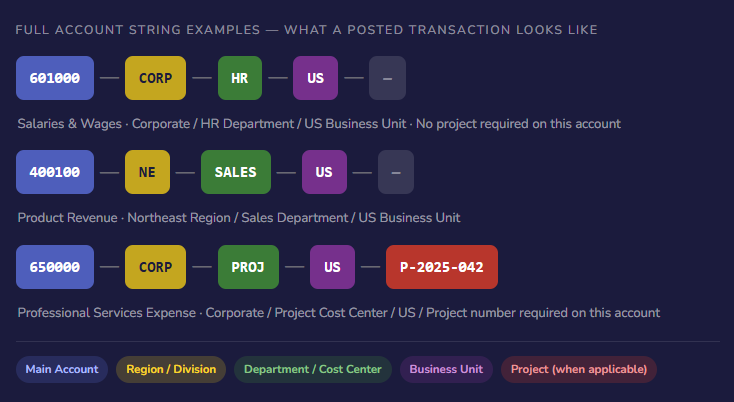
Notice that third example — Project is required for that expense account, but not for the others. That’s account structures doing their job: defining which dimensions are mandatory, optional, or not applicable depending on the main account. You design these rules intentionally so users are only required to enter the context that actually matters for each type of transaction.
Main Account Types — What They Mean and Why They Matter
Every main account in F&SCM has a type that controls how the system treats it. Get these right and your financial statements work the way you expect. Get them wrong and you’ll spend a lot of time in troubleshooting conversations you don’t want to be having.
| Account Type | What It Means | Examples | Closes at Year-End? |
|---|---|---|---|
| Balance Sheet | Permanent accounts — balances carry forward to the next fiscal year. Assets, liabilities, equity all live here. | Cash, AR, AP, Fixed Assets, Retained Earnings | No — balance carries forward |
| Profit & Loss | Temporary accounts — balances reset to zero at fiscal year-end and roll into retained earnings. Revenue and expense accounts. | Revenue, COGS, Salaries, Utilities, Rent | Yes — closes to retained earnings |
| Reporting | Stat and reporting accounts that don’t affect the financial statements but track operational metrics. Headcount, square footage, units produced. | FTE Count, Sq Ft Occupied, Units Manufactured | Depends on configuration |
| Total | Summary accounts used for consolidation and reporting aggregation. Doesn’t hold transactions — sums other accounts. | Total Operating Expenses, Total Revenue | N/A — no transactions post here |
The year-end close behavior is the one that really matters practically. P&L accounts close to a retained earnings account you designate — and that retained earnings account, the closing account designation, and the fiscal year calendar all have to be configured correctly and tested before your first year-end close in the system. This is not the kind of thing you want to discover is misconfigured on December 31st.
Designing Your Main Account Number Structure
F&SCM doesn’t enforce a specific numbering format, but your numbering scheme is one of the most consequential decisions in your COA design. It affects navigation, reporting, account structure configuration, and how easily your team can find the right account in the middle of a transaction. Here’s what well-designed numbering looks like and why.
- Range-Based Numbering by Account Type
- Group your account types into logical number ranges so a user can immediately know what category an account belongs to just from its number. Assets in the 1000s, liabilities in the 2000s, equity in the 3000s, revenue in the 4000s, COGS in the 5000s, expenses starting at 6000.
- 1100 – Cash & Equivalents
- 4100 – Product Revenue
- 6200 – Salary Expense
- Group your account types into logical number ranges so a user can immediately know what category an account belongs to just from its number. Assets in the 1000s, liabilities in the 2000s, equity in the 3000s, revenue in the 4000s, COGS in the 5000s, expenses starting at 6000.
- Leave Gaps — Intentionally
- Number by tens or fifties within a category, not sequentially. The business you’re implementing for today will change. New product lines get added. New departments form. You need room to insert new accounts logically without breaking your numbering story.
- 6100 – Salaries & Wages
- 6150 – Contract Labor
- 6200 – Employee Benefits
- (Room for 6110–6149 as needed)
- Number by tens or fifties within a category, not sequentially. The business you’re implementing for today will change. New product lines get added. New departments form. You need room to insert new accounts logically without breaking your numbering story.
- Design for All Legal Entities, Not Just One
- Because your COA is shared, it must accommodate the account needs of every entity. A manufacturing entity needs COGS accounts your holding company doesn’t use. A services entity needs revenue accounts your distribution entity doesn’t need. Design a COA comprehensive enough for everyone — then use account structures to control which accounts are valid in each entity.
- 5000 – COGS (used by Mfg)
- 4500 – Service Revenue (used by Svcs)
- 4100 – Product Revenue (used by both)
- Because your COA is shared, it must accommodate the account needs of every entity. A manufacturing entity needs COGS accounts your holding company doesn’t use. A services entity needs revenue accounts your distribution entity doesn’t need. Design a COA comprehensive enough for everyone — then use account structures to control which accounts are valid in each entity.
- Name Accounts Like a Human Being
- This sounds obvious and yet. Account names like “Expense 47” or “Misc 3” or “Overhead – Misc – Other” are a maintenance nightmare and a data quality risk. Every account should have a name clear enough that a new accounting staff member can figure out what posts there without asking anyone.
- ✓ Utilities – Electricity
- ✓ Professional Fees – Legal
- ✗ Misc OH
- ✗ Other Expense 2
- This sounds obvious and yet. Account names like “Expense 47” or “Misc 3” or “Overhead – Misc – Other” are a maintenance nightmare and a data quality risk. Every account should have a name clear enough that a new accounting staff member can figure out what posts there without asking anyone.
Account Structures: The Rules That Connect COA to Dimensions
This is the F&SCM-specific piece that doesn’t have a real equivalent in simpler accounting systems, and it’s worth spending some time on because it determines the quality of your transaction data from day one.
An account structure in F&SCM is a configuration rule that says: when a transaction is posted to a main account in this range, these are the financial dimensions that are required, optional, or blocked. You attach account structures to your ledger, and the system enforces the rules every time a transaction is posted.
Why does this matter? Because without account structures, your users can post a salary expense with no department, no cost center, and no business unit — which means your department-level P&L reports have a hole in them, and you’re chasing down missing dimension values at month-end instead of reviewing actuals. Account structures are how you prevent that problem before it starts.
| Account Range | Department | Cost Center | Business Unit | Project |
|---|---|---|---|---|
| 1000–3999 (Balance Sheet) | Optional | Not Used | Required | Not Used |
| 4000–4999 (Revenue) | Required | Required | Required | Optional |
| 5000–5999 (COGS) | Required | Required | Required | Optional |
| 6000–8999 (Expenses) | Required | Required | Required | Optional |
| 9000–9999 (Project Expenses) | Required | Required | Required | Required |
The sample above is simplified — your actual structures will reflect your specific dimension design. But the point is that you’re making deliberate choices about what context is required for each type of transaction. Revenue always needs a region, a department, and a business unit. Balance sheet accounts need a business unit but not necessarily a department. Project-specific expense accounts require a project number. None of this happens by accident — it’s all configuration that someone has to design intentionally.
A Sample COA Structure — Seeing It on Paper
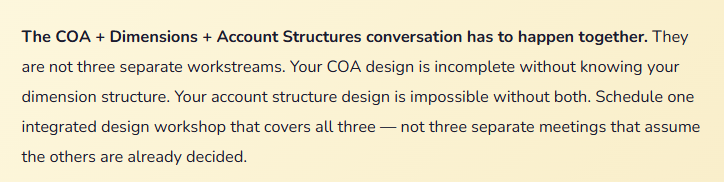
Let me show you a slice of what a clean, well-organized F&SCM chart of accounts looks like. This is intentionally simplified, but the structure and naming conventions are real.
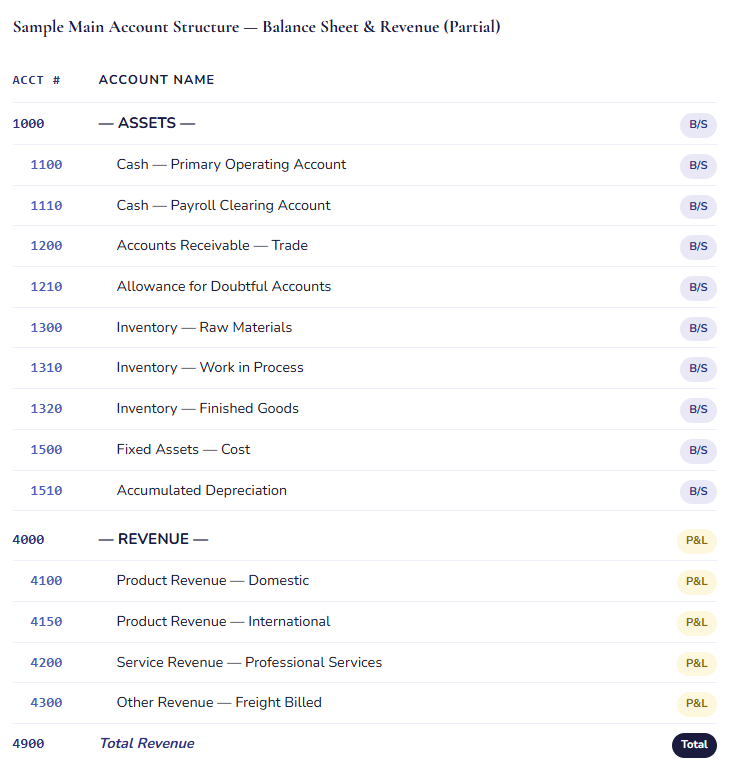
A few things worth calling out in that structure: the Payroll Clearing Account is separate from the primary operating account — that’s intentional, because payroll runs through a dedicated account and you want clean visibility into that activity. The Allowance for Doubtful Accounts is explicitly included alongside AR — an account I see missing more often than I should. And the revenue accounts distinguish domestic from international from the start, because those are different reporting and compliance considerations that are infinitely easier to track when they’re built into the structure rather than chased through dimension filters after the fact.
The Mistakes That Cost Organizations the Most — F&SCM Edition
These are the COA errors I see most consistently in F&SCM implementations — some of them the same as any ERP, some of them specific to the platform’s complexity.
Designing the COA for Only One Legal Entity
The most common F&SCM-specific COA mistake. One entity’s finance team leads the design conversation, the COA gets built around their needs, and then the implementation team tries to add other legal entities and discovers the account structure doesn’t accommodate a manufacturing entity, or lacks the revenue granularity the international subsidiary requires. Now you’re adding accounts to a live system — or worse, retrofitting account structures — which affects transaction history, reporting, and everyone’s confidence in the data.
→ Every legal entity in scope needs a representative in the COA design conversation. Before finalizing the account list, map each entity’s key business processes to the proposed accounts. If there are gaps, fill them during design — not during build, and definitely not after go-live.
Trying to Do With COA What Financial Dimensions Should Do
This one is a close cousin to the Business Central version of the same mistake, but it shows up more severely in F&SCM because the dimension capability is so powerful. Organizations create separate revenue accounts for every region, every product line, every sales channel — when the right answer is one revenue account with regional, product, and channel financial dimensions. The result is a massive chart of accounts where every new region or product line requires new accounts, and reporting becomes a mapping exercise instead of a filter exercise.
→ A clean test: if you’re creating accounts to distinguish “who” or “where” a transaction belongs to, that’s probably a dimension. If you’re distinguishing “what type” of transaction it is, that’s probably an account. Draw that line clearly in your design workshop and hold it.
Not Testing Year-End Close Before Go-Live
In F&SCM, the fiscal year-end closing process posts closing entries that move P&L balances to retained earnings. The retained earnings account, the closing account designation on each P&L account, and the fiscal year calendar all have to be configured and coordinated correctly. I have seen go-lives where nobody ran a test year-end close in the sandbox — and the first time the organization tried to close a year in production was a very unpleasant learning experience. Go-live in October and not planning to close until December is not a reason to skip this test. Run it anyway.
→ Include a test year-end close as a formal UAT scenario. Post test transactions, run the closing process, verify that P&L balances zeroed out correctly and the retained earnings account received the right amount. This is a half-day exercise that can prevent a very bad day.
Migrating Inactive or Redundant Accounts From the Legacy System
F&SCM implementations often involve a migration from an older Dynamics version, from a different ERP entirely, or — bless the journey — from a collection of spreadsheets. In every case, the source system has accumulated accounts over time that no longer reflect active business activity. Migrating all of them feels like the safe choice. It isn’t. It bloats your COA, makes navigation harder, increases training complexity, and creates a situation where your accounting team is guessing which of several similar-looking accounts to use for a new transaction.
→ Run a two-year transaction activity report on your source system before migration planning begins. Any account with no activity becomes a candidate for retirement, consolidation, or renaming. Bring your Controller into this review. They often know exactly which accounts are historical artifacts and which ones carry meaning.
Skipping the Intercompany Account Setup
If you have multiple legal entities and any intercompany transactions — shared services allocations, intercompany loans, intercompany sales — you need dedicated intercompany accounts in your COA and you need the intercompany accounting rules configured to use them. Organizations that skip this and try to handle intercompany transactions manually through journal entries end up with consolidation nightmares, unbalanced intercompany positions at period-end, and a Controller who is not sleeping well. F&SCM can automate intercompany accounting beautifully — but only if the COA and the intercompany setup are designed to support it.
→ Map your intercompany transaction flows before finalizing your COA. Identify which entities transact with which other entities, what types of transactions flow between them, and what account structure those transactions should hit. Build those intercompany accounts into the COA from the start.
Forgetting About the Reporting Layer
F&SCM’s financial reporting — whether you’re using the built-in Financial Reporting module, Business Performance Analytics, or both — needs to be designed in conjunction with your COA, not after it. Report row definitions reference specific main accounts and account ranges. If your COA structure changes after your reports are built, your reports break. If your report requirements weren’t considered when the COA was designed, you’ll build the reports and discover the COA doesn’t have the granularity you need. These conversations belong in the same room.
→ As part of COA design, sketch out the three or four most critical financial reports your leadership will use — Balance Sheet, P&L by department, cash flow statement, management reporting package. Walk through how those reports would be built against your proposed COA. If you run into a place where the COA doesn’t support the report you need, you’ve found a design gap worth fixing now.
A Design Process That Actually Works
Here’s the sequence I recommend — built from experience on what gets skipped, what gets rushed, and what makes the difference between a COA you’re proud of and one you’re apologizing for.
01 Assemble the Right People
Your CFO or VP of Finance, your Controller, your most senior accounting staff, a representative from every significant legal entity, and your implementation consultant as facilitator. If your organization has multiple business units with distinct operations, include an operational finance lead from each. This is not a meeting your IT project manager runs solo. This is a finance and accounting design session that happens to be about a technology implementation.
02 Start With the Financial Statements You Need to Produce
Gather your current financial statement package — the Balance Sheet, P&L, cash flow statement, and any management reports that leadership actually reads. These are your requirements. Your COA needs to be able to produce every one of them. Walk through each statement and map each line item to the account or accounts that feed it. Any line item that can’t be traced to a proposed account is a gap that needs to be filled.
03 Review Every Existing Account for Continued Relevance
Pull a full account list with transaction volume for the past two years from your current system. Work through it with your Controller: active accounts carry forward, inactive ones get evaluated for retirement or consolidation, and duplicates get merged. This is the hard work that nobody wants to do — and the work that makes the biggest difference in whether your new COA is clean or cluttered from day one.
04 Draft Your Structure in a Spreadsheet First
Before anyone touches the system, build your proposed COA in Excel or a shared document. Account number, account name, account type (Balance Sheet / P&L), account category, which entities use it, and any notes on what posts there. This is your working document — circulate it, revise it, debate it. Changes in a spreadsheet take seconds. Changes to accounts that already have test transactions in a configured system take significantly longer, and carry downstream consequences for posting setups, account structures, and any reports that reference specific account numbers.
05 Design Account Structures and Dimension Requirements Simultaneously
As your COA takes shape, work through the account structure design in parallel. For each main account range, define which financial dimensions are required, which are optional, and which don’t apply. This is the step where your COA design and your dimension design converge — and it’s the step where gaps in either one become visible. You cannot finalize your COA without finalizing your account structures, and you cannot finalize your account structures without a complete dimension design.
06 Configure, Test, and Run Real Reports
Once your COA and account structures are configured in a test environment, post representative transactions across all your major account types — journal entries, vendor invoices, customer invoices, inventory adjustments — and pull your financial statements. Do the reports show what you expected? Do totals calculate correctly? Are transactions showing up in the right categories? Run a test year-end close. Chase down any discrepancy before go-live, when fixing things is straightforward, rather than after, when the same fix requires careful coordination to avoid corrupting live data.
Quick Reference: Do’s and Don’ts
✓ Do This
- Design the COA to serve all legal entities, not just the loudest one in the room
- Start with the financial statement outputs you need to produce
- Leave intentional gaps in your account numbering scheme
- Name every account clearly and without abbreviations that only veterans will understand
- Design COA, financial dimensions, and account structures as one integrated conversation
- Include intercompany accounts from day one if you have multiple entities
- Review all existing accounts for activity before migrating anything
- Set up and test your year-end close configuration before go-live
- Sketch your most critical reports against the proposed COA before finalizing it
- Get documented sign-off from Finance leadership before configuration begins
✗ Don’t Do This
- Migrate your entire legacy COA without reviewing it first
- Use main accounts to do the work that financial dimensions should be doing
- Number accounts sequentially with no room to grow
- Design for a single legal entity and retrofit others later
- Skip the account structure design conversation until after the COA is built
- Leave the reporting layer as a post-go-live conversation
- Let this be an IT or project management decision — this is a Finance decision
- Create accounts with vague names like “Misc,” “Other,” or “Overhead – Various”
- Assume year-end close will work without testing it first
- Make COA changes after account structures and posting setups are configured without a formal change control process
From one recovering controller to the next: I know this feels like a lot of design work before you ever see the system do anything impressive. It doesn’t have the same excitement as watching a workflow fire or an AI-generated reconciliation run. But six months after go-live, when your leadership team can pull a clean P&L by business unit in minutes and trust what they’re reading — and when your Controller is closing the books in days instead of weeks because the account structure is logical and the data is clean — you will feel the value of every hour you spent on this. Unglamorous infrastructure is still infrastructure. Build it right.
Up Next:
We’re going to dig into Posting Profiles in D365 F&SCM — the configuration that tells the system where to record every type of transaction automatically, and the place where COA design, financial dimensions, and module setup all come together in one place. If you have ever wondered why a vendor payment hit an account you didn’t expect, or how the system decides which AR account to use for which customer — that post is your answer.
It’s one of the most powerful — and most misunderstood — pieces of the system. We’ll make it manageable.
Until then: design with all your entities in mind, test your year-end close early, and please make sure your Controller is in the room for every COA design meeting. Not on the email chain. In the room.
— Bobbi
D365 Functional Architect · Recovering Controller
Leave a Reply