
Costing methods, posting groups, period close, and why “the inventory didn’t reconcile” is almost always a configuration conversation — not a data entry problem.
Why Inventory Accounting Is Genuinely Different
Every other module we’ve covered in this series is primarily a Finance module. AP is run by Finance. AR is run by Finance. General Ledger, collections, posting profiles — Finance owns these, Finance configures them, Finance feels the consequences when they’re wrong.
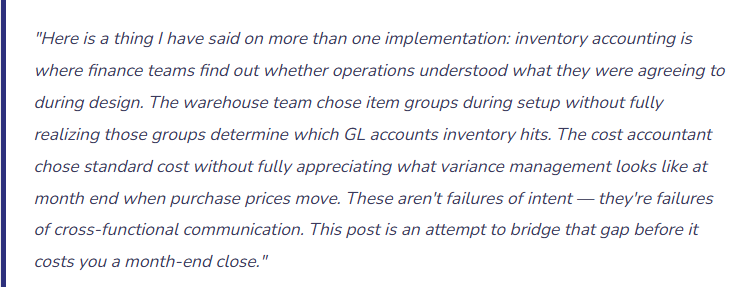
Inventory accounting is different. The configuration lives in Finance — item groups, inventory posting setup, costing methods. But the transactions that drive that configuration happen in Operations — purchase receipts, production completions, inventory adjustments, shipments. Finance sets the rules. Operations runs the plays. And when a play is run incorrectly — a receipt posted to the wrong warehouse, an adjustment made without a reason code, a production order closed with an unrealistic cost — it’s Finance who discovers the discrepancy at month end and has to explain it.
This is why inventory accounting implementations go sideways when Finance and Operations are not in the same room during the design phase. It is not enough for Finance to configure the posting setup correctly if Operations doesn’t understand what their transactions are doing to the general ledger. And it is not enough for Operations to understand their physical processes if Finance hasn’t explained what financial expectations those processes need to meet.
The goal of this post is to give both sides enough shared vocabulary that the design conversation is productive — and to give Finance specifically the F&O-specific knowledge they need to make informed configuration decisions.
Costing Methods — The Decision That Shapes Everything Downstream
The costing method on an item determines how the system calculates the cost of goods sold when inventory moves out and how it values inventory on the balance sheet. In D365 F&O, costing method is set at the item model group level — which means you assign a costing method to groups of items, and every item in that group uses the same method. You can have different item model groups for different categories of inventory, each with a different costing method. What you cannot do is change the costing method on an item model group after inventory transactions have posted against items using that group. That path leads to a restatement conversation nobody wants to have.
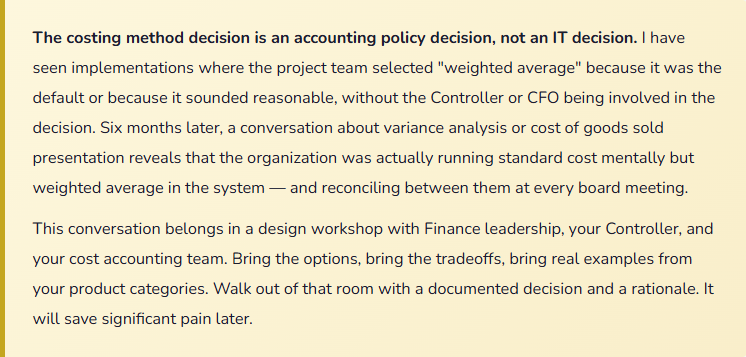
This decision needs to happen early, it needs Finance and Operations both engaged, and it needs to be understood before a single item record is created.
01 Standard Cost
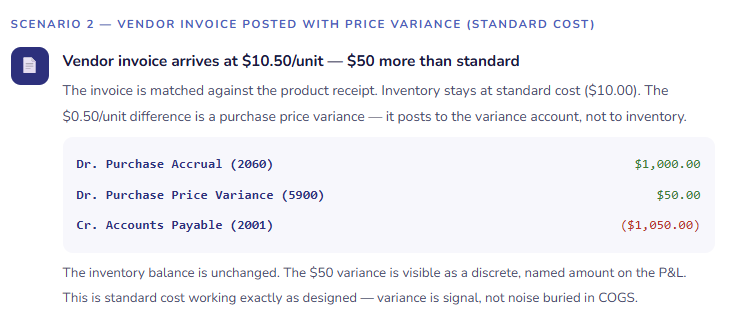
Each item is assigned a predetermined standard cost — a budgeted or engineered cost per unit. Inventory is always valued at this standard, regardless of what was actually paid. When actual purchase prices or production costs differ from the standard, the difference posts to a variance account, not to inventory.
This creates a clean, predictable inventory valuation on the balance sheet and makes variance analysis — understanding where actual costs deviated from plan — a formal, visible accounting exercise rather than a buried rounding difference.
Best for: Manufacturers and companies with engineered products where costs are predictable and cost control is a management priority. Standard cost requires ongoing maintenance — standards must be updated when costs change materially, or your variances become noise rather than signal.
02 First In, First Out
The cost of the oldest inventory received is used first when inventory is issued. Cost of goods sold reflects the earliest purchase prices in the queue. In a rising cost environment, FIFO produces lower COGS and higher gross margin than LIFO — because the older, cheaper inventory is being expensed first.
In D365 F&O, FIFO is calculated by the inventory close process — meaning transactions are initially valued at a running average and then adjusted to FIFO at period close. Understanding this two-step process is important for anyone trying to reconcile interim GL balances to inventory value mid-period.
Best for: Companies with perishable or time-sensitive inventory where physical flow actually matches FIFO, or where lower COGS (in rising cost environments) aligns with financial reporting objectives.
03 Weighted Average
Cost of goods sold is calculated as the weighted average cost of all units on hand at the time of issue, or as of period close depending on your configuration. Every issue uses the same blended cost rate, which smooths out price fluctuations and produces less period-to-period volatility in COGS than FIFO.
Weighted average in F&O can be applied as a running average (calculated at each issue) or as a period-end average (all issues in a period are adjusted at close to the period’s average cost). Period-end weighted average produces a cleaner reconciliation but means inventory values on the GL may shift at period close when the adjustment runs.
Best for: Distribution companies, commodity-based businesses, or any organization where items are interchangeable and precise lot-level costing isn’t required. Simpler to maintain than standard cost and produces more stable COGS than FIFO.
04 LIFO & Moving Average
LIFO (Last In, First Out) expenses the most recently received inventory first — common in US tax accounting but not permitted under IFRS. Moving Average continuously recalculates cost with each receipt, making it conceptually simple but sometimes producing unexpected results when negative inventory occurs or when large receipts at unusual prices distort the running average.
Both are supported in F&O but each comes with implementation caveats worth understanding before selecting them.
LIFO: Verify your reporting framework permits it before selecting. Moving Average: Requires strict inventory quantity disciplines — negative inventory generates erratic cost calculations that are difficult to explain at month end.
Item Groups and Inventory Posting Setup — The Configuration Chain
We covered posting profiles in an earlier post in this series. Inventory has its own posting setup, and it works through a chain of assignments that connects each item to the GL accounts its transactions should hit. Here’s how that chain works.
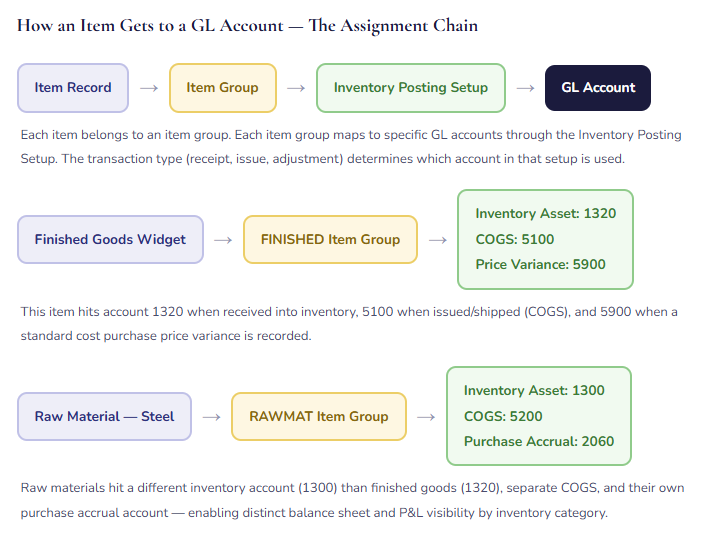
The practical implication: item group design is a Finance decision, not just an Operations categorization exercise. When Operations says “we just need groups for finished goods, raw materials, and packaging,” Finance needs to ask: “Do those three categories need to be on separate balance sheet lines? Do they have different COGS accounts? Do they have different variance accounts?” The answers determine how many item groups you actually need — and the item groups you configure during implementation become very difficult to change after transactions have posted.
How Inventory Transactions Hit the GL — A Walkthrough
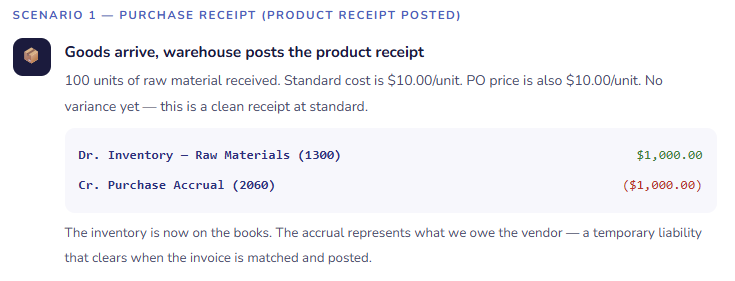
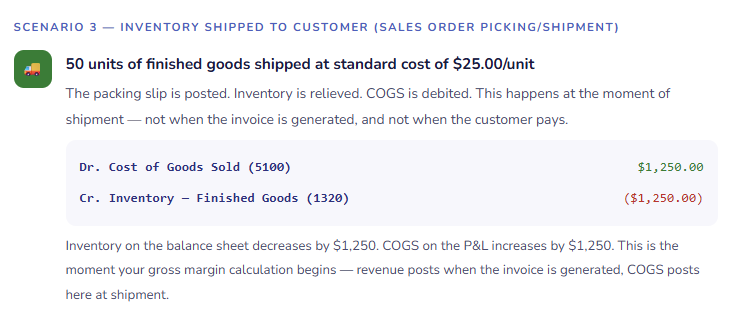
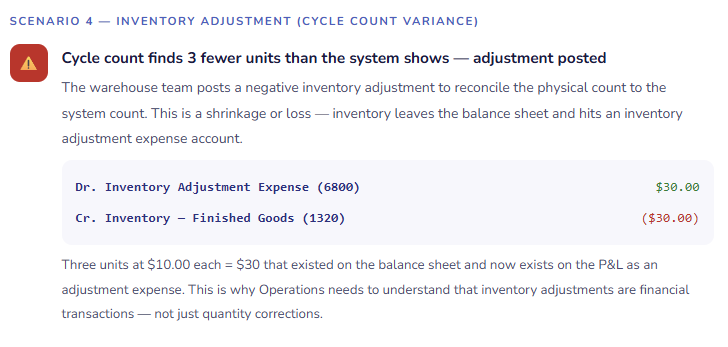
Let me walk through the three most important inventory transaction types in F&O and show exactly what the GL entries look like. This is the section where Finance and Operations finally see the same transaction from two different angles simultaneously.
Three Inventory Transactions — What Actually Posts to the GL
Standard Cost Variances — Understanding What They’re Telling You
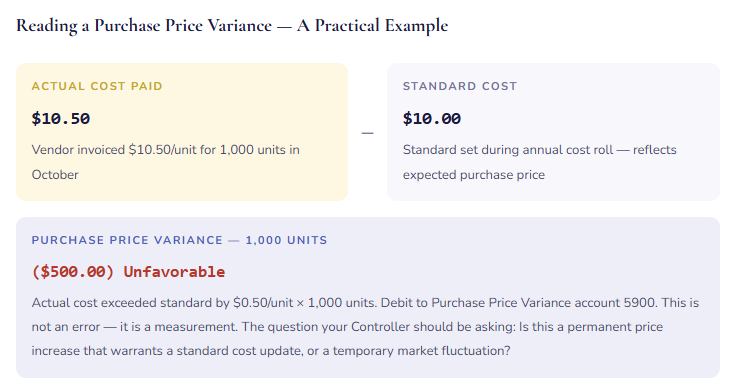
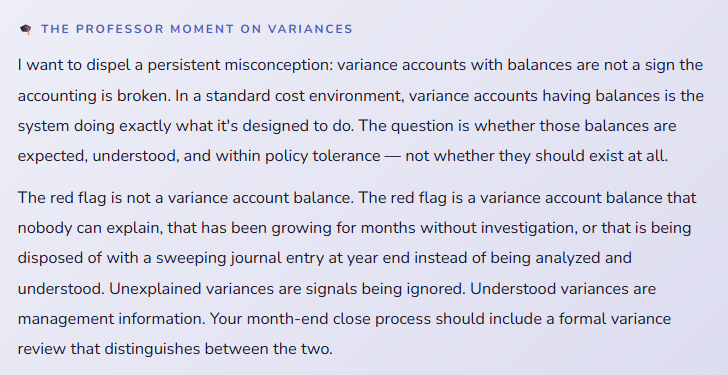
If your organization uses standard cost, variance accounts are not a sign something went wrong — they are the reporting mechanism that shows you where actual costs deviated from plan. The question is not “why do we have variances?” The question is “what are our variances telling us, and are they within acceptable range?”
| Variance Type | What Caused It | Account It Posts To | What to Ask |
|---|---|---|---|
| Purchase Price Variance | Vendor invoice price differs from the item’s standard cost | PPV Account (e.g., 5900) | Is the standard still realistic? Has the vendor’s pricing changed permanently? Should the standard be updated in the next cost roll? |
| Production Quantity Variance | Actual output from a production order differs from the expected yield based on the BOM | Production Variance (e.g., 5910) | Is the BOM accurate? Is there a yield loss issue in the production process? Is scrap being tracked correctly? |
| Production Substitution Variance | A production order consumed a different material than specified in the BOM — a substitution was made on the floor | Production Variance (e.g., 5910) | Was the substitution authorized? Should the BOM be updated to reflect the substitute material? Is this a one-time occurrence or a pattern? |
| Inventory Adjustment | A manual inventory adjustment — cycle count reconciliation, damage write-down, shrinkage | Inventory Adj. (e.g., 6800) | Is this within expected shrinkage range? If cycle count adjustments are large and frequent, is there a process issue in receiving or picking? |
| Rounding Variance | Small differences caused by unit-of-measure conversions or rounding in cost calculations | Rounding Acct (e.g., 5950) | Usually immaterial — but worth monitoring. A rounding variance that grows suggests a UOM conversion configuration issue worth investigating. |
Inventory Close — The Period-End Process That Makes It All Reconcile
For costing methods other than standard cost — FIFO, weighted average, LIFO — D365 F&O uses an inventory close process to finalize inventory valuations at period end. This is a batch process that runs after all transactions for the period are posted, recalculates inventory costs using the selected method, and posts adjustment entries to bring the GL in line with the final calculated values.
The inventory close is not optional for these costing methods. It is the step that turns running average interim values into method-correct final values. Skipping it means your inventory balance on the GL is an approximation, not a final figure — which is not acceptable for financial reporting purposes.
01 Post All Period Transactions Before Running Close
Every inventory transaction for the period — receipts, shipments, adjustments, production completions — must be posted before the inventory close runs. Any transaction posted after close creates a situation where the close has already calculated costs that didn’t include that transaction, and a recalculation may be needed. Your period-close checklist should confirm with Operations that all transactions are posted before Finance initiates inventory close.
02 Run Inventory Recalculation (Optional Pre-Step)
Before running the full inventory close, you can run an inventory recalculation — a preview that shows what cost adjustments the close will produce without actually posting them. This lets Finance review the expected adjustments and catch anything surprising before it hits the GL. For organizations with large or complex inventory, this preview step is worth the extra time — it’s much easier to investigate a surprise before it’s posted than after.
03 Run Inventory Close
The inventory close process settles open inventory transactions — matching receipts to issues using the costing method (FIFO matches oldest receipt to each issue, weighted average calculates the period’s average and adjusts all issues to that rate), calculates adjustment amounts, and posts those adjustments to the GL. The process marks the period as closed, preventing further posting to closed inventory periods and ensuring that historical cost calculations remain stable for reporting.
04 Reconcile Inventory Subledger to GL
After inventory close, run the Inventory Value report and compare the total inventory value to the inventory account balances on your trial balance. They should agree. If they don’t, an inventory transaction posted to a period that’s already closed, a configuration error in inventory posting setup, or a manual journal entry to an inventory account (which bypasses the subledger) is the likely culprit. This reconciliation is a required step in your period-close checklist — not a nice-to-have.
05 Reverse Close If Corrections Are Needed (Carefully)
If a significant error is discovered after inventory close — a large transaction posted to the wrong period, a product receipt that needs to be reversed — F&O does allow you to reverse the inventory close and reopen the period. This is not a routine step and should not be treated casually. Reversing a close in a production environment has downstream effects on any reporting, journal entries, or processes that depended on the closed period’s figures. Get Controller approval and document the reason before reversing a closed inventory period.
The Inventory Reconciliation — Making Sure the Books and the Bin Cards Agree
The fundamental promise of inventory accounting in F&O is this: if every transaction is posted correctly, the quantity and value of inventory in the system will match what’s physically in the warehouse. In practice, that promise requires ongoing discipline from both Finance and Operations — and a reconciliation process at period end that verifies the match is still holding.
| Reconciliation Step | What You’re Checking | Common Culprit When It Doesn’t Agree |
|---|---|---|
| Inventory Value Report vs. Trial Balance | Do the inventory account balances in the GL match the total value in the inventory subledger? | Manual journal entries posted directly to inventory GL accounts (bypassing the subledger), inventory close not yet run for the period, or an inventory posting setup gap that caused a transaction to post to an unexpected account |
| On-Hand Quantities vs. Physical Count | Does the quantity F&O shows for each item and location match what’s actually on the shelf? | Product receipts posted in the system that haven’t physically arrived, shipments physically processed but not posted in the system, picking slips posted without corresponding physical movement, or unreported damage and shrinkage |
| Purchase Accrual Account vs. Uninvoiced Receipts | Does the balance in the purchase accrual account match the total value of product receipts that don’t yet have a matched vendor invoice? | Vendor invoices posted without being matched to a product receipt, product receipts reversed after an invoice was already posted against them, or the accrual account being used for purposes other than purchase accruals |
| WIP Balance vs. Open Production Orders | Does the Work In Process account balance represent only genuinely open production orders, with reasonable values? | Production orders that were physically completed but never closed in the system, leaving cost accumulated in WIP indefinitely; or BOM and routing errors that caused unrealistic costs to accumulate during production |
| Slow-Moving and Obsolete Inventory Review | Is inventory that hasn’t moved in a defined period flagged for management review — potential write-down or write-off? | This isn’t a system failure — it’s a business process gap. Inventory aging data is available in F&O. Acting on it requires Finance and Operations to jointly review and make disposition decisions at a defined frequency. |
The Mistakes That Generate the Hardest Month-End Conversations
Choosing a Costing Method Without Finance Leadership Involved
Item model group costing method selection is sometimes treated as a data setup question — a dropdown in a setup form that someone fills in during implementation without a formal decision process. Then six months after go-live, the Controller realizes the organization is running weighted average when the external auditors and the internal cost management process both assume standard cost. The path back involves either a restatement or a very uncomfortable explanation of why the financial statements reflect a different costing methodology than management reports.
→ Make costing method selection a formal, documented design decision with Finance leadership sign-off — including the CFO and Controller, not just the project team. Document the decision, the rationale, and the implications for variance reporting. Store that decision document somewhere it can be retrieved when the question comes up again — and it will come up again.
Operations Posting Inventory Adjustments Without Understanding the Financial Impact
In F&O, any user with sufficient security permissions can post an inventory adjustment. In warehouses, this happens regularly — a cycle count variance, a damage write-down, an inventory transfer. What Operations sometimes doesn’t fully understand is that every adjustment is a financial transaction with a GL entry. A warehouse supervisor posting a $15,000 inventory adjustment to reconcile a cycle count is simultaneously posting a $15,000 debit to inventory adjustment expense. That appears on the P&L. Finance finds it at month end and has to trace it back to understand what happened.
→ Require a reason code on every inventory adjustment — and configure Finance-reviewed reason codes that map to meaningful expense account distinctions (shrinkage vs. damage vs. cycle count vs. obsolescence). Set a dollar threshold above which inventory adjustments require a manager or Finance approval before posting. Train your warehouse team explicitly that adjustment = accounting entry, not just quantity correction.
Posting Journal Entries Directly to Inventory GL Accounts
This one makes auditors visibly uncomfortable, and for good reason. The inventory subledger and the inventory GL accounts should agree — always — because the GL accounts are populated exclusively by inventory transactions flowing through the subledger. When someone posts a manual journal entry directly to an inventory account — to “fix” a balance, to record an estimate, or to make the trial balance look right — the subledger and the GL no longer agree. The inventory value report says one number. The GL says another. Reconciling them requires tracing every manual entry and untangling its impact. This is one of the most painful audit findings in inventory accounting.
→ Establish and enforce a policy: inventory GL accounts are posted to only through inventory transactions, never through manual journals. If an inventory correction is needed, it goes through an inventory adjustment in the Inventory Management module — not a general journal. Restrict journal entry posting to inventory accounts at the security level so this policy has teeth, not just words.
Not Running Inventory Close Before Closing the Financial Period
For organizations using FIFO or weighted average, the inventory close is the step that finalizes inventory costs and posts adjustment entries to the GL. If the financial period is closed before inventory close runs, the inventory account balances on the closed financial statements are preliminary values — running averages, not method-correct finals. The adjustments that inventory close would have posted are now being posted into the next period. Your closed period’s financials are not final. Your next period starts with prior-period adjustments. This is a sequencing error that causes cascading reconciliation problems.
→ Add inventory close to your period-close checklist as a prerequisite step before financial period close — not a concurrent step, not an afterthought. The sequence is: all transactions posted → inventory close runs → inventory reconciles to GL → financial period closes. In that order, every period, without exception.
WIP Accounts That Grow Without Anyone Investigating
Work In Process accounts accumulate cost as production orders are started and consume materials and labor. They clear — to finished goods inventory — when production orders are reported as finished and closed. When production orders are physically completed but never closed in the system, the cost stays in WIP indefinitely. Months go by. The WIP balance grows. At some point the Controller notices a WIP balance that is implausibly large relative to actual production in progress, and the investigation reveals dozens of production orders that were finished in the warehouse six months ago and never closed in F&O. The cost transfer to finished goods never happened. Finished goods inventory is understated. WIP is overstated.
→ Add a WIP aging review to your monthly close checklist. Production orders older than a defined threshold (30 days is common) that haven’t been closed require investigation — either they’re genuinely still in progress and there’s a reason, or they were completed and the system closure was missed. Assign this review to whoever owns production in your organization and make it a standing agenda item in the close meeting.
Allowing Negative Inventory
Negative inventory in F&O means the system is showing a quantity on hand below zero — more units have been issued than were ever received, according to the system records. This happens when shipments are posted before receipts, when there are transaction sequencing errors, or when someone bypasses the normal receiving process. Negative inventory causes two problems: it’s physically impossible (you can’t actually have negative widgets on a shelf), and the cost calculation against a negative quantity produces nonsensical results — especially under weighted average costing, where a negative quantity with a cost produces a cost rate that can be wildly wrong for subsequent transactions.
→ Configure F&O to disallow negative inventory for item model groups where this isn’t intentional behavior. Review any current negative inventory balances as a data quality cleanup task and understand how each one occurred. If negative inventory is appearing regularly after go-live, it’s a process problem — transactions are being posted out of sequence — that needs an operational fix, not a GL correction.
Quick Reference: Do’s and Don’ts
✓ Do This
- Make costing method selection a formal, Finance-leadership-documented design decision
- Design item groups to match the GL account granularity Finance actually needs for reporting
- Include Finance and Operations in the same room for inventory posting setup design
- Train Operations that inventory adjustments are financial transactions, not just quantity corrections
- Require reason codes on all inventory adjustments and map them to meaningful GL accounts
- Set a dollar threshold for inventory adjustments that require Finance approval
- Add inventory close to the period-close checklist as a prerequisite to financial period close
- Run inventory reconciliation (inventory value report vs. trial balance) at every period close
- Monitor WIP account aging monthly and investigate orders older than your defined threshold
- Restrict manual journal entries to inventory GL accounts — all inventory posting goes through the subledger
- Review and explain variance accounts at month end — not sweep them with a journal entry
- Configure negative inventory restrictions on item model groups for items where negative is physically impossible
✗ Don’t Do This
- Select a costing method without Controller and CFO involvement and documented sign-off
- Change a costing method on an item model group after inventory transactions have posted
- Design item groups purely for operational categorization without considering GL account implications
- Allow unlimited inventory adjustments without reason codes or approval thresholds
- Post manual journal entries directly to inventory GL accounts to “fix” balances
- Close the financial period before running inventory close for FIFO or weighted average items
- Let WIP account balances grow without a monthly review of aged open production orders
- Allow negative inventory to accumulate without investigating the transaction sequencing that caused it
- Treat variance accounts with balances as errors rather than as management information
- Skip the inventory-to-GL reconciliation at period close because “it usually agrees”
- Leave Operations out of inventory accounting design — they drive the transactions you’re configuring for
- Accept “the system just does it” as an explanation for why inventory costs what it costs
The closing thought from someone who has sat in both chairs: I spent years as a controller reviewing month-end inventory reconciliations and wondering why the numbers always seemed to require explanation. Not large errors — just persistent, nagging differences between what I expected and what the system showed, never quite the same issue twice. When I moved to the implementation side of this work, I understood for the first time that most of those differences were traceable to decisions made during setup — costing method, item groups, posting configuration — that Finance hadn’t been fully included in making.
The best inventory accounting implementations I’ve been part of are the ones where Finance and Operations sit in the same design workshops, where cost accountants understand what a BOM explosion does to a WIP account, and where warehouse managers understand that their adjustment postings are appearing on a P&L that their CFO is reviewing. That shared understanding doesn’t happen by accident. It has to be built deliberately, during the implementation, while there’s still time to get the design right.
Up Next:
We’ve covered the financial modules that most D365 F&O implementations lead with. Next, we’re going upstream — into the Supply Chain side of the platform. Procurement and Sourcing in D365 F&O covers purchase requisitions, purchase orders, vendor evaluation, and the purchasing controls that protect your organization’s spending before money is committed, not just before it’s paid. If you’ve ever had a finance team discover a large unbudgeted commitment after the fact, that post is for you.
Until then — involve Operations in your inventory design, run your inventory close before you close the period, and please don’t post journal entries directly to inventory accounts. Your auditors are already tired.
— Bobbi
D365 Functional Architect · Recovering Controller
Leave a Reply