

Job cards, job tasks, WIP accounting, billing, and how BC connects project costing to the general ledger — for anyone who bills by the hour, manages fixed-fee engagements, or wants to know whether projects are profitable before the invoice goes out.
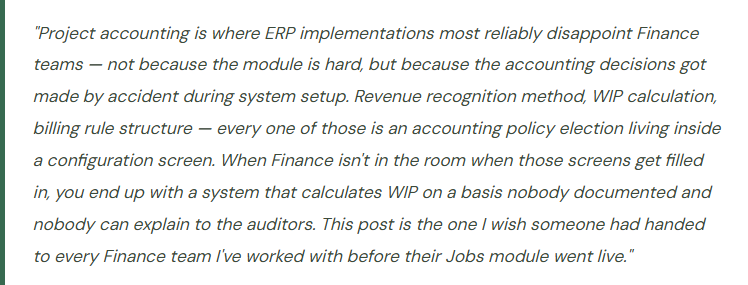
What Business Central’s Jobs Module Actually Does
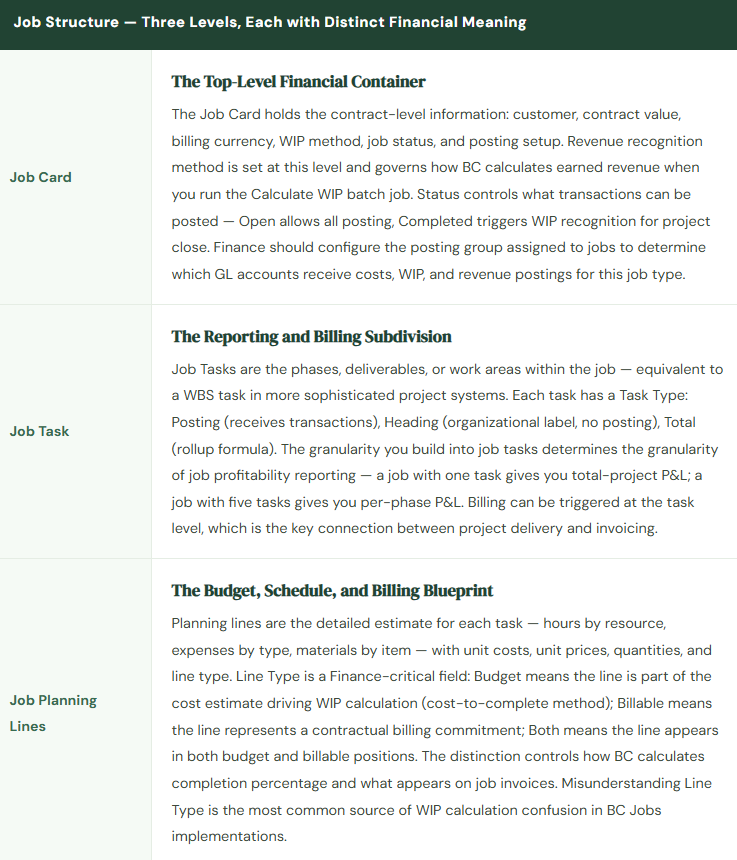
BC’s Jobs module is project accounting built into the core ERP — no additional license, no separate application. It handles the complete lifecycle of a project: setup, cost accumulation, WIP calculation, billing, and close. If your organization bills clients for hours and expenses, manages fixed-fee deliverables, or runs internal capital or R&D projects that need their own cost tracking, Jobs is the module that makes BC a project accounting system instead of just a transaction processing system.
The core principle is simple: a Job is a cost and revenue container. Transactions — hours posted via time sheets, expenses submitted against the job, purchase lines directed to the job, items consumed from inventory — flow to the job. BC tracks those transactions in the job ledger (the project subledger), calculates earned revenue based on your configured WIP method, generates invoices based on billing rules, and reconciles everything back to the general ledger through a WIP calculation process that runs at period close.
Organizations that use Jobs successfully treat it as a financial reporting tool, not just an operational scheduling tool. The job card isn’t an administrative record for the project manager to track Gantt charts — it’s a financial position that Finance monitors, reconciles at period close, and ultimately closes when the project is complete and all revenue has been recognized.
WIP Methods — This Is the Accounting Policy Decision
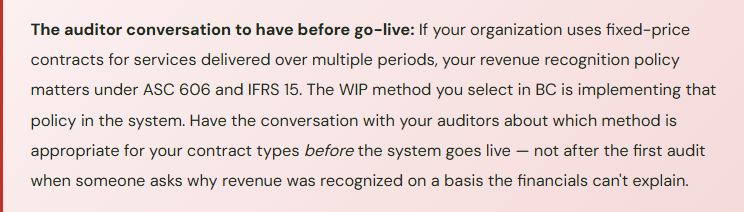
The WIP method on a job determines how BC calculates earned revenue and the resulting WIP balance on the balance sheet. BC offers five methods out of the box. Choosing between them isn’t a preference — it’s your revenue recognition accounting policy for project-based revenue, and it needs to be documented, consistently applied, and defensible to auditors. The wrong default selected during implementation because nobody had the conversation is the most common project accounting problem I encounter in BC.
📋 Completed Contract
- No revenue recognized until the job is complete. All costs accumulate as WIP on the balance sheet. Revenue and profit recognized in the period the job is completed and status changed to Completed.
- Most conservative. Appropriate for short-cycle projects where completion is a clear discrete event. Creates lumpy income statement recognition — all revenue from a project hits in one period.
- Best for: short-cycle deliverables, projects where “done” is unambiguous
📊 Percentage of Completion
- Revenue recognized proportionally as costs are incurred relative to total estimated costs. BC calculates: (Actual Total Cost / Total Scheduled Cost) × Contract Value = Recognized Revenue to date.
- Required by ASC 606 / IFRS 15 for most long-term service contracts. Produces smoother income statement recognition. Budget accuracy is non-negotiable — an outdated cost budget produces a wrong completion percentage.
- Best for: multi-month fixed-price engagements, construction, professional services
🧾 Sales Value
- Revenue recognized equals amounts invoiced to the client. Simple to understand — revenue and billing are the same event. Not appropriate under GAAP when significant performance remains after billing.
- Easy to administer, hard to defend for long-duration contracts. Works for transactional projects where each invoice represents a completed distinct performance obligation.
- Best for: transactional / milestone-billed projects with discrete deliverables
💼 Cost of Sales
- Recognizes revenue at the same time costs are posted — essentially T&M revenue recognition behavior applied to all project types. Cost and revenue move together; no WIP balance accumulates.
- Appropriate for time-and-material billing arrangements where every dollar of cost incurred maps directly to a dollar of billable revenue. Minimal balance sheet complexity.
- Best for: pure T&M engagements, cost-plus contracts, reimbursable arrangements
How Job Transactions Flow to the GL
Every transaction posted to a job generates both a job ledger entry (the project subledger) and a general ledger entry. The two must reconcile. Here’s how the full cycle flows:
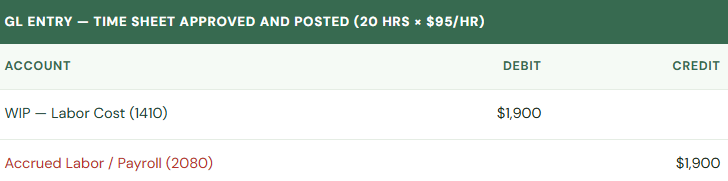
Step 1 — Posting Hours: An employee submits a time sheet for 20 hours on a job. After approval, BC posts a Job Journal entry. The cost category (resource) drives the GL posting based on the job posting group configuration.
Step 2 — Posting Expenses: A project manager posts travel and lodging expenses against the job via an expense entry or purchase invoice coded to the job number.
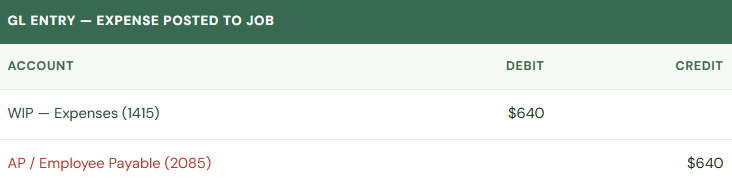
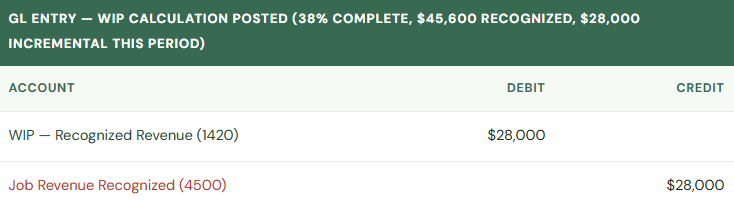
Step 3 — Running Calculate WIP: At period close Finance runs Calculate WIP (Reports > Jobs > Calculate WIP). BC computes earned revenue based on the WIP method, compares to prior recognized amount, and calculates the incremental revenue to post. For a Percentage of Completion job that is 38% complete on a $120K contract, recognized revenue to date = $45,600.
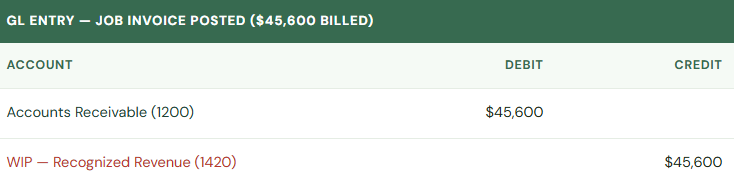
Step 4 — Creating a Job Invoice: Finance or billing runs Create Job Sales Invoice from the job card. BC pulls billable planning lines (or actuals for T&M) and creates a sales invoice. When the invoice posts, it creates an AR entry and reduces the WIP recognized revenue account to the extent of the billed amount.
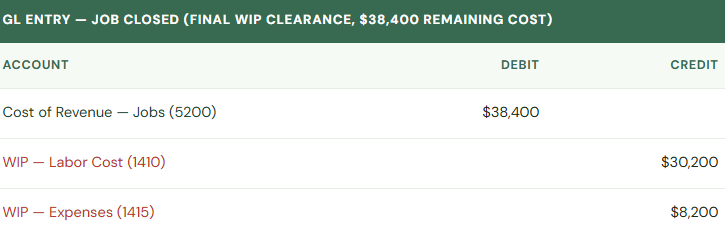
Step 5 — Closing the Job: When the project is complete, Finance changes job status to Completed and runs Calculate WIP one final time. All remaining WIP balances clear — costs move to cost of revenue, revenue fully recognized, balance sheet WIP goes to zero.
Billing — Connecting the Job to the Invoice
Jobs in BC support two billing approaches, and the distinction matters because they produce different GL behavior and require different Finance processes:
T&M / Actuals-Based Billing: The Create Job Sales Invoice function pulls all usage entries marked as billable (time, expenses, items) that haven’t yet been invoiced. Finance reviews the proposed invoice lines, adjusts if needed, and posts. The invoice reflects what actually happened — hours worked, expenses incurred. This is the simpler path: billing and cost recognition happen in the same period, WIP management is minimal, and the invoice is a direct output of posted job transactions.
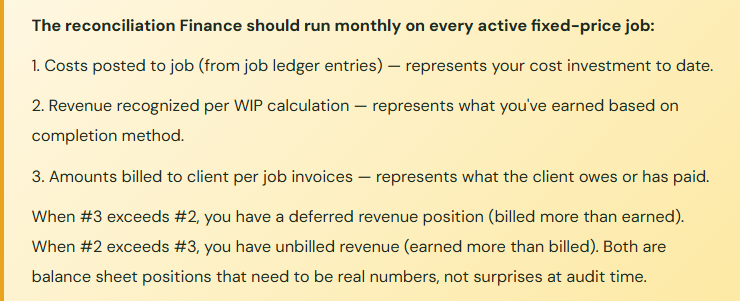
Planning-Line (Fixed-Fee) Billing: Billable planning lines drive the invoice. You define the billing schedule in the job planning lines — Milestone 1: $25,000 when design is approved; Milestone 2: $50,000 when development is complete. The invoice is generated from those lines when you mark them as ready to bill. Revenue recognition and billing are now decoupled — the job may be 40% complete from a cost perspective, but the first milestone hasn’t been approved yet so no invoice has gone out. Or the invoice has gone out, but the revenue recognition calculation says you’ve only earned $18,000 of that $25,000 based on completion. The difference sits in WIP or deferred revenue on the balance sheet. Finance needs to understand this decoupling and monitor it.
Job Posting Groups — The Configuration Finance Owns
The Job Posting Group is the configuration that maps job transaction types to GL accounts. It’s the jobs equivalent of customer/vendor posting groups — every posting group specifies exactly which accounts receive each type of job-related posting. Finance needs to define this before jobs go live, because the posting group assignment on the job card determines where every dollar flows in the general ledger.
| Posting Group Field | What It Controls | Typical Account |
|---|---|---|
| WIP Costs Account | Where costs accumulate during project (balance sheet) | 1410 – WIP: Labor & Expense Costs |
| WIP Accrued Costs Account | Accrued but not-yet-posted cost estimates (if using accrued cost WIP) | 1412 – WIP: Accrued Costs |
| Job Costs Applied Account | Offset when WIP is cleared at completion | 5200 – Cost of Revenue: Jobs |
| Job Costs Adjustment Account | Variance between estimated and actual cost at completion | 5210 – Job Cost Variance |
| WIP Invoiced Sales Account | Invoiced amounts not yet recognized as revenue (balance sheet) | 2200 – Deferred Revenue: Jobs |
| WIP Accrued Sales Account | Earned revenue not yet invoiced (balance sheet) | 1420 – WIP: Recognized Revenue |
| Recognized Costs Account | Cost of revenue on the income statement when revenue recognized | 5200 – Cost of Revenue: Jobs |
| Recognized Sales Account | Revenue on the income statement when recognized via WIP calculation | 4500 – Project Revenue |
Most implementations create one posting group and assign it to all jobs. This works but loses income statement granularity — consulting revenue and construction revenue post to the same account. Organizations with multiple revenue types benefit from multiple job posting groups mapping to distinct revenue and cost-of-revenue accounts. That conversation belongs in the chart of accounts design session, not after two years of undifferentiated project revenue on the P&L.
Five Mistakes That Cost Finance Time at Every Close
⚠️ WIP Calculation Never Run — Or Run Once at Year-End
- The Calculate WIP batch job doesn’t run automatically. If Finance doesn’t include it in the monthly close checklist, WIP balances on the balance sheet reflect costs accumulated but no recognized revenue against them — balance sheet shows inflated WIP, income statement shows no project revenue for months of active work, then both snap into place when someone finally runs the job. Interim financials are meaningless for project-based revenue businesses if WIP isn’t calculated every period close without exception.
- Fix: Add Calculate WIP to the period close checklist as a required step before trial balance is distributed. It takes minutes to run. The conversation with management about why project revenue was flat for three months is much more expensive.
⚠️ Job Planning Lines Not Updated After Scope Changes
- For Percentage of Completion jobs, the budget in planning lines is the denominator in the completion percentage calculation. A job scoped at $180K original cost estimate that has grown through change orders to $240K actual estimated cost, but whose planning lines still show $180K, is calculating 133% complete and recognizing revenue that hasn’t been contracted. Budget maintenance isn’t optional — it’s the input that makes the WIP calculation produce a number that means something.
- Fix: Establish a monthly requirement for project managers to review and update job planning line estimates. Finance should flag any job where actual costs already exceed the planning line budget before running WIP — that job’s completion calculation is wrong and needs a budget update before the number is posted to the GL.
⚠️ Jobs Left Open Long After Work Is Complete
- A job with status Open continues to accumulate costs and WIP balances indefinitely. When project managers finish a project and move on to the next one without anyone changing the job status and running a final WIP close, the job sits on the balance sheet with a WIP balance that represents completed work nobody is monitoring. Six months later Finance has WIP on the balance sheet from a project the operations team considers complete, billed, and done — reconciliation requires investigation into a project nobody remembers clearly.
- Fix: Include a WIP aging review in the monthly close process. Flag any job where the last transaction posted is more than 45 days ago but status is still Open. Require project managers to formally close jobs in BC within one billing cycle of project completion — not just in their project management tool or in their heads.
⚠️ Job Subledger Not Reconciled to GL at Period Close
- The job subledger (Job Ledger Entries) and the general ledger are maintained separately in BC and can diverge through manual journal entries to WIP accounts, posting errors, or configuration gaps. Finance teams that reconcile AP, AR, and inventory subledgers monthly but skip the job subledger reconciliation are leaving one of the most material balance sheet positions unverified. The WIP balance reported on interim statements may not agree with the sum of actual job WIP balances.
- Fix: The Jobs WIP Summary report in BC shows WIP balances by job as calculated in the subledger. The corresponding GL account balance on the trial balance should agree. Any difference requires investigation before the period closes. This is the same discipline as AR aging to trade receivables balance — just applied to a balance sheet account Finance teams tend to treat as “someone else’s problem.”
⚠️ One Job Per Customer Instead of One Job Per Engagement
- In the interest of simplicity, some implementations create one ongoing job per customer and post all project work to it. Revenue recognition, WIP calculation, and profitability analysis become impossible at the engagement level. The job shows a cumulative WIP balance across years of work with no ability to distinguish a profitable 2023 engagement from a money-losing 2024 engagement for the same client. Billing becomes a manual workaround because planning lines don’t map to individual contracts.
- Fix: One job per contract or engagement. The overhead of creating a new job for each engagement is minimal — it’s a five-minute setup. The benefit is engagement-level profitability visibility, accurate WIP by contract, and a billing process that actually reflects contractual obligations. Define the job creation policy before go-live and enforce it consistently.
Do This / Don’t Do This
✓ Do This
- Decide WIP method as a formal accounting policy before configuring jobs
- Involve auditors in revenue recognition method selection for fixed-price contracts
- Build Calculate WIP into the monthly close checklist as a required step
- Create one job per contract or engagement, not one per customer
- Define job posting groups from the chart of accounts design outward
- Require monthly planning line budget updates for all active PoC jobs
- Reconcile job subledger to WIP GL accounts at every period close
- Include a WIP aging review in the close process to catch stale open jobs
- Define a job closure policy and enforce it within one billing cycle of project completion
- Test the full lifecycle (create → cost → WIP → invoice → close) with real scenarios before go-live
✗ Don’t Do This
- Select WIP method by default because nobody raised the question during configuration
- Skip Calculate WIP during close because “jobs aren’t material this month”
- Leave planning line budgets at original contract value through scope changes
- Create one catch-all job per customer and post all work to it
- Ignore WIP subledger reconciliation while reconciling every other subledger monthly
- Assume project managers know to close jobs in BC when work is complete
- Let billing run independent of job status and WIP recognition without a reconciliation step
- Treat job posting group setup as a system detail rather than a Finance configuration decision
What Makes Jobs Different From Everything Else
Every other module we’ve covered in this series processes transactions that map cleanly to standard accounting: an invoice has a debit and a credit, a payment closes a receivable, a depreciation entry reduces an asset. The math is deterministic. Jobs is different because the accounting treatment for revenue depends on a calculation that requires human judgment inputs — the cost budget, the completion assessment, the billing schedule — and those inputs change over the life of the project as scope evolves, timelines shift, and client relationships develop.
That’s why project accounting is where the gap between ERP and financial reality widens fastest when Finance isn’t actively involved. The system can only calculate what it was configured to calculate, using the data it was given. When the data is stale or the configuration doesn’t match accounting policy, the output is precisely wrong — not random, not obviously broken, just systematically off in a way that takes work to discover and explain.
The organizations I’ve seen manage Jobs well share one characteristic: Finance treats the job subledger the same way it treats the AP and AR subledgers. Monthly reconciliation. Active monitoring of aging balances. Formal close procedures. Audit-ready documentation of the revenue recognition policy and how the configuration implements it. The ones who struggle have convinced themselves that project accounting is Operations’ problem that Finance reviews once a quarter. It isn’t. WIP is on the balance sheet. Revenue recognition is on the income statement. Those are Finance’s problem by definition.
Up Next:
Jobs covered the revenue side of project-based businesses. Next we’re going into the other side of the supply chain — the one that controls what you spend before the invoice arrives: Purchasing and Supply Chain Management in Business Central — purchase orders, vendor management, item charges, receipt and matching workflows, and the configuration decisions that determine whether your procurement-to-pay cycle is a controlled process or a series of workarounds Finance discovers at month-end.
Until then — run Calculate WIP before you close the period. Every period. Without exception.
— Bobbi
D365 Functional Architect · Recovering Controller
Leave a Reply