

Purchase orders, vendor catalogs, item charges, receipt and invoice matching, blanket orders, and the procurement configuration decisions that determine whether your AP close is clean or chaotic.
“Post 4 in this series covered the AP end of purchasing — vendor ledger, invoice posting, payment runs. This post is about what happens before the invoice arrives. The purchase order is the financial commitment. The receipt is the inventory event. The invoice match is the liability confirmation. All three steps generate different GL entries, in different accounts, at different times. When Finance understands that three-part structure, month-end accruals for goods received not invoiced are manageable and explainable. When Finance doesn’t, the GRNI balance grows unexplained until someone has to track down three months of unmatched receipts the week before audit.”
The Procurement Cycle in BC — Three Steps, Three GL Events
The purchasing module in BC handles the full procurement-to-pay cycle. Where Post 4 focused on what happens once an invoice is in the system, this post covers the upstream structure — how purchase orders, receipts, and vendor catalog setup affect what arrives at the AP team’s desk and how much manual effort the invoice matching process requires.
The procurement cycle in BC has three distinct financial events, each with its own GL impact:
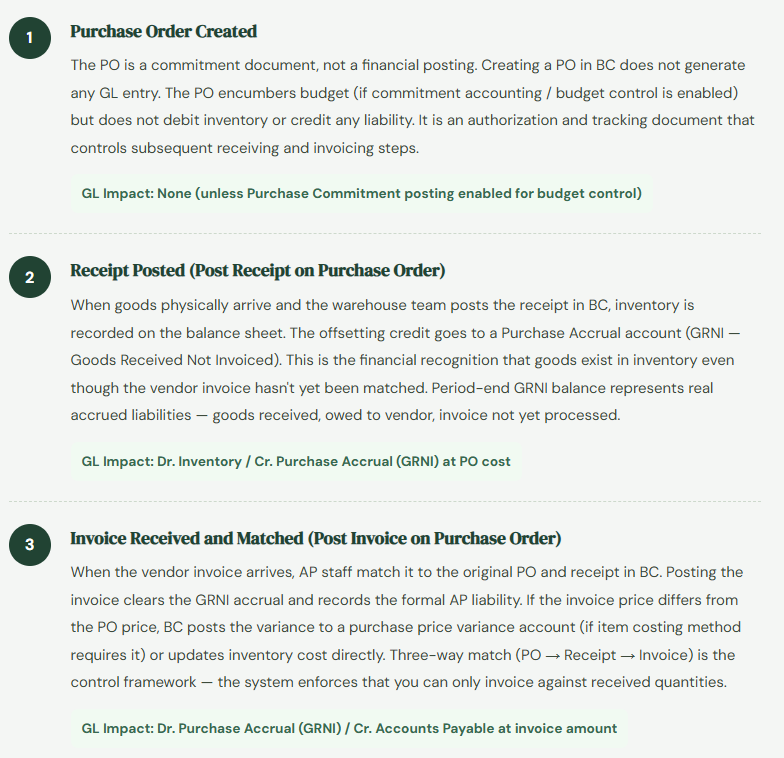
Purchase Order Setup — What Finance Configures
Several purchase order setup elements live in Finance’s domain, not just Operations’. Getting these right at implementation prevents months of manual workarounds:
Purchase & Payables Setup — Invoice Rounding, Receipt Requirements: The Purchases & Payables Setup page in BC controls whether BC requires a posted receipt before an invoice can be matched (the “Receipt on Invoice” check), default payment terms, and invoice rounding configuration. The Receipt on Invoice setting is the single most important procurement control in BC — enabling it means you cannot post a vendor invoice without a matching posted receipt, which enforces three-way match as a system control rather than a manual process discipline.
Vendor Card — Payment Terms, Lead Times, Currency: The vendor card carries the default payment terms that BC uses to calculate due dates when invoices are posted, the vendor’s currency (critical for foreign currency payables — covered in the AP post), and lead times used by the planning system to suggest purchase order dates. Keeping vendor cards current — especially payment terms and currency — prevents miscalculated due dates and foreign exchange surprises at payment runs.
Purchase Price Lists (formerly Special Prices): BC allows vendor-specific prices and discounts stored on the vendor card or item card. When a PO line is created, BC applies the vendor’s negotiated price automatically. Keeping price lists current prevents POs at wrong unit costs, which creates GRNI-to-invoice variances at matching time — variances that need explanation or adjustment before the AP close.
Item Charges — The Most Underused Feature in BC Purchasing
Item Charges is one of the most important and least-used features in BC’s purchasing module, particularly for organizations that import goods or pay for delivery, freight, customs, or installation as separate line items from the goods themselves. Item charges allow you to allocate ancillary costs — freight, insurance, duty, handling — directly to the landed cost of inventory items rather than expensing them separately.
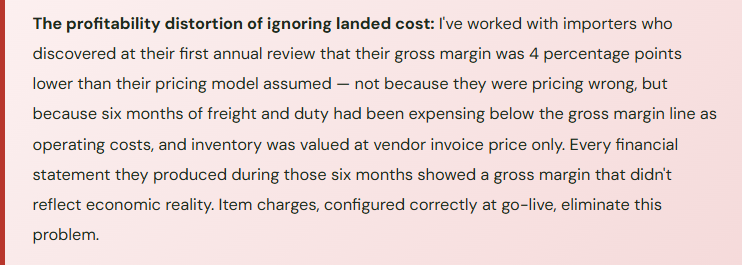
Why this matters for Finance: when you receive 500 units of a component at $10 each, your inventory is $5,000. When you also pay $800 in freight to get those components to your warehouse, the true cost of those components is $10.16 each, not $10.00. If you expense the freight to a shipping expense account and carry inventory at $10.00, your inventory cost is understated, your gross margin is overstated during the period you sell those components, and your shipping expense line is inflated by a cost that belongs in COGS, not in operating expenses.
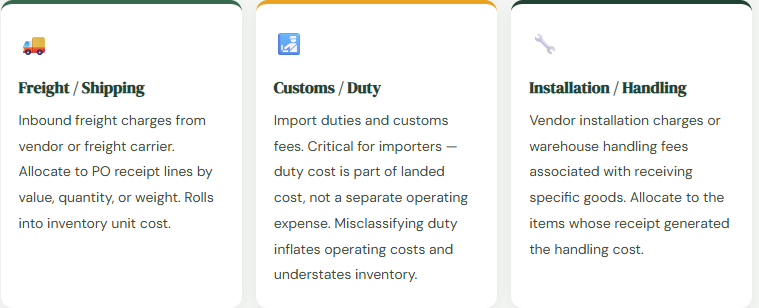
In BC, item charges are posted via a purchase invoice line using a special item charge item number. When you assign the charge to a receipt (using Assign Item Charge), BC allocates the cost to the individual item units using the selected method (Equal, By Amount, By Weight, By Volume). The result: each unit’s average or standard cost in BC includes the freight/duty allocation, and COGS when those units are sold reflects actual landed cost.
Blanket Purchase Orders — Commitment Purchasing
Blanket Purchase Orders handle long-term vendor agreements: a commitment to purchase a total quantity or value over a period, with individual releases drawn down against the blanket as needed. Common uses include annual supply agreements, standing vendor contracts, and volume commitment arrangements where the full quantity won’t be received in a single shipment.
In BC, a Blanket PO holds the total agreement. Release purchase orders are created from the blanket as shipments are needed. Each release reduces the blanket’s outstanding quantity. Finance benefits from blanket POs in two ways: purchasing commitments are visible in a single document for budget tracking, and individual release POs go through the standard receipt-match-invoice cycle with full GL control rather than being managed as one-off orders that bypass established workflow.
The most common misuse of blanket POs is treating them as a way to bypass purchase order approval workflow — creating a blanket approved once and then releasing orders under it indefinitely without authorization review. Define approval thresholds for blanket POs that reflect the total commitment value, not the individual release amounts. A $500K annual blanket shouldn’t bypass approval because each monthly release is only $40K.
The Matching Process — Where AP and Procurement Connect
Invoice matching in BC happens when AP staff open the vendor invoice, reference the original PO number, and BC pulls the outstanding receipt lines. The matching process is where the three-way control closes: purchase order (authorized price/quantity) meets receipt (verified delivery) meets invoice (vendor’s claim). Each mismatch — price variance, quantity difference, goods not yet received — requires resolution before the invoice posts.
| Mismatch Type | What Happened | How BC Handles It | Finance Action |
|---|---|---|---|
| Price Variance | Invoice price differs from PO price | BC warns and can post variance to Purchase Variance account or update inventory cost depending on costing method | Review variance, confirm PO price is correct, or update price and reissue PO if vendor price changed legitimately |
| Quantity Over-Invoice | Invoice qty exceeds received qty | BC blocks posting if Receipt Required is on — cannot invoice unreceived goods | Confirm receipt is complete and posted, or dispute invoice quantity with vendor |
| Quantity Under-Receipt | Received partial shipment, invoice for full PO qty | Match invoice to received quantity only; residual PO stays open for remaining receipt | Communicate partial shipment to vendor, expect second invoice or credit for undelivered quantity |
| Receipt Not Posted | Goods in warehouse but receipt not recorded in BC | Invoice matching fails if Receipt Required enabled — nothing to match against | Require receiving team to post receipt before AP can match invoice — enforce same-day receipt posting |
Purchase Return Orders — Doing It Right
When goods need to go back to a vendor — damaged on arrival, wrong item, quality rejection — the correct BC process is a Purchase Return Order, not an inventory adjustment journal. This distinction matters to Finance more than it does to Operations.
A purchase return order reverses the original receipt: inventory decreases, the GRNI accrual reverses (or vendor payable decreases if already invoiced), and the vendor’s account is debited for the expected credit. If you process a vendor return as an inventory adjustment instead, inventory decreases correctly but the vendor payable or GRNI accrual is not reversed — you have a liability on your balance sheet for goods you’ve sent back and will never pay for. The error is invisible in Operations’ view of the transaction because the inventory quantity is right. It’s only visible in Finance’s view when the vendor credit never clears an open payable.
Purchase Return Order
- Creates vendor return shipment reversing receipt
- Reverses GRNI or reduces AP payable correctly
- Generates vendor credit memo through normal AP flow
- Inventory subledger matches GL at period close
- Vendor account shows credit available for offset
Inventory Adjustment Journal
- Reduces inventory quantity correctly
- Does NOT reverse vendor liability or GRNI accrual
- No vendor credit memo generated in AP
- Liability remains open long after goods are returned
- Requires manual GL journal to correct — messy audit trail
Five Mistakes That Make the AP Close Harder Than It Should Be
⚠️ Receipts Not Posted Same Day as Physical Arrival — Especially at Period End
- Goods arrive on the last day of the period. Warehouse team posts the receipt two days later in the new period. Inventory is on the balance sheet in the wrong period. GRNI accrual is in the wrong period. If the vendor invoice was already processed, AP has a liability posted in one period and the GRNI clearing in another — reconciliation shows a difference that persists until someone investigates the posting date mismatch. At period close, this produces balance sheet inventory and GRNI balances that are simply wrong by the value of the late-posted receipts.
- Fix: Define a period-close receiving cutoff — goods received before 5pm on the last business day of the period must have the receipt posted in BC before that period closes. Train receiving supervisors on backdating receipt posting dates to the physical arrival date when posting the next morning. The system date defaults to today; the posting date should reflect when goods physically arrived.
⚠️ Vendor Returns Processed as Inventory Adjustments
- Already covered above, but worth repeating because it’s consistent across every BC implementation I’ve reviewed: vendor returns processed as inventory adjustments create liabilities that never clear. The faster path (inventory adjustment takes 30 seconds, purchase return order takes two minutes) creates a cleanup problem that takes significantly more than 90 seconds to fix at period-end reconciliation.
- Fix: Document the vendor return process in both the warehouse procedures manual and the AP procedures manual. Physical vendor returns require a Purchase Return Order in BC, full stop. Make this a non-negotiable control, not a suggested best practice.
⚠️ Freight and Duty Expensed Instead of Allocated to Inventory via Item Charges
- Organizations importing goods or paying material freight costs systematically understate inventory and overstate operating expense when ancillary procurement costs are not allocated to inventory via item charges. The income statement shows artificially inflated freight/logistics operating expense, artificially elevated gross margin (inventory costs are understated so COGS is understated), and a profitability analysis that doesn’t reflect the actual cost to deliver product. This is a configuration and process design problem, not a one-time journal entry problem.
- Fix: Identify all significant procurement-related costs that represent part of the landed cost of inventory items — freight, duty, customs clearance, warehousing-in fees — and configure item charges for each. Set up the process for posting item charge invoices and assigning them to the corresponding receipts. The accounting improvement justifies the setup investment for any organization where these costs are material relative to inventory value.
⚠️ GRNI Account Not Reconciled at Period Close
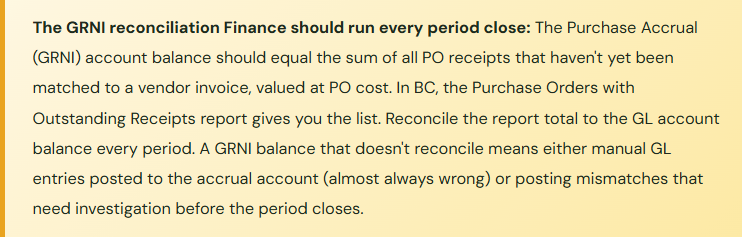
- The Purchase Accrual (GRNI) account is one of the most important reconciliations in the AP close — it represents real liability for goods received that haven’t been invoiced yet. It should trend toward zero and clear promptly as invoices arrive and are matched. When it’s not reconciled monthly, it accumulates mismatches: invoices matched to wrong receipts, receipts never invoiced because the vendor skipped it, old items sitting for months with no one investigating why the invoice hasn’t arrived. By the time audit season arrives and someone actually looks at it, cleaning up a year of accumulated GRNI mismatches can take days.
- Fix: Run the Purchase Orders with Outstanding Receipts report at every period close and reconcile its total to the GL account balance. Investigate and resolve any items older than 30 days — either the invoice is in dispute, the vendor never sent it (real accrued liability requiring disclosure), or it’s a processing error that needs correction.
⚠️ Blanket PO Approval Thresholds Set at Release Level, Not Commitment Level
- The approval workflow is configured to require approval for purchase orders above $10,000. A $480,000 blanket PO gets created with individual monthly releases of $40,000 each — comfortably below the approval threshold. The total commitment ($480K) never goes through the authorization controls that were designed to protect the organization from large unapproved commitments. The intent of the approval control is bypassed by the document structure.
- Fix: Configure blanket PO approval thresholds based on the total commitment value on the blanket, not the individual release amounts. Review existing blanket POs annually to confirm they represent current business requirements and vendor terms, not standing commitments nobody is actively managing.
Do This / Don’t Do This
✓ Do This
- Enable Receipt Required on Purchase & Payables Setup to enforce three-way match
- Reconcile GRNI account to outstanding receipts report at every period close
- Configure item charges for all material landed cost components (freight, duty)
- Require same-day receipt posting; define a period-close receiving cutoff
- Process all vendor returns as Purchase Return Orders, not inventory adjustments
- Set blanket PO approval thresholds at total commitment value
- Keep vendor price lists current to prevent receipt-invoice price variances
- Define GRNI aging thresholds — investigate any receipt unmatched beyond 30 days
- Document purchasing procedures in both warehouse and AP manuals consistently
✗ Don’t Do This
- Skip GRNI reconciliation because “AP reconciles the vendor ledger”
- Expense freight and duty to operating cost accounts when they’re part of inventory landed cost
- Use inventory adjustments as shortcuts for vendor returns
- Allow blanket POs to bypass approval controls through low-value releases
- Let receipts age unposted over a period-end because the warehouse team was busy
- Match invoices manually outside BC when the matching workflow seems slow
- Leave purchase price variances unreviewed — they indicate PO or vendor price list is outdated
Up Next:
Purchasing covers the single-company procurement cycle. But many BC organizations operate as more than one legal entity — parent and subsidiary, holding company and operating companies, multi-country organizations where intercompany transactions need to flow through the system cleanly. Next we’re going into Intercompany Accounting and Multi-Company Setup in Business Central — intercompany transactions, automated posting between companies, consolidations, and the configuration decisions that determine whether your consolidated close is a manageable process or a manual reconciliation project.
Until then — reconcile GRNI every period, enforce receipt-on-invoice, and configure item charges before you go live if landed cost matters to your margin story.
— Bobbi
D365 Functional Architect · Recovering Controller
Leave a Reply