

Bill of materials, production orders, routings and capacity, costing methods for manufactured items, variance analysis, and the GL entries that happen when you build something instead of just buying it.
What BC’s Manufacturing Module Covers
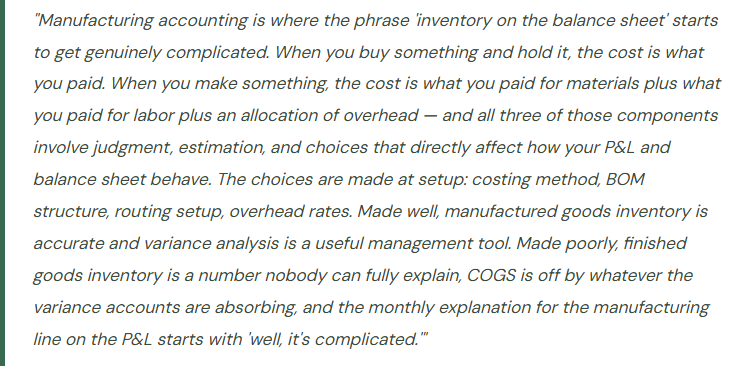
BC’s Manufacturing module (available in BC Premium) handles discrete manufacturing — the process of building finished goods from component materials through defined production steps. It is not designed for process manufacturing (chemical blending, batch processing, continuous production) or project-based manufacturing with highly custom configurations. For those scenarios, ISV solutions built on BC are often a better fit than the native manufacturing module.
For discrete manufacturers — companies building assemblies, configured products, or standard finished goods from defined component lists — BC Manufacturing handles the full production cycle: bill of materials defining what goes into a product, routings defining how it’s made and on what equipment, production orders managing the work through the floor, and costing capturing the actual cost of what was produced versus what was planned.
Two BC features are worth distinguishing before going further: Assembly Orders and Production Orders. Assembly Orders (available in BC Essentials) handle simple kitting and light assembly — combining components into a finished item without labor routing or capacity planning. Production Orders (BC Premium) handle full manufacturing with routing steps, work centers, capacity loading, and WIP tracking. If your “manufacturing” is really just combining a few components into a kit, Assembly Orders may be sufficient. If you have multiple production steps, dedicated machinery, and labor time to track, Production Orders is the right tool.
The Foundation — Bill of Materials and Routings
Two master data records define a manufactured item in BC. Getting them right is prerequisite to any meaningful manufacturing cost accounting.
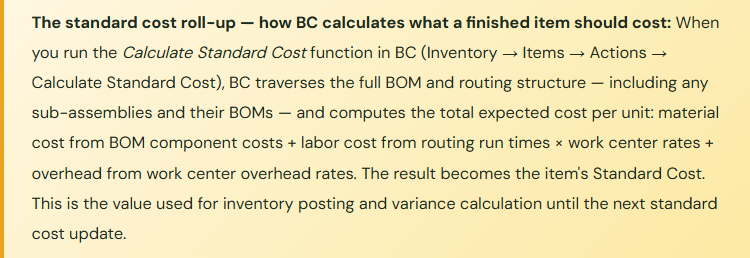
Production BOM (Bill of Materials): The BOM lists every component required to build one unit of the finished item — raw materials, sub-assemblies, packaging — with required quantities and units of measure. The BOM is the cost recipe: when BC calculates the standard cost of a finished item, it multiplies component quantities by component unit costs and sums them to get the material cost component. Inaccurate BOMs produce inaccurate standard costs produce inaccurate variance analysis produce a manufacturing P&L that nobody trusts.
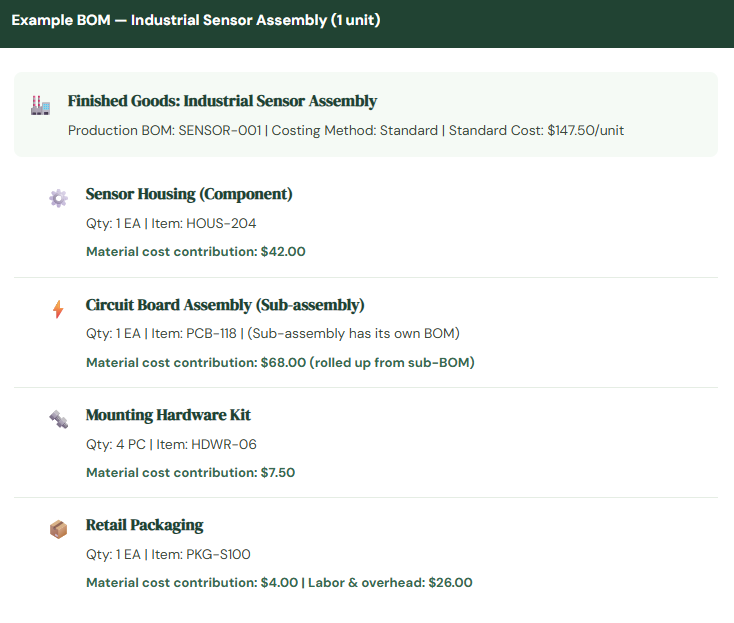
Routing: The Routing defines the sequence of production operations, the work center (machine or work area) where each operation is performed, and the setup and run times per unit. The Routing is the labor and overhead cost recipe: BC multiplies run times by work center cost rates to calculate the labor and overhead cost contribution to finished goods. Work center cost rates — direct labor rate, machine rate, overhead allocation rate — are configured in the Work Center and Machine Center cards and must reflect actual cost structure to produce meaningful variance analysis.
Production Order Statuses — Where Finance Needs to Pay Attention
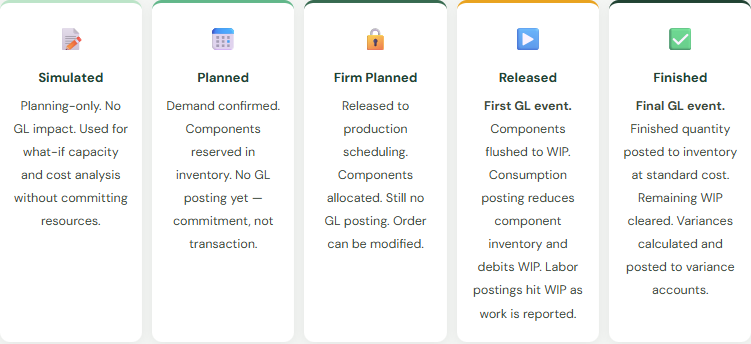
A production order in BC moves through five statuses, and the GL implications change significantly at two of them:
The GL Flow — From Components to Finished Goods
Let’s trace the complete GL flow for a production order, because this is where Finance teams get confused about why inventory balances don’t behave the way they expect.
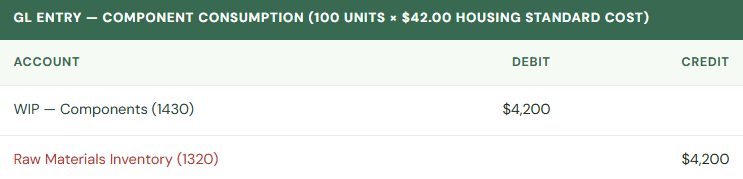
When Components Are Consumed (Flushing): As production begins and components are picked from inventory to the production floor, BC posts component consumption. The component inventory account is credited (reducing raw materials/WIP components balance) and a WIP account is debited. With Standard costing, components flush at their standard cost. The flushing can happen automatically at release, at output, or via manual consumption posting depending on the flushing method configured on the item card.
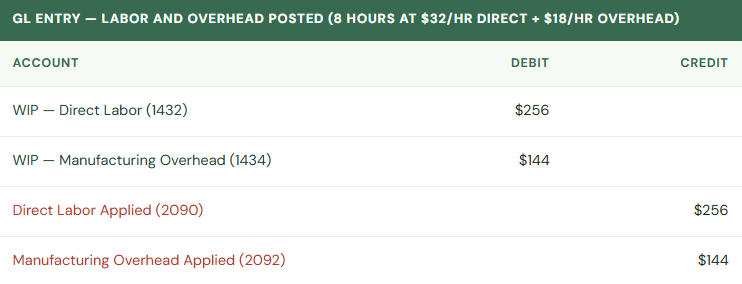
When Labor Is Reported (Output Journal): As production steps are completed and operators report time via the Output Journal, BC posts labor cost to WIP. The work center’s direct rate is applied to the reported hours. Overhead is allocated simultaneously based on the work center’s overhead rate.
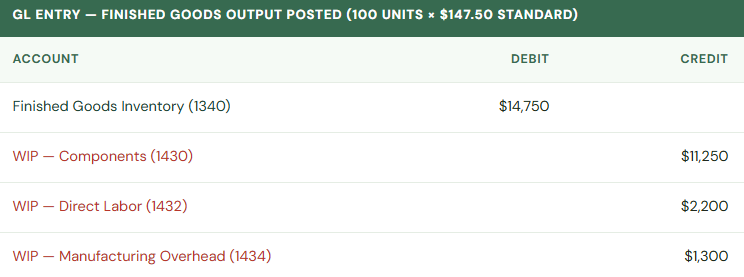
When Finished Goods Are Posted (Output): When the production order reports finished output, BC posts finished goods to inventory at the item’s Standard Cost — regardless of what was actually consumed or how long it took. The WIP accounts are credited and Finished Goods inventory is debited.
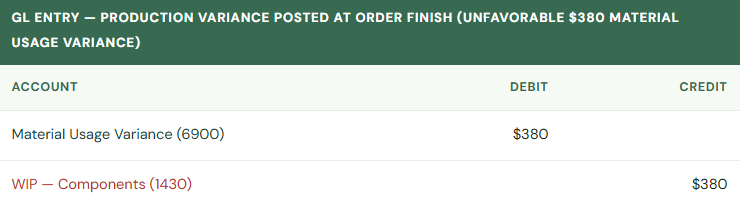
When the Production Order Is Finished and Variances Are Calculated: When the production order status changes to Finished, BC calculates the variance between what was expected (standard cost × quantity produced) and what was actually consumed and reported. Variances post to variance accounts on the income statement.
Costing Methods — The Most Consequential Item Setup Decision
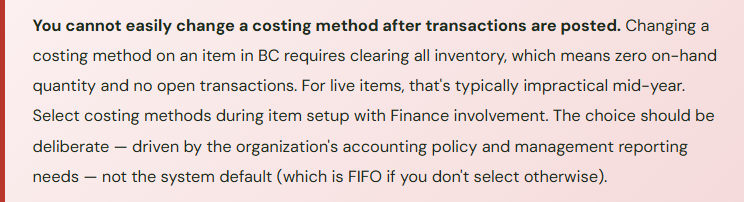
The Costing Method on an item card determines how BC calculates the cost of each unit in inventory and therefore what flows to COGS when the item is sold or consumed. The choice is made at item setup and is difficult to change after transactions have been posted — this is a Finance decision that must happen before items are created, not a default to accept without review.
📊 FIFO (First In, First Out)
Oldest cost layers consumed first. Each receipt creates a cost layer; issues consume the oldest layer. COGS reflects historical purchase prices of earliest inventory. Inventory on balance sheet reflects most recent purchase prices.
Rising prices: lower COGS, higher inventory value, higher gross margin. Falling prices: opposite. Creates cost layer management complexity for high-volume items.
Common in: distribution, food/beverage, pharma requiring lot tracking
📋 Standard
All transactions use a fixed standard cost set by Finance. Variances between standard and actual are posted to variance accounts. Inventory is always valued at standard. COGS is always standard cost per unit — predictable, controllable, variance-analysis-friendly.
Requires periodic standard cost updates (at minimum annually). Stale standards produce large variances that obscure operational efficiency signals.
Common in: manufacturing, high-volume standard products, cost-control-focused environments
⚖️ Average
Weighted average cost recalculated after every receipt. Each issue uses the current running average. Simpler than FIFO for high-volume items with many receipts. Smooths price volatility across the inventory balance.
Average cost can shift significantly with large receipts at materially different prices. COGS and inventory value can be hard to reconcile to specific purchase invoices.
Common in: wholesale distribution, commodity items, organizations wanting simplicity over precision
🎯 Specific
Each unit tracked individually — every item has a unique cost tied to its specific purchase or production lot. Highest precision. Highest overhead. Requires lot or serial number tracking on every transaction.
Appropriate only when individual unit cost tracking has business justification (high-value assets, unique configurations, regulatory traceability requirements).
Common in: high-value equipment dealers, bespoke manufacturers, vehicle/asset tracking
Production Variances — What They Tell You and Why Finance Should Review Them
For Standard cost items, every time a production order closes, BC calculates and posts the variance between standard expected cost and actual incurred cost. These variances are management information, not just accounting noise. Finance teams that review manufacturing variance detail monthly catch operational and cost structure issues earlier than those who let variances accumulate until year-end.
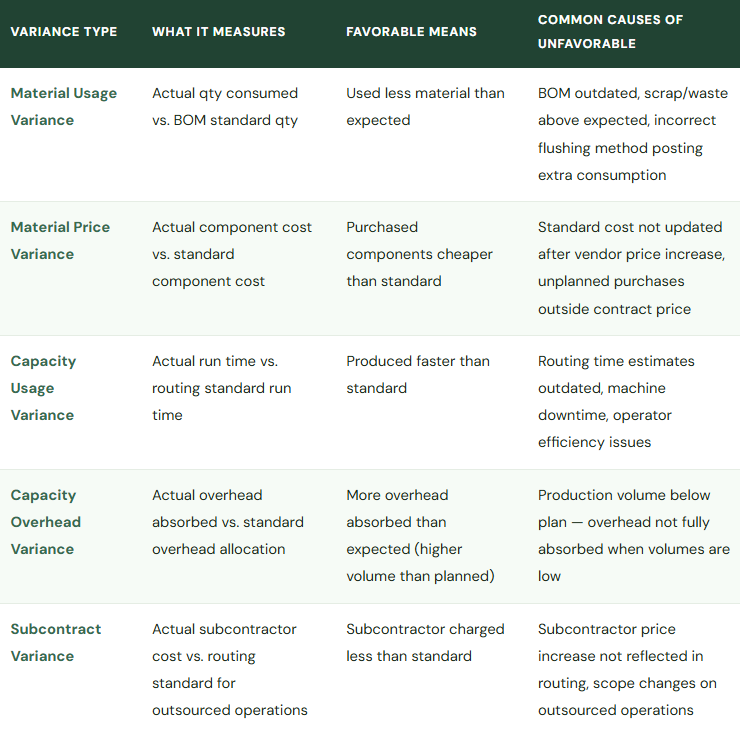
Large, persistent variances in any category tell a specific story: material usage variance growing means BOM is wrong or scrap is increasing; capacity overhead variance consistently unfavorable means production volume running below the overhead absorption plan — not an efficiency issue but a volume issue. The variance type distinguishes the diagnostic, which points to the right conversation with the right team. Without the variance detail, it’s just an unexplained income statement line.
Five Mistakes That Produce a Manufacturing P&L Nobody Can Explain
⚠️ Standard Costs Not Updated Annually — Variances Accumulate All Year
Standard costs are set at a point in time. Component prices change. Labor rates get negotiated. Overhead structures evolve. An organization that set standard costs at go-live two years ago and hasn’t updated them is using costs that may be 15-20% off actual for some items. Every production order posts a variance reflecting that gap — not operational inefficiency, just stale math. By year-end, the manufacturing variance accounts are absorbing hundreds of thousands of dollars of cumulative cost delta that represents “our standards are wrong” not “our operations are inefficient.” Finance can’t use the variance accounts as management information because they’re too noisy with structural cost drift.
Fix: Run the standard cost roll-up annually (at minimum) at the start of each fiscal year. Update work center rates when labor contracts renew. Update component standard costs when vendor price lists are renegotiated. The process is: update component standard costs → run Calculate Standard Cost to roll up through BOMs → run Adjust Cost – Item Entries → review variance accounts for any remaining unexplained items. Make this a scheduled Finance activity, not a reaction to audit questions.
⚠️ Production Orders Left Open After Production Is Complete
Changing a production order status from Released to Finished triggers the final WIP clearance and variance calculation. Production supervisors who complete the physical work but don’t change the order status in BC leave WIP balances accumulating indefinitely — material consumption and labor postings sitting in WIP accounts rather than being cleared to finished goods and variance accounts. Finance’s WIP balance grows without explanation. At some point someone discovers 40 open production orders from the last quarter, all with WIP balances, none of them representing actual in-progress work.
Fix: Run a Production Order Aging report monthly — flag any Released production order where the last output posting is more than one standard production cycle ago (whatever that is for your products — 7 days for short-cycle work, 30 days for longer runs). Require production supervisors to close completed orders in BC within 48 hours of physical completion. The system discipline matters: open orders produce open WIP balances that Finance has to explain.
⚠️ BOMs Not Maintained When Products Change
Engineering makes a component substitution — replaces one circuit board with a lower-cost alternative, adds a new fastener to fix a quality issue, changes packaging material for a supplier switch. The physical product changes. The BOM in BC doesn’t change because nobody told the ERP team. Production orders now consume components that aren’t on the BOM (generating material usage variances) or don’t consume components that are on the BOM (generating the opposite). Standard cost for the item still reflects the old component structure. Variance analysis is impossible to interpret because the BOM no longer reflects what’s actually being built.
Fix: Engineering change control needs to include a BC BOM update step as a mandatory part of every product change. Define the process: Engineering change approved → BOM updated in BC → standard cost recalculated → Finance notified of cost impact before the change goes to production. The BOM in BC isn’t an archive document — it’s the live production and costing recipe. It must match the current product design.
⚠️ Overhead Not Configured in Work Centers — Overhead Just Missing From Manufactured Goods Cost
Work centers in BC have fields for direct cost per unit time and overhead rate. Implementations that set up the direct labor rate but leave overhead rate at zero produce manufactured goods with cost = materials + direct labor, with no overhead component. Every unit produced is undercosted from a full-absorption standpoint. Finished goods inventory is understated. COGS when those goods sell is understated. Gross margin looks better than it actually is. The underabsorbed overhead is sitting in the manufacturing overhead accounts without any mechanism to flow through production into COGS.
Fix: Finance needs to define the overhead rate for each work center before the routing is used in production. The overhead rate should reflect the true overhead cost of running that work center — depreciation on equipment, facility allocations, supervision — expressed per unit of time or output. Getting this number requires a proper overhead allocation analysis, not an estimation. If the number is genuinely unknown, using a reasonable estimate is better than zero — you can refine with variance analysis once you’re running.
⚠️ Assembly Orders Used Where Production Orders Are Needed — Losing Variance Visibility
Assembly Orders are simpler and available in BC Essentials — they’re sometimes chosen because Production Orders require Premium and “seem more complex.” For actual manufacturing with labor steps, multiple work centers, and meaningful cost structure, Assembly Orders produce assembled goods without routing cost tracking, without WIP accumulation by stage, and without production variance calculation. Finance gets an assembled item at BOM component cost plus whatever indirect cost was manually configured, but no visibility into labor efficiency, overhead absorption, or production-by-production cost performance.
Fix: Assess honestly whether the operation is assembly (combine components with minimal labor, no meaningful routing) or manufacturing (multiple operations, labor time tracking matters, overhead allocation is material to product cost). Assembly Orders for actual assemblies — correct choice. Assembly Orders as a shortcut for manufacturing — the cost accounting information Finance needs will not be produced, and there’s no path from Assembly to Production data once history exists under the Assembly Order structure.
Do This / Don’t Do This
✓ Do This
- Select costing method for each item before first transactions are posted — Finance decision, not default
- Update standard costs annually (at minimum); update when significant cost structure changes occur
- Configure overhead rates in work centers — don’t leave manufactured item cost without overhead component
- Establish a BOM change control process that includes a BC BOM update step
- Close production orders in BC within defined timeframe of physical completion
- Run production variance analysis monthly — use it as a management tool, not just an accounting entry
- Review open production orders monthly to identify stale WIP
- Include manufacturing WIP in the period-close subledger reconciliation list
- Test standard cost roll-up in sandbox before applying updated standards to live items
- Distinguish Assembly Orders (kitting) from Production Orders (manufacturing) before go-live
✗ Don’t Do This
- Accept the default costing method without Finance reviewing each item category
- Let standard costs age for years — the variance accounts become noise, not signal
- Leave overhead rate at zero in work centers because “we don’t know the number yet”
- Allow engineering changes without corresponding BOM updates in BC
- Let production supervisors leave orders in Released status after work is physically complete
- Use Assembly Orders as a simpler substitute for manufacturing processes that need variance tracking
- Ignore manufacturing variance accounts at period close — they contain operational intelligence
- Skip the cost roll-up when component or labor costs change materially
Closing the Arc
We’ve now covered the full financial operations stack in Business Central — from chart of accounts through AP and AR, cash management, fixed assets, period close, inventory, dimensions, budgeting, jobs, purchasing, intercompany, and now manufacturing. Sixteen posts in and I keep finding the same underlying pattern.
Every configuration decision in BC is an accounting policy decision in a system interface. The costing method selection isn’t a technical setting — it’s your inventory valuation policy. The overhead rate in the work center isn’t a system parameter — it’s your overhead absorption methodology. The BOM isn’t a production document — it’s the cost recipe that determines what flows to your balance sheet and income statement every time something is built.
Finance teams who treat ERP configuration as a system implementation project — something for IT and the consultant to handle — consistently end up with systems that produce financial statements they can’t fully explain. Finance teams who treat ERP configuration as the operational implementation of accounting policy — where every setup screen maps to a documented accounting treatment — consistently end up with systems they can trust, explain to auditors, and use as actual management tools.
That’s been the whole series. The technology is just the mechanism. The accounting is the intent. Own the configuration and you own both.
Up Next:
The core financial and operations module stack is complete. The next arc broadens the lens: Power BI and Reporting Beyond Financial Reports in Business Central — connecting BC to Power BI, the BC connector and its limitations, building operational and financial dashboards that complement the native Financial Report builder, and the practical decisions about what belongs in BC reporting vs. what should live in a dedicated BI layer. For Finance teams who want the numbers not just accurate but visible to the right people at the right time.
— Bobbi
D365 Functional Architect · Recovering Controller
Thank you for reading!
If this post helped you solve a real problem, share it with a Finance colleague who is in the middle of a BC implementation or a post-go-live optimization. If you have a topic that I haven’t covered, please reach out. There is always one more post worth writing.
Leave a Reply