

The VAT posting groups model, how BC decides which tax rate applies to every transaction, US sales tax and GST setup, tax-exempt customers and items, the VAT return and settlement process, and the configuration mistakes that create financial statement misstatements Finance won’t find until a tax authority does.
How BC Calculates Tax — The Two-Group Intersection Model
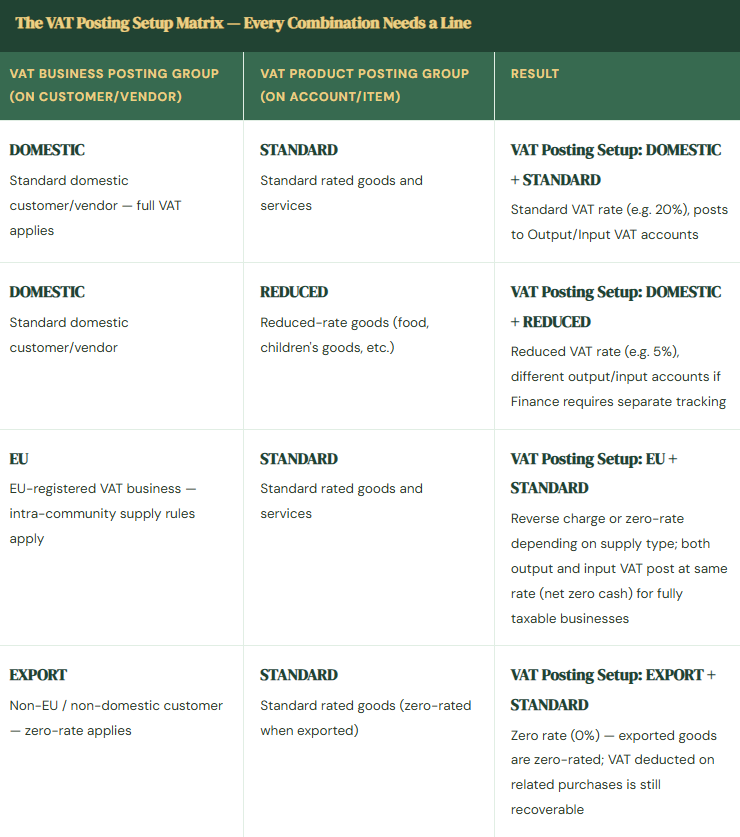
Business Central determines the applicable tax setup for any transaction through a combination of two posting groups: the VAT Business Posting Group (VBPG — assigned to the customer or vendor, representing who you are transacting with) and the VAT Product Posting Group (VPPG — assigned to the GL account, item, or resource, representing what is being transacted). The specific combination of VBPG and VPPG determines which VAT Posting Setup line applies — and that line carries the tax rate, the GL accounts for tax posting, and the calculation type.
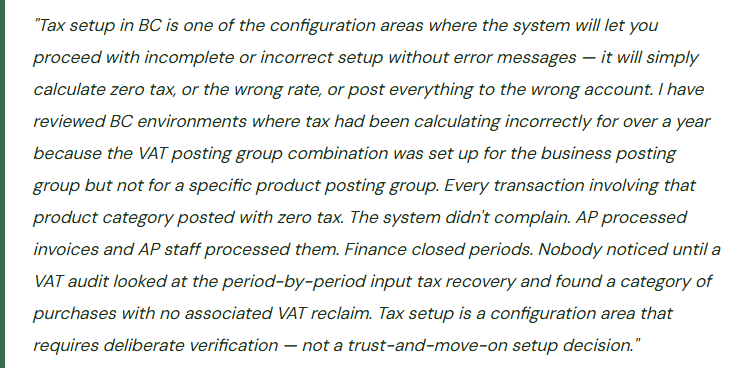
This intersection model is BC’s core tax mechanism for both VAT jurisdictions and US/Canadian sales tax scenarios. The critical implication: every VBPG and VPPG combination that can appear on a transaction must have a corresponding VAT Posting Setup line. A combination with no setup line produces zero tax silently — not an error, just zero. Finance must verify that the matrix of combinations is complete.

VAT Posting Setup — What Each Line Configures
Each line in the VAT Posting Setup table defines six key elements for the VBPG/VPPG combination. Finance must review and own all six — this is not a configuration the implementation team can populate by default without Finance input on the GL account mapping.
| Field | What It Controls | Finance’s Responsibility |
|---|---|---|
| VAT % | The tax rate applied to transactions matching this combination | Verify against current statutory rates for each jurisdiction and supply type. Rates change — assign an owner to monitor rate changes and update BC before the effective date. |
| VAT Calculation Type | Normal VAT (standard), Reverse Charge VAT (buyer accounts for both output and input), Full VAT (the entire amount is VAT — used for journal entries recording VAT-only amounts), or No VAT | Reverse Charge must be set for applicable cross-border B2B service and goods categories. Getting this wrong — using Normal VAT on a reverse charge transaction — produces incorrect VAT return figures. Tax counsel defines which supply types require reverse charge. |
| Sales VAT Account | GL account receiving output VAT on sales transactions for this combination | Finance defines the output VAT account. Separate accounts per VAT rate (standard vs. reduced) provide cleaner VAT return reporting. A single output VAT account for all rates requires manual calculation to split the return by rate. |
| Purchase VAT Account | GL account receiving input VAT on purchase transactions for this combination | Finance defines the input VAT/recoverable account. For partially exempt businesses, Finance may need separate accounts for fully recoverable input VAT and restricted input VAT to correctly present the balance sheet. |
| Reverse Charge VAT Account | GL account for the output side of reverse charge entries (where the buyer self-assesses both output and input) | Required for any combination using Reverse Charge calculation type. Both the output (liability) and input (asset) accounts must be specified. For a fully taxable business the net is zero — but both postings must occur for the VAT return to be correct. |
| VAT Identifier | A label used to group VAT entries for VAT return reporting and reconciliation. Entries with the same identifier are summed together on the VAT statement. | Assign identifiers consistently and deliberately. The VAT statement — the BC report that generates the VAT return figures — groups by identifier. If identifiers are inconsistent, the statement produces incorrect box totals and the return is wrong. |
The GL Flow — What Happens When Tax Posts
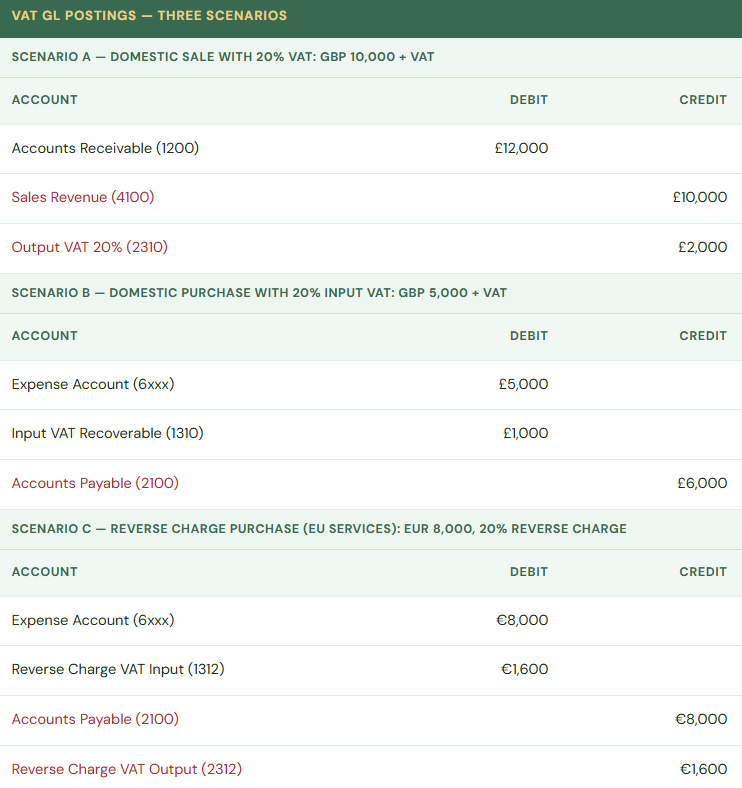
Scenario C is the most commonly misconfigured scenario in BC implementations. The reverse charge creates two VAT postings simultaneously — output VAT (liability to the tax authority) and input VAT (recoverable from the tax authority). For a fully taxable business these net to zero cash but both entries must exist for the VAT return to report correctly. When reverse charge is misconfigured as Normal VAT on cross-border service purchases, the VAT return understates both Box 1 (output VAT) and Box 4 (input VAT) — technically zero net effect on remittance, but the return is factually wrong, which creates compliance exposure in a review.
The VAT Return and Settlement Process in BC
BC produces the VAT return through the VAT Statement — a configurable report that aggregates VAT entries by VAT identifier into the boxes required by the relevant tax authority’s return format. The VAT Statement setup maps VAT identifiers to return boxes and specifies whether each box is a base amount, VAT amount, or sum of other boxes. Finance owns the VAT Statement configuration; it is not something the implementation team can set up correctly without Finance defining which of their VAT identifiers maps to which return box.
Once the return is reviewed and verified, the VAT Settlement process in BC closes the return period. The settlement calculates the net payable (output VAT minus recoverable input VAT), posts a journal entry that clears the individual output and input VAT accounts into a VAT payable account, and closes the VAT period against further changes. Finance then pays the net VAT amount to the tax authority, which clears the VAT payable account. The settlement account — where the net VAT balance sits between settlement and payment — must be a designated liability account, not shared with general tax payable or other liabilities.
US Sales Tax and Multi-Rate Setup in BC
BC handles US sales tax through the same VAT posting group framework, using tax area codes as an additional layer that maps customer locations to applicable tax rates. The setup elements for US sales tax:
- Tax Areas (geographic areas — state, county, city — each carrying one or more tax jurisdictions)
- Tax Jurisdictions (the specific taxing authority — State of Texas, Harris County, City of Houston — each with a rate and a GL account);
- Tax Groups (the equivalent of the VAT Product Posting Group — what is being sold, determining taxability); and the intersection of customer Tax Area and item Tax Group that determines which jurisdictions apply and at what rate.
For organizations selling into multiple US states, the complexity of maintaining accurate tax rates and nexus coverage in BC’s native tax framework grows with each state. Organizations with significant US multi-state sales should evaluate integration with a dedicated tax compliance platform (Avalara, Vertex, or similar) that maintains rate tables and nexus analysis automatically and connects to BC through a standard connector. The integration cost is generally lower than the risk of maintaining state and local tax rates manually in BC across a growing nexus footprint.
Five Tax Setup Mistakes That Create Real Exposure in BC
⚠️ Incomplete VAT Posting Setup Matrix — Missing Combinations Produce Silent Zero Tax
A manufacturer adds a new product line with a reduced-rate VAT classification. The new item category is assigned to the REDUCED VAT Product Posting Group. Nobody creates a VAT Posting Setup line for DOMESTIC + REDUCED. For six months, every domestic sale of reduced-rate items posts with zero tax charged — the system found no matching setup line and defaulted to zero. The VAT return understates output tax for six periods. When the error is found, the tax authority requires an amended return for each affected period, with interest on the late payment of the understated tax. The customers who were undercharged VAT cannot be re-invoiced retroactively under most tax authority rules — the company absorbs the output VAT liability from its own margin.
Fix: After any change to the chart of accounts, item setup, or customer/vendor group structure that introduces a new VBPG or VPPG, Finance must audit the VAT Posting Setup matrix for completeness. The matrix should cover every combination that can realistically appear on a transaction. Build the matrix review into the change control process for new item categories and new customer segments — it takes five minutes when the change is made, and it prevents months of silent miscalculation.
⚠️ Reverse Charge Not Configured for Cross-Border Service Purchases — VAT Return Is Wrong in Both Directions
A UK company purchases marketing services from a French agency. The French agency charges no VAT (correct — the UK company should self-assess under reverse charge). In BC, the French vendor is set up with a DOMESTIC VAT Business Posting Group (copy-pasted from a domestic vendor template at setup). The purchase posts with zero tax and nothing in the reverse charge accounts. The VAT return for the period shows no output VAT and no input VAT for these services. The correct position: output VAT should appear in Box 1 (output VAT due) and input VAT in Box 4 (input VAT reclaimable) — both at the UK standard rate, netting to zero remittance. The VAT return submitted is factually incorrect. In a Making Tax Digital compliance review, the misclassification is visible from the transaction data and leads to a formal enquiry.
Fix: Create a VAT Business Posting Group specifically for EU and overseas vendors subject to reverse charge — don’t use DOMESTIC for any overseas vendor. Assign the EU or OVERSEAS VBPG to all applicable vendors, and ensure the VAT Posting Setup for EU/OVERSEAS + STANDARD is configured for Reverse Charge VAT calculation type with both the output and input accounts populated. Tax counsel defines which supply types require reverse charge; Finance configures BC to apply that definition consistently for every applicable vendor. Review the vendor list specifically for overseas service providers — they are the most common source of reverse charge misconfiguration.
⚠️ VAT Identifiers Inconsistent — VAT Statement Aggregates Incorrectly, Return Has Wrong Box Totals
During go-live configuration, VAT identifiers were assigned without a naming convention or documentation. Some standard rate sales transactions used “VAT20,” others used “STANDARD,” others used “UK-STD-20.” All three represent the same 20% standard rate but with different identifiers. The VAT Statement was configured to sum the “VAT20” identifier for Box 1. Transactions using “STANDARD” and “UK-STD-20” are excluded from the Box 1 total. The VAT return understates output VAT by the sum of transactions using the non-standard identifiers. Finance submits the return. The amount paid is lower than the correct liability. The tax authority’s data matching system flags the discrepancy when reconciling to sales invoice data reported through Making Tax Digital.
Fix: Define VAT identifiers as a controlled list before go-live and enforce them. One identifier per tax rate and supply type combination — document it, don’t let it vary. For UK VAT: one identifier for standard rate (20%), one for reduced rate (5%), one for zero rate, one for exempt, one for reverse charge output, one for reverse charge input. The VAT Statement maps each identifier to the correct return box. Any new identifier created after go-live must be immediately added to the VAT Statement configuration before any transactions post using that identifier.
⚠️ Tax-Exempt Customer Setup Without Certificate Tracking — Exemption Is Applied But Not Documented
Several customers are set up with a zero-rate or exempt VAT Business Posting Group because they are resellers or non-profits. Zero tax posts on every transaction with those customers. Nobody established a process for documenting the basis for the exemption — the exemption certificate, the non-profit registration number, or the reseller’s VAT registration that justifies the zero-rate treatment. A tax audit requests exemption documentation for 50 zero-rate sales transactions. Finance searches through email, shared drives, and physical files. Documentation exists for 30 of the 50 customers. For the remaining 20, the company cannot demonstrate the basis for the zero-rate treatment — the burden of proof falls on the seller, and without documentation, the tax authority assesses the output VAT that should have been charged, plus interest.
Fix: Every customer assigned to a zero-rate or exempt VBPG must have documented basis for that classification on file — the customer’s VAT registration number (for B2B zero-rating), their exemption certificate, or their qualifying organizational status. Build the documentation requirement into the customer setup process: no customer is moved to an exempt posting group without Finance confirming the documentation is on file. The customer setup in BC can include notes fields for referencing the exemption document; use them. And build a renewal review into the Finance calendar — exemption certificates expire, and BC won’t tell you when they do.
⚠️ VAT Settlement Run Without VAT Statement Reconciliation — Return Is Submitted Based on Potentially Incorrect Data
Finance runs the VAT settlement monthly as a period-close step. The process runs quickly; the net payable is calculated; the payment is made. Nobody reconciles the VAT Statement output to the underlying VAT ledger entries before the settlement runs. After three years, a tax audit examines three years of submitted returns. The auditor runs their own aggregation of the company’s BC transaction data and produces different VAT totals for multiple periods. The discrepancy is traced to two sources: a GL account used for a miscoded expense category that had a VAT Product Posting Group with a wrong identifier (excluded from the VAT Statement), and a period where a manual journal was posted to the VAT account directly without using a VAT code (excluded from the VAT ledger entries). The cumulative understatement over three years is material.
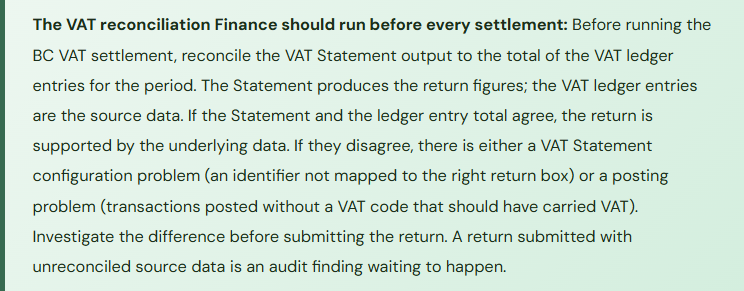
Fix: Make the VAT Statement-to-ledger reconciliation a required step before every VAT settlement. The reconciliation takes fifteen minutes and compares two numbers: the Box 1 total on the VAT Statement and the sum of all entries in the output VAT account for the period (and the equivalent for input VAT). They should agree. When they don’t, there is either a Statement configuration problem or a posting problem — both need to be investigated and resolved before the settlement runs and the return is submitted. A VAT return submitted with unreconciled source data is a compliance risk that compounds with each unreviewed period.
Do This / Don’t Do This
✓ Do This
- Verify the VAT Posting Setup matrix is complete for every VBPG + VPPG combination before go-live
- Create separate VBPG for EU and overseas vendors — never use DOMESTIC for cross-border vendors
- Configure Reverse Charge VAT calculation type for all applicable cross-border service and goods combinations
- Define VAT identifiers as a controlled list with one identifier per rate/type combination
- Add all VAT identifiers to the VAT Statement configuration before any transactions post using that identifier
- Reconcile the VAT Statement to VAT ledger entries before every settlement and return submission
- Document and track exemption certificates for every zero-rate/exempt customer
- Assign an owner to monitor statutory VAT rate changes and update BC before the effective date
- Evaluate tax compliance software integration for organizations with multi-state US nexus
✗ Don’t Do This
- Assume a missing VAT Posting Setup line will produce an error — it produces zero tax silently
- Use the DOMESTIC VBPG for EU or overseas vendors — reverse charge will not apply
- Let VAT identifiers vary without a controlled naming convention
- Run the VAT settlement without reconciling the Statement to ledger entries first
- Set customers to exempt posting groups without a documented exemption basis on file
- Post manual journals to VAT GL accounts without a VAT code — they won’t appear on the VAT return
- Configure tax in BC without Tax counsel input on which supply types require which treatment
- Treat the VAT Statement as complete after go-live — new identifiers require immediate Statement updates
Up Next:
Tax setup handled. My next post moves into a module that mid-market service businesses frequently underuse despite it being purpose-built for their needs: Human Resources, Payroll Integration, and Employee Expenses in Business Central — BC’s HR module for employee data management, the payroll integration architecture, employee expense posting, and the controls Finance needs over compensation data and the accounts that sit at the intersection of HR and Finance — service orders, service contracts, billing intervals, contract renewal automation, service item tracking, and the configuration decisions that determine whether BC runs your service operation or whether Finance maintains a parallel spreadsheet to track what’s been billed against what’s been contracted.
— Bobbi
D365 Functional Architect · Recovering Controller
Thank you for reading!
If this post helped you solve a real problem, share it with a Finance colleague who is in the middle of an ERP implementation or a post-go-live optimization. If you have a topic that I haven’t covered, please reach out. There is always one more post worth writing.
Interested in learning more? Here are some of my recent posts:
Leave a Reply