
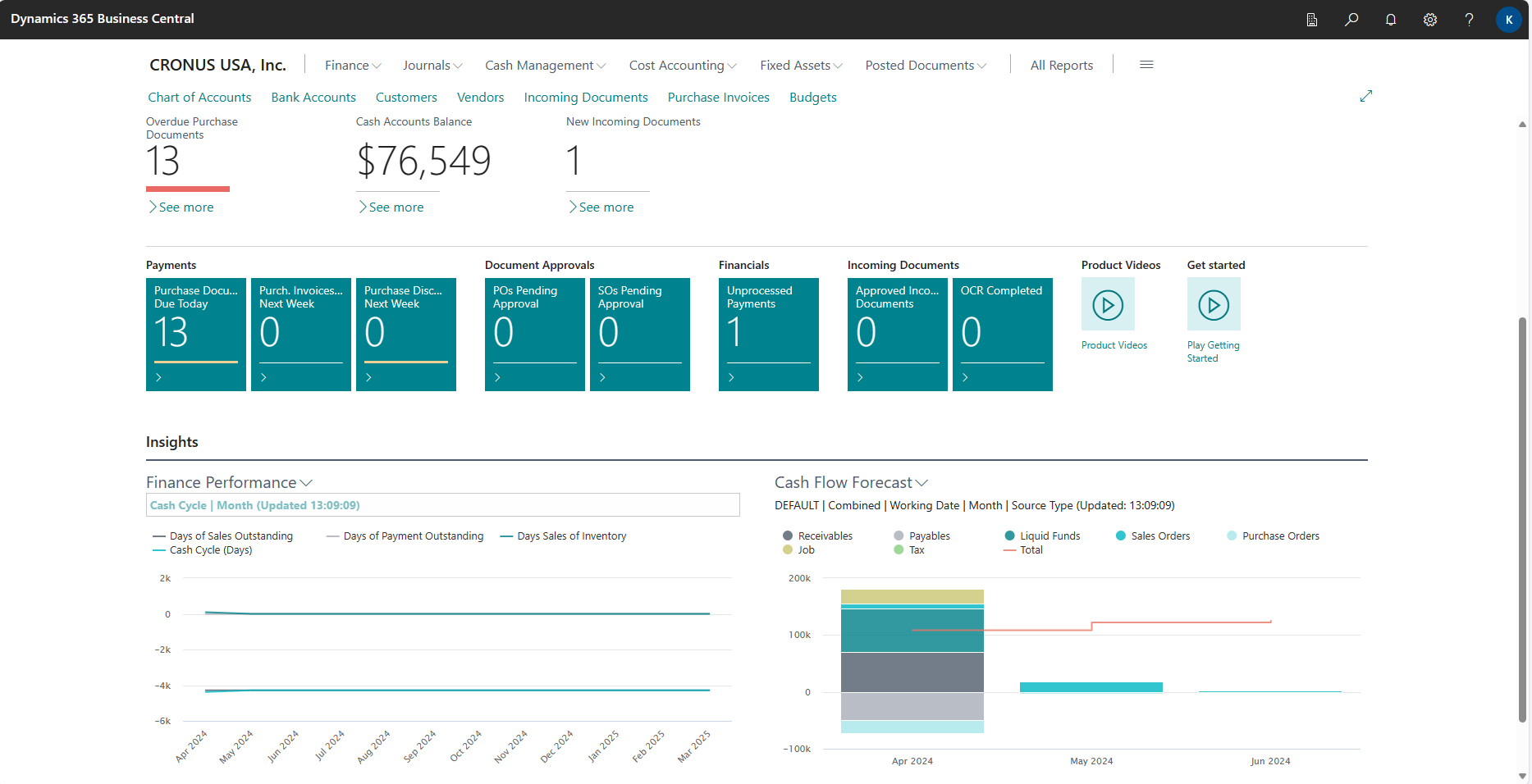
How BC’s built-in cash flow forecast module works, the sources it draws from (open AR, open AP, sales orders, purchase orders, payroll estimates, tax obligations, fixed asset purchases, manual entries), the forecast accuracy review that tells Finance where the model is wrong, and the configuration decisions that determine whether the cash flow forecast becomes a Finance tool or a tab nobody opens.
What BC’s Cash Flow Forecast Module Actually Does
BC’s Cash Flow Forecast is found under Finance → Cash Flow Forecasts. It is a named forecast object that aggregates expected cash inflows and outflows from multiple sources, projects them into future periods based on due dates and payment terms, and presents the resulting net cash position by date or period. Finance can create multiple named forecasts—a conservative scenario, a base case, and an optimistic scenario—and update each independently.
The forecast does not automatically update in real time. Finance runs a Suggest Cash Flow Amounts action that re-pulls data from all configured sources, recalculates the projected cash flows, and refreshes the forecast as of the current date. For most Finance teams, running the update daily or at each close checkpoint is sufficient. The forecast is not a bank feed—it does not show actual cash balances posted to BC’s bank accounts in real time. It shows expected future cash movements based on the data in BC as of the last update run.
The Eight Cash Flow Sources—What Each One Contributes
- Receivables (Open Customer Ledger)
- Projects cash inflows from open customer invoices based on each invoice’s due date. BC uses the payment terms on each invoice to determine when the cash is expected. Finance can apply a payment probability percentage by customer or customer group to adjust for historical payment timing—a customer who consistently pays 15 days late can be modeled at due date plus 15 days rather than the contractual due date.
- Payables (Open Vendor Ledger)
- Projects cash outflows from open vendor invoices based on each invoice’s due date and the payment terms. If the organization consistently pays vendors on a specific payment run schedule rather than on individual due dates, the payment terms on the vendor record should reflect the actual payment timing rather than the vendor’s stated terms—otherwise the forecast will project payments on dates when the organization would never actually initiate a payment run.
- Sales Orders (Not Yet Invoiced)
- Projects future cash inflows from open sales orders that have not yet been invoiced—expected future revenue. The projection uses the expected ship date or requested delivery date on the sales order plus the customer’s payment terms to estimate when the cash will arrive. This source extends the forecast beyond the AR subledger to include revenue that is committed but not yet billed.
- Purchase Orders (Not Yet Invoiced)
- Projects future cash outflows from open purchase orders that have not yet been received and invoiced. The projection uses the expected receipt date on the PO plus the vendor’s payment terms. This source extends the payables forecast beyond the AP subledger to include purchase commitments the organization has made but not yet received.
- Fixed Asset Budgets
- Projects cash outflows for planned capital expenditures entered in BC’s Fixed Asset Budget. Finance enters the planned acquisition date and cost for each budgeted capital purchase; the cash flow forecast draws these entries as expected outflows in the periods when the acquisitions are planned. Requires that the capital plan is maintained in BC’s FA Budget rather than only in a spreadsheet.
- G/L Budgets (Revenue and Expense)
- Projects future cash flows from GL Budget entries for accounts not covered by the other sources. Finance can link GL budget lines to cash flow categories—payroll expense budget amounts become expected payroll cash outflows, tax expense budget amounts become expected tax payments. This source fills in the operating cash flows that do not flow through AR, AP, or order commitments.
- Manual Revenues
- Finance enters expected cash inflows that are not captured by any BC source: a loan drawdown on a specific date, an insurance settlement, a grant disbursement, a tax refund. Manual entries are dated and assigned to a cash flow category. They are static—they do not update when BC data changes—and must be maintained by Finance as the information changes.
- Manual Expenses
- Finance enters expected cash outflows not captured by AP or GL budget: a debt principal repayment, an annual insurance premium, a lease security deposit, a litigation settlement. Same static maintenance requirement as Manual Revenues. These manual entries are where Finance captures the significant cash events that no module in BC knows about until they post.
Setting Up the Cash Flow Forecast—The Configuration Decisions That Matter
Cash Flow Forecast Setup—Six Configuration Decisions Finance Must Make
- Cash Flow Accounts—The Category Structure
- Before creating a forecast, Finance sets up the Cash Flow Account structure under Finance → Cash Flow → Cash Flow Accounts.
- This is a separate account structure from the GL chart of accounts—a simplified hierarchy of inflow and outflow categories:
- Operating Receipts (Receivables, Sales Order Collections)
- Operating Payments (Payables, PO Payments, Payroll, Tax)
- Capital Expenditures (Fixed Asset Purchases)
- Financing (Loan Draws, Debt Repayments).
- Each source is mapped to a Cash Flow Account. The category structure determines how the forecast is displayed and analyzed.
- Payment Terms Accuracy—The Single Most Important Data Quality Driver
- The AR and AP forecast projections use payment terms to determine when cash is expected. If customer payment terms say Net 30 but the customer consistently pays in 45 days, the AR forecast will consistently over-project near-term collections.
- Finance should review customer and vendor payment terms annually and adjust them to reflect actual payment behavior—not contractual terms alone—to improve forecast accuracy.
- For customers with significantly different payment patterns than their contractual terms, BC allows a payment probability percentage to be applied in the Cash Flow Setup that shifts the projected collection date.
- Forecast Horizon—How Far Out the Forecast Extends
- The Cash Flow Forecast setup includes a starting date and a period length. A 13-week rolling forecast (the standard for most treasury management) requires setting the forecast to cover 91 days from the current date, with weekly periods for the first four weeks and monthly for the remainder.
- Finance can create multiple forecasts with different horizons: a detailed 13-week operating forecast for Treasury and a 12-month strategic forecast for capital planning that uses GL Budget data for periods beyond the 13-week AR and AP visibility window.
- Which Sources to Include in Each Forecast
- Each named forecast in BC can include or exclude specific sources independently. A 13-week operating forecast includes Receivables, Payables, Sales Orders, and Purchase Orders—the commitments that affect near-term liquidity.
- It may exclude Fixed Asset Budgets if capital spending is lumpy and better modeled as manual entries. A 12-month strategic forecast includes GL Budgets for payroll and tax, Fixed Asset Budgets for capex planning, and Manual entries for debt service—but may exclude Sales Orders as too granular at that horizon.
- Design each forecast to include only the sources that are accurate and useful at that time horizon.
- Bank Account Balances—The Starting Position
- The cash flow forecast shows net cash position over time, which requires a starting bank balance.
- BC draws the starting balance from the posted bank account ledger entries in BC’s Cash Management module. If bank accounts are reconciled regularly (per the Post 9 discipline), the starting balance in the forecast is current and accurate.
- If bank reconciliation is weeks behind, the forecast’s starting position is wrong and every period in the forecast is offset by the unreconciled difference.
- Forecast Update Schedule—When Finance Refreshes the Data
- The Suggest Cash Flow Amounts action must be run to refresh the forecast with current BC data.
- Finance must decide: how often is the forecast updated, who is responsible for running the update, and what is the protocol when the update is not run (stale forecast presented as current).
- Recommended minimum: update the 13-week operating forecast daily or at each payment run. Update the 12-month strategic forecast weekly or at each period close. Document the update schedule in the Finance procedures so it is maintained even when the primary user is unavailable.
Reading the Cash Flow Forecast—What Finance Looks For
The Cash Flow Forecast Chart and the Cash Flow Forecast Statistics page show the net cash position by period. Finance uses the forecast to answer three recurring questions:
- Is there a near-term liquidity gap? (a period where projected outflows exceed projected inflows plus the beginning bank balance, producing a negative net position)
- When is the next significant cash event? (a large customer payment expected, a major vendor payment due, a payroll date, a debt service payment)
- How does the actual cash position compare to last week’s forecast? (the forecast accuracy review that tells Finance where the model is wrong).
The forecast accuracy review is the most important and least-performed cash flow discipline. Each week, Finance compares the prior week’s forecast to the actual cash movement that occurred. If the forecast projected $180,000 of AR collections in week 3 and actual collections were $142,000, the $38,000 shortfall requires an explanation: which customers paid late, did a specific invoice slip to the next collection cycle, or is the payment terms modeling for those customers structurally wrong? Systematic forecast accuracy review over three to six months produces enough data to adjust the payment probability percentages and payment terms that drive the AR projection—converting the forecast from a rough estimate into a reliable planning tool.
Five Cash Flow Forecast Mistakes That Produce Useless Numbers
⚠️ AR Source Projects Collections at Contractual Due Dates—Actual Collections Are Consistently 18 Days Later
The largest customer segment pays on net 30 terms contractually, but the segment’s actual payment history averages 48 days from invoice date. The cash flow forecast draws the AR source using the contractual net 30 payment terms. Every week, the forecast projects $240,000 of collections in the current week from this customer segment. Every week, the actual collections are $80,000—the current week’s payments actually reflect invoices from 48 days ago, not 30 days ago. The CFO uses the weekly forecast to determine whether to delay a vendor payment. Three times in two months the decision to pay vendors was made based on a collection projection that never materialized on schedule. The vendor payment delays create relationship strain that nobody connects to the forecast error.
Fix: Calibrate payment terms in BC to reflect actual customer payment behavior for the major customer segments, not contractual terms. For the customer segment paying in 48 days, set the payment terms code used by those customers to Net 48 or, if Net 30 must be retained on the invoice for contractual reasons, apply the Payment Probability percentage in Cash Flow Setup to shift the projected collection date. The calibration requires three to six months of payment history: calculate the average days from invoice date to payment date by customer or customer group, compare to the current payment terms, and adjust where the gap is material. A 10-day average payment delay on a $240,000/week collection base is a $343,000 systematic overstatement of the near-term cash position.
⚠️ Sales Order Source Includes Orders With Stale Ship Dates—Collections Already “Due” Months Ago
The cash flow forecast includes open sales orders as a source of future collections. The sales team has 34 open orders with expected ship dates ranging from four to nine months ago that were never updated when the orders were delayed, put on hold, or informally cancelled. BC’s sales order source includes all of these as expected near-term cash inflows because the system has no way to know the ship dates are stale—it simply reads the due date field and projects accordingly. The forecast shows $620,000 of near-term collection inflows from orders that will not ship for months (or ever). Finance presents a liquidity position to the bank that includes $620,000 of projected receipts that are essentially fictitious at the projected timeline.
Fix: The sales order source in the cash flow forecast is only as accurate as the ship dates maintained on open orders. Finance must work with Sales Operations to establish a standing process for reviewing and updating expected ship dates on open orders—at minimum monthly, ideally as part of the weekly sales review. Any open order with a ship date more than 30 days in the past should either be updated with a new expected ship date or formally cancelled in BC. Finance can filter the sales order source in the cash flow forecast by order status or include a maximum outstanding date offset that excludes orders past a certain threshold. The alternative is to disable the sales order source entirely and manage future commitments through manual revenue entries that Finance controls and actively maintains.
⚠️ Payroll Is Not in the Forecast—The Largest Regular Cash Outflow Is Invisible
The cash flow forecast is configured with Receivables, Payables, and Purchase Orders as sources. Payroll is not in BC’s AP module because the organization uses an external payroll processor and the payroll journal posts directly to GL expense accounts without creating vendor invoice records. BC’s AP source has nothing to draw for payroll. The result: the two largest regular cash outflows (bi-weekly payroll and the associated payroll tax deposits) are completely absent from the forecast. The forecast shows a healthy positive cash position in weeks 2 and 4 of each month because it does not see the $185,000 payroll outflow on those dates. The CFO approves a discretionary capital purchase based on the forecast, which shows adequate liquidity. The payroll run on the following Friday creates a brief overdraft situation on the operating account.
Fix: Payroll and payroll tax obligations that do not flow through BC’s AP module must be entered as Manual Expense entries in the cash flow forecast. Finance creates a recurring manual expense entry for each payroll date in the forecast horizon, using the payroll processor’s confirmed payroll total. For bi-weekly payroll, this means 26 manual entries per year, each dated to the specific payroll ACH date and categorized to the Payroll cash flow account. When the payroll total changes (merit increases, headcount changes), the manual entries must be updated. The payroll manual entries can be templated in Excel and batch-entered into BC to minimize the maintenance burden. The alternative—routing payroll through a BC vendor record to capture it in the AP source—is worth considering for organizations whose payroll processor can accept a single net payment per payroll run.
⚠️ Forecast Is Never Updated—Month-Old Data Used to Make Daily Cash Decisions
The cash flow forecast was configured during implementation and the Suggest Cash Flow Amounts action was run on go-live day. In the press of learning the new system, nobody established a process for who updates the forecast and when. The forecast runs without updates for 6 weeks. The Controller discovers the forecast has a “last updated” date of the go-live day when she prepares for the first board presentation that includes a liquidity slide. The AR source has not drawn new collections since go-live. Three large customers paid invoices that have been closed in the AR subledger but still show as open in the forecast. The AP source shows invoices that were paid weeks ago as still outstanding. The liquidity position shown on the forecast is $314,000 lower than the actual position because closed AR invoices are still showing as uncollected.
Fix: The Suggest Cash Flow Amounts update must be scheduled as a recurring Finance procedure with a named owner and a documented update frequency. For operational use, daily updates are ideal and take under two minutes to run. For weekly treasury reporting, run the update Monday morning before the Treasury review. Assign a backup runner so the update continues during vacations and absences. The last-updated date on the Cash Flow Forecast page is visible without running a report—Finance should check this date any time the forecast is used for a decision or presentation. A forecast that has not been updated in more than 48 hours should not be used for cash position decisions without first running the Suggest Cash Flow Amounts action.
⚠️ Multiple Scenarios Created but Never Differentiated—Finance Doesn’t Know Which Scenario Is Current
During implementation, the partner creates three named cash flow forecasts: “Base Case,” “Optimistic,” and “Conservative.” The differentiation between scenarios was supposed to be different AR collection probability percentages and different sales order inclusion settings. In practice, the Suggest Cash Flow Amounts action has only ever been run on the “Base Case” forecast. “Optimistic” and “Conservative” have never been updated and show go-live data. When the CFO asks Finance to prepare a conservative scenario for the board, Finance runs the update on “Conservative” without adjusting any parameters first—producing an identical result to the base case because the differentiation was never configured. The board receives two forecasts that are numerically identical labeled differently.
Fix: Each named cash flow forecast must have a documented set of assumptions that differentiate it from the other scenarios, and those assumptions must be configured in BC before the forecast is used. The Conservative scenario should have a lower AR collection probability (e.g., 80% versus the base case’s 95%) applied in the forecast setup, a longer days offset on the AR and sales order sources, and possibly the exclusion of uncommitted sales pipeline. The Optimistic scenario should reflect the upper-end assumptions. When Finance runs Suggest Cash Flow Amounts, they run it on all active scenarios in sequence. If the organization does not have the capacity to maintain multiple scenarios, maintain only the Base Case forecast and present scenarios as adjustments from the base case in the commentary rather than as separate BC forecast objects.
Do This / Don’t Do This
Do This
- Calibrate customer payment terms in BC to actual payment behavior, not contractual terms alone
- Run Suggest Cash Flow Amounts on a defined schedule with a named owner and a documented backup
- Enter payroll and payroll tax dates as Manual Expense entries if payroll does not flow through BC’s AP
- Maintain open sales order ship dates—include a monthly review of open orders with past-due ship dates in the Finance close checklist
- Perform a weekly forecast accuracy review: compare prior week’s projected collections to actual collections and investigate gaps above a defined threshold
- Check the last-updated date before using the forecast for any cash decision or presentation
- Document the assumption set for each named scenario forecast so they produce meaningfully different results
- Use the 13-week detailed view for treasury operations and a 12-month GL budget-sourced view for capital planning
Don’t Do This
- Project AR collections at contractual due dates without validating against actual customer payment behavior
- Include the sales order source without a process to keep expected ship dates current
- Leave payroll out of the forecast because it doesn’t flow through BC’s AP module
- Run the forecast update once at go-live and never again—stale forecast data is worse than no forecast
- Create multiple scenario forecasts that are never differentiated in their configuration or assumptions
- Present the cash flow forecast without checking the last-updated date
- Maintain the entire cash flow model in a desktop spreadsheet when BC has a native tool that draws live from AR, AP, and order data
Up Next:
Cash flow forecasting gives Finance visibility into future liquidity from BC’s live transaction data. The next post moves to a module that sits between the GL and operational reporting and is almost universally underused in mid-market BC implementations: Cost Accounting in Business Central—how BC’s Cost Accounting module differs from financial accounting, the cost type, cost center, and cost object structure that Finance configures, how costs transfer from the GL to the cost accounting layer, the internal reporting it enables, and why Finance teams that ignore it end up building in Excel what BC already does natively.
— Bobbi
D365 Functional Architect · Recovering Controller
Thank you for reading!
If this post helped you solve a real problem, share it with a Finance colleague who is in the middle of an ERP implementation or a post-go-live optimization. If you have a topic that I haven’t covered, please reach out. There is always one more post worth writing.
If you are interested in learning more, some of my recent blogs are listed below:
Leave a Reply