

The vendor portal and self-service invoicing, purchase agreements vs. trade agreements and how each prices a PO, procurement policies and category hierarchies, consignment inventory and its unique GL treatment, and the three-way match controls that prevent paying for what wasn’t received at a price that wasn’t agreed.
Invoice Matching in D365 — The Three Variants and When Each Applies
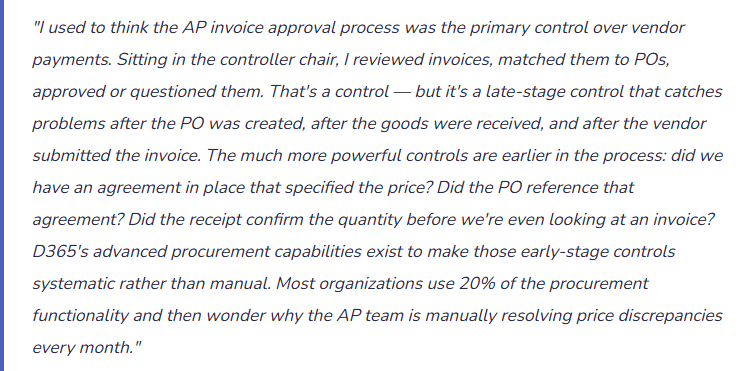
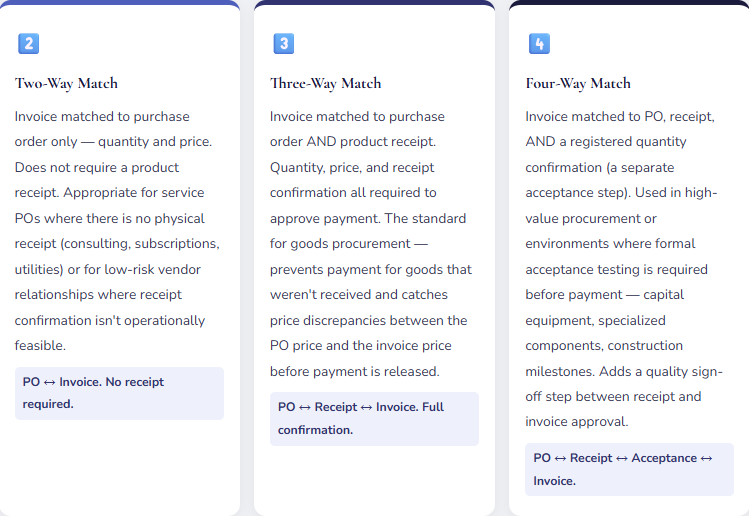
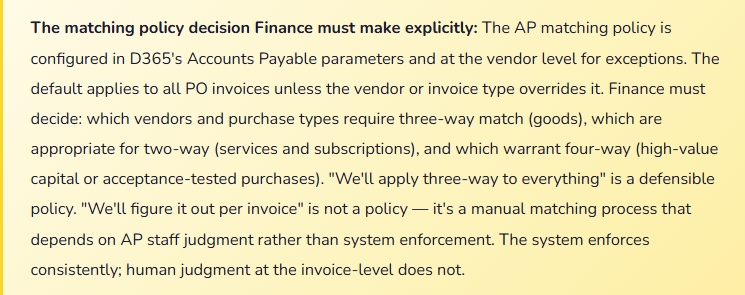
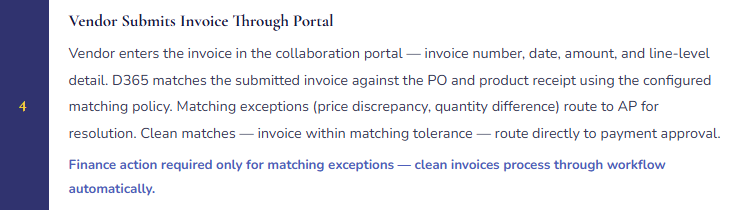
Invoice matching in D365 F&O is the control that validates vendor invoices against purchase orders and product receipts before they can be approved for payment. Finance configures the matching policy — per legal entity, per vendor group, or per individual vendor — and the system enforces it. The three matching variants represent progressively stronger controls with progressively more operational overhead.
Purchase Agreements vs. Trade Agreements — Two Different Pricing Mechanisms
D365 F&O has two distinct contract-based pricing mechanisms for vendor purchases, and they work differently. Finance and Procurement must understand which mechanism applies to which vendor relationship — they are not interchangeable, and using the wrong one produces either incorrect PO pricing or a procurement control structure that doesn’t enforce the negotiated terms.
| Feature | Purchase Agreements | Trade Agreements (Price/Discount) |
|---|---|---|
| What it is | A commitment contract — the buyer commits to purchase a defined quantity or value from a vendor over a defined period. The vendor provides pricing in exchange for the commitment. | A price list — the vendor’s pricing for items, applied automatically when POs are created. No quantity or value commitment. Volume-based price breaks can be configured. |
| Commitment structure | Supports quantity commitments (we’ll buy 10,000 units over 12 months) and value commitments (we’ll buy $500,000 of goods over 12 months). D365 tracks fulfillment against the commitment automatically. | No commitment tracking. Price applies to any PO that meets the configured item, vendor, and quantity conditions. No obligation is created when the trade agreement is configured. |
| How POs reference it | PO created as a release order from the purchase agreement — the PO explicitly links to the agreement and consumes committed quantity/value. Release orders can be created manually or by MRP. | Trade agreement prices apply automatically to any PO created for the vendor and item — no explicit linkage required. The PO picks up the price from the trade agreement journal that matches the conditions. |
| Finance use case | Strategic suppliers with negotiated volume commitments. Capital procurement with defined spend authorization. Vendor relationships where commitment fulfillment tracking is part of the contract management obligation. | Standard item pricing from catalog suppliers. Volume-based pricing that applies automatically without a formal commitment. Vendor price lists that need to apply consistently without manual price entry on each PO. |
| Expiration enforcement | Purchase agreements have defined start and end dates. Expired agreements cannot have new release orders created against them. D365 alerts when commitments are near expiration. | Trade agreements have effective and expiration dates. After expiration, the price no longer applies and POs revert to manual price entry — Finance must monitor for expired trade agreements to prevent manual price drift. |
The Vendor Collaboration Portal — What Finance Must Know About Vendor Self-Service Invoicing
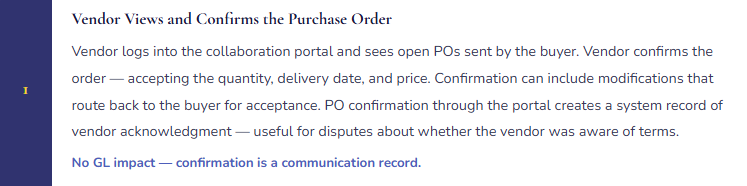
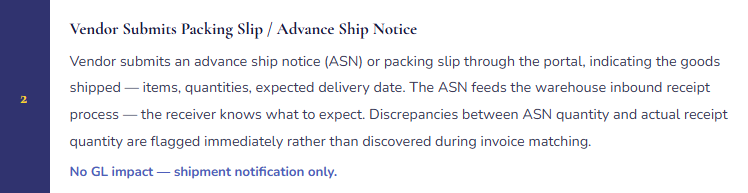
D365 F&O’s Vendor Collaboration module gives external vendors secure access to a portal where they can view purchase orders, confirm orders, submit packing slips, and submit invoices directly into the D365 AP workflow. For organizations with high vendor invoice volumes, vendor self-service invoicing reduces the manual data entry burden on the AP team — the vendor enters the invoice, D365 matches it against the PO and receipt, and the invoice routes for approval.
Consignment Inventory — The Unique GL Treatment Finance Must Understand
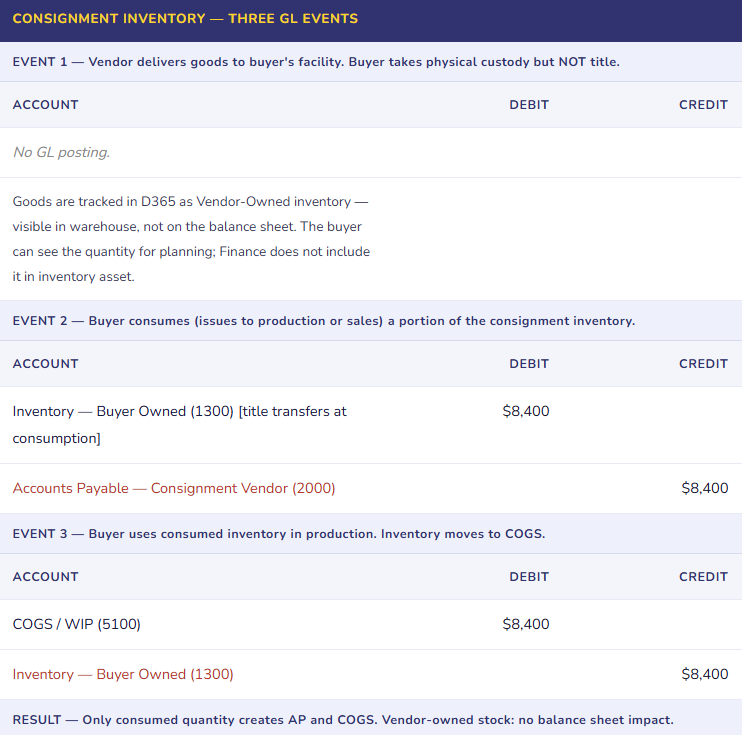
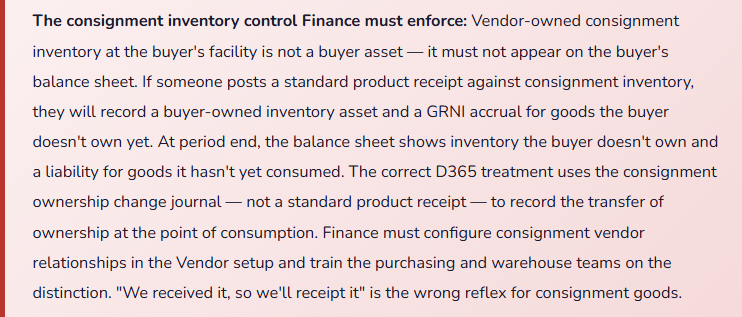
Consignment inventory is vendor-owned inventory physically located at the buyer’s facility. The buyer doesn’t own it — and doesn’t record it as an asset — until the goods are consumed. The vendor retains title until consumption, at which point ownership transfers and the AP liability is created. For Finance, consignment inventory requires a GL treatment that is distinct from standard purchased inventory, and getting it wrong produces an overstated inventory balance and an understated AP position.
Procurement Policies and Category Hierarchy — The Spending Controls Finance Designs
D365 F&O’s procurement policies allow Finance and Procurement to define the rules that govern how purchases are initiated, approved, and processed — by category, by legal entity, by requester, and by dollar threshold. The category hierarchy classifies what is being purchased (IT hardware, office supplies, professional services, raw materials) and allows different rules to apply to different spending categories.
Finance-owned policy decisions that belong in procurement policy setup: Which purchase categories require a formal purchase requisition before a PO can be created? What dollar thresholds trigger multi-level approval? Which categories require at least two vendor quotes? Which spend categories are restricted to preferred vendors only? Which categories can be purchased with a corporate purchasing card (bypassing the PO process) and up to what dollar limit?
The category hierarchy is the backbone of spend visibility reporting. If every purchase flows through a categorized PO — even simple office supply orders — Finance can run a spend analysis by category without exporting to Excel. If purchases bypass the PO process (employees buying on personal cards and expensing), the category data is lost, spend visibility is limited to the account code the expense report uses, and vendor management decisions (consolidating suppliers, renegotiating rates) lack the transaction-level data they require.
Five Mistakes That Undermine Procurement Controls and Finance Accuracy
⚠️ Three-Way Match Configured but Bypassed Through Price Tolerance Settings That Are Too Wide
Finance configures three-way match for all goods POs. Excellent. The matching tolerances are set at 10% price variance and 5% quantity variance — “to allow for minor adjustments without requiring manual review.” In practice, a vendor systematically invoices 8–9% above the PO price on every invoice, staying just inside the tolerance band. AP never flags the invoices. The invoices match automatically. Finance discovers the pattern eighteen months later when a vendor analysis reveals $340,000 of overpayments that each individually fell within tolerance. The total is material; no individual invoice was flagged.
Fix: Invoice matching tolerances are not a convenience setting — they are a control parameter that defines the boundary of acceptable variance. Set tolerances based on realistic business need: 2–3% price tolerance for commodity goods with stable pricing; perhaps 5% for custom-spec items with variable component costs. Never set quantity tolerance above zero for standard goods without a defined operational justification. Review matching exception rates monthly — if more than 5% of invoices are generating exceptions, the root cause is either a vendor relationship issue (prices not updated in D365) or a pricing management process failure, not a tolerance calibration issue. Widening tolerances to reduce exceptions suppresses the symptom while leaving the underlying discrepancy unresolved.
⚠️ Trade Agreements Not Maintained — PO Prices Drift from Contracted Rates After Agreements Expire
Trade agreements were configured at go-live for the top 20 vendors. The agreements have one-year terms. Year two, the agreements expire and no one updates them. New POs for those vendors default to manual price entry. Buyers enter the prices they remember from last year — which may or may not match the renegotiated rates. Some buyers round; some don’t. Over six months, PO unit prices across those 20 vendors show 3–12% variance from contracted rates. Some are over-contracted (buyer entered too high, vendor invoiced correctly, three-way match flagged a discrepancy); some are under-contracted (buyer entered too low, vendor invoiced correctly, AP manually approved the difference). The total cost impact is difficult to quantify because there’s no clean contracted rate to measure against.
Fix: Trade agreements have expiration dates. Finance or Procurement must maintain a trade agreement expiration calendar and initiate renewals at least 60 days before expiration. D365 can generate alerts when trade agreements approach expiration — configure this alert and assign it to the buyer responsible for the vendor relationship. When a new vendor contract is signed, the trade agreement update in D365 is a required step in the contract execution process — not an optional follow-up. Expired trade agreements with significant vendor spend should trigger a procurement review: are we operating under old rates, new rates, or no rates? The answer determines whether the budget assumption for that vendor’s spend is still valid.
⚠️ Purchase Agreements Created but Not Used for Release Orders — Commitment Tracking Is Meaningless
Procurement negotiates an annual supply agreement with a key vendor: 50,000 units at $22.50, with the vendor holding safety stock and committing to 48-hour lead time in exchange for the buyer’s volume commitment. The agreement is entered into D365 as a purchase agreement. Buyers then create regular POs manually — not as release orders from the agreement — because they don’t know the agreement exists or because the buyer who knows about it isn’t the one creating the daily POs. D365’s commitment tracking shows 0% fulfillment against the purchase agreement. The vendor, expecting 50,000 units of demand, holds the committed safety stock. At year-end, the vendor invoices for carrying costs under the shortfall clause of the agreement — a liability Finance didn’t know existed because no one was monitoring commitment fulfillment.
Fix: Purchase agreements must be linked to the procurement process — not entered as a record and forgotten. The buyer setup for vendors with active purchase agreements should include the agreement as the default sourcing mechanism: when a PO is created for that vendor, it should reference the agreement unless there’s a specific reason for an off-agreement purchase. Configure D365 procurement policies to require agreement reference for designated vendors. Build a monthly commitment fulfillment report into the procurement management review — remaining commitment against timeline is a financial obligation the business has made. Shortfall penalties are a Finance liability that appears only in the contract language, not in D365, unless someone is monitoring consumption against the agreement.
⚠️ GRNI Balance Not Reviewed — Aging Receipts Create Phantom Liabilities on the Balance Sheet
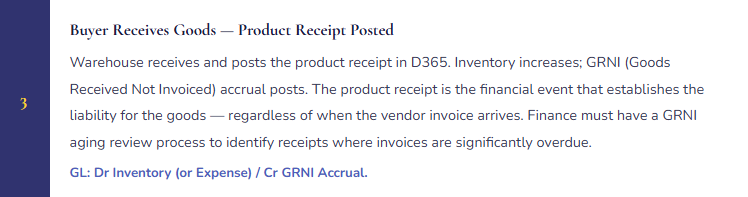
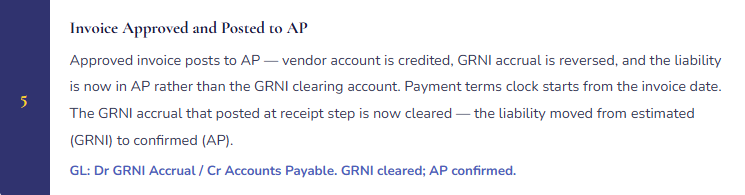
The GRNI (Goods Received Not Invoiced) accrual account accumulates product receipt postings for which the vendor invoice hasn’t yet arrived or hasn’t been matched. For most receipts, the invoice follows within 30 days and the GRNI clears. But some receipts are older: a vendor dispute where the invoice was contested and is unresolved, a product receipt posted against the wrong PO, a receipt for goods that were returned but the return wasn’t processed in D365, or a vendor that simply hasn’t invoiced. After 12 months of operations, the GRNI balance includes $620,000 of items that should have cleared but haven’t. Some represent real liabilities; some represent phantom transactions. Finance doesn’t know which is which because no one has been reviewing the aging.
Fix: The GRNI account requires an aging review on the period-close checklist — not quarterly, monthly. Run the GRNI aging report: amounts aged 0–30 days are normal processing lag; amounts aged 31–60 days require explanation; amounts aged over 60 days require Finance investigation and resolution before period close. For each aged item: is the vendor invoice genuinely not received (follow up with vendor); is the receipt posted in error (reverse it); is there a dispute in process (accrue the estimated resolution amount separately and track to resolution); has the inventory already been returned (process the return in D365). A monthly GRNI cleanup is a 30-minute process. A quarterly GRNI cleanup is a two-day investigation. An annual GRNI cleanup is an audit finding.
⚠️ Consignment Inventory Receipted as Standard Inventory — Balance Sheet Includes Assets the Buyer Doesn’t Own
A manufacturing company manages vendor-owned consignment inventory for a key raw material — the vendor holds title until the buyer issues the material to production. The warehouse team receives consignment deliveries using the standard product receipt process because it’s the same physical process as receiving purchased goods and they weren’t trained on the distinction. D365 posts the product receipt as buyer-owned inventory — inventory asset increases, GRNI accrual posts. At month-end, the balance sheet shows $1.8M of raw material inventory that includes $480,000 of vendor-owned consignment goods. The buyer is reporting an asset it doesn’t own and a corresponding liability it doesn’t have yet. When the auditor asks for support for the inventory balance, Finance can’t identify which portion is buyer-owned and which is vendor-owned from the D365 records alone.
Fix: Consignment inventory must be tracked in D365 using the consignment ownership model — not standard product receipt. Configure the consignment vendor relationship in the vendor setup (designate as a consignment vendor), use the consignment replenishment order to record vendor-owned stock arriving at the facility, and use the consignment ownership change journal when goods are consumed (ownership transfers to buyer at consumption, AP liability is created at that moment). The physical receipt of consignment goods does not create a buyer-owned inventory asset — that is the fundamental accounting difference from standard purchased goods. Train the warehouse team on the distinction; build it into the receiving procedure for consignment vendors; verify the configuration before the first consignment delivery arrives.
Do This / Don’t Do This
✓ Do This
- Configure matching policy explicitly by vendor and purchase type — goods get three-way, services get two-way, high-value capital gets four-way
- Set matching tolerances based on realistic business variance — review if exception rates exceed 5%
- Maintain a trade agreement expiration calendar with 60-day renewal trigger alerts
- Require release orders from purchase agreements for designated strategic vendors — don’t let buyers create off-agreement POs as the default
- Review GRNI aging monthly — investigate anything over 60 days before period close
- Configure consignment vendor relationships and use ownership change journals at consumption — not standard product receipts
- Build the category hierarchy and procurement policies before go-live based on the spend visibility analysis Finance needs
- Monitor purchase agreement commitment fulfillment monthly — shortfall penalties are a contractual liability
- Train warehouse staff on the consignment vs. purchased goods receipt distinction before the first consignment delivery
✗ Don’t Do This
- Widen matching tolerances to reduce exception volume — you’re suppressing the discrepancy signal, not resolving it
- Let trade agreements expire without renewal — buyers will manually enter prices that drift from contracted rates
- Enter purchase agreements as records without linking them to the requisition and PO creation process
- Neglect the GRNI aging review — aged receipts become phantom liabilities that obscure the true AP balance
- Receipt consignment inventory as standard purchased inventory — you record an asset you don’t own
- Apply a single matching policy to all purchases — service POs don’t have receipts to match; forcing three-way on them blocks legitimate invoices
- Allow procurement to bypass the PO process for convenience — you lose the category data that makes spend analysis possible
Up Next:
Vendor collaboration and procurement controls close out the supply chain execution arc. The next post steps back to something every organization eventually has to navigate: Upgrades, Release Waves, and Managing Change in a Cloud ERP — how Microsoft’s continuous delivery model works for D365 F&O, what Finance must review before each release wave deploys, how to test changes that affect financial processes without delaying the update, and the governance model that keeps “the system updated automatically” from becoming “our period-close process changed and nobody told Finance.”
— Bobbi
D365 Functional Architect · Recovering Controller
Thank you for reading!
Recent Blogs:
- AI and ERP Security: What Copilot Means for Your D365 Security Roles and Internal Controls
- The Natural Language ERP: Stop Running Reports, Start Asking Questions
- AI Adoption in ERP: Why Change Management Is Your Most Critical AI Investment
- Agent 365: Microsoft’s Control Tower for All Your ERP Agents
- AI in D365 Supply Chain: From Demand Planning to Warehouse Intelligence
If this post helped you solve a real problem, please share it with a colleague who is in the middle of an ERP implementation or a post-go-live optimization. If you have a topic that I haven’t covered, please reach out. There is always one more topic worth exploring.
Leave a Reply