

The Cash Flow Forecast workspace and what it actually aggregates, bank account structure and liquidity visibility, payment timing adjustments that make the forecast usable, the gap between system-generated projections and a forecast leadership can act on, and the Finance governance that bridges the two without rebuilding the whole thing in Excel.
What D365’s Cash Flow Forecast Actually Aggregates
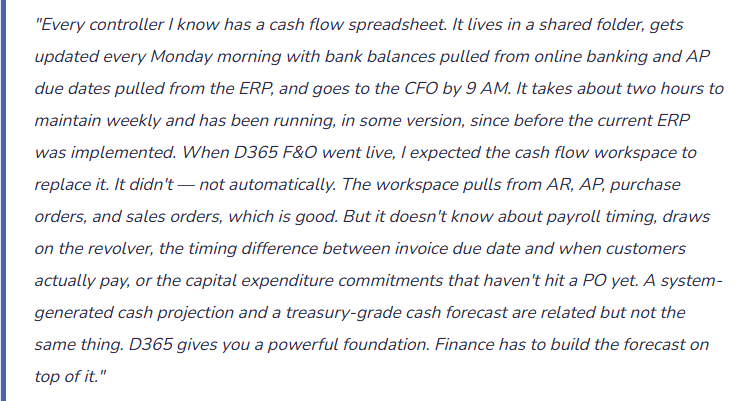
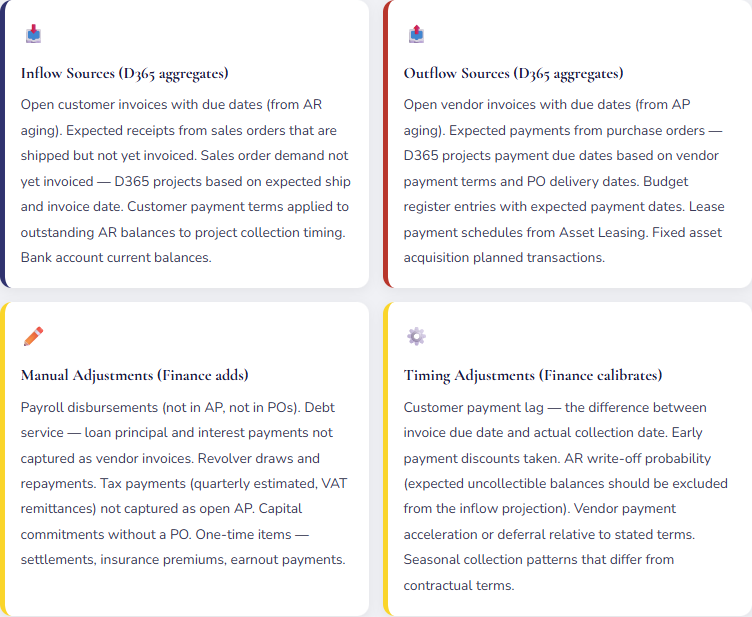
The D365 F&O Cash Flow Forecast workspace (found in Cash and bank management) generates a forward-looking cash position by aggregating expected cash inflows and outflows from multiple transaction sources across the system. Understanding which sources are included — and which are not — is the starting point for evaluating how much of the total cash forecast D365 can generate automatically and how much requires Finance to add manually.
Cash Flow Forecast Horizons — What Each Time Frame Requires
| Horizon | Primary Use | D365 Reliability | Finance Adjustments Required |
|---|---|---|---|
| 0–2 weeks (operational) | Daily cash positioning. Which bank accounts need funding today? Can AP release this vendor payment batch? | High | Payroll dates and amounts. Same-day wires and ACH already in process not yet reflected in D365. Confirmed but not-yet-entered receipts from lockbox or wire notifications. |
| 2–8 weeks (near-term) | Working capital management. Will we need to draw on the revolver? When can we accelerate AP payments to take early payment discounts? | Medium | Customer payment timing adjustments (actual vs. due date). Payroll cycle totals. Debt service payments. Tax remittance dates. Known large receipts not yet invoiced (pending milestones, progress billings). |
| 2–6 months (planning) | Borrowing needs, investment decisions, covenant compliance, seasonal liquidity planning. | Lower | Sales forecast demand not yet converted to orders. Capital expenditure commitments. Lease payment schedules. Revolver availability and expected draws. Seasonal collection pattern adjustments. Budget-period payroll and benefits accruals. |
| 6–18 months (strategic) | Long-range liquidity, debt maturity planning, covenant headroom analysis, M&A capacity modeling. | Low | At this horizon, D365 transaction data provides the base; Finance must overlay revenue projections, capex plans, working capital assumptions, and financing activity. This is a financial model exercise that uses D365 as one input, not a system-generated output. |
Bank Account Structure — The Treasury Foundation Finance Must Design
The D365 Cash and bank management module manages bank accounts as the physical accounts that cash flows through. The bank account structure in D365 must mirror the actual bank account structure — and Finance must design both together, because account structure decisions affect both treasury operations and accounting.
Bank Account Setup Decisions Finance Owns
- Account Pooling and Notional Pooling — How Subsidiary Liquidity Consolidates
- Organizations with multiple bank accounts — by legal entity, by currency, by purpose (operating, payroll, controlled disbursement) — often use cash pooling structures to centralize liquidity. A zero-balance account (ZBA) structure sweeps subsidiary accounts to a master concentration account nightly. D365 must reflect the pooling structure: the subsidiary accounts show the activity during the day, and the sweep transaction moves the net balance to the concentration account. Finance must configure the intercompany accounting for cross-entity sweeps — the subsidiary’s bank balance goes to zero, an intercompany receivable from the treasury entity is created, and the treasury entity’s bank account receives the deposit. The GL must handle cross-entity cash movement without creating phantom intercompany balances.
- Controlled Disbursement Accounts — Positive Pay and AP Segregation
- A controlled disbursement account is a dedicated AP payment account that receives a daily funding transfer equal to the checks and ACH payments clearing that day — the balance is zero except when payments are clearing. D365 supports positive pay file generation: a file sent to the bank each day listing authorized checks by number and amount. The bank honors only checks on the positive pay list. Finance must configure the positive pay file format, the bank account for disbursements, and the daily funding transfer from the concentration account. The funding transfer is an internal bank-to-bank movement in D365 — the GL reflects it as a credit to the concentration account and a debit to the disbursement account.
- Foreign Currency Bank Accounts — Separate Accounts per Currency
- Each foreign currency bank account must be configured in D365 with its own bank account record, currency designation, and associated GL main account. Foreign currency bank accounts require periodic revaluation (covered in Post 26) and separate bank reconciliation. Finance must decide whether to maintain foreign currency balances in each currency’s account (natural hedge) or convert to the functional currency as receipts occur. The decision affects both treasury operations and the FX gain/loss pattern in the income statement.
- Bank Statement Import Configuration
- D365 Cash and bank management supports automated bank statement import via standard formats (BAI2, ISO 20022 CAMT.053, MT940, and custom formats via Electronic Reporting). Daily bank statement import is the foundation of both the bank reconciliation process and the cash position update for the forecast workspace. Finance must configure the statement import format for each bank account and define the reconciliation matching rules — which transaction types auto-match and which route to manual review. Automated import with same-day reconciliation makes the cash position in D365 reflect actual bank balances daily rather than being days behind the actual cash position.
Making the D365 Forecast Usable — The Five Calibration Steps
The gap between a D365-generated cash projection and a forecast Finance is comfortable presenting to the CFO is usually closed by five calibration steps. Each step requires Finance judgment and periodic recalibration as business patterns change.
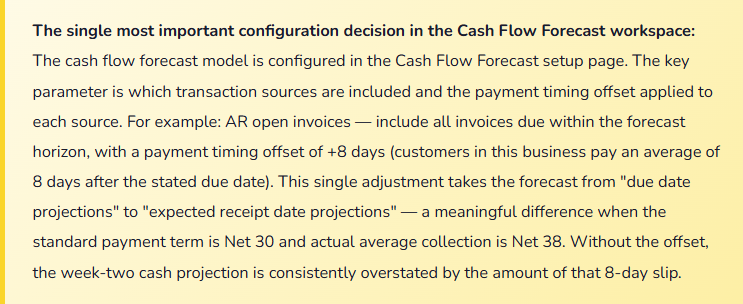
Step 1: Set payment timing offsets based on actual collection and payment history. Pull 90 days of actual AR collection data — when customers actually paid relative to the invoice due date. Calculate the average lag by customer segment or payment method. Set the cash flow forecast timing offset for AR to match. Do the same for AP — when does the organization actually release payment relative to vendor due dates? These offsets convert due-date projections into expected-date projections, which is what treasury needs for operational positioning.
Step 2: Layer in payroll — amount, frequency, and exact disbursement dates. Payroll is often the largest single cash outflow in any two-week period and is not in D365 AP. Enter payroll as a recurring manual transaction in the cash flow forecast — exact gross payroll by pay date, net of any amounts funded through a separate payroll clearing account. Payroll timing varies (weekly, biweekly, semi-monthly) and must be mapped to calendar days in the forecast period, not assumed to be evenly distributed.
Step 3: Add debt service and revolver position. Loan principal and interest payments are on a fixed schedule and can be entered as recurring manual transactions in the forecast. The revolver position requires a live balance — updated as draws and repayments occur — plus the projected future draws or repayments based on the forecast cash position. If the forecast shows a cash shortfall in week four, the revolver draw that would fund the shortfall must appear in the forecast for week four.
Step 4: Apply an AR collectibility probability to the aged receivables. Not all open AR will be collected within the forecast horizon. The 90-day bucket AR balance from a customer on credit hold is an inflow that probably won’t arrive. Applying a collectibility probability (100% for current, 85% for 30–60 days, 60% for 60–90 days, 20% for 90+ days — calibrated to actual collection history) produces an expected cash inflow that is more reliable than the raw due-date-based projection.
Step 5: Add known capital commitments not yet in POs. Capital projects that are approved but haven’t yet generated purchase orders in D365 create real cash outflows that won’t appear in the system-generated forecast. Finance must track approved capital commitments outside of D365 and enter them as manual forecast transactions when the expected payment timing is reasonably estimable.
Five Mistakes That Make the Cash Forecast Unreliable
⚠️ The Forecast Uses Invoice Due Dates, Not Actual Payment Timing — The Two-Week Position Is Always Wrong
D365 generates the cash flow forecast using AR invoice due dates as the expected collection dates. The business has Net 30 terms with most customers but actual average collection time is 41 days. Every week in the forecast shows AR collections based on due dates — so the forecast projects $480,000 of collections in week two that will actually arrive in weeks three and four. The CFO looks at the week-two cash position, sees a comfortable surplus, and approves a capital expenditure purchase. The actual week-two position is $280,000 lower than forecast because the AR collections are late. The revolving credit facility has to cover the gap. “The forecast was wrong” — yes, but it was predictably wrong in the same direction every week because payment timing offsets were never configured.
Fix: The payment timing offset in the cash flow forecast configuration is not an optional refinement — it is a calibration step that determines whether the near-term forecast is actionable. Pull 90 days of actual AR collection history, calculate average collection lag by customer segment, and set the timing offset accordingly. Recalibrate quarterly — collection patterns change seasonally and with customer payment behavior. The difference between “due in 30 days” and “actually collected in 41 days” is an 11-day timing shift that, across a material AR balance, produces a week-one or week-two cash position error that consistently leads to suboptimal liquidity decisions.
⚠️ Payroll Is Not in the Forecast — The Largest Recurring Outflow Is Invisible
The cash flow forecast workspace in D365 shows projected AP payments, open PO commitments, and lease payments. Payroll is processed through a third-party payroll provider — it doesn’t flow through D365 AP. Finance never configured payroll as a recurring manual transaction in the forecast. The weekly cash position report goes to the CFO. It shows a $1.8M cash surplus in the current week. The CFO approves releasing a large vendor payment batch. What the report doesn’t show is the $1.2M biweekly payroll ACH that hits Thursday — three days from now, two days after the vendor payment batch is released. The week ends with a $340,000 overdraft on the operating account and an emergency revolver draw. The forecast was not wrong because D365 failed — it was wrong because Finance never told D365 about payroll.
Fix: Configure payroll as a recurring manual outflow in the D365 cash flow forecast. Enter each pay date’s gross disbursement amount as a manual transaction — the exact calendar date, the exact amount based on the current payroll register, and the disbursement bank account. Update the amount each pay period when the final payroll register is available. For biweekly payroll, this is a two-minute update every two weeks. For organizations where payroll is funded through a separate payroll clearing account, configure both the funding transfer (from operating to payroll clearing) and the clearing account disbursements so the operating account position reflects the net impact on the day the funding transfer occurs.
⚠️ The Forecast Is Refreshed Weekly Instead of Daily — Treasury Decisions Are Based on Stale Data
The cash flow forecast is refreshed every Monday morning — a manual process that takes about an hour. During the week, transactions post, invoices are approved, large payments go out, and significant customer receipts arrive. By Thursday, the Monday forecast is reflecting a cash position that is materially different from the actual bank position because four days of transactions have posted that aren’t in the forecast. The CFO asks for the cash position Wednesday afternoon before approving a time-sensitive investment. Finance provides the Monday forecast. The Monday forecast is $620,000 higher than the actual bank position because a large customer payment that was projected to arrive Monday didn’t arrive until Wednesday (arrived correctly — just two days late), and two vendor payments went out Monday that shifted the outflow pattern from Thursday to Monday. Treasury decisions made on Wednesday are based on Monday data in a dynamic environment.
Fix: Configure automated daily bank statement import and set the cash flow forecast to refresh automatically on the import cycle — daily, after the morning bank statement downloads. Daily refresh requires automated statement import (BAI2 or equivalent) rather than manual statement entry, but the configuration investment pays back immediately in forecast accuracy. If daily automated refresh is not feasible given the bank statement format or the D365 configuration, establish a protocol for Finance to manually enter same-day bank activity that materially affects the cash position before the forecast is used for any treasury decision. A forecast that is more than 24 hours stale should be labeled as such when presented — “as of Monday, $X; bank position may differ by up to $Y based on Tuesday activity.”
⚠️ All AR Is Included at Full Value — Uncollectible Balances Inflate the Forecast
The AR aging report shows $3.4M of open receivables. The cash flow forecast pulls the full $3.4M as projected inflows based on due dates. What the forecast doesn’t reflect: $420,000 belongs to a customer who filed Chapter 11 three weeks ago and whose balance Finance has flagged as doubtful. $180,000 belongs to a customer on credit hold whose payments are disputed. $290,000 is in the 90+ day bucket with no payment commitment from the customer. The $3.4M AR balance the forecast projects will become $2.5M of actual collections over the next 60 days — the other $900,000 will become write-offs, credit memos, or extended payment arrangements. Presenting a forecast with $3.4M of projected AR collections when the realistic expectation is $2.5M produces consistently overstated liquidity projections that leadership eventually stops trusting.
Fix: Apply a collectibility probability to the AR aging before the forecast uses it. The probabilities should be calibrated to actual collection history: current (within terms) at 97–100%, 1–30 days past due at 90–95%, 31–60 days at 75–85%, 61–90 days at 50–65%, 90+ days at 20–35%. Adjust probabilities for known facts — a customer in bankruptcy gets 0–10% regardless of aging bucket; a customer who has communicated a specific payment date gets 95% for that specific amount. D365 doesn’t apply collectibility adjustments automatically — Finance applies them as a manual overlay on the AR projection when building the forecast. The result is an expected cash inflow from AR that reflects what will actually be collected, not what is technically due.
⚠️ Multiple Legal Entities — Each Entity’s Forecast Is Separate and No One Has the Consolidated Position
A company operates four legal entities in D365. Each entity has its own bank accounts, its own AR and AP, and its own cash flow forecast workspace. Finance produces four separate weekly cash positions — one per entity. The CFO asks for the consolidated cash position: “How much cash do we have across the whole company, and where is it?” Finance adds the four entity positions in Excel. The total shows $4.2M of consolidated cash. What the consolidation doesn’t reflect: $1.8M of that cash is trapped in a European subsidiary in EUR and is subject to repatriation withholding tax; $800,000 is in an entity whose revolving credit facility requires maintaining a minimum $500,000 compensating balance; the parent entity has a $300,000 payment due Thursday and its local cash is only $180,000, requiring either an intercompany transfer from a subsidiary or a revolver draw. The consolidated number is technically correct; the operational treasury picture it represents is incomplete.
Fix: For multi-entity organizations, the consolidated cash flow forecast requires a layer that the individual entity workspaces don’t provide: the intercompany transfer plan, the repatriation constraints, the entity-level minimum balance requirements, and the revolver availability by entity. D365 does not produce a consolidated cross-entity treasury position automatically — it produces entity-level positions. Finance must build the consolidation layer: a weekly process that aggregates entity positions, applies intercompany netting, identifies constrained cash versus freely available cash, and produces the net available liquidity figure that the CFO actually needs. This is a Finance analytical process that uses D365 entity positions as inputs — it is not a configuration feature. Build it deliberately; don’t assume the sum of entity cash positions equals available consolidated liquidity.
Do This / Don’t Do This
✓ Do This
- Set payment timing offsets in the forecast configuration based on actual 90-day collection and payment history — recalibrate quarterly
- Enter payroll as a recurring manual outflow in the forecast — exact amounts by pay date, updated each pay period
- Configure automated daily bank statement import — daily refresh makes the near-term forecast operationally reliable
- Apply a collectibility probability overlay to AR aging before projecting inflows — exclude confirmed uncollectible balances
- Add debt service and revolver activity as manual forecast transactions — they don’t appear in D365 AP
- Build the multi-entity consolidation layer explicitly — sum of entity positions is not the same as available consolidated liquidity
- Add approved capital commitments without POs as manual forecast transactions when timing is estimable
- Label any forecast presented as “as of [date]” — stale forecasts used for treasury decisions compound liquidity risk
✗ Don’t Do This
- Present the D365 raw forecast without timing offsets — due-date projections consistently overstate near-term inflows
- Omit payroll from the cash forecast — it is often the largest single recurring outflow and is invisible to D365 without manual entry
- Refresh the forecast weekly in a dynamic business — Thursday decisions on Monday data produce avoidable liquidity surprises
- Include full AR balance as projected inflows without collectibility adjustment — doubtful and disputed balances inflate the forecast
- Treat the sum of entity positions as consolidated available liquidity in a multi-entity structure without accounting for repatriation constraints and minimum balance requirements
- Stop maintaining the forecast once the initial configuration is done — timing offsets, payroll amounts, and debt service schedules all change
Up Next:
Cash flow forecasting closes the treasury arc. The next post addresses a topic that Finance often delegates entirely to IT and then discovers it needs to understand deeply when an audit begins, a data governance problem surfaces, or a key employee leaves: Security, Role-Based Access, and Data Segregation in D365 F&O — how D365’s security model works, the duty and privilege structure that defines what each role can do, segregation of duties controls that auditors require, and the record-level security and extensible data security features that let Finance restrict access not just to functions but to specific legal entities, cost centers, and financial data.
— Bobbi
D365 Functional Architect · Recovering Controller
Thank you for reading!
Recent Posts:
- D365 Finance · Safe Bulk Edits Without Waiting on IT
- Easy Wins in D365 F&O – Set the Code Once, Let It Flow
- Easy Wins in D365 F&O – Stop Rebuilding Your View Every Morning
- Ground an Agent in Live D365 Data: A Customer Balance Agent
- Turn Statement Variances into Board Commentary with Claude
If this post helped you solve a real problem, please share it with a colleague who is in the middle of an ERP implementation or a post-go-live optimization. If you have a topic that I haven’t covered, please reach out. There is always one more topic worth exploring.
Leave a Reply