
Year-End Readiness: D365 Finance & Operations, Step 10 of 10
The close ran clean and the numbers tie out. Now the auditor’s request list arrives, and a few days later someone tries to post a January 2 invoice into a year that doesn’t exist yet. Both are easy to handle if you get ahead of them. This last post covers audit prep first, then new year setup.
Review access and segregation of duties
Auditors usually start with who can do what. Finance and operations apps use role-based security, where privileges roll up into duties, duties roll up into roles, and users get roles. Microsoft’s own guidance says to run the security reports before an audit, not for the first time during one. The User role assignments report shows every user with a role. The Security duty assignments report shows the duties inside each role, which is how you check that separation holds up.
Then look at your segregation of duties rules. Each rule pairs two duties that one person shouldn’t hold together, such as acknowledging receipt of goods and paying the vendor. You also record the risk and your mitigation, say a monthly manager review. One catch: the system doesn’t check compliance when you create a rule. After any new or changed rule, select Validate duties and roles, then run Verify compliance of user-role assignments, both under System administration > Security > Segregation of duties.
Anything that conflicts lands on the Segregation of duties unresolved conflicts page. You can deny the assignment or allow it, and allowing requires a Reason for override. That written reason is exactly what an auditor wants to see. The conflict documentation notes that conflicts aren’t verified for users who get roles through Active Directory domain groups, so review those by hand.

Pull the audit trail and supporting reports
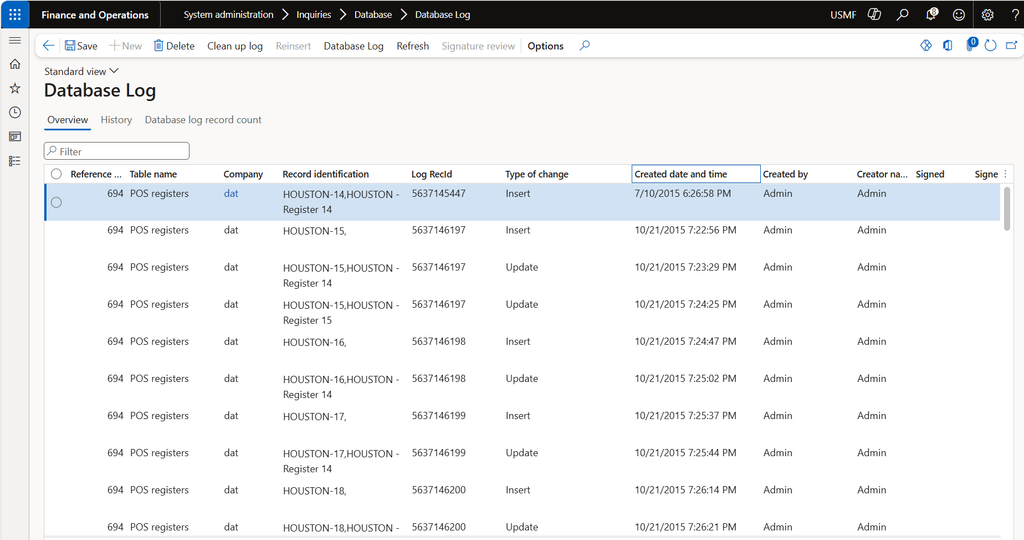
For change history, database logging tracks inserts, updates, deletes, and renames on the tables and fields you choose. Set it up under System administration > Setup > Database log > Database log setup. Microsoft recommends logging specific fields, like a vendor bank account or customer credit limit, rather than whole tables, and it isn’t meant for batch-run transactions. Decide how long you’ll keep the log, and schedule the cleanup under System administration > Inquiries > Database > Database log.
For transactions, the Audit trail and Voucher transactions inquiries show who created what and when. Approval evidence lives on the Workflow history page (Common > Inquiries > Workflow > Workflow history), where Tracking details shows each step.
For support documents, document management is the Attach button on most pages. Attachment history is kept for 180 days by default, so extend that setting if your audit window is longer. Starting in version 10.0.40, Export attachments under Document management parameters pulls attachments for chosen tables and a date range into zip files.
For the reports themselves, start with the Trial balance under General ledger > Inquiries and reports, where you can drill into the transactions behind any balance. Trial balance snapshots (version 10.0.39 and later) export to Excel. Ledger reports such as Ledger transaction list and Print journal cover the detail. For subledger tie-outs, the Account reconciliation workspace compares the ledger to accounts payable, accounts receivable, tax, and bank, and keeps a snapshot for fully reconciled periods that are on hold or permanently closed.
Set up the new fiscal year
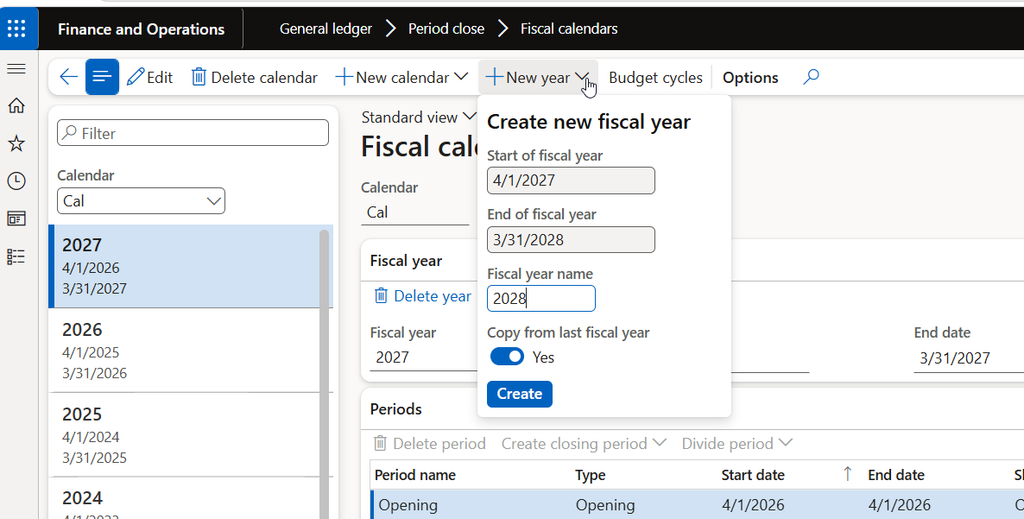
Open General ledger > Calendars > Fiscal calendar, pick your calendar, and select New year. You can only add future years, never past ones. Then visit the Ledger calendar page, where you set period status and who can post. The same calendar can serve fixed asset books and budget cycles.
Next, check your number sequences under Organization administration > Number sequences. Microsoft’s example format, #####_2017, shows a year sitting inside a sequence as a constant, and a constant won’t change itself on January 1. Compare each sequence’s Largest value to its Next value. If a sequence reaches Largest, users get a “Number sequence has been exceeded” message. Sequences scoped with Fiscal calendar period also need a look.
Budget register entries hold the approved budget. Once you select Update budget balances, an entry is Completed and can’t be reopened, so corrections need a new entry. If you use budget control, Microsoft says to turn it on only at the start of a new budget cycle.
Finally, review your periodic journals under General ledger > Periodic tasks > Periodic journals. Check the Date and Last date on each line. For workflows, delegation rules under Common > Setup > User options carry start and end dates, so refresh any that expire with the year.
Year-end checklist
- Run the security reports, validate every segregation of duties rule, and document each override.
- Confirm database log fields, attachment history retention, and workflow history cover the audit period.
- Save the trial balance, ledger reports, and reconciliation results for the closed year.
- Add the new fiscal year and set period statuses on the ledger calendar.
- Check number sequences, enter the new budget, and refresh periodic journals and delegations.
Thank you for reading!
This is the last post in the series. Last time, in Step 9, we covered Running the Year-End Close in Finance and Operations. If you also work in Business Central, look for the companion series, “Year-End Readiness: D365 Business Central.”
Sources
- Role-based security
- Secure finance and operations apps
- Set up segregation of duties
- Identify and resolve conflicts in segregation of duties
- Configure database logging
- View journal entries and transactions
- View workflow history
- Configure document management
- General ledger account balances
- Account reconciliation
- Fiscal calendars, fiscal years, and periods
- Missing fiscal calendar for GL: Error code ERR00001
- Number sequences overview
- Configure number sequences and autonumber columns when using dual-write
- Budgeting overview
- Budget control overview
- Post periodic journals
- Delegate work items in a workflow
Interested in learning more? Below are some of my latest posts:
Leave a Reply