

Bank account setup, the Payment Reconciliation Journal, Copilot bank matching, foreign currency cash, and the reconciliation habits that keep your book cash honest — every period, without the spreadsheet.
Bank Account Setup — The Foundation That Reconciliation Depends On
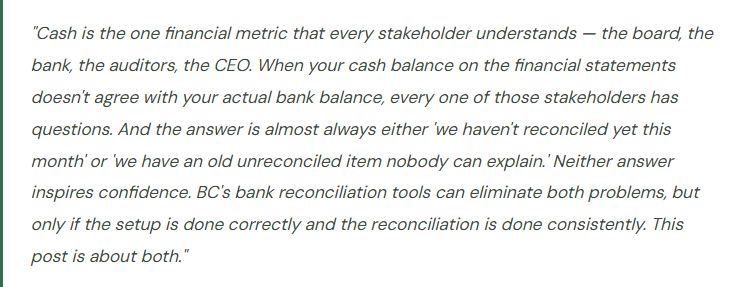
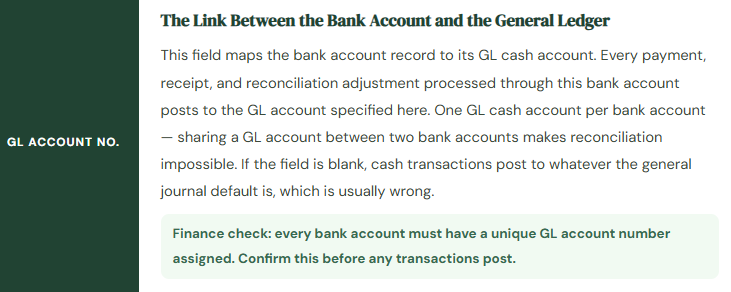
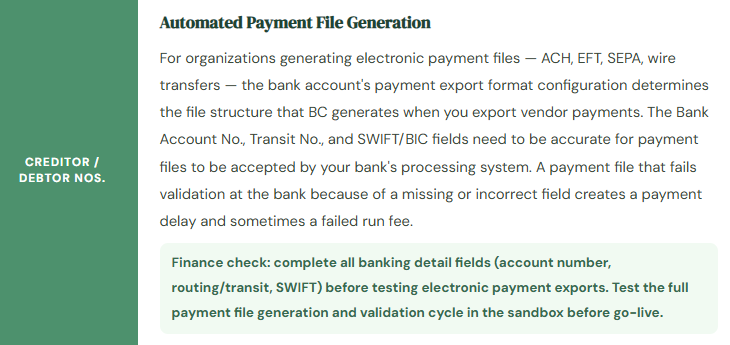
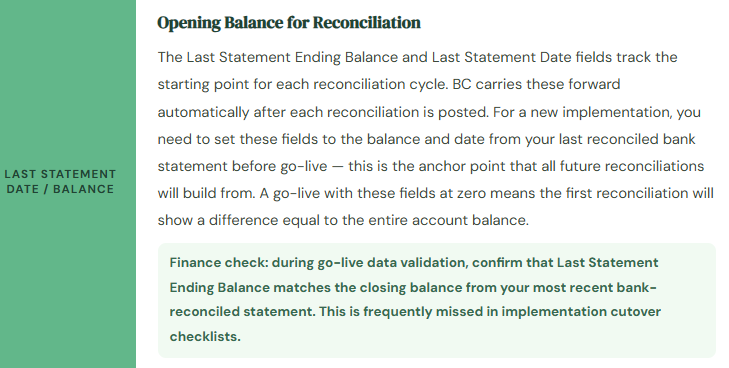
Every bank account in BC has a Bank Account Card — the record that connects the physical bank account to the general ledger and controls the behavior of every cash transaction processed through it. A bank account card that’s set up completely and correctly makes every downstream process — payment processing, bank statement import, reconciliation — more reliable. One that’s missing key fields creates friction and errors in every single cash transaction for the life of the implementation.
The Payment Reconciliation Journal — BC’s Core Cash Application Tool
The Payment Reconciliation Journal is where bank reconciliation actually happens in BC, and it’s one of the most powerful features in the system for reducing manual reconciliation effort. The workflow is straightforward: you import your bank statement file, BC automatically matches statement lines to open customer payments, vendor payments, and GL transactions in the system, you review and adjust the matches, and you post. The bank account is reconciled, the matched entries are closed, and the GL is updated — all in one posting step.
📥 Step 1
Import the Bank Statement File
Open the Payment Reconciliation Journal for your bank account and import the statement file downloaded from your bank’s online portal. BC reads the file and creates a line in the journal for each transaction on the statement — deposits, payments, fees, interest, wire transfers. The import only adds lines; it doesn’t post anything. You’re looking at your actual bank statement, now inside BC, ready to be matched.
🤖 Step 2
Run Automatic Matching
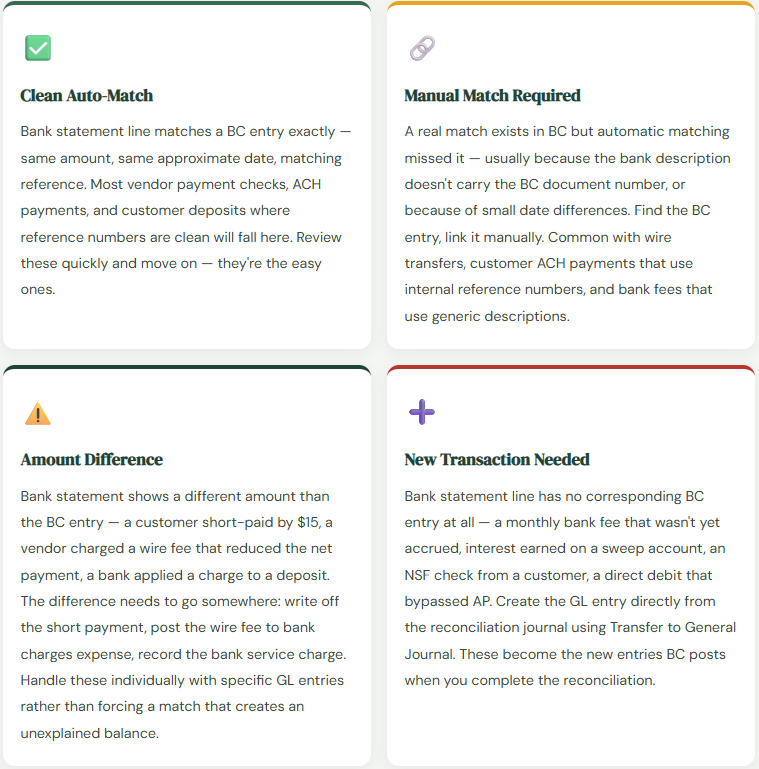
BC’s matching engine compares each bank statement line against open entries in the customer ledger, vendor ledger, and general ledger — looking for matches based on amount, date proximity, document number patterns, and transaction description text. Matches with high confidence are marked automatically. The matching isn’t perfect — it works best for transactions with clean reference numbers and won’t catch everything — but it typically handles 60–80% of statement lines without manual intervention in a well-maintained system.
✨ Step 3
Review Copilot Suggestions (BC Current Version)
In current BC versions, the bank reconciliation Copilot feature provides AI-assisted match suggestions for lines the automatic matching didn’t resolve — particularly useful for bank fees, interest charges, and transactions where the reference information in the bank statement doesn’t cleanly match a BC document number. Copilot suggestions appear as proposed matches that you accept or decline — they support the review, not replace it. For most organizations, enabling Copilot for bank reconciliation meaningfully reduces the manual matching time for the residual unmatched lines.
🔍 Step 4
Manually Match or Create Entries for Remaining Lines
For lines that neither automatic matching nor Copilot resolved, review manually. Some will be existing BC entries that didn’t match automatically due to reference number differences — find them using the Match Manually function and link them. Others are transactions that need new GL entries: bank fees, interest earned, NSF check charges, wire transfer fees. Use the Transfer to General Journal action to create the GL entry directly from the bank statement line without leaving the reconciliation journal.
✅ Step 5
Confirm the Difference Is Zero, Then Post
Before posting, BC shows the difference between the bank statement ending balance and the sum of the matched transactions. This number should be zero when everything is correctly matched. A nonzero difference means either an unmatched statement line or a transaction in BC that hasn’t appeared on the statement yet. Investigate the difference — don’t post with a nonzero balance and assume it will resolve itself. Post when the difference is zero. BC updates the bank account’s Last Statement Balance, closes the matched entries, and posts the GL entries for any new transactions created during reconciliation.
📁 Step 6
Review the Outstanding Transactions Report
After reconciliation is posted, run the Bank Account — Reconciliation report to see the list of transactions that are in BC but not yet on a bank statement — outstanding checks, deposits in transit, and payments processed but not yet cleared. This is the traditional reconciliation schedule: book balance, plus deposits in transit, less outstanding checks, equals bank balance. Review this list at period close to identify any items that have been outstanding for an unusual length of time — old outstanding checks especially, which may need to be voided or investigated for escheatment requirements.
The Four Match Scenarios You’ll Encounter Every Cycle
Cash Journals and Petty Cash
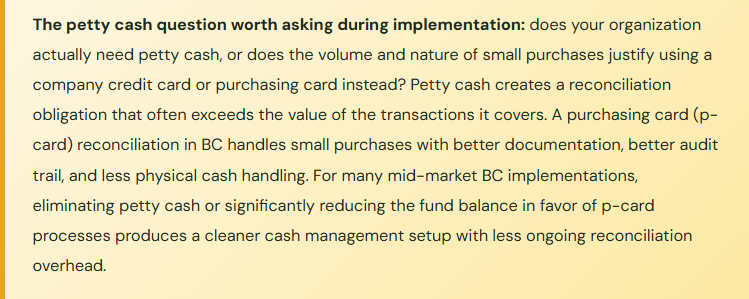
Not all cash transactions flow through the Payment Reconciliation Journal. Organizations with petty cash funds, cash registers, or physical cash operations use the Cash Receipt Journal and Cash Payment Journal for transactions that don’t originate from a customer invoice or vendor invoice.
For petty cash specifically, BC handles it simply: the petty cash fund is a separate bank account in BC (even though it’s physical cash) with its own GL account. When petty cash is replenished from the operating account, a transfer journal moves the replenishment amount from the operating account to the petty cash account. Petty cash disbursements are posted directly to expense accounts via a cash payment journal. At any point, the GL balance of the petty cash account should equal the physical cash on hand plus the unposted receipts in the box. The petty cash reconciliation is just a count — total the physical cash, add up unposted receipts, and confirm it equals the GL balance.
Foreign Currency Cash — The Configuration Finance Often Misses
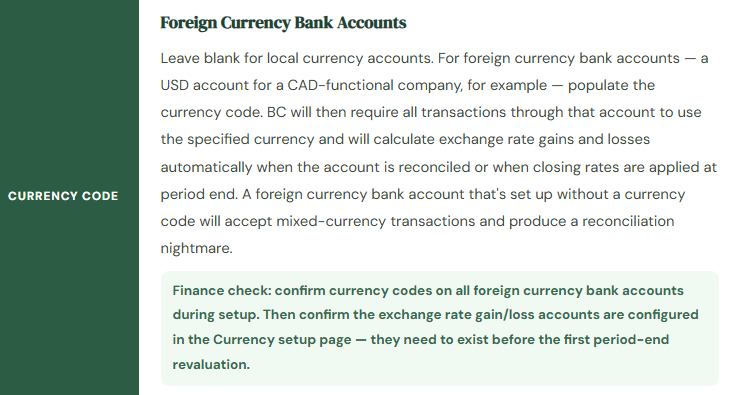
Organizations with foreign currency bank accounts have two configuration requirements beyond the basic bank account setup that Finance needs to own explicitly.
First, the Currency Exchange Rate Table in BC needs to be populated with current exchange rates for every currency in which the organization holds balances or processes transactions. BC can be configured to pull exchange rates automatically from a service (the ECB rate service is available out of the box for many currencies), or rates can be entered manually. Either way, rates need to be current — stale exchange rates produce inaccurate foreign currency valuations on the balance sheet and understated or overstated FX gain/loss on the income statement.
Second, at period-end, any foreign currency bank account balances need to be revalued to the closing exchange rate in effect at the balance sheet date. BC has an Adjust Exchange Rates function that does this: it recalculates the local currency equivalent of every open foreign currency entry and posts the difference — realized or unrealized — to the exchange rate gain or loss accounts configured in your currency setup. This function must be run as part of the period-close checklist for any company with foreign currency balances. The foreign currency bank balance on the balance sheet is wrong until it has been revalued at the closing rate.
| Cash-Related Period-Close Step | What It Does | Consequence If Skipped |
|---|---|---|
| Bank Reconciliation Posted | Matches all bank statement lines to BC entries; posts new GL entries for fees, interest, charges | Book cash balance doesn’t equal bank balance; open items accumulate; audit questions |
| Outstanding Items Review | Identifies checks/deposits in BC not yet cleared by bank — normal reconciling items | Stale outstanding items accumulate; voided checks remain open; escheatment risk on old outstanding checks |
| Adjust Exchange Rates | Revalues foreign currency bank account balances at the period-end closing rate | Foreign currency cash is presented at stale rates; FX gain/loss is understated or overstated; balance sheet is wrong |
| Bank GL Reconciliation | Confirms BC bank account balance matches the GL cash account balance for that bank | Manual journal entries to the cash GL account may have bypassed the bank account — creates an unexplained difference |
The Cash Reconciliation Mistakes Finance Regrets
⚠️ Reconciling Infrequently and Letting Old Items Accumulate
Monthly bank reconciliation is the minimum viable cadence — and for high-volume accounts, it’s not sufficient to catch timing issues before they become problems. The most common cash management complaint I hear from Finance teams is “we have items on the outstanding list that are months old and nobody knows what they are.” Those items didn’t become unexplicable overnight. They became unexplicable because nobody investigated them when they were fresh. An outstanding check from three weeks ago is a five-minute investigation. An outstanding check from nine months ago is a half-day investigation — and sometimes never resolves.
→ Reconcile high-volume bank accounts weekly. Reconcile all accounts by the fifth business day after period-end at the latest. Set a policy: any outstanding item more than 30 days old gets reviewed and investigated before the next reconciliation cycle. Make this a named task in the period-close checklist with an assigned owner.
⚠️ Posting Journal Entries Directly to the Cash GL Account
The most reliable way to create a bank reconciliation difference that nobody can explain is to post a general journal entry directly to the cash GL account without going through the bank account’s transaction processing. The journal entry updates the GL balance. The bank account reconciliation statement balance is unchanged. The two no longer agree. The reconciliation shows a difference. Three months later, when someone finally traces the difference, they find a journal entry with a cryptic description and no clear business reason. The reconciliation doesn’t close. The auditor asks questions.
→ Configure posting restrictions that flag or block manual journal entries to GL accounts mapped to bank account records. All transactions that affect a bank account should flow through the bank account in BC — via payment journals, cash receipt journals, or the bank reconciliation journal itself. The GL account for a bank account is not a general-purpose account.
⚠️ Never Setting Up Statement Import — Reconciling Manually Line by Line
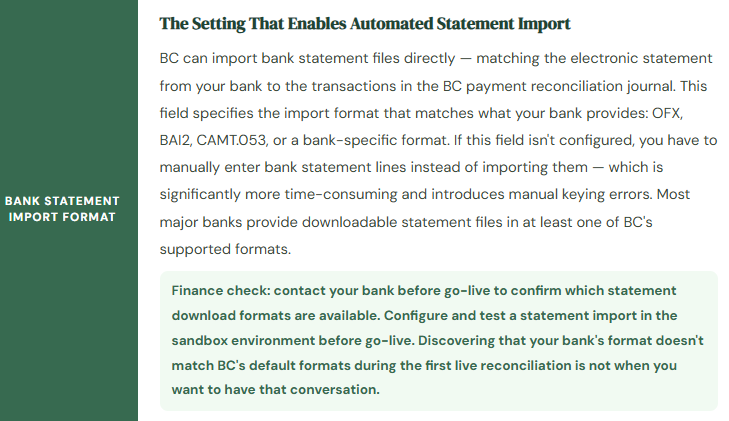
I’ve worked with BC organizations that have been reconciling their bank accounts by manually entering every bank statement line into BC since go-live — sometimes for years — because nobody configured the bank statement import format during implementation. The import configuration takes less than an hour. The manual entry it replaces takes hours every month. The math on this tradeoff is obvious, and yet it’s one of the most common post-go-live inefficiencies I encounter. The team adapted to the absence of the feature instead of going back and configuring it.
→ Configure bank statement import during implementation, not as a post-go-live enhancement. Identify the file format your bank provides, test the import in sandbox, and document the export/import steps as part of the bank reconciliation procedure. If your bank doesn’t provide a format BC supports natively, check whether a custom import format can be configured or whether a bank data service (Yodlee, etc.) can provide normalized files.
⚠️ Not Running Adjust Exchange Rates at Period-End for Foreign Currency Accounts
This one is subtle until it isn’t. A foreign currency bank account that isn’t revalued at period-end shows its balance in local currency at whatever rate was in effect at the time of the last transaction — which may be months old. For a high-balance account with meaningful exchange rate movement, the difference between the book value and the period-end rate can be material. The balance sheet shows a cash amount that doesn’t reflect the exchange rate at the reporting date. The auditors notice. The restatement is unpleasant.
→ Add Adjust Exchange Rates to the period-close checklist as a required step for any company with foreign currency bank accounts. Run it after all other period-end transactions are posted, since it calculates based on the open entries at the time it runs. Confirm the FX gain/loss accounts are configured in currency setup before go-live — a missing account will cause the Adjust Exchange Rates function to fail with a posting error exactly when you least want it to.
Quick Reference: Do’s and Don’ts
✓ Do This
- Assign a unique GL account to every bank account — one account per bank account, no sharing
- Configure bank statement import format before go-live and test a full import cycle in sandbox
- Set Last Statement Ending Balance on every bank account as part of go-live cutover
- Reconcile high-volume accounts weekly; all accounts by day 5 of the new period at latest
- Review outstanding items older than 30 days before each reconciliation cycle
- Use the Transfer to General Journal function in the reconciliation journal for new bank transactions — don’t create them separately
- Run Adjust Exchange Rates as a required period-close step for all foreign currency accounts
- Configure exchange rate gain/loss accounts in Currency setup before the first period-end revaluation
- Include bank GL reconciliation (BC bank account vs. GL account balance) in the close checklist
- Enable Copilot bank reconciliation assist — it materially reduces manual matching time for residual lines
✗ Don’t Do This
- Post general journal entries directly to the GL account mapped to a bank account
- Share one GL cash account between two bank accounts
- Skip the bank statement import configuration and reconcile manually line by line
- Post a reconciliation with a nonzero difference and assume it will sort itself out
- Let outstanding items age without investigation — they don’t become clearer with time
- Skip Adjust Exchange Rates at period-end for foreign currency accounts
- Set up a foreign currency bank account without a Currency Code assigned
- Use a single bank account in BC to represent multiple physical bank accounts — creates reconciliation impossibility
- Treat petty cash as an informal system outside BC — give it a bank account record and reconcile it
- Ignore the Outstanding Transactions report — it’s your evidence that your bank reconciliation is complete
Up Next:
With inventory, AP, AR, reporting, and cash management in place, we now have a complete financial operations foundation. Next, we’re going to talk about the analysis layer that sits on top of it: Dimensions in Business Central — what they are, how they’re designed, how they turn your GL data into segment reporting by department, region, project, or business unit, and why the dimension design decisions made during implementation determine whether your management reporting is useful or forever a work-in-progress. If you’ve ever wanted P&L by department or revenue by region without building separate GL accounts for each combination, this post is the one you need.
Until then — configure your statement import, reconcile your accounts, and don’t post to the cash GL account directly.
— Bobbi
D365 Functional Architect · Recovering Controller
Leave a Reply