

What is actually live, what is genuinely useful for Finance teams, where current capabilities require careful governance, and my honest read of BC’s AI feature set today versus where the marketing suggests it is.
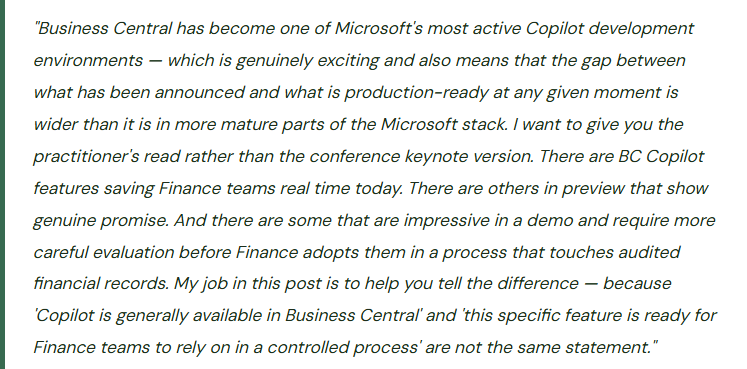
BC’s AI Architecture — Where Copilot Actually Lives
Business Central’s Copilot features are integrated directly into the product experience — they appear as contextual assistance panels, inline suggestions, and natural language interfaces within existing BC pages rather than as separate applications. The integration is intentional: AI assistance is available where the work actually happens, inside the bank reconciliation workspace, the collections page, the sales quote.
The technology behind BC Copilot is Azure OpenAI Service. Microsoft’s stated commitment is that customer data used in BC Copilot interactions is not used to train the underlying models — that assurance is in the Microsoft Product Terms, and Finance teams in regulated industries or jurisdictions with data residency requirements should verify the current terms and their BC environment’s geographic configuration before activating features. Terms are updated periodically; go-live documentation from eighteen months ago isn’t the current answer.
BC Copilot features appear in three places in the product: embedded in existing pages (Copilot suggestion panel in bank reconciliation), as dedicated conversational interfaces (Chat with Copilot for natural language data queries), and as AI-assisted creation tools (item setup assistance, marketing text generation). Finance uses the first two categories most directly. The third is primarily relevant to Sales and Inventory functions.
Finance-Relevant Features — What They Do and Where They Stand
Where BC Copilot Earns Its Place and Where Finance Should Be Careful
✓ Where It Is Earning Its Place
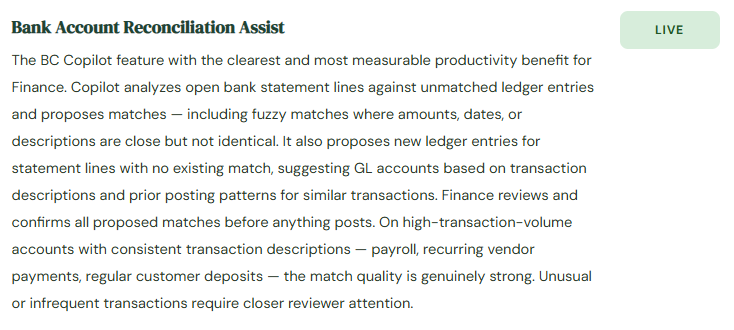
- Bank reconciliation on high-volume accounts with consistent transaction descriptions — real time savings
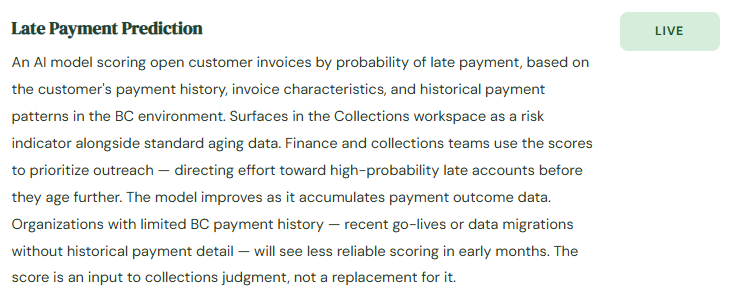
- Late payment prediction for triage of collections effort — focus on highest-risk before they age
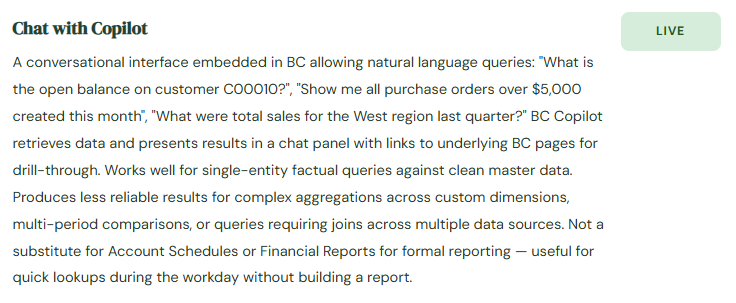
- Quick factual lookups during the workday without opening a report
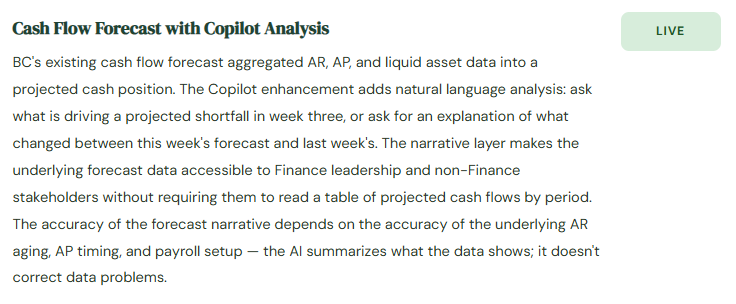
- Cash flow forecast narrative for presenting treasury data to non-Finance stakeholders
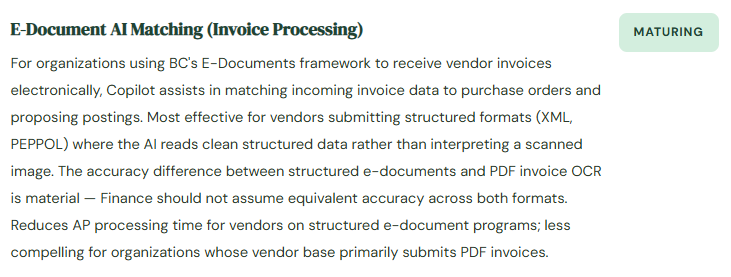
- E-document matching for vendors using structured XML/PEPPOL format submission
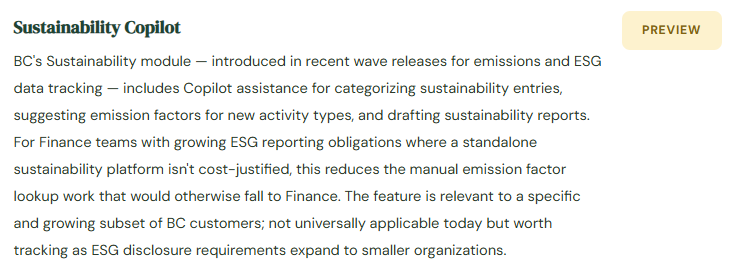
- Sustainability emission factor assistance for Finance teams with ESG obligations
△ Where Finance Should Evaluate Before Relying On It
- Chat with Copilot for period-end or comparative analysis — validate against Account Schedule output before using
- Bank reconciliation proposed new ledger entries — apply full GL entry scrutiny, not the same as accepting a match
- Late payment predictions during the first 6–12 months post go-live — limited history reduces model accuracy
- E-document matching for PDF invoices — OCR-dependent accuracy is lower than structured format matching
- Any Copilot output forwarded to leadership without Finance verification of the underlying query logic
- New BC environments without sufficient transaction history for AI pattern learning
BC Copilot Governance — What Finance Needs Before Features Are Activated
BC Copilot Governance Checklist for Finance Teams
- Know What Is Active — Check BC Admin Center Each Release Wave
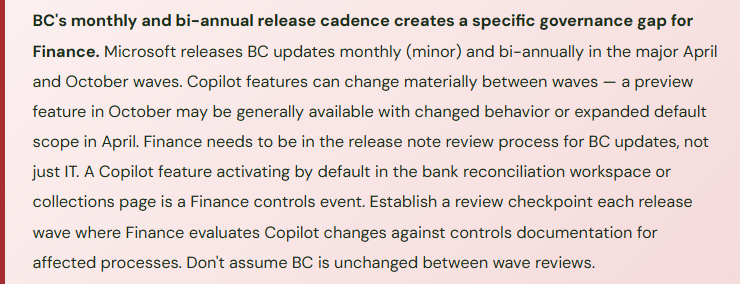
- BC Copilot features are managed at the BC Admin Center level and can be enabled or disabled per feature and per environment. Finance should review the “Copilot and AI capabilities” page in Admin Center after each release wave to understand what changed. A feature enabled by IT without Finance awareness in a Finance module is a controls event that Finance didn’t review. Don’t assume the Copilot feature list is unchanged from go-live. It isn’t.
- Define the Human Review Step for Every Active Feature — Document It
- Bank reconciliation Copilot: Finance reviews all proposed matches before posting; proposed new ledger entries require GL entry scrutiny. Late payment prediction: used as one collections prioritization input alongside relationship knowledge. E-document matching: AP verifies vendor match against source invoice before approving. Every active feature gets a documented review step and a named owner. The documentation is both the operational procedure and the audit evidence that a control exists over AI-assisted processes.
- Measure Reconciliation Copilot Accuracy — It Is Not Assumed
- Track the match acceptance rate (AI proposals accepted without modification) and override rate (proposals rejected or materially changed) for bank reconciliation Copilot, reviewed quarterly. A high acceptance rate with low overrides confirms the feature is working well for your transaction population. A low acceptance rate means Finance staff are spending more time reviewing and correcting than the feature saves — the efficiency gain may not be materializing, and the activation decision should be revisited.
- Confirm Data Residency for Your BC Environment
- BC Copilot processing uses Azure OpenAI Service. The data residency location depends on your BC environment’s geographic region. For organizations in regulated industries or jurisdictions with strict data residency requirements — GDPR, HIPAA, or specific financial sector requirements — confirm that Copilot data processing is compliant with your obligations before activating features. Review the current Microsoft Responsible AI and BC documentation, not go-live materials from 18 months ago.
- Train Finance Staff on What to Verify — Not Just How to Use the Feature
- BC Copilot presents proposals with a consistent interface regardless of underlying confidence level. Finance staff who aren’t trained on what the AI pattern-matches from will tend to trust the presentation. The training Finance teams need isn’t “how to click approve on a Copilot proposal” — it’s “what should I independently verify before accepting this, even though the AI presented it confidently?” For bank reconciliation: always compare the proposed matched amount to the bank statement amount before accepting. For e-document matching: verify the vendor name on the proposal against the invoice header. The verification checklist is the control; the training is what ensures staff actually apply it.
Three Ways BC Copilot Adoption Goes Wrong for Finance
⚠️ Bank Reconciliation Copilot Adopted Without Reviewing “New Ledger Entry” Proposals as GL Journal Entries
Finance activates bank reconciliation Copilot. Staff are trained to use it. Reconciliation that took 45 minutes takes 15. Three months in, a review finds several Copilot-proposed new ledger entries accepted without adequate scrutiny. One was a duplicate — a bank fee that had already been recorded in the prior period. Copilot saw the description, found no current-period match, and proposed a new posting. The Finance staff member accepted it; a duplicate charge posted. A second was a customer payment that Copilot couldn’t match due to a small discount difference; it proposed the unmatched amount as miscellaneous income. Both errors required correcting journals. Both happened because the reduced friction of “the AI proposed it” lowered the review intensity the staff member applied.
Fix: Train Finance staff to apply different scrutiny levels to the two Copilot proposal types. Matched entries (AI matches a bank line to an existing ledger entry) require verification that amount and date are correct. Proposed new ledger entries (AI suggests a brand new GL posting) require the same scrutiny as any manual journal entry — is this already recorded somewhere, is the account correct, is the amount appropriate? The new entry proposals carry the highest risk because they create net new GL postings that affect account balances. Build an explicit step into the reconciliation checklist: “before accepting any Copilot-proposed new entry, search for an existing entry that should match before creating a new one.”
⚠️ Chat with Copilot Numbers Used in Management Reporting Without Validation Against Account Schedules
During quarterly close, a Finance analyst uses Chat with Copilot to answer the CFO’s question about Q3 sales by region. Copilot returns a table. The analyst forwards it to the CFO without checking it against the Account Schedule that Finance produces from the same underlying data. In the board prep call, the CFO references the numbers. The board deck already shows slightly different figures from the Account Schedule. The difference — $84,000 in this case — came from Chat with Copilot aggregating from sales invoice header data without filtering invoices in a pending correction status. The Account Schedule filtered those invoices correctly. Both were using BC data; the query logic differed in a way the analyst had no way to detect without running a comparison.
Fix: Chat with Copilot is a discovery and exploratory tool — it is not a reporting tool for numbers that will appear in management packs, board presentations, or external filings. Any figure produced through Chat that Finance intends to include in formal reporting must be validated against the Account Schedule or Financial Report that Finance owns and controls. If Chat and the report agree, the number is confirmed. If they disagree, investigate the discrepancy before using either. This applies to all ad hoc query tools, not just Copilot — the validation step is the control, and it cannot be skipped because the Chat interface looks authoritative.
⚠️ Late Payment Predictions Treated as Autonomous Collections Prioritization — Relationship Context Excluded
The collections team adopted the late payment prediction score as the primary driver of their call order. High-risk scores get called first; low-risk scores wait. What the model doesn’t know: a customer with a consistently perfect payment history in BC is quietly experiencing financial stress — they’re paying older invoices on time while deferring newer ones. Their BC payment pattern still looks clean. The model scores them low-risk. The collections team deprioritizes them. The invoice ages past 90 days before the deteriorating pattern becomes statistically visible. By then the customer is in restructuring and the receivable is impaired. The model was correct about historical behavior; it had no way to know about current circumstances that hadn’t yet appeared in payment data.
Fix: Late payment predictions are one input to collections prioritization — they are not the full picture. Train the collections team that the score reflects what the historical data shows; it does not reflect collector knowledge from direct customer contact, sales team intelligence, or industry signals about a customer’s sector. Build the process so that collectors review the AI priority list and apply relationship knowledge before finalizing the day’s call order. Document override rationale when collectors work outside the AI-suggested priority. The override documentation tells you over time whether the AI or the collector’s judgment is more predictive — that’s useful information for calibrating the process.
Do This / Don’t Do This
✓ Do This
- Check the BC Admin Center Copilot features list each release wave — know what is active
- Document the human review step and named owner for every active Copilot feature
- Train Finance on “what to verify” for each feature — not just how to use it
- Apply full GL entry scrutiny to bank reconciliation Copilot “new ledger entry” proposals
- Track match acceptance and override rates for reconciliation Copilot quarterly
- Validate Chat with Copilot output against Account Schedules before formal reporting use
- Use late payment prediction as one input alongside collector relationship knowledge
- Confirm data residency for Copilot processing before activating features in regulated environments
- Include BC Copilot feature changes in Finance controls review at each release wave
✗ Don’t Do This
- Let IT activate Copilot features in Finance modules without Finance review
- Accept bank reconciliation new ledger entry proposals with lower scrutiny than a manual journal
- Forward Chat with Copilot output to leadership without validating against formal reports
- Assume BC Copilot feature behavior is unchanged between release waves — it changes frequently
- Use late payment prediction scores as autonomous collections prioritization
- Remove Finance review from Copilot-assisted processes because accuracy looks high
- Activate Copilot features without understanding what data is sent to Azure OpenAI for processing
Up Next:
AI features handled. Back to foundational configuration: Tax Setup in Business Central — the VAT posting groups model, how BC determines which tax code applies to any transaction, US sales tax setup, the multi-rate and GST configuration, tax-exempt customers and items, the VAT return process, and the setup mistakes that produce tax calculation errors that survive undetected until a tax authority inquiry arrives.
— Bobbi
D365 Functional Architect · Recovering Controller
Thank you for reading!
If this post helped you solve a real problem, share it with a Finance colleague who is in the middle of an ERP implementation or a post-go-live optimization. If you have a topic that I haven’t covered, please reach out. There is always one more post worth writing.
Leave a Reply