

Expense categories, per diem, expense policies, the full GL flow from report submission to ledger posting, project-coded expenses, corporate card integration, and the approval and audit controls that keep T&E from becoming the line item internal audit always finds something in.
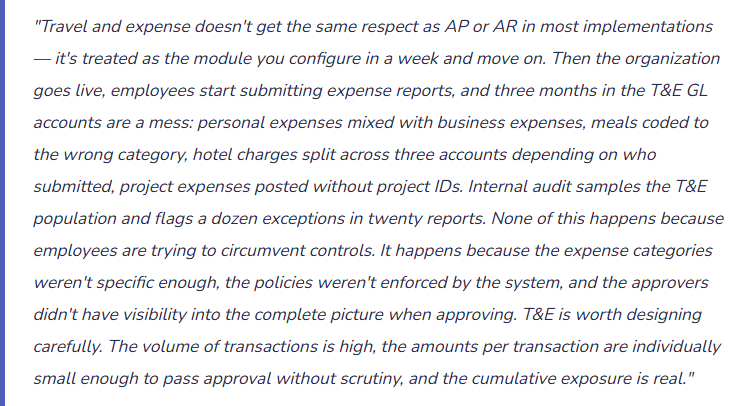
The Expense Management Structure — What Finance Owns at Setup
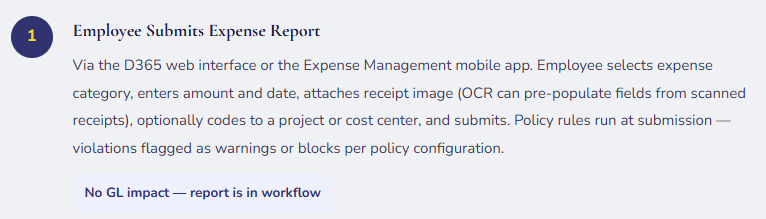
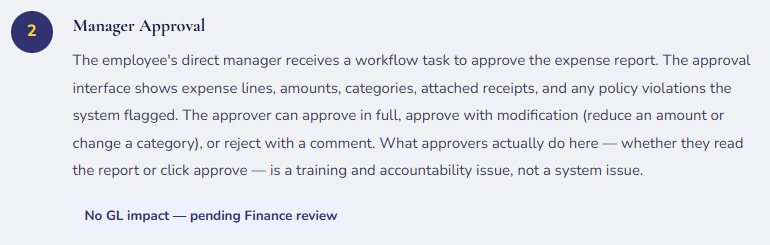
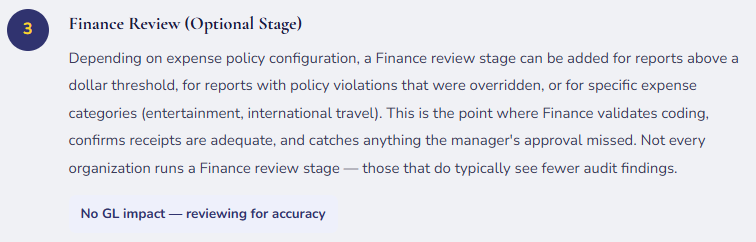
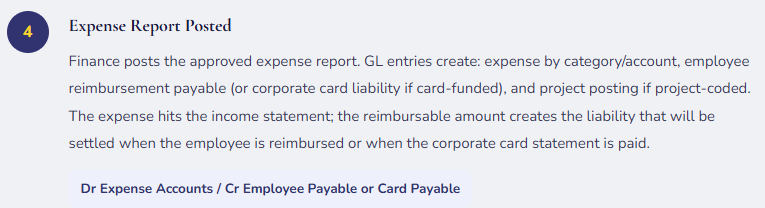
The D365 F&O Expense Management module connects employees to the general ledger through a structured workflow: employees submit expense reports, managers approve, Finance reviews and posts, the GL records the expense and the liability to reimburse. Every decision point in that flow is configurable — and the configuration decisions determine whether the process enforces policy or merely documents departures from it.
Expense categories are the primary Finance-owned configuration. Each category maps to a specific GL account (where the expense posts), carries a tax type (whether mileage or meal expenses are taxable compensation to the employee under IRS rules), and can have policy limits attached. The granularity of expense categories should match the granularity at which Finance wants to analyze T&E spending. Five categories across all of travel, meals, entertainment, and lodging produces five GL lines and tells Finance nothing about spending patterns. Twenty appropriately specific categories (domestic air, international air, hotel — domestic, hotel — international, ground transportation, meals — internal, meals — client entertainment, client entertainment — events, etc.) produces meaningful line-item visibility without overwhelming the submitter.
Expense policies are the rules Finance imposes on expense submissions — daily meal limits, receipt requirements above threshold amounts, advance booking requirements, prohibited expense types. In D365 F&O, policies can be configured to either warn (the submitter sees the violation but can override and submit with a justification) or block (the submission cannot be completed until the violation is resolved). The choice between warn and block is a governance decision: warn relies on approver vigilance; block relies on the system. Both have appropriate use cases. Neither removes the approver’s responsibility to read what they’re approving.
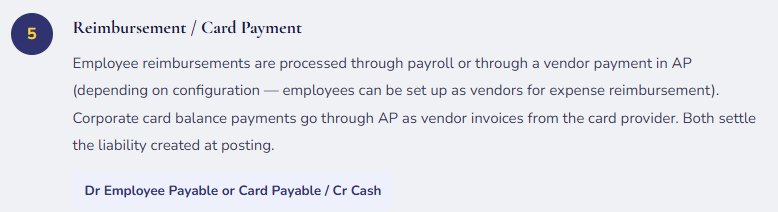
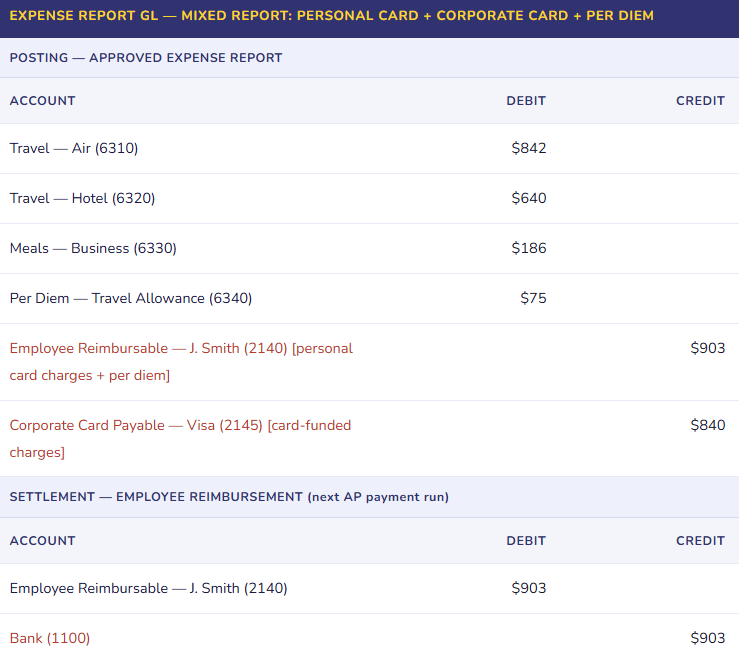
The Expense Report Lifecycle — From Mobile App to General Ledger
Expense Policies — Hard Blocks vs. Soft Warnings
Every organization has a T&E policy. The question isn’t whether the policy exists — it’s whether the system enforces it or whether it lives in a PDF that employees have nominally agreed to and approvers have nominally reviewed. D365’s expense policy configuration is where the PDF becomes a control.
🚫 Hard Block Policies
- The expense line cannot be submitted until the violation is resolved. Appropriate for policies that represent non-negotiable compliance requirements — expenses above the per-meal limit, expenses without required receipts above the receipt threshold, expense categories designated as prohibited (personal travel, alcohol in restricted territories).
- Hard blocks enforce themselves without requiring approver vigilance. They also generate friction. Every block should represent a rule that is genuinely absolute — use blocks sparingly for true compliance requirements, not for every preference in the T&E policy.
- Examples: no-receipt block above $25; prohibited category block; international per diem cap
⚠️ Soft Warning Policies
- The submitter sees the violation and can proceed with a justification comment. The violation is visible to the approver, who must make an active decision to approve it. Appropriate for policies that have legitimate exceptions — a meal above the per-person limit for a client dinner with documented attendees, a hotel above rate cap in a high-cost city, an expense slightly outside the normal category definition.
- Soft warnings rely on approver discipline. An approver who rubber-stamps all warnings defeats the control. Design warnings to produce visible audit trails that Finance review can sample.
- Examples: meal per-person limit exceeded; hotel above nightly rate cap; advance booking window missed
Per Diem Setup — The Details That Determine Whether It’s Useful or Painful
Per diem in D365 F&O is a configurable daily allowance system for travel expenses. Rather than requiring receipts for meals and incidentals, per diem pays a defined daily rate based on the destination city, trip length, and travel tier. Per diem simplifies employee expense reporting (no meal receipts required) and simplifies Finance processing (standard rate, standard category, standard amount).
| Per Diem Configuration Element | What Finance Sets | Common Setup Error |
|---|---|---|
| Rate Tiers | Rates by location (city/state/country) and travel date range. Typically mirrors IRS per diem schedules or company-defined rates that don’t exceed IRS limits to avoid taxable compensation treatment. | Using flat national rates rather than GSA city-by-city rates. San Francisco and rural Kansas have the same $75/day rate — employees in high-cost markets are underreimbursed; the rate isn’t market-appropriate and creates reimbursement equity issues. |
| Meal Reduction Rules | Reduction percentages for meals provided by the employer or client during travel (conference breakfast included — reduce per diem by breakfast allowance; client dinner provided — reduce by dinner rate). Prevents double-reimbursement. | Not configuring meal reductions — employees collect full per diem including meals on days where breakfast and dinner were conference-provided. The over-reimbursement is individually small but cumulative across hundreds of travel days. |
| Travel Day Fractions | Reduced rates for departure and return days (typically 75% of full per diem). IRS rules require proration for partial travel days. Many organizations use the simpler 75% or 50% rather than calculating actual hours. | Paying full per diem for departure and arrival days. Technically non-compliant with IRS regulations for accountable plans — the per diem excess becomes taxable compensation to the employee on those days. |
| Taxable vs. Non-Taxable | Per diem amounts within IRS limits are non-taxable under an accountable plan. Per diem amounts exceeding IRS limits are taxable compensation to the employee. D365 must be configured to flag the taxable portion for W-2 inclusion. | Setting company per diem rates above IRS limits without configuring the W-2 reportable amount. The excess is employee compensation regardless of how the company calls it — failing to report it creates payroll tax exposure. |
Project-Coded Expenses — Where T&E Intersects Project Accounting
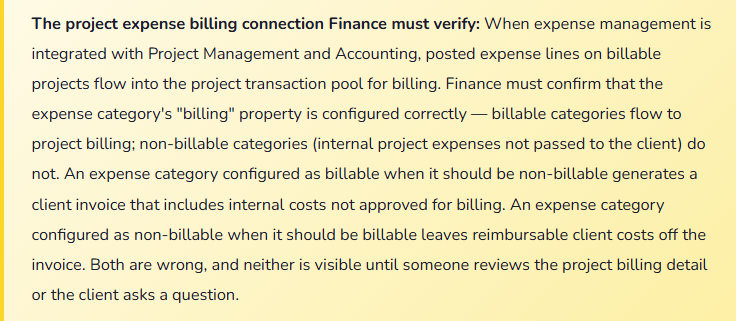
For professional services firms, consulting organizations, and any business that tracks expense by project or engagement, the expense report’s project coding is as important as the expense category. An employee travels to a client site for a billable engagement — the airfare, hotel, and meals are project costs that flow to WIP and ultimately to the client invoice or project P&L, not to departmental overhead.
D365 F&O handles project-coded expenses by allowing expense lines to be tagged with a project ID and project activity. At posting, those lines route to the project subledger in addition to the GL — creating a project cost record that shows on project inquiries, feeds the project billing invoice, and contributes to project profitability reporting. The project coding on an expense report is a Finance accuracy requirement: the same expense amount posted to the wrong project creates a revenue recognition error (the wrong project gets billed or recognized), a project profitability distortion (one project looks more expensive than it was), and a client relationship issue (a client invoice with expenses from a different engagement).
Corporate Card Integration — Centralizing the Liability
When employees use corporate cards, the card transaction flow in D365 can be configured so that card charges are imported from the card provider, matched to expense report lines, and posted in a way that correctly reflects where the liability sits. The liability for corporate card charges belongs to the organization, not the employee — the posting should reflect that from day one.
D365 F&O supports credit card transaction import through data entity feeds from card providers (AmEx, Visa corporate programs, etc.). Imported transactions appear in the employee’s expense workspace for matching to expense report lines. The matching confirms that the employee is reporting the card charge accurately, attaching the required business purpose documentation, and coding it to the right account. Unmatched card transactions — charges the employee hasn’t yet added to an expense report — sit as aging items in the card transaction workspace and need Finance visibility to ensure they’re eventually reported and posted.
Five Mistakes That Make T&E the Line Item Internal Audit Always Finds Something In
⚠️ Too Few Expense Categories — Everything Ends Up in “Travel” or “Meals”
- The expense category setup has six lines: Air, Hotel, Meals, Ground Transportation, Other Travel, and Entertainment. All domestic airfare goes to Air. All hotel goes to Hotel. A $1,200 international flight and a $190 domestic flight both go to Air. A $45 team lunch and a $620 client dinner both go to Meals. At year-end, the CFO asks for a breakdown of T&E by type. Finance pulls the accounts and gets six numbers. To produce anything more granular — domestic vs. international air, client entertainment vs. internal meals — someone has to pull individual expense reports and reclassify manually. The granularity Finance needed for analysis was never captured at posting because the category setup didn’t ask for it.
- Fix: Design expense categories based on how Finance wants to analyze T&E — not based on the minimum number of categories that cover everything. Domestic air, international air, hotel domestic, hotel international, ground transportation, rideshare, meals — internal, meals — client, client entertainment under $100, client entertainment over $100, conference/registration fees, per diem. Each category maps to its own account. The analysis runs from the trial balance without manual reclassification. This is a five-minute design conversation at setup that saves hours of manual work every reporting cycle.
⚠️ No Finance Review Stage — Approvers Approve Everything, Policy Violations Accumulate
- Expense reports go from employee submission directly to manager approval with no Finance review stage. The manager, who travels extensively and submits their own expense reports, approves a team member’s report in 90 seconds without reading it. The team member submitted $340 of personal grocery purchases coded to “Meals — Business,” a hotel charge above the nightly rate cap with no justification comment, and an Uber charge with no business purpose noted. All three are policy violations. All three post to the GL and are reimbursed. Internal audit samples 30 expense reports in its quarterly review and finds the same pattern across four employees. The finding cites “inadequate controls over expense report approval” — which is accurate. The approvers aren’t fraudulent; they’re busy and the system let everything through.
- Fix: Add a Finance review stage for expense reports above a defined dollar threshold (e.g., $500) and for all reports with policy violations that were approved as warnings rather than resolved. The Finance reviewer isn’t re-approving the business decision — they’re verifying that coding is accurate, receipts are adequate, and policy overrides are documented with reasonable justifications. The review stage is a compensating control for approver volume and familiarity effects. Configure it, staff it, and measure the exception rate. A Finance review that finds zero exceptions in three consecutive months either means T&E controls are excellent or nobody is doing the review.
⚠️ Corporate Card Charges Imported but Not Monitored for Aging — Unmatched Charges Sit Forever
- The corporate card integration imports transactions from the card provider daily. Employees are supposed to add their card charges to expense reports within 30 days per policy. The system doesn’t enforce the 30-day requirement. There’s no report or alert that surfaces aging unmatched card transactions to Finance or to the employee’s manager. After six months, the card transaction workspace has 180 unmatched transactions from 23 employees — charges that have already been paid by the company (because the corporate card bill is paid centrally) but haven’t been posted to an expense account or project. The GL shows the card payable paid but no offsetting expense posting. Finance is carrying a $14,000 balance in a “corporate card clearing” account that represents charges the company has paid but hasn’t recognized as expense. Quarter-end accrual work-arounds are required to close the gap.
- Fix: Build a weekly aging report for unmatched corporate card transactions and include it in the T&E oversight process. Cards with transactions older than 15 days without an expense report submission should trigger an automated reminder to the cardholder and a notification to their manager. Cards with transactions older than 30 days should escalate to Finance for direct follow-up. Corporate card charges that have been paid by the company create an accounting obligation — the expense must post. Don’t let the clearing balance grow because the follow-up process doesn’t exist.
⚠️ Project Expense Categories Not Reviewed for Billability — Clients Billed for Non-Billable Items
- The expense category setup designates all expense categories as billable because “most of our clients reimburse T&E.” An employee working on a fixed-fee engagement (where T&E is not separately billed) submits a $1,200 travel expense coded to the project. The category is configured as billable. D365 includes the expense in the project billing proposal for the fixed-fee engagement. The billing clerk approves the proposal without checking the engagement type. The client invoice goes out with $1,200 of travel that the contract doesn’t allow to be billed. The client disputes the invoice. The correction requires a credit memo, a revised invoice, and a conversation with the client about why they were billed for something the contract excluded.
- Fix: Billability configuration on expense categories needs to be reviewed for every project type the organization runs. The right structure: create expense categories specifically for project use, and configure billability at the project-category intersection rather than globally. Projects on time-and-materials contracts get billable expense categories. Fixed-fee projects get non-billable expense categories for the same expense types. In D365 F&O, project billing rules can control which expenses appear in billing proposals — use them. A billing proposal that contains every project cost and requires manual removal of non-billable items is a control that relies entirely on the billing clerk’s knowledge of which items each contract excludes. That knowledge fails.
⚠️ Expense Reports Submitted and Approved Months After Travel — Accrual and Period Matching Problems
- The organization has no policy requiring timely expense report submission. An employee travels in September, submits the expense report in December for October–November review and December posting. Finance’s September close showed no T&E for that employee despite a multi-city client engagement. The December posting is a Q4 expense for a Q3 trip — two periods out of alignment. For project-based businesses, the timing gap means Q3 project costs are understated and Q3 project profitability is overstated. The Q3 board presentation showed project margins that are materially better than they were — because $18,000 of travel that belongs in Q3 didn’t post until Q4. Leadership made resource allocation decisions based on Q3 profitability that doesn’t accurately represent Q3 performance.
- Fix: A T&E submission policy with actual enforcement is a period close control. Define the requirement: expense reports must be submitted within 30 days of the last date on the report; reports for the closing period must be submitted by the 5th business day of the following month. Configure the expense policy to flag submissions for dates older than 30 days. At period close, Finance runs a report showing all corporate card transactions with no matching expense report submission and accrues those amounts based on the card data. The accrual is reversed when the expense report posts. It’s an imperfect mechanism — but it closes the period-matching gap when employees don’t submit on time.
Do This / Don’t Do This
✓ Do This
- Design expense categories based on how Finance analyzes T&E — 15-20 specific categories outperform 6 broad ones
- Add a Finance review stage for reports above threshold or with approved policy violations
- Build a weekly aging report for unmatched corporate card transactions
- Set per diem rates by city (GSA schedule or equivalent) — not flat national rates
- Configure meal reduction rules for conference-provided meals to prevent double-reimbursement
- Review project expense category billability by engagement type — not globally
- Establish a submission deadline policy and enforce it with period-close accrual for late submitters
- Set hard blocks for non-negotiable compliance requirements; use warnings for policy items with legitimate exceptions
- Include T&E controls in internal audit scope annually
✗ Don’t Do This
- Configure six broad expense categories and plan to analyze granularly later — you never get that data back
- Let all expense reports route directly to manager approval with no Finance review option
- Leave corporate card aging unmonitored — the clearing account balance grows invisibly
- Set all project expense categories as billable because “most clients reimburse T&E”
- Ignore the IRS per diem proration rules for travel day fractions — the excess is taxable compensation
- Accept late expense submissions as a normal process — they create period-matching problems that compound
- Make all policies soft warnings — some requirements need to be absolute to be effective
- Treat T&E module setup as a one-week item — the policy configuration is where the real work is
Up Next:
T&E handles the employee side of expense. The next post addresses a revenue-side topic that has become increasingly central for software, subscription, and equipment-as-a-service businesses: Subscription Billing and Revenue Recognition in D365 F&O — the Subscription Billing module, contract revenue schedules, ASC 606 / IFRS 15 compliance mechanics, deferred revenue, the GL flow from contract inception through revenue recognition, and the configuration decisions that determine whether the system produces an auditable revenue schedule or requires Finance to maintain a parallel spreadsheet.
— Bobbi
D365 Functional Architect · Recovering Controller
Leave a Reply