

Project types, contracts, cost categories, revenue recognition methods, WBS structure, billing rules, and the GL integration that Finance teams need to own — for the organizations where project accounting is the whole financial story.
Why Project Accounting Is Different From Everything Else
Every other module we’ve covered in this series handles transactions that map cleanly to standard accounting: an invoice has a debit and a credit, a payment closes a receivable, a depreciation run reduces an asset balance. Project accounting is different in a specific way: costs are incurred over time, revenue may or may not be recognized in the same period as the cost, and the timing of billing to the client may not align with either. The result is a set of balance sheet accounts — Work in Process, unbilled receivable, deferred revenue — that don’t exist in the AP, AR, or inventory modules and that require active management to ensure the financial statements reflect economic reality.
The organizations where project accounting matters most are: professional services firms (consulting, engineering, legal, IT services), government contractors, construction companies, manufacturers with long-cycle customer contracts, and any business that capitalizes internal development or capital project costs. If your organization is any of these, this post will explain how D365 F&O handles the accounting — and what Finance needs to own in the configuration.
Project Types — The Decision That Sets Everything Downstream
D365 F&O has six project types, and the type you assign to a project determines what accounting behavior is available — specifically, what revenue recognition methods apply, how billing is handled, and which GL accounts the cost and revenue postings hit. This is a Finance decision, made in coordination with Operations and the project management team, before a project is ever created in the system.
⏱️ Time & Material
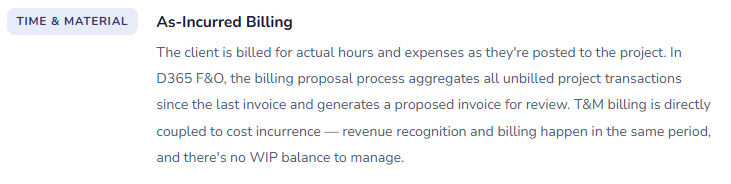
- The client pays for actual hours, expenses, and materials consumed. Revenue is recognized as costs are incurred — there’s no deferred revenue and no WIP in the traditional sense, because every billable hour or expense generates both a cost and recognizable revenue simultaneously.
- Revenue recognition: immediate on consumption.
- Billing: based on billing rules (milestone, on-account, or as-incurred).
- Common in: consulting, staffing, professional services.
📋 Fixed Price
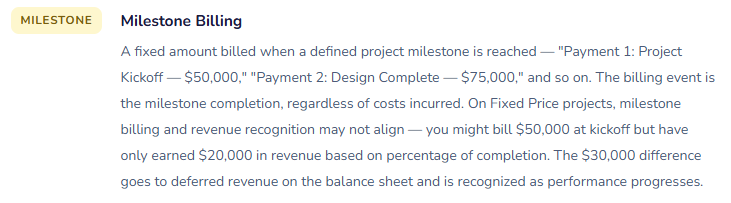
- The client pays a contracted amount regardless of actual costs. Revenue recognition is the complex part — completed contract, percentage of completion (cost-to-cost or effort-based), or sales value method. Costs accumulate in WIP until revenue is recognized. Billing may be milestone-based and may not align with revenue recognition timing.
- Revenue recognition: configurable method — completed contract or % completion.
- Billing: milestone or scheduled.
- Common in: construction, fixed-scope IT projects, government contracts.
🏗️ Investment
- Internal capital projects — constructing a building, developing software for internal use, building out a facility. Costs capitalize to a fixed asset balance sheet account rather than flowing to the income statement as incurred. No billing to a client. The asset is completed and transferred to Fixed Assets when the project is done, where it begins depreciating.
- Revenue recognition: none — costs capitalize.
- No billing.
- Common in: capital construction, internal development, facilities improvement, capitalized software development (ASC 350).
🏢 Internal
- Non-capital internal projects — R&D, process improvement initiatives, training programs, overhead projects. Costs flow to the income statement as incurred. No billing to a client, no capitalization. The project primarily serves as a cost collector and management reporting tool — enabling Finance to see how much the organization spends on specific internal initiatives without creating separate GL accounts for each one.
- Revenue recognition: none.
- No billing.
- Common in: R&D, internal improvement projects, overhead cost tracking, pre-bid proposal costs.
💰 Cost
- Similar to Internal but with a different revenue recognition structure — costs are tracked on the project with the intent of recovering them, but recovery happens through a mechanism other than direct client billing (overhead rate allocation, intercompany reimbursement, grant reimbursement). Used in situations where costs need to accumulate before the recovery mechanism is applied.
- Revenue recognition: recovery-based.
- No direct client billing.
- Common in: government grant projects, shared service recovery, intercompany cost allocation projects.
🔄 Time & Material — Subscription
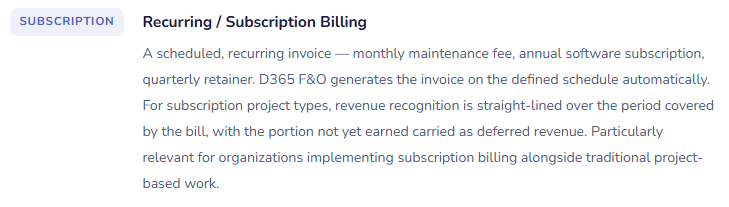
- A recurring billing arrangement — subscription fees, maintenance contracts, retainer arrangements. Revenue is recognized ratably over the subscription period (straight-line across months), and billing can be in advance (creating deferred revenue on the balance sheet) or in arrears. A relatively newer project type in D365 F&O designed specifically for recurring revenue businesses.
- Revenue recognition: straight-line over contract period.
- Billing: periodic, often in advance.
- Common in: SaaS services, maintenance contracts, managed services.
The Project Structure — Contract, Project, and WBS
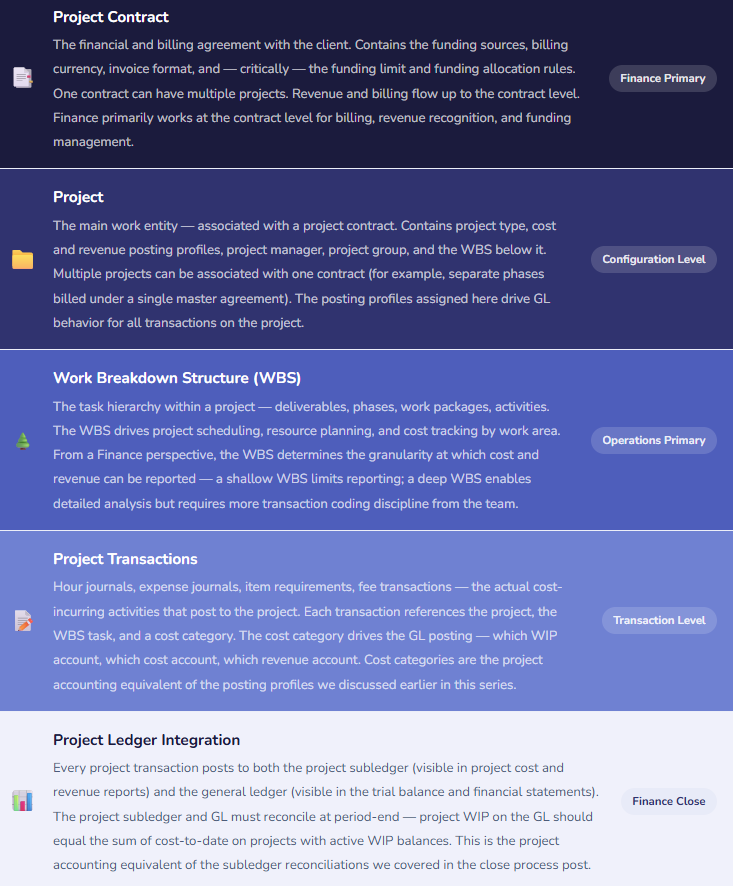
D365 F&O organizes project work through a three-level structure, and understanding each level — and which one Finance primarily interacts with — prevents a lot of configuration confusion during implementation.
Cost Categories — The Project Accounting Equivalent of Posting Profiles
Cost categories in D365 F&O serve the same function for project transactions that posting profiles serve for subledger transactions — they’re the bridge between the transaction and the general ledger. Every project cost transaction must have a cost category, and the cost category determines which GL accounts the posting hits: which WIP account, which revenue account, which cost account, and which cost-of-revenue account.
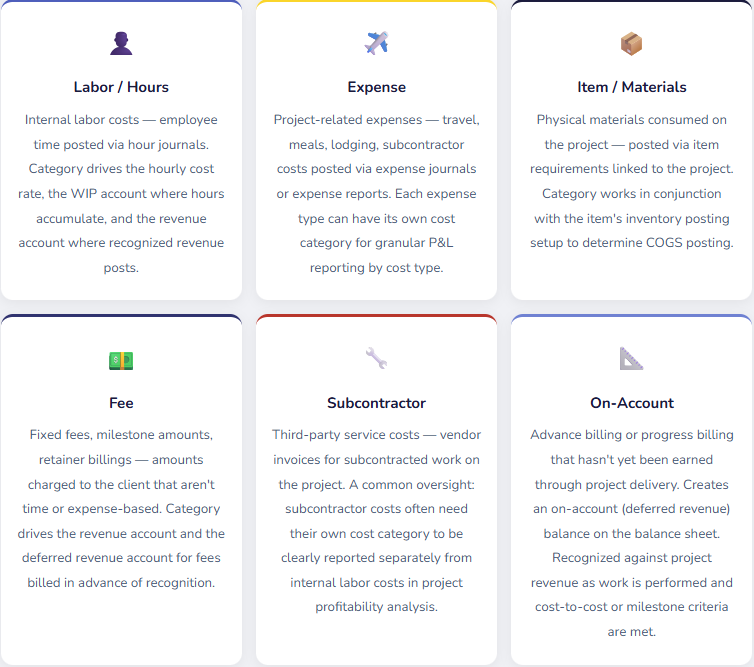
The cost category configuration is a Finance decision, not a system configuration detail. Every category has a posting profile that maps to specific GL accounts. Before you create categories in D365 F&O, Finance needs to define the GL account structure for project costs and revenue — which accounts represent project WIP, which represent project revenue, which represent project COGS, and what level of granularity the income statement should show for project cost types. Building the categories after the chart of accounts is finalized, not before it, is the right sequence.
Revenue Recognition — The Accounting Policy in System Form
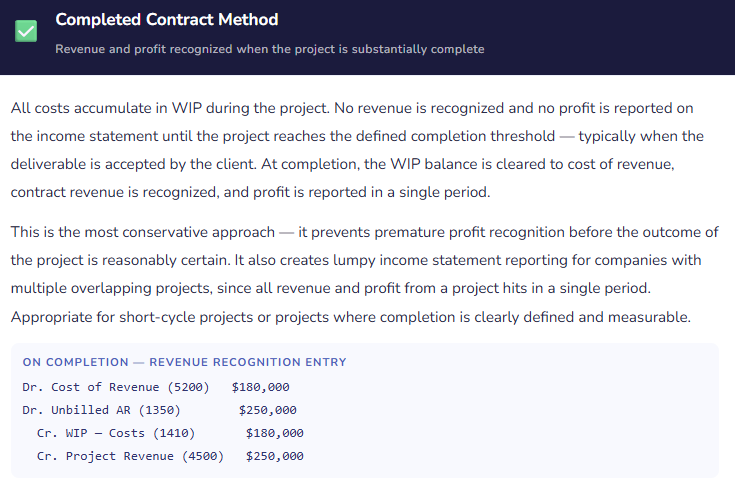
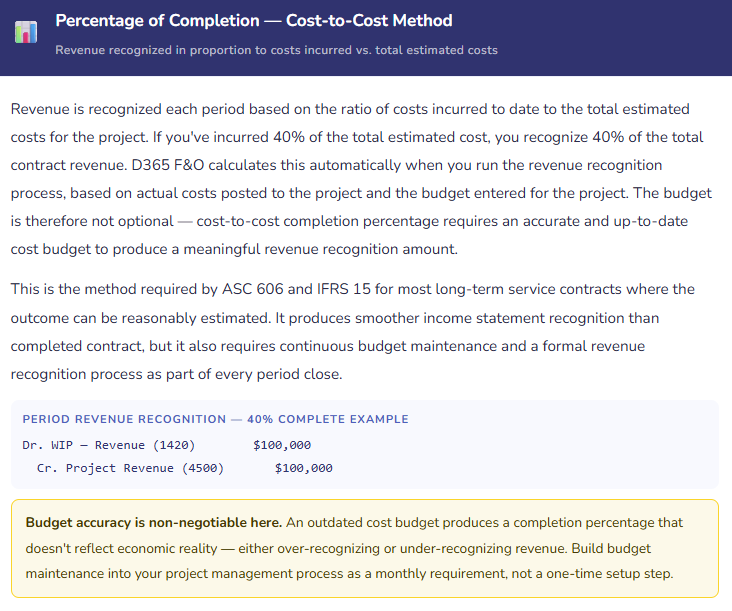
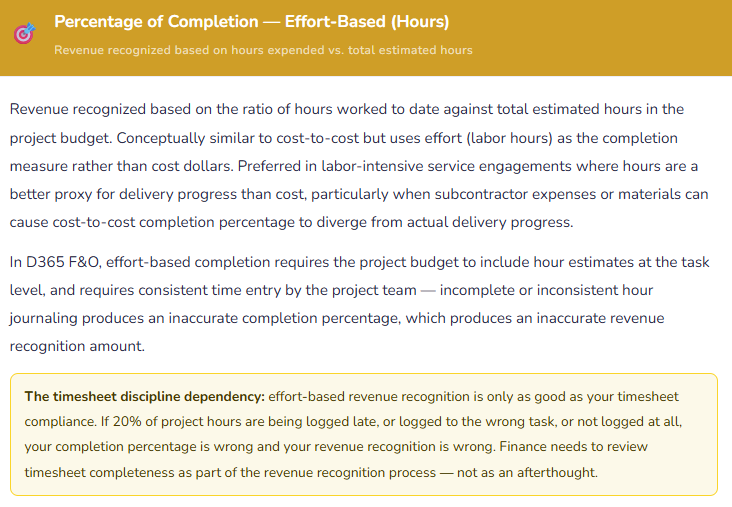
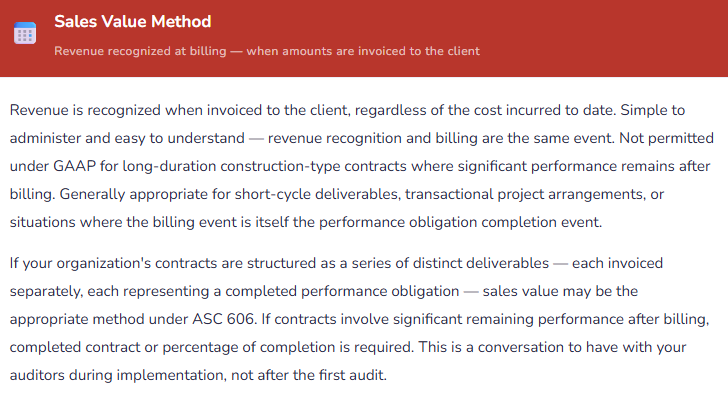
Revenue recognition for Fixed Price projects is where project accounting and Generally Accepted Accounting Principles meet most directly, and where the configuration decisions carry the most audit significance. D365 F&O supports several revenue recognition methods, and the choice between them isn’t a system preference — it’s an accounting policy that needs to be documented, applied consistently, and disclosed in your financial statement footnotes.
Billing Rules — How Clients Get Invoiced
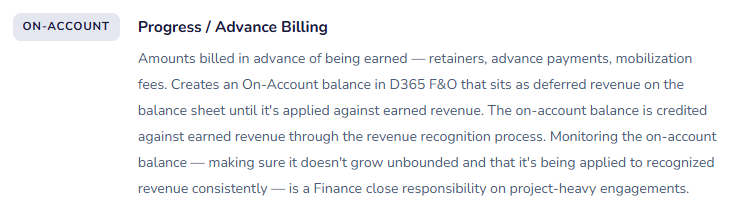
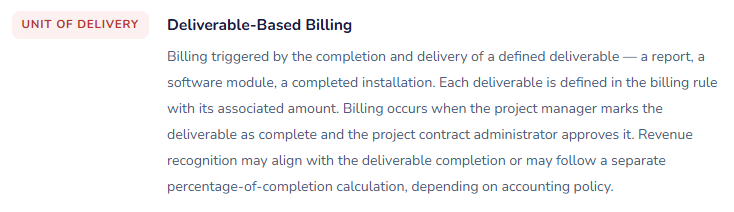
Billing rules in D365 F&O define the conditions under which a project invoice is generated — what triggers the bill, what amount is billed, and how the billing relates to revenue recognition. On Time & Materials projects, billing rules are relatively straightforward. On Fixed Price projects, billing rules and revenue recognition can be entirely decoupled from each other, which is both a feature and a source of confusion for Finance teams that haven’t explicitly designed the relationship between the two.
The Project-to-GL Flow — Tracing a Cost Through the System
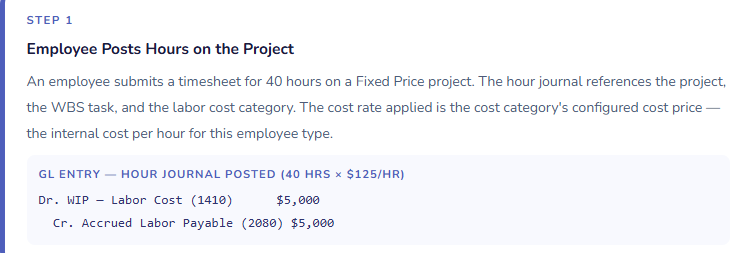
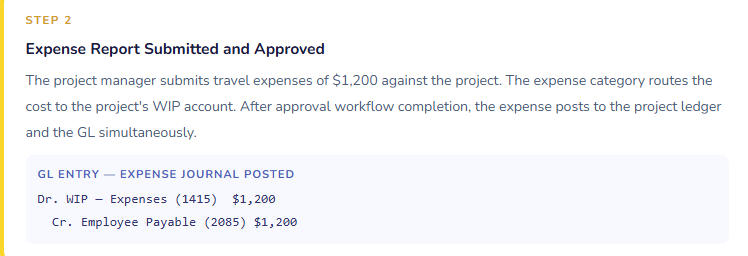
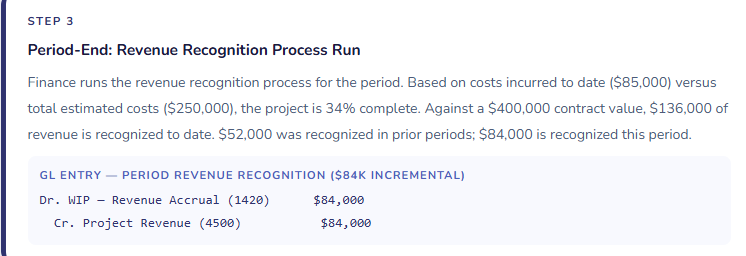
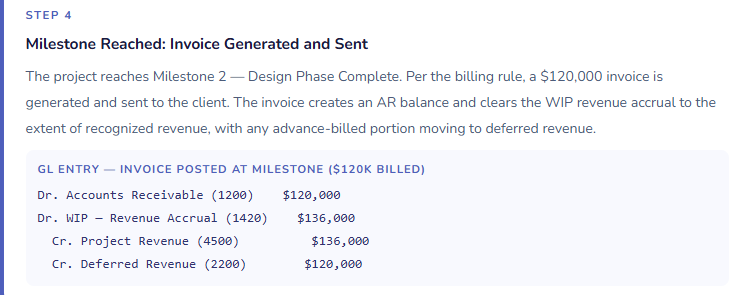
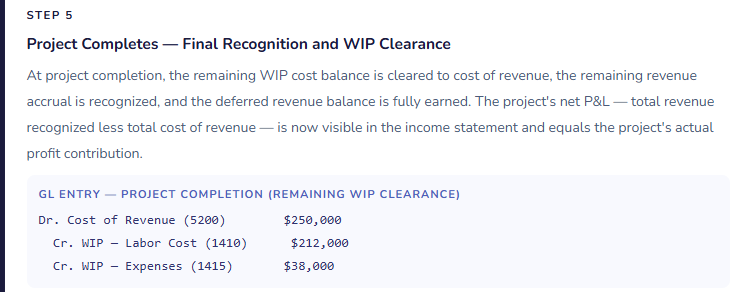
Walking through the complete GL flow for a Fixed Price project — from cost incurrence through revenue recognition to final invoicing — shows how all of these concepts connect. This is the map Finance teams need when a project balance sheet account doesn’t match what they expected.
The Project Accounting Mistakes That Generate the Most Audit Attention
⚠️ Revenue Recognition Method Selected Without Finance or Auditor Input
Revenue recognition method for Fixed Price projects is an accounting policy decision with GAAP and IFRS implications. It affects the timing of revenue reported on your income statement, the size of your WIP balance sheet position, and the disclosures required in your financial statements. In D365 F&O implementations, this decision is often made during system configuration by an implementation consultant who selects a default — because nobody on the project had a conversation about which method the organization actually needs to use. The result is an ERP that recognizes revenue on a basis that doesn’t match the organization’s accounting policy, often not discovered until the first external audit.
→ Make the revenue recognition method selection a formal Finance and auditor decision made before system configuration begins. Document it as an accounting policy. Map the chosen method to the corresponding D365 F&O configuration. If your organization has never had a formal revenue recognition policy for project-based revenue, the D365 F&O implementation is the forcing function to create one — involve your auditors in that conversation, not as a post-implementation check but as an input to the configuration decision.
⚠️ Project Budgets Not Maintained — Percentage of Completion Is Meaningless Without Them
For any project using cost-to-cost or effort-based percentage of completion, the revenue recognition calculation depends entirely on the accuracy of the project cost budget. A budget that was entered at contract signing and never updated produces a completion percentage that diverges from reality as the project scope and timeline evolve. If the budget shows $250,000 in total estimated costs and the project has already incurred $220,000 with significant work remaining, the 88% completion percentage D365 F&O calculates is wrong — and the revenue recognized against it is wrong. This is a material misstatement risk, not a minor reporting inconvenience.
→ Define budget maintenance as a project management requirement, enforced by Finance. Project managers update the cost-to-complete estimate monthly. Finance reviews projects where actual-to-budget variance is material and where the completion percentage implies a profitability level inconsistent with the project team’s assessment. In D365 F&O, use the Estimate page to review and update project estimates — it shows the current estimated total, the cost incurred, and the implied completion percentage side by side. Make this review part of the monthly close process, not an optional project health check.
⚠️ WIP Balances Growing Without Active Monitoring
WIP accounts in D365 F&O accumulate the cost of projects in progress. When projects complete and are closed in the system, the WIP clears to cost of revenue. When projects are completed physically but never closed in D365 F&O — because the project manager doesn’t know the system step is required, or because there’s a billing hold, or because the project was simply abandoned — the WIP balance grows indefinitely. I have walked into finance teams with six-figure WIP balances on their balance sheet that nobody could explain because the underlying projects had been complete for months and nobody had run a WIP aging report to identify them.
→ Run a WIP aging report monthly. In D365 F&O, the Project WIP report shows the age and composition of all open project WIP balances. Flag any project where the last cost transaction is older than your typical project cycle — 30 days for short-cycle work, 90+ days for longer engagements. Investigate why WIP is still open. Is the project complete and needing to be closed? Is there a billing dispute preventing invoice generation? Is revenue recognition being held pending a scope determination? Each of those requires a different action, and none of them should be allowed to age indefinitely on the balance sheet.
⚠️ Hour Journals Not Reviewed for Accuracy Before Revenue Recognition Runs
For effort-based percentage of completion, the revenue recognition amount is calculated from hours posted to the project. Hours posted to the wrong project, hours for the wrong period, hours not yet approved — all of these affect the completion percentage and therefore the revenue recognized. An organization that runs revenue recognition as an automated batch job without first reviewing timesheet accuracy for the period is producing financial statements based on input data that nobody has validated. The risk isn’t hypothetical: I’ve seen revenue recognition processes that produced a $200,000 variance from expectation because a project team bulk-entered prior months’ timesheets in the final days of the quarter to meet a deadline.
→ Build a timesheet completeness review into the close checklist as a required step before revenue recognition is run. In D365 F&O, the Project Timesheet Status report shows which projects have hours submitted, approved, and posted for the period. Set a close cutoff: all hours for the period must be submitted, approved, and posted by a defined date before the revenue recognition batch runs. Enforce the cutoff. Accept that some hours will occasionally be caught in the next period rather than allowing the revenue recognition calculation to be based on an incomplete record.
⚠️ Project Subledger Not Reconciled to the GL at Period Close
The project subledger and the general ledger are maintained separately in D365 F&O and can diverge in the same ways the AP or inventory subledgers can — through manual GL journal entries to project accounts, through posting errors that hit the GL but not the project ledger, or through configuration gaps in the project posting profiles. A Finance team that reconciles AP and inventory subledgers every month but doesn’t reconcile the project subledger is leaving one of the most complex balance sheet positions unverified at close.
→ Add project WIP reconciliation to the close checklist alongside AP, AR, inventory, and fixed asset reconciliations. In D365 F&O, the Project WIP report and the Project Revenue Recognition report together show the project-ledger values for WIP, unbilled revenue, and on-account balances. These should agree to the corresponding GL account balances on the trial balance. A difference means either a posting gap or a manual journal that bypassed the project subledger — both require investigation before the period closes.
Quick Reference: Do’s and Don’ts
✓ Do This
- Make revenue recognition method selection a formal accounting policy decision, with auditor input, before configuration begins
- Assign project type (T&M, Fixed Price, Investment, Internal) deliberately — it drives all downstream accounting behavior
- Build cost category configuration from the GL account structure up — not from the system defaults down
- Require monthly project budget maintenance for all projects using cost-to-cost or effort-based completion methods
- Include timesheet completeness review in the close checklist as a prerequisite to running revenue recognition
- Run a WIP aging report monthly and investigate any project with stale WIP balances
- Reconcile project WIP subledger to GL accounts at every period close
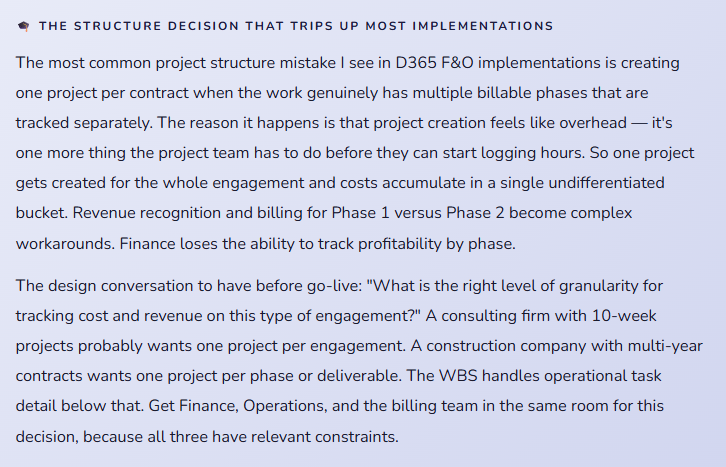
- Include Finance in the project structure design (contract/project/WBS granularity) decisions
- Define on-account balance monitoring as a Finance close responsibility
- Distinguish between subcontractor costs and internal labor in cost category design — they should report separately
- Test the full project lifecycle (create, cost, recognize, bill, close) in sandbox with real project scenarios before go-live
- Close completed projects in D365 F&O promptly — open projects with no activity accumulate WIP that Finance has to explain
✗ Don’t Do This
- Let the implementation team select a revenue recognition method without Finance and auditor involvement
- Enter project budgets at contract signing and never update them as scope and timeline evolve
- Run revenue recognition as an automated batch job without a preceding timesheet completeness review
- Allow WIP balances to age without monthly review and investigation of stale balances
- Post manual journal entries to project WIP or revenue GL accounts — it breaks the subledger reconciliation
- Omit subcontractor costs from project cost categories — they need their own category for margin reporting
- Skip the project WIP-to-GL reconciliation during close because “project accounting is Operations’ responsibility”
- Ignore on-account balance accumulation — large, aging on-account balances are a revenue recognition and client relationship risk
- Create one project for a multi-phase engagement and manage phase-level profitability outside the system
- Assume all project types use the same billing rules — they don’t, and the billing rule design should reflect the contract structure
- Wait until the first external audit to have the revenue recognition policy conversation with your auditors
- Allow projects to remain open in D365 F&O after physical completion — stale open projects produce stale WIP balances
What’s Next:
We’ve now worked through the full financial module stack in D365 F&O — from chart of accounts through close, from procurement through project accounting. The next set of posts explores the integration layer: Intercompany Accounting in D365 F&O — multi-entity transactions, intercompany AR/AP, consolidated financial reporting, intercompany elimination entries, and the configuration decisions that determine whether your consolidated close is straightforward or a monthly investigation. If your organization has more than one legal entity in D365 F&O, this post will explain how to keep them connected correctly.
Until then — select your revenue recognition method with your auditors, maintain your project budgets monthly, and close your completed projects before WIP becomes a balance sheet puzzle nobody can solve.
— Bobbi
D365 Functional Architect · Recovering Controller
Leave a Reply