

The sales tax engine, tax groups and item tax groups, the intersection model, VAT for multi-country implementations, withholding tax, tax-exempt scenarios, and the configuration mistakes that produce financial statement misstatements that survive undetected until a tax authority asks questions.
The D365 F&O Tax Engine — How It Decides What Rate to Apply
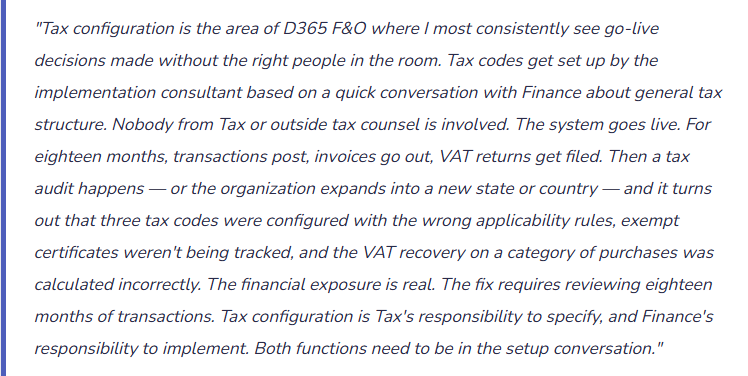
D365 F&O determines the applicable tax rate for any transaction through the intersection model — a deliberate design that separates “who is this transaction with?” from “what is being transacted?” and applies the tax code only when a specific combination of both conditions is met.
The two components are: Sales Tax Group (assigned to the customer or vendor — represents the taxability of the counterparty based on where they are and who they are), and Item Sales Tax Group (assigned to the item or procurement category — represents the taxability of what is being sold or purchased). The tax code that applies to a transaction is the intersection of the two groups — only codes that appear in both the sales tax group and the item sales tax group will apply.
Three Tax Types Finance Must Configure Separately
The GL Flow — What Actually Posts When Tax Calculates
VAT Setup for Multi-Country Implementations — What Finance Must Define
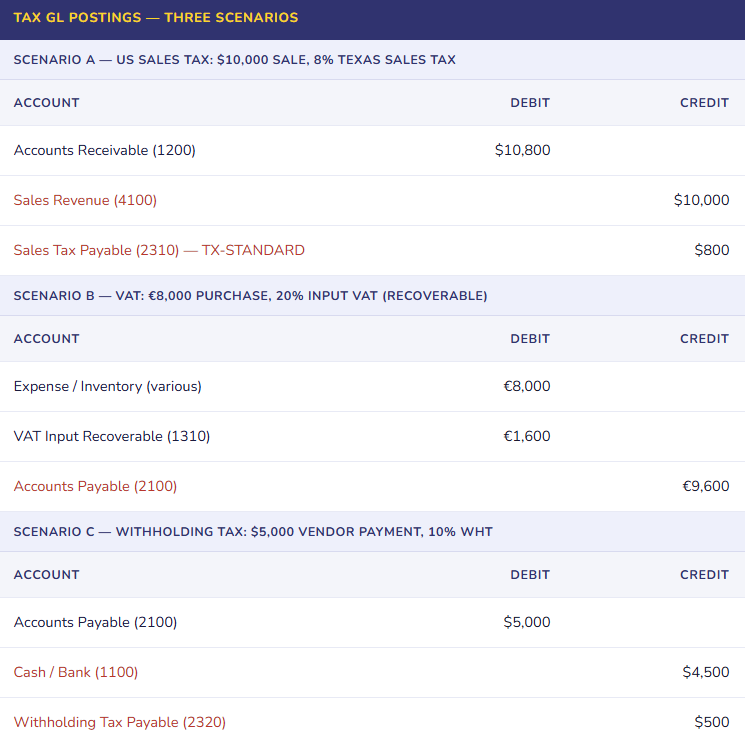
Multi-country D365 F&O implementations require VAT setup for each legal entity with tax obligations in a VAT jurisdiction. The setup isn’t simply “configure a 20% code” — it involves decisions with direct tax liability implications that must be owned by Tax, not configured by default.
| VAT Setup Element | What Finance/Tax Must Define | Why It Matters |
|---|---|---|
| VAT Registration Number | The legal entity’s VAT registration number for each jurisdiction, configured in the legal entity address and tax registration setup | VAT numbers must appear on invoices in most VAT jurisdictions. Missing or incorrect VAT numbers produce invoices that don’t meet the legal requirements for the customer to recover input VAT — a customer relationship problem, not just a compliance one. |
| Input VAT Recovery Rate | The percentage of input VAT that is recoverable based on the entity’s business activities. Fully taxable businesses: 100% recovery. Mixed businesses (taxable and exempt activities): partial recovery percentage based on the applicable partial exemption method. | Setting 100% recovery for an entity with significant VAT-exempt activities overstates the VAT asset on the balance sheet and understates expense. The tax authority will assess the difference — with penalties and interest — when the VAT return is reviewed. |
| Reverse Charge VAT | Cross-border B2B services and certain goods categories shift VAT liability from the supplier to the buyer under reverse charge rules. The buyer accounts for both output VAT (owed) and input VAT (recoverable) simultaneously — net cash impact is zero for fully recoverable businesses but both entries must post. | Failing to configure reverse charge results in no VAT posting on transactions that require it — an understatement of both VAT output liability and input recovery in the VAT return. Tax authorities specifically audit cross-border transaction VAT treatment. |
| Cash Accounting / Conditional Tax | Some jurisdictions allow (or require for smaller businesses) VAT on a cash basis — VAT is due when payment is received or made, not when the invoice is raised. D365’s “conditional sales tax” feature handles this. Must be deliberately activated and configured. | A business eligible for cash basis VAT that doesn’t activate it is paying VAT on invoiced amounts before collecting cash — a timing-driven cash flow disadvantage. A business not eligible that inadvertently activates it understates its VAT liability. |
| VAT Period and Settlement Account | The VAT settlement period defines how frequently VAT returns are filed (monthly, quarterly). The settlement process nets output VAT against input VAT and posts the balance to a VAT settlement/payable account for remittance. | The settlement account is the balance sheet account that carries the net VAT balance until it is paid to the tax authority. It must be designated specifically — not lumped with general tax payable — because the VAT authority treats it as a trust account and audits it accordingly. |
Withholding Tax — The AP Module Extension Finance Frequently Overlooks
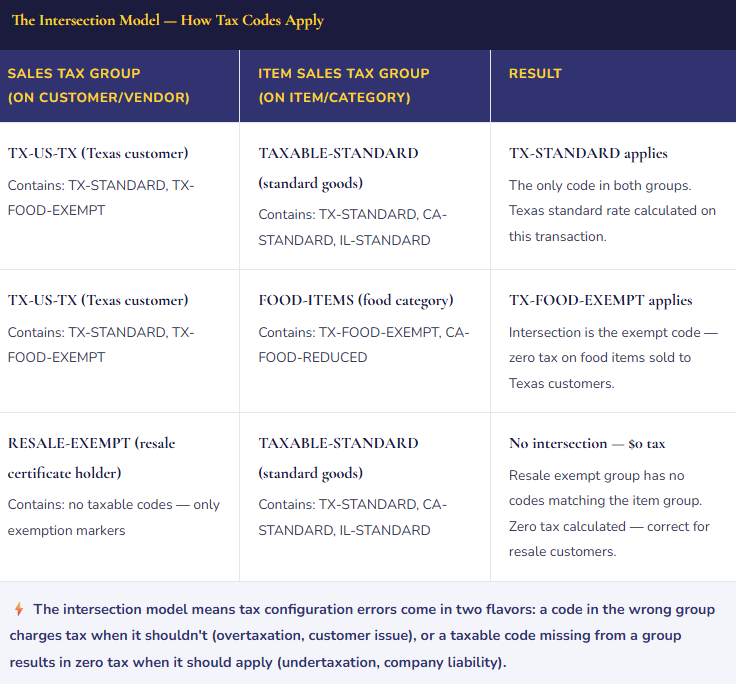
Withholding tax in D365 F&O operates through a module that is separate from the sales tax engine and is activated at the vendor level. Vendors subject to withholding (contractors, royalty recipients, interest-paying counterparties) are configured with a withholding tax group that specifies the applicable rate and the minimum payment threshold above which withholding applies. At payment time, D365 calculates the withholding amount, reduces the payment to the vendor by that amount, and posts a withholding tax payable entry for subsequent remittance to the tax authority.
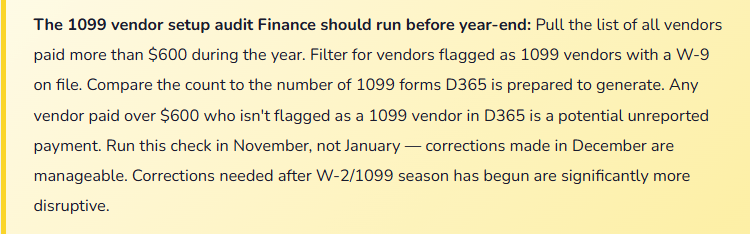
The 1099 reporting that most US-based Finance teams are familiar with is the downstream output of withholding tax setup — the annual 1099/1096 filing that reports vendor payments subject to information reporting to the IRS. In D365 F&O, 1099 reporting is driven by the vendor’s 1099 configuration (Box designation, TIN) and is generated through the Tax module’s 1099 reporting functionality using Electronic Reporting configurations. The data quality of the 1099 filing is entirely dependent on whether vendor tax information was set up correctly and whether the withholding group was applied to the right vendors at the right threshold.
Five Tax Configuration Mistakes That Create Real Financial Exposure
⚠️ Tax Codes Configured Without Tax Counsel Involvement — Applicability Rules Are Guesses
- The implementation consultant configured US sales tax codes based on a conversation with the controller about “what states we sell into.” Nobody from Tax or outside tax counsel reviewed the applicability rules — which item categories are taxable, what the nexus thresholds are, which customers qualify for exemption. The codes were set up in two hours. The system went live and processed two years of transactions. A voluntary disclosure review initiated before expanding into two new states discovers that one product category sold in three states was configured as taxable when it qualifies for a manufacturing exemption in two of those states — and as non-taxable in one state where it is, in fact, taxable. The combined over-collection and under-collection is material. The remediation involves customer refunds, amended returns, and back payments with interest.
- Fix: Tax code applicability rules are a Tax question — what is taxable, where, and to whom. The answer involves legal analysis of state statutes, product taxability determinations, and nexus analysis that a controller or implementation consultant cannot reliably perform without tax expertise. Involve Tax counsel in the tax code design session. Document the taxability determination for each product category and each state. Treat those determinations as the authoritative source for tax code configuration. Review them when products change, when you enter new states, and when tax law changes.
⚠️ Exempt Customer Certificates Not Tracked — Audit Leaves the Company Holding the Liability
- Customers with resale certificates, manufacturing exemptions, or non-profit exemptions were set up with a “RESALE-EXEMPT” sales tax group so no tax calculates on their invoices. But nobody established a process for collecting, verifying, and storing the exemption certificates that justify the zero-tax treatment. The certificates — which should be updated on the state’s schedule (typically every three to five years) — were collected at account setup years ago and nobody has tracked renewals. A state sales tax audit samples 200 transactions with zero tax charged. The auditor asks to see the exemption certificate for each customer. For 60 of them, the certificate is expired, was never collected, or doesn’t cover the product category sold. The company owes the tax that should have been collected from those customers — because the legal obligation for uncollected tax falls on the seller when valid exemption documentation isn’t on file.
- Fix: Tax exemption certificate management is a business process that must be defined before the first exempt transaction posts. Every customer in an exempt sales tax group needs an active, valid exemption certificate on file covering the products purchased and the state of transaction. Build a certificate tracking process — collection, filing, renewal reminder, expiration — and connect it to the customer’s exempt tax group status in D365. When a certificate expires without renewal, the customer’s tax group should revert to standard taxable. This is not a D365 configuration issue; it is a business process discipline issue that prevents a configuration from creating liability.
⚠️ VAT Input Recovery Rate Set to 100% for a Mixed-Activity Business — Balance Sheet Overstates VAT Asset
- A financial services company uses D365 F&O with operations in the UK. Their business mix is approximately 40% VAT-taxable services (advisory) and 60% VAT-exempt services (regulated financial products). Input VAT recovery is limited to the taxable proportion — roughly 40% in this case. But the system was configured with 100% input VAT recovery because “that’s the default and the implementation team didn’t ask about exempt activities.” For eighteen months, all input VAT on purchases is flowing to the VAT recoverable asset account in full. The VAT returns filed use 100% recovery. HMRC reviews the return and calculates the partial exemption method — the company has over-claimed approximately £280,000 of input VAT recovery. The assessment comes with an interest charge and a potential penalty for inaccurate returns.
- Fix: Partial exemption VAT recovery requires a specific calculation methodology agreed with the tax authority (standard method, special method, or sector-specific method). Finance and Tax must determine the applicable recovery percentage before the VAT setup is configured. The recovery rate must be reviewed annually as business mix changes. For businesses with significant VAT-exempt activities, this is one of the highest-exposure configuration decisions in D365’s tax setup. Do not accept a default without understanding whether the entity’s business mix makes 100% recovery appropriate.
⚠️ Withholding Tax Not Configured for Contractor Vendors — 1099 Data Is Incomplete
- The organization uses independent contractors paid through AP. At go-live, withholding tax setup was scoped as “a phase two item” — it was on the project plan but didn’t make the go-live cutoff. Contractors were set up as vendors, invoices processed, payments made. At year-end, the 1099 reporting run from D365 produces forms for zero contractors — because no vendor had a withholding tax group assigned, no Box 7 designation was set, and no TIN was recorded in the format the 1099 reporting module requires. Finance spends the first two weeks of January manually compiling payment totals from payment history, cross-referencing W-9s from the accounting folder, and manually preparing 1099 forms outside D365. Late filing exposure exists for forms not ready by the January 31 deadline.
- Fix: Withholding tax and 1099 configuration is not a phase two item — it is a go-live requirement if the organization pays contractors, rents, royalties, or interest. The configuration is not complex, but it requires a complete vendor list review at go-live to ensure every vendor subject to 1099 reporting has the correct Box designation, TIN, and withholding group assigned. Run a test 1099 extraction in December using the full year’s payment data. Compare the output to the expected list of reportable vendors. Resolve gaps before year-end. January corrections to 1099 data after payments have been distributed are operationally painful and legally risky.
⚠️ Single Tax Code Used for Multiple Jurisdictions — Filing Produces Wrong Jurisdiction-Level Amounts
- To simplify setup, a single sales tax code (“SALES-TAX-8PCT”) was created and used for multiple states that happen to have similar rates — Illinois at 6.25% state rate, some Texas jurisdictions at 8%, some California jurisdictions near 8%. The code was set at 8% and applied broadly. The tax calculation produces approximately correct totals — close enough that nobody noticed. But the tax remittance process requires filing state-by-state, county-by-county returns with the correct amounts for each jurisdiction. The single-code approach means D365 cannot attribute the collected tax to the correct jurisdiction. The state-level tax reports from D365 show all collected tax in the single code’s settlement account with no jurisdiction breakdown. Filing accurate state and local returns requires manually attributing the collections by customer ship-to address — a project that grows more difficult with each period of accumulated undifferentiated tax data.
- Fix: One tax code per rate-jurisdiction combination — not one code per rate. US sales tax requires state-level, county-level, and sometimes municipal-level codes that map to the specific tax authority receiving remittance. Yes, this means more codes. It also means D365 produces jurisdiction-specific tax liability data that makes the state and local return preparation an automated process rather than a manual reconciliation. For organizations selling into multiple US jurisdictions, a tax compliance software integration (Avalara, Vertex) that maintains jurisdiction rates and integrates with D365 is worth evaluating — it handles the rate proliferation and provides automatic nexus tracking.
Do This / Don’t Do This
✓ Do This
- Involve Tax counsel in tax code applicability rule design — taxability determinations require legal analysis
- Define one tax code per rate-jurisdiction combination for US sales tax
- Create a written taxability determination for each product category and customer type
- Establish an exemption certificate collection, tracking, and renewal process before first exempt transaction
- Confirm partial exemption VAT recovery rate with Tax before configuring input VAT recovery
- Configure withholding tax and 1099 vendor setup at go-live — not phase two
- Run a test 1099 extraction in December against full-year payment data
- Separate VAT settlement accounts from general tax payable
- Review tax configuration when products change, when entering new jurisdictions, and when tax law changes
- Consider tax compliance software integration (Avalara/Vertex) for multi-state US organizations
✗ Don’t Do This
- Configure tax codes without Tax counsel input on applicability rules
- Use a single tax code for multiple jurisdictions to simplify setup
- Set exempt customer tax groups without a certificate management process behind them
- Accept 100% VAT input recovery without confirming the entity has no exempt activities
- Defer withholding tax and 1099 setup to phase two
- Treat tax configuration as final at go-live — tax law changes require ongoing maintenance
- Ignore the nexus analysis — the Wayfair decision expanded nexus exposure for remote sellers materially
- Skip the year-end 1099 test extraction — surprises in January are operationally and legally expensive
Up Next:
Tax configuration handles the obligations on revenue and payments. Next post covers how employees themselves interact with Finance: Expense Management and Travel & Expense in D365 F&O — expense categories and policies, the expense report workflow, project-coded expenses, per diem, corporate card integration, the GL flow from expense report to ledger, and the approval and audit controls that keep T&E from becoming the line item that internal audit always finds something in.
— Bobbi
D365 Functional Architect · Recovering Controller
Leave a Reply