

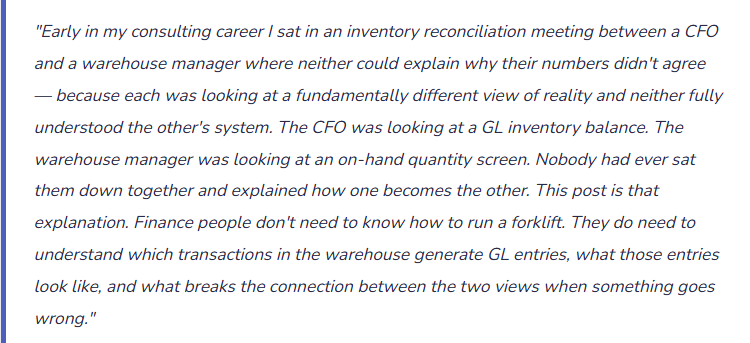
Location hierarchies, receiving and picking, the Basic vs. WMS decision, cycle counting, and — most importantly for Finance — exactly which warehouse transactions generate GL entries and why.
The Finance-Relevant Question About Warehouse Management
Warehouse Management in D365 F&O is a large module with enormous operational depth — warehouse automation, mobile device workflows, wave processing, containerization, carrier integration, dock management. If you’re an Operations Director or a Warehouse Manager, all of that matters. If you’re a Controller, an AR Manager, or a Finance Business Partner implementing D365 F&O, what matters is a specific subset: the points in the warehouse process where inventory transactions post to the GL, how those postings are controlled, and what creates reconciliation differences between the inventory system and the financial statements.
That’s the lens this post uses. I’m going to explain how warehouse management works in D365 F&O, but I’m going to anchor every concept to its financial consequence. By the end, you should be able to look at any inventory GL variance and trace it back to which warehouse process either worked correctly or broke down.
The Storage Dimension Hierarchy — How D365 F&O Organizes Physical Space
Before any transaction can be processed, D365 F&O needs to know where inventory physically lives. The storage dimension hierarchy is how the system represents physical space — and how it connects physical location to inventory valuation. Understanding this hierarchy is the prerequisite to understanding every other concept in warehouse management.
🌐Legal Entity (Company)
Financial Boundary: The top-level accounting entity. Inventory belonging to separate legal entities should never share a site — intercompany boundaries in D365 F&O are at the legal entity level, and mixing entities at the site level creates accounting complications that are very hard to unwind.
🏭 Site
GL Dimension Driver: A physical location or campus — a manufacturing plant, a distribution center, a retail location cluster. Sites are critical because inventory posting profiles in D365 F&O can be configured at the Site level, meaning inventory stored at different sites can post to different GL accounts. Finance uses this to separate inventory by business unit, geography, or function on the balance sheet.
🏢 Warehouse
Operational Unit: A distinct storage facility within a site — Receiving Warehouse, Finished Goods Warehouse, Quarantine Warehouse, Returns Warehouse. A site can have multiple warehouses. Warehouses can also carry dimension values that affect GL posting. The distinction between “quarantine” and “available” inventory frequently requires separate warehouse configuration rather than a simple status flag.
📍 Location
Operational Detail: A specific storage position within a warehouse — aisle/rack/bin in WMS environments, or a broader area designation in simpler setups. Locations are optional at the financial statement level — they drive operational execution (put goods in bin A-03-02, pick from A-03-02) but don’t typically affect GL posting. What matters financially is that inventory moves between locations correctly so quantities are accurate.
📦 License Plate (WMS only)
WMS Advanced: A unique identifier for a physical unit of inventory — a pallet, a container, a tote. License plate tracking is a WMS-Advanced capability that enables lot-level or pallet-level traceability. When license plates are active, every piece of inventory has a physical identifier that ties its quantity and location in the system to a verifiable real-world object.
🔢Serial / Batch Number
Item-Level Tracking: Item-level tracking dimensions that follow specific units or lots of inventory through the supply chain. Batch numbers are required for regulated industries (food, pharma) and critical for FIFO costing accuracy. Serial numbers enable per-unit cost tracking and are required for high-value discrete items. Both are configured on the item’s Tracking Dimension Group — a decision that cannot be easily changed after transactions are posted.
Two things Finance needs to flag during implementation design: First, the decision about which storage dimensions are active for which items is made in item setup — specifically in the Storage Dimension Group and Tracking Dimension Group assigned to each item. Once those groups are assigned and transactions have been posted, changing them is extremely difficult. Get Finance and Operations in the same room when this decision is made. Second, GL posting can be differentiated by site. If your business model requires separate balance sheet lines for inventory at different facilities, the site-level configuration in your inventory posting setup is where that differentiation happens.
Basic Warehousing vs. Advanced WMS — The Decision That Shapes Everything
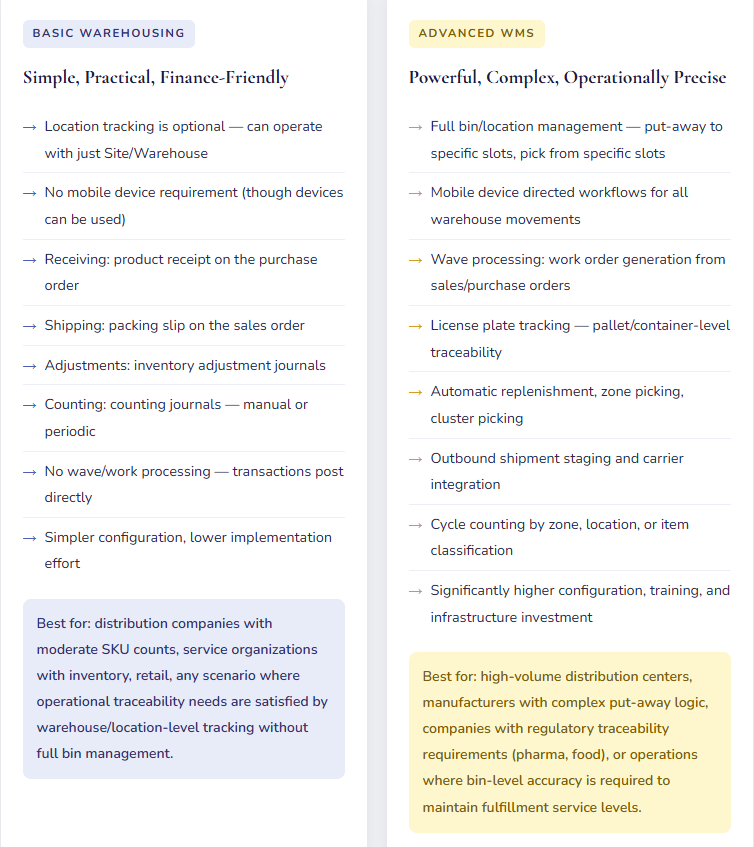
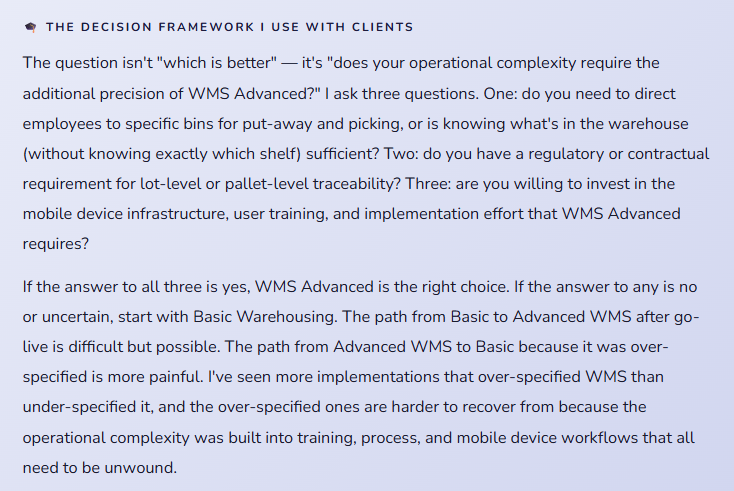
D365 F&O offers two warehouse management approaches, and the choice between them is one of the most consequential decisions in an implementation. The choice affects process complexity, user training requirements, mobile device infrastructure, licensing, and — relevant for Finance — the precision with which inventory quantities are tracked and the available controls on movement transactions.
The Warehouse Transactions That Drive Your GL — An Honest Map
This is the section Finance teams actually need. Every warehouse process below has a direct GL consequence. The goal here is to show the connection between what the warehouse does and what Finance sees — clearly enough that when a reconciliation difference appears, you can trace it back to its source.
📥Inbound — Purchase Order Receiving
Product Receipt: The Moment Inventory Enters the Financial System
When the warehouse posts a product receipt on a purchase order — either through a manual posting or a mobile device receive workflow in WMS — D365 F&O records the inventory arrival. In Basic Warehousing, this happens when the receiving team posts the packing slip. In WMS Advanced, this happens when the inbound shipment is received and a product receipt is generated from the work completion.
The product receipt is the financial event, not the physical arrival. Inventory that has arrived physically but hasn’t had a product receipt posted is not in the system and is not on the balance sheet. Finance and the warehouse need to agree on a same-day posting standard for received goods — otherwise a shipment can arrive at 4pm, sit on the receiving dock overnight, and be posted the next day in the next period.
GL Entry — Product Receipt Posted
Dr. Inventory (1300) $10,000
Cr. Purchase Accrual (2060) $10,000
🔄Internal Movement — Transfer and Adjustment
Location Transfers and Inventory Adjustments: Quantity Changes That May Trigger Value Changes
Moving inventory between locations within the same warehouse (bin to bin) generates no GL entry in WMS — it’s a pure quantity movement. Moving inventory between warehouses within the same site (Receiving to Finished Goods) also typically generates no GL entry if the same inventory account is used for both warehouses. Moving inventory between sites generates a transfer journal that may or may not have GL consequences depending on whether the sites use different inventory accounts.
Inventory adjustment journals — quantity corrections from cycle counts, damage write-offs, shrinkage — always generate GL entries. The quantity changes, the value changes, and the difference goes to the inventory adjustment expense account configured in your inventory posting setup. These are the entries that show up as “Inventory Adjustments” on your P&L and that Finance and Operations frequently discuss at month-end when the balance is higher than expected.
GL Entry — Inventory Adjustment (Quantity Decrease)
Dr. Inventory Adjustment Expense (6800) $500
Cr. Inventory (1300) $500
📤Outbound — Sales Order Shipment
Packing Slip / Shipment Confirmation: The Moment Revenue Becomes Earneable
In Basic Warehousing, inventory is relieved from the system when a packing slip is posted on a sales order. In WMS Advanced, inventory relief happens when a shipment is confirmed after picking and packing work is complete. Either way, this is the transaction that removes inventory from the balance sheet and records COGS — regardless of when the sales invoice is generated or when cash is collected.
The timing difference between shipment and invoice is important for Finance. Revenue recognition policies may require revenue to be recognized at shipment (FOB shipping point) or at delivery (FOB destination) — but COGS are typically relieved at the point of physical shipment. If your revenue policy defers revenue until delivery, you will have a brief period where COGS has been recorded but revenue hasn’t — which will look like a gross margin problem on interim P&L if the Finance team isn’t expecting it.
GL Entry — Packing Slip Posted (COGS Relief)
Dr. COGS (5100) $6,000
Cr. Inventory (1320) $6,000
🔁 Returns — Sales Return and Purchase Return
Return Orders: Reversing the Financial Transaction Correctly
When a customer returns goods, the return order in D365 F&O generates a return receipt that puts inventory back on the balance sheet and reverses the COGS entry. When you return goods to a vendor, the return order generates a return shipment that removes inventory from the balance sheet and reverses the accrual or payable entry. In both cases, the correct document type — a sales return order or a purchase return order, not a manual GL journal — is what keeps the inventory subledger and the GL in agreement.
The most common return-processing error from a Finance perspective is posting a vendor return as an inventory adjustment rather than a purchase return order. The inventory balance decreases correctly either way. But the purchase accrual or vendor payable is only reversed if a purchase return order is used — with a plain inventory adjustment, the liability balance remains even though the goods are no longer on hand.
GL Entry — Customer Return Receipt (Goods Back In)
Dr. Inventory (1320) $6,000
Cr. COGS Reversal (5100) $6,000
GRNI — The Account Finance and Operations Both Need to Understand
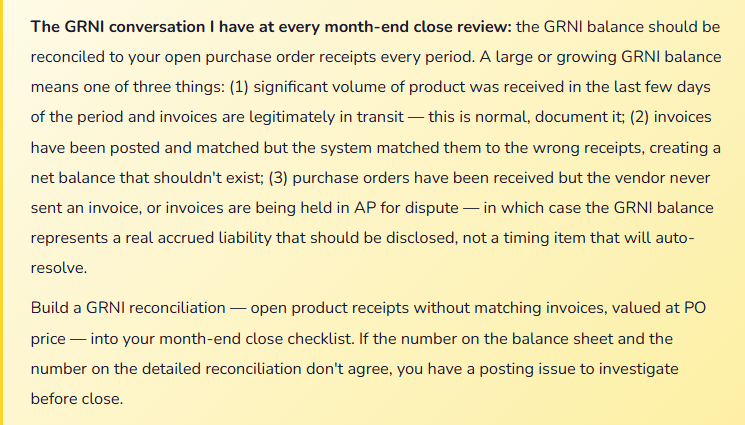
The Goods Received Not Invoiced account — called the Purchase Accrual in D365 F&O posting setup — is one of the most frequently misunderstood accounts in an inventory-based implementation. Understanding it is essential for both the month-end close process and the AP-to-GL reconciliation.
Here is how the GRNI account works: when a product receipt is posted on a purchase order, D365 F&O debits Inventory and credits the GRNI account (as shown in the GL entries above). The GRNI credit represents a liability — we’ve received the goods, we know we owe the vendor, but we haven’t yet received or matched the invoice. When the vendor invoice is matched to the purchase order and posted, the GRNI account is debited (clearing the accrual) and the vendor payable (AP) is credited. The GRNI account should trend toward zero at period end — a receipt without a matching invoice and a matched invoice without a receipt should largely offset, with a residual balance representing genuine timing items.
Cycle Counting — The Inventory Accuracy Process Finance Depends On
Physical inventory accuracy is the foundation of a reliable inventory GL balance. If the system says you have 500 units and the shelf has 480, that 20-unit discrepancy will eventually become a GL entry — either through a formal cycle count adjustment or through an unexplained COGS variance when the units are shipped and the system corrects itself. Regular cycle counting prevents the accumulation of those discrepancies into material month-end surprises.
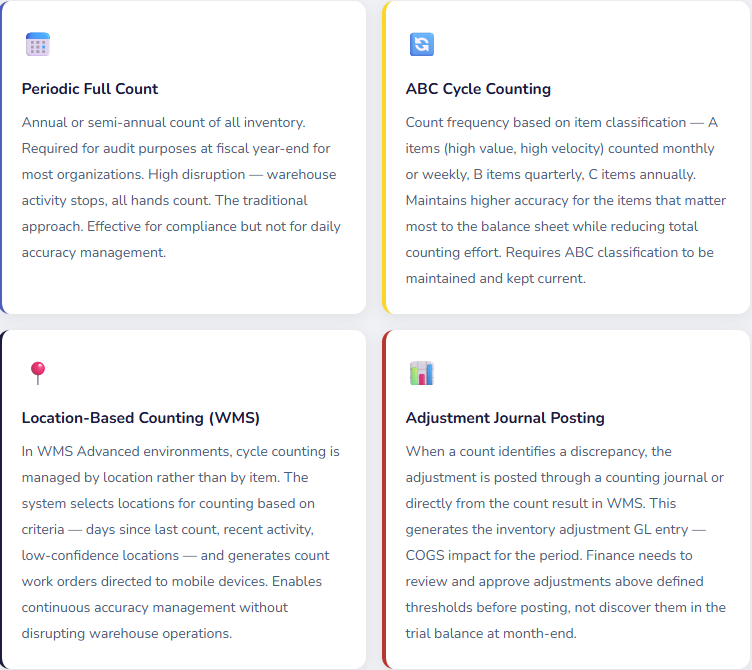
The Finance team’s role in cycle counting is not to count inventory — it’s to define the materiality threshold above which count adjustments require Finance review before posting, to ensure the GL impact of adjustments is understood before they hit the P&L, and to review the cumulative inventory adjustment balance at period-end as part of the close reconciliation. A well-run cycle counting program produces a smooth, predictable inventory adjustment line on the P&L. A poorly run one produces lumpy, unexplained variance balances that require extensive investigation to close.
What Finance Needs to Know About the Warehouse — Concise Reference
| Warehouse Event | D365 Transaction | GL Impact | Finance Action Required |
|---|---|---|---|
| Goods received on PO | Product receipt post | Dr. Inventory / Cr. GRNI accrual | None — but confirm product receipts are posted same-day as physical arrival |
| Vendor invoice matched | Vendor invoice post | Dr. GRNI accrual / Cr. AP payable | GRNI reconciliation at period-end to confirm all receipts have matching invoices |
| Inventory shipped to customer | Packing slip / shipment confirm | Dr. COGS / Cr. Inventory | Confirm revenue recognition timing policy is consistent with shipment posting timing |
| Inventory transferred between sites | Transfer journal / transfer order | May generate GL entries if sites use different inventory accounts | Confirm intersite inventory posting is configured to match balance sheet presentation intent |
| Cycle count discrepancy posted | Inventory adjustment journal | Dr. Inventory Adjustment Expense / Cr. Inventory | Review and approve adjustments above materiality threshold before posting; reconcile total monthly adjustment to budget |
| Inventory damaged / scrapped | Inventory write-off journal | Dr. Inventory Write-off Expense / Cr. Inventory | Separate expense account from routine cycle count variance for analytical clarity; ensure documented approval for scrapping |
| Customer return received | Sales return order receipt | Dr. Inventory / Cr. COGS reversal | Confirm returns are processed as return orders, not inventory adjustments — return order correctly reverses COGS |
| Quarantine / quality hold | Transfer to quarantine warehouse | No GL entry (same inventory account) unless quarantine warehouse has different posting | Confirm quarantined inventory is excluded from available-to-promise reporting and that quarantine duration is monitored for write-off consideration |
The Mistakes That Generate the Hardest Finance Conversations
⚠️ Inventory Adjustments Posted Without Finance Review or Approval
Every inventory adjustment is a P&L entry. A warehouse supervisor who posts a $15,000 cycle count variance at 3pm on a Tuesday because the count identified 30 missing units has just posted $15,000 to your income statement. Finance finds it at month-end in the trial balance, usually asks “what is this,” and then has a conversation about why a $15,000 expense appeared without any review or approval. This is not a warehouse management problem or a Finance problem — it’s a process problem created by an implementation that never defined the boundary between operational inventory management and financial transaction approval.
→ Define an adjustment approval threshold with Finance leadership during implementation. Below $X: warehouse can post directly, with mandatory reason code and documentation. Above $X: adjustment requires Finance review and approval before posting. Configure workflow or a two-step approval process in D365 F&O to enforce this. The threshold should reflect your materiality level, not an arbitrary number — $500 at a company with $50M in inventory is different from $500 at a company with $500K.
⚠️ Product Receipts Not Posted Same-Day as Physical Arrival
A shipment arrives on the last day of the period. The receiving team is busy and posts the product receipt the next morning — in the new period. The inventory is on your balance sheet in the wrong period. The GRNI accrual appears in the wrong period. If the vendor invoice was already posted, the AP liability and the GRNI credit are now in different periods and the reconciliation shows a difference until the inventory posting catches up. This happens frequently during month-end when receiving volume is high and the receiving team doesn’t know that posting date matters to Finance.
→ Train the receiving team on why posting date matters, specifically at period-end. Define a period-close receiving cutoff: “Any goods physically received before 5pm on the last business day of the month must have a product receipt posted before the period closes.” In D365 F&O, the posting date on a product receipt defaults to the system date when it’s posted — if a shipment arrived Monday but isn’t posted until Wednesday, the posting date needs to be manually backdated. Give receiving supervisors the training and access to backdate appropriately.
⚠️ Returns Processed as Inventory Adjustments Instead of Return Orders
This is the most common return-processing error with direct financial consequences. A customer returns 10 units of a product. The warehouse team posts an inventory adjustment to bring the quantity back up — because it’s faster than creating a return order. The inventory quantity is now correct. COGS is not reversed. The customer’s AR balance is not affected. The Finance team generates a credit memo separately as a standalone AR transaction that doesn’t tie back to the original invoice. Three separate entries — inventory adjustment, credit memo, and original invoice — where two should be: a return order receipt (reverses COGS, brings inventory back) and a sales credit memo generated from the return order (reduces AR correctly).
→ Document the return processing policy clearly in both the warehouse procedure manual and the AR procedure manual — and make them consistent. Physical returns of goods that were originally sold require a sales return order, which handles both the inventory receipt and the credit memo generation. The standalone inventory adjustment shortcut looks fast and creates a mess. Train both teams, enforce the correct process, and audit return transactions periodically to confirm compliance.
⚠️ Choosing WMS Advanced for a Business That Needs Basic Warehousing
I’ve been brought into several post-go-live assessments where Finance was struggling to reconcile inventory and the root cause was an overly complex WMS configuration that the warehouse team didn’t fully understand or consistently follow. Work orders weren’t being closed. Shipments were being confirmed in the wrong sequence. Receiving workflows required steps the team skipped. The result was an inventory system that was technically WMS Advanced but operationally producing less accurate results than a simple Basic Warehousing approach would have. Every complexity in WMS creates an additional opportunity for a transaction to be processed incorrectly, which creates an additional opportunity for an inventory-to-GL discrepancy.
→ Right-size the warehouse management configuration to the organization’s operational maturity and actual complexity needs. Basic Warehousing with disciplined process produces more accurate financial results than Advanced WMS with inconsistent process. If you’re in the early phases of a D365 F&O implementation and facing a choice between the two, be honest about whether your team’s current operational discipline is ready for WMS Advanced. You can always upgrade. Simplifying an over-specified system after go-live is significantly harder.
⚠️ No Reason Codes on Inventory Adjustment Journals
An inventory adjustment journal that says “Adjustment” tells Finance nothing. Six months of inventory adjustment journals that all say “Adjustment” tell Finance nothing useful about whether the adjustments are normal shrinkage, a specific vendor quality issue, a recurring damage pattern, or a theft problem that hasn’t been identified yet. The data exists in the system. Without reason codes, it’s invisible as a management information tool and visible only as an undifferentiated expense line that Finance and Operations argue about at every budget review.
→ Define inventory adjustment reason codes during implementation: Cycle Count Variance, Damage — Receiving, Damage — Warehouse, Shrinkage, Quality Rejection, Customer Return — Defective, System Error Correction. Make reason code entry required on all adjustment journals. Then run the Inventory Adjustment by Reason Code analysis monthly. Patterns that emerge from that analysis — a specific vendor’s goods arriving damaged at an elevated rate, a location in the warehouse with persistent shrinkage — are actionable management information that would never have surfaced from an undifferentiated adjustment balance.
Quick Reference: Do’s and Don’ts
✓ Do This
- Include Finance in the site/warehouse structure design discussion — posting profiles can be differentiated at the site level
- Define inventory adjustment approval thresholds before go-live — materiality-based, with Finance sign-off above threshold
- Require reason codes on all inventory adjustment and write-off journals
- Train receiving teams that posting date matters — same-day product receipt posting at period-end is a Finance requirement
- Reconcile the GRNI account to open purchase order receipts at every period close
- Process physical customer returns as sales return orders, not inventory adjustments
- Choose the warehouse management approach (Basic vs. WMS) based on operational maturity and actual complexity requirements
- Build a cycle counting program with Finance-defined thresholds for pre-posting approval
- Review the inventory-to-GL reconciliation after every inventory close, before distributing financial statements
- Get Finance and Operations in the same design workshops for Item Group and inventory posting setup
- Confirm return processing policy is documented in both the warehouse manual and the AR procedure manual — consistently
- Run a monthly Inventory Adjustment by Reason Code analysis to identify patterns
✗ Don’t Do This
- Let warehouse supervisors post material inventory adjustments without Finance review
- Allow product receipts to sit unposted overnight at period-end
- Process customer returns of physical goods as standalone credit memos without return orders
- Process vendor returns as inventory adjustments instead of purchase return orders
- Implement WMS Advanced for an organization that doesn’t have the operational maturity or complexity to justify it
- Skip reason codes on inventory adjustment journals
- Let the GRNI balance grow without monthly reconciliation to open purchase orders
- Post inventory transfers between sites without confirming the posting accounts are correctly configured
- Accept negative inventory — configure D365 F&O to prevent it
- Run inventory close after the GL period is already closed and locked
- Allow quarantined inventory to age indefinitely without a formal disposition review process
- Assume that because inventory quantities look right, the GL balances are right — reconcile them separately
The thing I want Finance teams to take away from this post: the inventory GL balance and the on-hand inventory quantity are two views of the same underlying reality, but they’re maintained by different systems and different teams. The GL balance is maintained by Finance through the posting configuration and the period close. The on-hand quantity is maintained by Operations through the receiving, movement, and shipping transactions that happen every day in the warehouse. When they agree, it means both systems are working correctly and both teams are processing transactions properly.
When they don’t agree, the reconciliation investigation requires both teams to be in the room together — because the discrepancy could be a Finance configuration issue, an Operations process issue, or a timing difference that belongs to both. The organizations that reconcile fastest are the ones that have built a shared understanding of how warehouse transactions become GL entries. That shared understanding starts with Finance people reading posts like this one, and it deepens in the joint design workshops that should happen before any of this is configured.
Up Next:
We’ve covered every financial module in the core platform and added the warehouse management context that Finance teams need to manage inventory accounting effectively. Next, we’re moving into a module that affects every organization that bills clients for professional services, manages capital projects, or tracks internal development work: Project Management and Accounting in D365 F&O — project types, contracts, cost categories, the WBS hierarchy, billing rules, revenue recognition methods, and the configuration decisions that determine whether your project costing and your financial statements tell the same story. If your organization runs time-and-materials engagements, fixed-price contracts, or internal capital projects, this post is the one that explains how D365 F&O handles all of it — and what Finance needs to own in the setup.
Until then — post your product receipts the same day goods arrive, define your adjustment approval thresholds, and please stop processing physical returns as inventory adjustments.
— Bobbi
D365 Functional Architect · Recovering Controller
Leave a Reply