

Bank account setup, electronic payments, bank reconciliation, the cash flow forecast, and the configuration decisions that determine whether treasury is a five-minute daily review or a full-time investigation.
What Cash and Bank Management Actually Covers
Let’s establish the scope. Cash and Bank Management in D365 F&O is the module responsible for:
The bank account master records — every bank account your organization maintains, configured with the information F&O needs to generate payment files, post transactions to the right GL account, and match against bank statements. The electronic payment infrastructure — the file formats, the bank-specific configurations, and the routing that turns a payment journal into an ACH file or a wire instruction that your bank can actually process. The bank reconciliation process — the matching of what you posted in F&O against what the bank reports, with structured handling of the differences that always exist at any point in time. The cash flow forecast — a forward-looking view of cash position built from actual open transactions in the system rather than from a separate planning spreadsheet. And letters of credit and bank guarantees for organizations with international trade financing needs — which we’ll note but not go deep on here.
That’s a broader scope than many finance teams associate with “bank reconciliation.” The full capability is considerably more than matching a bank statement once a month. Let’s walk through it in the order that matters for implementation.
Bank Account Setup — The Foundation for Everything Else
Every bank account your organization uses needs to be configured in D365 F&O before any payment or receipt transactions can be posted. The bank account record is more than a number — it’s the nexus of your payment infrastructure, your GL posting, and your reconciliation process, all connected through a single record that needs to be right from the start.
01 Essential Bank Account Fields
The fields that every bank account needs — no exceptions
The Bank account number and routing number are the obvious ones — and the ones that need to be verified against your actual bank records rather than entered from memory. A transposed digit in a routing number doesn’t typically cause an immediate error; it creates a problem at the moment a payment file is generated and your bank rejects it, which is an inconvenient time to discover a configuration error.
The Main account field links the bank account record to a GL account in your chart of accounts — this is the cash account that gets debited or credited whenever a bank transaction posts. One bank account, one GL account. If you have three operating bank accounts and one savings account, you should have four GL cash accounts and four bank account records in F&O. Do not route multiple bank accounts to the same GL account unless you have a specific and documented reason — it makes reconciliation impossible because you can’t distinguish which bank transactions generated which GL entries.
The Currency on the bank account determines the functional currency of transactions posted through it. A USD checking account and a EUR operating account should be separate bank account records with separate GL accounts and separate currencies. Foreign currency bank account balances are translated to your reporting currency at period end — the translation adjustment posts to the account configured in your currency revaluation setup.
Bank Account Setup Checklist
- Verify routing and account numbers against bank-issued documentation — not from prior-system records, not from memory
- Assign one unique GL cash account per bank account — no sharing
- Set the currency to match the bank account’s functional currency, not your reporting currency
- Confirm the bank account name is specific enough to be unambiguous — “Operating Account” is not a useful name when you have three of them
02 Payment Configuration — Bank-Specific Setup
The configuration that turns a payment journal into a file your bank will accept
Electronic payments in D365 F&O require a bank document type and an export format — the file format specification that matches what your bank expects. For US ACH payments, that’s typically a NACHA-formatted file. For international wires, it might be SWIFT MT101. For some banks, it’s a proprietary format they’ve defined. The export format must match exactly — your bank’s technical specifications document will define the required field positions, character encoding, and record structure. If the format is wrong, the bank rejects the file. This is not a configuration area for approximation.
The Bank account for check printing configuration, if your organization still runs checks, includes the check number series, the MICR encoding, and the check layout template. Check number series in F&O must align with your physical check stock — if your checks start at 10001 and F&O’s number series starts at 1001, your first check run produces a mismatch that causes void and reissue work. Verify check number alignment before your first check run, not during it.
For organizations with multiple payment types — ACH for most vendors, wires for international, checks for a few remaining suppliers — each payment method needs its own method of payment configuration, each linked to the appropriate bank account and export format. This configuration drives what the vendor’s payment method code on their vendor record actually does at payment run time.
Payment Configuration — What Needs to Be Tested Before Go-Live
- Generate a test ACH/NACHA file and have your bank validate the format before the first live payment run
- Run a test check print against your actual check stock and verify MICR line alignment
- Confirm check number series starting points match your physical check stock
- Test the wire payment format with your bank’s international payments team for any non-standard currency or country combinations
03 Reconciliation Setup — Configuring the Matching Engine
The settings that determine how automated the reconciliation process can be
Bank reconciliation in F&O can be highly automated — bank statement import, automatic matching of statement lines to system transactions, systematic handling of unmatched items — or it can be essentially manual. The difference lies in the reconciliation setup decisions made before the first statement is imported.
The reconciliation matching rules define the criteria F&O uses to automatically match bank statement lines to posted transactions — amount, date tolerance, transaction type, reference number. A well-configured matching rule set can automatically match 80-90% of a typical bank statement, leaving only genuine exceptions — uncleared checks, timing differences, bank fees, returned items — for manual review.
The bank statement format configuration defines how F&O reads imported bank statement files — the file type (MT940, BAI2, OFX, CSV), the field mapping, and the date format. Every bank formats their statement files differently. This configuration must be built specifically for your bank’s format — there is no universal default that works out of the box. Your bank’s technical team can provide the statement format specification; your implementation team translates that into F&O’s import configuration.
Reconciliation Setup Considerations
- Get your bank’s statement file format specification document before implementation begins — the import configuration depends on it
- Configure date tolerance on matching rules (±2 business days is common) to handle weekend and holiday posting timing differences
- Configure amount tolerance at zero — amounts should always match exactly; a tolerance here masks real discrepancies
- Test bank statement import with a real statement file in sandbox before go-live — the format errors will surface in testing, not in production
04 Bank-to-Bank Transfers — Moving Cash Between Accounts
The right way to record interbank movements
When cash moves between your own bank accounts — from an operating account to a payroll account, from a concentration account to a subsidiary account — that movement needs to be recorded in F&O as a bank transfer, not as a manual journal entry to two GL accounts. F&O’s bank transfer function creates both the debit and the credit to the respective bank accounts, ensures both transactions appear in both bank accounts’ reconciliation queues, and posts the GL entries correctly.
The reason this matters: a manual journal entry to two GL cash accounts creates GL entries that look identical to a bank transfer from the accounting perspective, but they don’t create bank account transactions in F&O’s bank management records. When you go to reconcile, the movement won’t be visible as a transaction in either bank account’s reconciliation — it’s only on the GL. You end up matching GL entries rather than bank transactions, which makes the reconciliation significantly more complicated and more error-prone.
Use the bank transfer function in Cash and Bank Management for every interbank movement. It’s a small discipline with a large reconciliation payoff.
Bank Reconciliation — Making It Actually Work
Bank reconciliation in F&O is where a lot of organizations leave significant capability on the table. The process supports automated statement import, rule-based matching, and structured exception handling — but most organizations I see are doing it semi-manually: importing the statement, matching obvious items by hand, and posting adjustments at the end. That works, but it’s slower than it needs to be and more error-prone than it should be. Let me walk through the full process as it’s designed to work.
The Bank Reconciliation Process — Automated to Manual Exception
- Import the Bank Statement
- F&O accepts bank statement files in multiple formats — MT940, BAI2, OFX, and bank-specific CSV layouts. The import maps the bank’s data into F&O’s reconciliation workspace: date, amount, description, and any reference numbers the bank includes. Each imported line becomes a bank statement transaction waiting to be matched to a system transaction or explained as a reconciling item.
- Run Automatic Matching
- After import, run the automatic matching process. F&O applies your configured matching rules — comparing bank statement lines to outstanding checks, uncleared deposits, and other open system transactions on the same bank account. Items that match on amount, approximate date, and transaction type are marked as matched automatically. In a well-configured system with current reconciliations, 80-90% of a typical statement reconciles automatically in this step.
- Review and Manually Match Remaining Items
- The unmatched items are the ones that need human attention — and they’re now a manageable list rather than the entire statement. Common reasons for non-automatic matching: the bank statement description doesn’t contain enough reference information for the rule to identify a match, the transaction date differs by more than your tolerance window, or the item is genuinely a reconciling item (an outstanding check, a deposit in transit) rather than a matching failure. Review each unmatched bank statement line and either manually match it to a system transaction or mark it as an outstanding item to carry forward.
- Post Bank Transactions for Items Not in the System
- Some bank statement lines represent transactions that should be in F&O but aren’t — bank fees, interest earned, returned items, wire charges, automatic debits. These need to be posted from within the reconciliation workspace so they appear in both the bank account and the GL. The posting creates the system transaction that then matches to the bank statement line, clearing it from the unmatched queue. Do not skip this step and leave bank fees and interest as perpetually unmatched lines — they accumulate into an unintelligible unmatched balance that makes future reconciliations harder.
- Review Outstanding Items — The Reconciling Differences
- After matching and posting, what remains are genuine outstanding items: checks that were issued but haven’t cleared the bank yet, deposits that were posted but haven’t appeared on the bank statement, items from the bank that hit the statement before the corresponding system transaction was posted. These are the reconciling items that explain why the bank balance and the book balance differ — which they always legitimately do at any point in time. The reconciliation is complete when every difference between bank and book balance is explained by a dated, identifiable outstanding item.
- Complete and Print the Reconciliation
- When all statement lines are matched or explained, mark the bank statement reconciliation as complete. F&O preserves the completed reconciliation as a historical record — including the matched items, the outstanding items, and the date of completion. Print or save the reconciliation as a supporting document for your month-end working papers. This document is a standard audit request item — the reconciliation should be findable, dated, and signed off before the period closes.
Understanding Reconciling Items — What’s Normal, What Isn’t
Every bank reconciliation has reconciling items — differences between the book balance and the bank balance that exist because the two systems record transactions on different timelines. Understanding which reconciling items are expected versus which are warning signs is a core treasury skill. Here’s the framework.
- Outstanding Checks
- Checks issued and recorded in F&O that haven’t cleared the bank yet.
- Normal — checks take time to arrive, be deposited, and clear. Should clear within 30-45 days for domestic recipients. An outstanding check older than 90 days warrants investigation: did it get lost? Is the payee expecting re-issuance?
- Normal — monitor aging
- Deposits in Transit
- Cash or checks received and posted in F&O on the last day or two of the period that haven’t hit the bank statement yet because of processing timing.
- Normal — deposits posted Friday afternoon often appear on Monday’s bank statement. Should be zero within 2-3 business days. A deposit in transit older than a week is unusual and should be investigated.
- Normal — short-lived by definition
- Bank Fees and Interest
- Service charges, wire fees, interest earned — items the bank recorded but that don’t have a corresponding system entry yet. These need to be posted through the reconciliation workspace so both sides have the transaction.
- Leaving them unmatched indefinitely creates a growing unmatched balance that makes the reconciliation unreadable.
- Post immediately when found
- Stale Outstanding Items
- Outstanding checks or deposits that have been on the reconciliation for more than 90 days without clearing.
- Not normal. Could indicate a lost check, a voided payment that wasn’t recorded, a deposit error, or in the worst case, a fraudulent transaction that needs to be investigated before it gets older. Old outstanding items are a red flag, not a harmless carry-forward.
- Investigate immediately
- NSF / Returned Items
- A customer check that bounced — the bank returned it and reversed the deposit. The customer’s payment needs to be reversed in F&O, the AR balance reopened, and the bank fee posted.
- Returned items that aren’t handled promptly in the system create a book balance that overstates actual available cash and leaves the AR understated.
- Requires prompt system action
- Unexplained Differences
- A difference between bank and book balance that can’t be attributed to any identifiable outstanding item.
- The most concerning category — this is the one that indicates either a transaction that wasn’t recorded in F&O, a transaction that was recorded incorrectly, or in serious cases, a discrepancy that requires a fraud investigation.
- An unexplained difference is never acceptable as a reconciling item.
- Never leave unexplained
Here’s the reconciliation in simplified visual form — what a clean month-end bank reconciliation looks like when everything is working correctly:
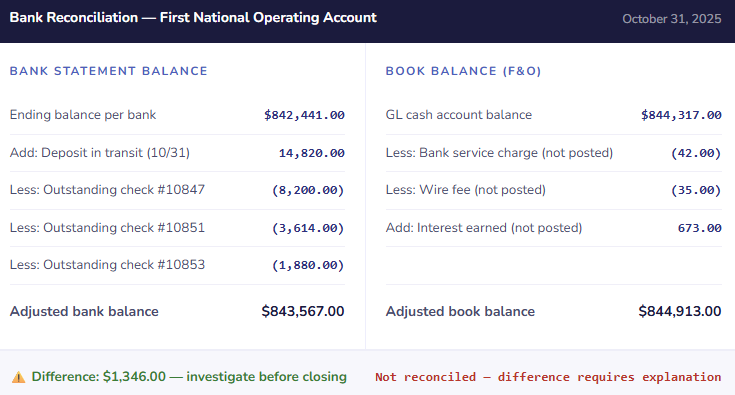
In that example — which is deliberately not balanced, because that’s the teaching moment — the adjusted bank balance doesn’t match the adjusted book balance. Before this period can close, that $1,346 difference needs an explanation. Is there a transaction the bank recorded that wasn’t entered in F&O? Is there a system entry that doesn’t have a corresponding bank transaction? The reconciliation’s job is to make that question answerable — not to paper over it.
Electronic Payment Formats — Getting This Right Before Go-Live
The payment file format configuration in Cash and Bank Management is one of those implementation items that is easy to defer, impossible to miss, and painful to fix under go-live pressure. Here is the complete picture of what needs to be configured and tested.
- ACH / NACHA
- US domestic electronic payments through the ACH network. NACHA format is standardized but banks have specific requirements around company IDs, file headers, and optional fields. Get your bank’s NACHA specs document — not the generic NACHA standard, your bank’s specific implementation requirements.
- SEPA Credit Transfer
- EU/EEA payments in euros through the SEPA network. Required for organizations with European legal entities paying European vendors. SEPA XML format (pain.001) is more standardized than ACH but still has bank-specific variations, particularly around creditor reference formats and batch handling.
- SWIFT / International Wire
- Cross-border wire payments. F&O supports standard SWIFT formats but international wires also require BIC codes, IBAN validation, and sometimes intermediary bank information. More complex than domestic formats — test with actual international payment scenarios before go-live.
- Check Printing
- Still in active use at many organizations. Requires MICR font configuration, check layout matching your physical check stock, and check number series alignment. Print a test batch against non-live check stock before your first production run — alignment errors waste check stock and require voiding.
- Bank-Specific Formats
- Some banks require proprietary file formats for treasury management integration — especially large bank cash management platforms. These require custom format configuration using Electronic Reporting (ER) in F&O. More complex to configure; Microsoft’s format library has many common banks pre-built.
- Positive Pay
- A fraud control where you send your bank a file of issued check numbers and amounts — the bank only clears checks that match the positive pay file. Requires a positive pay file format configured in F&O and a process for sending the file to the bank after every check run. Under-implemented given how effectively it prevents check fraud.
The Cash Flow Forecast — Liquidity Visibility from System Data
D365 F&O’s cash flow forecast is a feature that most organizations have available and most organizations underuse. When it’s configured and running, it gives you a forward-looking view of your expected cash position — not based on a CFO’s intuition or a manually maintained spreadsheet, but based on actual open transactions in the system: outstanding customer invoices due for collection, vendor invoices due for payment, open purchase orders representing future payment commitments, and open sales orders representing future expected receipts.
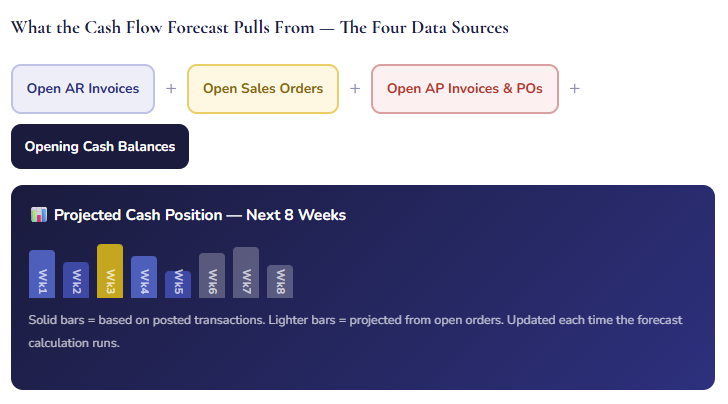
Solid bars = based on posted transactions. Lighter bars = projected from open orders. Updated each time the forecast calculation runs.
The cash flow forecast in F&O is updated by running a calculation process — manually triggered or on a scheduled batch. The output is a week-by-week or day-by-day view of expected cash inflows and outflows, with a projected balance that shows whether your cash position is comfortable or whether a shortfall is developing before it becomes a crisis.
Positive Pay — The Check Fraud Control Worth Configuring
Positive pay is a fraud prevention feature that many organizations know about and most don’t implement. The concept is simple: every time you print checks, you send your bank a file listing the check numbers, payee names, and amounts. The bank only clears checks that match your positive pay file exactly — any check presented for payment that doesn’t match gets flagged for your review before it clears.
Check fraud — using stolen or altered checks — remains among the most common forms of business payment fraud, and it’s disproportionately prevalent against mid-market organizations that don’t have the fraud detection infrastructure of large enterprise treasury functions. Positive pay is not a sophisticated or expensive control. It’s a file sent to your bank after every check run, in a format your bank specifies, generated automatically by F&O’s positive pay export process.
| Positive Pay Step | Who Does It | When |
|---|---|---|
| Configure positive pay format | Implementation team, one time — requires the bank’s file spec | During implementation; update if bank changes their format |
| Generate positive pay file | AP or Treasury — runs from F&O’s positive pay export function | Same day as every check run, before checks are released |
| Upload to bank | AP or Treasury — via bank’s portal or secure file transfer | Same day as check run; the file must reach the bank before checks can clear |
| Review bank exceptions | AP or Treasury — checks the bank’s exception list for flagged items | Daily during periods when checks are clearing; respond to exceptions within bank’s decision window (usually 24-48 hours) |
| Confirm or return flagged checks | AP or Treasury, with Controller sign-off on any discrepancy | Within the bank’s exception decision deadline — missing the window typically results in the bank returning the check by default |
The Mistakes That Make Cash Management Harder Than It Should Be
⚠️ Multiple Bank Accounts Mapped to the Same GL Cash Account
This is a setup error with persistent consequences. When two or more physical bank accounts post to the same GL account in F&O, the GL account balance tells you the combined cash position but not the individual account balances. Bank reconciliation becomes significantly more complicated — you’re reconciling a combined GL balance against two separate bank statements, and you can’t simply compare the GL to a single bank statement. Any discrepancy is harder to locate because the source could be either account. The reconciliation that takes twenty minutes for a single-account mapping can take hours when accounts are combined on the GL.
→ One GL cash account per bank account — always, without exception. Create a separate GL account for every physical bank account your organization maintains. If your chart of accounts doesn’t have enough cash accounts, add them during implementation. The granularity enables clean reconciliation and clear cash position reporting by account.
⚠️ Bank Statement Import Not Tested Before Go-Live
The bank statement import configuration — file format, field mapping, date format, encoding — needs to be tested with an actual bank statement file in the production environment before go-live, not just in sandbox. Banks format their files differently from what their documentation describes, and the discrepancy usually only surfaces when a real file is processed. Discovering a format incompatibility at the first month-end after go-live means either reconciling manually for that period or scrambling to fix the import configuration under deadline pressure.
→ Request a sample bank statement file from your bank in the exact format they will provide for daily or monthly downloads. Import it into the F&O sandbox. Verify that amounts, dates, descriptions, and reference numbers import correctly. Fix any format mapping issues before go-live. Do this for every bank account if different banks use different formats — do not assume that a format that works for one bank works for another.
⚠️ Reconciliation Not Done Monthly — Outstanding Items Accumulate
Bank reconciliation falls into arrears in organizations where it’s treated as a nice-to-have rather than a required control. One month gets missed because the close was busy. The next month is reconciled against a background of unresolved prior-month items. By month three, the outstanding item list is so cluttered with items from multiple periods that it’s difficult to identify what’s genuinely outstanding versus what’s a prior-period error that was never investigated. Stale outstanding items breed more stale outstanding items — each reconciliation is harder than the last, which makes the team less likely to do them promptly.
→ Bank reconciliation is a monthly close requirement, not optional. Add it to the close checklist. Assign a specific owner. Set a completion deadline before the financial period closes. Treat an incomplete reconciliation the same way you’d treat an unposted journal entry — as an open item that blocks the close. Reconciliations done monthly take twenty to forty minutes. Reconciliations done quarterly take days.
⚠️ Stale Outstanding Checks Left on Reconciliation Without Investigation
Outstanding checks older than ninety days on a bank reconciliation are a red flag, not a normal reconciling item. A check issued six months ago that hasn’t cleared could mean: the check was lost in the mail, the payee lost the check and needs a replacement, the check was voided in the system but not physically, or in a fraud scenario, a check was altered and cashed but the transaction modified to avoid detection. Whatever the cause, it needs to be investigated and resolved — not carried forward indefinitely as a reconciling item.
→ Add an outstanding check aging review to your monthly reconciliation procedure. Any check older than ninety days gets investigated: confirm with the payee whether they received and deposited it, confirm with the bank whether it cleared under a different reference, and if genuinely uncashed, either stop the check and reissue or move toward unclaimed property reporting per your state’s unclaimed property law. Most states require escheatment of unclaimed checks after one to five years — ignoring stale checks creates a compliance obligation in addition to a control gap.
⚠️ Electronic Payment File Format Not Tested With the Bank Before Go-Live
I mentioned this in the setup section and I’m repeating it in the mistakes section because it is that important. An ACH file with a formatting error doesn’t generate a posting error in F&O — it generates a file that looks correct to the system, gets uploaded to the bank, and gets rejected by the bank’s processing system. Depending on the timing, this means vendors don’t get paid on schedule. Depending on how the rejection is handled, it might mean a payment was technically initiated but not completed — which creates a liability on the books without a corresponding bank debit. Discovering this on a Friday payment run at 4pm is not a recoverable situation for the end of the business day.
→ Test your ACH file format with your bank’s treasury operations team before go-live — not the general 800 number, the treasury operations or corporate payments team who can actually validate the file format. Send them a test file generated from F&O’s sandbox environment with fictitious payment data. Get a written confirmation that the format is accepted before any live payment run. Schedule this test at least three weeks before go-live to allow time to address any format issues.
⚠️ NSF / Returned Items Handled as Journal Entries Instead of Proper Reversals
When a customer check is returned — NSF, account closed, stop payment — the bank reverses the deposit and charges a fee. The wrong response is to post a manual journal entry to reverse the AR credit and re-open the invoice. The right response is to use F&O’s payment reversal process, which properly unwinds the cash receipt journal entry, reopens the customer’s ledger entry, and restores the invoice to open status — all in a single transaction with a complete audit trail. Manual journal entries to reverse cash receipts create orphaned entries in the cash account that don’t match any bank transaction, which makes reconciliation harder and creates an incomplete audit trail for the collection history.
→ Train your AR and Treasury teams on the payment reversal process in F&O before go-live. Include an NSF scenario in your go-live training and have the team work through it — creating the original receipt, importing the bank statement showing the return, and using the reversal function to unwind the transaction correctly. The process is straightforward once you’ve seen it done once. The workaround of manual journal entries is seductive in the moment and problematic in every future reconciliation.
Quick Reference: Do’s and Don’ts
✓ Do This
- Assign one unique GL cash account per physical bank account — no shared accounts
- Verify bank routing and account numbers against bank-issued documentation before entering them
- Get the bank’s statement file format specification before configuring the import
- Test bank statement import with a real file in the production environment before go-live
- Test the ACH/payment file format with your bank’s treasury operations team at least three weeks before go-live
- Align check number series in F&O with your physical check stock before the first check run
- Configure positive pay if you run checks — send the file the same day as every check run
- Configure bank reconciliation matching rules to automate the routine matching work
- Complete bank reconciliation every month as a required close step with a designated owner
- Post bank fees, interest, and returned items through the reconciliation workspace — not as manual journal entries
- Investigate outstanding checks older than ninety days — don’t carry them forward indefinitely
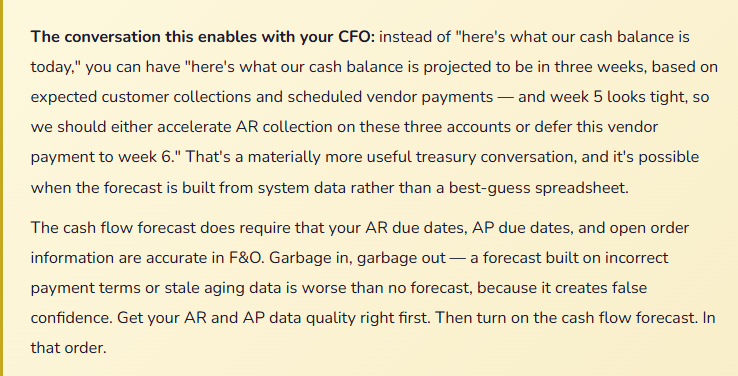
- Use the cash flow forecast once AR and AP data quality is reliable
✗ Don’t Do This
- Map multiple bank accounts to the same GL cash account
- Enter bank routing or account numbers from memory — verify against bank documents
- Skip bank statement import testing and discover format issues at first month-end
- Generate a live ACH payment file without validating the format with the bank first
- Leave bank reconciliation undone because the close was busy
- Allow stale outstanding items to accumulate without investigation
- Reverse NSF / returned payments with manual journal entries — use the payment reversal process
- Use bank transfers as manual journal entries — use F&O’s bank transfer function
- Enable the cash flow forecast before AR and AP data quality is reliable — forecast built on bad data is worse than no forecast
- Skip positive pay configuration because checks “aren’t that many” — check fraud is indifferent to volume
- Treat an unreconciled difference as an acceptable carry-forward — every difference needs an explanation
A final thought on what clean cash management actually gives you: when bank reconciliation is current, bank accounts are properly configured, electronic payments are working reliably, and the cash flow forecast is populated with real data — your treasury function stops being reactive and starts being informative. You know your actual cash position. You know where it’s going. You know when payments will clear and when customer collections are expected. You can answer “can we make this payment?” in minutes, not hours, because the data is in the system and the system is trusted.
That level of confidence in your cash data is not automatic — it’s built through setup discipline, reconciliation discipline, and the unglamorous work of maintaining data quality across AR, AP, and the bank accounts that connect them. The module makes it possible. The discipline makes it real. And having worked on both sides of this — as a controller who once spent three days tracking down a $47,000 reconciling difference that turned out to be a voided check entered in the wrong month — I can tell you that the discipline is worth every ounce of effort it requires.
Up Next:
We’ve worked our way through the financial foundations, procurement, inventory, collections, and treasury. Next, we’re moving into a module that affects every organization with physical assets — and confuses nearly every finance team that implements it for the first time: Fixed Assets in D365 F&O — asset books, depreciation methods, acquisition posting, disposals, and the configuration decisions that determine whether your fixed asset register and your GL agree at year end. If you’ve ever had a fixed asset audit where the physical count and the system register didn’t tie, that post is written for you.
Until then — reconcile your bank accounts, configure positive pay, and please don’t map two bank accounts to the same GL cash account. Your future reconciling self will be grateful.
— Bobbi
D365 Functional Architect · Recovering Controller
Leave a Reply