
Post #019 – AI In Microsoft ERP
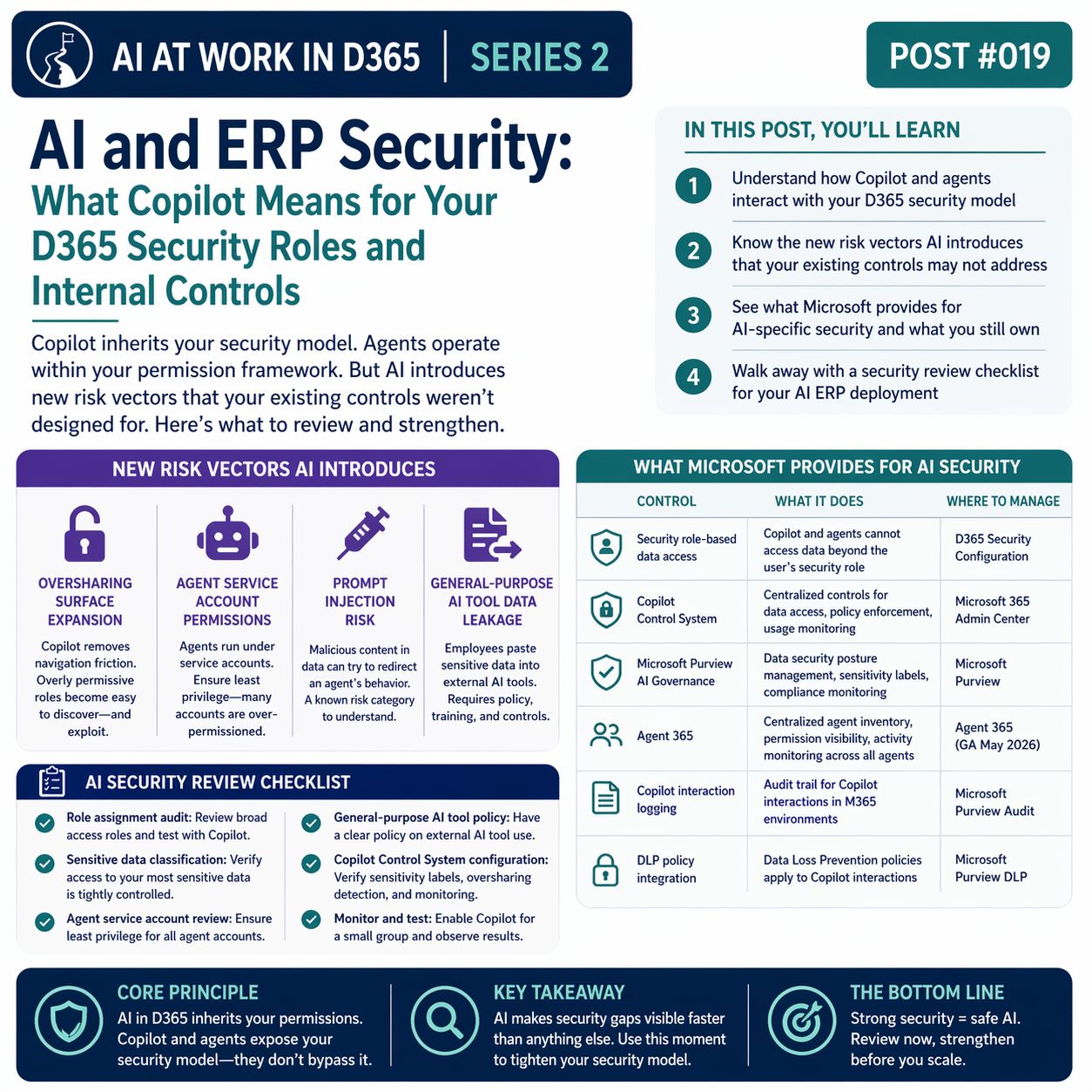
Copilot inherits your security model. Agents operate within your permission framework. But AI introduces new risk vectors that your existing controls weren’t designed for. Here’s what to review and strengthen.

The Core Security Principle: AI Inherits Your Permissions
In D365, Copilot and AI agents operate within the security role assigned to the user (or service account) running the interaction. Copilot cannot access data that the user doesn’t have permission to access. An agent running in the context of a user’s session cannot take actions that the user couldn’t take directly. This is a foundational design decision that Microsoft has been consistent about — and it’s the right one for a financial system.
The practical implication: the biggest AI security risk in most D365 environments isn’t the AI itself. It’s the existing security model — and specifically, whether that model is as tight as you think it is. AI queries make it faster and easier to access data, which means overly permissive roles are more likely to be discovered and more likely to be exploited.
New Risk Vectors That AI Introduces
- 🔓Oversharing Surface Expansion
- When users could only navigate D365 forms manually, overly broad security roles were partially mitigated by the friction of form navigation. Copilot removes that friction. A user with “view all” access who never used certain forms now has natural language access to all of it. Review role assignments with this in mind — particularly for senior roles that historically received broad access as a matter of convenience.
- 🤖Agent Service Account Permissions
- When AI agents run on behalf of an organization (not a specific user), they need a service account. The permissions assigned to that service account determine what the agent can access and do. Principle of least privilege applies — but many organizations configure service accounts with broader access than the agent actually needs. Review agent service account roles carefully.
- 💉Prompt Injection Risk
- Prompt injection is an attack pattern where malicious content embedded in data (an invoice description, a document field) attempts to redirect an AI agent’s behavior. In an ERP context, this is relatively constrained — D365 agents are more narrowly scoped than general-purpose AI — but it’s a known risk category that your security team should understand, especially as agents take more autonomous actions.
- 📤General-Purpose AI Tool Data Leakage
- This is the risk most finance teams are actually most exposed to, and it’s not a D365 issue — it’s a people and policy issue. Employees pasting financial data into ChatGPT or similar tools to get analysis done faster. Sensitive vendor information, employee data, customer records going into tools that aren’t covered by your data agreements. This requires policy, training, and — ideally — technical controls that limit what can be pasted into unapproved AI tools.
What Microsoft Provides for AI-Specific Security
| Control | What It Does | Where to Manage |
|---|---|---|
| Security role-based data access | Copilot and agents cannot access data beyond the user’s security role | D365 Security Configuration |
| Copilot Control System | Centralized controls for data access, policy enforcement, usage monitoring | Microsoft 365 Admin Center |
| Microsoft Purview AI Governance | Data security posture management, sensitivity label enforcement, compliance monitoring for AI interactions | Microsoft Purview |
| Agent 365 | Centralized agent inventory, permission visibility, activity monitoring across all agents | Agent 365 (GA May 2026) |
| Copilot interaction logging | Audit trail for Copilot interactions in M365 environments | Microsoft Purview Audit |
| DLP policy integration | Data Loss Prevention policies apply to Copilot interactions | Microsoft Purview DLP |

A Security Review Checklist for AI in D365
Before expanding AI capabilities — especially agent deployment — run through these specific security review items:
Role assignment audit. Review which users have which security roles. Focus specifically on roles with broad “view all” access. Have someone ask Copilot what data those roles can see — the answer may be illuminating.
Sensitive data classification. Identify the data in your D365 environment that would be most sensitive if exposed — employee compensation, vendor banking details, customer credit information. Verify that the security roles limiting access to this data are correctly configured and enforced.
Agent service account review. For any agent operating in your environment, identify the service account it runs under and verify that account’s role assignments follow least privilege.
General-purpose AI tool policy. Confirm your organization has a written policy on what data employees may or may not put into external AI tools. If you don’t have one, you have a gap regardless of how well D365 itself is secured.
Copilot Control System configuration. If you’re running M365 Copilot, verify that the Copilot Control System is configured — sensitivity label enforcement, oversharing detection, usage monitoring are all worth checking.

📚 Go Deeper — Microsoft Resources
- Data, Privacy, and Security for Microsoft 365 Copilot
- Security for Microsoft 365 Copilot — Architecture and Controls
- Copilot Control System — Enterprise AI Governance Tools
- Microsoft Purview for AI Security and Compliance
The security conversation around AI in D365 is best framed as an opportunity: AI makes security gaps visible faster than anything else will, which means it’s also a forcing function for the security hygiene work that organizations often deprioritize. Use the AI deployment moment to tighten your security model — your auditors will thank you, and your AI deployment will be safer as a result.
BB
Bobbi Bricker
ERP Capability Lead and D365 Functional Architect at Centric Consulting. Former controller. This series reflects fifteen + years in ERP (as an end user and a Consultant) and a genuine belief that AI, used thoughtfully, makes finance and operations teams more capable — not less. Reach out with questions, pushback, or war stories from your own organizations.
Thank you for reading!
Interested in learning more? Below are some of my latest posts:


Leave a Reply