

How BC handles recurring invoicing natively, the deferred revenue setup Finance must own, the configuration decisions for subscription-based businesses, the revenue recognition timing controls, and why the Finance team that configures this correctly never maintains a separate subscription tracking spreadsheet again.
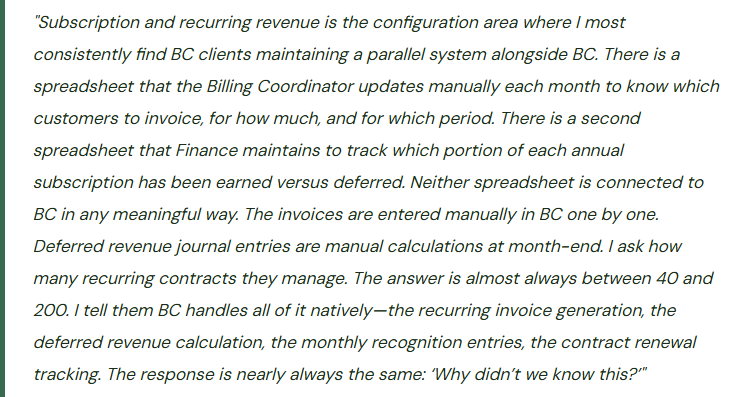
BC’s Two Approaches to Recurring Revenue
BC offers two mechanisms for recurring revenue depending on the complexity of the subscription model and whether the organization needs formal contract-level tracking or just recurring invoice generation. Finance must choose the right tool—or combination of tools—before configuring the subscription process.
- Recurring Sales Lines (Standard BC)
- The simpler mechanism. Finance creates a “Standard Sales Code” for each recurring billing item and links it to each customer as a “Recurring Sales Line.” The Create Recurring Sales Invoices batch job runs on a defined schedule and generates sales invoices for all customers with active recurring lines, using the amount, GL account, dimension assignments, and billing frequency defined on the recurring line.
- Best for: straightforward monthly or annual billings where the invoice amount is fixed, the billing cycle is consistent, and contract-level tracking (renewal dates, usage-based adjustments, tiered pricing) is not required.
- Deferred revenue requires separate journal entry setup—Recurring Sales Lines do not natively handle deferred revenue posting.
- Subscription Billing (BC Premium / Extension)
- BC’s Subscription & Recurring Billing module (available in BC Premium or via AppSource extensions from ISVs such as Progressus or NAVAX) provides contract-level management: start date, end date, renewal terms, billing interval, quantity, unit price, price escalation, and contract-level deferred revenue tracking. Invoices are generated from contracts rather than from customer-level recurring lines.
- Best for: SaaS, managed services, maintenance agreements, or any model with variable renewal terms, tiered pricing, usage-based true-ups, or the need to track MRR and ARR at the contract level.
- Provides native deferred revenue posting per contract period.
For this post, I will focus primarily on what Finance can configure natively in standard BC using Recurring Sales Lines plus the Deferral Templates mechanism—the combination that handles 80% of mid-market subscription billing needs without an additional license or extension. The extension-based Subscription Billing module follows the same Finance principles but with more automation.
Deferred Revenue—The Finance Configuration BC Does Natively
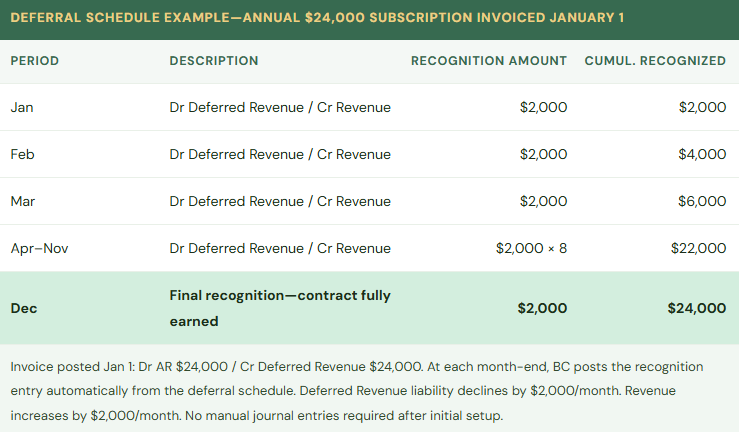
When a customer pays for a 12-month subscription in advance, the cash received is not revenue—it is a liability. Revenue is earned as the service is delivered, one month at a time. The initial receipt creates a Deferred Revenue liability on the balance sheet. Each month, Finance recognizes one-twelfth of the annual amount by debiting Deferred Revenue and crediting the appropriate revenue GL account.
BC handles this through Deferral Templates (found under Finance → Deferral Templates). A Deferral Template defines: the deferral method (straight-line, equal per period, or user-defined), the deferral GL account (the Deferred Revenue liability account on the balance sheet), the recognition GL account (the Revenue account where recognized amounts post monthly), and the recognition start date relative to the invoice date.
Once a Deferral Template is created and assigned to a sales line item (on the Item Card or directly on the invoice line), BC automatically calculates the deferral schedule when the invoice is posted: the full invoice amount goes to Deferred Revenue, and a BC-generated deferral schedule shows the monthly recognition entries for the life of the contract. Finance runs the Post Deferred Revenue Transactions batch at month-end close and BC posts all recognition entries automatically, moving each month’s earned portion from Deferred Revenue to Revenue without manual journal entries.
Setting Up Recurring Sales Lines—The Configuration Sequence
- Create the Deferral Template for Each Revenue Recognition Pattern
- For each distinct revenue recognition pattern the organization uses (straight-line monthly over 12 months, straight-line monthly over 24 months, equal per period over a custom term), create a named Deferral Template at Finance → Deferral Templates. Set the Deferral Code (a short identifier), the Deferral Account (the Deferred Revenue liability account), the Recognition Account (the appropriate revenue GL account), and the Calculation Method (Equal per Period for straight-line monthly). If multiple revenue streams use different GL revenue accounts, create a separate Deferral Template for each account combination. Finance owns this setup—not IT, not the billing team.
- Create the Standard Sales Codes for Each Recurring Billing Item
- A Standard Sales Code is a named template for a sales invoice line: GL account or item, description, unit price, unit of measure, and the Deferral Template to apply. Create one Standard Sales Code for each recurring billing product or service the organization invoices: Annual Software License, Monthly Support Agreement, Quarterly Maintenance Fee, and so on. The Standard Sales Code is the billing template; the Recurring Sales Line on each customer links the customer to their specific Standard Sales Code at their contracted price.
- Assign Recurring Sales Lines to Each Customer
- On each Customer Card, navigate to the Recurring Sales Lines action. Add one line per recurring billing item for that customer: the Standard Sales Code, the invoice amount for this customer (which may differ from the Standard Sales Code default price for customers on negotiated rates), and the billing frequency (monthly, quarterly, annually). Set the Valid From and Valid To dates to match the contract term so BC automatically stops generating invoices when the contract expires. Finance and the billing team share responsibility for maintaining these dates as contracts renew or terminate.
- Run Create Recurring Sales Invoices on the Billing Schedule
- The Create Recurring Sales Invoices batch job (Customers → Create Recurring Sales Invoices) generates sales invoices for all customers with active recurring lines whose next billing date falls within the specified date range. Run this job on the organization’s billing cycle (monthly, quarterly, etc.). The job creates draft invoices that Finance or Billing reviews before posting. After review and approval, post the invoices in batch. The Deferral Template on each line automatically generates the deferral schedule for each posted invoice.
- Post Deferred Revenue at Month-End Close
- During the month-end close process, run the Post Deferred Revenue Transactions batch job (Finance → Deferral Templates → Post Deferred Revenue Transactions). This job processes all recognition entries in the deferral schedules whose recognition date falls in the period being closed, posting the earned revenue from Deferred Revenue to the Revenue account for each active contract. The journal entries are created and posted automatically. Finance reviews the batch posting summary: total recognized in the period, total remaining deferred balance, and the GL accounts affected. No manual revenue recognition journal entries are required.
- Reconcile Deferred Revenue Balance at Period End
- After the deferral batch posts, Finance reconciles the Deferred Revenue GL account balance to the sum of outstanding deferral schedule amounts for all active contracts. Run the Deferral Summary report (Finance → Reports → Deferral Transactions) and compare the total unrecognized amount to the GL Deferred Revenue balance. Any difference indicates a posting error, a cancelled invoice whose deferral schedule was not updated, or a manual journal entry that bypassed the deferral mechanism. The reconciliation takes 10–15 minutes and should be a standing month-end close checklist item.
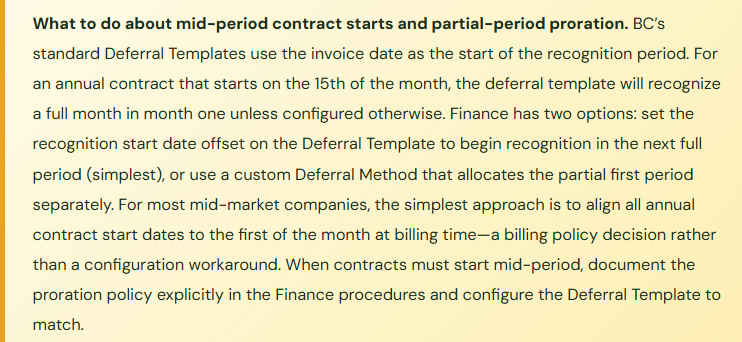
Subscription Metrics BC Supports and Where You Still Need Outside Help
With Recurring Sales Lines and Deferral Templates configured, Finance can pull from BC natively: monthly recurring revenue (sum of recurring sales invoices generated in a period), annual recurring revenue (annualize the monthly figure), deferred revenue balance by customer or contract, revenue recognized in a period versus cash collected in a period, and customer-level billing history. These are the core SaaS and subscription finance metrics that Finance needs for monthly management reporting.
What standard BC does not do natively without an extension: MRR cohort analysis, churn tracking by contract, customer lifetime value modeling, and usage-based billing true-up calculations where the invoice amount varies each month based on consumption data that lives outside BC. For organizations where these capabilities are central to the Finance function, the AppSource subscription billing extensions (evaluated using the Post 26 AppSource framework before installation) provide them. For most mid-market companies, BC’s native capability covers the core requirement and the extension investment is discretionary.
Five Subscription Revenue Mistakes That Create Audit Problems
⚠️ Annual Subscriptions Posted Entirely to Revenue on the Invoice Date—Revenue Is Overstated All Year
The billing team posts annual subscription invoices as they are generated, with the full annual amount credited to the Revenue account on the invoice date. No Deferral Template is configured. A $36,000 annual subscription invoiced on January 1 posts $36,000 to revenue in January. By February, $36,000 has been recognized for a contract that has only delivered one month of service. In a company with 85 annual subscription customers, January revenue is overstated by the unearned portion of all annual contracts renewed in January. At the first external audit, the auditor asks Finance to explain the deferred revenue balance on the balance sheet. Finance does not have a deferred revenue balance because the mechanism was never configured. The auditor requires Finance to reconstruct the deferred revenue balance retroactively for all active annual contracts and restate revenue for the current year and any prior year where the misstatement is material. The retroactive reconstruction takes three weeks and produces adjusting entries that the auditor must accept before issuing the opinion.
Fix: Deferral Templates must be configured before any annual or multi-period subscription is invoiced. The Deferral Template is assigned to the sales line item (on the Item Card or directly on the invoice line) before posting. Once assigned, BC automatically creates the deferral schedule when the invoice posts—the full amount goes to Deferred Revenue, not to Revenue. Monthly recognition entries are posted automatically at month-end close. Finance does not need to calculate, track, or journal deferred revenue manually if the Deferral Template is configured correctly. If the organization has already been posting annual subscriptions to revenue without deferral, the current-year correction requires Finance to calculate the unearned portion of all active annual contracts as of the restatement date, post a journal entry to move the unearned amount from Revenue to Deferred Revenue, and configure Deferral Templates going forward so the error does not recur.
⚠️ Recurring Sales Lines Not Updated When a Customer Cancels—Invoices Generate After Contract End
A customer cancels their annual maintenance agreement effective March 31. The cancellation is communicated to the account manager, who updates the CRM. Nobody updates the Recurring Sales Line in BC to set the Valid To date to March 31. The Create Recurring Sales Invoices batch runs in April and generates an invoice for the cancelled customer. The invoice is posted automatically as part of the batch posting process without individual review. The cancelled customer receives an invoice for a service they are no longer receiving. They call to dispute it. Finance researches the issue, determines the invoice was generated in error, and issues a credit memo. The credit memo creates an offsetting revenue credit in April. The net effect is zero, but Finance has sent an erroneous invoice to a cancelled customer, created unnecessary AR activity, and generated an audit trail question about why a credit memo was issued for the full amount of an invoice that was just posted.
Fix: Contract cancellations must trigger an immediate update to the BC Recurring Sales Line Valid To date on the same day the cancellation is processed. The process requires a clear handoff: whoever receives the cancellation notification (account manager, customer success, operations) must have a documented responsibility to notify Finance—or update BC directly if they have the access—with the effective cancellation date. Finance should review the active Recurring Sales Lines list monthly as part of the billing preparation process, confirming that the active lines match the current contract roster. Any recurring line without a corresponding active contract should be investigated. The monthly review takes 20–30 minutes and prevents billing errors that damage customer relationships and create audit trail noise.
⚠️ Deferred Revenue Balance Not Reconciled—Manual Journal Entries Have Created an Untrackable Variance
At a previous period close, the Controller was concerned that the Deferred Revenue balance looked too high and posted a manual journal entry to reduce it by $18,400—based on her estimate of how much revenue had been earned, calculated from the subscription spreadsheet. The estimate was $6,200 less than what BC’s deferral schedules would have recognized if the Post Deferred Revenue batch had been run with current data. The $6,200 discrepancy between the manual journal and the deferral schedule accumulates in subsequent periods. Over four months, BC’s Deferred Revenue balance and the deferral schedule total diverge by a growing amount because the manual journal bypassed the deferral mechanism. Finance cannot reconcile the Deferred Revenue GL balance to the deferral schedule total. The auditor asks Finance to provide the roll-forward of Deferred Revenue for the year. Finance cannot produce a clean roll-forward because two methods of recognition have been used simultaneously.
Fix: Revenue recognition for subscription contracts must run exclusively through BC’s deferral mechanism—never through manual journal entries to the Deferred Revenue or Revenue accounts. If the Deferred Revenue balance appears incorrect, the investigation must identify whether the deferral schedules are wrong (incorrect invoice amount, incorrect recognition period, incorrect Deferral Template) or whether a prior manual journal created the variance. Correct the deferral schedules if they are wrong; reverse the manual journal if that is the source of the variance. Going forward, establish a policy: no manual journal entries to the Deferred Revenue account during the period; all revenue recognition runs through the Post Deferred Revenue batch. The month-end reconciliation of the Deferred Revenue GL balance to the deferral schedule total is the control that catches any violation of this policy before it compounds.
⚠️ Price Increases at Renewal Not Updated in Recurring Lines—Customers Invoiced at Old Rates for Multiple Periods
Annual contracts renew on various dates throughout the year. Most include a 4% price escalation clause. The Finance team updates prices in the customer master file for new contracts, but the Recurring Sales Lines for renewing customers are not systematically reviewed for price at renewal. Eight customers who renewed in Q1 have been invoiced at the prior-year rate for three months because the Recurring Sales Line unit price was not updated at renewal. The total underbilling is $9,600. Finance discovers the error during a contract review. The underbilled customers must be invoiced for the difference—a back-billing conversation that damages the customer relationship—or the organization must absorb the revenue loss as a billing error.
Fix: Create a contract renewal calendar—a view or report in BC (or a maintained list in SharePoint) that shows every customer’s contract Valid To date sorted by expiration month. Finance reviews the renewal calendar 60 days before each renewal date to confirm: the new contract price is agreed, the Recurring Sales Line Valid To date will be extended or the line recreated with the new price and term, and the Deferral Template is still appropriate for the renewed contract structure. The renewal review is a Finance and Sales shared responsibility: Sales owns the price negotiation and term agreement; Finance owns the BC configuration update before the next billing cycle runs. A renewal that is not updated in BC before the billing job runs will invoice at the old terms.
⚠️ Post Deferred Revenue Batch Skipped During a Busy Close—Two Months Recognized in One Period
The month-end close in September is compressed by a holiday and an unexpected audit request. The close checklist is abbreviated. The Post Deferred Revenue batch is one of the last steps and is not run before the September period is closed. In October’s close, Finance runs the Post Deferred Revenue batch for October. BC attempts to process September’s and October’s recognition entries. Depending on how the batch is configured, either September’s entries are blocked because the September period is closed, or both months’ recognition runs in October, recognizing two months of revenue in a single period. September shows no subscription revenue recognition; October shows double. The income statement shows a significant subscription revenue dip in September and a spike in October that management asks Finance to explain. The explanation is a close process failure that Finance must document and defend.
Fix: The Post Deferred Revenue batch is a hard requirement in the month-end close checklist—it cannot be deferred to the following month without creating the exact income statement distortion described above. Build it into the close checklist as a mandatory pre-close step, before the accounting period is closed. If the close timeline is compressed and checklist steps must be prioritized, the Post Deferred Revenue batch belongs in the same priority tier as payroll accruals and AR/AP cutoff—it affects revenue recognition and must run in the correct period. If September’s period closes without the recognition batch running, Finance must reopen the period (if still within the open period window), run the batch, and reclose. The two-minute investment in running the batch before period close prevents the two-week investigation into why the income statement shows a monthly revenue anomaly.
Do This / Don’t Do This
Do This
- Configure Deferral Templates before the first annual subscription invoice is posted—not after an auditor asks about deferred revenue
- Assign Deferral Templates to the Item Card so every invoice line for that item automatically applies deferral—no per-invoice configuration required
- Update Recurring Sales Line Valid To dates on the same day a contract cancellation is confirmed
- Maintain a contract renewal calendar and review it 60 days before each renewal month for price and term updates
- Include Post Deferred Revenue batch in the month-end close checklist as a mandatory pre-close step
- Reconcile the Deferred Revenue GL balance to the deferral schedule total at every period close
- Post all subscription revenue recognition exclusively through BC’s deferral mechanism—no manual journals to Deferred Revenue
- Review active Recurring Sales Lines monthly before the billing batch runs to confirm they match the current contract roster
Don’t Do This
- Post annual subscription invoices to Revenue on the invoice date without a Deferral Template—revenue is overstated from day one
- Rely on the billing team to update BC when a customer cancels—Finance must own the BC contract record update with a defined same-day process
- Post manual journal entries to the Deferred Revenue account during the period to “correct” the balance—this breaks the deferral schedule reconciliation
- Skip the Post Deferred Revenue batch during a compressed close—it creates a two-month recognition distortion that requires explanation
- Continue maintaining a subscription tracking spreadsheet in parallel with BC once Recurring Sales Lines and Deferral Templates are configured and reconciled
- Set contract prices once at initial setup and never build a renewal review process—price escalation clauses are billing revenue that requires Finance ownership to capture
Up Next:
Subscription billing closes the revenue management arc. The next post addresses a Finance topic that surfaces reliably in multi-entity, multi-currency, or internationally active organizations: Multi-Currency and Foreign Exchange in Business Central—how BC’s currency setup works, the exchange rate update process, the difference between transaction currency and reporting currency, where unrealized and realized FX gains and losses post, the balance sheet translation mechanics, and the five currency configuration mistakes that produce foreign exchange surprises at year-end.
— Bobbi
D365 Functional Architect · Recovering Controller
Thank you for reading!
If this post helped you solve a real problem, share it with a Finance colleague who is in the middle of an ERP implementation or a post-go-live optimization. If you have a topic that I haven’t covered, please reach out. There is always one more post worth writing.
Interested in learning more? Here are a few of my latest posts:
Leave a Reply