
Year-End Readiness: D365 Finance & Operations, Step 6 of 10
Say your company paid a 12,000 insurance premium in January, and a consultant worked all of December but hasn’t sent the invoice. You also hold a euro bank account that hasn’t been revalued since the spring. Close the year like that and the income statement carries the wrong expense, the balance sheet carries the wrong cash, and nobody can explain either one. Here’s how to get each item into the right period before you lock it.
Spreading amounts with accrual schemes and deferrals
Start with the insurance. An accrual scheme spreads one journal amount over several periods. You set it up once under General ledger > Journal setup > Accrual schemes. Each scheme has an Accrual identification, debit and credit main accounts that replace the ones on the journal line, a Period frequency, a Number of occurrences by period, and a Post transactions setting such as Monthly. Microsoft’s setup steps cover each field.
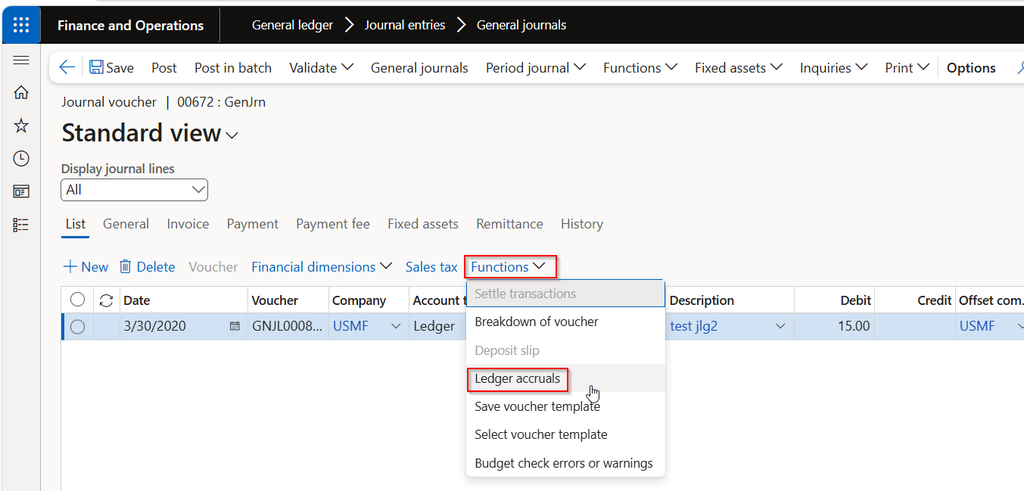
To use it, open a general journal line and select Functions > Ledger accruals. Pick the scheme, enter a start date, and select Transactions to preview what gets created. The 12,000 becomes 1,000 a month. If you reverse the accrued voucher, all its accrual transactions reverse together. Individual accrual transactions can’t be reversed alone, so check before you post.
For customer revenue, the older Revenue recognition feature was deprecated in January 2024, and Microsoft says new users should use Subscription billing. If you still use the older feature, its revenue recognition journal entries can’t be reversed.
Reversing and periodic journals
For the December consulting cost, a general journal with an automatic reversal is simpler. Post the expense in December and set Reversing entry and Reversing date on the voucher lines, usually the first day of the next period. When the real invoice arrives, the accrual has already reversed and you won’t double count.
Two things trip people up. Journal header values only default onto new lines, so if you enter lines first and mark the journal as reversing afterward, the existing lines stay unmarked (Microsoft explains it here). And the reversing date must land in an open fiscal period, so make sure January is open.
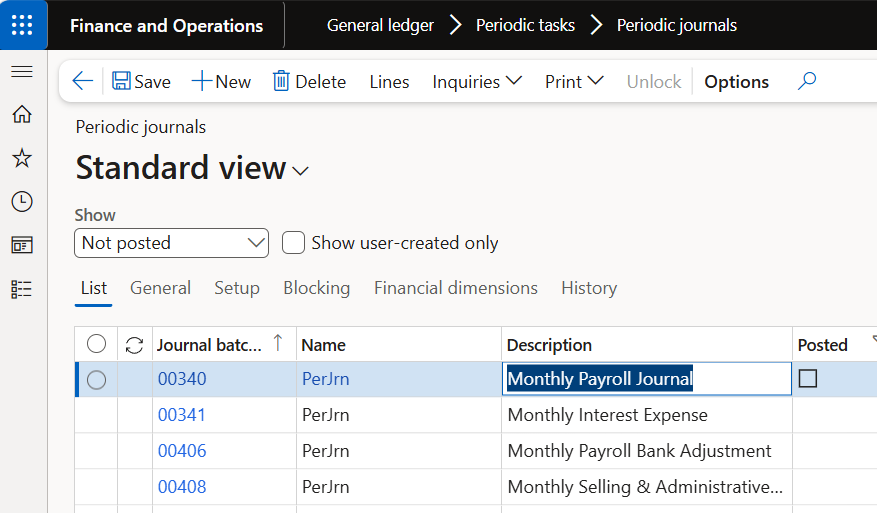
For repeating entries like rent, use periodic journals under General ledger > Periodic tasks > Periodic journals. Set the date, Unit, Number of units, and Last date. Each period, open a general journal, select Period journal > Retrieve journal, and enter a To date. The same line can come through more than once, so check before posting.
Setting up foreign currency revaluation
Foreign currency revaluation restates foreign currency balances at the rate you choose, and the difference posts as an unrealized gain or loss. On each Main account, select Foreign currency revaluation and enter an Exchange rate type. If the account has none, the rate type on the Ledger page applies. The Ledger page also holds your unrealized gain and loss accounts, and Currency revaluation accounts lets you override them by currency and company.
Bank, Accounts receivable, and Accounts payable have their own revaluation that posts to the ledger so the subledgers and GL reconcile. Microsoft says to exclude those main accounts from the GL run so they aren’t revalued twice.
Running, reviewing, and reversing the run
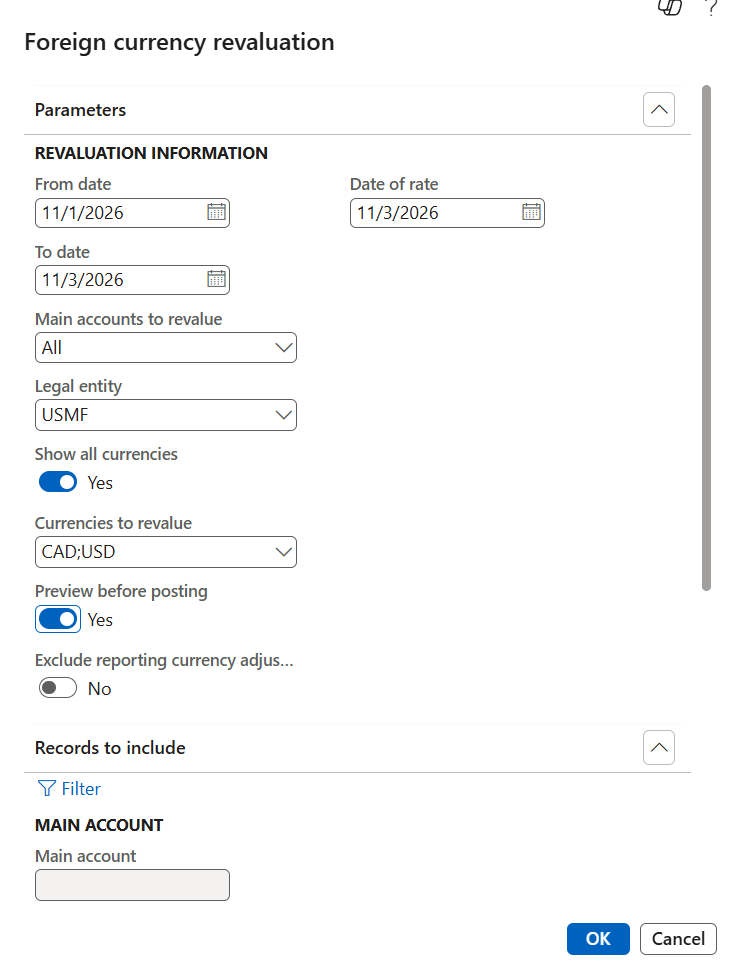
On the Foreign currency revaluation page, set the From date, To date, and Date of rate. For balance sheet accounts the From date is ignored, and the balance runs from the start of the fiscal year to the To date. Profit and loss accounts use the date range. Pick legal entities and currencies, then choose All, Balance sheet, or Profit and loss.
Set Preview before posting to Yes. You can post the preview, export it to Excel to keep the calculation history, or use Select legal entities to post if one company looks wrong. Preview can’t be used in batch. In AR and AP the equivalent is the Simulation report.
The GL run doesn’t reverse the prior revaluation. It posts the difference between the current balance, earlier revaluations included, and the new value. To undo a GL run, use Reverse transaction on the same page, into an open period. AR and AP revaluations can’t be reversed (Microsoft’s guidance is to rerun them with the Invoice date method). If you use ledger settlements, Microsoft recommends revaluing after you settle.
Year-end checklist
- Post accrual journals with a reversing date in an open period.
- Confirm accrual scheme and periodic journal lines have posted through the last period.
- Review deferral schedules and recognition for revenue and expenses.
- Check main account revaluation flags and rate types, and exclude bank, AR, and AP accounts from the GL run.
- Run revaluation with preview, export it, then post.
- Finish all of this before year-end close, since transactions in a closed year can’t be reversed.
Thank you for reading!
Last time we covered fixed assets at year-end, including depreciation, disposals, and the last run. Next up is step 7, Bank Reconciliation and Intercompany Balances.
Sources
- Foreign currency revaluation for General ledger
- Currency revaluation for Accounts payable and Accounts receivable
- Accruals overview
- Create accrual schemes
- Create ledger accrual transactions
- Post periodic journals
- Vouchers aren’t reversed when you post a journal that has a reversing entry and date
- Can’t reverse a transaction
- Revenue and expense deferrals in Subscription billing
- Revenue recognition overview
- Ledger settlements
Interested in learning more? Below are some of my latest posts:
Leave a Reply