
Year-End Readiness: D365 Finance & Operations, Step 5 of 10
Say you sold a delivery van in November, the free text invoice posted fine, and then everyone moved on. In January your auditor ties the fixed asset roll forward to the trial balance and the two don’t agree. Fixed assets rarely fail loudly. They drift a little each month, and year-end is when it shows.
Run depreciation through the last period
Go to Fixed assets > Journal entries > Create depreciation proposal, choose the journal name, and enter a To date. For a calendar year that’s December 31. The Summarize depreciation option rolls monthly amounts into one line per asset, which keeps the journal short if you’re catching up several periods. For larger portfolios, Microsoft recommends running the depreciation proposal in batch so you can keep working while it calculates. Then open Fixed assets > Journal entries > Fixed assets journal, review, and post.
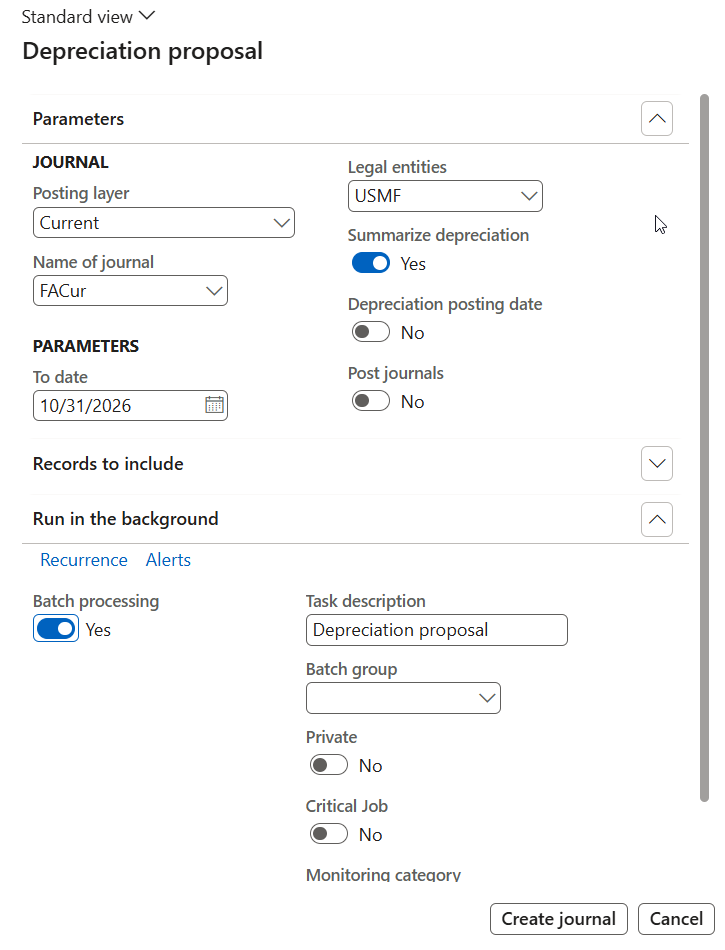
Know what the proposal skips. It only picks up assets in Open status, and it skips any book where Calculate depreciation is set to No. Also check Fixed assets parameters for the Lock asset books in a depreciation journal setting. When it’s on, the same book can’t sit in two depreciation journals at once, so clear out old unposted depreciation journals before you run the final one.
Check every book, not just the main one
Each book tracks its own financial life for an asset. By default a book posts to the general ledger. A book with Post to general ledger set to No posts only to the fixed asset subledger, and Microsoft notes these are typically used for tax reporting. Those books need a journal name with the posting layer set to None.
So if you keep a corporate book and a tax book, run depreciation for both and confirm each one reached the same To date. Derived books copy a primary book’s transactions and are typically used for acquisitions and disposals, not depreciation.
Handle disposals before the year turns
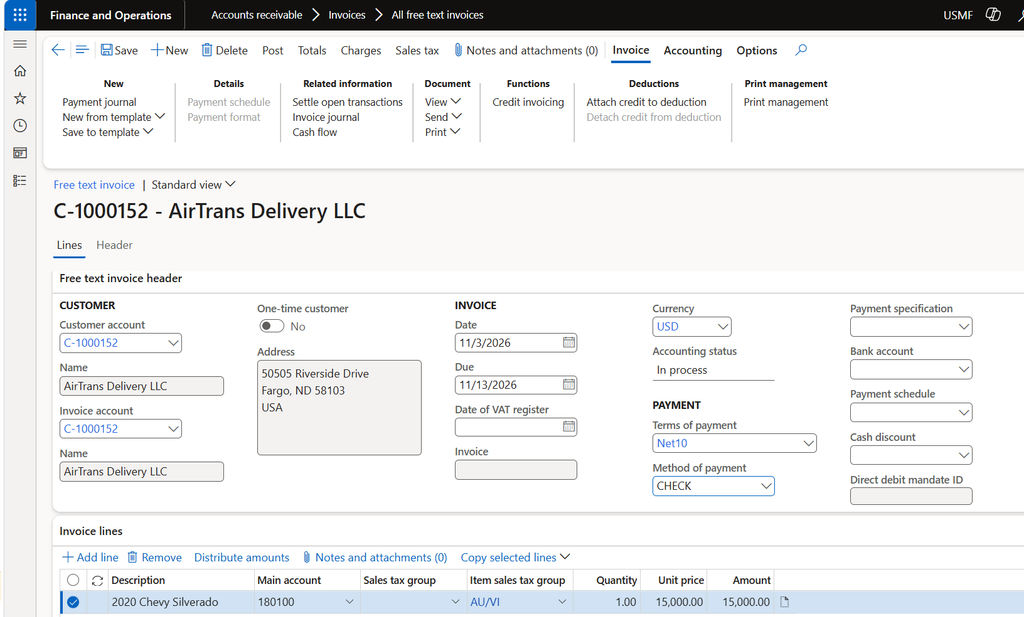
Fixed assets aren’t part of Inventory management, so you sell them from Accounts receivable > Invoices > All free text invoices. Enter the sale amount, open Line details, and pick the fixed asset (and book). The transaction type is always Disposal – sale. (Microsoft’s steps). A scrapped asset goes through Fixed assets journal > Lines, with the Disposal – scrap transaction type. Leave Debit and Credit blank to dispose of the whole asset.
The gain or loss comes from your posting profile. At disposal, the system reverses the acquisition and accumulated depreciation out of their original accounts and moves the net amount to your gain and loss for disposal account. Microsoft suggests confirming those accounts with your CFO or controller. Open Fixed assets > Setup > Fixed asset posting profiles and review the disposal setup before the year-end rush. Check Post disposal transactions in detail on the parameters page too. Set to Yes, the profile needs Acquisition this year and Acquisition prior years lines. Set to No, it needs Acquisition value. A mismatch stops the posting.
Also check Automatically create depreciation adjustment amounts with disposal. It controls whether depreciation is adjusted at disposal, so know how it’s set before December sales.
Acquisitions that haven’t been acquired yet
A common leftover: a product receipt created the asset with a status of Not yet acquired, the vendor invoice posted, but nobody posted the acquisition. When Allow asset acquisition from Purchasing is set to No, that’s expected. The accountant posts the acquisition separately using an Acquisition proposal from the Fixed assets journal lines. Until then the cost sits in the receipt account, which Microsoft notes is typically an expense account, and the depreciation proposal skips the asset. Microsoft walks through this scenario.
The Fixed asset management workspace has summary tiles for assets not yet acquired, acquired this year, and disposed this year, a handy starting point.
After depreciation posts, the Placed in service and Depreciation run date fields lock on the book. Confirm the in-service date before the first depreciation, not after.
Reconcile to the general ledger, then close
Microsoft recommends reconciling each subledger to the ledger every period. For fixed assets, the Fixed assets roll forward report gives you opening and closing balances, acquisitions, depreciation, and disposals with profit or loss. It uses Electronic reporting, so an admin imports its configurations first. Compare its closing acquisition and depreciation values to the GL balances on the main accounts in your posting profiles. If you’ve turned on Do not allow manual entry for those accounts, as Microsoft recommends, differences usually point to unposted journals or timing.
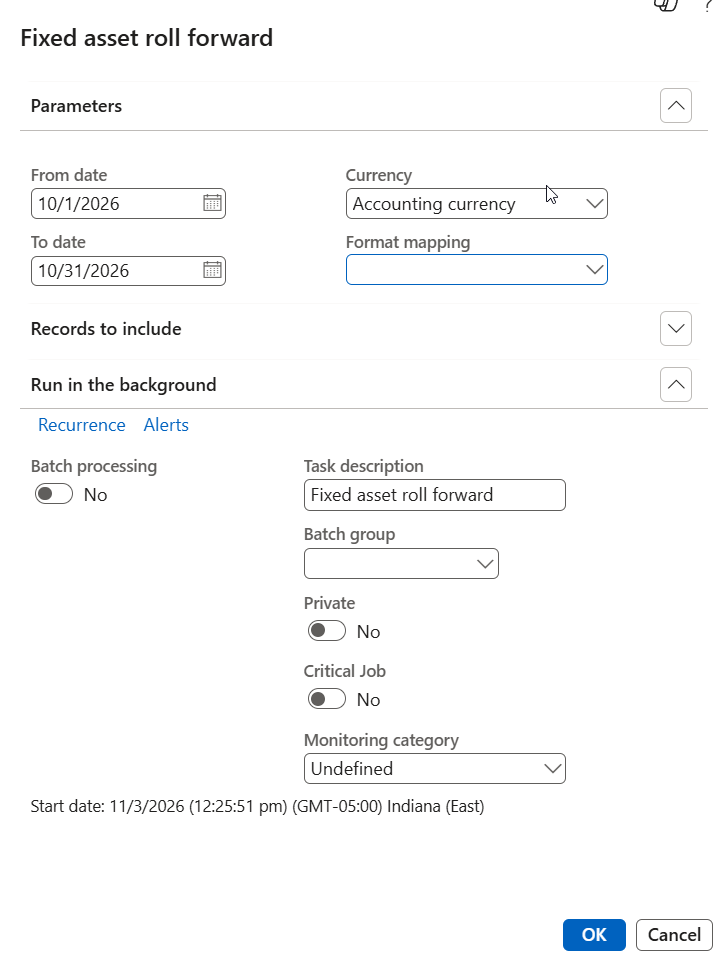
On a separate fixed asset year-end close, I didn’t find one in Microsoft’s documentation. The year-end close you’ll run is the general ledger one, at General ledger > Period close > Year-end close. Once fixed assets is finished, you can set ledger calendar periods to On hold, and reopen them if an adjustment turns up.
Year-end fixed assets checklist
- Clear old unposted depreciation journals, then run and post the proposal through the last day of the year for every GL book and non-GL book.
- Post all December disposals (sales and scraps) and confirm the gain and loss account.
- Review assets in Not yet acquired status and post acquisitions where the asset is in service.
- Run the Fixed assets roll forward report and tie it to the GL.
- Put the final period on hold, and keep the roll forward as support.
Thank you for reading!
In step 4 we looked at inventory close and cost reconciliation before year-end, and in step 6 we’ll cover accruals, deferrals, and foreign currency revaluation.
Sources
- Create a depreciation proposal
- Fixed asset depreciation
- Set up fixed assets
- Fixed asset value model and depreciation book merge
- Fixed asset transaction options
- Dispose of a fixed asset using a free text invoice
- Dispose of a fixed asset as scrap
- Acquire assets through procurement
- Fixed assets integration
- Fixed assets roll forward report
- Fixed asset management workspace
- Create a fixed asset
- Recommended practices for posting profiles
- Year-end close
Interested in learning more? Below are some of my latest posts:
Leave a Reply