

Accounting periods, the close sequence, subledger reconciliations, year-end close, and the habits that separate a predictable two-day close from a month-end that feels different every cycle.
How BC Manages Accounting Periods
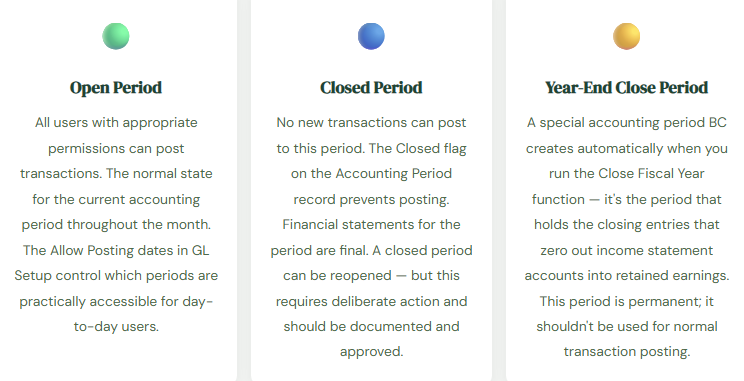
Before you can close anything, you need to understand how BC thinks about time. BC organizes the fiscal year into Accounting Periods — defined in the Accounting Periods table, which maps the fiscal calendar for the company. Every company in BC has its own accounting period setup, and every GL posting is assigned to an accounting period based on the posting date on the transaction.
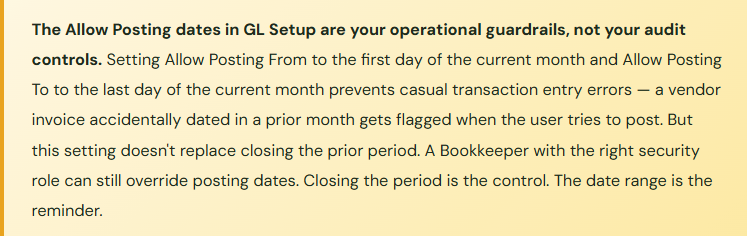
Unlike some ERP systems with elaborate period-locking hierarchies, BC’s period management is relatively direct. Each accounting period has a Closed flag. When a period is open, transactions can be posted to it. When it’s closed, BC will not accept new postings to that period — any transaction dated in a closed period triggers an error at posting time. There’s also a Allow Posting From / Allow Posting To date range in General Ledger Setup that provides a secondary control: a rolling window of dates that are open for posting regardless of the period status, used for ongoing transaction processing before period-level locks are applied.
The Close Sequence — What Goes in What Order, and Why
A close checklist is a sequence, not a list. The items have dependencies. Posting the bank reconciliation before all vendor invoices are entered means the bank balance is right but the AP subledger isn’t. Running the Adjust Cost job after locking the inventory period means the cost adjustments can’t post. The order matters. Here’s the sequence that works.
📋 Throughout the Month
- Keep Transaction Processing Current
- The close doesn’t start at month-end. It starts with the discipline of posting transactions promptly throughout the month. Vendor invoices processed within a day or two of receipt. Customer payments applied the day they arrive. Expense reports posted weekly. The close becomes hard when there’s a three-week backlog of unprocessed transactions waiting at the period-end deadline.
- This includes:
- AP Invoice Posting
- Cash Receipt Application
- Expense Reports
📦 Last 2–3 Days of Period
- Clear Operational Backlogs First
- Post all remaining vendor invoices matched to receipts. Apply all outstanding customer cash receipts to their invoices. Post pending purchase and sales order receipts and shipments with the correct period date. Run the Adjust Cost — Item Entries batch job to ensure inventory values are current. These subledger-clearing steps must happen before the GL reconciliation — subledger imbalances found after period lock are significantly more painful to fix.
- This includes:
- Issues with AP Three-Way Match
- AR Cash Application
- Adjust Cost Run
- Open Order Review
📊 Close Day
- Subledger-to-GL Reconciliations
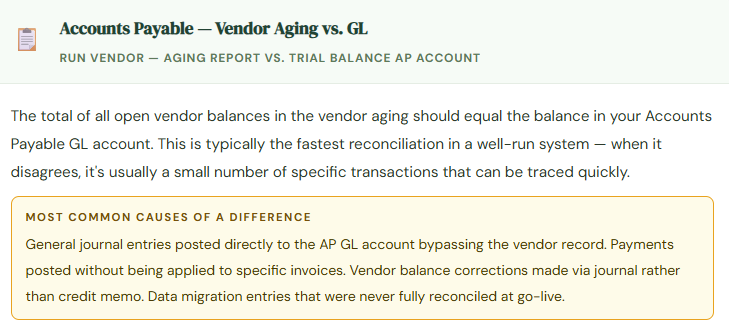
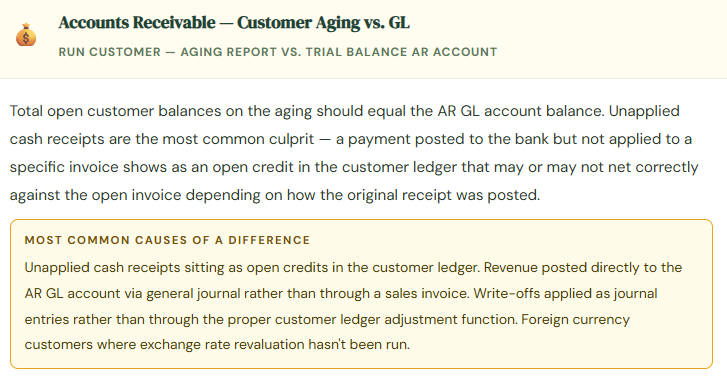
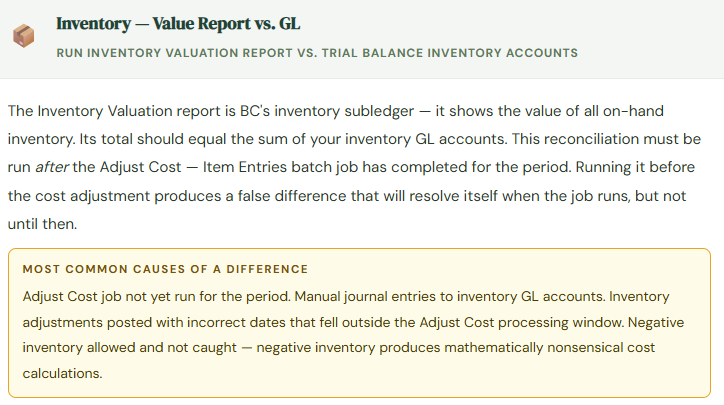
- With subledgers cleared, reconcile each one to the GL. AP aging total to the Accounts Payable GL account. AR aging total to the Accounts Receivable GL account. Inventory Value report to inventory GL accounts. Bank account balances to GL cash accounts. Each should agree. A difference here means either a posting error, a manual journal that bypassed a subledger, or a timing item you can specifically identify. Resolve all differences before proceeding — don’t close with an unexplained variance.
- This includes:
- AP Aging ↔ GL
- AR Aging ↔ GL
- Inventory ↔ GL
- Bank ↔ GL
⚙️ Close Day, Continued
- Post Period-End Adjusting Entries
- With a clean, reconciled trial balance as the foundation, post the period-end entries: prepaid amortization, accruals for services received but not yet invoiced, depreciation, deferred revenue recognition, and any other estimates. Use BC’s Recurring Journals for entries that repeat every period with consistent amounts — set them up once, post them in a batch. Manual accruals should have supporting documentation attached to the journal header before posting.
- This includes:
- Depreciation Run
- Recurring Journals
- Accrued Liabilities
- Prepaid Amortization
🔍 Review Before Lock
- Run Financial Statements and Review
- Run the trial balance and the Financial Reports you built for leadership. Review for anything unexpected — a revenue number that doesn’t match the sales team’s report, an expense that’s unusually high, a balance sheet account that should be zero but isn’t. This is the review step. Finding something unexpected now means you can still post an adjustment. Finding it after the period is closed means a prior-period adjustment, a conversation with management, and a longer paper trail.
- This includes:
- Trial Balance Review
- Income Statement Check
- Balance Sheet Review
- Financial Reports vs. Trial Balance
🔒Period Lock
- Close the Period, Update Posting Date Range
- When the review is complete and the Controller has approved the financials, close the accounting period. In BC, this means checking the Closed flag on the period record in the Accounting Periods table, and updating the Allow Posting From date in GL Setup to prevent casual posting to the now-closed period. Before closing, confirm the next period is in the table and accessible — a gap in the accounting period setup stops all posting until it’s fixed, and you don’t want to discover that during active transaction processing.
- This inlcudes:
- Period → Closed
- Allow Posting From Updated
- Next Period Confirmed Open
📁 Post-Close
- Distribute Reports and Archive Close Documentation
- Run and distribute final financial statements, departmental P&Ls, and management reports. Archive the close package — trial balance, subledger reconciliations, journal entry documentation — in your document management system. Build this documentation as a byproduct of a disciplined close process, not as a reconstructed artifact at year-end when auditors ask for it. The close package you build now is the first thing your auditors will request.
- This includes:
- Financial Reports Distributed
- Close Package Archived
Subledger Reconciliations — The Step That Finds the Problems
The reconciliation step in the close sequence is where the quality of your entire implementation becomes visible. When subledgers agree to the GL, everything is working. When they don’t, you have a specific difference to explain — and how quickly you can explain it depends on how current and complete your transaction processing has been throughout the month.
Recurring Journals — Automate the Entries That Never Change
BC’s Recurring General Journal is one of the most underused time-saving features in the system, and one I consistently find configured only partially (or not at all) at post-go-live assessments. A recurring journal is a template that holds a journal entry — fixed accounts, fixed or variable amounts, fixed or calculated balancing — that can be posted on demand or scheduled to post automatically on a recurring basis.
| Entry Type | Recurring Method | Practical Use |
|---|---|---|
| Fixed Monthly Accrual | Fixed — same amount each period | Monthly rent, fixed subscriptions, retainers, insurance installments. Set once, post every period without recreation. |
| Prepaid Amortization | Fixed declining balance | Recognizes the monthly expense from a prepaid asset. Insurance paid annually, software licenses paid upfront, deposits and deferred charges — each becomes a scheduled monthly entry. |
| Allocation Entry | Percentage allocation | Distributes a source account balance across multiple dimensions or accounts — shared overhead to departments, common costs to business units. Replaces the manual overhead allocation spreadsheet. |
| Variable Accrual | Variable — amount entered each period | Entries where the accounts are always the same but the amount varies — bonus accrual, commission accrual, estimated utility accrual. Pre-populates the accounts; the Accountant enters the amount before posting. |
| Reversing Accrual | Reversing — posts current period, auto-reverses next | Accruals for expenses that will be invoiced early next period. Posts the liability in the correct period; reverses automatically when the next period opens so the eventual invoice doesn’t double-count. |
For every journal entry you find yourself recreating from last month’s posted journal at each close, ask whether it should be a recurring journal. Fixed accounts and predictable amounts — it’s a recurring journal. Variable amounts but consistent accounts — it’s a variable recurring journal where someone just fills in the amount. The setup takes twenty minutes. The time saved compounds every single close cycle for as long as the entry repeats.
Year-End Close in BC — What It Actually Does
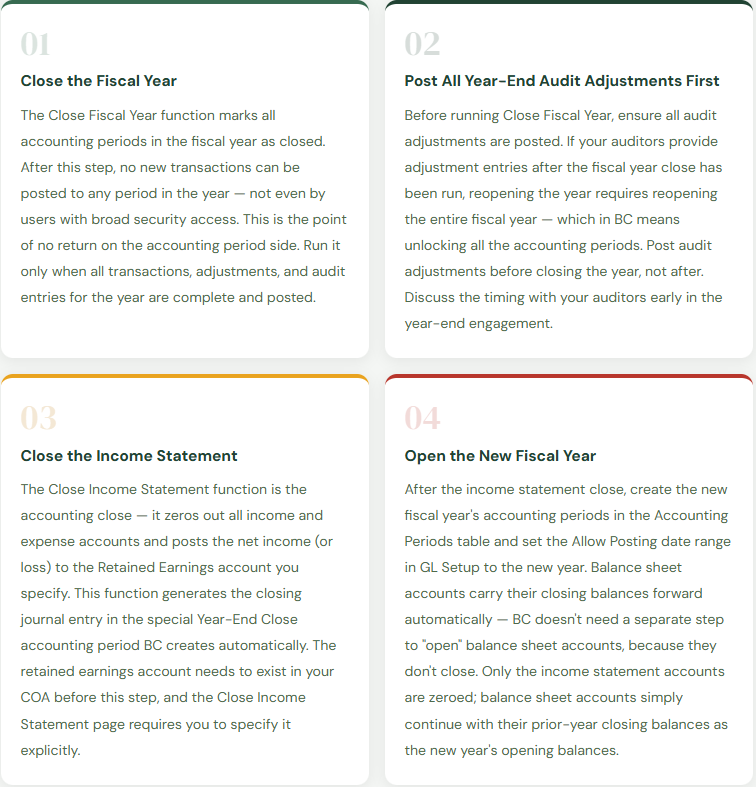
Year-end close in BC is a specific function — the Close Fiscal Year and Close Income Statement processes — that closes income statement balances to retained earnings and prepares the system for the new fiscal year. Understanding the two-step process prevents the most common year-end mistakes.
The Close Mistakes That BC Finance Teams Make Most
⚠️ No Written Close Checklist — The Process Lives in One Person’s Head
A verbal close process that the Controller runs from memory works until the Controller takes leave, changes roles, or is simply unavailable during a close cycle. The close then either doesn’t happen on time, happens inconsistently, or requires significant knowledge transfer under time pressure. A month-end close where “something different goes wrong every cycle” is almost always a process documentation problem, not a software problem.
→ Document the close sequence as a written checklist with step descriptions, task owners, due-date offsets from period end, and explicit dependency notes. Keep it in a shared location. Review and update it after each close cycle for the first six months. A close checklist that reflects how your specific BC environment and team actually operate is worth more than any generic template.
⚠️ Closing the Period Before Reconciling Subledgers
When time pressure is high at month-end, the subledger reconciliation steps are the most commonly skipped. They feel like confirmation steps rather than critical controls. The consequence surfaces two or three periods later as a growing, unexplained difference between the AR aging and the GL — a difference that was small enough to skip in Month 3, but now requires four hours of transaction-level investigation to trace in Month 6 when it’s grown and the transaction trail is cold.
→ Make subledger reconciliation a blocking prerequisite to the period close — not a step that happens after. Define a reconciliation sign-off in your close checklist: “AP aging reconciled to GL — confirmed by [name] on [date].” The reconciliation is not complete until someone has confirmed it in writing. Building the confirmation into the checklist structure makes skipping it a visible exception rather than a quiet omission.
⚠️ Recurring Entries Rebuilt Manually Every Month
If your close checklist includes “post prepaid amortization” and “post rent accrual” and “post insurance accrual” as separate manual steps where someone opens last month’s posted journal and recreates it from scratch, you’re accumulating risk with every cycle. Manual recreation introduces the possibility of wrong amounts, wrong accounts, and wrong periods. For a ten-period implementation, this creates ten opportunities per entry per year for a mistake that might not surface until an auditor asks why insurance expense was overstated in March.
→ Set up recurring journals for every entry that repeats with consistent or calculable amounts. For truly variable entries, create the recurring journal with the accounts pre-populated and the amounts blank — the Accountant fills in the amount before posting, which at least eliminates account-entry errors and speeds up the process. Rebuilding the same entry from a posted journal every month is the kind of work that recurring journals exist specifically to eliminate.
⚠️ Running Year-End Close Before Audit Adjustments Are Posted
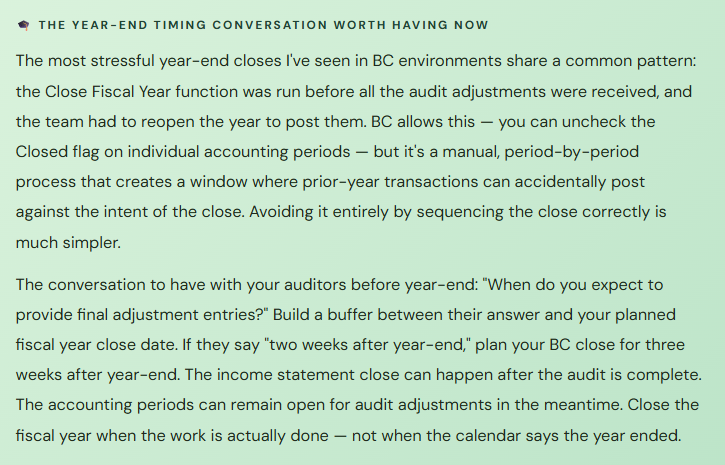
This is the year-end equivalent of closing the period before the reconciliation. The Close Fiscal Year function locks all periods in the year. If your auditors subsequently provide adjustment entries — and they almost always do — posting them requires reopening the accounting periods, posting the adjustments, and running the Close Income Statement function again to reflect the updated net income in retained earnings. It’s manageable, but it’s additional work that’s entirely avoidable by sequencing the close correctly.
→ Don’t close the fiscal year in BC until you have written confirmation from your auditors that their work is complete and no further adjustments are expected. Keep the current year’s periods open and accessible for audit adjustment postings in the meantime — this doesn’t prevent you from running the new year in BC, since BC allows simultaneous access to multiple fiscal years. Close the year when the audit is complete, not when it started.
Quick Reference: Do’s and Don’ts
✓ Do This
- Document the close sequence as a written checklist with owners, due dates, and dependencies
- Make subledger reconciliation a blocking prerequisite to period close — not a post-close step
- Run Adjust Cost — Item Entries before the inventory-to-GL reconciliation
- Set up recurring journals for every period-end entry that repeats with consistent accounts
- Set Allow Posting From/To in GL Setup as a rolling window to prevent inadvertent prior-period postings
- Confirm the next accounting period exists and is accessible before closing the current one
- Wait for all audit adjustments before running Close Fiscal Year
- Reconcile Financial Report net income to trial balance as a close checklist step
- Archive the close package — trial balance, reconciliations, JE docs — every period
- Review the outstanding items list after bank reconciliation for old uncleared items
✗ Don’t Do This
- Run the close as a verbal process managed from memory — document it
- Skip subledger reconciliations when time is short — that’s exactly when they catch the most
- Post manual journal entries to AP, AR, or inventory GL accounts directly — use the correct transaction type
- Rebuild the same recurring entries manually each period
- Run Close Fiscal Year before audit adjustments are received and posted
- Close the current period without confirming the next period is open in BC
- Leave closed periods accessible without updating the Allow Posting date range
- Run the inventory-to-GL reconciliation before the Adjust Cost job has completed
- Distribute financial statements before reconciling the Financial Report to the trial balance
- Accept that “something different goes wrong every month-end” as a permanent condition
Up Next:
We’ve covered the full financial operations core in BC — chart of accounts, posting groups, AP, AR, inventory, cash management, dimensions, reporting, and close. Next, we’re going into one of the modules that Finance teams often configure underspecified and then regret: Fixed Assets in Business Central — asset cards, depreciation books, acquisition posting, disposal, the FA-to-GL reconciliation, and why the decisions made in Fixed Asset setup determine whether your asset register and your balance sheet tell the same story at year-end.
Until then — document your close sequence, configure your recurring journals, and please don’t close the fiscal year before the auditors are done.
— Bobbi
D365 Functional Architect · Recovering Controller
Leave a Reply