

Master Planning decisions don’t stay in Supply Chain—they hit inventory, cash flow, and margin. This post explains what Planning Optimization really does in D365 F&O and why Finance needs visibility into planning parameters before supply planning becomes a financial black box.
Planning Optimization vs. Built-In Master Planning—What Changed and Why It Matters
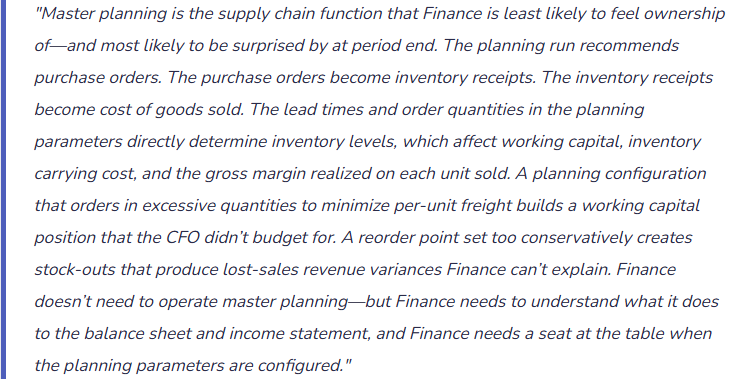
For most of D365 F&O’s history, master planning ran as an in-process calculation within the D365 application: when the planning run was triggered, D365 processed all supply and demand data within the same application server session, producing planned purchase orders, planned production orders, and planned transfer orders. This approach worked but had significant performance limitations for large data sets and was architecturally tied to the D365 application tier.
Built-In Master Planning (Deprecated)
The legacy in-application planning engine. Still available in D365 F&O environments that have not yet migrated, but Microsoft has announced it will be removed. Runs synchronously within the D365 application, which means long planning runtimes for large data volumes, potential performance impact on other users during planning runs, and a planning engine architecture that Microsoft is no longer developing.
Organizations still on built-in master planning should be actively planning migration to Planning Optimization. Microsoft has communicated a deprecation timeline—verify the current deadline in the D365 release notes for your version.
Important to Note: Deprecated · Not under active development · Migration required
Planning Optimization (Current)
A separate Azure-hosted microservice that performs planning calculations outside the D365 application tier. The planning run reads demand and supply data from D365, processes planning calculations in the Azure service, and writes recommended planned orders back to D365. Planning runs are dramatically faster for large data sets (minutes instead of hours), the main D365 application is not impacted during planning runs, and Microsoft continues to develop and add capabilities to Planning Optimization.
Requires enabling the Planning Optimization add-in in Lifecycle Services. Supports most master planning scenarios with some feature gaps relative to built-in planning that have been progressively closed with each release wave.
Important to Note: Current · Active development · Microsoft-recommended path
What Planning Optimization Actually Calculates—The Finance Translation
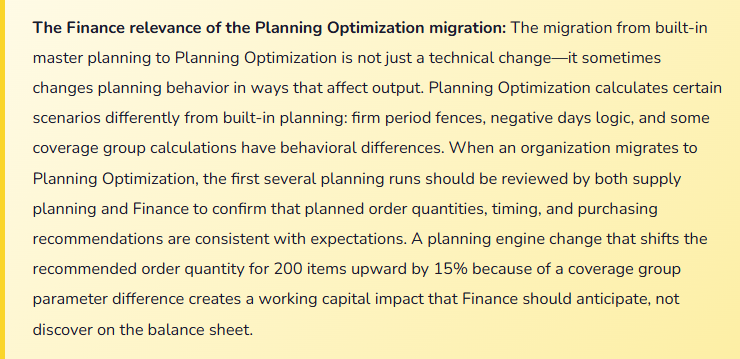
Planning Optimization is, at its core, an algorithm that answers one question for each item in each warehouse: given current inventory on hand, open purchase orders, open production orders, forecast demand, and confirmed sales orders, what additional supply actions are required to cover demand within the planning horizon? The answer comes in the form of planned orders—recommended purchase orders, production orders, or transfer orders that have not yet been firmed and executed.
The calculation uses a set of coverage rules defined for each item or item group: minimum and maximum inventory levels (min/max coverage), reorder point and fixed order quantity (reorder point coverage), or requirement-based coverage that plans exactly to demand (requirement coverage). The coverage type Finance chooses—or the supply chain team chooses without Finance input—directly determines how much inventory is held on the balance sheet at any point in time.
- Minimum Stock Level (Safety Stock)
- The buffer inventory held to absorb demand variability or supply disruption. Higher safety stock means higher average inventory balance on the balance sheet. Finance must understand the inventory carrying cost implication of the safety stock levels set in planning parameters—safety stock is a working capital decision, not just a supply chain decision.
- Lead Time and Order Cycle
- The number of days from purchase order release to inventory receipt. Longer lead times require planning further in advance, which means more open purchase orders outstanding at any period end and more inventory in transit on the balance sheet. Lead time accuracy in the system directly affects the purchase commitment balance Finance reports.
- Minimum and Maximum Order Quantities
- Vendor-imposed or logistics-driven constraints on how much can be ordered in a single PO. A minimum order quantity that exceeds near-term demand forces over-buying, inflating inventory and consuming working capital. Finance should review minimum order quantity constraints for high-value items and evaluate whether the per-unit savings justify the working capital cost of the excess inventory.
- Demand Forecast Integration
- Planning Optimization can incorporate demand forecasts from D365’s Demand Forecasting module or external forecast imports. Forecast accuracy directly affects planned order recommendations—an overestimated forecast drives over-procurement and inventory buildup. Finance should track forecast accuracy as a KPI because forecast error has a direct and predictable effect on inventory variance and gross margin.
The Finance Parameters That Live Inside the Planning Configuration
| Planning Parameter | Where It Lives in D365 | Finance Impact If Set Incorrectly |
|---|---|---|
| Coverage group and coverage type | Item coverage or item default coverage group settings | Determines the replenishment logic for each item. Min/max coverage holds excess inventory between the min and max levels regardless of actual demand. Requirement coverage orders only what is needed. The coverage type is the single most important driver of average inventory balance for each item. |
| Safety stock levels | Item coverage → Minimum quantity, or Inventory → Safety stock journal | Safety stock sits on the balance sheet as available inventory that is never consumed in normal operations. Too-high safety stock inflates inventory and consumes working capital. Too-low safety stock creates stock-outs that produce lost-sales variance. Finance should review safety stock levels for the highest-value items annually against actual demand variability. |
| Planning horizon (days covered) | Master plan parameters → Coverage time fence | The number of days into the future the planning run looks when generating planned orders. A longer horizon creates more planned purchase orders visible in the purchase commitment report, which Finance uses for cash flow forecasting. A horizon too short generates stock-outs that don’t appear until the supply team reviews the plan. |
| Firm period fence | Coverage group → Firm time fence | The number of days within which Planning Optimization will not suggest modifications to already-planned orders—protecting the near-term supply plan from being disrupted by daily demand fluctuations. If set too long, the firm fence delays demand signal responsiveness and locks in purchase commitments that Finance cannot cancel. If too short, the near-term plan changes daily, creating execution instability. |
| Negative days | Coverage group → Negative days | The number of days beyond the requirement date that an existing supply order is considered acceptable to fulfill demand without generating a new planned order. Setting negative days too low creates duplicate planned orders for demand that existing supply orders could satisfy if the timing were adjusted. Duplicate planned orders overstate the apparent purchase commitment and can drive over-procurement if acted on without review. |
| Purchase price and vendor assignment | Trade agreements or item purchase price setup | Planning Optimization uses trade agreement prices to calculate the estimated cost of planned purchase orders. The purchase commitment value Finance reports for cash flow forecasting uses these prices. Stale or missing trade agreement prices produce purchase commitment estimates that don’t reflect actual contract pricing, making the cash flow forecast inaccurate for the procurement line items. |
The Purchase Commitment Report—Finance’s Window Into Planning Output
The most directly Finance-relevant output of master planning is the purchase order commitment position: the total value of planned and firmed purchase orders that have not yet been received into inventory. This balance appears on the cash flow forecast as expected outflows and, in organizations using purchase order encumbrance accounting (budget control), it creates encumbrance entries that reduce the available budget balance before the invoice is even received.
Finance should review the purchase commitment report—available under Procurement and sourcing → Purchase orders → Purchase order statistics or via a Financial Reporter report built on open PO data—at least monthly as part of the close process and before presenting the cash flow forecast to leadership.
Review questions to consider: What is the total outstanding purchase commitment by period? How much of the commitment converts to expected cash outflow in the next 30, 60, and 90 days based on lead times? Are there planned orders with unusually large values that require Finance review before firming?
Five Mistakes That Make Planning Optimization a Finance Surprise
⚠️ Safety Stock Levels Set Without Working Capital Analysis—Inventory Overruns Budget by $2M
During implementation, the supply chain team set safety stock levels for the top 200 SKUs based on the operations manager’s judgment about acceptable risk. The total safety stock level across the item portfolio implied an average inventory balance of $8.2M. Finance’s inventory budget assumed $6.4M. The $1.8M difference was never discussed—Finance wasn’t involved in the safety stock level-setting exercise. At the first quarter-end close, inventory on hand is $8.1M. The CFO asks why inventory is $1.7M over budget. Finance doesn’t have a clean answer because the safety stock levels—which are working capital decisions—were made without Finance input and Finance never reconciled the planning configuration to the inventory budget.
Fix: Safety stock levels are a joint supply chain and Finance decision, not a supply chain-only decision. Before go-live, Finance must model the working capital implication of the proposed safety stock levels: total safety stock quantity by item times the standard cost equals the average safety stock inventory balance. That balance is a baseline below which inventory will not fall even at zero demand—it is committed working capital. Finance compares the modeled safety stock balance to the inventory budget and either confirms the budget is consistent with the safety stock levels, adjusts the safety stock levels to align with the budget, or revises the budget to reflect the deliberate safety stock policy. After go-live, Finance reviews safety stock levels annually as part of the working capital planning cycle.
⚠️ Planned Orders Are Firmed Without Review—Over-Procurement Creates a Slow-Moving Inventory Problem
The supply planning team has a standing practice: every Monday morning, run the Planning Optimization batch, then firm all planned purchase orders that the system recommends. No individual review, no Finance visibility. Over six months, three items accumulate 14 to 22 months of supply because a demand forecast error sent an overstated signal and Planning Optimization recommended purchase orders that, once firmed and received, far exceeded actual consumption. The inventory carrying cost on those three items is $180,000 annually. The slow-moving inventory reserve, when Finance finally recognizes it in the annual inventory reserve calculation, is $340,000. The operations team was “following the system.”
Fix: Planned purchase orders above a defined dollar value or above a defined weeks-of-supply threshold should require Finance or supply chain management review before firming. In Planning Optimization, the planned order review process can be supported by the “Futures” and “Action messages” views—action messages flag supply orders where Planning Optimization recommends an action (advance, postpone, increase, decrease, cancel) that deviates materially from the current plan. Finance should receive a weekly summary of firmed purchase order value by vendor and item category, with any item whose projected weeks-of-supply exceeds a defined maximum flagged for review. The combination of a firming threshold and a weekly inventory coverage report gives Finance the visibility to intercept over-procurement before it becomes a slow-moving inventory reserve.
⚠️ Trade Agreement Prices Are Stale—The Purchase Commitment Forecast Is Materially Wrong
Finance builds the cash flow forecast for Q3, including expected procurement outflows sourced from the open planned and firmed purchase order values in D365. The purchase commitment report shows $4.8M of expected Q3 procurement. The actual Q3 invoices total $5.9M—$1.1M more than forecast. The investigation finds that the trade agreement prices for six key suppliers were not updated when annual vendor contracts were renegotiated in January. Planning Optimization generated planned orders using January’s trade agreement prices (the old contracted rates), but the actual invoices came in at the new rates, which were 12% to 18% higher for those suppliers. The cash flow forecast used the old prices; the AP team paid the new prices.
Fix: Trade agreement maintenance is a Finance and procurement joint responsibility. When supplier contracts are renegotiated, the new pricing must be updated in D365 trade agreements before the next planning run that will generate purchase orders under the new contract period. Finance should include trade agreement currency and price validation in the annual contract renewal process—confirm that D365 trade agreement prices for each renewed contract match the executed contract terms before the effective date. The purchase commitment report used for cash flow forecasting is only as accurate as the prices in the trade agreements. Stale trade agreement prices systematically bias the forecast in the direction of cost increases if prices are generally rising—producing a predictable, correctable understatement of expected procurement cash outflows.
⚠️ Planning Horizon Is Too Short—Stock-Outs Generate Revenue Variances Finance Can’t Explain
The planning coverage time fence for the primary product line is set to 60 days. Supplier lead time for the primary raw material is 45 days. The coverage fence gives Planning Optimization a 15-day window to react to demand changes before lead time makes a supply response impossible. In Q2, a sales promotion drives demand 40% above forecast for three weeks. The planning run sees the increased demand but cannot recommend an actionable purchase order because the lead time exceeds the remaining planning window. Stock-out occurs. Revenue for Q2 is $680,000 below forecast. The CFO asks Finance why the shortfall occurred. The supply chain team explains the planning horizon. Finance had no visibility into the planning configuration that created the stock-out risk—and no way to flag it as a revenue exposure in advance.
Fix: The planning coverage time fence should be set to a minimum of twice the longest supplier lead time for each item group—providing Planning Optimization enough runway to generate actionable recommendations before lead time makes the recommendation unexecutable. Finance should review the planning horizon configuration for the highest-revenue item groups and verify that the horizon is adequate relative to supplier lead times. Where the horizon cannot be extended due to forecast uncertainty, Finance should identify the at-risk items and include a revenue exposure range in the quarterly forecast commentary: “Items X, Y, and Z have supply lead times that exceed our planning horizon during demand spikes—a sustained demand increase above forecast for these items creates stock-out risk and a potential revenue shortfall of $X.” Naming the risk explicitly in the forecast is more useful than discovering the variance after the quarter closes.
⚠️ Planning Optimization Migration Changed Planning Behavior—Purchase Order Volume Increased 22% Without Explanation
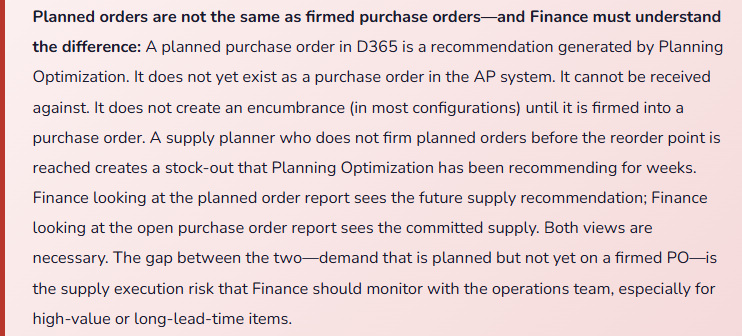
The organization migrates from built-in master planning to Planning Optimization. The first post-migration planning run generates 22% more planned purchase orders by line count than the equivalent run on built-in planning would have generated. The supply planning team firms the recommended orders because “the system said to.” The subsequent month’s AP invoices are significantly higher than budget. Finance investigates. The root cause: the negative days parameter, which in built-in planning was set to 5 days, is interpreted differently in Planning Optimization—the same value of 5 produces more new planned orders in Planning Optimization because the algorithm handles existing supply differently in time-fence edge cases. The planning team didn’t review the behavioral differences before migration.
Fix: Planning Optimization migration requires a parallel run period where both planning engines generate recommendations and the outputs are compared before any planned orders from Planning Optimization are firmed. The parallel run comparison focuses on: total planned order count, total planned purchase order value by period, and any items where the recommended quantity or timing differs significantly between the two engines. Differences are investigated with both supply planning and Finance participation—supply planning to evaluate whether the Planning Optimization recommendation is operationally correct, Finance to evaluate the working capital and cash flow implication of the change in recommended purchase volume. The parameter adjustments required to align Planning Optimization’s behavior with the organization’s intent (negative days, coverage group settings, firm period fence) should be made during the parallel run period, not after firmed orders from Planning Optimization have generated supply that doesn’t match the budget.
Do This / Don’t Do This
Do This
- Involve Finance in safety stock level-setting—model the working capital implication before finalizing planning parameters
- Review the purchase commitment report monthly as part of the close process and before presenting the cash flow forecast
- Set a firming threshold that requires Finance or management review before planned orders above a dollar or weeks-of-supply limit are firmed
- Update trade agreement prices in D365 when vendor contracts are renegotiated—before the next planning run under the new contract
- Set the planning coverage time fence to at least twice the longest supplier lead time for each item group
- Run a parallel comparison period when migrating from built-in master planning to Planning Optimization before firming any planned orders
- Include planning-related revenue risk (stock-out scenarios from planning horizon gaps) in quarterly forecast commentary
- Track forecast accuracy as a Finance KPI—forecast error has a direct, predictable effect on inventory variance and over-procurement
Don’t Do This
- Set safety stock levels without Finance input—safety stock is committed working capital, not just a supply chain risk parameter
- Firm all planned orders automatically without review—Planning Optimization recommends based on its inputs, which may include stale forecasts or incorrect coverage parameters
- Use stale trade agreement prices for cash flow forecasting—systematically understates expected procurement outflows when costs are rising
- Set the planning horizon shorter than supplier lead times—creates unactionable recommendations and predictable stock-out revenue exposure
- Migrate to Planning Optimization without a parallel run comparison period
- Treat master planning as a supply chain-only function that Finance has no role in—every planning parameter is a financial decision with balance sheet and income statement consequences
What’s Next:
Planning Optimization closes the supply chain–Finance intersection arc. The series continues with advanced Finance topics: Intercompany Accounting and Transfer Pricing Configuration, Revenue Recognition Under ASC 606 in D365 F&O, Advanced Bank Reconciliation and Cash Application, and more—each post continuing the same approach: Finance-first, practically grounded, with the mistakes and fixes that implementation teams and Finance teams actually encounter.
— Bobbi
D365 Functional Architect · Recovering Controller
Thank you for reading!
If this post helped you solve a real problem, share it with a Finance colleague who is in the middle of an ERP implementation or a post-go-live optimization. If you have a topic that I haven’t covered, please reach out. There is always one more post worth writing.
Interested in learning more about D365? Here are some of my recent blogs:
Leave a Reply