

How D365 F&O’s security model is structured — roles, duties, privileges, and permissions — the segregation of duties conflicts auditors require Finance to resolve, Extensible Data Security (XDS) for financial dimension and legal entity access control, the user security review that should happen quarterly but usually doesn’t, and why Finance must own the access control design rather than inheriting whatever IT configured at go-live.
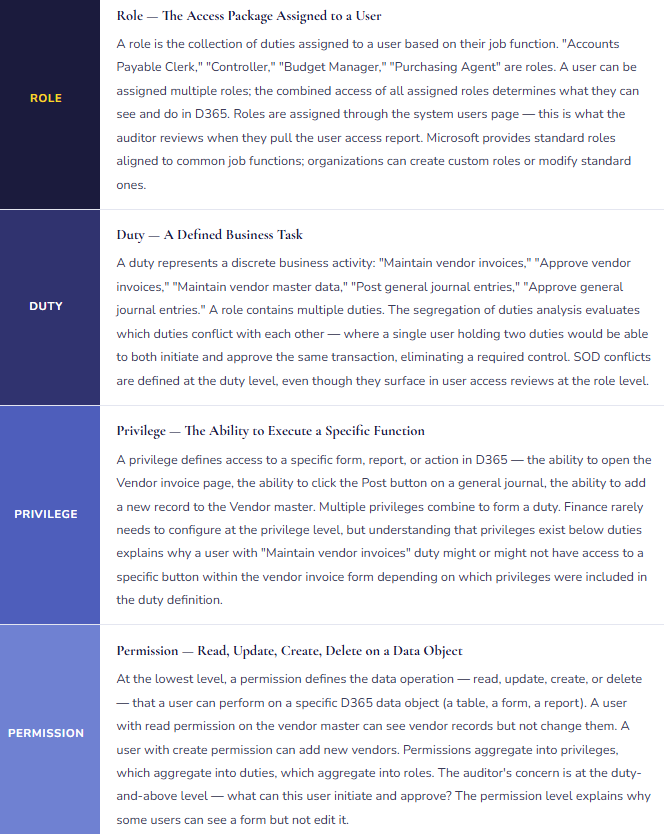
D365 F&O’s Security Model — Four Layers from Role to Permission
D365 F&O’s security architecture is a hierarchy: roles contain duties, duties contain privileges, and privileges contain permissions. Understanding how the layers relate is essential for Finance to participate meaningfully in security design — and to understand what an auditor means when they flag a “role-level conflict.”
Segregation of Duties — The Finance Conflicts Auditors Always Find
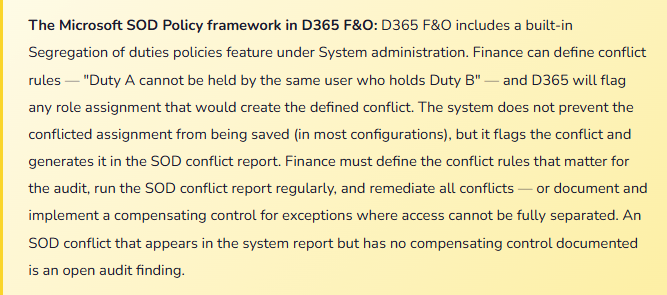
Segregation of duties (SOD) requires that no single user has the combined ability to initiate and complete a transaction without a second person’s involvement — the fundamental control that prevents both error and fraud from going undetected. In D365 F&O, SOD conflicts occur when a user’s combined role assignments give them duties that should be held by different people.
| SOD Conflict | Duty 1 (Initiate) | Duty 2 (Approve/Complete) | Risk | Common Compensating Control if Access Cannot Be Separated |
|---|---|---|---|---|
| AP Invoice + Vendor Master | Maintain vendor invoices (enter, edit) | Maintain vendor master (create, edit vendors) | High | Vendor master change report reviewed weekly by Finance manager not involved in AP. New vendor additions require secondary approval workflow. |
| AP Invoice + AP Payment | Maintain vendor invoices | Maintain vendor payments (generate and release) | High | Payment release requires second approver. Bank positive pay file reviewed by Treasury before release. Unusual payment report reviewed daily. |
| GL Journal Entry + Journal Approval | Maintain general journals (create, edit journal lines) | Approve general journals | High | Workflow approval by a different user enforced at system level. All journal postings require workflow completion — no bypass. Periodic review of approved journals by the approver’s supervisor. |
| Customer Master + AR Invoice | Maintain customer master (create, edit customers) | Maintain customer invoices (create, post) | High | New customer additions require secondary approval. Customer master change log reviewed weekly. AR aging review by someone without customer master access. |
| Fixed Asset Additions + Fixed Asset Disposal | Maintain fixed assets (add, modify) | Dispose of fixed assets | Medium | Disposal requires physical sign-off from asset custodian plus Finance approval. Asset addition and disposal report reviewed quarterly by controller. |
| Expense Reports + Expense Approval | Maintain employee expense reports (submit) | Approve expense reports | Medium | Expense approval workflow requires the approver to be different from the submitter — enforced at system level. No self-approval permitted. Audit of expense reports by Finance sampling. |
| User Security Admin + Financial Posting | Maintain system user security (assign roles, grant access) | Any financial posting duty | High | Security administration should be IT-only with no financial posting access. If the same person must hold both (small organizations), compensating control is an access log review by someone outside the Finance/IT overlap — typically the CFO or external auditor sample. |
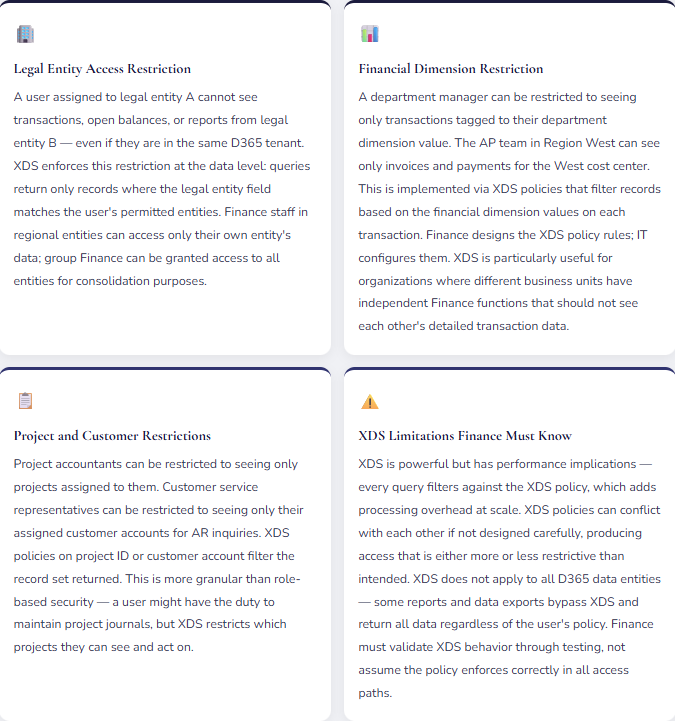
Extensible Data Security (XDS) — Restricting What Data a User Can See, Not Just What They Can Do
Role-based security controls what a user can do — post a journal, approve an invoice. Extensible Data Security (XDS) controls what data a user can see when doing those things. XDS policies filter the data returned to a user based on a defined rule — a legal entity assignment, a financial dimension value, a department hierarchy.
The Quarterly Access Review — What Finance Must Do and Usually Doesn’t
Role assignments accumulate. A user who started as an AP clerk gets assigned a temporary accounts receivable role during a staff shortage, then keeps it when the shortage ends. A former controller who moved to a business analyst role still has the Controller security role because nobody removed it when their job changed. An IT administrator still has the “temporary” system administrator access granted at go-live two years ago. A terminated employee’s account was disabled in Active Directory but the D365 role assignments were never reviewed because D365 access doesn’t auto-revoke when an Active Directory account is disabled in all configurations.
The quarterly user access review is not an IT process — it is a Finance control. Finance is the function that knows which employees should have which access based on their current job responsibilities. IT knows what access each user actually has in D365. The quarterly review brings both pieces of knowledge together:
What Finance reviews quarterly: The active user list from D365 system administration, compared to current HR employee list — any D365 user who is not a current employee is a security risk and should be immediately disabled. The role assignment report by user — verify that each user’s assigned roles match their current job function, not their historical job function. The SOD conflict report — all conflicts identified should either be resolved through access removal or have a documented compensating control. Any role that includes system administrator or security administration duty — specifically confirm the list of people with admin access has not grown since the last review.
Five Mistakes That Create Security Findings in the Finance Audit
⚠️ AP Clerk Has Vendor Master Access — The Classic SOD Failure
During implementation, the AP clerk role was built to include everything the AP clerk needed to do their job: enter invoices, check vendor payment status, look up vendor details, process payments. “Vendor details” was interpreted broadly — the role included the ability to create and edit vendor records, not just view them. At go-live, the AP staff can create new vendors, enter invoices against those vendors, and release payments to those vendors. Three steps of what should be a three-party process (vendor setup, invoice entry, payment release) can be executed by one person. The auditor flags this in year one. The remediation requires removing vendor master maintenance from the AP clerk role, which requires verifying that AP staff can still access the vendor information they legitimately need for invoice processing — a read-only view rather than edit access. The access redesign takes two weeks; the audit finding requires a management response and a remediation timeline.
Fix: The AP clerk role should include read access to vendor master data (ability to look up vendor information when processing invoices) and edit access to vendor invoice records only. The ability to create or modify vendor records (vendor name, bank account, payment terms, address) belongs to a separate Vendor Master Maintenance role that cannot be combined with AP invoice processing. This is the most fundamental AP SOD requirement and must be designed into the role structure at go-live — not discovered in year-one audit. Define the conflict explicitly in D365’s SOD policies, run the conflict report after every role assignment change, and remediate any conflict before the period closes.
⚠️ System Administrator Access Given at Go-Live and Never Removed
During implementation, ten Finance and IT staff were given system administrator access to configure D365. At go-live, the access was never reviewed. Two years later, the Finance Controller, two senior accountants, and the CFO still have system administrator access — assigned during testing and never removed. System administrator access in D365 provides unrestricted access to every function and every data record across all legal entities. It supersedes all role-based and XDS restrictions. A user with system administrator access can post any journal, approve any transaction, modify any record, and change any configuration — in any legal entity, for any amount. The auditor’s IT security review flags it as a critical finding: four Finance users have unrestricted system access with no business justification and no monitoring of how that access is being used.
Fix: System administrator access in D365 should be restricted to IT administrators only — not Finance staff, not business users, not the CFO. The legitimate Finance need that system administrator access usually addresses (I need to configure something, I need to see everything) should be met through appropriate role design: a Finance configuration role with the specific configuration capabilities needed, and appropriate read access for oversight. Remove system administrator from all users who do not have a documented IT administration function. Create a log of system administrator activities — every action taken by a system administrator account should be reviewable. Audit the log quarterly. The list of users with system administrator access should shrink at go-live, not grow.
⚠️ No XDS on a Multi-Entity Environment — Business Unit A Can See Business Unit B’s Financials
A company operates three business units as separate legal entities — a deliberate structural decision to maintain financial separation for performance reporting, potential sale, or regulatory compliance. Each business unit has its own Finance team. D365 is configured with three legal entities, correct. But no XDS policies restrict access by legal entity — Finance users are assigned to the environment, not to specific entities, and any D365 user can switch to any legal entity using the entity selector. The Finance team in Business Unit B routinely switches to Business Unit A’s entity for benchmarking. When Business Unit A begins confidential strategic discussions, the Business Unit B Finance manager continues to access Business Unit A’s detailed transaction data. The CFO learns of the access when a confidential acquisition target appears in a conversation where it shouldn’t.
Fix: For any D365 F&O environment with multiple legal entities that require financial data separation, XDS policies restricting access by legal entity are required — not optional. Finance must define which user groups (roles) have access to which legal entities. Group Finance oversight roles may have access to all entities; entity-level Finance roles are restricted to their assigned entity. The XDS policy must be tested: attempt to access a restricted entity as a restricted user and confirm the data is filtered. Test not just the main form access but report outputs, exported data, and data entity-based integrations — XDS does not apply universally across all access paths and testing must confirm coverage across the paths Finance actually uses.
⚠️ Terminated Employee D365 Access Not Revoked — Active User Account for Someone Who Left Six Months Ago
A senior accountant leaves the company in March. HR initiates the offboarding process — Active Directory account disabled, laptop collected, email forwarding set up. D365 access is not part of the standard offboarding checklist — “IT will handle it.” IT disables the Active Directory account. But D365 user accounts are not directly tied to Active Directory in this implementation — the D365 user account exists independently, and disabling Active Directory does not automatically disable the D365 user or remove their role assignments. In August, the external auditor runs the active user report in D365. The former accountant’s user account is active, with the same role assignments they had in March, including GL journal entry access and AP invoice processing. The account has not been used since March — but it exists, with full access, as a potential attack surface. The auditor flags it as a critical user access control failure.
Fix: D365 user account deactivation must be a required step in the standard employee offboarding checklist — not an “IT will handle it” assumption. The offboarding process must include: (1) Disable the D365 user account on the employee’s last day (not when someone gets around to it). (2) Review and document the user’s role assignments before disabling — for audit purposes, the roles held at termination should be documented. (3) Verify that the account cannot log into D365 after disabling — test the disable, don’t just assume it worked. The quarterly user access review described earlier is also a safeguard: comparing the D365 active user list to current HR employee records will catch any termination that was missed in offboarding. This review has caught departed employees with active access in virtually every organization where it was run for the first time.
⚠️ SOD Conflicts Documented but No Compensating Controls — The Audit Finding Remains Open
The D365 SOD conflict report is run and Finance identifies twelve conflicts. Eight are remediated — access is removed or redesigned. Four conflicts exist in small-team situations where the same person must hold conflicting duties because there isn’t a second person to separate the function: a two-person AP team where both members need to be able to enter invoices and release payments during leave coverage. Finance documents the four conflicts in the audit workpapers: “Conflict exists — compensating control TBD.” The following year’s audit finds the same four conflicts with no compensating controls implemented. The documentation of the conflict without a compensating control is not a remediated finding — it is an acknowledged control deficiency. The auditor escalates the finding to the audit committee.
Fix: Every SOD conflict that cannot be remediated through access redesign requires a documented compensating control that actually operates. Documenting the conflict without implementing a compensating control is not remediation — it is acknowledgment. For small-team situations where duty separation is not feasible: the compensating control must be a detective control (something that would detect if the conflict was exploited), operated by someone outside the conflict. For AP: a weekly report of all new vendors added and all payments released, reviewed by the Finance manager or CFO who is not involved in AP processing, with evidence of the review retained. For GL: all journal postings reviewed by the controller before the period closes, with the controller’s review documented. The compensating control must actually operate — not exist on paper. The auditor will ask for evidence of the review, not just the description of the control.
Do This / Don’t Do This
✓ Do This
- Design Finance roles based on SOD requirements from the start — AP invoice entry, vendor master, and payment release should be three separate capability sets
- Define SOD conflict rules in D365’s Segregation of duties policies before go-live
- Run the SOD conflict report quarterly and remediate all conflicts or implement documented compensating controls
- Remove system administrator access from Finance users at go-live — it is not a Finance role
- Implement XDS legal entity restrictions in any multi-entity environment with financial data separation requirements
- Include D365 access deactivation in the standard employee offboarding checklist
- Run a quarterly user access review — compare D365 active users to current HR employee list, and compare role assignments to current job functions
- Document compensating controls for every SOD conflict that cannot be remediated through access redesign — and actually operate them
- Test XDS policies across all access paths Finance uses — not just the main form, but reports and data exports too
✗ Don’t Do This
- Give AP clerks vendor master create/edit access — the vendor setup and invoice entry conflict is the most commonly found AP audit finding
- Leave system administrator access assigned to business users after go-live
- Allow SOD conflicts to persist with “compensating control TBD” documentation — that is not a remediated finding
- Skip the quarterly user access review — accumulated role drift and terminated employee accounts accumulate faster than annual reviews can catch
- Assume Active Directory disable automatically revokes D365 access — test the offboarding process before the first employee departure
- Skip XDS in a multi-entity environment on the assumption that users “wouldn’t look at” other entities’ data
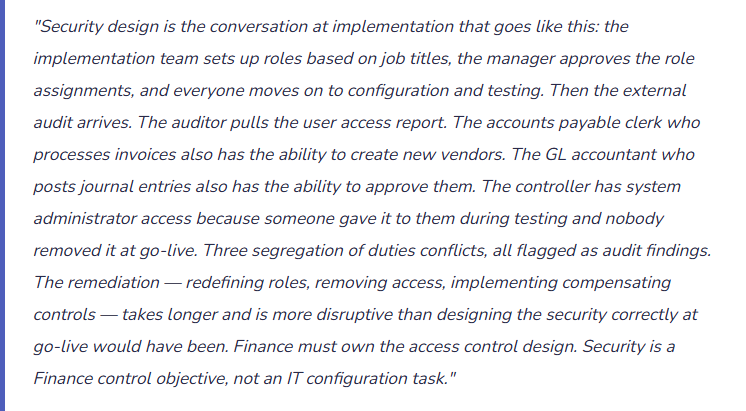
- Design security roles based on what’s convenient and let audit findings drive the SOD design retroactively — remediation after go-live is more disruptive than design before go-live
Up Next in the F&SCM Series
Security and access control closes the governance and compliance arc of this series. The next post turns to the plumbing underneath every other module: Data Management and Data Entities in D365 F&O — how the Data Management Framework works, the difference between data entities and direct table access, how Finance uses data entities for period-end imports, recurring journal loads, and integration feeds, and the data quality controls that keep automated data loads from silently corrupting the financial records they’re supposed to populate.
— Bobbi
D365 Functional Architect · Recovering Controller
Thank you for reading!
Recent Posts:
- D365 Finance · Safe Bulk Edits Without Waiting on IT
- Easy Wins in D365 F&O – Set the Code Once, Let It Flow
- Easy Wins in D365 F&O – Stop Rebuilding Your View Every Morning
- Ground an Agent in Live D365 Data: A Customer Balance Agent
- Turn Statement Variances into Board Commentary with Claude
If this post helped you solve a real problem, please share it with a colleague who is in the middle of an ERP implementation or a post-go-live optimization. If you have a topic that I haven’t covered, please reach out. There is always one more topic worth exploring.
Leave a Reply