

The three-currency architecture, exchange rate types and where each applies, foreign currency revaluation and what it actually posts, realized versus unrealized gain and loss, the period-close currency controls Finance must own, and what breaks when the rate setup doesn’t match the accounting intent.
The Three-Currency Architecture — What D365 Tracks on Every Transaction
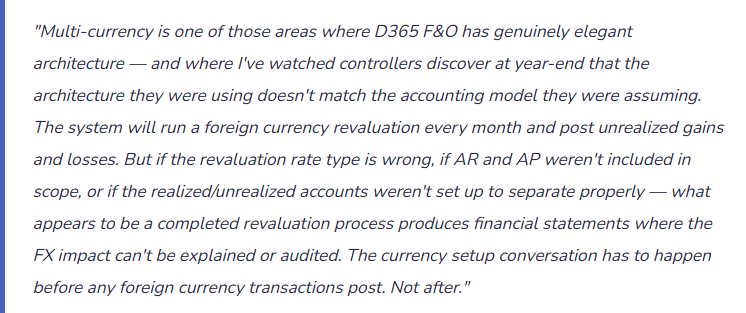
Every financial transaction in D365 F&O carries three currency values simultaneously. Finance needs to understand all three, because each serves a distinct purpose and errors in any one of them affect either the legal entity’s statutory reporting, the group’s consolidated reporting, or both.

Exchange Rate Types — The Setup Decision That Drives Every Translation
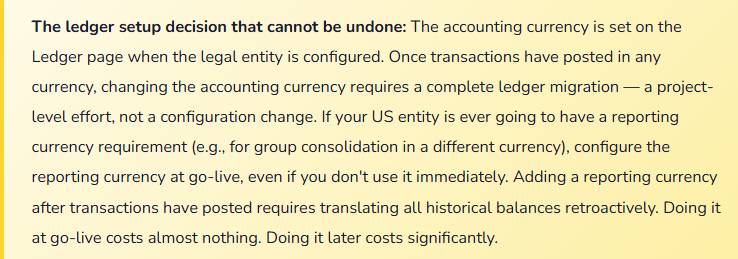
D365 F&O uses exchange rate types to determine which rate to use for which purpose. A rate type is simply a named bucket — “Default,” “Average,” “Spot,” “Closing” — that you populate with exchange rates by currency pair and date. The same USD/EUR pair might have three different rates on the same date depending on which rate type you’re looking at. The rate type assigned to each module and process determines which of those rates actually gets used.
| Rate Type | Typical Use | Where Configured in D365 | Finance Implication if Wrong |
|---|---|---|---|
| Default (spot) | Transaction date rate for AP invoices, AR invoices, POs, SOs, bank transactions. The rate on the day the transaction occurs. | Ledger → Default exchange rate type. Applied to all transaction posting unless a module overrides it. | If the default rate is loaded weekly instead of daily, transactions dated mid-week use a rate that doesn’t reflect the actual market rate. Cumulative FX translation errors accumulate in GL balances. |
| Average (period) | Income statement translation for consolidated reporting when subsidiary statements are prepared in a different functional currency than the group. | Used in consolidation setup and in reporting currency translation if applicable. | Using spot instead of average for income statement translation violates the accounting standard requirement (ASC 830 / IAS 21) that income statement items be translated at period average rates. Overstated or understated revenue and expense in translated statements. |
| Closing (period-end spot) | Balance sheet translation for consolidated reporting. Assets and liabilities translate at the rate on the last day of the period. | Used in consolidation and in foreign currency revaluation — the rate that revaluation uses to re-measure open foreign currency balances. | If revaluation uses the default (average) rate instead of closing rate, the revalued balance doesn’t agree to the balance that would appear in a correctly translated consolidated balance sheet. Revaluation amount is wrong; CTA won’t reconcile. |
| Budget rate | Used to translate budget amounts entered in a foreign currency to accounting currency for budget vs. actual reporting. | Budget model setup — each budget model can reference a different exchange rate type for budget translation. | If the budget rate type isn’t loaded or defaults to spot, budget-to-actual FX variances appear in variance reporting that are pure rate differences rather than volume or price variances. Budget variance reports become unreliable for management review. |
Foreign Currency Revaluation — What It Does, What It Posts, and Why It’s Required
Foreign currency revaluation is the month-end process that re-measures open foreign currency balances at the current period-end exchange rate and records the difference as an unrealized gain or loss. It is required by both US GAAP (ASC 830) and IFRS (IAS 21) for monetary items denominated in a foreign currency — accounts receivable, accounts payable, bank accounts, and certain other balance sheet accounts.
The logic is straightforward: if a US entity has an open EUR receivable that was recorded at 1.08 USD/EUR when the invoice was posted, and the EUR/USD rate is 1.12 at period end, the balance sheet should reflect the current value of that receivable — not the historical value at invoice date. Revaluation records the adjustment. If the EUR strengthened, the receivable is worth more in USD terms — unrealized gain. If the EUR weakened, it’s worth less — unrealized loss.
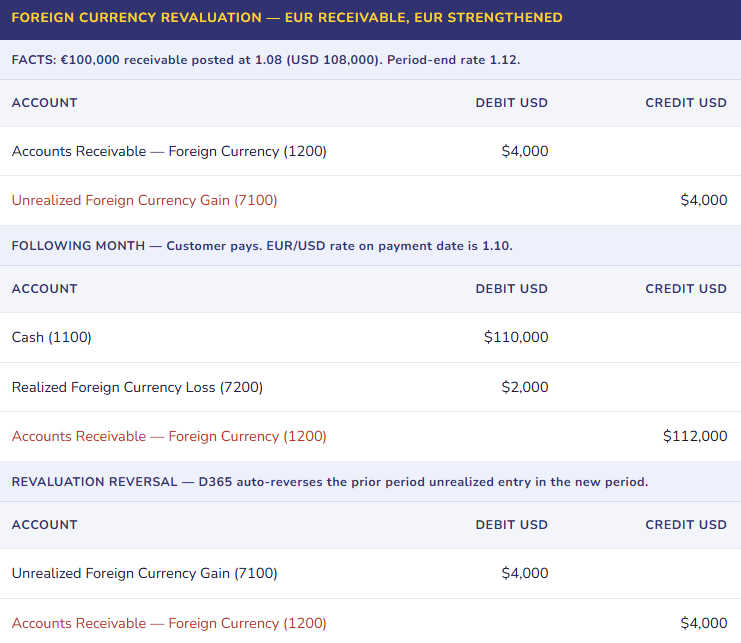
The revaluation auto-reversal is critical to understand: D365 posts the revaluation in period one and automatically reverses it at the start of period two. This means the net effect of the revaluation on the balance sheet is correct at each period end, but the income statement sees both the unrealized amount and its reversal in the following period. Finance must account for this when explaining FX line items in management reporting — the period-two reversal is not a new loss; it is the mechanical unwind of the prior period’s unrealized position.
What Gets Revalued — And What Doesn’t
✓ Accounts Subject to Revaluation
- Open customer invoices in foreign currency (AR).
- Open vendor invoices in foreign currency (AP).
- Bank accounts denominated in foreign currency.
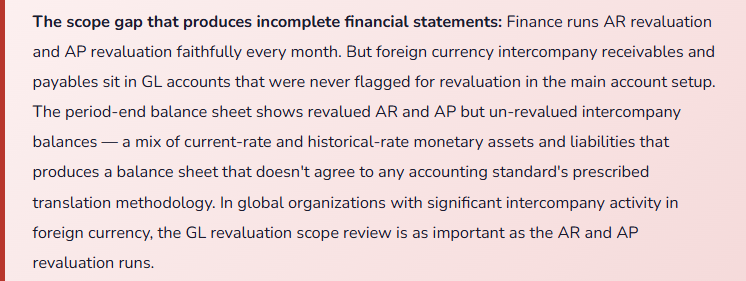
- Intercompany receivables and payables in foreign currency.
- Other monetary balance sheet accounts denominated in foreign currency (loans, deposits, accruals).
✗ Accounts NOT Subject to Revaluation
- Inventory (a non-monetary asset — recorded at historical cost regardless of currency movements).
- Fixed assets (non-monetary — historical cost basis).
- Prepaid expenses (non-monetary).
- Equity accounts.
- Revenue and expense accounts (already translated at transaction-date rate — no period-end re-measurement).
In D365 F&O, revaluation scope is controlled by the Foreign currency revaluation setup within each module. AR revaluation runs from the AR module and re-measures all open customer invoices in foreign currency. AP revaluation runs from the AP module. Bank revaluation runs from Cash and bank management. GL revaluation runs for any main account flagged for revaluation in the chart of accounts setup — this is how you catch foreign currency balances in accounts outside AR, AP, and bank (intercompany accounts, accrued liabilities in foreign currency, etc.).
Realized vs. Unrealized Gain and Loss — The Separation Finance Must Enforce
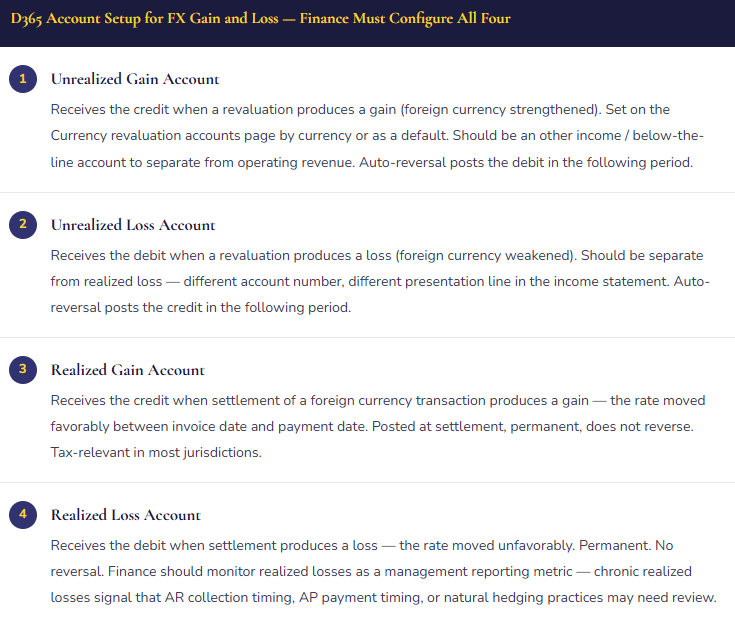
The distinction between realized and unrealized foreign currency gain and loss is both an accounting requirement and a practical management reporting need. They should never share the same GL account, and they should never be combined in management reporting without being labeled explicitly.
Unrealized gain/loss exists only on paper — it represents the change in value of an open foreign currency position due to rate movement between the transaction date and the balance sheet date. It reverses when the position closes. It is not taxable in most jurisdictions until realized. Its income statement impact is a function of open positions and rate movement, not of business performance.
Realized gain/loss occurs when a foreign currency transaction is settled — the EUR invoice is paid, the GBP bank account is swept, the JPY intercompany balance is netted. The realized amount is the difference between the rate at which the transaction was originally recorded and the rate at which it was actually settled. It is permanent, taxable in most jurisdictions, and represents the actual economic FX impact of the transaction.
The Period-Close Currency Checklist
Multi-currency period close has a defined sequence. Running these steps out of order, or skipping any of them, produces financial statements where the FX line items can’t be explained.
Month-End Currency Close — Required Steps in Order
- Load Period-End Exchange Rates
- Before revaluation runs, the closing exchange rates for the period must be loaded for every active currency pair. D365 can import rates from external feeds (European Central Bank, Federal Reserve, bank feeds) or they can be entered manually. Finance must confirm rates are loaded and correct — revaluation uses whatever rate exists in D365 for the period-end date, regardless of whether it’s the actual market close rate.
- Run AR Foreign Currency Revaluation
- Re-measures all open customer invoices in foreign currency at the closing rate. Reviews the proposed revaluation amounts before posting — large single-invoice adjustments deserve a sanity check against the actual rate movement for that currency pair.
- Run AP Foreign Currency Revaluation
- Re-measures all open vendor invoices in foreign currency. Same process as AR. AP and AR revaluation can run independently and in either order — what matters is that both run before the period is closed.
- Run Bank Foreign Currency Revaluation
- Re-measures all bank accounts denominated in foreign currency. Foreign currency bank accounts that aren’t revalued show a historical-cost balance on the balance sheet — which doesn’t reflect the actual USD value of the cash on hand if rates have moved significantly.
- Run GL Foreign Currency Revaluation
- Re-measures any main account flagged for revaluation in the chart of accounts — intercompany accounts, foreign currency deposits, and any other monetary balance sheet account denominated in a foreign currency that isn’t captured by AR, AP, or bank revaluation.
- Reconcile and Review FX Line Items
- Run the FX gain/loss report and verify: total unrealized is explainable by open position size and rate movement. Realized amounts for the period match settlement activity. Realized and unrealized are posting to the correct separate accounts. The prior period’s unrealized reversal is visible and matches last period’s revaluation amount. Any FX amount that can’t be explained by a known position or rate movement requires investigation before the period closes.
Five Mistakes That Make Multi-Currency Close a Monthly Mystery
⚠️ Revaluation Not Run at Period Close — Balance Sheet Carries Historical Rates on Open Positions
- A manufacturing company with EUR and GBP vendor relationships has €2.4M of open AP at any given period end. The AP accountant knows to post invoices and process payments but wasn’t trained that foreign currency revaluation is a required month-end step. For eleven months, revaluation isn’t run. At year-end, the external auditor runs a test — comparing the USD balance of open EUR AP to what it should be at the closing rate — and finds a $180,000 understatement of AP. Eleven periods of rate movements accumulated unrecognized. The correction creates an unexplained $180,000 loss in the final month that requires an adjusting journal, a management disclosure, and an audit memo explaining the control failure.
- Fix: Foreign currency revaluation is a required close procedure, not an optional reporting step. Add it explicitly to the period-close checklist for AR, AP, bank, and GL — in that order. Assign ownership by module: the AR accountant runs AR revaluation, the AP accountant runs AP revaluation. Finance management reviews the revaluation results before approving period close. The review should include confirming that the revaluation amount is directionally consistent with rate movements during the period — a large gain in a period where your primary foreign currency weakened should prompt investigation, not acceptance.
⚠️ Realized and Unrealized Gain/Loss Mapped to the Same Account — FX Analysis Is Permanently Obscured
- At implementation, the configurator sets up a single “Foreign Currency Gain/Loss” account and maps all four FX accounts (realized gain, realized loss, unrealized gain, unrealized loss) to it. The logic: “It all nets out anyway.” Eighteen months later, Finance is trying to explain to leadership why the FX line item swings by $400,000 between periods. The answer is a combination of actual realized FX impact from settlement activity and unrealized position re-measurement that reverses the following month — but they’re in the same account and can’t be separated without reconstructing every transaction. Tax compliance also requires separating realized from unrealized — the tax provision treats them differently, and the combined account forces manual reconstruction for every tax provision period.
- Fix: Minimum of four separate accounts — unrealized gain, unrealized loss, realized gain, realized loss. Ideally six to eight if the organization has multiple significant foreign currency exposures and wants visibility by currency. The four-account minimum is required for tax compliance and basic management reporting clarity. The additional currency-level accounts are optional but enable the analysis that drives hedging decisions. Configure the correct accounts at go-live — remapping after significant transaction history exists is a significant journal entry exercise that creates its own audit questions.
⚠️ Closing Rate Not Loaded Before Revaluation Runs — Revaluation Uses the Wrong Rate
- Period-end is March 31. Rates are loaded weekly — the most recent load was March 28 with the rates from that date. The accountant runs AR revaluation on April 1, using the March 28 rate as a proxy for March 31. The difference between the March 28 and March 31 rates is 0.4% on a $3.2M open AR position — a $12,800 error in the unrealized gain/loss amount. Compounded across twelve periods and multiple currencies, the accumulated rate-timing errors produce an FX position that doesn’t agree to the actual market rate history at any period end. The auditor samples five period-end revaluation rates against market close rates and finds systematic differences.
- Fix: The period-end exchange rate must reflect the rate on the last day of the period — not the most recent load date if that date is before period end. For month-end closes, load rates on the last business day of the month before running revaluation. Automated rate feeds (ECB, Fed reserve, bank API) that update daily are preferable to weekly manual loads for organizations with significant foreign currency exposure. Confirm the rate-as-of date on the rate load before running revaluation — D365 shows the effective date of the rate being used.
⚠️ Reporting Currency Enabled Mid-Implementation Without Historical Translation — Opening Balances Are Wrong
- The implementation team enables the reporting currency feature six months after go-live — the CFO wants to see USD-equivalent balances alongside EUR functional currency amounts. D365 adds the reporting currency to the ledger. But historical transactions that posted before the reporting currency was enabled don’t carry a reporting currency amount — they were posted before the feature existed. The reporting currency balance sheet shows the current period’s activity correctly but carries zero for all prior periods. Retained earnings in reporting currency doesn’t match what it should be. Year-to-date income statement in reporting currency is partially correct. The balance sheet doesn’t balance in reporting currency because historical balances weren’t translated.
- Fix: Reporting currency, if needed, must be configured at go-live — not added mid-implementation. If the business requirement for dual-currency reporting emerges after go-live, the enablement requires a coordinated project: translating all historical transactions to reporting currency, posting opening balance translations, and verifying that the reporting currency balance sheet balances and agrees to a manual translation of the historical accounting currency balances. This is a significant effort for even a single legal entity. The cost of “we’ll add it later” is the cost of that project. The cost of “we’ll configure it now even though we might not need it” is essentially nothing at go-live.
⚠️ Budget Exchange Rate Not Configured — Budget vs. Actual FX Variance Is Invisible
- The budget is prepared with European sales targets denominated in EUR, translated to USD using the rate at the time of budget preparation — say 1.05. By Q3, the EUR/USD rate is 1.14. Actual EUR sales translate to USD at 1.14; budgeted EUR sales translate at 1.05 (because the budget model exchange rate type defaults to the daily spot rate and the budget was prepared at the historical rate). The USD budget vs. actual report shows a $1.2M favorable variance in European revenue. Leadership attributes it to sales performance. Finance knows it’s primarily a favorable FX rate movement — actual volume is roughly on plan, but the dollar-equivalent is higher because EUR strengthened. But the FX component of the variance can’t be isolated from the system because the budget rate type wasn’t separated from the actual rate type.
- Fix: Configure a dedicated Budget exchange rate type, populated at the time of budget preparation with the rates used in building the budget. Apply this rate type to the budget model. When budget vs. actual is run in D365, the actual column uses current-rate translation and the budget column uses the budget rate — the FX component of the variance is the difference between the two rate translations applied to the same volume. With separate rate types, Finance can quantify exactly how much of any revenue or expense variance is rate versus volume versus price. Without it, budget variance analysis in a multi-currency environment is always a mix of business performance and rate movement that nobody can fully separate.
Do This / Don’t Do This
✓ Do This
- Configure the reporting currency at go-live if there’s any chance it will be needed — adding it later is a significant remediation project
- Set up four separate FX accounts: unrealized gain, unrealized loss, realized gain, realized loss
- Load period-end closing rates before running revaluation — confirm the rate effective date
- Run AR, AP, bank, and GL revaluation every period close, in that order
- Assign module-level revaluation ownership on the close checklist by accountant
- Configure a dedicated budget exchange rate type and load it with the rates used in building the budget
- Flag all foreign currency monetary GL accounts for revaluation — not just AR, AP, and bank
- Review revaluation results before posting — direction of gain/loss should agree with rate movement direction
- Explain the prior-period reversal to management — it is not a new loss, it is the mechanical unwind of last month’s unrealized position
✗ Don’t Do This
- Map realized and unrealized FX to the same account — you permanently lose the ability to analyze or explain the FX line
- Run revaluation before loading period-end rates — you’ll revalue at the wrong rate
- Skip GL revaluation — intercompany foreign currency balances won’t be re-measured
- Add the reporting currency feature mid-implementation without planning for historical translation
- Use a weekly rate load for month-end close — load rates on the last day of the period for revaluation accuracy
- Use the same exchange rate type for both budget and actual translations — budget variance is permanently a mix of rate and volume that can’t be separated
- Accept a revaluation amount without a directional sanity check against the period’s rate movement
Up Next:
Multi-currency closes the global finance foundation. The next post turns to a functional area that many D365 F&O organizations underinvest in at implementation time: Service Management in D365 F&O — service agreements, service orders, subscription billing through service, resource and dispatch management, the full GL flow from service delivery through invoicing, and the Finance setup decisions that determine whether your service business can report profitability by agreement, by customer, and by technician.
Until then — separate your realized from unrealized, load your closing rates before you run revaluation, and configure your reporting currency before any transactions post.
— Bobbi
D365 Functional Architect · Recovering Controller
Thank you for reading!
Recent Posts:
- AI and ERP Security: What Copilot Means for Your D365 Security Roles and Internal Controls
- The Natural Language ERP: Stop Running Reports, Start Asking Questions
- AI Adoption in ERP: Why Change Management Is Your Most Critical AI Investment
- Agent 365: Microsoft’s Control Tower for All Your ERP Agents
- AI in D365 Supply Chain: From Demand Planning to Warehouse Intelligence
If this post helped you solve a real problem, share it with a Finance colleague who is in the middle of an ERP implementation or a post-go-live optimization. If you have a topic that I haven’t covered, please reach out. There is always one more topic worth exploring.
Leave a Reply