

How Microsoft’s continuous delivery model works for D365 F&O, what Finance must review before each release wave deploys, how to test changes affecting financial processes without becoming the bottleneck, and the governance model that keeps automatic updates from becoming unannounced surprises at period close.
How Microsoft Delivers Updates — The Two-Wave Model
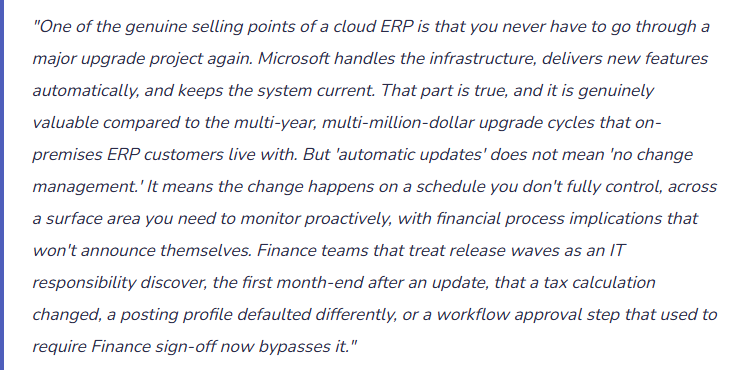
D365 F&O operates on a defined release cadence. Microsoft publishes two major release waves per year, plus monthly quality updates. Understanding the schedule is the foundation of a viable change management approach — because unlike on-premises ERP, you cannot decline updates indefinitely.
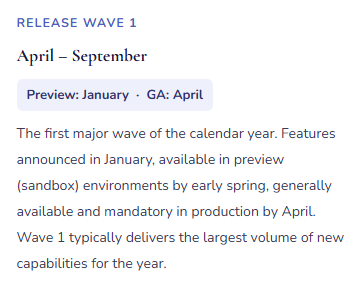
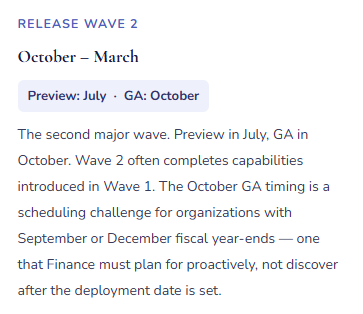
In addition to the two release waves, Microsoft delivers monthly platform updates — quality fixes, performance improvements, and security patches that apply automatically to all environments. Monthly updates are generally lower risk; Microsoft explicitly excludes functional behavior changes from quality updates. But Finance should be aware of when monthly updates deploy, particularly during close periods, because a bug fix that corrects a behavior Finance was relying on can change outcomes even when the intent is purely corrective.
The Three Update Types Finance Must Treat Differently
| Update Type | What It Contains | Finance Risk | Required Finance Action |
|---|---|---|---|
| Release Wave Features | New capabilities, changed workflow behavior, updated calculation logic, modified posting rules, new UI. Published in Microsoft’s release wave documentation on Microsoft Learn months in advance. | High | Finance reads every feature note for relevant functional areas. Features with posting, tax, workflow, or reporting implications require sandbox testing before production deployment. Written Finance sign-off required before production deployment date is confirmed. |
| Monthly Quality Updates | Bug fixes, performance improvements, security patches. No functional feature changes per Microsoft policy. But bug fixes can change behavior if the prior behavior was the bug Finance was working around. | Medium | Review the KB article list for quality updates affecting Finance modules (GL, AP, AR, Fixed Assets, Tax, Cash Management). Test any hotfix that modifies a calculation or posting path the Finance team relies on. Note any fix that resolves behavior Finance had configured around. |
| ISV / Partner Extension Updates | Updates to third-party solutions running on the D365 F&O platform. Released on ISV schedules independent of Microsoft waves. Require separate compatibility testing against the current D365 base version. | High | Maintain a register of all ISV solutions. Require advance release notes from ISV vendors before updates deploy to any environment. Test ISV updates in sandbox before production. Confirm ISV certification against the current D365 F&O version after each Microsoft wave deployment. |
The Finance Release Wave Review Process — Eight Steps
Release Wave Review — What Finance Does, When, and Who Owns Each Step
- Read the Release Wave Documentation When It Publishes
- Microsoft publishes wave documentation on Microsoft Learn when preview begins — approximately three months before GA. Finance reviews every feature listed for the Finance functional areas: General Ledger, AP, AR, Fixed Assets, Tax, Cash Management, Budgeting, and any industry-specific Finance modules in use. Flag anything that changes calculation logic, posting behavior, workflow routing, or financial reporting output.
- Change Owner: Finance
- Classify Features by Risk
- Not every new feature requires regression testing. Classify each relevant change: Low (UI improvement, new report — no process impact); Medium (new optional capability — test if enabling); High (mandatory behavior change to posting, tax calculation, or workflow — test before production regardless). Document the classification so testing effort focuses where the financial risk is highest.
- Change Owner: Finance
- Enable Preview Features in Sandbox
- Release wave features are available on an opt-in basis in sandbox environments before they become mandatory in production. Enable Medium and High risk features in sandbox as soon as preview is available. This provides the maximum testing window. Features that are not enabled in preview before GA will become mandatory in production at the GA date whether tested or not — the preview window is Finance’s protection, not an optional step.
- Ownership: IT enables · Finance tests
- Execute Finance-Specific Test Scenarios
- Run Finance’s documented test scenarios against the preview features: process an AP invoice through three-way match with a price variance; run the tax calculation for each significant tax configuration; execute the period-close sequence; run a bank reconciliation; post a fixed asset depreciation batch; run the foreign currency revaluation. Compare actual system output to expected results. Document pass/fail for each scenario.
- Ownership: Finance team
- Test ISV Solutions Against the Updated Platform
- After the Microsoft update deploys to sandbox, test all ISV and partner solutions that touch Finance processes. Confirm that ISV-generated journals, reports, posting routines, and workflow integrations function correctly on the updated base platform. Any ISV compatibility failure must be resolved — by the ISV vendor or through configuration adjustment — before the production deployment date.
- Ownership: IT · Finance · ISV vendor
- Update Process Documentation and Training Materials
- Any Finance process that changes as a result of the wave update requires updated procedure documentation before the update reaches production. If the AP invoice matching workflow adds a confirmation step, the AP procedure must reflect it before the first live invoice processes. If a tax calculation method changes, the tax team must understand the new behavior before it’s mandatory. Documentation updates happen during the testing window — not after the update is live.
- Ownership: Finance
- Schedule Production Deployment Outside Close Blackout Windows
- Coordinate with IT to schedule the production deployment outside of defined close blackout dates. The blackout window should cover the last five business days of the period, the first three business days of the following period, and the full fiscal year-end close period. No production updates deploy during a blackout except emergency security patches. If the default GA date falls inside the blackout, request a deployment extension before IT commits to a date.
- Ownership: Finance defines blackout · IT schedules
- Post-Deployment Monitoring — First Close After the Update
- The first period close after a release wave deployment is the highest-risk close in the cycle. Run the close checklist with heightened attention on every process area where a feature change applied. Compare key financial outputs — tax calculation results, depreciation amounts, revaluation amounts — to expected values before locking the period. Unexplained differences require investigation before the period closes, not after the auditor asks about them.
- Ownership: Finance team
The Governance Model — Finance as a Partner, Not a Bottleneck
The failure mode in cloud ERP change management runs in two directions: Finance is excluded entirely and discovers changes after they break production, or Finance demands full regression testing before every monthly quality update and brings the organization’s update cadence to a standstill. Neither works. The governance model that functions in practice has four components.
A designated Finance change owner. One person on the Finance team reads release wave documentation, coordinates sandbox testing, and communicates Finance-relevant changes to the team before each production deployment. This is a part-time role — not a full-time position — but it requires someone who is organized, reads Microsoft documentation methodically, and understands both Finance processes and D365 configuration deeply enough to assess risk without IT translating everything. In most organizations, this is a Finance systems lead, a senior accountant with strong functional configuration knowledge, or a Finance manager with hands-on D365 experience.
A standing sandbox environment maintained current with production. “We don’t have a sandbox” is a change management risk, not a cost-saving measure. Finance testing requires a non-production environment where real scenarios can be run against the actual configuration without affecting live transactions. A sandbox that hasn’t been refreshed in four months doesn’t reflect production configuration — tests against it produce results that don’t translate to production behavior. The sandbox refresh schedule must be part of the governance model.
A documented test scenario library. Finance should maintain a library of test scripts for each critical financial process — the AP three-way match flow, fixed asset depreciation batch, period-close sequence, tax calculation, bank reconciliation, foreign currency revaluation, financial statement generation. These scenarios run against each release wave in sandbox. The library is updated when processes change and becomes institutional memory of expected D365 behavior. A test library built over two or three waves enables regression testing in one to two days by Finance staff who know the processes — without rebuilding the approach each cycle.
A proactive communication protocol. When a release wave changes a Finance process, the team needs to know before the update hits production. A standard communication format works: “Wave 2 deploys October 22. Three changes affect Finance processes. [Change 1 — what it is, what it means for your work]. [Change 2]. [Change 3]. Questions or concerns by October 18.” Proactive communication prevents the close-morning call from the AP manager who discovered the invoice matching screen looks different and doesn’t know why.
Five Mistakes That Make Cloud ERP Updates a Finance Crisis
⚠️ Finance Hears About the Release Wave After It Deploys to Production
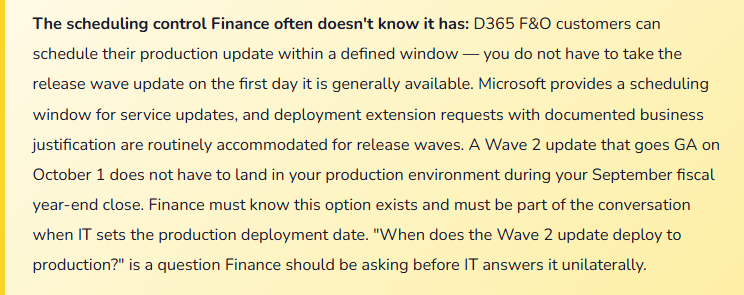
IT manages the update schedule. Finance’s involvement is an email the morning after the production update: “The Wave 2 release was applied last night. Let us know if you have any issues.” The AP manager opens D365 and the invoice matching page has a new required field — a document type field that didn’t exist before, mandatory for a new matching feature enabled by default. Forty-seven vendor invoices that arrived overnight are stuck in workflow. The required field is blank. AP stops. Finance calls IT. IT calls the partner. Four hours of production disruption that a fifteen-minute sandbox test would have caught in October.
Fix: Finance must be on the release wave communication distribution before IT schedules any production deployment. The governance requirement is simple: Finance reviews release wave documentation for Finance-relevant functional areas and provides written sign-off that the impacted changes have been tested before the production deployment date is confirmed. No Finance sign-off means the deployment date is not confirmed. This is Finance owning operational continuity of financial processes — the same standard IT applies to platform stability. Both must be verified before any production change.
⚠️ A Tax Calculation “Correction” Deploys Without Testing — The Next VAT Return Is Wrong
Wave 1 includes a change to how D365 handles tax code defaulting for purchase orders with mixed item tax groups. The release notes call it a “correction to tax defaulting priority.” Finance doesn’t read the notes carefully — “tax defaulting” sounds like a minor technical fix. The update deploys. For the next quarter, purchase orders with items in two tax groups calculate at the wrong rate for one group because the “corrected” priority changes the result Finance’s configuration was producing. The Q2 VAT return uses system-calculated amounts. The tax authority audits, finds the discrepancy, and three months of calculations require an amended return, back payments, and an explanation of why the ERP produced incorrect output.
Fix: Tax calculation changes — including anything described as a “correction” or “bug fix” — require mandatory sandbox testing before production. Run a representative purchase order through each tax configuration the organization uses. Compare calculated tax to expected amounts. If the “corrected” behavior changes a result Finance was relying on — even if Microsoft characterizes the prior behavior as a bug — Finance must decide in sandbox whether to adjust configuration to restore the intended outcome or accept the new calculation and update the return process accordingly. That decision requires Finance knowledge; it cannot be made by IT reading the release notes.
⚠️ Wave 2 Deploys During October Year-End Close — Finance Runs Year-End on a Changed System
The organization’s fiscal year ends September 30. Wave 2 GA is October 1. IT applies the update October 2 — technically outside the fiscal year, exactly when Finance is running year-end close: finalizing Q4 accruals, running depreciation, processing year-end entries, preparing audit documentation. The close runs on a system that changed overnight. A financial report format produces slightly different output. A workflow step routes differently. Finance is simultaneously closing the year and discovering what the new system does. The year-end close takes an extra week. The audit timeline slips. The explanation to the CFO starts with “the system was updated during close.”
Fix: The production update blackout window must cover fiscal year-end close, not just month-end close. For a September 30 fiscal year-end, the blackout should extend from mid-September through at least October 20 — covering pre-close preparation, the close itself, and initial audit preparation. Communicate the blackout to IT before the Wave 2 GA date is published. Request a production deployment extension if the default date falls inside the blackout. Microsoft accommodates documented business justification requests routinely; “our fiscal year-end close runs through October 20” is a justification that has been accommodated many times. Establishing the blackout calendar at the beginning of the year rather than the week before the release is the difference between a planned schedule and an emergency extension request.
⚠️ No Test Scenario Library — Every Wave Rebuilds the Testing Approach from Zero
When release wave testing season arrives, the Finance change owner asks what needs to be tested. Each time, a new discussion identifies processes, assigns testers, and reconstructs what “correct behavior” looks like for each scenario. By the time the approach is agreed, the sandbox testing window is half over. Testing is rushed. Something passes in sandbox that should have been flagged. The same preparation effort repeats every wave because nothing from the previous cycle was documented and reused. Over two years, the team spends four times the effort they would have spent building a library after the first wave.
Fix: After the first release wave testing cycle, save the test scenarios, expected outcomes, and actual results in a simple spreadsheet: Process, Test Scenario, Steps, Expected Result, Actual Result, Pass/Fail, Wave. Before each subsequent wave, add scenarios for processes added since the last cycle and update expected results for any scenarios where behavior legitimately changed. A library built over two or three cycles becomes a comprehensive regression suite that Finance can execute in one to two days. The initial investment in building the library is recovered in the second wave cycle. The alternative — rebuilding from scratch every cycle — costs more in staff time over any two-year period than building the library would have.
⚠️ ISV Solutions Not Tested Against the Updated Base Platform — An Incompatible Integration Stops Production
The organization runs a payroll integration ISV solution that processes weekly payroll data into D365 GL journal entries. Wave 1 deploys. The ISV solution hasn’t been tested against the new platform version — the vendor wasn’t notified of the deployment timing. Payroll runs Friday. The integration fails: a D365 API endpoint the ISV calls was deprecated and replaced in Wave 1. The journal doesn’t post. Finance discovers the failure Friday afternoon. The ISV vendor is reached after hours. An emergency fix deploys Saturday morning. Payroll posts Saturday. The process was down for twenty-four hours due to an ISV compatibility issue that a sandbox test the prior week would have identified and resolved before production.
Fix: Maintain a register of all ISV solutions in the D365 environment — vendor name, contact, support SLA, functional areas covered, version history. Before every release wave production deployment, notify each ISV vendor of the upcoming platform version and request written compatibility certification. If the ISV cannot certify before the production date, either delay deployment or document the compatibility risk and mitigation in writing. ISV solutions that touch financial posting routines, workflows, or reports are Finance’s operational risk — Finance must own the ISV update coordination for those solutions, not delegate it to IT and assume someone will sort it out if something breaks.
Do This / Don’t Do This
✓ Do This
- Designate a Finance change owner who reads wave documentation and coordinates Finance testing every cycle
- Read release wave documentation when it publishes — three months before GA, not the week before production
- Test all Finance-critical feature changes in sandbox before production deployment — tax, depreciation, matching, revenue recognition, workflow
- Define and enforce a production update blackout window covering both month-end and fiscal year-end close
- Request a deployment extension when the GA date falls inside a blackout — before the production date is set
- Build and maintain a reusable Finance test scenario library — update it after each wave cycle
- Notify ISV vendors of upcoming platform version changes and require compatibility certification before production
- Communicate Finance-relevant wave changes to the team before production deployment
- Monitor the first period close after each wave update with heightened attention on changed process areas
✗ Don’t Do This
- Treat release wave management as IT’s responsibility — Finance owns the financial process impact
- Skip sandbox testing for changes described as “corrections” — tax and posting corrections change behavior Finance may have been relying on
- Allow production deployments during close blackout windows without explicit Finance sign-off
- Leave ISV solutions untested against updated platform versions — incompatibility stops production operations
- Rebuild the testing approach from scratch every wave — the library investment pays back starting in the second cycle
- Communicate wave changes to the Finance team after the update is live — proactive communication prevents close disruption
- Let the Finance change owner role go unfilled — “everyone is responsible” means no one is
Up Next:
Change management closes the operational governance arc. The next post goes deep into a financial standard that most D365 F&O customers implemented imperfectly the first time and are still correcting: Asset Leasing and ASC 842 / IFRS 16 in D365 F&O — the right-of-use asset and lease liability model, how D365’s Asset Leasing module handles classification, amortization schedules, and automated journal generation, and the Finance setup and ongoing governance that keep the lease portfolio reconciled without a parallel spreadsheet running alongside the system.
— Bobbi
D365 Functional Architect · Recovering Controller
Thank you for reading!
Recent Blogs:
- D365 Finance · Safe Bulk Edits Without Waiting on IT
- Easy Wins in D365 F&O – Set the Code Once, Let It Flow
- Easy Wins in D365 F&O – Stop Rebuilding Your View Every Morning
- Ground an Agent in Live D365 Data: A Customer Balance Agent
- Turn Statement Variances into Board Commentary with Claude
If this post helped you solve a real problem, please share it with a colleague who is in the middle of an ERP implementation or a post-go-live optimization. If you have a topic that I haven’t covered, please reach out. There is always one more topic worth exploring.
Leave a Reply