

How data quality in D365 F&O’s vendor master, customer master, and chart of accounts determines the accuracy of every financial report Finance produces, the governance framework Finance must enforce to maintain master data integrity across the organization’s life on the platform, and the five master data failures that produce financial statement errors Finance traces back to a single field set incorrectly at record creation.
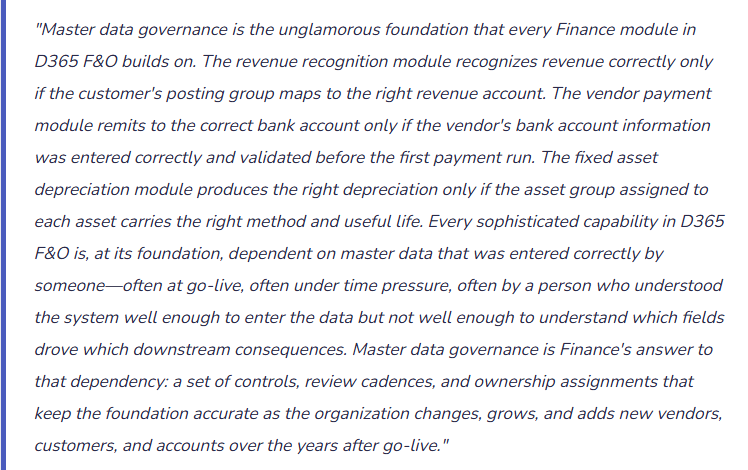
The Three Master Data Domains Finance Must Own
- Vendor Master
- Every vendor record in D365 F&O determines: how invoices are posted (through the vendor posting group → GL account mapping), when payment is due (through the terms of payment), how the vendor is paid (through the method of payment and bank account), what tax reporting applies (through the 1099 classification for US vendors), and what controls apply to the relationship (through the approval workflow settings and the purchase order requirement flag).
- Finance-critical fields: Vendor posting group, Terms of payment, Method of payment, Bank account (IBAN/routing validated), 1099 box (for US vendors), Payment hold flag, Purchase order required flag.
- Finance owns: vendor bank account changes (highest fraud risk field in the system), posting group assignment (determines GL impact of every invoice), and periodic vendor master cleanup (deactivating inactive vendors, identifying duplicates).
- Customer Master
- Every customer record determines: where revenue posts (through the customer posting group), the customer’s credit exposure limit, the payment terms that drive AR aging and collection letter triggers, the currency of the relationship, the sales tax group that determines tax on every invoice, and the salesperson assignment that drives commission calculation and territory reporting.
- Finance-critical fields: Customer posting group, Terms of payment, Credit limit, Sales tax group, Currency, Collection letter sequence, Interest code, Financial dimensions (for cost center attribution of revenue).
- Finance owns: posting group assignment, credit limit, collection letter sequence assignment, and the annual customer master audit (identifying inactive customers, correcting tax group errors, confirming terms of payment accuracy).
- Chart of Accounts
- The COA in D365 F&O is not a static list—each account carries configuration that determines how it behaves in every transaction: the account type (balance sheet vs. income statement), the posting type restrictions (which transaction types can post to this account), the dimension requirements (which financial dimensions are mandatory for transactions hitting this account), the closing type (profit and loss vs. balance sheet for year-end close), and the currency restriction (functional currency only vs. all currencies).
- Finance-critical fields: Account type, Main account category (drives Financial Reporting classification), Posting type restrictions, Mandatory dimension requirements, Closing type, Default currency.
- Finance owns: new account creation approval, periodic COA review for unused accounts (deactivation prevents misdirected postings), and posting type restriction configuration (ensures accounts are used only for their intended transaction types).
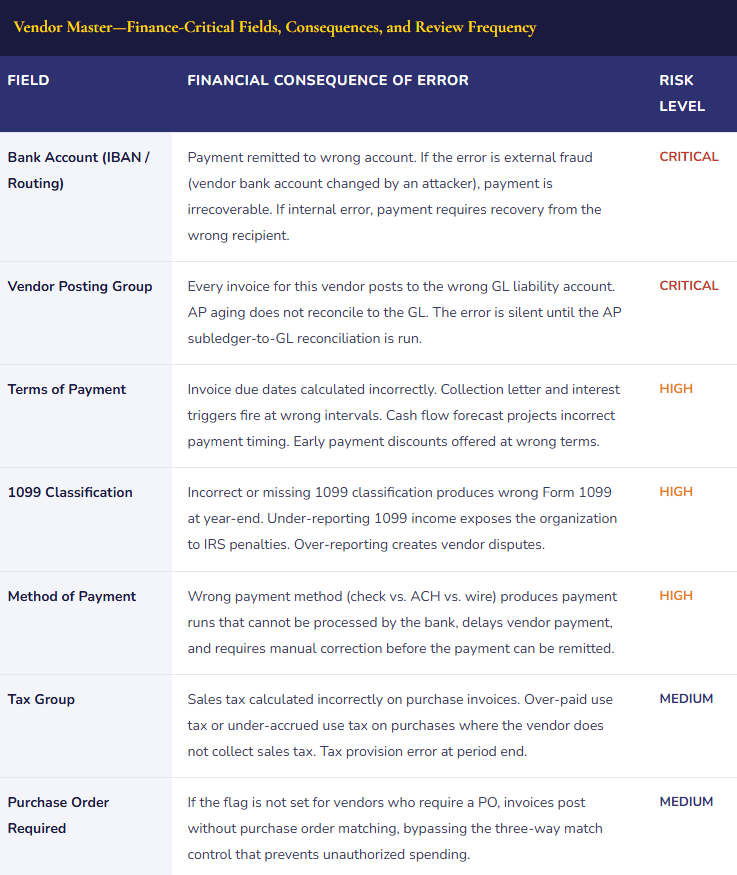
The Vendor Master Fields That Finance Must Govern Most Tightly
The vendor master contains dozens of fields, but a subset drives the financial consequences that Finance must control most rigorously. Errors in these fields are not self-correcting—they propagate into every transaction until Finance identifies and corrects the underlying record.
The Master Data Governance Framework—Four Pillars Finance Must Maintain
Master Data Governance Framework—Finance-Owned Controls and Cadences
- New Record Creation Controls
- Every new vendor, customer, and GL account must pass through a defined approval workflow before becoming active in D365 F&O. The workflow routes the new record to Finance for review of the Finance-critical fields: posting group, terms of payment, 1099 classification (vendors), credit limit (customers), account type and posting restrictions (GL accounts). Finance approves or returns the record for correction before it can be used in any transaction. New vendor records specifically require: TIN (tax identification number) validation for US vendors before approval, bank account entry with IBAN/routing validation, and verification that the vendor is not a duplicate of an existing vendor record (Finance checks the vendor master for existing records with the same name or TIN before approving any new vendor).
- Change Controls for High-Risk Fields
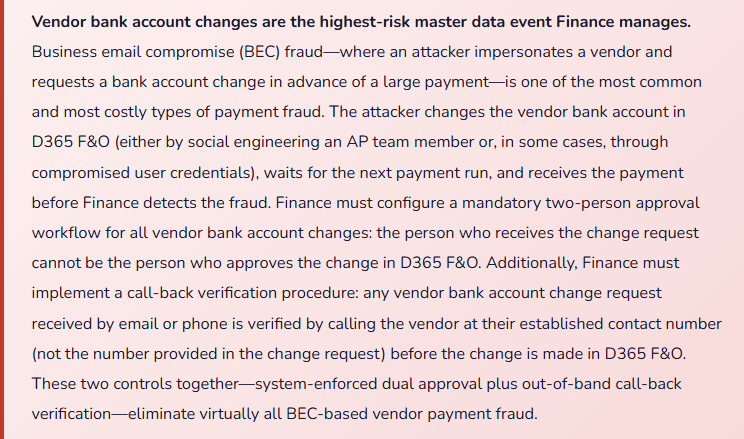
- Changes to high-risk master data fields require a separate approval workflow with higher authorization than the original record creation. Vendor bank account changes: two-person approval plus out-of-band call-back verification. Customer credit limit changes: Credit Manager approval for increases, Controller approval for increases over 50% of current limit. Vendor posting group changes: Controller approval required (changes affect the GL account mapping for all future invoices). GL account deactivation: Controller approval required to prevent accounts with historical transaction history from being inactivated while still referenced in open transactions or recurring journal templates. D365 F&O’s workflow engine enforces these controls at the field level using the Data Management Framework change tracking and workflow configuration.
- Periodic Master Data Audits
- Finance conducts quarterly master data audits to identify and correct records that have drifted from the required standard. The vendor master audit: run the Vendor aging and payment performance report to identify vendors with consistently inaccurate terms of payment (the terms in D365 F&O do not match actual payment behavior), identify vendors inactive for more than 18 months (candidates for deactivation), identify vendors with missing or unvalidated bank accounts (candidates for bank account verification). The customer master audit: run the Customer payment statistics report to identify customers whose terms of payment in D365 F&O do not match their actual payment pattern, identify customers with no credit limit (uncontrolled credit exposure), identify customers inactive for more than 24 months (candidates for deactivation). The COA audit: identify GL accounts with zero activity in the trailing 12 months (candidates for deactivation to prevent misdirected postings), identify accounts with posting type restrictions that no longer match the account’s intended use, identify accounts missing the required financial dimension assignments.
- Ownership Assignment and Accountability
- Every master data domain has a named Finance owner who is accountable for the quality of the data in that domain. The Vendor Master Owner (typically the AP Manager) is accountable for vendor posting group accuracy, bank account validation, 1099 classification completeness, and duplicate vendor identification. The Customer Master Owner (typically the AR Manager or Credit Manager) is accountable for customer posting group accuracy, credit limit currency, collection letter sequence assignment, and customer terms of payment accuracy. The COA Owner (typically the Controller or Senior Accounting Manager) is accountable for account type configuration, posting type restrictions, dimension requirements, and the annual account rationalization that deactivates unused accounts. The ownership assignment is documented and the quarterly audit results are reviewed with each owner. This accountability structure ensures master data governance is a defined Finance responsibility, not a background task that happens when someone notices a problem.
Five Master Data Failures That Finance Traces to a Single Wrong Field
⚠️ New Vendor Created With Wrong Posting Group—18 Months of Invoices Post to the Wrong Liability Account
A new vendor is set up in D365 F&O during the go-live data migration. The vendor provides professional services and should be assigned to the Services vendor posting group, which maps to the Professional Services Payable account (GL 20200). Due to a data entry error in the migration file, the vendor is assigned to the Goods posting group, which maps to the Trade Payable account (GL 20100). For 18 months, every invoice from this vendor posts to GL 20100. The AP subledger agrees to the GL because D365 F&O posts correctly to the mapping—the mapping itself is wrong. Finance runs the AP aging reconciliation monthly and it always reconciles. The error is discovered when the Controller reviews the balance by vendor posting group and notices that the trade payable account includes vendor balances that appear to be service vendors. Investigation identifies the single misconfigured vendor. Correcting 18 months of misclassified payables requires a correcting journal that moves the vendor balance from GL 20100 to GL 20200—a single entry for the current balance, plus a historical-period adjustment if the prior-period financial statements require restatement.
Fix: Vendor posting group assignment must be validated by Finance before the new vendor record is activated, not discovered through a retroactive analysis. The new vendor workflow includes a Finance review step that confirms the posting group assignment is appropriate for the vendor’s category: goods vendors to the trade payable group, service vendors to the services payable group, employee reimbursements to the expense reimbursement group. The Finance reviewer checks the account mapping associated with the assigned posting group (Accounts payable → Setup → Vendor posting profiles) to confirm the correct GL accounts will be used. This review takes two minutes per new vendor and prevents months of misclassified payable balances.
⚠️Duplicate Vendor Records Created—Payments Remitted to Wrong Bank Account
A major supplier with whom the organization has an established vendor record (Vendor ID 100423, bank account on file, terms Net 30) is re-entered by an AP coordinator as a new vendor (Vendor ID 100847) when a new invoice arrives with a slightly different format on the remittance address. The new record carries no bank account and defaults to check payment. For three months, invoices coded to Vendor 100847 are paid by check to the supplier’s PO box address. The supplier does not receive the checks, because they have migrated to ACH-only billing and no longer process checks at the PO box address. The checks go uncashed. Finance has three months of outstanding checks to a vendor that considers itself unpaid. The vendor’s accounts receivable team eventually contacts the organization’s AP team; the duplicate is discovered and the outstanding checks are stopped and reissued via ACH from the correct vendor record. The supplier threatens late payment penalties for the delayed payment period.
Fix: Duplicate vendor detection must be a step in the new vendor creation workflow, not a retroactive cleanup exercise. Finance configures D365 F&O to search for potential duplicate vendors by name, TIN, and address before the new vendor record can be approved. Any potential match is flagged and routed to the AP Manager for review before the new record is activated. The AP Manager confirms whether the new request is a genuinely new vendor (new supplier, not previously in D365 F&O) or a variant of an existing vendor that should be handled through the existing record. Running the duplicate detection search takes 30 seconds per new vendor request. Finding and resolving a duplicate after payments have been misrouted takes days and risks supplier relationship damage.
⚠️ Customer Posting Group Changed Without Finance Approval—Revenue Posts to Wrong Account for Six Months
A power user with vendor and customer master edit access changes a customer’s posting group from the Domestic Revenue group (mapping to Revenue Account GL 40100) to the International Revenue group (mapping to Revenue Account GL 40200) without Finance approval. The change was intended—the customer is expanding internationally and the sales team requested the update. However, Finance had not reviewed whether the international revenue group and its associated GL account were the right classification for this customer’s specific revenue type, and Finance was not notified the change had been made. For six months, this customer’s invoices post to GL 40200. Management Reporter shows international revenue as overstated and domestic revenue as understated by the amount of this customer’s billings. The sales commission calculation, which is based on revenue by GL account, is also affected—the salesperson whose territory includes this customer receives commission calculations from the wrong revenue pool for six months.
Fix: Customer posting group changes require Controller approval in D365 F&O’s change workflow—they should not be editable by any user without a Finance review step. Finance configures the customer master change workflow to require Controller approval for changes to the customer posting group, customer group, and financial dimensions fields. The workflow is set up in D365 F&O’s workflow module (Accounts receivable → Setup → Accounts receivable workflows → Customer change workflow). When a posting group change is requested, the system routes it to the Controller with the current and proposed values, the revenue accounts that will be affected, and the list of open invoices that will be posted under the new mapping going forward. Finance reviews and approves or returns the request. Changes take effect only after approval—the system will not allow the field to be saved with the new value until the workflow is complete.
⚠️ GL Accounts Proliferate Without Governance—Chart of Accounts Has 1,200 Accounts Including 340 With No Activity
The organization’s D365 F&O implementation began with a chart of accounts designed for the original business. Over four years, the business has added product lines, legal entities, and reporting requirements. Each addition generated new account requests. The account creation process requires only a Finance manager’s approval by email—there is no workflow in D365 F&O that validates whether a new account is genuinely needed before it is activated. Finance managers generally approve requests quickly to avoid operational delays. Four years post-go-live, the chart of accounts has 1,200 active GL accounts. Management Reporter runs slowly because every report definition must evaluate all 1,200 accounts. Tax return preparation requires mapping 1,200 accounts to the appropriate Schedule M-3 lines. The annual audit produces 1,200 GL account balance confirmations for the auditors. Of the 1,200 accounts, 340 have no transaction activity in the trailing 12 months. Many of these are alternative accounts created when the requester was not sure which existing account was correct and created a new one to be safe.
Fix: New GL account creation requires a Finance review that confirms: the account does not duplicate an existing account, the account is needed for a specific accounting requirement that existing accounts cannot satisfy, the account has been assigned to the correct Management Reporter row definition and Financial Reporting classification, and the account’s posting type restrictions are configured to allow only the intended transaction types. Finance also conducts an annual COA rationalization: run the Main account activity report for the trailing 12 months, identify accounts with zero activity, confirm with the COA Owner whether each inactive account is needed for future use or can be deactivated, deactivate confirmed-inactive accounts (deactivation prevents future use while preserving historical transaction history). A COA rationalization that deactivates 340 inactive accounts reduces report complexity, simplifies tax mapping, and eliminates the risk that future transactions are misdirected to accounts nobody is monitoring.
⚠️ Financial Dimensions Missing on Vendor and Customer Records—Transactions Post Without Dimension Coding
The organization uses the Department and Business Unit financial dimensions for management reporting. Every GL account for expense and revenue is configured as dimension-mandatory—transactions cannot post to those accounts without a Department and Business Unit code. New vendors are created by the AP coordinator with no default financial dimensions on the vendor record. When invoices are posted against these vendors, D365 F&O requires the AP coordinator to manually enter the Department and Business Unit codes on each invoice line. In a high-volume AP environment processing 300 invoices per month, 20–30 invoices per month are posted with blank dimension fields because the AP coordinator is under close-day pressure and overrides the dimension validation to post the invoice. The dimension mandatory validation is disabled for the AP coordinator—it was disabled 14 months ago to resolve a posting error and never re-enabled. As a result, 14 months of AP invoices have a 7–10% missing dimension rate, producing cost center reports Finance cannot trust.
Fix: Financial dimension defaults must be configured on vendor and customer records to minimize the manual dimension coding burden on AP and AR users. For vendors where the department is always the same (all IT vendor invoices go to the IT department cost center, all facilities vendors go to Facilities), Finance configures the default Department dimension on the vendor record. When an invoice is posted for that vendor, the department code defaults from the vendor record and the AP coordinator only needs to override it if it is wrong—which is far less likely than requiring manual entry every time. Re-enable the dimension mandatory validation for all users including AP coordinators. Address the specific transaction that caused the validation to be disabled 14 months ago by fixing the underlying record rather than suppressing the control. Dimension mandatory validation is not optional overhead—it is the system control that enforces the data quality that management reporting depends on.
Do This / Don’t Do This
Do This
- Require Finance approval for all new vendor and customer record creation—validate Finance-critical fields before the record is activated
- Configure mandatory two-person approval plus out-of-band call-back verification for all vendor bank account changes
- Run duplicate vendor detection (by name, TIN, and address) as a step in the new vendor creation workflow
- Require Controller approval in D365 F&O’s workflow for customer and vendor posting group changes
- Conduct an annual COA rationalization—deactivate accounts with zero activity in the trailing 12 months
- Configure vendor and customer financial dimension defaults to minimize manual coding burden and reduce missing dimension rates
- Re-enable and maintain dimension mandatory validation—never disable it as a workaround for a posting error; fix the underlying record instead
Don’t Do This
- Allow vendor bank account changes through email request without a D365 F&O workflow approval and an out-of-band verification call
- Create new GL accounts on request without a Finance review confirming the account does not duplicate an existing one
- Allow posting group changes on vendor or customer records without Controller approval
- Disable dimension mandatory validation as a workaround for any reason—it is the control that prevents missing dimension coding from accumulating
- Let the chart of accounts grow indefinitely without annual deactivation of unused accounts
- Treat master data governance as an IT responsibility—the financial consequences of master data errors are Finance’s problem and Finance must own the controls that prevent them
Finance & Supply Chain Series · Post 49
What’s Next in the Series
Master data governance is the foundation everything else builds on. The series continues with two Finance topics that sit at the intersection of system configuration and Finance leadership: Financial Reporting Governance—How Finance Owns the Management Reporter Library Across the Organization’s Life on D365 F&O—building the report library that replaces the Excel management package, governing report definitions across release waves and business changes, training Finance users to produce and interpret D365 F&O reports rather than Excel derivatives, and the five reporting governance failures that leave Finance producing the same manual package eighteen months after go-live.
— Bobbi
D365 Functional Architect · Recovering Controller
Thank you for reading!
If this post helped you solve a real problem, share it with a Finance colleague who is in the middle of an ERP implementation or a post-go-live optimization. If you have a topic that I haven’t covered, please reach out. There is always one more post worth writing.
If you are interested in learning more, below are some of my latest blogs:
- Human in the Loop, With Tips: D365 Finance & Operations – Save Yourself the Re-Filtering
- Human in the Loop, With Tips: D365 Finance & Operations – Make the System Work Like You Do
- The Human Skills That Get More Valuable as AI Takes Over the Busywork
- The Skills That Matter More as Agents Take the Busywork
- Setting the Right Guardrails
Leave a Reply