

How D365 F&O’s Subscription Billing feature handles recurring billing schedules, revenue and expense deferral schedules, and multi-element revenue allocation without a separate Revenue Recognition module—the three sub-modules Finance must understand and configure, the period-end recognition run Finance must own, the Contract Liability reconciliation that belongs on every close checklist, and the five subscription billing failures that produce revenue misstatements Finance discovers at audit.
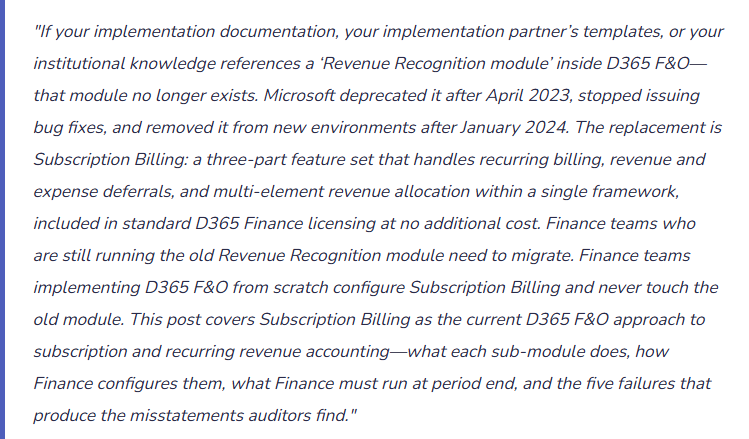

The Three Subscription Billing Sub-Modules—What Each Does and Why Finance Must Understand All Three
Subscription Billing has three sub-modules that can be used independently or in combination. Most Finance teams that need recurring revenue accounting will use at least the first two together. Organizations with bundled contracts need all three.
- Recurring Contract Billing
- Subscription billing → Recurring contract billing
- Manages the commercial billing relationship: who is billed, what they are billed for, how often invoices generate, and how renewals, price escalations, and cancellations are handled. Recurring Contract Billing creates and maintains billing schedules—the contractual record of what each customer owes and when.
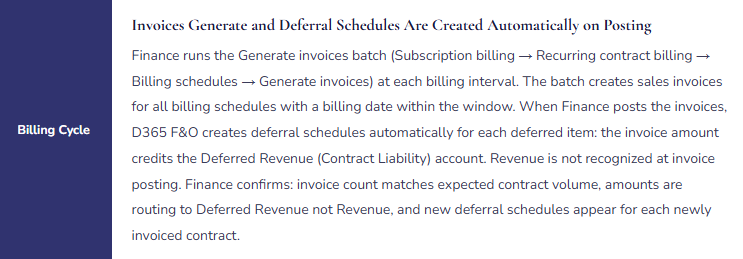
- Core object: the billing schedule. A billing schedule captures the customer, the billing items, the billing frequency (monthly, quarterly, annual), the contract start and end dates, the price, and the auto-renewal rules. Finance or sales operations creates a billing schedule for each active contract. The Generate invoices batch runs against all billing schedules whose next billing date falls within the processing window and creates the sales invoices automatically.
- Finance owns: The billing schedule template configuration (Setup → Billing schedule groups) that defines the default values applied when new schedules are created, the Generate invoices batch schedule (Finance runs it at the correct billing interval—the batch does not run automatically without a scheduled task), and the review of the Generate invoices batch output to confirm invoice count agrees to expected contract volume.
- Revenue and Expense Deferrals
- Subscription billing → Revenue and expense deferrals
- Manages the accounting relationship: when billed amounts move from the balance sheet (Deferred Revenue / Contract Liability) to the income statement (Revenue). This is the direct replacement for the deprecated Revenue Recognition module and is the sub-module most critical to Finance’s compliance obligations under ASC 606 and IFRS 15.
- How it works: Finance assigns a deferral template to each billable item (Setup → Deferral defaults → Deferrable items). When a billing schedule generates an invoice and the invoice posts, D365 F&O automatically creates a deferral schedule for each deferred item: the full invoice amount posts to Deferred Revenue (Contract Liability) rather than directly to Revenue. Each subsequent month, Finance runs the Recognition processing batch, which reads all open deferral schedules, calculates the recognition amount for the period (based on the template method), and posts the journal entry that moves the earned amount from Deferred Revenue to Revenue.
- Deferral templates Finance must configure: Straight-line monthly (12-month SaaS subscription recognized evenly), Straight-line over remaining term (for prepaid multi-year contracts), Event-based (milestone-driven professional services where recognition triggers when the milestone is marked complete), and Occurrence-based (usage-driven recognition). Finance creates one template per distinct recognition pattern and assigns templates to items through the Deferral defaults page before any billing schedule that includes those items is activated.
- The recognition run: Navigation is Subscription billing → Revenue and expense deferrals → Periodic tasks → Recognition processing. Finance runs this batch at each period end, specifying the recognition date (the last day of the period). The batch posts the recognition journal—Debit Deferred Revenue, Credit Revenue—for all active deferral schedules. This batch is a mandatory period-close task.
- Multiple Element Revenue Allocation (MERA)
- Subscription billing → Multiple element revenue allocation
- Manages the allocation problem that arises when a single contract bundles multiple distinct performance obligations with different recognition patterns. Under ASC 606 (paragraph 79) and IFRS 15, Finance must allocate the total contract transaction price to each performance obligation based on its relative standalone selling price (SSP) before recognizing revenue on each element separately.
- Example: A £180,000 bundled contract includes a software platform (SSP £150,000, recognized over 12 months) and implementation services (SSP £80,000, recognized as delivered). MERA allocates the £180,000 transaction price proportionally: £116,667 to the platform and £63,333 to services. Each element then follows its own deferral template. Without MERA, Finance either allocates manually in a spreadsheet or recognizes revenue at the wrong amounts on each element.
- Finance owns the SSP: Finance enters the standalone selling price for each item that appears in bundles (Setup → Items). The SSP is an accounting policy judgment—the price Finance would charge for the item sold on a standalone basis, which may differ from the list price. Finance documents the SSP determination methodology, reviews SSPs at least annually, and updates the MERA configuration whenever pricing changes materially. An outdated SSP produces wrong allocation on every bundled contract where that item appears.
The Subscription Billing Lifecycle—Finance-Owned Actions at Each Stage
Subscription Billing Lifecycle—Finance Configuration and Governance at Each Stage
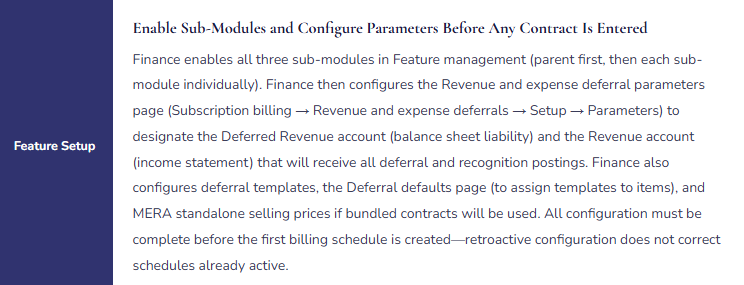



The Four Configuration Decisions Finance Must Make Before the First Billing Schedule
- Deferral Templates—One Template Per Distinct Recognition Pattern
- Finance creates a deferral template (Subscription billing → Revenue and expense deferrals → Setup → Deferral templates) for each distinct recognition pattern the organization uses. At minimum: a straight-line monthly template for SaaS and subscription access fees, an event-based template for milestone-driven professional services, and an occurrence-based template for usage-triggered recognition if applicable. Finance tests each template in the sandbox environment before assigning it to any item: create a test billing schedule using the template, review the generated deferral schedule to confirm the recognition is distributed as intended across the correct number of periods.
- Deferral Defaults—Assigning Templates to Items So Deferral Is Automatic
- Finance configures deferral defaults (Subscription billing → Revenue and expense deferrals → Setup → Deferral defaults) to assign deferral templates to specific items, product groups, or product categories. When a billing schedule or sales order includes an item configured in Deferral defaults, the deferral behavior is automatic at posting—Finance does not need to manually assign the template on each transaction. Finance also uses the Deferrable items page to mark each billable item as deferrable. An item that is not on the Deferrable items page will not create a deferral schedule when invoiced, routing its revenue directly to the income statement.
- GL Account Assignments—Deferred Revenue, Recognition, and Expense Accounts
- Finance configures the GL accounts for all deferral postings in the Revenue and expense deferral parameters page (Subscription billing → Revenue and expense deferrals → Setup → Parameters). The Deferred Revenue account receives the credit when a subscription invoice posts. The Revenue account receives the debit when recognition runs. Finance confirms these accounts are the correct balance sheet and income statement accounts, that they are active in the COA, and that they are not shared with other posting types that would make the Contract Liability balance difficult to reconcile. Finance validates the account assignments by posting a test invoice in sandbox and confirming the GL entries route correctly before any live billing schedule is activated.
- MERA Standalone Selling Prices—Reviewed and Owned by Finance
- If bundled contracts will be sold, Finance enters the standalone selling price for each item that appears in a bundle (Subscription billing → Multiple element revenue allocation → Setup → Items). Finance documents the SSP determination basis for each item—referencing either the observable standalone price (the price the organization charges when selling the item alone) or an estimate constructed using an acceptable method under ASC 606 paragraph 79 (expected cost plus margin, adjusted market assessment, or residual approach). Finance reviews and updates SSPs at least annually and immediately when any component price changes materially.
Five Subscription Billing Failures That Produce Revenue Misstatements
⚠️ Recognition Processing Batch Not on the Period-Close Checklist—Deferred Revenue Accumulates While the Income Statement Shows Zero Subscription Revenue
Finance configures Subscription Billing, creates billing schedules, and runs the Generate invoices batch correctly. Invoices post and route to Deferred Revenue as configured. The Recognition processing batch that releases earned amounts from Deferred Revenue to Revenue is not in the Financial Period Close workspace. For three months, billing cycles generate and post invoices. Deferred Revenue grows by the full invoice amount each cycle. The income statement shows zero subscription revenue. Finance distributes three months of management packs before the CFO questions why the subscription revenue line is empty. Investigation reveals the recognition batch has never run. The Deferred Revenue account carries £1.9 million of recognized-but-unreleased revenue. Posting three months of catch-up recognition in the current period creates an artificial spike in the income statement that Finance must explain to the auditor as a prior-period correction.
Fix: The Recognition processing batch (Subscription billing → Revenue and expense deferrals → Periodic tasks → Recognition processing) is a mandatory period-close task. Finance adds it to the Financial Period Close workspace as a named task in the Revenue Recognition task area, positioned after all subscription invoices for the period are generated and posted and before Management Reporter income statement reports are run. The task requires attestation: Finance specifies the recognition date (period-end), confirms the batch completed without errors, reviews the recognition journal total for directional reasonableness against the prior period, and confirms Deferred Revenue decreased by the expected recognition amount. Finance also establishes a monthly monitoring alert: if the Deferred Revenue GL balance increases month-over-month without a corresponding recognition journal entry, Finance is notified for investigation before the period closes.
⚠️ Item Not Configured as Deferrable—New Subscription Product Revenues Directly to Income Statement at Invoice Date
Finance launches a new subscription product tier mid-year. The product is created in D365 F&O and added to billing schedules. Nobody checks the Deferrable items page in the Subscription Billing setup. The new item is not listed as deferrable. When billing schedules for the new tier generate invoices, the invoiced amounts do not create deferral schedules—they route directly to Revenue at invoice posting. For six months, the new subscription product is recognized fully at billing rather than ratably over the subscription period. The income statement shows revenue spikes in billing months and zero in non-billing months for the new tier. The balance sheet carries no Deferred Revenue for the new product. The auditor selects the new tier as a sample item in the revenue recognition walkthrough and finds that recognition methodology does not comply with ASC 606 for subscriptions billed in advance.
Fix: Finance adds “Confirm new item is configured as deferrable in Subscription Billing” to the new product launch procedure. Before any billing schedule that includes a new item is activated, Finance opens the Deferrable items page, confirms the item is listed, and confirms the correct deferral template is assigned. Finance tests by creating a billing schedule in the sandbox environment using the new item, generating a test invoice, and confirming a deferral schedule was created and the amount routed to Deferred Revenue rather than Revenue. This test takes five minutes and prevents six months of incorrect revenue recognition for the new product line.
⚠️ Cancelled Subscriptions Not Terminated in Billing Schedules—Recognition Continues After Contract End
The customer success team processes cancellations in the CRM. The cancellation workflow in the CRM does not trigger a corresponding billing schedule termination in D365 F&O Subscription Billing. Billing schedules for cancelled contracts remain active and continue generating invoices and recognition journal entries. Over five months, 22 subscriptions cancelled in the CRM continue to generate invoices and run recognition in D365 F&O. Finance invoices customers who have cancelled, creating AR balances on departed customers. The income statement includes revenue recognized from contracts that no longer exist. Finance discovers the discrepancy when a quarterly subscription reconciliation compares D365 F&O active billing schedule count to the CRM active subscription count and finds a 22-schedule gap.
Fix: Billing schedule termination must be processed in D365 F&O within one business day of the cancellation event in the source system. Finance establishes a daily cancellation processing procedure: either through an automated integration that terminates the billing schedule in D365 F&O when the CRM cancellation is processed, or through a manual daily task where Finance reviews the prior day’s CRM cancellations and terminates the corresponding billing schedules. Finance runs a monthly reconciliation of active billing schedule count in D365 F&O against active subscription count in the CRM as a period-close procedure in the Financial Period Close workspace. This reconciliation is not optional: a systematic gap between the two counts is the only way to identify accumulating cancellation processing failures before they produce material revenue overstatement.
⚠️ Contract Liability Reconciliation Never Performed—GL Balance and Open Deferral Schedules Have Diverged by £580,000
Finance runs Subscription Billing correctly for 18 months but never performs the period-end Contract Liability reconciliation. Over 18 months, the Deferred Revenue GL balance and the sum of open deferral schedule balances diverge by £580,000 from four sources: six invoices that posted to Deferred Revenue without creating deferral schedules because the billing items were added to billing schedules before the items were configured as deferrable; three recognition journal entries that posted to an incorrect revenue account due to a misconfigured deferral parameter; eight cancelled contracts where the credit note reduced the GL but the deferral schedule was not terminated; and one billing period where the Generate invoices batch ran twice due to a system error, creating duplicate invoices and deferral schedules. Finance discovers the divergence when the external auditor requests a reconciliation of the Deferred Revenue balance to the underlying contract liability sub-ledger at the annual audit.
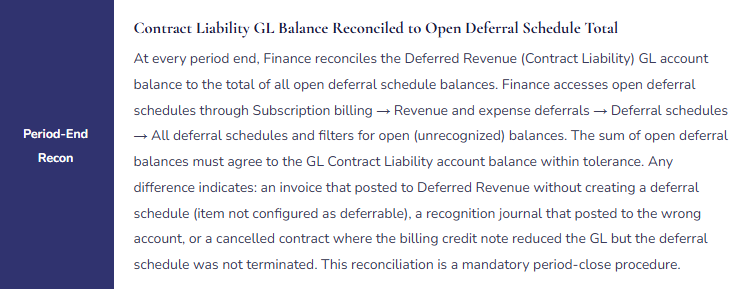
Fix: The Contract Liability reconciliation—comparing the Deferred Revenue GL account balance to the total of all open deferral schedules in Subscription Billing—is a monthly period-close procedure. Finance runs the reconciliation through Subscription billing → Revenue and expense deferrals → Deferral schedules → All deferral schedules, filters for open schedules, and confirms the total agrees to the Deferred Revenue GL account balance within defined tolerance. Any difference is investigated and corrected in the same close cycle. This reconciliation has the same standing as the AR-to-GL and AP-to-GL subledger reconciliations. Monthly discrepancies found at month-end are typically one or two root causes traceable in hours. Discrepancies found at year-end audit are months of accumulated root causes traceable over days during the highest-pressure Finance period of the year.
⚠️ MERA Standalone Selling Prices Not Updated After a Price Increase—Revenue Allocation on Bundled Contracts Is Systematically Wrong for Eight Months
At go-live, Finance configured MERA standalone selling prices of £120,000 for the software platform and £80,000 for implementation services. Eight months post-go-live, the software platform list price increased to £150,000. Finance updated the sales price list but did not update the SSP in MERA. For eight months, all new bundled contracts allocate revenue using the old £120,000 SSP. On a £180,000 bundled contract, the correct allocation should be £117,391 to the platform and £62,609 to services (using SSPs of £150,000 and £80,000). The actual allocation is £108,000 to the platform and £72,000 to services (using the old £120,000 SSP). Platform revenue is systematically understated and services revenue systematically overstated for every bundled contract signed in the eight-month period. The auditor tests the MERA allocation methodology by comparing the system-generated allocation to the current SSPs and finds the discrepancy across a full cohort of contracts.
Fix: Finance adds “Update MERA standalone selling prices” to the pricing change procedure: whenever any list price or cost-based price changes for an item that appears in a bundled contract, the SSP in the MERA item setup is reviewed and updated in the same workflow. Finance designates a named SSP Owner—typically the Controller or a senior Finance manager—who approves every SSP change and documents the determination basis. Finance also validates SSP accuracy quarterly: review the most recent 10 bundled contracts, recalculate the MERA allocation manually using current SSPs, and confirm D365 F&O’s allocation matches the manual calculation within rounding tolerance. Any mismatch indicates a missed SSP update. The quarterly validation takes 30 minutes and prevents an eight-month cohort of mis-allocated contracts.
Do This / Don’t Do This
Do This
- Disable the Revenue Recognition feature in Feature management before enabling Subscription Billing—the two features cannot coexist
- Enable all three sub-modules individually after enabling the parent Subscription Billing feature
- Configure deferral templates, deferral defaults, and deferrable items completely before creating any billing schedule
- Add the Recognition processing batch (Subscription billing → Revenue and expense deferrals → Periodic tasks → Recognition processing) to the Financial Period Close workspace as a mandatory close task
- Add “Confirm new item is configured as deferrable” to every new product launch procedure
- Run the Contract Liability-to-open-deferral-schedules reconciliation at every period close
- Process billing schedule cancellations in D365 F&O within one business day of the CRM cancellation event
- Review and update MERA standalone selling prices as part of every pricing change procedure
Don’t Do This
- Reference or attempt to enable the deprecated Revenue Recognition module—it is not available in D365 F&O after January 2024
- Enable only the parent Subscription Billing feature without enabling the individual sub-modules
- Create billing schedules before completing the deferral template and deferrable item configuration
- Omit the Recognition processing batch from the period-close checklist—Deferred Revenue accumulates and the income statement shows no subscription revenue
- Assume the Contract Liability GL balance and open deferral schedule totals agree without running the reconciliation monthly
- Process subscription cancellations only in the CRM without a corresponding billing schedule termination in D365 F&O
- Update list prices without reviewing and updating MERA standalone selling prices for any item that appears in bundled contracts
What’s Next:
Subscription Billing gives Finance the infrastructure for compliant recurring revenue accounting. The series continues with the AI and Copilot capabilities Finance can deploy on top of this infrastructure: Copilot for Finance in D365 F&O—What’s Real, What’s Hype, and What Finance Must Govern—which D365 F&O Copilot capabilities are genuinely useful in Finance workflows today, which require explicit governance before Finance acts on their output, the data and configuration prerequisites that determine whether the AI features deliver reliable output, and the five Copilot governance failures that produce AI-assisted Finance decisions based on inputs Finance never validated.
— Bobbi
D365 Functional Architect · Recovering Controller
Thank you for reading!
If this post helped you solve a real problem, share it with a Finance colleague who is in the middle of an ERP implementation or a post-go-live optimization. If you have a topic that I haven’t covered, please reach out. There is always one more post worth writing.
If you are interested in learning more, below are some of my latest posts:
Leave a Reply