

The six-week audit preparation timeline Finance must run before external auditors arrive, the BC-specific documentation and reconciliation package that supports the most common audit procedures, the controls evidence Finance must maintain continuously rather than assemble reactively at year-end, and the five audit preparation failures that produce extended audit timelines and avoidable findings.
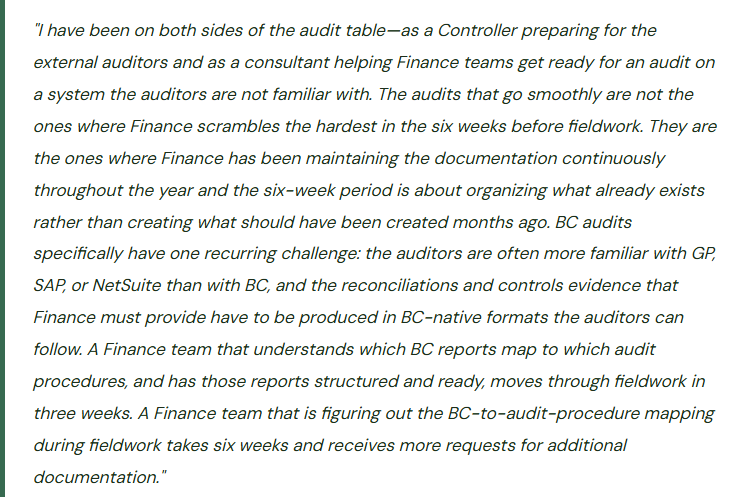
The Six-Week Audit Preparation Timeline
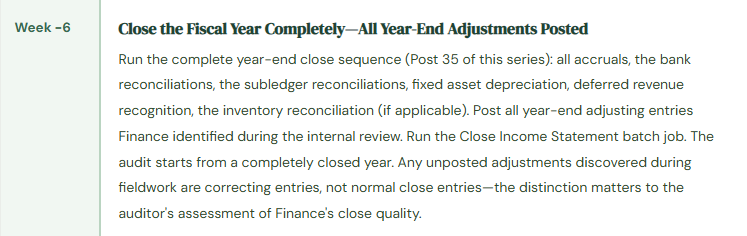
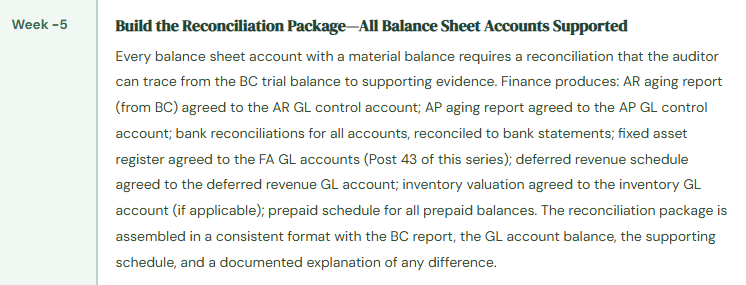
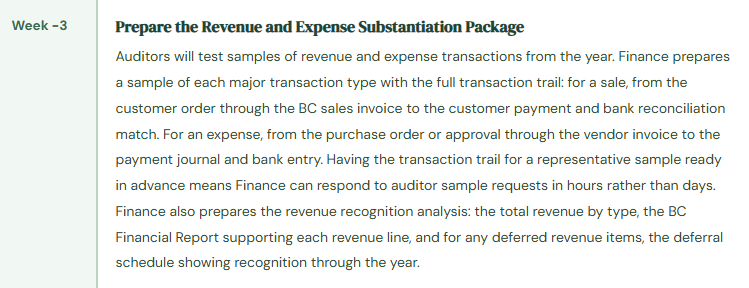
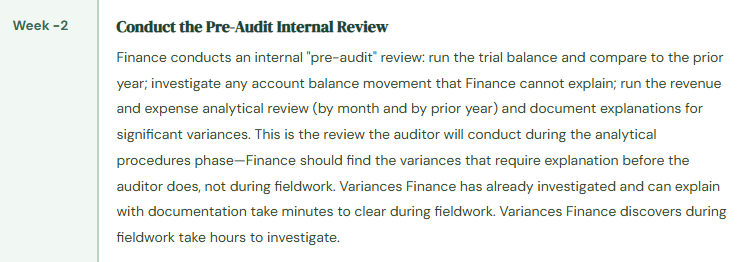
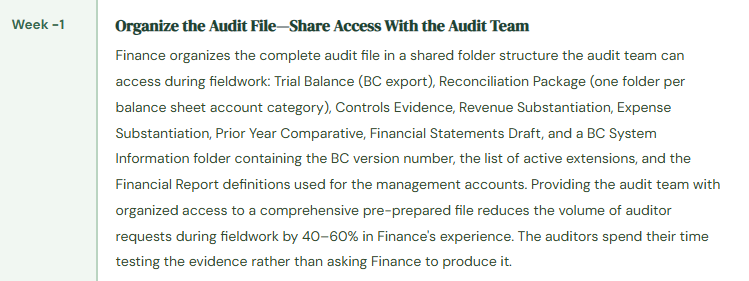
Audit Preparation Calendar—Six Weeks Before Fieldwork Begins
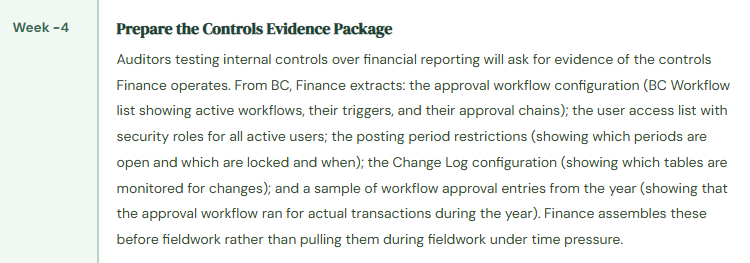
The Controls Evidence Finance Must Maintain Continuously—Not Assemble at Year-End
The most impactful shift Finance can make in audit preparation is recognizing that controls evidence is a year-round maintenance task, not a year-end assembly project. The evidence that takes the most time to prepare under fieldwork deadline pressure is the evidence that Finance could have been maintaining throughout the year with ten minutes per month.
Monthly Bank Reconciliation Archive
Every month’s bank reconciliation, signed off by the reviewer, saved in a consistent folder structure. The auditor will pull a sample of monthly reconciliations and ask for the reviewer sign-off. Finance that maintains this throughout the year produces it in seconds. Finance that assembles it retroactively at year-end discovers three months where the reconciliation was completed but not signed off.
User Access Review Log
The quarterly user access review (Post 25 of this series) documented and signed off by the Controller. The auditor testing access controls will ask when the last user access review was conducted and what the results were. Finance with documented quarterly reviews demonstrates a functioning access control governance process. Finance with no documented reviews cannot evidence that access controls were monitored during the year.
Approval Workflow Evidence
BC’s Approval Entries table records every approval workflow event during the year: who requested approval, who approved, the timestamp, and the document that was approved. Finance exports this table annually as part of the audit preparation package. The export demonstrates that the approval workflow operated throughout the year for real transactions—not just that it was configured.
Period Close Documentation
The Closing Cockpit (if configured) provides the period close task completion record. For each month, Finance exports the close task completion history: who completed each task, when it was completed, and the sequence of completions. This evidence supports the auditor’s assessment of the period-end close process and demonstrates that close tasks were completed in the correct sequence with appropriate sign-offs.
Change Log Evidence
BC’s Change Log records changes to configured tables (Post 33 of this series). Finance exports the Change Log for the audit year, filtered to high-risk tables (vendor bank accounts, customer posting groups, GL account setup). The export demonstrates that changes to sensitive master data were monitored during the year. A Change Log export that shows vendor bank account changes with the before and after values and the user who made the change is the primary evidence for the controls surrounding vendor bank account change risk.
Subledger Reconciliation Archive
The monthly AR-to-GL and AP-to-GL reconciliations, documented and signed off. For organizations running the inventory reconciliation (Post 34), the monthly inventory-to-GL reconciliation as well. The auditor will test whether Finance reconciles subledgers to the GL on a timely basis. Finance with 12 months of documented reconciliations demonstrates the control was operating continuously. Finance assembling them retroactively from BC reports cannot demonstrate when the reconciliation was performed relative to the close date.
Five Audit Preparation Failures That Extend Fieldwork and Produce Avoidable Findings
⚠️ Subledger Reconciliations Cannot Be Produced for Prior Months—Auditor Cannot Trace Balance Sheet Accounts
The auditor requests the monthly AR aging reconciliation for three months during the year as part of the controls testing. Finance runs the current AR aging report from BC—which reflects the current state of the AR subledger, not the state at the three requested month-end dates. BC’s AR aging report as of a historical date requires filtering the Customer Ledger Entries to the historical date, which Finance has never done and is not sure how to do correctly. Finance attempts to reconstruct the historical reconciliations from memory and from period-end reports that were not consistently saved. The reconstruction takes three days during fieldwork. The auditor extends testing in the AR area because Finance could not produce timely evidence that the reconciliation was performed during the year. The extended testing discovers two customers with credit balances that Finance has not investigated—a finding that would not have become a fieldwork finding if Finance had been running and archiving the monthly reconciliation throughout the year.
Fix: The AR-to-GL reconciliation is a monthly close procedure, archived as documentation every month. Finance runs the Customer Ledger Entries → Outstanding by due date report filtered to the period-end date and confirms the total agrees to the Accounts Receivable GL control account balance for the same date. The reconciliation report is saved (PDF or exported Excel) to the monthly close folder with the reconciler’s initials and the date. When the auditor requests the reconciliation for any month, Finance retrieves it from the folder in seconds. The reconciliation was performed on the close date; the archive demonstrates it. The same principle applies to AP-to-GL reconciliation, bank reconciliation, and inventory reconciliation—every subledger reconciliation should be archived at completion, not reconstructed on request.
⚠️ Approval Workflow Not Configured in BC—Controls Testing Finds No Evidence of Invoice Approval
Finance has an informal invoice approval process: the Controller reviews invoices above $5,000 by email before the AP coordinator posts them. The email approval happens outside BC. When the auditor asks for evidence of invoice approval controls, Finance provides email chains showing the Controller’s approval. The auditor notes that email-based approvals are not audit-reliable controls: they can be deleted, forwarded, or altered; they do not link to the specific transaction in BC; and they do not provide an automated segregation of duties enforcement. The auditor classifies the invoice approval process as a significant deficiency—a control that is inadequate in design because it relies on informal, out-of-system approvals for a material transaction class. The finding requires a management response and a remediation plan. Configuring BC’s purchase invoice approval workflow would have produced audit-reliable, in-system approval evidence for every invoice above the threshold.
Fix: Invoice approval workflows must be configured in BC, not managed through email, before the audit year begins. BC’s approval workflow capability routes purchase invoices to the designated approver within the system. When the Controller approves an invoice in BC, the Approval Entry is created with the approver’s user ID, the timestamp, and the document reference. The Approval Entry cannot be modified or deleted by the Finance user—it is the system’s record of what was approved and when. At year-end, Finance exports the full Approval Entry table filtered to purchase invoices for the audit year and provides it as the controls evidence for the invoice approval procedure. The export demonstrates that every invoice above the threshold received approval from an authorized approver within BC before being posted. This is a far more robust control than email approval, and the audit finding it prevents is far less expensive than the cost of configuring the workflow.
⚠️ User Access Review Never Conducted—Three Former Employees Have Active BC Accounts at Year-End
Finance has never conducted a formal user access review. The auditor, testing access controls, requests the active user list for BC and asks Finance to confirm that all active users are current employees with appropriate access. Finance pulls the BC user list and finds 47 active users. Cross-referencing against the current employee roster reveals three users who left the organization during the year and whose BC access was never deactivated: a former AP coordinator who left in February (access to post vendor payments), a former Finance analyst who left in June (access to journal entry posting), and a former Controller who left in August (System Administrator access). The auditor classifies the three active accounts as access control findings. The finding for the former Controller’s active System Administrator account is classified as a significant deficiency because System Administrator access provides unrestricted BC access with no audit trail for eight months after the Controller’s departure.
Fix: User account deactivation must happen on the day of employee departure, not at the quarterly access review or at year-end. Finance configures a deactivation trigger: HR notifies Finance (and IT) of every employee departure on the departure date. Finance deactivates the BC user account within one business day of departure. The quarterly access review confirms all active BC users are current employees—but it is a backup control, not the primary deactivation mechanism. The primary mechanism is the same-day deactivation triggered by the departure notification. Finance documents the quarterly access review with the Controller’s sign-off: “Active BC user list reviewed on [date] against current employee roster. All active users confirmed as current employees. [N] accounts deactivated during the quarter as documented in the access change log.” This documentation is the controls evidence the auditor receives without asking.
⚠️ Financial Statements Produced From Excel—Auditor Cannot Agree Statements to BC Trial Balance
Finance produces the annual financial statements in Excel, working from data exported from BC. The Excel financial statements have been refined over several years with formatting adjustments, rounding conventions, and classification choices that are embedded in the Excel model rather than in BC’s Financial Reports. When the auditor attempts to agree the financial statements to the BC trial balance, they find differences: revenue reclassifications made in the Excel model that are not reflected in BC’s account structure, a rounding adjustment in the Excel total that differs from BC’s exact calculation, and a balance sheet presentation order that does not match BC’s account sequence. Tracing each difference takes the auditor two days and requires Finance to produce working papers explaining each one. Three of the differences turn out to be classification choices Finance made in the Excel model that the auditor determines are not consistent with the applicable accounting standard. Finance must either change the BC account structure to match the correct presentation or revise the Excel model—either way, it is a two-day fieldwork extension.
Fix: The financial statements should be produced directly from BC’s Financial Reports (Account Schedules), not from an Excel model built on BC data exports. When the financial statements agree to BC’s trial balance by design—because they are produced from the same system using the same data—the auditor’s agreement procedure is straightforward. Finance configures BC’s Financial Reports to produce the income statement, balance sheet, and cash flow statement in the format the auditor expects. If the organization’s accounting presentation requires judgment calls about classification (operating vs. non-operating income, current vs. long-term liabilities), those decisions are reflected in the BC Financial Report row definitions, not in an Excel override layer that the auditor cannot audit. The BC Financial Report is the audit-ready financial statement. The Excel export is the working paper that the auditor can review to understand how BC produced the numbers.
⚠️ Change Log Not Configured—Auditor Finds Unexplained Vendor Bank Account Changes with No Audit Trail
BC’s Change Log was never configured during implementation. During controls testing, the auditor asks Finance to produce the log of vendor bank account changes during the year as part of testing the vendor payment fraud risk controls. Finance cannot produce a Change Log because it was never enabled. The auditor asks Finance to manually identify and explain any vendor bank account changes during the year by reviewing the vendor master records and comparing current bank account information to prior-year audit workpapers. Finance identifies six vendor bank account changes during the year. For three of the six, Finance cannot reconstruct when the change was made, who made it, or what the prior bank account number was. The auditor cannot conclude that the bank account changes were authorized and appropriately controlled. The auditor expands payment testing to cover all payments to those three vendors during the year, adding three days to fieldwork. The auditor also issues a finding that the organization lacks controls to prevent unauthorized vendor bank account changes.
Fix: BC’s Change Log must be configured to capture changes to vendor bank accounts before the audit year begins. Configuration (Administration → Change Log Setup): enable Change Log for the Vendor Bank Account table, monitoring Insert, Modify, and Delete actions for the IBAN, Bank Account Number, and Bank Branch No. fields. After enabling the Change Log, Finance tests it by making a test change to a non-production vendor bank account and confirming the Change Log Entry is created with the before and after values and the user ID of the person who made the change. Once confirmed, the Change Log provides a complete, BC-maintained audit trail of all vendor bank account changes during the year. At year-end, Finance exports the vendor bank account Change Log entries as part of the audit preparation package. The auditor reviews the export, confirms each change is associated with an authorization record (the approval workflow entry), and concludes that the bank account change control was operating effectively. Two minutes of configuration prevents the three-day fieldwork extension.
Do This / Don’t Do This
Do This
- Archive every month’s subledger reconciliations at completion—AR, AP, bank, inventory—as a standing monthly close procedure
- Configure BC’s approval workflows for purchase invoices before the audit year begins—email approval is not an audit-reliable control
- Conduct and document quarterly user access reviews with Controller sign-off throughout the year
- Deactivate departing employee BC accounts on the day of departure—not at the quarterly review
- Enable BC’s Change Log for vendor bank accounts, customer posting groups, and GL account configuration before the audit year
- Produce financial statements from BC’s Financial Reports, not from an Excel model built on BC exports
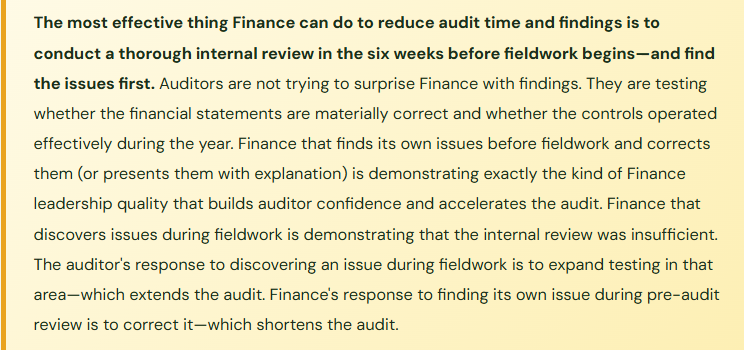
- Conduct a pre-audit internal review six weeks before fieldwork and find your own issues before the auditor does
Don’t Do This
- Reconstruct subledger reconciliations from BC reports during fieldwork—provide the archived version that was produced at month-end
- Manage invoice approvals outside BC through email chains that the auditor cannot tie to specific transactions
- Let user access reviews slip to year-end or conduct them only reactively
- Produce financial statements from Excel with classification and rounding adjustments that differ from BC—the auditor must agree statements to BC
- Leave the Change Log unconfigured and then attempt to reconstruct the audit trail manually during fieldwork
- Wait for the auditors to find issues—Finance should find them during pre-audit internal review and present them with explanation and correction
Up Next:
Audit preparation closes the governance arc. The series continues with Finance topics that apply across the BC implementation lifecycle: BC Implementation Lessons From the Finance Seat—What Controllers Wish They Had Known—the implementation decisions Finance teams consistently regret six to eighteen months after go-live, the questions Finance should be asking during discovery and design that nobody is asking because Finance isn’t in the room, and the configuration investments that pay back within the first close cycle versus the ones that create debt Finance spends years working down.
— Bobbi
D365 Functional Architect · Recovering Controller
Thank you for reading!
If this post helped you solve a real problem, share it with a Finance colleague who is in the middle of an ERP implementation or a post-go-live optimization. If you have a topic that I haven’t covered, please reach out. There is always one more post worth writing.
If you are interested in learning more, you can check out some of my recent posts below:
Leave a Reply