

How D365 F&O’s Cash and bank management module supports enterprise treasury operations, the cash position report Finance must build as the daily treasury dashboard, bank account structures for multi-entity cash pooling, foreign currency exposure management from the treasury perspective, and the five treasury management failures that leave Finance making liquidity decisions on stale or incomplete data.
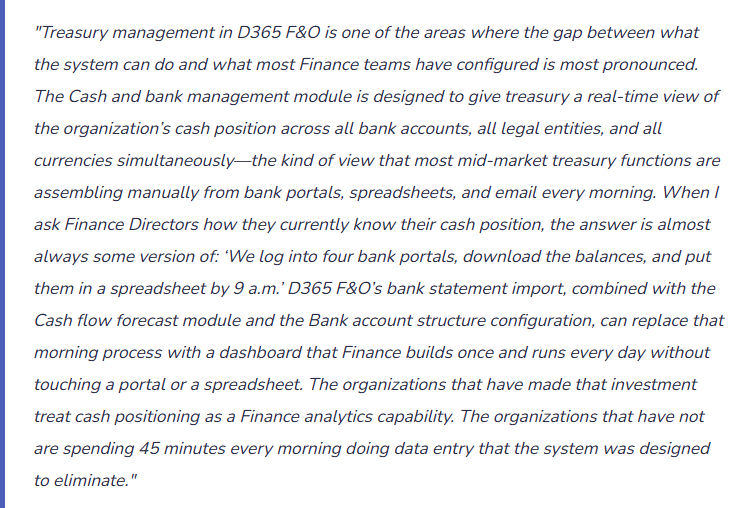
The Four Treasury Capabilities Finance Must Configure in D365 F&O
- Daily Cash Position Reporting
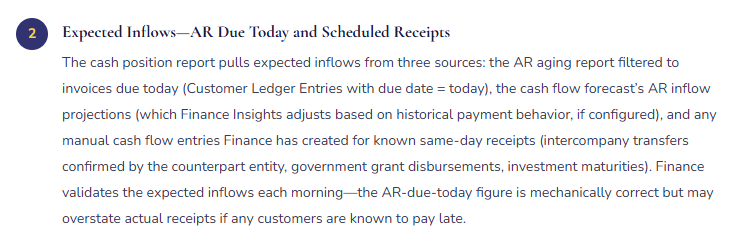
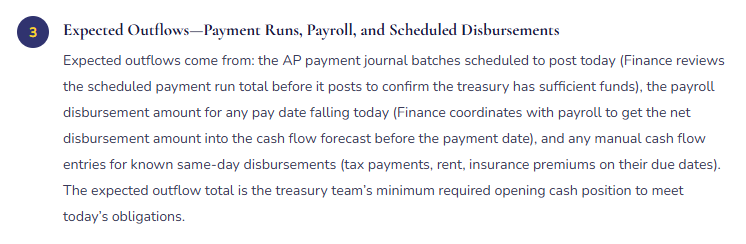
- The daily cash position report aggregates current bank account balances across all legal entities and all currencies, showing today’s opening position, expected inflows (customer payments due today, intercompany transfers scheduled), expected outflows (vendor payment runs scheduled, payroll disbursements, tax payments due), and the projected closing position for the day.
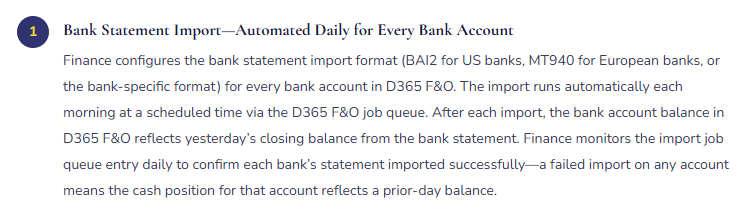
- D365 F&O configuration: Bank statement import configured for each bank account (BAI2, MT940, or bank-specific format) with automatic daily import. Cash flow forecast module configured with all material inflow and outflow sources. Cash position report (Cash and bank management → Cash position → Cash position) configured as the treasury dashboard. Finance builds a Management Reporter column definition that surfaces the cash position view alongside the bank account balances from the GL.
- Finance owns: The cash position report reconciliation—confirming the reported position agrees to the bank statement balances and the D365 F&O GL bank account balances daily. Any difference between the three sources is a reconciling item that Finance investigates before the treasury team makes any same-day liquidity decision based on the position.
- Cash Pooling and Intercompany Funding Structures
- For multi-entity organizations, cash pooling concentrates surplus cash from subsidiaries into a central treasury account and funds subsidiaries with liquidity shortfalls from the central account. D365 F&O supports notional pooling (balances are aggregated for interest calculation without physical transfer) and physical sweeping (cash is physically moved between accounts at a defined time each day).
- D365 F&O configuration: Bank account structure (Cash and bank management → Setup → Bank account structures) defines the pool master account and the participating subsidiary accounts. The intercompany accounting module (Post 38 of this series) records the intercompany loan positions that result from physical cash movements between entities. The treasury team uses the bank account structure view to see the consolidated pool position across all participating accounts.
- Finance owns: The intercompany loan positions that accumulate from cash pooling movements. Every physical sweep that moves cash from a subsidiary to the pool master creates an intercompany receivable in the subsidiary and an intercompany payable in the pool master. Finance must confirm these positions are tracked, interest is charged at arm’s length rates (Post 38), and the positions are included in the intercompany balance reconciliation at period end.
- Foreign Currency Exposure Management
- Treasury’s FX exposure management requires knowing the organization’s net open position in each non-functional currency: the sum of AR denominated in that currency minus the sum of AP in that currency, adjusted for any forward contracts or options that hedge the exposure. D365 F&O surfaces the component positions from AR, AP, and the bank accounts; the net exposure calculation and the hedging instrument accounting are Finance’s responsibility.
- D365 F&O configuration: Foreign currency revaluation runs at period end (General ledger → Periodic → Foreign currency revaluation) to update the functional currency value of open AR, AP, and bank balances at the closing rate. Finance configures the unrealized gain/loss accounts to capture the period-end revaluation effect separately from the realized gain/loss accounts that capture the effect at settlement. The FX exposure report Finance builds combines the AR foreign currency aging, AP foreign currency aging, and bank account foreign currency balances into a net exposure view by currency.
- Finance owns: The hedge accounting entries if the organization uses forward contracts or options to hedge FX exposure. D365 F&O supports hedge accounting designation and effectiveness testing for qualifying hedges, but Finance must designate the hedge, document the hedging relationship, and post the fair value adjustments at each reporting date.
- Short-Term Investment and Counterparty Exposure
- Treasury’s investment portfolio—money market funds, treasury bills, short-term bank deposits—and the counterparty credit exposure those investments represent are tracked in D365 F&O through bank accounts configured for each investment instrument. Finance uses the bank account balance reporting combined with the cash flow forecast’s manual revenue entries to model the maturity schedule of the investment portfolio.
- D365 F&O configuration: Each short-term investment instrument is configured as a separate bank account in D365 F&O (or as a financial instrument if the organization uses D365 F&O’s banking module). Interest income accrues monthly to the designated interest income account. The maturity of each instrument is tracked in the manual revenue entries of the cash flow forecast, triggering the forecast to include the principal repayment as an inflow on the maturity date.
- Finance owns: The counterparty credit exposure reporting—the total deposits and investments with each bank and financial institution, compared to the board-approved counterparty credit limits. Finance reviews counterparty concentration monthly and escalates to Treasury management when any counterparty approaches its limit.
Building the Daily Cash Position Report Finance Runs Without a Spreadsheet
The daily cash position report is the treasury function’s most operationally critical output. Finance builds it once in D365 F&O and runs it daily without manual data assembly. The five components Finance must configure before the report is reliable:
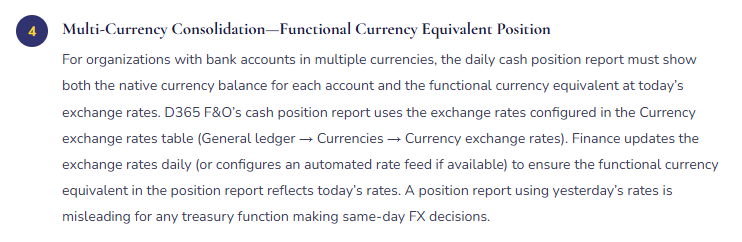
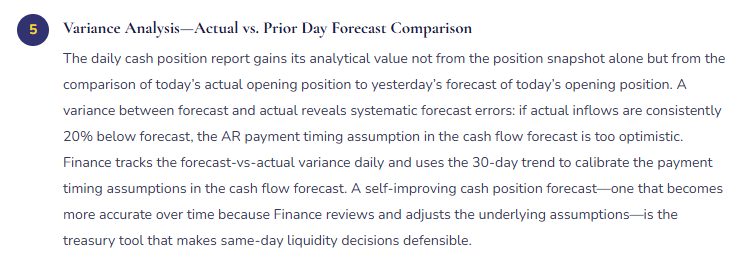
Daily Cash Position Report—Five Configuration Components Finance Owns
Five Treasury Management Failures That Force Finance Back to Spreadsheets
⚠️ Bank Statement Import Not Configured—Treasury Spends 45 Minutes Every Morning Downloading Balances
The Cash and bank management module was configured at implementation with bank account records for all eight of the organization’s bank accounts, but the bank statement import format was not configured for any of them. Finance did not include bank statement import configuration in the implementation scope because it was assumed the bank accounts would simply update when payments were posted in D365 F&O. Two years post-go-live, the treasury function starts every morning by logging into four separate bank portals, downloading the closing balances from each, and entering them into the master cash position spreadsheet alongside the AP payment run amounts from D365 F&O. The process takes 45 minutes and produces a cash position that is as current as the previous day’s bank statements—exactly what D365 F&O’s bank statement import would produce automatically if it were configured.
Fix: Bank statement import configuration is a Cash and bank management implementation deliverable, not a post-go-live optional. Finance identifies the statement format for each bank (BAI2, MT940, or proprietary CSV) by requesting the format documentation from each bank’s electronic banking team, configures the import format in D365 F&O (Cash and bank management → Setup → Advanced bank reconciliation setup → Statement format), and sets up a scheduled job queue entry to run the import daily. Finance tests the import with a 30-day historical statement for each bank before going live to confirm the field mappings are correct. After two weeks of automatic daily imports, Finance compares the imported balances to the bank portal balances to confirm accuracy. The 45-minute morning process becomes a 2-minute exception review of the overnight import log.
⚠️ Cash Flow Forecast Missing Major Outflow Categories—Positive Forecast Masks a Liquidity Crisis
Finance configures the cash flow forecast with AR inflows and AP payment schedule outflows. The forecast shows a comfortable positive cash position for the next 60 days. Treasury defers the quarterly credit facility draw. On Day 38, the organization’s quarterly VAT payment of £840,000 hits the bank account. The cash flow forecast did not include tax payments—they were not configured as a cash flow source because the tax team submits VAT returns outside the AP payment workflow. The actual cash position on Day 38 is £840,000 lower than the forecast indicated. Treasury must draw on the credit facility at short notice to cover the VAT payment, incurring a higher borrowing rate than if the draw had been planned. Finance investigates and finds that payroll disbursements, quarterly rent payments, insurance premiums, and lease payments were also absent from the forecast—four additional categories of material regular outflows the forecast did not include.
Fix: Finance conducts a cash flow forecast completeness review before treating any cash flow forecast output as reliable for treasury decisions. The review methodology: pull the prior 12 months of bank statements for the main operating account, categorize every debit by transaction type, and identify every recurring debit category. For each category above the materiality threshold, confirm it is configured as a source in the D365 F&O cash flow forecast. Any recurring outflow category not in the forecast is a gap that must be added before the forecast is used for decisions. For non-systematic outflows like quarterly tax payments, Finance creates manual cash flow entries in D365 F&O for each known future payment date. The manual entries appear in the forecast as explicit outflows. Finance updates them as the payment amounts are confirmed.
⚠️ Intercompany Cash Pool Positions Not Tracked in D365 F&O—Tax Authority Imputes Interest on Undocumented Loans
The organization operates a physical cash pool: each evening, subsidiary account balances above a target level are swept to the pool master account held by the parent entity. The sweeps are executed automatically by the bank. Finance records the sweeps in D365 F&O as bank transactions but does not record the corresponding intercompany loan positions that the sweeps create. The parent entity receives cash from subsidiaries with no intercompany payable in its books. The subsidiaries transfer cash out with no intercompany receivable in their books. After three years of daily sweeps, the parent entity has received approximately £18 million from subsidiaries that has no documentation of the terms under which it was received. The tax authority, during a transfer pricing audit, identifies the undocumented intercompany positions and imputes interest income in the parent and potential interest expense in the subsidiaries at market rates for the three-year period. The tax exposure exceeds £400,000.
Fix: Every physical cash pool sweep that moves cash between legal entities creates an intercompany loan position that must be recorded, documented with a loan agreement, and charged at an arm’s-length interest rate (Post 38 of this series). Finance configures the intercompany accounting module to automatically create the intercompany receivable in the subsidiary and the intercompany payable in the parent entity whenever a pool sweep is processed. A recurring intercompany interest journal calculates and posts interest monthly based on the average pool position at the agreed intercompany interest rate. Finance maintains a pool participation agreement signed by each entity that documents the pool structure, the sweep rules, the interest rate methodology, and the daily calculation basis. The pool agreement is the transfer pricing documentation for the intercompany lending that the cash pool creates.
⚠️ Exchange Rates Not Updated Daily—Functional Currency Cash Position Is Materially Wrong During Volatile FX Periods
Finance configures the cash position report to show functional currency equivalents using the exchange rates in D365 F&O’s currency exchange rate table. The rates are updated monthly when Finance runs the period-end foreign currency revaluation. During a period of significant GBP/USD volatility, the treasury team reviews the cash position report and makes a decision not to execute a planned USD-to-GBP conversion because the functional currency USD equivalent of the GBP bank balance appears sufficient to meet USD obligations for the next 30 days. The functional currency equivalent in the report uses last month’s rate. The actual current rate has moved 6% against the functional currency. At the actual current rate, the USD equivalent of the GBP balance is £280,000 lower than the report shows. The treasury team’s decision was based on a materially inaccurate cash position.
Fix: The exchange rates in D365 F&O’s currency exchange rate table must be updated at the frequency with which the organization makes FX-sensitive decisions. For organizations that make daily treasury decisions involving non-functional currencies, the rates must be updated daily. Finance either configures an automated exchange rate feed (available through D365 F&O’s currency exchange rate provider integration if the organization subscribes to a rate feed service) or establishes a daily manual rate update procedure: Finance downloads the daily closing rates from a reference source (Reuters, Bloomberg, or the bank’s published rates), enters them in D365 F&O, and confirms the cash position report reflects the updated rates before distribution to the treasury team. The rate update takes three minutes manually. The decision error it prevents can be material.
⚠️ Cash Position Report Used for Decisions Without Reconciliation to Bank Statements—Three Stale Positions Go Undetected for Six Weeks
Finance configured the bank statement import for eight accounts and the daily cash position report is distributed to the treasury team each morning. The treasury team uses the report without verifying that each account’s import completed successfully. Over six weeks, the import job for three accounts fails silently—the bank changed a field delimiter in its statement format and the import configuration no longer parses the file correctly. The failed imports produce no error notification because the job queue entry was not configured to send failure alerts. For six weeks, the three affected accounts show the balance from the last successful import. The treasury team makes multiple investment rollover decisions based on a cash position that is six weeks stale for three accounts. When a quarterly reporting exercise requires Finance to reconcile the D365 F&O cash position to actual bank statements, the three-account discrepancy is discovered. Two of the three decisions made during the six-week period would not have been made if the actual current balances had been visible.
Fix: The bank statement import job queue entry must be configured to send failure alerts to a Finance-monitored email address. Finance reviews the import log each morning as part of the daily cash position workflow—the first step before distributing the position report is confirming that all bank statement imports completed successfully for today’s date. Any account where the import did not complete must be manually updated by logging into the bank portal and entering the current balance as a manual adjustment or re-triggering the import with the correct date range. Finance also runs the Bank reconciliation status report weekly to confirm that no bank accounts have open (unreconciled) statement lines older than 5 business days—a persistent old unreconciled line often signals an import that completed but did not match, not a fully failed import.
Do This / Don’t Do This
Do This
- Configure bank statement import for every bank account before going live—not as a post-go-live optional
- Conduct a cash flow forecast completeness review before treating forecast output as reliable for treasury decisions
- Update exchange rates at the frequency Finance makes FX-sensitive decisions—daily for treasury functions with daily FX exposure
- Configure import job queue failure alerts and confirm all imports completed before distributing the daily cash position report
- Record intercompany cash pool positions as intercompany loans with documented terms and arm’s-length interest charges
- Track forecast-vs-actual variance daily and use the 30-day trend to calibrate cash flow forecast assumptions
Don’t Do This
- Accept a 45-minute manual morning bank balance assembly process as normal when D365 F&O’s automated import is available
- Use the cash flow forecast for liquidity decisions before running the completeness check against 12 months of bank statement debits
- Use a monthly-updated exchange rate in a daily cash position report used for FX-sensitive treasury decisions
- Distribute the cash position report without confirming all bank statement imports completed successfully
- Allow intercompany cash pool positions to accumulate without recording corresponding loan positions in D365 F&O
What’s Next:
Treasury management addresses the daily cash and liquidity layer. The next post covers a Finance configuration context that the series has not yet addressed—one where D365 F&O’s standard Finance configuration is significantly different from commercial Finance: Appropriation Budgeting and Encumbrance Accounting—D365 F&O for Public Sector and Regulated Finance—how D365 F&O’s budget control framework handles appropriation-based spending limits, encumbrance accounting that commits budget at the purchase requisition stage, the budget availability calculation Finance must understand before any transaction posts, and the five budget control configuration failures that allow regulated Finance organizations to overspend appropriated amounts without any system-level warning.
— Bobbi
D365 Functional Architect · Recovering Controller
Thank you for reading!
If this post helped you solve a real problem, share it with a Finance colleague who is in the middle of an ERP implementation or a post-go-live optimization. If you have a topic that I haven’t covered, please reach out. This platform is always evolving, and there is one more subject worth exploring.
Interested in learning more? Below are some of my latest posts:
Leave a Reply