

AI in Microsoft ERP · Cash Management & Treasury · Series 3 · Post #021
Cash forecasting has always been the finance discipline most dependent on reliable data and most punished by bad assumptions. AI in D365 attacks both problems directly. Here’s what’s actually available and how to use it.
I spent enough time as a controller to know that the 13-week cash flow forecast is simultaneously the most important and the most unreliable report. You build it from AR aging, AP schedule, payroll, loan payments, and whatever operational plan you could get out of your business partners before it was due. Finance Insights changes that equation — and most D365 Finance organizations haven’t turned it on yet.
What Finance Insights Is — And What It Includes
Finance Insights is a machine-learning-powered set of capabilities built into D365 Finance. As of February 2026, Finance Insights 1.2.x with Business Performance Analytics integration is generally available for new installations. It includes three AI capabilities that finance teams have been trying to solve manually for years:
- Customer Payment Predictions
- Uses machine-learning trained on your historical invoices, payment patterns, and customer data to predict which open invoices will be paid on time, late, or very late. Predicts at the individual invoice level, not just the customer level — so you can prioritize collections work with precision.
- Cash Flow Forecasting
- Generates rolling cash flow projections from your live ERP transactions — open AR, open AP, purchase orders, project activity — supplemented by ML-enhanced payment timing predictions. Updates automatically; no manual refresh required.
- Intelligent Budget Proposals
- Uses historical actuals and pattern analysis to generate budget line-item proposals as a starting point for your next budget cycle. Dramatically reduces the time required to build a first-draft budget that finance teams then refine with business context.
- External Data Connections
- Finance Insights can incorporate external data sources — weather, economic indicators, market signals — to improve forecast accuracy for businesses where external factors meaningfully drive revenue or cost patterns.
The Customer Payment Predictions Use Case in Detail
This is the Finance Insights feature I recommend starting with, because the value is immediate and measurable. The model trains on your own invoice and payment history – minimum 100 settled transactions over the past six to nine months, distributed across on-time, late, and very-late payment buckets. Once trained, it scores every open invoice with a probability in each bucket.
What this changes for AR and collections teams: instead of working from an aging report and calling everyone over 60 days, your collections coordinator can see which invoices are statistically likely to go very late, and act before they do. That’s a shift from reactive collections to predictive collections. For organizations carrying significant AR balances, the working capital impact of catching even 15-20% more late payments early is material.
The accuracy reporting is built in, you can check the model’s prediction accuracy under Credit and Collections > Setup > Finance Insights parameters. Track it over the first three months of use. Most organizations see meaningful improvement over judgment-only collections prioritization.
Cash Forecasting: The Before and After
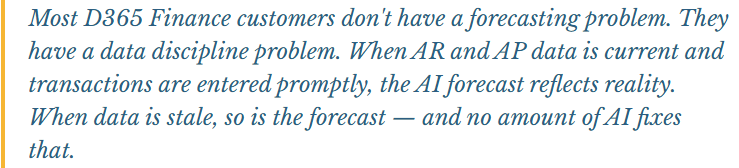
The typical cash forecasting workflow I see at controller-level clients: export AR aging on Monday morning, build a collections schedule manually, pull the AP payment run from D365, add payroll from the HR system, layer in the bank balance from the weekend statement, and assemble the 13-week forward view in Excel. It takes three to four hours, it’s done once a week if everyone remembers, and the moment anything changes mid-week the forecast is already stale.
Finance Insights replaces the core of that workflow. The cash flow forecast in D365 pulls directly from live transactions and runs on a schedule you define — daily is reasonable for most organizations. The ML layer improves the AR timing component using payment prediction probabilities rather than assuming all AR collects on terms. And the result is always current, without manual reassembly.
What Finance Insights doesn’t replace: your judgment about large one-time cash events (acquisitions, cap-ex projects, unusual items), cross-system data that doesn’t live in D365, and the scenario analysis your CFO needs when they ask “what happens to cash if Q3 revenue comes in 10% below plan.” Those still require a model-building layer — though tools like Claude or the Finance Agent in M365 Copilot can accelerate the scenario work significantly.


📚 Go Deeper — Microsoft Resources
- Finance Insights Home Page — D365 Finance — setup, features, and update guide
- Use Customer Payment Predictions — how to read the model output and apply it to collections
- Enable Customer Payment Predictions — data requirements and configuration steps
- Configure Finance Insights — prerequisites and admin setup
Finance Insights is one of those capabilities I consistently find underdeployed in D365 Finance environments. It’s available, the data requirements are achievable, and the value — better collections prioritization, live cash forecasting, faster budgeting — is concrete and measurable. If you’re on D365 Finance and not using it, the first question to answer is why not. Post 22 moves from treasury to projects: AI in D365 Project Operations.
BB
Bobbi Bricker
ERP Capability Lead and D365 Functional Architect at Centric Consulting. Former controller. This series reflects fifteen + years in ERP (as an end user and a Consultant) and a genuine belief that AI, used thoughtfully, makes finance and operations teams more capable — not less. Reach out with questions, pushback, or war stories from your own organizations.
Thank you for reading!
Interested in learning more? Below are a few of my latest posts:





Leave a Reply