

How D365 F&O’s Invoice Capture uses AI document recognition to accelerate vendor invoice processing, the three-way match configuration Finance must own, the tolerance settings that determine when matches are automatic versus requiring Finance review, and the five AP automation failures that introduce errors at scale faster than the manual process they were designed to replace.
D365 F&O Invoice Capture—How It Works at Enterprise Scale
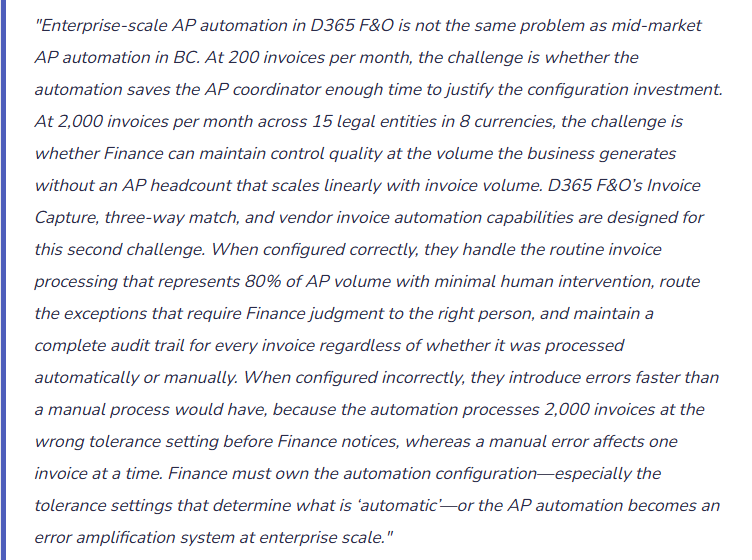
D365 F&O’s Invoice Capture (available in D365 F&O through the Vendor invoice automation feature set) uses Azure AI Document Intelligence to extract structured data from vendor invoice PDFs and create draft vendor invoices in D365 F&O for Finance review and posting. At enterprise scale, the feature operates across multiple legal entities and multiple vendor invoice sources simultaneously, routing captured invoices to the appropriate entity and AP coordinator based on the routing configuration Finance defines.
Invoice Capture Enterprise Workflow—Five Stages Finance Governs
- Multi-Channel Invoice Ingestion
- At enterprise scale, invoices arrive through multiple channels simultaneously: vendor portal submissions (vendors upload invoices directly to the D365 F&O vendor portal), email ingestion (dedicated AP email addresses per legal entity monitored by Invoice Capture), EDI feeds (structured electronic invoice data from high-volume vendors), and manual upload (for paper invoices and non-standard formats). Finance configures which channels are active for each legal entity and which invoice types each channel is authorized to process. A vendor portal submission should not be able to create a vendor invoice in a legal entity that vendor does not supply. The ingestion routing configuration is the first control Finance owns in the automated AP process.
- AI Extraction and Confidence Scoring
- Azure AI Document Intelligence reads each ingested invoice and extracts: vendor identifier (name, address, VAT registration number), invoice number, invoice date, due date, currency, line-item descriptions, quantities, unit prices, line amounts, and tax amounts. Each extracted field receives a confidence score reflecting the AI’s certainty about the extraction. Finance configures confidence thresholds that determine the downstream routing: high-confidence extractions proceed toward automated matching; low-confidence extractions route to the AP review queue for human validation. For enterprise environments, Finance reviews extraction accuracy by vendor quarterly and increases the confidence threshold for vendors whose invoice formats consistently produce low-confidence extractions that Finance ends up correcting manually.
- Vendor Master Matching
- Extracted vendor information is matched to existing vendor records in D365 F&O using the vendor matching rules Finance configures. For high-volume established vendors, the match is based on the vendor VAT registration number—a more reliable matching key than vendor name, which varies across invoice formats. For new or infrequent vendors, matching falls back to name and address matching with lower confidence. Unmatched invoices route to the AP exception queue. Finance reviews the exception queue daily and creates vendor mappings for any vendor with recurring unmatch patterns—the mapping tells Invoice Capture to associate a specific name format with a specific D365 F&O vendor record for future automatic matching.
- Three-Way Match Execution
- For purchase-order-based invoices, D365 F&O attempts to match the captured invoice to the associated purchase order and product receipt automatically. The three-way match compares invoice quantity and price to the PO quantity and price and the receipt quantity. Matches within the configured tolerance are accepted automatically and the invoice moves to the approval queue. Matches outside the tolerance are flagged as exceptions and route to Finance for investigation. The tolerance configuration Finance defines here is the most consequential AP automation decision Finance makes—it determines the boundary between automatic processing and human review at scale.
- Approval Workflow and Posting
- Matched invoices route through D365 F&O’s vendor invoice approval workflow before posting. The workflow routes invoices to the appropriate approver based on the invoice amount, the vendor category, the legal entity, and any exceptions identified in the matching process. Finance configures the approval workflow to ensure that every invoice above the defined threshold receives appropriate authorization before posting—regardless of whether it was matched automatically or manually. The automation does not replace the approval workflow; it accelerates the invoices that reach the approval queue by handling the matching and extraction that previously required manual data entry.
Three-Way Match Tolerance Configuration—Finance Must Own Every Setting
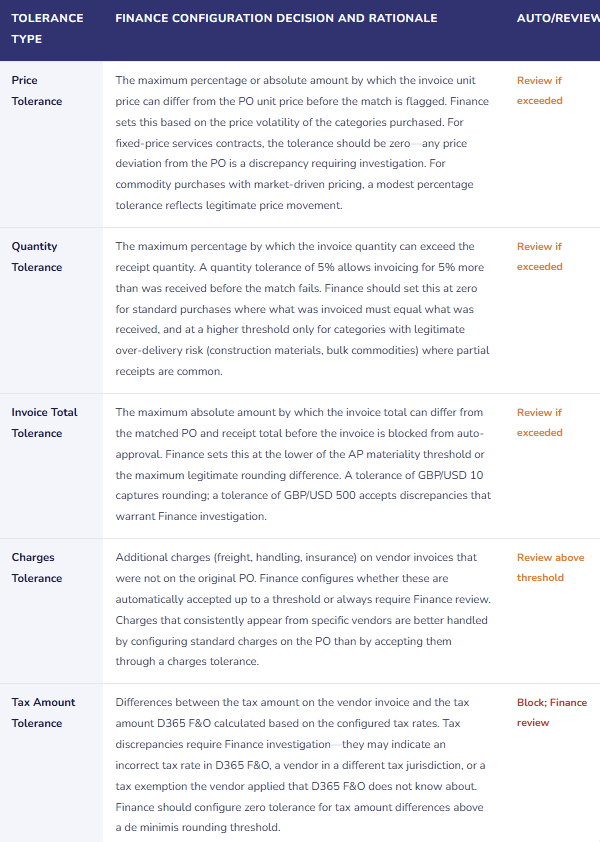
The three-way match tolerance settings determine when an invoice-to-PO discrepancy is accepted automatically versus flagged for Finance review. Finance must configure these tolerances deliberately, based on the organization’s control requirements and the practical range of legitimate discrepancies—not at the implementation partner’s default, which is typically optimized for automation rate rather than for control quality.
Three-Way Match Tolerance Configuration—Finance Ownership by Tolerance Type
Five AP Automation Failures at Enterprise Scale
⚠️ Price Tolerance Set at 10%—6,800 Invoices Processed at Wrong Prices Over 18 Months
The implementation partner configured the price tolerance at 10% as a default that would minimize the exception queue volume and maximize the auto-match rate. Finance accepted the default without evaluating what a 10% price variance means at the organization’s invoice volume. Over 18 months, 6,800 invoices matched automatically with price variances between 1% and 10%. The accumulated price overpayment for invoices that matched at the high end of the tolerance range is $286,000—Finance paid 10% more than the PO price on several hundred invoices without Finance review because the match was within the tolerance. Finance discovers the accumulated overpayment during an AP analytics review conducted as part of a year-end cost optimization exercise.
Fix: Price tolerance must be set based on what Finance is willing to pay without human review, not based on what maximizes the automation rate. For fixed-price contracts: zero tolerance. For market-price commodities: the maximum expected price movement per delivery period, typically 2–5% for most categories. Finance reviews the invoice population for the prior 12 months and calculates the distribution of invoice-to-PO price variances. The tolerance should be set at the percentile that captures legitimate variances without including variances that represent systematic overpayment. Finance reviews the tolerance settings annually and adjusts them based on the actual variance distribution observed.
⚠️ Invoice Capture Vendor Matching Uses Name Only—Same-Name Vendors in Different Entities Create Cross-Entity Postings
The organization has two vendors named “Acme Supplies Ltd”—one in the UK legal entity (Vendor ID UK-10234) and one in the US legal entity (Vendor ID US-10234), which is a different US company that happens to share the same name. Invoice Capture’s vendor matching is configured to match on vendor name only. When the UK entity receives an invoice from UK Acme Supplies, Invoice Capture matches it to UK-10234 correctly in most cases. In six cases over eight months, the entity routing configuration routes the UK invoice to the US legal entity’s Invoice Capture queue (due to a misconfigured email alias), and Invoice Capture matches the UK vendor name to US-10234. Six UK invoices are created as vendor invoices in the US legal entity. Finance discovers the cross-entity postings during the AP aging reconciliation when the UK accounts payable aging disagrees with the GL AP control account.
Fix: Vendor matching in multi-entity Invoice Capture environments must use the vendor VAT registration number or tax identification number as the primary matching key, not vendor name. VAT numbers are unique per vendor per jurisdiction and eliminate same-name matching errors. Finance configures the vendor matching rules in Invoice Capture to require VAT/TIN match for all vendors where this information is available, and falls back to name-plus-address matching only for vendors where TIN information is not maintained. Finance also confirms that the ingestion channel routing (which entity’s queue an invoice enters) is based on the email recipient address or vendor portal login, not on the invoice content—routing errors should be caught at ingestion, not discovered in the AP aging.
⚠️ Three-Way Match Auto-Approves Invoices Where Receipt Was Posted in Error—Finance Pays for Goods Never Received
A purchase order is created for 500 units. A warehouse coordinator posts a product receipt for 500 units in error—the goods have not arrived but the coordinator posts the receipt to close out the PO in the system. The vendor submits an invoice for 500 units at the PO price. Invoice Capture matches the invoice to the PO and the erroneous receipt. The three-way match is perfect: invoice quantity equals receipt quantity equals PO quantity. The invoice auto-approves and posts. Finance pays the vendor for 500 units of goods that were never received. When the goods eventually arrive (if the vendor actually ships them), the warehouse coordinator cannot post a receipt because the PO is already fully receipted and paid. The discrepancy surfaces when the vendor inquires about the shipment status weeks later.
Fix: The three-way match automation does not eliminate the need for receipt quality controls in the warehouse. If receipts can be posted in error without review, the three-way match will faithfully match invoices to those erroneous receipts and Finance will pay for goods not received. Finance must work with Operations to establish receipt posting controls: receipts above a material threshold require supervisory approval before posting, and the warehouse management system must confirm physical receipt before the D365 F&O product receipt is posted. Finance also reviews the AP aging monthly for invoices paid more than 30 days before the expected delivery date for the PO—a structural indicator of potential pre-payment or erroneous receipt situations.
⚠️ Invoice Capture Exception Queue Grows to 800 Invoices—Not Monitored, Not Worked
Invoice Capture is processing 1,800 invoices per month. The exception queue—invoices that failed the automatic match for any reason (low confidence extraction, vendor matching failure, tolerance exceeded, duplicate detected)—receives approximately 15% of incoming invoices, or 270 per month. Nobody is monitoring the exception queue. Finance assumes the automation is working because the 85% that auto-match are posting without issues. After three months, the exception queue has 800 unworked invoices. Vendor statements begin arriving with unpaid balances for invoices that Finance cannot find in the posted invoice list. Vendors who are critical to the supply chain escalate to the procurement team. Finance investigates and finds 800 invoices in the exception queue that have been sitting unworked for up to three months. The AP team spends two weeks working through the exception queue, posting overdue invoices, and managing vendor relationship damage from the payment delays.
Fix: The Invoice Capture exception queue is a daily Finance operational responsibility, not a periodic review. Finance assigns named owners to the exception queue, establishes an exception queue aging policy (any exception older than five business days requires escalation to the AP Manager; any exception older than 10 business days requires Controller attention), and reviews exception queue depth daily as part of the AP team’s morning routine. Finance also monitors the exception rate—the percentage of invoices that route to the exception queue—as a KPI. An exception rate above 20% signals either a vendor format quality problem that Invoice Capture cannot handle reliably or a tolerance configuration that is too tight and sending legitimate matches to exceptions. Finance investigates exception rate increases and resolves the root cause rather than accepting a growing exception queue as normal.
⚠️ Duplicate Invoice Detection Disabled to Increase Throughput—Finance Pays the Same Invoice Twice for 90 Days
The AP Manager disables D365 F&O’s duplicate invoice detection feature because it was generating false positives—flagging legitimate invoices as potential duplicates when the vendor used the same invoice number format across multiple entities or sequential invoice numbers that were close to prior period numbers. The duplicate detection was generating 40–50 false positives per month that required Finance review. Disabling it eliminated the review queue. It also eliminated the detection of two actual duplicate invoices per month that the vendor was submitting through the portal and by email simultaneously. Over 90 days, Finance pays six duplicate invoices totaling £48,400 before the vendor’s accounts receivable team contacts Finance asking about credit memo application for the overpayments.
Fix: Duplicate detection must not be disabled to reduce workload—it must be calibrated to reduce false positives while retaining genuine duplicate detection. Finance works with the vendor and the D365 F&O configuration to refine the duplicate detection rules: the matching criteria should include vendor ID plus invoice number plus invoice date plus invoice total (all four, not just invoice number alone, which is what was generating false positives for same-format invoice numbers across entities). Finance also implements a process control for known dual-channel vendors—vendors who submit through both the portal and email—requiring the vendor to use a consistent submission channel rather than both simultaneously. Duplicate detection is not optional for enterprise AP environments; it is the control that prevents the most expensive category of AP error at high invoice volumes.
Do This / Don’t Do This
Do This
- Set price and quantity tolerances based on what Finance is willing to pay without human review, not based on what maximizes the automation rate
- Use VAT/TIN as the primary vendor matching key in multi-entity Invoice Capture environments, not vendor name alone
- Configure the exception queue as a daily Finance operational responsibility with named owners and aging thresholds
- Monitor exception rate as a KPI—investigate root cause when exception rate exceeds 20%
- Calibrate duplicate detection criteria rather than disabling it when false positives appear
- Confirm receipt quality controls in Operations before enabling three-way match automation—erroneous receipts produce fraudulent three-way matches
- Review tolerance settings annually against the actual invoice-to-PO variance distribution for the prior year
Don’t Do This
- Accept the implementation partner’s default tolerance settings without evaluating what they mean at your invoice volume
- Configure vendor matching on name only in multi-entity environments with same-name vendors in different jurisdictions
- Allow the exception queue to accumulate without a daily working cadence and an aging escalation policy
- Disable duplicate detection to reduce workload—calibrate it instead
- Assume three-way match automation eliminates the need for receipt quality controls in the warehouse
- Treat AP automation as an IT system that runs independently—Finance owns the tolerance configuration, the exception queue, and the control quality
What’s Next:
AP automation addresses high-volume invoice processing. The next post steps back from individual module depth to deliver the D365 F&O equivalent of the BC Finance Health Check: The D365 F&O Finance Implementation Health Check—the self-assessment Finance runs to identify configuration and governance gaps that have accumulated since go-live, the scoring framework across six Finance-critical domains, the improvement prioritization methodology, and the evidence that Finance should be able to produce on demand for any auditor, CFO, or board inquiry about the quality of D365 F&O’s Finance configuration.
— Bobbi
D365 Functional Architect · Recovering Controller
Thank you for reading!
If this post helped you solve a real problem, share it with a Finance colleague who is in the middle of an ERP implementation or a post-go-live optimization. If you have a topic that I haven’t covered, please reach out. There is always one more post worth writing.
Interested in learning more? Below are some of my latest posts:
Leave a Reply