

How BC connects to Power Platform, external systems, and third-party applications; what Finance must understand about each integration type before it is built; why Finance needs a seat at the integration architecture table even when IT is doing the technical work; and the five integration failures Finance discovers too late because Finance was not involved when the integration was designed.
The Four BC Integration Patterns Finance Encounters
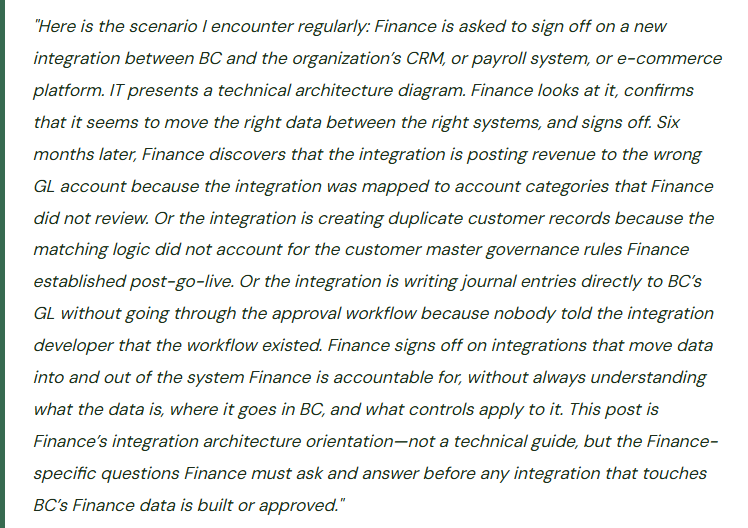
BC integrations fall into four structural patterns. Finance encounters all four and must understand the Finance implications of each before any integration is approved for production use.
Native Microsoft Integrations
BC connects natively to other Microsoft products—Microsoft 365 (Outlook, Teams, SharePoint), Power Platform (Power Automate, Power BI, Power Apps), Azure services, and Dataverse. These integrations are built and maintained by Microsoft, updated with each release wave, and supported through Microsoft’s standard support channels.
Native integrations are the most reliable and lowest-maintenance integration pattern. They are also the pattern Finance teams least often review from a Finance data perspective because they feel like BC features rather than integrations.
Finance must know: native integrations still move BC data outside BC’s security perimeter. When BC financial data flows to Power BI, it is accessible to whoever has been granted Power BI access—which may be a broader audience than the BC security roles Finance configured. Finance reviews who can access BC data through Power BI, Power Automate, and other native Microsoft integrations as part of the quarterly access review.
Power Automate Flows
Power Automate flows are the most common Finance-built integration in BC environments. They connect BC to other systems, automate multi-step Finance processes, route approvals, send notifications, and synchronize data. Flows are built by Finance users (low-code) or developers, run on Microsoft’s Power Platform infrastructure, and are governed through the Power Platform admin center.
Finance builds flows for AP approval routing, payment confirmation notifications, vendor bank account change alerts, period-close notifications, and data synchronization with payroll or expense management systems.
Finance must know: flows that post data to BC must be reviewed for posting accuracy—which GL accounts does the flow use, does the flow bypass BC’s approval workflows, and who owns the flow and maintains it when it breaks? Finance maintains the Power Platform inventory (Post 28 of this series) and reviews it quarterly.
API-Based Integrations (BC Web Services and OData)
Third-party systems connect to BC through BC’s published API pages (REST APIs and OData feeds). An e-commerce platform that creates sales orders in BC when orders are placed online, a payroll system that posts payroll journal entries to BC at each pay run, a CRM that synchronizes customer data—these are API-based integrations typically built by the third-party system vendor, IT, or a systems integrator.
API integrations are more capable than flows (they can handle higher transaction volumes and more complex data structures) and more technically complex to build and maintain. They typically require developer involvement for initial setup and for ongoing maintenance when BC updates change API behavior.
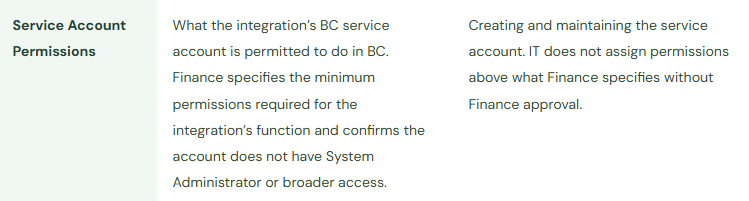
Finance must know: API-based integrations write to BC using a service account or named user account. Finance must confirm: what BC user account does the integration run under, what permission set is assigned to that account, and does the integration respect BC’s approval workflows? An API integration that runs under a System Administrator service account can post any transaction to any account without any approval—a control gap Finance may not know exists.
File-Based Integrations (Import/Export via Data Management)
Some integrations operate through file exchange: BC exports data to a file (CSV, Excel, XML) that another system imports, or BC imports a file that another system exports. Payroll journal entries imported from payroll software via Excel upload, bank statement files imported for bank reconciliation, inventory data exported to a reporting system—these are file-based integrations.
File-based integrations are the most common pattern in mid-market BC environments because they require no API development. They are also the most manual and the most error-prone: the file must be generated, transferred, and imported on a schedule, and any step in that sequence can fail without an automated alert.
Finance must know: for file-based integrations that affect Finance data, Finance must own the mapping documentation—which column in the import file maps to which BC field, and what happens when the mapping fails or the data in a column is in an unexpected format? An import file with a blank GL account column will create journal entries with blank account codes unless BC’s dimension validation catches them, which it will not if the mandatory dimension validation for that account is not configured.
The Finance Ownership Map for Integrations
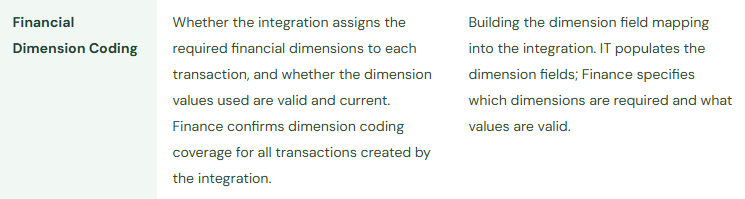
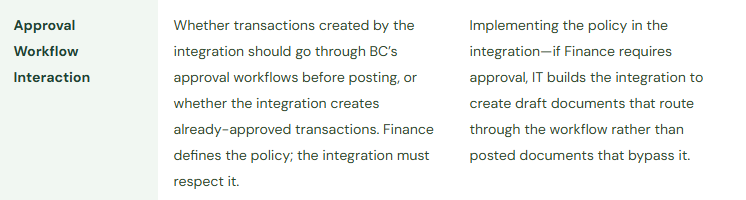
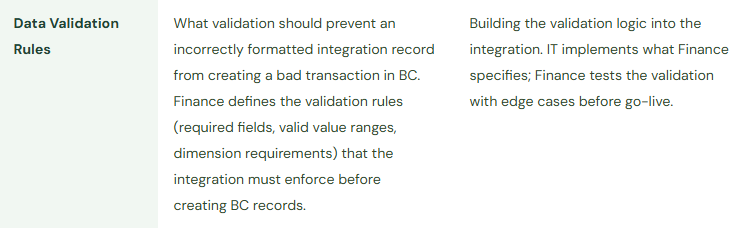
Finance and IT share responsibility for integrations that touch BC Finance data, but the division is not always clear to either party. The table below maps which aspects of each integration Finance must own versus which IT owns—regardless of which party built the integration.
Integration Ownership—Finance vs. IT Responsibility



Five Integration Failures Finance Discovers Too Late
⚠️ E-Commerce Integration Posts Revenue to a Single Catchall Account—Product Line Reporting Is Impossible for 18 Months
The organization launches an e-commerce store integrated with BC through an API integration built by the platform vendor. The integration creates BC sales invoices for every online order automatically. During the integration setup, the platform vendor’s implementation team mapped all online sales to a single BC revenue account (GL 4000—General Revenue) because the BC revenue account structure was not provided to them. Finance was not consulted during the integration mapping configuration. For 18 months, all e-commerce revenue posts to GL 4000 regardless of which product line was sold online. Finance cannot produce a product-line revenue analysis that separates online sales by category because the GL coding does not support it. Building the analysis retroactively requires matching each of 14,000 e-commerce invoices to a product category from the order detail—a project Finance estimates at 80 hours of manual work.
Fix: Finance reviews and approves the GL account mapping for any integration that creates BC transactions before the integration goes live in production. The review is not a formality—Finance opens the integration’s mapping configuration and traces each transaction type to the BC account it will use. For e-commerce integrations specifically, Finance confirms: each product line or product category maps to the correct revenue account, the tax account mapping is correct for each jurisdiction, and any discount or promotion account is mapped separately from revenue. Finance provides the mapping specification to the integration developer in writing before configuration begins, rather than reviewing it after configuration is complete. A mapping specification document takes two hours to prepare and prevents the 80-hour retroactive analysis.
⚠️ Payroll Integration Creates GL Entries That Bypass the Journal Entry Approval Workflow
The organization implements a payroll integration that posts payroll journal entries directly to BC after each payroll run. The integration runs under a service account with Accounts Manager permissions. When the payroll journal entries are created, they are created as Posted Transactions rather than Journal Entry drafts—meaning they post to the GL immediately without going through BC’s journal entry approval workflow that Finance configured for all manual journal entries above £5,000. Payroll entries, which routinely exceed £100,000 per run, post without any Finance review or approval. Finance discovers this pattern during an internal controls assessment eighteen months after the integration went live. The auditor, reviewing the journal entry approval controls, asks why the payroll entries do not show in the BC Approval Entries for the journal workflow. Finance cannot explain why.
Fix: Finance specifies for every API-based integration whether transactions it creates should enter BC as drafts (requiring approval) or as posted transactions (bypassing approval). The default assumption should be: integrations that create journal entries or financial transactions must create them as drafts that go through BC’s approval workflow, unless Finance has explicitly approved and documented a specific exception. Payroll entries, despite being generated by a trusted system, should be reviewed by Finance before posting—payroll errors occur and the journal entry approval workflow is the Finance control that catches them before they hit the GL. Finance raises this requirement with IT before any payroll integration is built: “The integration must create journal entry drafts in the General Journal batch designated for payroll, not post directly to the GL.”
⚠️ Power Automate Flow Creates Duplicate Customer Records When CRM and BC Sync Out of Order
IT builds a Power Automate flow that creates BC customer records when new customers are added to the CRM. The flow matches CRM contacts to BC customers by company name. When a company name in the CRM has a slightly different format from the same company’s BC record (punctuation difference, abbreviation, legal entity designation), the flow creates a duplicate BC customer record rather than updating the existing one. Over six months, 34 duplicate customer records are created in BC. AR transactions for the affected customers are split between the original and duplicate records. The AR aging is inaccurate for 34 customers because the balance is divided between records that the AR coordinator does not know are related. Collection letters are sent to some records but not others. When a customer pays against the duplicate record, the payment does not apply to the correct open invoices on the original record.
Fix: Finance defines the customer matching logic for any CRM-to-BC synchronization flow before the flow is built, not after. The matching logic must reflect BC’s customer master governance standards: matching by company name is insufficient because name formats vary. Finance specifies a multi-field matching approach: match on company name AND postcode, or match on VAT registration number where available, with a Finance review queue for potential matches rather than automatic creation for any record that does not find an exact match. Finance also includes the CRM integration in the quarterly vendor master audit scope: Finance reviews new BC customer records created by the integration in the past 90 days and confirms none are duplicates of existing records.
⚠️ Integration Service Account Has System Administrator Permissions—An Unrestricted Posting Path Exists in BC
An e-procurement integration was built two years ago and runs under a BC service account. When the integration was set up, IT assigned the service account the System Administrator permission set because it was the quickest way to confirm the integration had all the permissions it needed. The System Administrator permission set gives the service account unrestricted access to every BC function, including posting any transaction to any account without validation. Finance did not specify minimum permissions for the integration at the time; the System Administrator assignment was IT’s decision made for convenience. The integration has been running correctly since go-live. But the service account represents an unrestricted posting path into BC’s GL that bypasses every Finance control—and if the service account credentials are ever compromised, an attacker has System Administrator access to BC.
Fix: Finance reviews the BC permission set assigned to every integration service account and replaces System Administrator with a minimum-permission custom permission set scoped to exactly what the integration needs to do. For a purchase order creation integration: the service account needs permissions to create purchase headers and purchase lines, read vendor records, and read item records—not to post journals, modify GL accounts, or access user settings. Finance works with IT to define the minimum permission set for each integration and confirms no integration service account has System Administrator or unrestricted Finance Posting permissions. This review is included in the quarterly access review: Finance reviews not just human user accounts but all BC service accounts and confirms their permission sets are appropriately scoped.
⚠️ Integration Breaks After a BC Release Wave—Finance Discovers It When Transactions Stop Arriving
A bank statement import integration was built using BC’s OData API to pull transactions from the bank’s portal and create bank statement lines in BC. BC’s Wave 1 update changes the OData endpoint schema for the bank statement import function. The integration was built by a development consultant who is no longer engaged with the organization. IT did not test the integration against the Wave 1 sandbox build because integrations were not included in the Wave 1 test plan. Finance does not discover the integration has stopped working until the third day of the month-end close when the bank coordinator opens BC to run the bank reconciliation and finds that no bank statement lines have imported for the current month.
Fix: Every custom integration that connects to BC through its API must be included in the release wave sandbox test plan. Finance maintains an integration inventory (as covered in Post 28 of this series) that lists every active integration, its connection method, the BC APIs or pages it uses, and its owner. Before each major wave deploys to production, IT tests each API-based integration in the sandbox environment to confirm it continues to operate correctly with the new wave build. Any integration that fails the sandbox test is prioritized for repair before the wave deploys to production. Finance participates in the pre-wave testing sign-off: Finance confirms that all Finance-affecting integrations have been tested and confirmed working before approving the production wave deployment.
Do This / Don’t Do This
Do This
- Review and approve the GL account mapping for every integration that creates BC transactions before it goes to production
- Specify whether each integration creates draft transactions (requiring BC approval) or posted transactions, and document the Finance policy decision
- Define customer and vendor matching logic for CRM and procurement integrations before the integration is built
- Review integration service account permission sets quarterly—no integration should run under System Administrator
- Include all API-based integrations in the release wave sandbox test plan
- Maintain a Power Platform inventory and review it quarterly for flows that affect Finance data
- Confirm who can access BC financial data through Power BI and native Microsoft integration channels as part of the quarterly access review
Don’t Do This
- Sign off on integrations without reviewing the GL account mapping Finance will inherit
- Allow integrations to post transactions directly to BC’s GL without going through approval workflows Finance has configured for the same transaction types
- Let IT assign System Administrator to integration service accounts for convenience—specify minimum permissions
- Exclude integrations from the release wave sandbox test plan and discover breakage during a live close
- Assume that a native Microsoft integration (Power Automate, Power BI) is automatically within Finance’s security perimeter—Finance data flowing outside BC can reach audiences BC security roles do not control
- Treat integration architecture as an IT-only topic—Finance data flowing through integrations is Finance’s accountability
Up Next:
Integration architecture connects BC to the broader technology stack Finance operates in. The next post returns to a Finance module that the series covered at a foundational level early on but that deserves a deeper treatment for organizations with multiple legal entities: Intercompany Accounting in BC—Multi-Entity Without the Manual Layer—how BC’s intercompany module automates reciprocal transactions between related entities, the setup sequence Finance must complete before the first intercompany transaction posts, the intercompany elimination process at period-end, and the five intercompany accounting failures that keep Finance teams reconciling intercompany balances manually every close.
— Bobbi
D365 Functional Architect · Recovering Controller
Thank you for reading!
If this post helped you solve a real problem, share it with a Finance colleague who is in the middle of an ERP implementation or a post-go-live optimization. If you have a topic that I haven’t covered, please reach out. There is always one more post worth writing.
Interested in learning more? Below are some of my latest posts:
Leave a Reply