
Post #011 – AI In Microsoft ERP
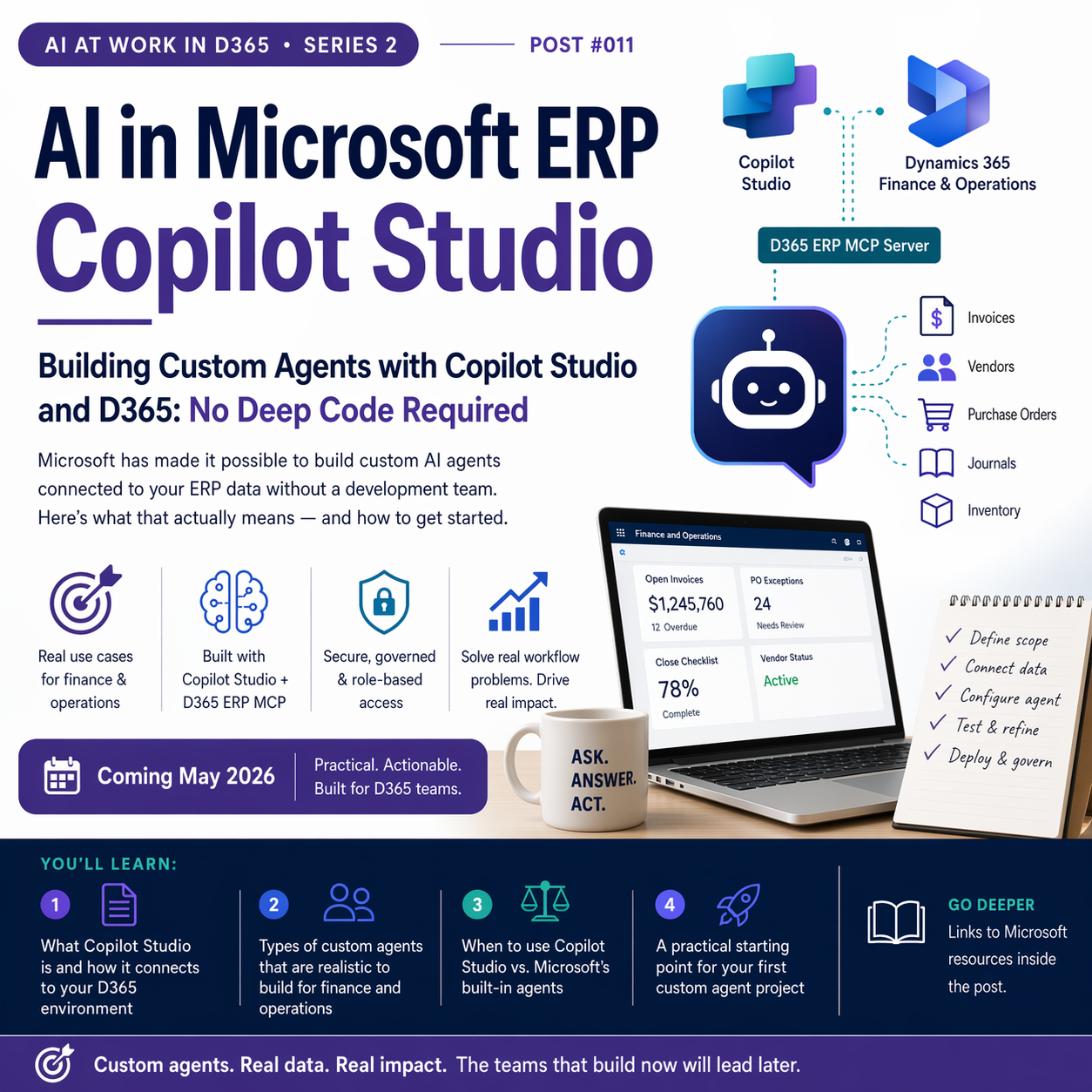
Microsoft has made it possible to build custom AI agents connected to your ERP data without a development team. Here’s what that actually means — and how to get started.


What Copilot Studio Actually Is
Microsoft Copilot Studio (formerly Power Virtual Agents) is a low-code platform for building custom AI agents that can be grounded on your organization’s specific data, policies, and workflows. It’s part of the Power Platform family, which means if you’re using Power Automate or Power Apps, you’re already in the same ecosystem. If your organization has Microsoft 365 or Dynamics 365 licenses, there’s a good chance you have some access to Copilot Studio already — though the features available vary by license tier.
The key capability for D365 customers: Copilot Studio agents can connect directly to your finance and operations data through the Dynamics 365 ERP MCP server, giving agents real access to your ERP data — invoices, vendors, purchase orders, journals, inventory — without requiring custom connectors or complex API integrations. You tell the agent what it can do, configure which data it can access, and it inherits the security role of the user interacting with it.
Why This Is Different From What Came Before
Building ERP-connected chatbots used to require development resources, integration middleware, and months of work. The MCP (Model Context Protocol) server approach that Microsoft has built into D365 changes the economics of this dramatically. An agent can access nearly any function available through the F&O user interface — data reads, business logic, workflow actions — through the MCP layer, without custom code at each integration point.
Microsoft’s own documentation explicitly recommends Claude Sonnet 4.5 as the preferred AI model when using the Dynamics 365 ERP MCP server in Copilot Studio, noting it provides a better success rate than GPT-4.1 for ERP-connected agent scenarios. That’s a notable call-out worth understanding when you configure your first agent.

Real Finance and Operations Use Cases
The custom agent scenarios that make the most sense for finance and operations teams are the ones where you have a specific, repetitive workflow that doesn’t fit neatly into one of Microsoft’s pre-built agents. Some examples from the kinds of conversations I’ve had with clients:
Vendor inquiry agent. Finance teams field a lot of “when will my invoice be paid?” and “what’s the status of my PO?” queries — often from internal business partners, not external vendors. A custom agent grounded in your D365 AP data can handle these lookups in plain language, freeing your AP team from fielding routine status questions.
Journal entry policy assistant. New accountants spend significant time learning which account to debit or credit for a given transaction type. A custom agent trained on your chart of accounts policy and historical coding patterns can answer “what account should I use for this type of expense?” in plain language, reducing coding errors and training time.
Purchase order exception triage. When a PO has a discrepancy — quantity mismatch, price variance, missing receipt — someone needs to investigate and decide what to do. A custom agent can surface the relevant details (original PO, received quantities, invoice amount, contract terms) and help the buyer work through the decision, without digging through six different screens.
Close checklist status agent. During close, people spend a lot of time asking “where are we on the checklist?” A custom agent connected to your workflow and journal data can give a real-time close status summary on demand.

How to Build One: The Basic Approach
- Define the agent’s scope precisely
- Start narrow. “Help finance staff look up open vendor invoices and payment status” is a good first agent. “Help with all things finance” is too broad to build or test well.
- Enable the Dynamics 365 ERP MCP server in your environment
- Your admin enables the MCP server in D365 F&O settings. This gives Copilot Studio agents access to your ERP data through a defined interface.
- Create and configure the agent in Copilot Studio
- Add the MCP server as a tool. Write instructions that tell the agent its role, tone, and what it should and shouldn’t do. Set Claude Sonnet 4.5 as the model if available in your environment.
- Test with real scenarios before deploying
- Test with actual finance users asking realistic questions. Document what the agent handles well, what it gets wrong, and what it declines. Refine instructions accordingly.
- Deploy, monitor, and govern
- Use Agent 365 (generally available as of May 2026) to manage the agent alongside other agents in your tenant — with consistent policy, security, and audit visibility.
Where to start if you’re new to this: Microsoft’s hands-on guide Build an agent with Dynamics 365 ERP MCP walks through the exact steps in Copilot Studio. It’s well-written and more approachable than most Microsoft Learn documentation. Bookmark it before your first agent build.
When to Use Copilot Studio vs. Built-In Agents
Microsoft’s pre-built agents (Payables Agent, Sales Order Agent, Finance Agent) are the right starting point for their specific use cases — they’re built, tested, and supported by Microsoft. Copilot Studio is for the use cases that aren’t covered: your specific workflow, your specific data sources, your specific terminology. Think of Copilot Studio as the customization layer that extends what Microsoft ships, not a replacement for it.
📚 Go Deeper — Microsoft Resources
- Build an Agent with D365 ERP MCP — Microsoft Learn — step-by-step guide for the complete build process
- Copilot Studio 2026 Wave 1 Release Plan — what’s new in the platform
- Use Model Context Protocol for Finance and Operations Apps — MCP server setup and configuration
- Copilot Studio April 2026 Updates — governance, Agent 365 GA, and new workflow capabilities
Custom agents built on Copilot Studio and the D365 ERP MCP server represent one of the most significant capability shifts available to D365 organizations right now — and most teams haven’t started exploring it yet. The organizations that invest the time to build even one or two well-scoped agents in the next six months will have a meaningful head start on what will become standard practice.
Next up: Post 12 tackles Microsoft Fabric — the analytics platform that’s quietly becoming the backbone of AI-powered reporting for D365 organizations.
BB
Bobbi Bricker
ERP Capability Lead and D365 Functional Architect at Centric Consulting. Former controller. This series reflects ten years in ERP and a genuine belief that AI, used thoughtfully, makes finance and operations teams more capable — not less. Reach out with questions, pushback, or war stories from your own organizations.
Thank you for reading!
If you are interested in learning more, here are some of my latest posts:

Leave a Reply