

How BC’s twice-yearly release waves work, what Finance should evaluate before each update arrives, the sandbox testing process for Finance-specific functionality, how to build a release readiness practice that prevents the “something changed after the update” discovery cycle, and the five release wave mistakes that turn a productivity upgrade into a period-close disruption.


How BC’s Release Cycle Works
Business Central Online (SaaS) updates on Microsoft’s schedule. Finance cannot choose to stay on an older version indefinitely the way an on-premises implementation could. Understanding the update cadence is the starting point for planning around it.
Major Release Waves ship twice per year: Release Wave 1 targets April deployment, Release Wave 2 targets October deployment. Each wave is announced approximately six months in advance with a detailed release plan published on docs.microsoft.com covering every new feature, changed behavior, and deprecated capability across the entire BC platform. Microsoft opens a “preview” period—typically six to eight weeks before the wave reaches production—during which the wave is available in BC sandbox environments. Administrators can also configure an “update window” to schedule when the production environment receives the update, with some flexibility within Microsoft’s deployment window.
Monthly Minor Updates ship on the first or second workday of each month. These contain bug fixes, performance improvements, and small feature additions that did not require the major wave planning process. Minor updates are generally lower-risk than major waves but can occasionally change behavior in Finance-relevant areas. Finance should review the monthly release notes (published on the BC release notes page) as part of the monthly close preparation.
Hotfixes may be deployed between scheduled updates to address critical issues. Microsoft communicates hotfixes through the BC admin center and the Microsoft 365 Message Center. Finance should ensure the BC admin (IT or the partner) has notifications enabled and forwards Finance-relevant hotfix notices to the Controller.
The Finance Release Readiness Calendar
Finance Release Wave Readiness—Wave 1 (April) Example Calendar
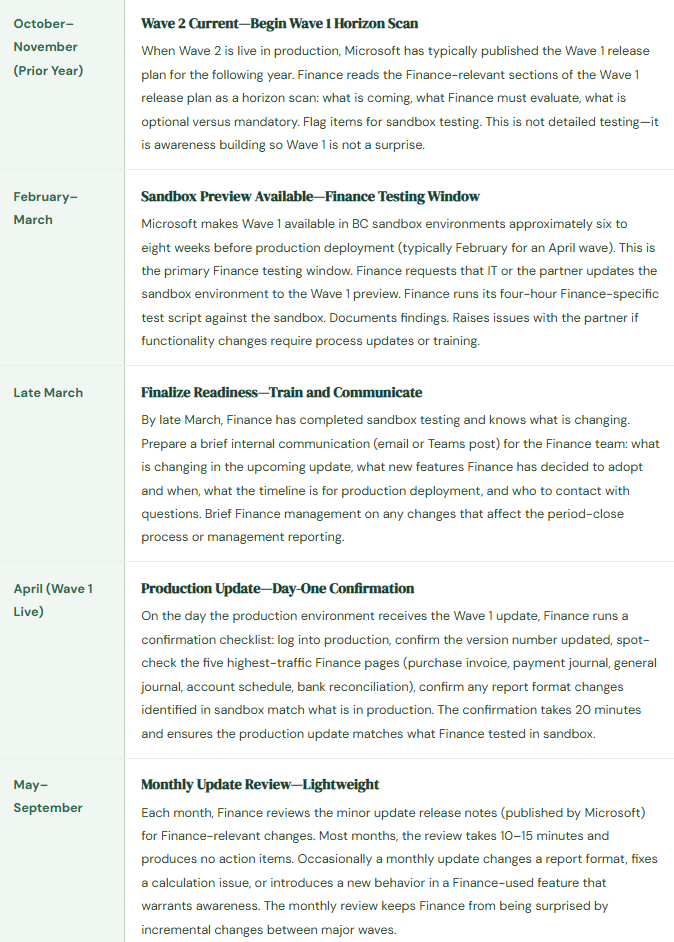
What Finance Reviews in the Release Plan—The Eight Finance Areas to Scan
Financial Management Module
Changes to GL setup, posting group behavior, account schedule functionality, budget features, dimension processing, and period-close mechanics. These are the highest-priority items for Finance review because they directly affect the close process and financial reporting.
Accounts Payable and Receivable
Changes to invoice processing pages, payment journal behavior, application logic, aging report formats, and credit management features. AP and AR changes affect Finance’s highest-volume daily workflows and the subledger reconciliations that anchor the balance sheet.
Cash Management and Bank Reconciliation
Changes to the bank reconciliation page, bank feed integration behavior, payment matching logic, and bank account setup. BC’s bank reconciliation has received significant investment across multiple waves; Finance must test it specifically after each wave that touches this area.
Fixed Assets
Changes to depreciation calculation methods, FA posting setup, acquisition and disposal workflows, and FA reporting. Fixed asset depreciation runs automatically; a changed calculation behavior Finance does not catch in sandbox can produce incorrect depreciation postings across the entire asset register before Finance notices.
Reporting and Account Schedules
Changes to Account Schedule structure, Financial Reports functionality (post-2023 rename), built-in report layouts, and RDLC report changes. Report layout changes Finance discovers after the wave hits production without sandbox testing mean the management package goes out with unexpected formatting changes that require explanation to leadership.
Approval Workflows
Changes to the BC workflow engine, Power Automate integration behavior, approval routing logic, and workflow notification format. Workflow changes can affect Finance controls; a changed routing behavior that Finance does not test may allow transactions to route incorrectly or fail to route at all after the update.
Extensions and AppSource Apps
Each release wave may change BC APIs that installed extensions depend on. The extension publisher is responsible for maintaining compatibility, but the update may arrive in production before the publisher has released an updated version of their extension. Finance should check with the partner whether any installed Finance extensions require a compatibility update before the wave deploys to production.
Copilot and AI Features
BC’s Copilot capabilities have expanded significantly in recent waves. Finance should review new Copilot features that apply to Finance workflows (bank reconciliation AI matching, invoice suggestion, financial analysis chat) and determine which to enable, which to defer, and what governance is needed before enabling AI-assisted features in Finance processes.

Five Release Wave Mistakes That Disrupt Period Close
⚠️ Wave Deploys to Production the Week of Period Close—Finance Has No Testing Buffer
Microsoft deploys Wave 1 to the organization’s production BC environment on April 3. The April 30 period close begins April 25. Finance has not tested the wave in sandbox. On April 25, the Controller opens BC to begin the close sequence and finds that the Account Schedule she uses for the management income statement is producing different subtotals in two line items. She cannot determine whether the report is wrong (a wave change she was not aware of) or whether there is a data error in the current period. The investigation takes four hours during the close window. The management income statement is two days late because of a layout change Finance would have identified in four hours of sandbox testing six weeks earlier.
Fix: When scheduling the production update window in the BC admin center, avoid deploying major waves during the last two weeks of any period that Finance closes. If Wave 1 deploys in April and Finance’s April close begins April 22, schedule the production update for the first week of April—giving Finance three weeks of production experience with the wave before close begins. Microsoft’s deployment window gives administrators some flexibility on the exact deployment date within the wave’s deployment schedule. Use that flexibility deliberately. The production deployment date is a Finance calendar decision, not a default IT setting.
⚠️ Extension Breaks After Wave Deploys—Finance Discovers It at AP Invoice Entry
The organization uses an AppSource extension for automated purchase invoice approval routing that integrates with the purchase invoice page. Wave 2 ships in October with a change to the purchase invoice API that the extension’s October-compatible version addresses. However, IT deploys Wave 2 to production before the extension publisher has released the compatible version to AppSource. On the first day of Wave 2 in production, the AP coordinator opens a purchase invoice and the custom approval routing button is missing. Invoices cannot route for approval. The AP queue stops. Finance calls the partner. The partner calls the extension publisher. The compatible extension version is not yet published. Finance manually routes invoices via email for three days while waiting for the extension update to be published and installed.
Fix: Before each major wave deploys to production, verify with each extension publisher (or through the partner) whether a wave-compatible version of every installed Finance extension is available and has been tested. The BC admin center shows installed extension versions and their last update dates. If a Finance-critical extension does not have a wave-compatible version available before the production deployment date, delay the production deployment within the available window until the compatible extension is published and tested in sandbox. Extension compatibility is a Finance pre-deployment checklist item, not a post-deployment discovery.
⚠️ New Mandatory Feature Changes Behavior Finance Relied On—Finance Doesn’t Know Until It Affects a Transaction
Wave 2 includes a feature that changes the default behavior of the payment journal application logic for foreign-currency invoices. Previously, the application defaulted to applying at the invoice exchange rate; the new behavior defaults to applying at the payment date rate and automatically calculates a realized FX gain or loss. The feature was listed as “mandatory” in the release plan, meaning Finance cannot opt out after the wave deploys. Finance did not read the release plan. After Wave 2 deploys to production, an AP user applies a EUR vendor payment and is surprised to find a realized FX gain entry posted automatically—an entry type she has never seen before and does not understand. She calls Finance management, who does not recognize the entry. Finance spends two days investigating what posted to the FX Gain account before concluding the new behavior is correct and documenting it as a wave-introduced change. Had Finance read the release plan six weeks earlier, a 10-minute team briefing would have prepared the AP user for the new entry format before her first encounter with it in a live transaction.
Fix: The release plan distinguishes between optional features (which Finance can enable or defer) and mandatory features (which will activate automatically with the wave). Finance must read the mandatory feature section of each wave’s release plan with particular attention to Finance-relevant areas. Mandatory features require training before the wave deploys, not after. For each mandatory feature that changes Finance workflow behavior, prepare a brief team communication: what is changing, what the new behavior looks like in BC, what the accounting rationale is, and who to contact with questions. Distribute the communication before the production deployment date. The communication does not need to be long—three to five sentences per changed behavior is sufficient for most mandatory features.
⚠️ Finance Never Tests in Sandbox—All Wave Discovery Happens in Production
Every BC subscription includes at least one sandbox environment. The organization’s BC sandbox has been updated to the current production version and then never touched again. Finance has never tested in sandbox because “IT manages the sandbox” and the Finance team does not have access configured. Over three waves, Finance has discovered every significant change by encountering it first in production: a changed bank reconciliation UI that confused the Controller in the middle of a bank rec, a report format change that required reformatting the management package on the close day, an approval workflow change that caused two invoices to route to the wrong approver before anyone noticed the pattern. Each discovery is a disruption. None of them would have occurred if Finance had four hours of sandbox access before each wave.
Fix: Finance users need active sandbox access—not IT-managed access, not read-only access, but the same functional access they have in production. Request that IT or the partner configures Finance sandbox access for the Controller, the AP manager, and the AR manager at minimum. Update the sandbox from the wave preview build six to eight weeks before production deployment. Finance runs the four-hour test script in sandbox before each major wave. The investment is four Finance people-hours, twice per year, using an environment already included in the subscription. The return is zero wave-introduced surprises in production. The ratio of that investment to the disruption cost of a single close-day BC discovery should make the decision straightforward.
⚠️ New Copilot Features Enabled Without Finance Governance—AI Suggestions Used Without Validation
Wave 1 introduces an expanded Copilot bank reconciliation feature that suggests matches between bank statement lines and BC ledger entries with higher confidence scoring and a new auto-apply option for high-confidence matches. IT enables the auto-apply feature in the BC Copilot settings because it was on by default and IT did not consult Finance before enabling it. Finance users discover the auto-apply behavior during the next bank reconciliation: the system automatically applies 34 matches without user confirmation. Two of the 34 auto-applied matches are incorrect—Copilot matched a $4,200 bank entry to the wrong customer payment because two customers made identical-amount payments on the same day. The reconciliation posts with two incorrect applications. Finance discovers the error during the AR aging review three days later and must reverse and re-apply the two incorrect matches. The error was preventable if Finance had tested the auto-apply behavior in sandbox and decided whether to enable it, defer it, or enable it with a lower confidence threshold.
Fix: Copilot and AI features in BC require Finance evaluation and opt-in decision before production enablement, even when Microsoft enables them by default. For each new Copilot feature in a release wave that touches Finance workflows, Finance must test the feature in sandbox, assess the accuracy of its suggestions in the context of the organization’s data, determine the appropriate confidence threshold for auto-apply (if any), document the governance policy (does Finance review all Copilot suggestions before applying, or are high-confidence matches auto-applied?), and communicate the policy to Finance users before the wave goes live. Copilot features that reduce manual effort are valuable—but only after Finance has decided the confidence threshold that justifies removing the human review step.
Do This / Don’t Do This
Do This
- Read the Finance-relevant sections of each wave’s release plan six to eight weeks before production deployment
- Request sandbox access for Finance users and update the sandbox to the wave preview build before production deployment
- Run the four-hour Finance test script in sandbox before every major wave deploys to production
- Schedule production wave deployment outside the last two weeks of any period Finance closes
- Verify extension compatibility with each wave before production deployment—delay the wave if a Finance-critical extension is not compatible
- Brief Finance users on mandatory feature changes before the wave deploys, not after
- Evaluate new Copilot features in sandbox before enabling in production—document the governance policy before users encounter it
- Run the day-one production confirmation checklist after each wave deploys
Don’t Do This
- Let IT schedule the production wave deployment date without consulting Finance on close calendar conflicts
- Rely on discovering release wave changes in production during live Finance workflows
- Leave Finance users without sandbox access—the environment is already included in the subscription
- Skip extension compatibility verification before production deployment
- Enable new Copilot auto-apply features without Finance governance and sandbox testing first
- Read only the summary release notes—the Finance-relevant detail is in the feature-level descriptions, not the headlines
- Treat release wave management as an IT responsibility—the Finance process impact assessment is a Finance responsibility
Up Next:
Release wave planning keeps Finance ahead of the platform instead of reacting to it. The next post addresses the question I hear more often as organizations grow: BC vs. F&O—When Business Central Is No Longer Enough—the specific Finance capability gaps that signal an organization has outgrown BC, the signals that indicate F&O is the right next step versus BC with extensions, the migration path from BC to F&O and what Finance must own in that transition, and how to avoid making the upgrade decision based on the wrong indicators.
— Bobbi
D365 Functional Architect · Recovering Controller
Thank you for reading!
If this post helped you solve a real problem, share it with a Finance colleague who is in the middle of an ERP implementation or a post-go-live optimization. If you have a topic that I haven’t covered, please reach out. There is always one more post worth writing.
Interested in learning more? Here are some of my latest posts:
Leave a Reply