

How D365 F&O’s fixed asset module handles acquisition, depreciation, and disposal across the asset lifecycle, the depreciation profile configuration Finance must own for every asset category, the asset register-to-GL reconciliation Finance must run at every period close, and the five fixed asset configuration failures that produce depreciation misstatements Finance discovers at the year-end audit.
The Fixed Asset Lifecycle in D365 F&O—Finance-Owned Actions at Each Stage
Asset Acquisition
An asset enters the fixed asset register through one of three acquisition paths: acquisition from a purchase order (the PO is receipted and invoiced; Finance designates the item as a fixed asset and the system creates the asset record from the invoice), direct acquisition (Finance creates the asset record manually and posts the acquisition journal entry), or acquisition adjustment (Finance adds additional capitalizable costs to an existing asset’s acquisition value after the initial posting).
Finance owns the capitalization decision at acquisition: is the expenditure a capital asset subject to depreciation over its useful life, or an operating expense to be charged to the income statement immediately? The capitalization threshold (the minimum acquisition cost that qualifies an item as a capital asset rather than an expense) is a Finance accounting policy decision that Finance documents and enforces through D365 F&O’s fixed asset group configuration.
Finance validation at acquisition: Confirm the asset is assigned to the correct fixed asset group (which determines the depreciation profile, the posting accounts, and the book), the acquisition value is correct and complete, and the service life start date reflects when the asset was placed in service, not the invoice date.
Depreciation Calculation and Posting
D365 F&O calculates and posts depreciation through the depreciation proposal batch (Fixed assets → Journals → Fixed asset journal → Create proposals → Depreciation proposal). The batch calculates the depreciation amount for each asset in each period based on the depreciation profile assigned to the asset’s fixed asset group and book. Finance reviews the depreciation proposal before posting—the proposal is not self-approving.
Finance validation at depreciation: Before posting each period’s depreciation proposal, Finance reviews the total depreciation for reasonableness: the current period depreciation should be directionally consistent with the prior period, and any significant difference should be explained by asset additions, disposals, or impairments during the period. A depreciation proposal that is materially higher or lower than the prior period without a known explanation is a signal that Finance must investigate before posting.
Finance must run the depreciation batch before posting any accruals that depend on the depreciation figure. This is a close sequence dependency that must be in the Closing Cockpit before the first live close.
Asset Impairment and Revaluation
When an asset’s recoverable amount falls below its carrying value, Finance posts an impairment loss (reducing the asset’s net book value to the recoverable amount and charging the difference to the income statement). D365 F&O supports impairment posting through the impairment review and impairment posting workflow. Finance must document the impairment assessment and the recoverable amount determination as supporting evidence for the impairment journal entry.
For assets carried at revalued amounts (allowed under IFRS but not US GAAP), Finance posts revaluation adjustments to the asset’s carrying value and to the revaluation surplus in equity. The revaluation model requires the revaluation to be performed with sufficient regularity that the carrying amount does not differ materially from fair value—typically every three to five years depending on the asset class and the volatility of fair values.
Asset Disposal and Write-Off
When an asset is sold, scrapped, or otherwise removed from service, Finance posts a disposal. The disposal journal credits the fixed asset account at cost, debits accumulated depreciation, and posts any gain or loss on disposal to the income statement. D365 F&O handles the disposal calculation automatically once Finance specifies the disposal date and the proceeds (for sales) or zero proceeds (for scraps).
Finance owns: The physical inventory of fixed assets annually. Finance confirms that every asset in D365 F&O still physically exists in service and every asset still in service is in D365 F&O. Assets that exist in D365 F&O but are no longer in service must be disposed; assets physically in service but not in D365 F&O represent capitalized expenditures Finance may have expensed incorrectly or acquired without creating a fixed asset record.
The Depreciation Profile Configuration Finance Must Own
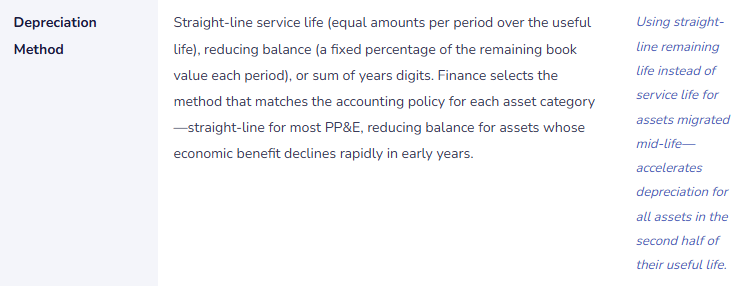
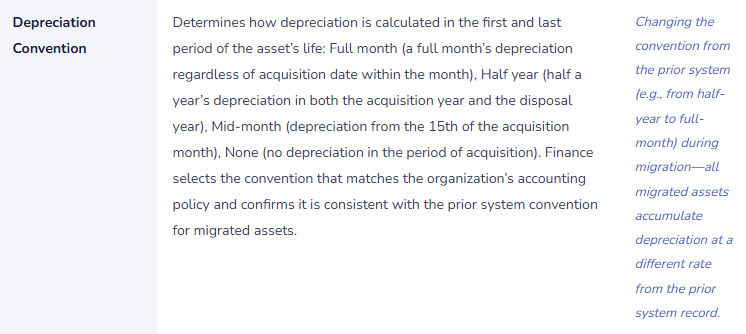
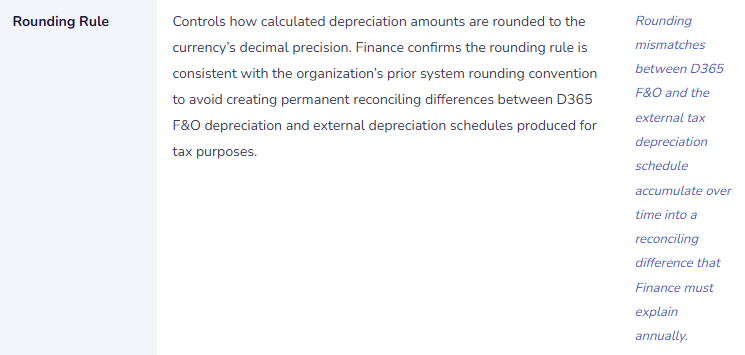
D365 F&O’s depreciation profile (Fixed assets → Setup → Depreciation profiles) determines the depreciation method, convention, and period-allocation basis for every asset assigned to that profile. Finance must configure and document a depreciation profile for every asset category the organization uses, and Finance must validate each profile against the accounting policy Finance applies to that asset category.


Five Fixed Asset Configuration Failures Finance Discovers at Year-End
⚠️ Depreciation Proposal Never Reviewed Before Posting—Wrong Depreciation Posts for 16 Months Undetected
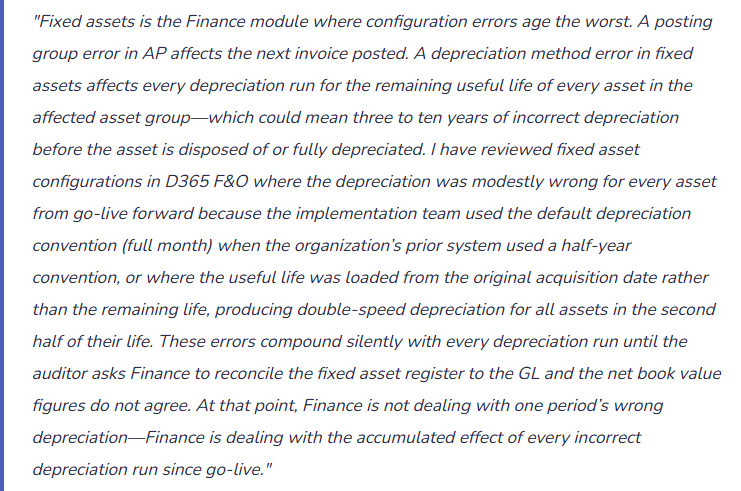
Finance configures the depreciation batch as a scheduled job that runs automatically at month-end and posts the depreciation proposal without requiring Finance review. When a data entry error creates an asset with an acquisition cost of £4,280,000 instead of £428,000 (a transposition of the last three digits), the depreciation batch calculates and posts depreciation based on the incorrect £4,280,000 acquisition value. Monthly depreciation is £71,333 instead of £7,133—a £64,200 per month overstatement. The error posts for 16 months before a Finance analyst investigating a balance sheet variance traces the inflated accumulated depreciation to the single miscoded asset. By then, cumulative overstatement is £1,027,200.
Fix: The depreciation batch should run as a proposal job (not an auto-posting job), producing a depreciation proposal journal that Finance reviews before posting. Finance’s review criteria: the period’s total depreciation expense should be within a defined reasonableness band of the prior period (Finance calculates the expected variance from known additions and disposals during the period); any individual asset with depreciation that has changed by more than 10% from the prior period without a known explanation is flagged for investigation. The review takes 15 minutes for a standard asset register and prevents the compounding error that 16 months of auto-posted incorrect depreciation produces.
⚠️ Fixed Asset Register Not Reconciled to the GL—£680,000 Discrepancy Discovered at Year-End Audit
Finance does not include the fixed asset register-to-GL reconciliation in the monthly close checklist. Over 24 months, four sources of discrepancy accumulate silently: three assets were acquired through purchase orders but the PO-to-asset link was not created, so the asset costs are in the GL but not in the fixed asset register; two assets were disposed in the fixed asset module without the corresponding GL entries being posted (the disposal was marked as complete in the asset module but the GL posting was not confirmed); one asset’s depreciation profile was changed mid-year and the change generated a one-time catch-up depreciation entry that posted to the depreciation GL account but the asset module records still show the prior accumulated depreciation. At year-end, the auditor asks Finance for the fixed asset register-to-GL reconciliation. Finance runs it for the first time and finds a £680,000 discrepancy. Tracing 24 months of accumulated items takes six days of Finance time during the audit fieldwork period.
Fix: The fixed asset register-to-GL reconciliation is a monthly close procedure with the same standing as the AP-to-GL and AR-to-GL reconciliations. Finance runs the Fixed asset roll forward report and confirms the net book value by asset group in the report agrees to the net fixed asset GL account balance by asset category. The reconciliation takes 20 minutes. Any difference above the de minimis rounding threshold is investigated before the period closes. Monthly reconciling items traced at month-end are typically one or two root causes. Annual reconciling items traced at audit are months of accumulated complexity that Finance should not be working through during the highest-pressure period of the Finance calendar.
⚠️ Assets In Service but Not in D365 F&O—Capitalized Expenditures Charged to the Income Statement
Finance discovers during the annual fixed asset physical inventory that 12 assets currently in service—servers, production equipment, and vehicles—do not exist in D365 F&O’s fixed asset register. Investigation reveals that the procurement team purchased these assets through purchase orders that were received and invoiced in D365 F&O, but the invoices were coded to operating expense accounts rather than creating fixed asset records. The 12 assets have a combined acquisition cost of £340,000. Finance has been depreciating zero of this and has instead expensed £340,000 in the period of acquisition. The income statement for the acquisition period understated gross margin and overstated operating expenses by £340,000. If the assets have useful lives of five years, Finance has also overstated depreciation for the years since acquisition (by showing no depreciation when the correct treatment would show annual depreciation) and understated the fixed asset balance sheet line by the NBV of all 12 assets.
Fix: Finance implements a fixed asset identification review as part of the purchase order approval workflow: for any PO line with an item description or commodity code that could represent a capital asset (equipment, vehicles, technology hardware, leasehold improvements), the AP coordinator flags the line for Finance review before the invoice is posted. Finance determines whether the expenditure meets the capitalization threshold and, if so, creates the fixed asset record before the invoice is posted to the asset acquisition account. Finance also conducts an annual fixed asset physical inventory—a physical walk-through confirming every asset in D365 F&O exists and is in service, and confirming that no assets in service are absent from D365 F&O. Any asset found during the physical inventory that is not in D365 F&O receives a retroactive capitalization assessment and, if appropriate, a correcting entry.
⚠️ Disposed Assets Still in D365 F&O—Depreciation Continues After the Asset Is Gone
Three production machines were scrapped 14 months ago when the production line was reconfigured. The operations team removed the machines and wrote them off in the inventory system. Finance was not notified. The fixed asset records for the three machines were never disposed in D365 F&O. The depreciation batch has been calculating and posting depreciation for the three machines every month for 14 months after they were physically removed from service. The accumulated post-disposal depreciation overstatement is £28,400. The balance sheet shows the three machines as assets with a non-zero net book value when they no longer exist. Finance discovers the error when the operations manager asks why the depreciation schedule still shows the scrapped machines.
Fix: Finance establishes a fixed asset disposal notification procedure: any time the operations team, IT, or facilities management removes a capital asset from service—for any reason including scrapping, sale, theft, or transfer to another entity—Finance receives notification within five business days. Finance includes this requirement in the internal controls documentation and communicates it to the operations, IT, and facilities management teams. Finance also runs the Fixed asset roll forward report monthly and reviews any asset whose net book value has not changed from the prior month for an asset that Finance expects to have been disposed. If an asset Finance knows was removed from service still appears in D365 F&O as active, Finance investigates immediately and processes the disposal if appropriate.
⚠️ Same Depreciation Profile Applied to All Asset Categories—Balance Sheet Shows No Asset Breakdown
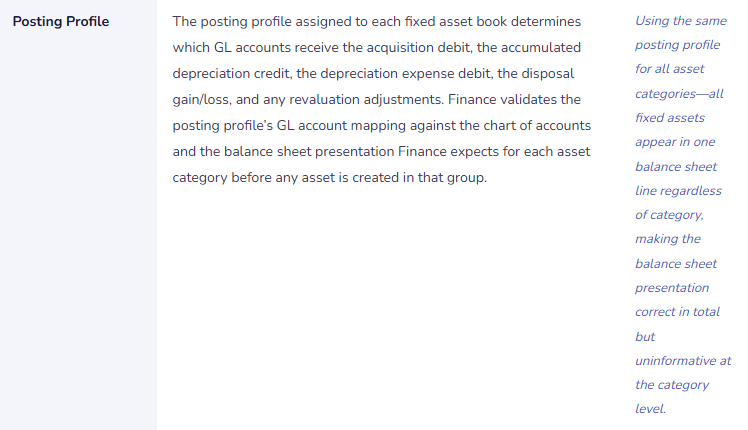
To simplify the implementation, all fixed assets are assigned to a single fixed asset group with a single posting profile. All acquisitions post to one asset GL account, all depreciation posts to one accumulated depreciation account, and all depreciation expense posts to one income statement account. The balance sheet shows one line for fixed assets (net) and the income statement shows one line for depreciation. Finance cannot distinguish machinery depreciation from leasehold improvement amortization from vehicle depreciation from technology hardware depreciation. Management and the board have repeatedly asked Finance for a fixed asset breakdown by category. Finance cannot produce it from D365 F&O without manually re-categorizing the entire asset register. When the auditor asks for the fixed asset roll-forward schedule by category, Finance must produce it from a manually maintained Excel model outside D365 F&O.
Fix: Fixed asset groups and posting profiles must be designed to support the balance sheet and management reporting presentation Finance needs from D365 F&O. Before any asset is entered in D365 F&O, Finance designs the asset group structure: one group per asset category the organization uses (Leasehold Improvements, Machinery and Equipment, Motor Vehicles, Office Furniture and Fittings, IT Hardware, IT Software), each with its own posting profile mapping to the appropriate balance sheet and income statement accounts. The asset group structure is a 2-hour design exercise. Redesigning it after 200 assets have been entered in a single default group is a 40-hour remediation project that Finance must complete while also running the close.
Do This / Don’t Do This
Do This
- Review the depreciation proposal before posting every month—never configure depreciation as an auto-post batch
- Run the fixed asset register-to-GL reconciliation monthly as a required period-close procedure
- Design the asset group and posting profile structure to support the balance sheet category presentation Finance needs before the first asset is created
- Establish a fixed asset disposal notification procedure requiring operations and IT to notify Finance within five business days of any asset removal
- Conduct an annual physical fixed asset inventory and reconcile to D365 F&O
- Include a capitalization review step in the purchase order approval workflow for PO lines that could represent capital expenditures
Don’t Do This
- Configure depreciation as an auto-post scheduled job—it removes the Finance review that catches acquisition errors before they compound
- Skip the fixed asset register-to-GL reconciliation during busy closes—discrepancies found monthly are hours; found at year-end audit they are days
- Use a single fixed asset group for all asset categories because it simplifies go-live—it permanently prevents category-level balance sheet reporting from D365 F&O
- Assume the operations team will notify Finance when assets are disposed—establish a formal notification procedure
- Accept that disposed assets will be caught at the annual physical inventory—the depreciation they accumulate in the interim is a known avoidable error
What’s Next:
Fixed assets addresses the capital expenditure lifecycle. The next post covers a Finance module that is simultaneously one of D365 F&O’s most powerful and least-understood capabilities in Finance teams: Project Accounting in D365 F&O—What Finance Must Own When Operations Runs the Projects—how D365 F&O’s project module handles cost accumulation, revenue recognition, billing, and WIP accounting for project-based businesses, the Finance configuration that Finance must own even when the project manager controls the project, and the five project accounting failures that produce cost misstatements Finance discovers when a project closes and the final margin is not what Finance expected.
— Bobbi
D365 Functional Architect · Recovering Controller
If a post helped you solve a real problem, share it with a Finance colleague who is in the middle of a D365 Finance & Operations implementation or a post-go-live optimization. If you have a topic the series did not cover, reach out. There is always one more topic worth exploring.
Interested in learning more? Below are some of my latest posts:
Leave a Reply