

How D365 F&O’s three-tier currency architecture works across functional currency, reporting currency, and transaction currency; the exchange rate configuration Finance must own and maintain; the period-end revaluation procedure and its income statement effect; and the five multi-currency configuration failures that produce balance sheet errors Finance cannot explain to a foreign currency lender or a cross-border auditor.
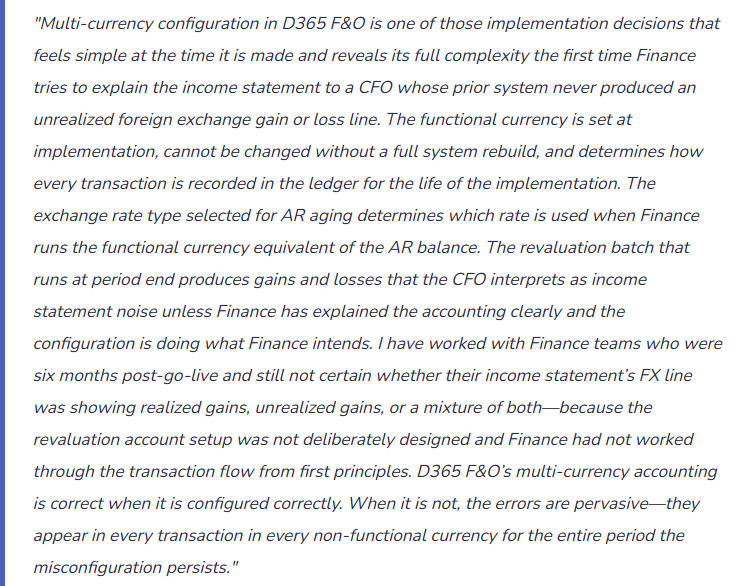
D365 F&O’s Three-Tier Currency Architecture—Finance Must Understand All Three Layers
Functional Currency
The primary currency of a legal entity’s economic environment—the currency in which the entity primarily generates and expends cash. In D365 F&O, the functional currency is set at the legal entity level in the Ledger setup (General ledger → Ledger setup → Ledger) and cannot be changed without a complete entity rebuild. Every transaction in any other currency is translated to the functional currency at posting and the functional currency amount is stored in the ledger alongside the transaction currency amount.
Finance owns: The functional currency selection is an accounting policy decision Finance must make deliberately before implementation and document as the entity’s accounting policy basis. Changing it post-go-live is not a configuration change—it is an implementation restart.
Common error: Selecting the functional currency based on operational convenience (the currency the business primarily invoices in) rather than the IAS 21/ASC 830 primary economic environment determination. An entity whose primary economic exposure is in USD but invoices in EUR may have USD as its functional currency, requiring EUR transactions to be translated to USD.
Reporting Currency
A second currency in which D365 F&O maintains a parallel ledger balance for all transactions, translated at the exchange rate type Finance specifies. Used when an entity must report in a second currency for group consolidation purposes (a EUR-functional entity that must also report in GBP for a GBP-functional parent), for statutory reporting requirements, or for management reporting in a currency different from the functional currency.
Finance owns: Whether a reporting currency is needed and which exchange rate type drives the translation. The reporting currency balance is calculated and stored at the time of every transaction posting—it is not recalculated retrospectively when exchange rates change. Finance must confirm the reporting currency setup before any transactions are posted.
Common error: Not setting up a reporting currency at go-live for an entity that will need to report to a GBP-functional parent, then discovering six months later that the consolidation requires GBP reporting and the historical transaction data cannot be retroactively translated without a manual journal reconstruction.
Transaction Currency
The currency in which an individual transaction is denominated—the currency on the vendor invoice, the sales order, the bank account. D365 F&O stores all three currency amounts simultaneously: the transaction currency amount (the invoice in EUR), the functional currency equivalent (translated at the exchange rate on the transaction date), and the reporting currency equivalent (translated at the reporting rate type Finance configured).
Finance owns: The exchange rate type applied to each transaction type. D365 F&O allows Finance to specify different exchange rate types for different transaction categories: spot rate for AR invoices, average rate for expenses, closing rate for intercompany transactions. Finance reviews the rate type assignment for each transaction category and confirms it matches the accounting policy and any contractual requirements.
Common error: Using a single exchange rate type for all transaction categories when the accounting policy requires different rates for different transaction types (e.g., IFRS requires closing rate for balance sheet items and average rate for income statement items in group consolidation translation).
The Period-End Foreign Currency Revaluation—What It Does and What Finance Must Own
At period end, Finance runs the foreign currency revaluation batch (General ledger → Periodic → Foreign currency revaluation) to update the functional currency value of all open foreign currency balances (AR, AP, and bank accounts) at the period-end closing exchange rate. The revaluation produces unrealized gains and losses that post to the income statement. Finance must understand precisely what the revaluation batch does and confirm the configuration matches Finance’s accounting policy intent before running it for the first time in the live environment.
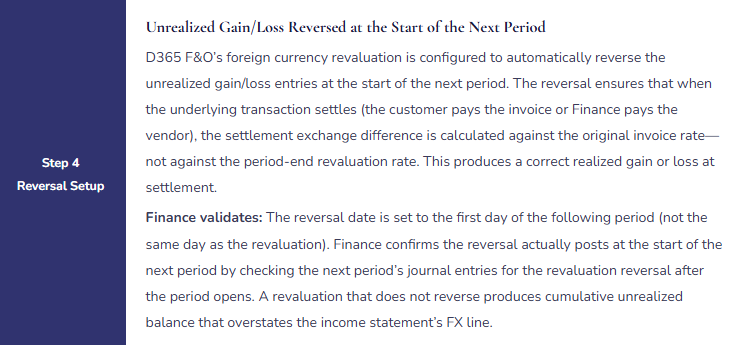
Foreign Currency Revaluation—What Each Batch Step Does and What Finance Validates
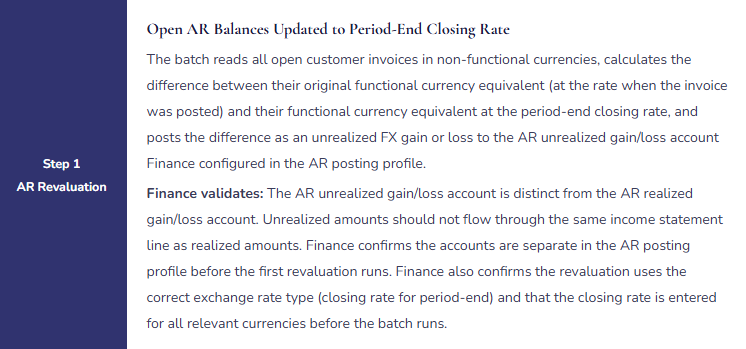
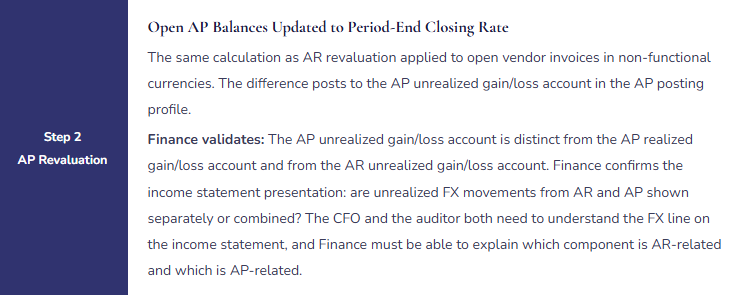
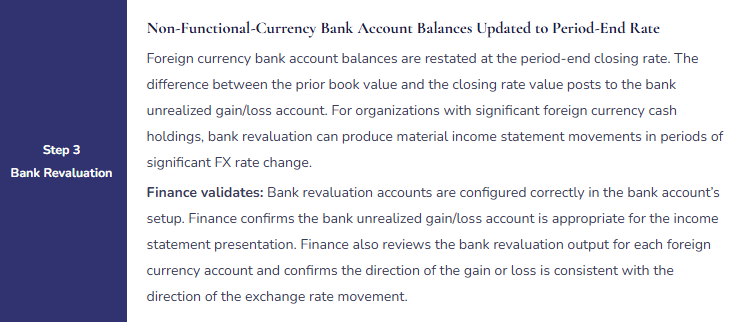
Five Multi-Currency Configuration Failures That Produce Balance Sheet Errors
⚠️ Functional Currency Set to the Wrong Currency at Go-Live—Cannot Be Changed Without Rebuilding the Entity
A UK subsidiary of a US parent company operates primarily in GBP—its customers pay in GBP, its employees are paid in GBP, and its primary suppliers invoice in GBP. During implementation, the implementation team sets the subsidiary’s functional currency to USD because the parent company reports in USD and the implementation team assumes all group entities use the parent’s currency. The correct functional currency for a GBP-primary-environment entity is GBP under IAS 21. For 30 months after go-live, all GBP transactions are treated as transactions in a “foreign currency” and generate unrealized FX movements at every revaluation. The income statement carries a large and volatile FX line that confuses management and the subsidiary’s local auditors. The corrective action is to rebuild the legal entity in D365 F&O—effectively a new implementation for the subsidiary, including data migration of all transactions at corrected functional currency amounts.
Fix: The functional currency determination is made before the implementation begins and documented as an accounting policy decision with reference to the applicable accounting standard (IAS 21 for IFRS reporters, ASC 830 for US GAAP). The determination considers: what currency does the entity primarily generate cash in, what currency are its primary costs denominated in, and what currency drives its pricing decisions? Finance leads this determination—not IT and not the implementation partner. The functional currency selected is documented with Finance’s rationale and reviewed by the CFO before any configuration begins. If there is any uncertainty about the correct determination, Finance consults the external auditor before go-live, not after 30 months of incorrect accounting.
⚠️ Unrealized and Realized FX Gain/Loss Posted to the Same Account—Finance Cannot Explain the FX Line to the Auditor
The AR posting profile is configured with the same GL account for both realized exchange gains/losses (posted when an invoice is settled at a different rate from when it was posted) and unrealized exchange gains/losses (posted by the period-end revaluation batch). Both types of FX movement post to the same income statement account. Finance presents the income statement to the auditor. The auditor asks Finance to break down the FX income line into realized and unrealized components as required by IFRS 7. Finance cannot produce this breakdown from D365 F&O because the two amounts are combined in a single GL account. Finance must trace every FX journal entry for the year, identify whether each entry was from a settlement transaction or from the revaluation batch, and manually reconstruct the realized/unrealized split. The reconstruction takes three days during audit fieldwork.
Fix: Finance configures four separate GL accounts for FX movements in D365 F&O: AR realized gain, AR realized loss, AR unrealized gain/loss; AP realized gain, AP realized loss, AP unrealized gain/loss; bank realized gain/loss, bank unrealized gain/loss. The AR and AP posting profiles reference the appropriate realized accounts for settlement transactions. The revaluation batch references the unrealized accounts. Finance reviews the posting profile configuration for each account and confirms each transaction type routes to the correct GL account. Finance runs a test revaluation in sandbox and a test settlement transaction to confirm the routing before any live transactions are posted in non-functional currencies.
⚠️ Exchange Rates Not Maintained—Revaluation Uses Month-Old Rates, Balance Sheet FX Exposure Is Materially Wrong
Finance configured the foreign currency revaluation batch at go-live with the correct setup. Exchange rates are entered manually in D365 F&O’s currency exchange rate table (General ledger → Currencies → Currency exchange rates). The rate entry is the responsibility of the Finance analyst who runs the period-end revaluation. For three consecutive months, the analyst runs the revaluation without confirming the rates have been updated for the current period. D365 F&O’s revaluation batch uses the most recent rate available for each currency pair—which is the rate from three months ago. During a period of significant GBP/EUR rate movement, the three-month-old rates produce a revaluation that is £890,000 lower than the correct revaluation at current period-end rates. The balance sheet AR balance and the income statement FX line are both materially wrong for three consecutive periods.
Fix: Finance adds “Confirm period-end closing rates are entered for all currencies” as a prerequisite step in the Period Close workspace that must be marked complete before the revaluation batch task can be started. The step specification: for each non-functional currency in which the entity has open AR, AP, or bank balances, Finance enters the period-end closing rate in D365 F&O from the agreed reference source (the bank’s published closing rates, Reuters, Bloomberg) before the revaluation batch runs. Finance keeps a log of the rates entered and the source for each, retained as audit evidence. Finance also runs a post-revaluation check: if the FX income line has changed by more than 20% from the prior month without a known change in open balances or rates, Finance investigates before accepting the revaluation output as final.
⚠️ Revaluation Reversal Not Configured—Cumulative Unrealized Balance Overstates the FX Income Line
Finance configures the foreign currency revaluation batch but does not enable the automatic reversal option. Every period, the revaluation posts unrealized FX gains and losses without reversing the prior period’s unrealized amounts. The unrealized gain/loss account accumulates the total of every revaluation since go-live rather than showing only the current period-end position. After 18 months, the unrealized gain/loss income statement account has a cumulative balance of £1.4M—a number that bears no relationship to the FX exposure on the current open AR and AP balances. Management asks Finance to explain the £1.4M FX gain in the income statement. Finance cannot explain it clearly because it represents 18 months of accumulated, unreversed unrealized movements rather than the current period’s exchange gain on the period-end open positions.
Fix: The automatic reversal configuration is a required component of the revaluation setup. Finance confirms in the revaluation batch parameters that “Use reversal date” is enabled and that the reversal date is set to the first day of the following period. Finance tests the reversal by running a test revaluation in the sandbox environment for a period, then advancing to the next period and confirming the reversal journal was automatically created. Finance also reviews the unrealized gain/loss account balance monthly—the account should carry a balance that reflects only the current open position at the current closing rate (typically a small amount). A growing cumulative balance in the unrealized account is a diagnostic signal that the reversal is not configured correctly.
⚠️ Reporting Currency Not Configured at Go-Live—Group Consolidation Cannot Be Run From D365 F&O
A EUR-functional subsidiary is owned by a GBP-functional parent. The group consolidation is prepared in GBP. At go-live, the subsidiary’s D365 F&O entity was not configured with GBP as a reporting currency—the setup was omitted because the implementation team did not know the group consolidation would be run from D365 F&O rather than in a separate consolidation tool. When Finance attempts the first D365 F&O group consolidation, the EUR-functional subsidiary has no GBP reporting currency balances. Finance must convert the EUR trial balance to GBP manually using the translation methodology: assets and liabilities at the closing rate, income and expenses at the average rate, equity at historical rates. The manual translation takes two days each quarter. A GBP reporting currency configured at go-live would have stored the GBP equivalent of every transaction automatically at the time of posting, making the consolidation translation automatic.
Fix: Before finalizing the legal entity setup for any entity in a multi-entity group, Finance identifies every currency in which that entity may need to report—including the parent entity’s functional currency and any statutory reporting currencies required by local regulation. Finance configures the reporting currency for each entity in the Ledger setup before the first transaction is posted. The configuration takes five minutes per entity. The absence of a reporting currency configuration that is discovered six months post-go-live cannot be corrected by adding the reporting currency to the Ledger setup retroactively—historical transactions were posted without the reporting currency amount and cannot have it added without reposting.
Do This / Don’t Do This
Do This
- Determine the functional currency using IAS 21 / ASC 830 criteria before implementation begins—document the rationale and confirm with the external auditor if uncertain
- Configure separate GL accounts for realized and unrealized FX gains and losses before any foreign currency transactions are posted
- Configure the reporting currency for all entities before the first transaction posts if multi-currency group consolidation is required
- Confirm period-end closing rates are entered as a Period Close workspace prerequisite before the revaluation batch runs
- Enable automatic revaluation reversal with the reversal date set to the first day of the following period
- Test the full revaluation-reversal-settlement cycle in sandbox before any live foreign currency transactions are posted
Don’t Do This
- Set the functional currency based on operational convenience rather than the primary economic environment determination
- Use the same GL account for realized and unrealized FX movements—the IFRS 7 breakdown requirement will expose the combination at audit
- Omit the reporting currency setup at go-live for entities in a multi-currency group—historical transactions cannot have reporting currency amounts added retroactively
- Run the revaluation batch without first confirming the period-end closing rates are current
- Configure revaluation without the automatic reversal—cumulative unrealized balances produce income statement noise Finance cannot explain
What’s Next:
Multi-currency configuration establishes the currency accounting framework that every other Finance module depends on. The series continues with the operational layer that Finance governance enables once the foundational configuration is correct: D365 F&O Expense Management—Finance Configuration for the Employee Expense Lifecycle—how D365 F&O’s Expense management module handles the full expense report lifecycle from submission through reimbursement, the policy controls Finance must configure before any employee can submit, and the five expense management failures that produce policy violations Finance discovers in the quarterly internal audit rather than at the point of submission.
— Bobbi
D365 Functional Architect · Recovering Controller
Thank you for reading!
If a post helped you solve a real problem, share it with a Finance colleague who is in the middle of a D365 Finance and Operations implementation or a post-go-live optimization. If you have a topic the series did not cover, please reach out. There is always one more question worth exploring.
Interested in learning more? Below are some of my latests posts:
Leave a Reply