
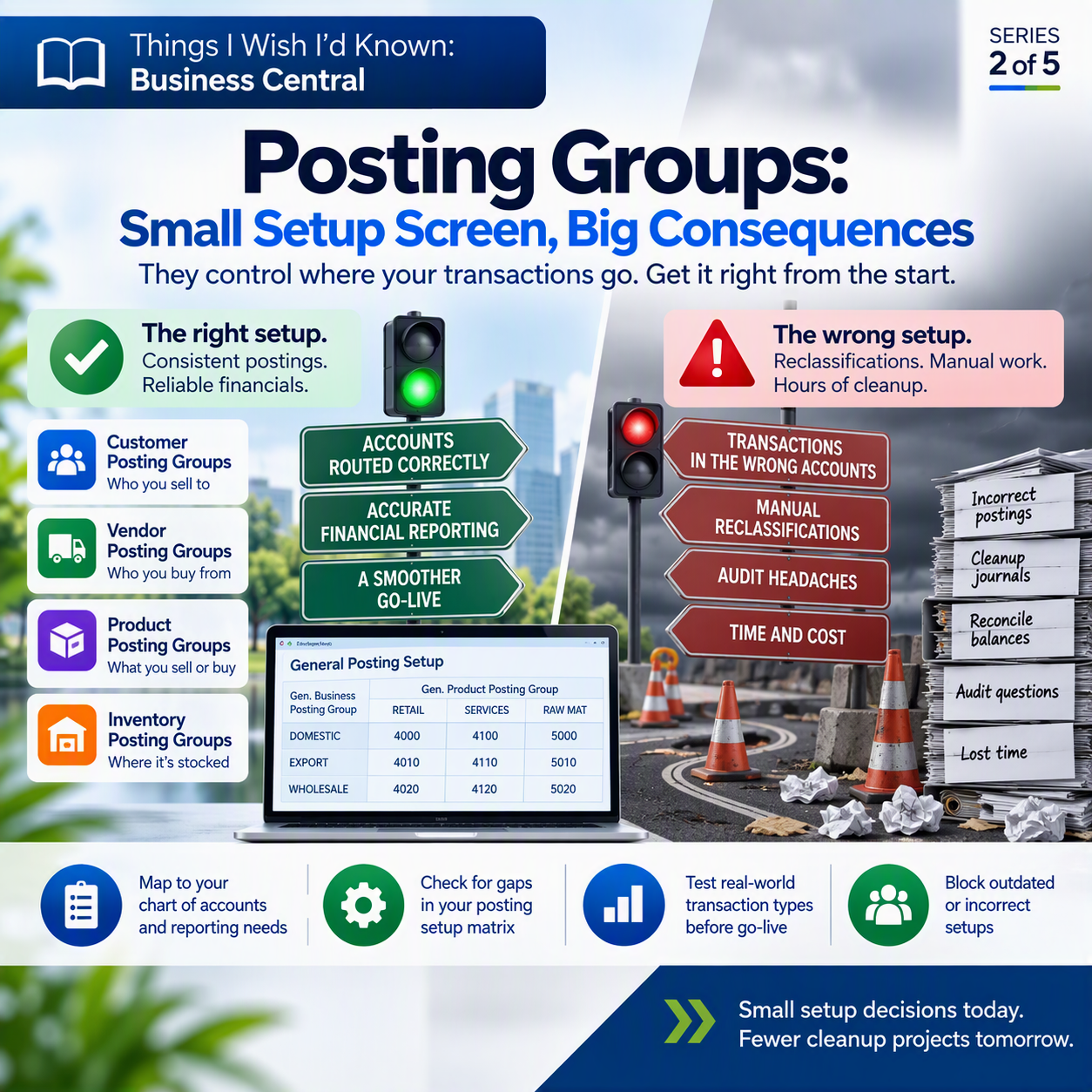
Have you ever posted a sales invoice, looked at the entry in the general ledger, and thought “wait, why did that land there”? If you’ve worked in Business Central for more than a few weeks, you probably have. Nine times out of ten, the answer traces back to a posting group that got set up in a hurry, months earlier, by someone racing through the implementation checklist.
I think the number one lesson I’ve learned about posting groups is the amount of work they can automate, and prevent employees from posting to the wrong places. The biggest piece of this is in the set up – if employees in charge of helping with the implementation don’t understand how Accounting does things (believe me, far too many have felt that ERP implementation was purely an IT function) it can cause big problems in testing, and even worse if accounting isn’t involved, at GoLive.
That’s the trap with posting groups. They look like a small, boring setup screen. They are anything but small once real transactions start flowing through them.
The idea in one minute 💡
Posting groups are the traffic controllers of Business Central. Every time you post an invoice, a payment, or an item receipt, the system needs to know which general ledger (G/L, the accounts that make up your financial statements) accounts to hit. Posting groups tell it exactly where to send each transaction, automatically, based on who or what is involved. Get the setup right early and posting is fast and consistent. Get it wrong, and you’re reclassifying transactions by hand, one entry at a time, after the fact.
What posting groups actually do
Think of posting groups as labels you attach to your master data. Every customer, vendor, item, and G/L account gets tagged with one or more posting groups, and those tags decide where a transaction’s debits and credits land.
There are two flavors working together. General business posting groups describe who you’re dealing with, your customers and vendors, often split by geography or business type (domestic vs. export, say). General product posting groups describe what is being sold or bought, your items and resources, split by category (raw materials, retail goods, services).
Neither one does anything alone. They combine in the general posting setup, a matrix where each business-and-product pairing gets its own set of G/L accounts. That’s how the same item can post to a different revenue account depending on whether you sold it to a domestic customer or an export customer, with nobody touching the chart of accounts by hand.
Alongside those sit more specific posting groups: customer posting groups drive your accounts receivable accounts, vendor posting groups drive accounts payable, and inventory posting groups determine which accounts your inventory value and cost of goods sold flow through, by item and location. Tag each customer, vendor, and item correctly, and Business Central routes every transaction for you.
Why this deserves real thought, not a rubber stamp
Here’s the part that catches people off guard. During implementation, posting groups often get treated as a checkbox exercise: accept the defaults, add a couple of obvious categories, move on to the “real” configuration. But they’re the mechanism deciding whether your income statement reflects how your business is actually organized, and whether your balance sheet accounts tie out the way your controller expects.
Once transactions have posted against a posting group, you can’t just quietly fix it. Microsoft’s documentation is direct here: after documents are posted, you can’t delete or freely change the posting groups and setups they used, because general ledger entries already exist tied to those accounts. Undoing a wrong setup means reclassifying journal entries, one by one or in batches, then reconciling everything afterward and hoping you caught every instance. That’s real hours nobody budgets for.
What to check before you post real transactions ✅
Before you go live, or before you add a new product line or customer segment, walk through this:
- Map posting groups to your actual chart of accounts and reporting needs first. Don’t let the defaults define how you’ll report revenue, COGS, or receivables. Start from what your controller needs on the financials.
- Review the general posting setup matrix for gaps. Every business-and-product combination that could realistically occur needs accounts assigned, or a transaction will fail (or post somewhere unintended).
- Confirm inventory posting groups align with how you value and report inventory by location, not just item type.
- Use the Blocked field on outdated or incorrect setups so nobody posts against them by accident.
- Test real-world transaction types before go-live, not just the happy path: a sale, a return, an intercompany transaction, whatever your business actually does.
Thank you for reading!
Up next in this series: dimensions are one of Business Central’s most powerful reporting tools, but you only get two shortcut dimensions per transaction line. Choosing them wisely matters more than you’d think, and that’s what we’ll dig into in post #3, “Shortcut Dimensions: You Only Get Two, Choose Wisely.” (If you missed it, post #1 covered company and intercompany setup decisions that are hard to unwind.)
Sources
Interested in learning more? Below are some of my latest posts:





Leave a Reply