
How D365 F&O’s project management and accounting module handles time-and-materials, fixed-price, and cost-plus contracts, the DCAA compliance configuration for organizations with government cost-accounting requirements, how project revenue recognition integrates with the five-step ASC 606 model, and the five project accounting failures that produce billing disputes, audit findings, and unrecoverable cost exposure.

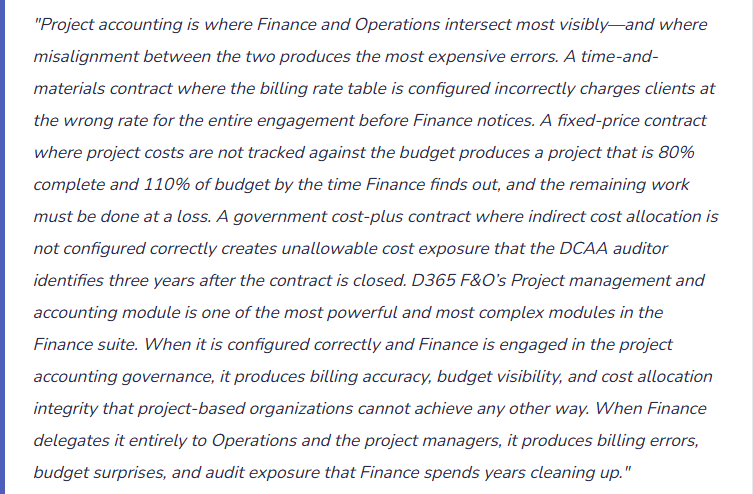
The Four Project Contract Types—How Each Works in D365 F&O
D365 F&O’s Project management and accounting module supports four project types, each with a different billing and revenue recognition model. Finance must understand how each type flows through D365 F&O before any project is created, because the project type determines the revenue recognition method, the billing workflow, and the cost-to-completion tracking approach.
Time and Materials (T&M)
- The client is billed for actual hours at contracted rates plus actual expenses. Revenue is recognized as costs are incurred and billed. D365 F&O generates invoices from posted hour and expense transactions against the project’s billing rules.
- Finance risk: Billing rate tables misconfigured for any resource category produces incorrect invoices from the first billable hour. Rate escalations (contractual annual rate increases) must be updated in D365 F&O before the effective date or the old rate bills for the new period.
- Revenue recognition: Revenue recognized at the time of billing for T&M contracts (output method). The invoice drives both the billing and the revenue recognition entry simultaneously.
Fixed Price
- The client pays a defined contract amount regardless of actual costs. Billing occurs on a milestone or percentage-of-completion schedule. Revenue is recognized over the performance period as obligations are satisfied.
- Finance risk: Cost overruns reduce margin but do not reduce the contract revenue. Finance must monitor project cost-to-completion continuously—a fixed-price project that exceeds budget at completion produces a loss that must be recognized when it becomes probable, not when it occurs.
- Revenue recognition: Percentage-of-completion (input or output method) under ASC 606. D365 F&O’s project revenue recognition module calculates the earned revenue based on costs incurred to date versus total estimated costs (input method) or milestones completed (output method).
Cost Plus
- The client reimburses actual allowable costs plus a fee (fixed fee, incentive fee, or award fee). Common in government contracting under FAR (Federal Acquisition Regulations). The billing is cost-driven; the fee is calculated as a percentage of allowable costs or as a separately negotiated amount.
- Finance risk: Unallowable costs that are charged to the project but cannot be billed to the government create cost exposure the company must absorb. DCAA defines allowability criteria; Finance must configure D365 F&O to segregate allowable from unallowable costs at the transaction level.
- Revenue recognition: Revenue recognized as allowable costs are incurred and billed. The fee component is recognized ratably over the contract period or at milestones, depending on contract terms.
Internal / Investment
- Projects that are not billed to an external client: capital projects that produce fixed assets, internal IT development projects, R&D projects. Costs are accumulated in the project and either capitalized (transferred to Fixed Assets at project completion) or expensed.
- Finance risk: Capital projects that are not transferred to Fixed Assets at completion leave costs in the project module indefinitely, understating Fixed Assets and producing no depreciation. The transfer to Fixed Assets must be a defined project close procedure.
- Revenue recognition: No external revenue. Internal projects either capitalize costs to the balance sheet (capital projects) or expense them as incurred (R&D, internal initiatives).
DCAA Compliance Configuration—What D365 F&O Must Support for Government Contractors
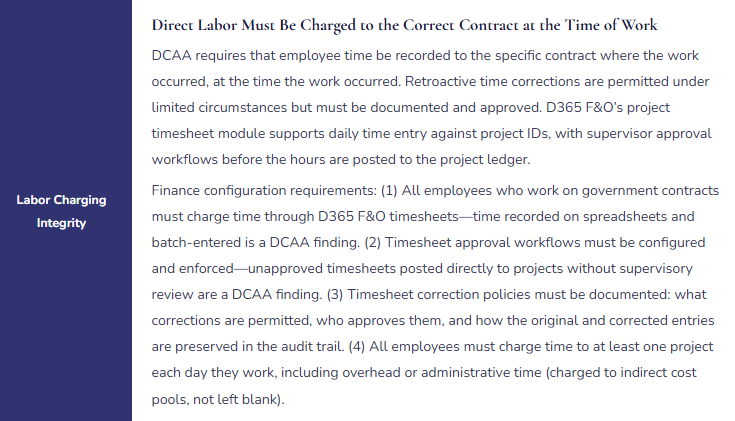
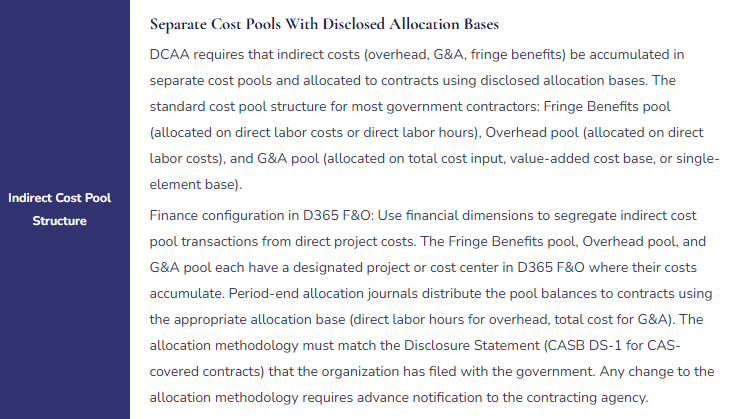
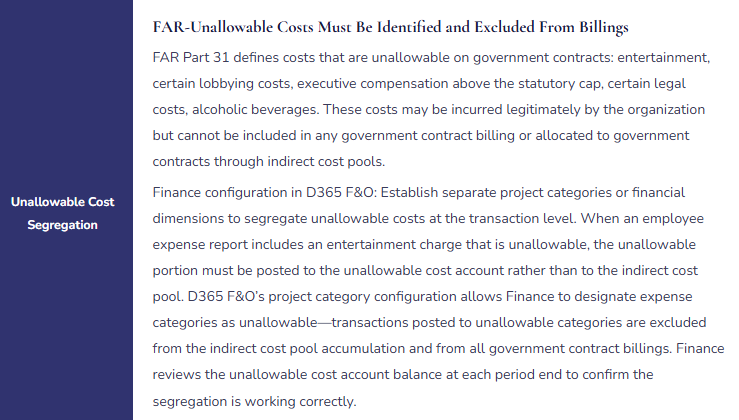
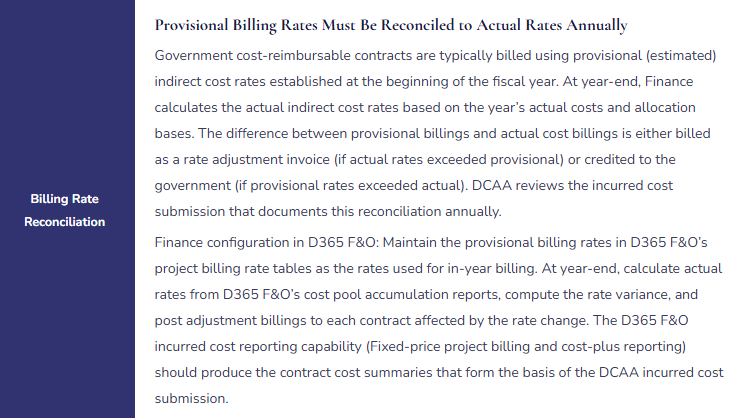
Organizations that hold US government cost-reimbursable contracts are subject to Cost Accounting Standards (CAS) and to audit by the Defense Contract Audit Agency (DCAA). DCAA’s primary concern is that indirect costs are allocated to government contracts in a consistent, disclosed, and equitable manner. D365 F&O must be configured to support four DCAA compliance requirements that Finance owns.
Project Revenue Recognition—The ASC 606 Integration Finance Must Configure
D365 F&O’s Project management and accounting module integrates with the Revenue Recognition module (covered in Post 39) for fixed-price project revenue recognition under ASC 606. The key Finance configuration decisions for project revenue recognition:
- Percentage-of-Completion Method (Input)
- Revenue recognized = (Costs incurred to date ÷ Total estimated costs) × Contract value. D365 F&O calculates the completion percentage from the project’s actual costs versus the project budget. Finance must maintain a current, realistic project budget—a budget that is never updated as the project scope evolves produces an incorrect completion percentage and misstated revenue.
- Percentage-of-Completion Method (Output)
- Revenue recognized at each milestone completion, based on the milestone’s allocated contract value. D365 F&O recognizes revenue when the milestone is marked complete in the project module. Finance configures milestones and their revenue allocations in the project’s billing rules. Output method is appropriate when milestones represent the delivery of distinct, separately valuable deliverables.
- Loss Contract Recognition
- When a fixed-price project’s total estimated costs exceed the contract price, the full anticipated loss must be recognized immediately. D365 F&O’s project cost-to-completion forecast identifies when estimated total costs exceed contract value. Finance must monitor the project cost forecast and post the loss provision when the overrun becomes probable—not when the project closes.
- Work-in-Progress (WIP) Balance
- On fixed-price projects where costs are incurred but milestones have not been reached, costs accumulate in a WIP balance on the balance sheet. D365 F&O posts project costs to WIP when incurred. Revenue recognition entries move costs from WIP to COGS and recognize revenue simultaneously when milestones are achieved. Finance must reconcile the WIP balance to open project cost accumulations at each period close.
Five Project Accounting Failures That Produce Billing Disputes and Audit Findings
⚠️ Billing Rate Tables Not Updated for Annual Rate Escalations—Client Billed at Prior Year Rates for Six Months
The T&M contract has contractual 3% annual rate escalations effective January 1. The D365 F&O project billing rate tables are maintained by the Project Management Office, not Finance. Nobody updates the rate tables on January 1. For six months, every invoice generated from D365 F&O bills at the prior year’s rates. The rate shortfall on a project billing $80,000 per month at a blended 3% underrate is $2,400 per month, or $14,400 over six months. When Finance discovers the error in June during a contract audit, the corrective invoice for $14,400 creates a client dispute—the client’s project sponsor does not recognize the escalation, questions why it was not applied on schedule, and delays payment pending review by their legal team.
Fix: Billing rate table updates are a Finance responsibility, not a Project Management Office responsibility. Finance owns the billing rate configuration because billing rate errors are financial errors—they produce incorrect revenue and incorrect client invoices. Finance maintains a rate table update calendar: for each T&M contract with contractual rate escalations, the escalation date, the new rates, and the D365 F&O rate table update that must be completed before the first invoice of the new rate period. The rate table update is a pre-close task for the period before the escalation takes effect—not a reactive correction after the first invoice at the wrong rate. Finance confirms after each rate table update that a test transaction at the new rates produces the expected billing calculation before the update goes live for actual transaction posting
⚠️ Fixed-Price Project Budget Never Updated—Completion Percentage Is Wrong—Revenue Is Misstated for 14 Months
The fixed-price project was originally budgeted at $2.4 million total cost for a $3.0 million contract. At month four, the project scope expands significantly through a contract modification. The total estimated cost increases to $3.1 million—now a loss contract, since the estimated cost exceeds the contract price of $3.0 million. Nobody updates the D365 F&O project budget. For 14 months, D365 F&O’s percentage-of-completion calculation uses the original $2.4 million budget denominator. The completion percentage based on the original budget shows the project as 45% complete when it is actually 35% complete based on the revised budget. Revenue recognized to date is $1.35 million (45% of $3.0M); it should be $1.05 million (35% of $3.0M)—overstated by $300,000. Additionally, the anticipated loss of $100,000 ($3.1M estimated cost minus $3.0M contract price) should have been recognized at the time the revised estimates showed a loss contract. Neither the revenue overstatement nor the loss provision is in the financial statements.
Fix: Project budget maintenance is a Finance governance responsibility with a defined cadence. Every fixed-price and cost-plus project must have its D365 F&O budget reviewed and updated at least monthly as part of the period-end project review. The project manager provides the revised total cost estimate; Finance updates the D365 F&O project budget and reviews the resulting completion percentage and revenue recognition impact. For any project where the revised total cost estimate exceeds the contract price, Finance recognizes the anticipated loss immediately and documents the basis for the estimate. The project budget is not a historical artifact of the original contract—it is the current best estimate of total project cost, and every change to that estimate produces a revenue recognition consequence that Finance must evaluate in the same period the estimate changes.
⚠️ Entertainment Costs Allocated to Government Contracts Through the Indirect Cost Pool—DCAA Finding
The organization’s G&A cost pool includes all expenses posted to G&A cost center GL accounts. Business entertainment expenses—client dinners, holiday parties, sporting event tickets—are posted to the G&A cost center as “Business Development” expenses. The entertainment costs flow into the G&A pool and are allocated to all contracts, including government contracts, through the G&A rate. DCAA’s annual incurred cost audit identifies $84,000 of entertainment costs in the G&A pool that are unallowable under FAR 31.205-14. The unallowable entertainment costs inflated the G&A rate applied to government contracts, producing overbillings to the government that must be repaid. The organization also faces potential penalties for billing unallowable costs to government contracts, even though the billing was the result of a configuration omission rather than intentional fraud.
Fix: Unallowable cost segregation must be enforced at the transaction level before costs enter any indirect cost pool. Every expense category that may contain unallowable costs must be mapped in D365 F&O to an unallowable cost financial dimension or project category that excludes it from pool accumulation. The configuration step: review FAR Part 31’s list of unallowable cost categories, identify the corresponding expense account or expense category in D365 F&O, and configure the project category or financial dimension to route those transactions to the unallowable cost tracking account rather than the allocable pool. Finance reviews the unallowable cost account balance monthly to confirm the segregation is working. The G&A pool accumulation report should show zero entertainment costs—if it does not, a transaction has been miscoded and must be corrected before the period’s billing.
⚠️ Capital Project Costs Never Transferred to Fixed Assets—$1.8M Sitting in Project WIP Indefinitely
The organization completes a $1.8 million ERP implementation project. The project was tracked in D365 F&O’s Project management and accounting module as an Investment project (internal capital project). At project completion, the $1.8 million in accumulated project costs should be transferred to Fixed Assets as a capitalized software implementation asset and begin depreciating over the expected useful life. The transfer is not a D365 F&O automatic action—it requires a Finance-initiated transaction (the Estimate and eliminate function for Investment projects, or a manual fixed asset acquisition journal referencing the project). Nobody initiates the transfer. The $1.8 million remains in the project’s WIP balance indefinitely. The balance sheet shows $1.8 million of project WIP that no longer represents active project costs. No depreciation is being recorded on the capitalized software. The asset’s amortization clock never starts. Two years after project completion, the auditor asks Finance to explain why $1.8 million of WIP is still on the balance sheet for a project that completed 24 months ago.
Fix: The transfer of completed capital project costs to Fixed Assets is a project close procedure, not an optional or eventual step. Finance includes the Fixed Asset transfer as a required Closing Cockpit task for every Investment project that reaches completion. The task: “Run Investment project Estimate and Eliminate for [Project ID]—confirm transfer to Fixed Asset [Asset ID]—confirm depreciation begins in [Month/Year].” The task cannot be marked complete without the fixed asset ID of the created asset. Finance reviews the Investment project WIP balance quarterly for any completed projects (status = Finished) with remaining WIP balances that have not been transferred. Any completed project with WIP balance over 90 days after the project completion date is an exception that Finance escalates for immediate resolution.
⚠️ Project Revenue Recognition Never Run—All Project Revenue Recognized at Invoice Date Instead of Over Performance
The organization has 12 active fixed-price projects, all configured with the percentage-of-completion revenue recognition method in D365 F&O. The Revenue Recognition module generates WIP entries as costs are incurred and should recognize revenue periodically as the completion percentage advances. Finance’s close checklist does not include the project revenue recognition periodic job. For eight months, costs post to WIP, invoices are generated at billing milestones, and the invoice posting recognizes revenue at the invoice date rather than as earned under the percentage-of-completion method. The recognized revenue pattern is lumpy and milestone-driven rather than reflecting the actual pattern of performance. The difference between revenue recognized at milestones and revenue that should be recognized under the input method (costs incurred to date over total estimated costs) is $1.2 million for the eight-month period. The income statement for the period is materially incorrect for each of the eight months.
Fix: Project revenue recognition is a period-close task for every organization using D365 F&O’s Project management and accounting module with fixed-price projects. Finance adds the following tasks to the Closing Cockpit: (1) “Update project cost-to-completion estimates—confirm all project managers have submitted revised ETCs by close cutoff;” (2) “Run Project revenue recognition periodic job—confirm all active fixed-price projects processed;” (3) “Review project WIP balance—confirm WIP balance is consistent with open project cost accumulations.” The project revenue recognition job must run before the income statement is finalized for the period—it is not a supplemental step that Finance runs when convenient. Finance should also run a project revenue reconciliation monthly: compare the revenue recognized through the project module against the invoices issued for the period. The difference is the deferred revenue (invoiced but not earned) or unbilled revenue (earned but not yet invoiced) that must appear on the balance sheet.
Do This / Don’t Do This
Do This
- Own billing rate table maintenance as a Finance responsibility with a rate escalation update calendar
- Review and update project budgets monthly as part of the period-end project review—the budget drives revenue recognition accuracy
- Recognize anticipated losses on fixed-price projects immediately when the revised total cost estimate exceeds the contract price
- Segregate FAR-unallowable costs at the transaction level before they enter any indirect cost pool
- Configure timesheet approval workflows that enforce DCAA’s contemporaneous labor charging requirements
- Transfer completed Investment project costs to Fixed Assets as a required project close procedure
- Add the project revenue recognition periodic job to the period-close checklist for every organization with fixed-price projects
- Run the project WIP reconciliation monthly to confirm WIP balances reflect actual open project cost accumulations
Don’t Do This
- Leave billing rate table maintenance with the Project Management Office—billing rate errors are Finance errors
- Use the original project budget as the fixed denominator for percentage-of-completion without updating as scope changes
- Allow entertainment and other FAR-unallowable costs to flow into indirect cost pools without explicit segregation configuration
- Leave completed capital project costs in WIP indefinitely without transferring to Fixed Assets
- Omit the project revenue recognition periodic job from the close checklist for fixed-price projects
- Accept timesheet submissions that are not routed through D365 F&O’s approval workflow for government-contract labor
- Defer DCAA compliance configuration to post-go-live—unallowable costs posted before the segregation is in place require retroactive correction that is expensive and time-consuming
What’s Next:
Project accounting and government contract compliance completes the major Finance module arc of this series. The final post steps back from module-level depth to name what I observe across D365 F&O Finance implementations of every size and industry: What Finance Gets Wrong in D365 F&O Implementations—and How to Fix It—the ten recurring Finance failures observed across implementations, the root cause pattern behind each one, and the practical correction that transforms a D365 F&O implementation from a transaction-processing system into the Finance platform the organization actually needs.
— Bobbi
D365 Functional Architect · Recovering Controller
Thank you for reading!
If this post helped you solve a real problem, share it with a Finance colleague who is in the middle of an ERP implementation or a post-go-live optimization. If you have a topic that I haven’t covered, please reach out. There is always one more post worth writing.
If you are interested in learning more, here are a few of my latest posts:
Leave a Reply