

How BC’s currency setup works, the exchange rate update process and its three rate types, the difference between transaction currency and reporting currency, where unrealized and realized FX gains and losses post, the balance sheet translation mechanics at period end, and the five currency configuration mistakes that produce foreign exchange surprises at year-end close.
BC’s Currency Architecture—The Foundational Concepts
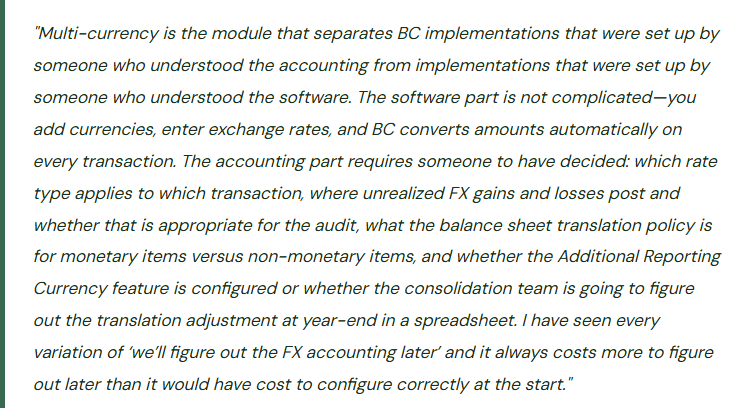
Every BC company has a single Local Currency (LCY)—the functional currency in which the GL, financial statements, and statutory reports are denominated. For a US-based company this is USD; for a UK entity it is GBP. All non-LCY currencies are Foreign Currencies (FCY). When a transaction is entered in a foreign currency, BC converts it to LCY using the exchange rate for the transaction date and stores both the FCY amount and the LCY equivalent in the ledger.
BC also offers an Additional Reporting Currency (ACY)—a second currency in which all GL entries are simultaneously recorded alongside the LCY amount. ACY is used by organizations that must report in two currencies (a European subsidiary reporting in EUR locally and USD for the US parent consolidation) or that want to maintain a parallel presentation currency without running a full consolidation. ACY is configured in the GL Setup and applies globally to the company; it is not a transaction-level option.
Exchange Rate Types—Which Rate Applies Where
BC supports multiple exchange rate types per currency, allowing Finance to use different rates for different purposes rather than a single rate applied universally. The three rate types Finance must configure and understand are:
- Transaction Exchange Rate
- The rate used to convert FCY transaction amounts to LCY when a sales invoice, purchase invoice, payment, or journal entry is posted. BC defaults to the exchange rate defined for the transaction date in the Currency Exchange Rates table. For transactions where a specific contractual rate applies (a fixed-rate contract, a hedged rate), Finance can override the rate on the transaction itself.
- Finance owns the exchange rate table update schedule—rates should be updated at minimum weekly for currencies where FX exposure is material, and daily for high-volume or high-volatility currencies.
- Average Rate (Reporting)
- The average exchange rate for a period, used for income statement translation in companies that report under GAAP or IFRS with income statement items translated at average period rates and balance sheet items at closing rates. BC stores an average rate separately from the transaction rate in the Currency Exchange Rates table. Finance must update this rate for each reporting period if average-rate income statement translation is required.
- The distinction between average rate and closing rate translation is most relevant for companies preparing multi-currency financial statements or intercompany eliminations.
- Closing Rate (Balance Sheet)
- The spot rate at the end of the reporting period, used for translating monetary balance sheet items (AR, AP, cash, debt) at period end. BC uses the closing rate in the Adjust Exchange Rates batch job, which calculates and posts unrealized FX gains and losses on open foreign-currency balances as of the period-end date.
- The closing rate is entered in the Currency Exchange Rates table with the period-end date. Finance must enter the closing rate before running the Adjust Exchange Rates batch at period end.
- Historical Rate (Non-Monetary Items)
- Fixed assets, equity, and other non-monetary balance sheet items are translated at the historical rate—the exchange rate that applied when the item was originally acquired or recorded. BC stores the original transaction rate on these items automatically. GAAP and IFRS generally do not remeasure non-monetary items at closing rates, so these items do not participate in the period-end Adjust Exchange Rates process.
- Finance must confirm that non-monetary GL accounts are correctly excluded from the Adjust Exchange Rates process by ensuring those account types are not designated as eligible for FX adjustment in the account setup.
Unrealized vs. Realized FX Gains and Losses—Where They Post in BC
Foreign exchange gains and losses arise from the difference between the rate used when a transaction was originally recorded and the rate at which it is ultimately settled or translated at period end. BC distinguishes between two types, and Finance must configure the correct GL accounts for each.
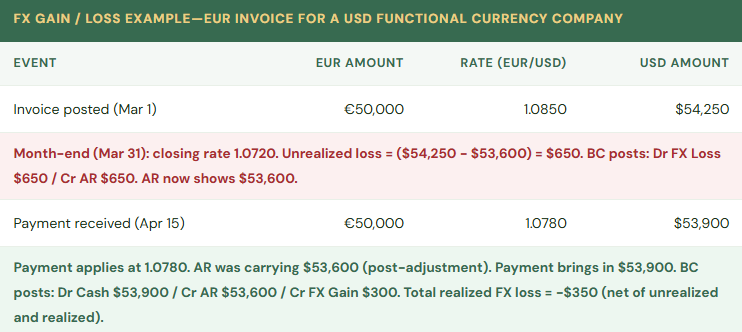
Unrealized FX gains and losses arise when open foreign-currency balances (AR, AP, cash in foreign-currency bank accounts) are retranslated at the period-end closing rate, but the underlying transaction has not yet been settled. BC’s Adjust Exchange Rates batch job calculates and posts these adjustments. The gain or loss is “unrealized” because it may reverse if the exchange rate moves back before the invoice is paid. Finance must configure dedicated GL accounts for Unrealized FX Gains and Unrealized FX Losses in the Currency setup—these should be separate from Realized FX accounts for clear financial statement presentation.
Realized FX gains and losses arise when a foreign-currency transaction is actually settled—a payment is received or made—and the settlement rate differs from the original transaction rate (adjusted for any interim unrealized adjustments). BC automatically calculates and posts the realized gain or loss when the payment is applied to the open invoice. Finance configures the Realized FX Gains and Realized FX Losses GL accounts in the Currency setup.
| GL Account | Where Configured | When It Posts | Finance Consideration |
|---|---|---|---|
| Unrealized FX Gains | Currency Card → Unrealized Gains Account | Adjust Exchange Rates batch at period end, when open FCY balances increase in LCY value | Income statement item. Reverses (partially or fully) when the transaction settles. Some organizations report unrealized FX separately from realized FX for management clarity. |
| Unrealized FX Losses | Currency Card → Unrealized Losses Account | Adjust Exchange Rates batch at period end, when open FCY balances decrease in LCY value | Income statement item. Separate account from Realized Losses allows trend analysis of period-end translation exposure vs. settlement exposure. |
| Realized FX Gains | Currency Card → Realized Gains Account | When a FCY payment is applied to an open FCY invoice at a more favorable rate than the invoice rate | Income statement item. For organizations with active FX hedging programs, compare realized gains/losses to hedge settlements to evaluate hedge effectiveness. |
| Realized FX Losses | Currency Card → Realized Losses Account | When a FCY payment is applied to an open FCY invoice at a less favorable rate than the invoice rate | Income statement item. High realized losses may indicate the need to review invoicing currency, payment timing, or hedging strategy. |
The Period-End Currency Adjustment Process
At each period end, Finance runs two FX-related processes in sequence. First, update the period-end closing rate in the Currency Exchange Rates table for each active FCY. The closing rate is the spot rate as of the last day of the period, sourced from the organization’s designated rate source (Bloomberg, the central bank, the bank the organization uses for FX transactions). Second, run the Adjust Exchange Rates batch (Finance → Periodic Activities → Adjust Exchange Rates). This batch reads all open customer ledger entries, open vendor ledger entries, and bank account ledger entries denominated in foreign currencies, calculates the difference between the carrying LCY amount and the amount at the current closing rate, and posts the unrealized gain or loss entries to the configured GL accounts.
The Adjust Exchange Rates batch must be run after the closing rate is entered and before the period is closed. If the period is closed without running the adjustment, the period-end financial statements will not reflect the correct LCY values of outstanding foreign-currency balances, and the AR and AP subledger totals will not agree to the GL at the closing rate.
Five Multi-Currency Mistakes That Surface at Year-End
⚠️ Exchange Rates Not Updated—All FX Transactions Use a Six-Month-Old Rate
The Currency Exchange Rates table was populated during implementation with rates for the go-live date. Nobody established a process for updating rates. Six months later, the EUR rate in BC is 1.0850 USD/EUR. The current market rate is 1.0420. Every EUR invoice is being converted to USD using a rate that is 430 basis points off. A $240,000 EUR invoice posts at $259,740 instead of $250,080—a $9,660 per-invoice overstatement. Across 40 EUR invoices in a month, the revenue overstatement is $386,400 relative to the current market rate. The overstatement reverses to some degree when payments are received at the correct bank rate, producing large realized FX losses that Finance cannot explain because the gain/loss pattern reflects rate-update failures rather than economic FX exposure.
Fix: Establish a currency rate update schedule and a named owner. For currencies where FX exposure is material, rates should be updated weekly at minimum—daily for high-volume operations. BC’s Currency Exchange Rates table can be updated manually (enter the new rate directly), via a third-party currency rate service that integrates with BC (available on AppSource for several providers), or via a Power Automate flow that pulls rates from a public API. The method matters less than the consistency. The rate update should be a standing item in the weekly Finance calendar. Period-end closing rates must be entered specifically for the period-end date before the Adjust Exchange Rates batch is run—they do not default from the daily rate table automatically.
⚠️ Unrealized and Realized FX GL Accounts Are the Same Account—Management Cannot Separate Period-End Translation from Settlement Gains/Losses
During implementation, the partner configured all four FX accounts (Unrealized Gain, Unrealized Loss, Realized Gain, Realized Loss) to post to a single GL account: “Foreign Exchange Gain/Loss.” The income statement shows one line for all FX activity. At year-end, the CFO asks Finance to explain the FX line: how much is from period-end translation adjustments and how much is from actual settlement gains and losses? Finance cannot answer the question from the GL because all FX activity has been accumulated in a single account for 12 months. Reconstructing the composition requires querying each individual FX posting entry and classifying it manually. The exercise takes two days and produces an analysis the auditor also asks for.
Fix: Configure four separate GL accounts for FX activity—Unrealized Gain, Unrealized Loss, Realized Gain, Realized Loss—in the Currency setup for each FCY. Present them on the income statement in a clearly labeled FX section, with unrealized and realized shown separately. The four-account structure enables Finance to answer the most common FX analysis question (how much of the FX line is translation vs. settlement?) in 30 seconds rather than two days. It also enables comparison of realized FX gains/losses over time to evaluate whether the organization’s invoicing currency policy and payment terms are managing FX exposure effectively.
⚠️ Adjust Exchange Rates Batch Not Run at Period End—AR Balance Sheet Amount Is Wrong
The month-end close process does not include the Adjust Exchange Rates batch as a standard step. The period is closed with outstanding EUR and GBP invoices carrying LCY amounts at the rates from their original posting dates, not at the period-end closing rates. The balance sheet shows AR at a LCY value that does not reflect the current FX rate. The difference between the posted LCY values and the closing-rate values is $47,000 for March—not material enough to trigger immediate concern but large enough to create a year-end audit adjustment. At year-end, the auditor asks Finance to provide the balance sheet at closing rates. Finance runs the Adjust Exchange Rates batch retroactively, discovers it should have been run monthly, and must explain why 12 months of period-end FX adjustments were not recorded in the periods they belong to.
Fix: The Adjust Exchange Rates batch is a required month-end close procedure for any company with foreign-currency activity, with the same priority as the period-end accruals and the AR/AP aging reconciliation. Add it to the close checklist immediately after the period-end closing rate update step. The correct sequence: enter closing rates in the Currency Exchange Rates table → run Adjust Exchange Rates batch → review the FX gain/loss postings → close the period. The batch cannot be run retroactively on a closed period without reopening the period, so a missed adjustment requires either reopening the prior period (disruptive) or recording a catch-up adjustment in the current period (messy audit trail). Running it as scheduled is always the lowest-cost option.
⚠️ Customer Invoiced in USD When Contract Is in EUR—FX Risk Is Borne by the Customer Instead of the Seller, Creating Collection Disputes
A European customer signs a contract denominated in EUR. The Finance team enters the customer invoice in BC in USD because “our system is USD.” The invoice amount is the EUR contract amount converted at the day’s rate—say, €100,000 converted to $108,500 at 1.0850. By the time the customer’s 30-day payment window closes, the EUR/USD rate has moved to 1.0420. The customer wires €100,000 from their EUR bank account. Their bank converts at market rate and the USD received is $104,200. The BC invoice shows $108,500 outstanding. AR shows a $4,300 balance on a paid invoice. The customer disputes the balance, arguing they paid the full contract amount in the contract currency. The accounts receivable team spends two weeks resolving a dispute that should not exist.
Fix: Invoices must be denominated in the currency of the contract, not in the seller’s functional currency. If the contract is in EUR, the BC invoice is in EUR, and BC handles the LCY conversion at the posting rate. When the customer pays in EUR, BC applies the EUR payment to the EUR invoice at the payment-date rate and calculates the realized FX gain or loss automatically. The FX risk is borne by the seller (who receives a USD amount that varies with FX rates) rather than by the customer (who pays the contracted EUR amount). The customer pays what the contract says; Finance manages the FX exposure. This requires that BC has the customer’s currency set to EUR on the Customer Card and that the Finance team understands that EUR invoices will show USD equivalents in the GL that will fluctuate with FX rates until payment.
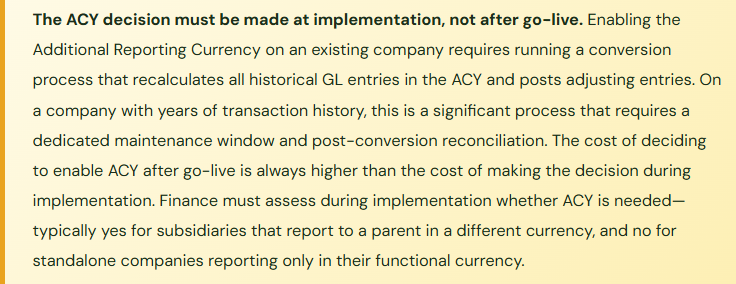
⚠️ Additional Reporting Currency Enabled Mid-Year Without Full Historical Recalculation—ACY Comparative Period Is Wrong
The US parent asks the BC subsidiary to add USD as an Additional Reporting Currency so the parent can pull subsidiary data in USD for consolidation. The Finance team enables ACY in the GL Setup in July of the current fiscal year. BC begins recording USD equivalents for all GL entries from July forward. Entries from January through June exist only in EUR (the LCY). The year-end consolidation package requires a full-year income statement in USD. Finance provides the July–December period in USD from BC and converts the January–June period manually in a spreadsheet at average rates. The two sources use different rate methodologies and different source data, producing a full-year USD income statement that the parent’s consolidation team cannot reconcile because the methodology changes mid-year.
Fix: When ACY is added to an existing BC company, BC provides an ACY conversion process that recalculates all historical GL entries in the ACY and posts the resulting ACY amounts to the ledger. This process must be run before ACY is used for any reporting purpose—it must cover the full history of the company’s GL entries, not just the period from the enabling date forward. The conversion process requires a maintenance window, a pre-conversion backup, and post-conversion reconciliation to verify that the total ACY amounts per account agree to an independent translation. Finance must plan the ACY enablement project before starting it, confirm the historical conversion scope with the parent’s consolidation team, and validate the results before submitting any ACY-based consolidation package.
Do This / Don’t Do This
Do This
- Establish a currency rate update schedule with a named owner—weekly minimum for material FX currencies
- Configure four separate GL accounts for FX activity: Unrealized Gain, Unrealized Loss, Realized Gain, Realized Loss
- Include the closing rate update and Adjust Exchange Rates batch in the month-end close checklist as mandatory pre-close steps
- Invoice customers in the contract currency, not the seller’s functional currency
- Decide on the Additional Reporting Currency need during implementation—enable at go-live, not mid-year
- Enter period-end closing rates specifically for the period-end date before running the adjustment batch
- Reconcile FCY AR and AP subledger LCY totals to the GL after each Adjust Exchange Rates run
- Document the rate source used for each currency (central bank, Bloomberg, commercial bank) for audit support
Don’t Do This
- Leave exchange rates at go-live values and never update them—all FX conversions accumulate error from day one
- Route all FX activity to a single GL account—unrealized and realized gains and losses become inseparable
- Skip the Adjust Exchange Rates batch at period end and attempt a year-end catch-up—retroactive adjustments require reopening closed periods
- Invoice in functional currency when the contract is in a foreign currency—it transfers FX risk to the customer and creates collection disputes
- Enable Additional Reporting Currency mid-year without running the full historical ACY recalculation first
- Use the same rate for transaction conversion, period-end translation, and average-rate income statement reporting—the rate types exist for a reason
Up Next:
Multi-currency closes the international finance arc. The next post turns to the compliance and governance infrastructure that every Finance team needs but that BC implementations rarely build out completely at go-live: Audit Trail, Change Log, and Compliance in Business Central—how BC’s change log works, which tables and fields Finance must log, the GL entry audit trail and why it is designed the way it is, the document approval workflow controls, the data retention and document archiving setup, and the audit readiness review Finance should conduct every year before the auditors arrive.
— Bobbi
D365 Functional Architect · Recovering Controller
Thank you for reading!
If this post helped you solve a real problem, share it with a Finance colleague who is in the middle of an ERP implementation or a post-go-live optimization. If you have a topic that I haven’t covered, please reach out. There is always one more post worth writing.
If you are interested in learning more, below are a few of my recent posts:
Leave a Reply