

How D365 F&O’s project module handles cost accumulation, revenue recognition, billing, and WIP accounting for project-based businesses; the Finance configuration Finance must own even when the project manager controls day-to-day project activity; the project WIP-to-GL reconciliation Finance must run at period end; and the five project accounting failures that produce margin misstatements Finance discovers when a project closes and the final result is not what anyone expected.
The Four Project Types Finance Configures Differently in D365 F&O
Time and Material
Revenue is recognized as costs are incurred: each hour of labor, each expense, each purchased item charged to the project generates an invoice to the customer. Revenue recognition is at the point of cost incurrence, with no deferred revenue or WIP accounting from a revenue perspective.
Finance configuration: Project posting profile maps labor, expense, and item costs directly to revenue when invoiced. Finance reviews the unbilled transactions report monthly to confirm all billable costs are invoiced within the billing cycle. Unbilled costs that are not invoiced within the agreed billing period represent revenue Finance has earned but not recognized.
Finance risk: Billable costs posted to the project without being included in the customer invoice—Finance has incurred cost but not recognized revenue. Finance reviews the Unbilled project transactions report before each billing run.
Fixed Price
The customer is charged a fixed total price regardless of actual cost incurred. Revenue is recognized using one of the ASC 606 or IFRS 15 recognition methods: percentage of completion (revenue recognized proportionally to work completed), completed contract (revenue recognized only when the project is substantially complete), or milestone-based (revenue recognized when defined contractual milestones are achieved).
Finance configuration: WIP accounting captures costs as incurred on the balance sheet. Revenue recognition events (percentage of completion calculations or milestone certifications) move WIP to the income statement. Finance must configure the project posting profile to route costs to WIP rather than directly to expense, and configure the revenue recognition method that matches the contract terms and the applicable accounting standard.
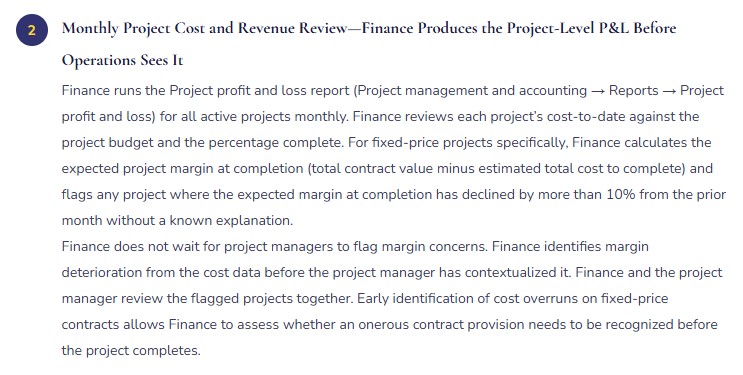
Finance risk: WIP accumulating faster than revenue is being recognized—a signal of cost overruns on a fixed price contract where Finance is spending more than the revenue being earned. Finance monitors the WIP balance relative to the project budget and percentage complete monthly.
Investment
Used for internally funded capital projects: R&D projects, system development projects, infrastructure investments. Costs accumulate in a project WIP account and are capitalized to a fixed asset (or expensed as R&D under GAAP rules) upon project completion. No external revenue is generated during the project.
Finance configuration: Project posting profile routes all costs to a capital WIP GL account. At project completion, Finance runs the elimination or capitalize-from-project transaction that moves the accumulated WIP to the fixed asset module (creating a fixed asset record) or to R&D expense. Finance must confirm the capitalization is consistent with the organization’s accounting policy before running the project completion transaction.
Finance risk: Costs accumulating in capital WIP that should be expensed as period R&D (overstating the balance sheet), or costs expensed that should be capitalized (understating fixed assets). Finance reviews the capitalizable vs. expensable cost determination annually for all active investment projects.
Cost and Internal
Used for internal cost allocation projects, shared service cost pools, and overhead accumulation: Finance pools costs to a project and allocates them to other projects, departments, or entities. No customer billing and no external revenue. The project is a cost management tool rather than a revenue-generating contract.
Finance configuration: Project posting profile routes costs to the WIP or direct cost account appropriate for the allocation basis. Finance configures the allocation rules that distribute the accumulated costs to the target projects or cost centers. The allocation runs as a periodic batch as part of the close process. Finance must run the allocation batch before closing the cost project for the period to ensure all accumulated costs are distributed before the cost project balance is reviewed.
Finance risk: Allocation batches not run before period close—costs remain in the cost project rather than being distributed to the target cost centers. Finance includes the project cost allocation batch in the Closing Cockpit as a Day +1 close task.
The Finance Project Governance Layer—What Finance Owns When Operations Runs the Projects
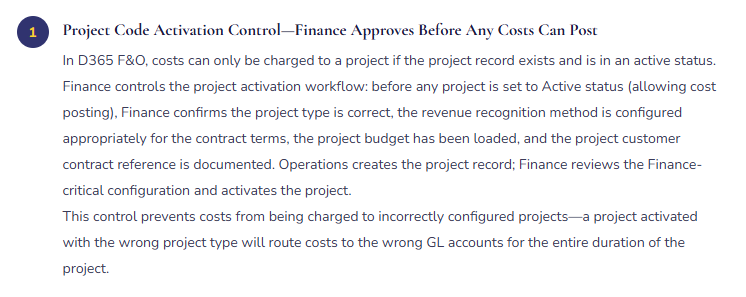
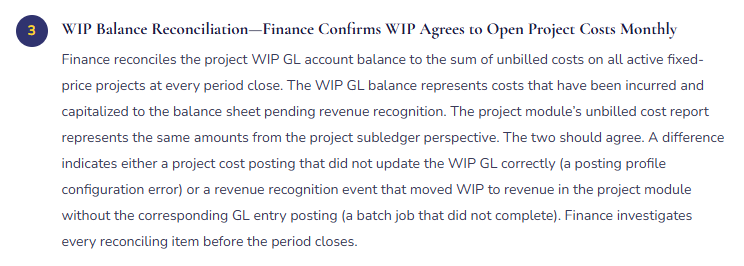
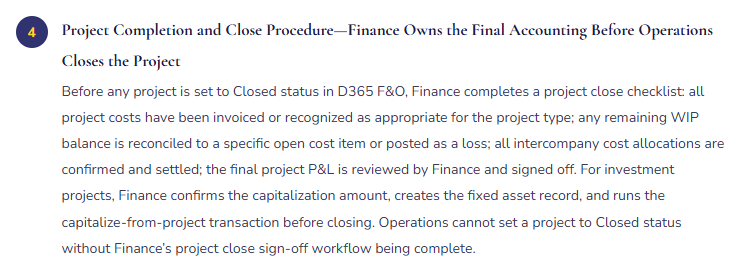
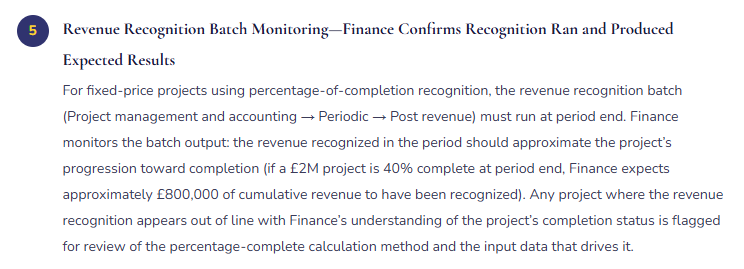
Finance Project Governance—Finance-Owned Procedures in a Project-Based Business
Five Project Accounting Failures Finance Discovers When the Project Closes
⚠️ Wrong Project Type Configured—18 Months of Fixed-Price Costs Expensed Instead of WIP
A fixed-price implementation project runs for 18 months. The project was created in D365 F&O as a Time and Material project type rather than a Fixed Price type because the person who created the project record was not aware of the difference. For Time and Material projects, labor and expenses post directly to the income statement as incurred. For 18 months, $1.4M of project costs flow directly through the income statement in the periods they are incurred, with no WIP accounting and no matching revenue recognition event. The customer is invoiced in three milestone payments, but the invoice revenue does not match the cost timing. The project-level margin varies wildly from month to month depending on whether costs were incurred in a billing period or not. The Finance team and the operations team have been reviewing an incoherent project P&L for 18 months without realizing the project type configuration was wrong.
Fix: Finance owns the project type configuration review as part of the project activation control. Before any project is activated, Finance confirms: Is this project billed at cost or at a fixed price? Is there a fixed-price element? If the project involves any billing that is not directly linked to cost incurrence, the project type must be Fixed Price with an appropriate revenue recognition method. Finance reviews the project contract documentation, confirms the billing structure, and selects the project type accordingly. Finance does not defer to the project manager’s choice of project type—the project type is an accounting policy decision that Finance owns.
⚠️ No Project Budget Loaded—Finance Cannot Identify Overruns Until the Project Closes
Operations creates projects in D365 F&O but does not load project budgets because the budget approval process is managed outside D365 F&O in a project planning tool. Finance has no baseline cost data in D365 F&O to compare actual project costs against. The Project profit and loss report shows actual costs but no budget variance. Finance cannot identify which projects are running over budget without manually comparing D365 F&O actual costs to the external project planning tool’s budget data—a monthly exercise that the Finance team has not established as a routine procedure. A project that was budgeted at $680,000 accumulates costs of $940,000 over 14 months without Finance flagging the overrun. Operations is aware of scope changes but has not communicated them to Finance. When the project closes and Finance produces the final P&L, the $260,000 cost overrun is presented to the CFO as a surprise.
Fix: The project budget must be loaded in D365 F&O before any cost is posted to the project—not maintained exclusively in an external tool. Finance includes the project budget load as a required step in the project activation workflow: Operations provides the approved project budget (in whatever format it was approved), Finance loads it in D365 F&O as the project budget, and the project is activated. Finance runs the Project budget vs. actual report monthly for all active projects with remaining budget. Projects where actual costs have exceeded 80% of the approved budget receive a Finance review flag—at 80% spending, Finance contacts the project manager to confirm whether the remaining scope will be completed within the remaining 20% of budget.
⚠️ Revenue Recognition Batch Not Run at Period End—WIP Accumulates While Revenue Understates
The revenue recognition batch for fixed-price projects is not on the period-close checklist. For five months, costs are incurred on three active fixed-price projects and posted to WIP as the project type requires. The revenue recognition batch that should move a portion of the WIP to revenue at each period end does not run. By the end of month five, the three projects have $1.8M in WIP and $0 in recognized revenue, even though the projects are 60–80% complete. The income statement understates revenue and the balance sheet overstates WIP by the cumulative unrecognized amount. Finance discovers the gap when the CFO asks why services revenue has declined so significantly while the project team reports strong project delivery progress.
Fix: The revenue recognition batch for projects is a period-close task with the same standing as the fixed asset depreciation batch and the deferred revenue release job. Finance adds it to the Financial Period Close workspace as a required step before the Management Reporter income statement is run. The batch specification: run the Post revenue batch for all active projects, review the output for reasonableness (each project’s cumulative recognized revenue should approximate the product of the contract value and the percentage complete), and confirm the project module’s unbilled cost balance is declining toward zero as projects progress toward completion. Finance also configures a WIP balance alert: if any project’s WIP balance has not changed from the prior period-end (indicating either no costs were incurred or the recognition batch did not run), Finance is notified for investigation.
⚠️ Intercompany Project Costs Not Settled—Group Consolidation Shows Inflated Project Revenue and Cost
A group project involves resources from two legal entities: the lead entity bills the client and recognizes all revenue; the resource entity provides staff charged at an intercompany transfer price. In D365 F&O, the resource entity posts hours to the project in the lead entity as intercompany costs. The intercompany settlement batch—which creates the offsetting revenue in the resource entity and the intercompany cost in the lead entity—runs monthly. For three months, the intercompany settlement batch fails silently due to a missing intercompany accounting configuration for a new resource entity added to the group. Three months of intercompany costs accumulate in the lead entity without the corresponding intercompany revenue posting in the resource entity. The group consolidated income statement double-counts the project costs and shows inflated overall costs without the offsetting intercompany revenue. Finance discovers the omission when the quarterly intercompany balance reconciliation reveals an unexplained imbalance in the project-related intercompany accounts.
Fix: The intercompany project cost settlement batch is a period-close dependency that must be confirmed as completed before the group consolidation proceeds—exactly as the IC balance reconciliation is a consolidation dependency (Post 54). Finance includes the intercompany project cost settlement batch in the Financial Period Closing workspace as a Day +1 task with a dependency that blocks group consolidation if it has not completed successfully. Finance also configures the batch with failure alerts and reviews the settlement output monthly: the resource entity should show intercompany project revenue, and the lead entity should show the corresponding intercompany project cost. Any project with resource entity contributions where the settlement has not occurred produces a gap in the intercompany reconciliation that Finance identifies immediately rather than at quarter-end consolidation.
⚠️ Investment Project WIP Not Capitalized at Completion—Balance Sheet Overstates WIP Indefinitely
An internally funded ERP system development project runs for 16 months and accumulates $2.3M in capital WIP. The project is declared complete by Operations when the system goes live. The project status in D365 F&O is set to Completed. However, Finance does not run the capitalize-from-project transaction that would move the $2.3M from capital WIP to the fixed asset module as a new intangible asset. For 11 months after project completion, the $2.3M remains in capital WIP on the balance sheet. No depreciation/amortization is being charged because the fixed asset record does not exist. The balance sheet overstates WIP by $2.3M and understates intangible assets by the same amount. The income statement understates amortization for the 11 months by the monthly amortization that should have been charged on the capitalized system development cost. Finance discovers the omission when the auditor asks for the capitalization documentation for the ERP project.
Fix: Finance includes the investment project capitalization as a project close procedure step that Finance owns. The project close checklist includes: confirm total capitalized cost is accurate and complete, determine the appropriate fixed asset category and useful life, run the capitalize-from-project transaction in D365 F&O, confirm the fixed asset record is created in the fixed asset module with the correct acquisition cost and service life, and run the first depreciation proposal for the new asset to confirm the amortization calculation is correct. The project cannot be set to Closed status until Finance has completed and signed off on all steps in the project close checklist. Finance does not accept Operations’ declaration that the project is complete as the trigger for closing the project accounting—Finance triggers the project close accounting when Finance has completed its own project close checklist.
Do This / Don’t Do This
Do This
- Own the project type configuration review as part of the project activation control—the project type is an accounting policy decision, not an Operations decision
- Require project budget loading in D365 F&O before any costs are posted—not maintained exclusively in external tools
- Run the revenue recognition batch as a period-close Cockpit task before the income statement is produced
- Run the WIP-to-GL reconciliation monthly for all fixed-price and investment projects
- Confirm intercompany project cost settlement as a close prerequisite for group consolidation
- Own the investment project capitalization procedure and make it a step Finance must sign off before the project is closed
Don’t Do This
- Accept the project manager’s choice of project type without Finance review of the billing structure
- Allow projects to be activated without a loaded budget in D365 F&O
- Leave the revenue recognition batch off the close checklist—it produces the largest WIP overstatement of any omitted close batch
- Allow Operations to set a project to Closed status without Finance’s project close sign-off workflow completion
- Discover project margin surprises at project close—Finance must monitor margins monthly and flag deterioration in-flight
What’s Next:
Project accounting addresses the cost and revenue lifecycle for project-based businesses. The next post addresses the configuration layer that affects every other Finance module for organizations operating in multiple currencies: Multi-Currency Finance in D365 F&O—The Configuration Decisions That Determine Everything Downstream—how D365 F&O’s currency architecture works across functional currency, reporting currency, and transaction currency; the exchange rate configuration Finance must maintain; the period-end revaluation procedure and what it does to the income statement; and the five multi-currency configuration failures that produce balance sheet errors Finance cannot explain to a foreign currency lender or a cross-border auditor.
— Bobbi
D365 Functional Architect · Recovering Controller
Thank you for reading!
If a post helped you solve a real problem, share it with a Finance colleague who is in the middle of a D365 Finance and Operations implementation or a post-go-live optimization. If you have a topic the series did not cover, reach out. There is always one more topic worth exploring.
If you are interested in learning more, below are some of my latest posts:
Leave a Reply