
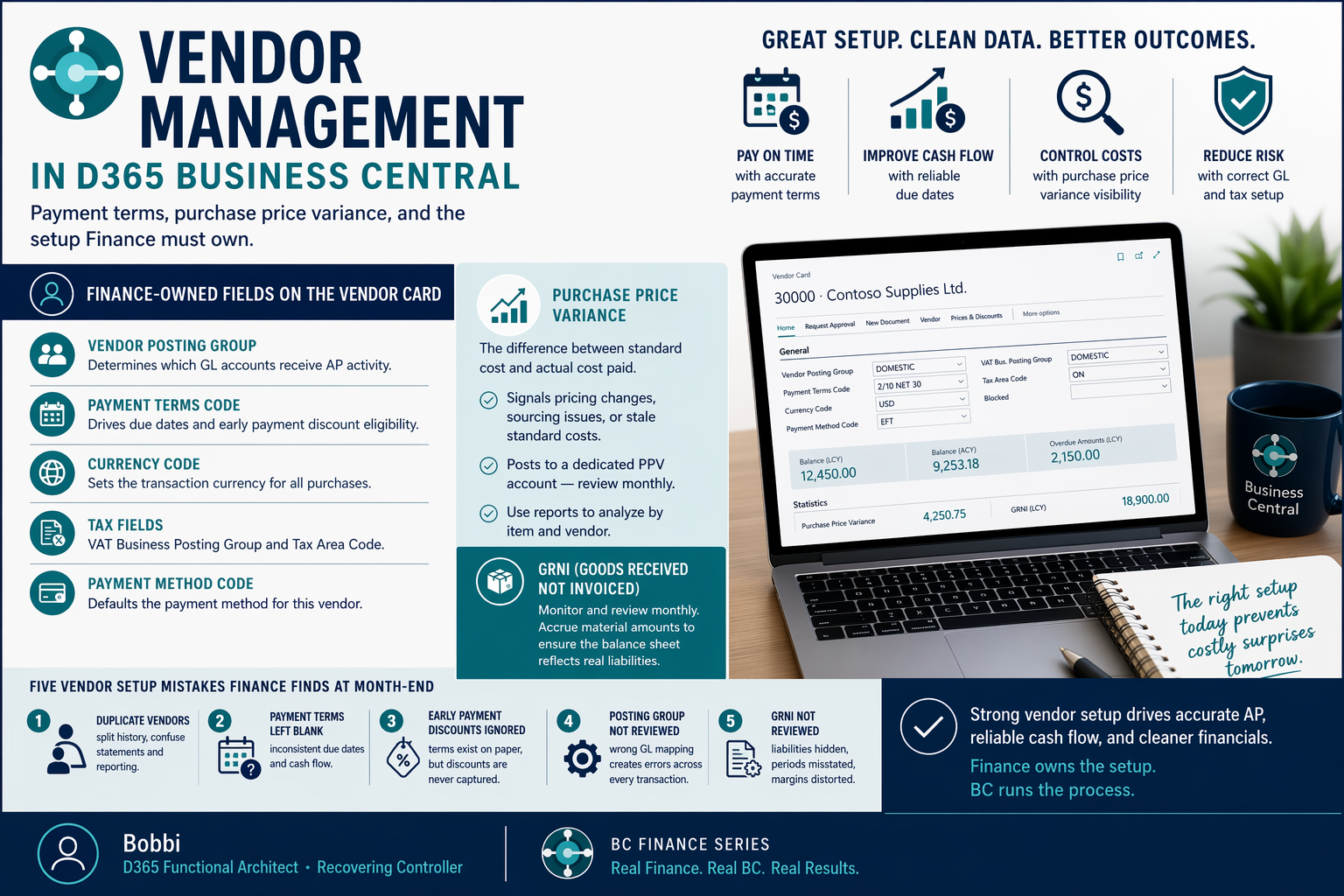
Payment Terms, Purchase Price Variance, and the Setup Finance Must Own

The Vendor Card: What Finance Must Review
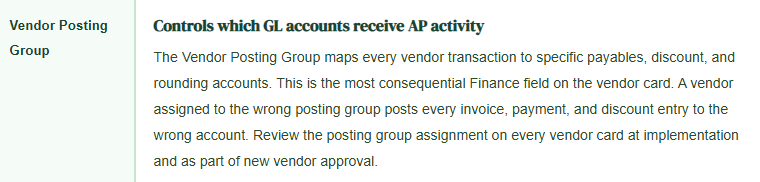
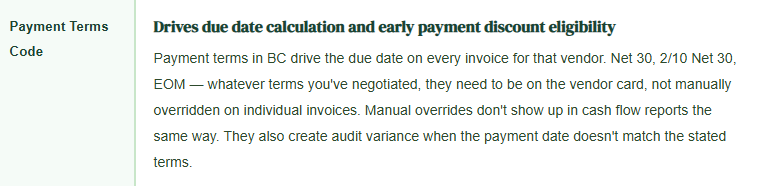
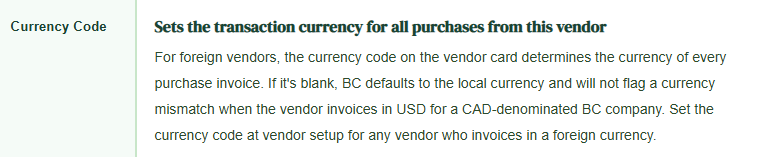
The vendor card in BC is not just a contact record. It’s a configuration record that controls transaction behavior. Finance should review and approve the following fields on every vendor card — not just at implementation, but as part of the vendor onboarding process going forward.
Purchase Price Variance: The Finance Signal Procurement Often Ignores
Purchase Price Variance — the difference between the standard cost on an item card and the price actually paid on a vendor invoice — is one of the most useful Finance signals in BC. It tells you that something changed: the vendor raised prices, a buyer deviated from the preferred vendor, or the standard cost hasn’t been updated to reflect current market rates.
BC calculates PPV automatically when you use standard costing on inventory items and post an invoice at a different price than the item’s standard. The variance posts to the Purchase Price Variance account defined in the General Posting Setup. Finance needs to confirm that account is mapped to a distinct GL account — not lumped into COGS — so the variance is visible and can be analyzed.

Accrued Purchases: GRNI and the Balance Sheet Risk
Goods Received Not Invoiced is the balance sheet account that holds the liability for inventory received before the vendor invoice arrives. In BC, when you post a purchase receipt, BC creates a GRNI entry. When the invoice is posted and matched to the receipt, the GRNI entry clears. If the invoice never arrives — or arrives in a future period — the GRNI balance sits on the balance sheet representing a real liability that needs to be reviewed.
Finance must monitor the GRNI account balance monthly. An aging GRNI balance — receipts from prior periods with no matching invoice — can indicate a receiving error, a vendor dispute, or simply a delayed invoice that needs to be accrued. The Purchase Order Outstanding report shows all open purchase orders with received-but-not-invoiced quantities. Run it at period end and accrue for material amounts.
Five Vendor Configuration Mistakes That Finance Finds at Month-End
Five Setup Mistakes — All Visible in the Vendor Ledger Within 30 Days
- Duplicate vendors created for the same supplier
- Someone can’t find the vendor, creates a new one, and now you have two vendor records for the same supplier — different posting groups, different payment terms, payment history split across two ledgers. The vendor balance doesn’t match the supplier’s statement because the statement reflects the full relationship and BC reflects only half of it. Implement a vendor search protocol before new vendor creation and use the Check Duplicate Vendor Name feature BC provides.
- Payment terms left blank on vendor cards
- When the payment terms code is blank, BC doesn’t calculate a due date automatically. The due date has to be entered manually on every invoice. Manual entries are inconsistent — some invoices are entered with 30-day terms, some with 45, some with whatever the AP clerk remembered. The Aged Accounts Payable report reflects the manual due dates, which means the cash flow forecast is as inconsistent as the data entry. Require payment terms on every vendor card as part of vendor onboarding approval.
- Early payment discount terms configured but never monitored
- 2/10 Net 30 terms are set on the vendor card. Nobody ever pays within 10 days because the invoice approval workflow takes 12 days. The discount is available in theory and captured by nobody in practice. Configure early payment discount terms only for vendors where the invoice-to-payment workflow can actually execute within the discount window. For all others, use Net 30 or whatever the actual payment target is. False discount terms create reporting noise and missed capture that doesn’t get analyzed because nobody knows the terms were there.
- Vendor Posting Group assigned without reviewing the GL mapping
- Someone creates a vendor during implementation, assigns it to “DOMESTIC” posting group, and never opens the Vendor Posting Groups page to see where DOMESTIC actually posts. The AP account might be correct. The payment discount account might post to Other Income instead of Purchase Discounts. The rounding account might be unmapped. Review the full posting group configuration — every GL account in the mapping — before assigning it to a vendor and before that vendor’s first invoice is posted.
- GRNI balance not reviewed at period end
- The GRNI account grows throughout the month as receipts are posted and clears as invoices are matched. At period end, the remaining GRNI balance represents received goods with no invoice. If Finance doesn’t review it, material received in one period gets expensed in the next when the invoice arrives — creating a period mismatch that distorts COGS by period and gross margin by month. Review GRNI monthly, accrue for amounts above your materiality threshold, and reverse the accrual when the invoice posts.
Up Next:
We’ve covered the procurement side of the vendor relationship. The next logical stop is the planning side of Finance: BC Budgeting and Cost Control—What the Budget Module Can and Cannot Do—how BC’s budget functionality handles budget entry, account schedule comparisons, and budget-to-actual reporting, and the five budgeting configuration decisions that determine whether BC gives Finance a working budget management tool or a static data entry screen that nobody uses after the first month.
— Bobbi
D365 Functional Architect · Recovering Controller
Thank you for reading!
If a post helped you solve a real problem, share it with a Finance colleague who is in the middle of an implementation or a post-go-live optimization. If you have a topic the blog series did not cover, reach out. There is always one more post worth exploring.
If you are interested in learning more, below are some of my latest posts:


Leave a Reply