

How BC’s warehouse management tiers work, the costing method decision Finance must own at implementation, how inventory valuation flows to the GL, the cost adjustment process Finance must understand even if Operations runs it, and the inventory reconciliation that belongs on the period-close checklist for every product-based business.
BC’s Three Warehouse Tiers—What Finance Needs to Know About Each
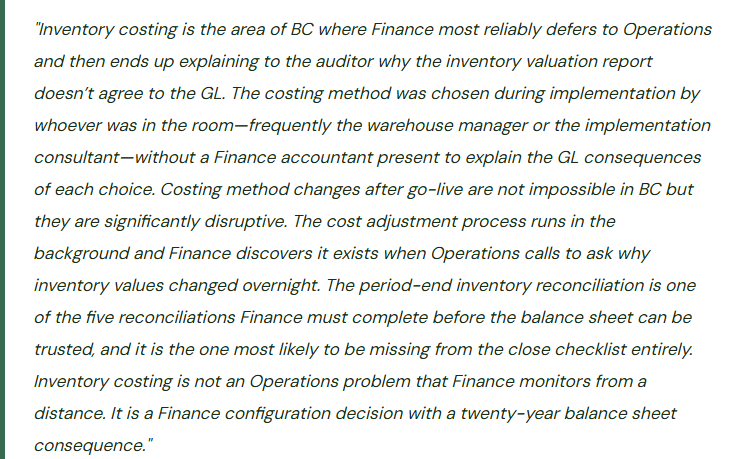
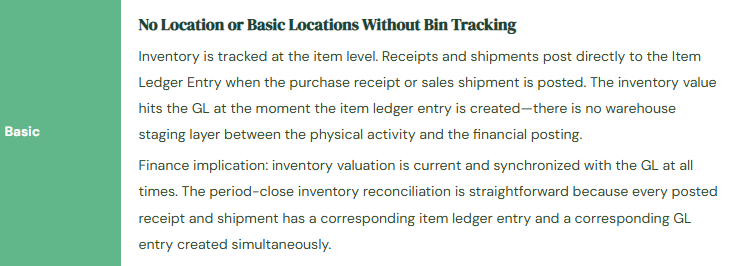
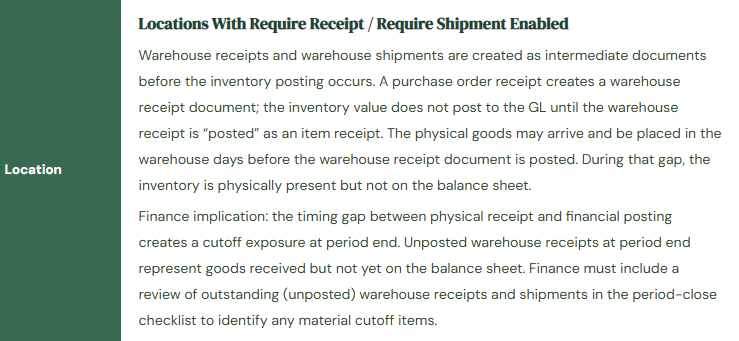
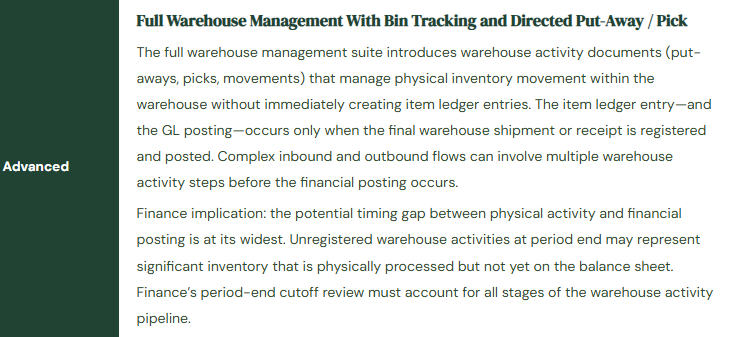
BC’s warehouse management is implemented in three tiers of increasing complexity, and the tier the organization operates in determines how inventory transactions flow into the item ledger and ultimately into the GL. Finance must understand which tier is active because the posting mechanics differ between them in ways that affect when inventory value hits the balance sheet.
The Costing Method Decision—Finance Must Own This at Implementation
The costing method is set on the Item Card for each item and determines how BC calculates the cost of goods sold when an item is sold or consumed. It is one of the most consequential accounting policy decisions in a BC implementation because it determines the flow of costs from the balance sheet (Inventory) to the income statement (COGS) for every sale—and because changing it after go-live requires a process that adjusts all historical item ledger entries.
| Costing Method | How COGS Is Calculated | Best For | Finance Risk |
|---|---|---|---|
| FIFO | The cost of the oldest inventory layer is used first. Each receipt creates a cost layer; each sale draws from the oldest open layer until it is exhausted, then moves to the next. | Distributors, retailers, and any business where inventory turnover is high and the cost of older inventory layers is meaningful for COGS accuracy. | In periods of rising purchase costs, FIFO produces lower COGS (older, cheaper inventory sold first) and higher ending inventory value. Inventory value on the balance sheet reflects recent purchase prices. Requires adequate costing layer management. |
| LIFO | The cost of the most recently received inventory is used first for COGS. BC supports LIFO but it is not permitted under IFRS and is used primarily by US-based companies using US GAAP where LIFO is allowed. | Companies in industries with consistently rising input costs that want to match higher current costs against current revenue for income tax purposes. Not available for IFRS reporters. | LIFO produces higher COGS in rising-cost environments (most recent, most expensive inventory sold first) and lower ending inventory value. The LIFO reserve and potential LIFO liquidation events require Finance attention at year-end. |
| Average | The weighted average cost of all inventory on hand is recalculated after each receipt and used as the cost for all subsequent sales until the next receipt changes the average. | Companies with high transaction volumes and interchangeable inventory where tracking specific cost layers is impractical. Common in manufacturing and process industries. | Average cost smooths COGS fluctuations across periods. The cost adjustment process is critical—item cost entries are finalized by the Adjust Cost–Item Entries batch, which must run regularly. Before the batch runs, some item ledger entries carry “expected” cost rather than actual cost. |
| Standard | A predetermined standard cost is used for all receipts and sales regardless of actual purchase price. Purchase price variances (actual cost vs. standard cost) post to a Purchase Price Variance account at the time of receipt. | Manufacturing environments where a standard cost system is the accounting policy. Requires annual (or more frequent) standard cost updates as input costs change. | Purchase price variances must be monitored and analyzed. Significant variances indicate the standard is no longer representative of actual costs and a standard cost update is needed. The standard cost update process in BC adjusts all on-hand inventory to the new standard and posts the revaluation to a specific GL account Finance must review. |
| Specific | Each individual unit carries its own specific cost, identified by lot number or serial number. COGS for a sale is the specific cost of the specific unit sold. | High-value, individually tracked items: capital equipment, jewelry, vehicles, medical devices. Each unit is unique and its specific cost must be tracked individually. | Requires serial or lot number tracking on every transaction. Any receipt without a serial/lot number cannot be correctly costed under Specific costing. Finance must confirm that the operations team maintains serial/lot discipline on 100% of transactions. |
The Cost Adjustment Process—What Finance Must Understand Even If Operations Runs It
When an item is received in BC, the receipt creates an Item Ledger Entry. For FIFO, Average, and Specific costing, the cost of that entry may not be finalized at the moment of receipt—it is marked as an expected cost until the vendor invoice is matched and posted. BC then runs the Adjust Cost–Item Entries batch job, which recalculates the actual costs for all item ledger entries that have received actual cost information since the last adjustment run, and propagates those actual costs forward to the outbound entries (sales, consumption, production output) that drew from those cost layers.
The Adjust Cost–Item Entries batch can be run manually or scheduled to run automatically. Microsoft recommends running it daily for active inventory environments. When it runs, it posts cost adjustment entries to the GL—typically to the inventory account and the COGS account—to bring the GL into alignment with the adjusted item ledger costs. These adjustment postings appear in the GL as entries from the “Inventory Adjmt.” source, posted by the system job rather than by a named user.
The Inventory-to-GL Reconciliation—Five Steps Finance Runs at Every Period Close
- Run Adjust Cost–Item Entries Before Closing
- Before any inventory reconciliation can be meaningful, all item ledger entry costs must be finalized. Run the Adjust Cost–Item Entries batch job and confirm it completes without errors. Review the GL entries it posts to the inventory and COGS accounts. Any entry over a materiality threshold should be understood by Finance before the period is closed—a large unexpected cost adjustment at period end is a signal of either a costing configuration problem or a data entry error in a receipt or invoice that affected a significant cost layer.
- Run the Inventory Valuation Report
- The Inventory Valuation report (Reports → Inventory → Inventory Valuation) shows the quantity on hand and the inventory value by item as of the period-end date, valued under the item’s costing method. The total value on this report is what the Inventory GL account should show for the same date. This report is the subledger-side of the reconciliation; the GL account balance is the general ledger side.
- Compare Inventory Valuation Report Total to the GL Inventory Account Balance
- The total inventory value from the Inventory Valuation report must equal the net balance of all Inventory GL accounts as of the same date. Pull the GL account balance for each inventory account (raw materials, WIP, finished goods) and compare the sum to the report total. Any difference is a reconciling item that requires investigation. Common causes: items posted to a GL account that is not designated as an inventory account in posting groups, inventory adjustments posted directly to the GL without going through an item journal, or expected cost postings that the Adjust Cost batch has not yet finalized.
- Review Unposted Warehouse Activity for Period-End Cutoff
- In locations with Require Receipt or Require Shipment enabled, check for unposted warehouse receipts and unposted warehouse shipments as of the period-end date. An unposted warehouse receipt represents goods physically in the warehouse that are not yet on the balance sheet. An unposted warehouse shipment represents goods physically shipped that are still on the balance sheet. Both are cutoff items. For material unposted receipts, Finance may need to post them into the closing period (if goods were received before period end) or confirm they are correctly excluded (if goods arrived after period end).
- Reconcile Expected Cost Postings
- BC posts expected costs to the GL when a receipt is posted before the vendor invoice is matched. These expected cost entries use a separate “Inventory Accrual (Interim)” account. When the vendor invoice is matched and posted, BC reverses the expected cost entry and posts the actual cost. Review the Inventory Accrual (Interim) account balance at period end: the balance represents receipts for which vendor invoices have not yet been matched and posted. A large or growing balance indicates an AP matching backlog that is understating COGS. Finance should review open receipts without matched invoices monthly and work with AP to ensure invoices are processed promptly after receipt.
Five Inventory Costing Mistakes That Damage the Balance Sheet
⚠️ Costing Method Set to Average—Adjust Cost Never Runs—COGS Is Wrong for Every Sale
The item costing method is set to Average. The implementation team configured the Adjust Cost–Item Entries batch to run automatically but set it up incorrectly—the scheduled task is in the BC job queue but is marked as inactive. The batch has not run since go-live. Over three months, 1,400 sales transactions posted COGS at the expected cost from the time of each receipt, not at the weighted average actual cost. When a significant price increase in a key raw material hits in month two, the expected costs for items received at the higher price do not flow into COGS correctly because the adjustment batch never updated the cost layers. COGS is understated for high-cost receipts and overstated for low-cost receipts by the unadjusted difference. The inventory valuation report and the GL inventory account disagree by $84,000 at the three-month mark when Finance first looks at the reconciliation.
Fix: Confirm the Adjust Cost–Item Entries job queue entry is active and running on schedule immediately after go-live. The job queue entry status is visible at Administration → Application Setup → Job Queue Entries. The Adjust Cost entry should show Status = Ready and a Next Run Date/Time in the near future. Monitor it weekly for the first month post-go-live. For Average costing environments, run the batch manually after any significant purchase price event—a large receipt at a materially different cost than the current average—to ensure the GL reflects the updated average cost before the period closes. Confirm after each run that the Inventory Valuation report total agrees to the GL inventory account balance within the defined tolerance.
⚠️ Standard Cost Update Not Run at Year-End—Purchase Price Variances Accumulate All Year
The organization operates on standard costing. The standard costs for raw materials were set at implementation using prior-year prices. Commodity costs have increased significantly during the year. Every receipt posts a purchase price variance (actual cost minus standard cost) to the Purchase Price Variance account. By year-end, the Purchase Price Variance account has a $240,000 debit balance—meaning actual purchase costs exceeded standard costs by $240,000 for the year. The inventory on the balance sheet is valued at the original (understated) standard costs. Ending inventory is undervalued by the cumulative effect of using an outdated standard. The COGS charge for the year is also understated because the cost of goods sold was calculated at the understated standard cost rather than actual cost. Both the balance sheet and the income statement are misstated. The auditor asks for the standard cost update memo and finds none exists.
Fix: Standard cost updates must be planned and executed on a documented schedule—annually at minimum, and mid-year when commodity costs shift materially from the standard. The BC standard cost update process involves: calculating the proposed new standard costs (from vendor price lists, the prior year cost build-up, or a manufacturing cost rollup), entering the new costs via the Standard Cost Worksheet, running the Implement Standard Cost Changes action, and reviewing the revaluation journal entries that adjust on-hand inventory from the old standard to the new standard before posting. The revaluation posts to the Inventory Revaluation account—Finance must review the revaluation amount and confirm it is directionally correct before posting. Document the standard cost update as an accounting policy event with the effective date, the new standards by item, and the revaluation amount posted.
⚠️Item Posted to Wrong GL Account Because Inventory Posting Group Is Misconfigured—Inventory Is on the P&L Instead of the Balance Sheet
During implementation, a new item category is added for a product line that the organization begins carrying six months after go-live. The implementation consultant creates a new Inventory Posting Group for the category but maps the Inventory account to the COGS account (account 5000) rather than the Inventory asset account (account 1400) in the Inventory Posting Setup. For six months, every receipt of items in this category posts the inventory value directly to COGS. The items are expensed immediately on receipt rather than held on the balance sheet and expensed on sale. The balance sheet understates inventory by $156,000 for the six-month period. COGS is overstated by $156,000 for the same period. Gross margin for the affected product line shows significantly lower than actual for six months before Finance notices during a product-line profitability review that the category’s gross margin is negative—which is physically impossible for the items in question.
Fix: Every new Inventory Posting Group must be validated immediately after creation by checking the Inventory Posting Setup to confirm the Inventory account maps to the correct balance sheet inventory account and the COGS account maps to the correct income statement expense account. This validation takes two minutes and should be a required step in the checklist for adding any new item category. Finance should run the Inventory Posting Setup review page annually to confirm that every combination of General Business Posting Group and Inventory Posting Group has the correct GL account assignments. An inventory posting group mapped to the wrong account can go undetected for months if Finance is not running the period-end inventory reconciliation that would show a discrepancy between the Inventory Valuation report and the GL inventory account.
⚠️ Unposted Warehouse Receipts Not Reviewed at Period End—Goods Received But Not on Balance Sheet
The organization uses locations with Require Receipt enabled. At the March period end, there are 14 unposted warehouse receipts in the system representing goods that arrived at the warehouse between March 27 and March 31. The warehouse receiving team created the warehouse receipts when the goods arrived but had not yet posted them as item receipts by March 31. Finance closes the March period without reviewing outstanding warehouse receipts. The 14 receipts represent $218,000 of inventory that was physically in the warehouse on March 31 but does not appear on the March 31 balance sheet. The balance sheet understates inventory by $218,000. The vendor invoices for these items arrive in April, are matched to the purchase orders, and post in April—creating $218,000 of inventory and COGS postings in April that belong in March. March inventory is understated; April COGS includes costs that belong in March.
Fix: Add a review of unposted warehouse receipts and unposted warehouse shipments to the period-end close checklist for all locations with Require Receipt or Require Shipment enabled. The review is performed on the day the period closes, before the period is locked. For each unposted warehouse receipt dated on or before the period-end date, Finance determines whether the goods were physically received before period end (in which case the receipt should be posted in the closing period) or whether the warehouse receipt date is incorrect (in which case the date should be updated to reflect actual receipt). Any unposted warehouse receipts representing goods received before period end must be posted before the period is closed. The warehouse receiving team should be aligned on the close calendar: all period-end receipts must be posted by a specified cutoff time on the close day.
⚠️ Inventory Reconciliation Never Performed—GL Inventory and Subledger Have Diverged by $340,000
Finance has been closing periods and producing financial statements for 22 months without running the period-end inventory reconciliation. The Inventory Valuation report and the GL inventory account have diverged gradually due to: two direct GL journal entries that someone posted to the inventory account to “adjust” an inventory discrepancy without using an item journal, one posting group misconfiguration that was corrected six months ago but whose prior-period postings were never corrected, and one instance where Adjust Cost posted adjustments into a period that Finance had considered closed. The current divergence is $340,000. Finance discovers it during the preparation of the annual audit reconciliation package. Tracing $340,000 of accumulated divergence across 22 months of transactions requires Finance to work backward through every reconciling item, explain each one to the auditor, and determine which items require correcting journal entries. The correction process takes six weeks and produces nine adjusting entries that the auditor must accept before issuing the opinion.
Fix: The inventory-to-GL reconciliation is a monthly close procedure, not an annual audit exercise. Run the Inventory Valuation report for the period-end date every month and compare the total to the GL inventory account balance. Document the comparison in the close checklist. Any difference above a defined materiality threshold requires investigation and resolution before the period is closed. Investigated monthly, a $340,000 divergence would have been found in the first month it appeared—likely as a $12,000 difference from a single misconfigured posting group or a single direct GL journal entry to the inventory account—and corrected within a week. Found 22 months later, it is a six-week audit recovery project. The difference between those two outcomes is a monthly 15-minute reconciliation step that Finance adds to the close checklist and never skips.
Do This / Don’t Do This
Do This
- Own the costing method decision at implementation with Finance present in the room—this is an accounting policy decision, not a configuration preference
- Run Adjust Cost–Item Entries before closing every period and review the GL entries it generates
- Include the five-step inventory reconciliation in the period-close checklist—monthly, every month
- Validate every new Inventory Posting Group by checking the Inventory Posting Setup accounts immediately after creation
- Review unposted warehouse receipts and shipments on the period-close day before locking the period
- Monitor the Inventory Accrual (Interim) account balance for receipts with unmatched vendor invoices
- Schedule standard cost updates on a documented annual cycle and mid-year when input costs shift materially
- Confirm the Adjust Cost job queue entry is active and running correctly immediately after go-live and at each BC update
Don’t Do This
- Let Operations choose the costing method without Finance involvement—it determines how costs flow to the income statement
- Change a costing method after go-live as a casual configuration update without a Finance-owned transition process
- Run Adjust Cost after the period is closed and allow it to post into a finalized period
- Post directly to inventory GL accounts via journal entry instead of through item journals—direct GL posts create reconciliation divergence that is difficult to trace
- Skip the inventory-to-GL reconciliation during busy closes—divergences found monthly are week-level problems; divergences found at the annual audit are month-level problems
- Assume the Adjust Cost job queue entry is running correctly without verifying its status after each BC update
Up Next:
Warehouse management and inventory costing closes the operational Finance arc. The next post turns to the annual event that Finance owns from start to finish and that BC requires specific preparation for: Year-End Close and Fiscal Year Rollover in Business Central—the full sequence Finance runs at fiscal year-end, the income statement closing process, the retained earnings entry, the prior-year audit adjustment window, the opening period setup for the new year, and the mistakes in year-end close that carry into the first quarter of the new fiscal year.
— Bobbi
D365 Functional Architect · Recovering Controller
Thank you for reading!
If this post helped you solve a real problem, share it with a Finance colleague who is in the middle of an ERP implementation or a post-go-live optimization. If you have a topic that I haven’t covered, please reach out. There is always one more post worth writing.
Interested in learning more? Below are a few of my latest posts:
Leave a Reply