
Post #010 – AI In Microsoft ERP
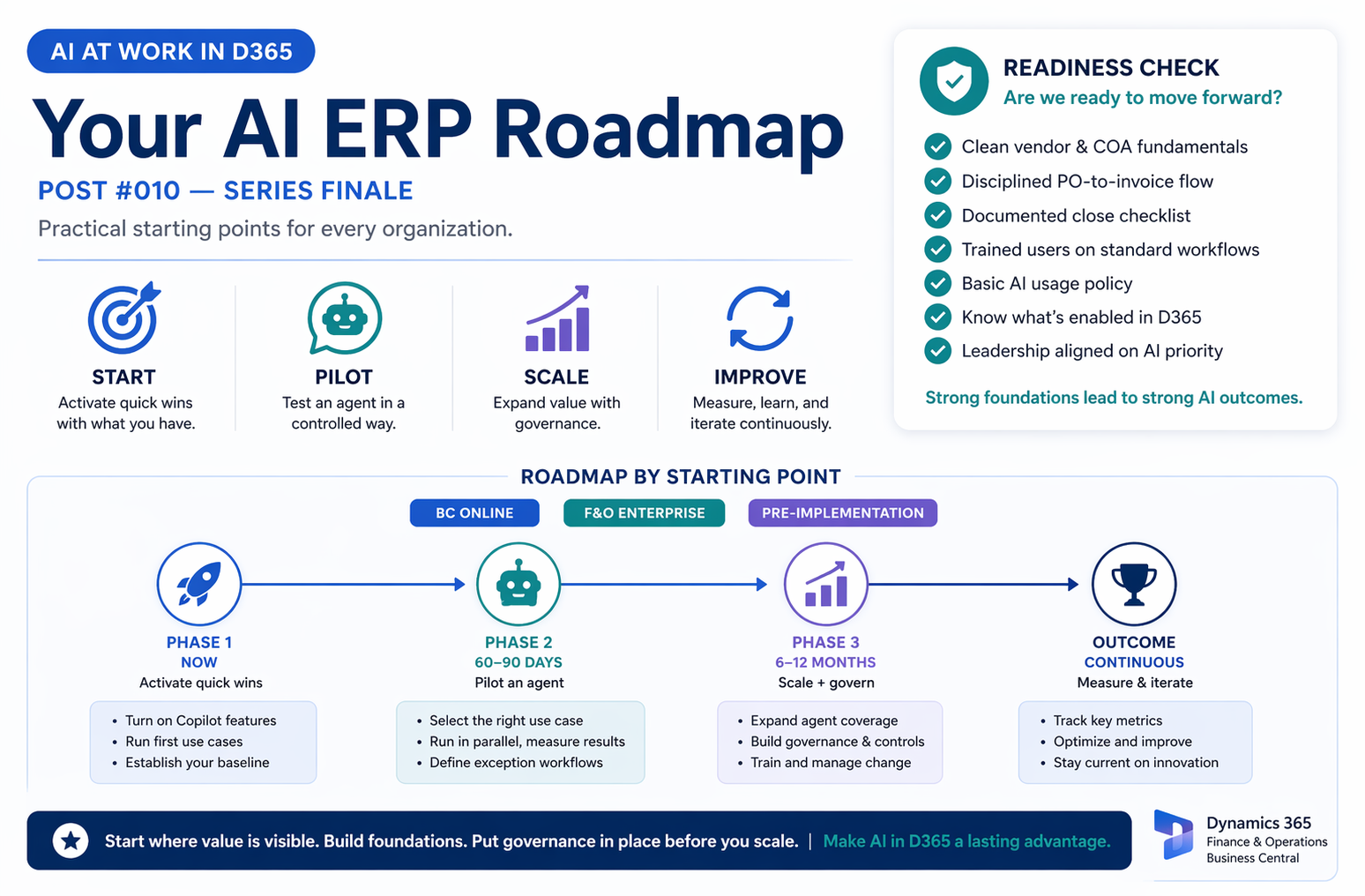
Ten posts in, we’ve covered the landscape. Now let’s make it actionable — with a practical roadmap tailored to where your organization actually is today.


Before the Roadmap: An Honest Readiness Check
The most important thing I can tell you about building an AI roadmap is this: the organizations that get the most value from AI in ERP are the ones that had good fundamentals before AI entered the picture. Data quality, process discipline, clear ownership, trained users. AI amplifies what’s there — good and bad.
Run through this quick readiness check before committing to an AI timeline. Each “no” is a heads-up about where you may need to shore up foundations before expecting AI to deliver:
- Our vendor master data is clean — consistent naming, deduplicated, current addresses and payment terms
- Our chart of accounts is consistently used — expense coding follows defined rules, not individual preference
- Purchase orders are generally created before invoices arrive (not after the fact)
- Our close process has a documented checklist with clear task ownership
- Our users are trained on current D365 workflows — not working around the system
- We have a basic AI usage policy that covers employee use of AI tools
- We know which Copilot features are active in our D365 environment today
- Our IT and finance leadership are aligned on AI as a shared priority
If you checked six or more of these: you’re in a strong position to move quickly on AI adoption. If you checked four or fewer: spend time on foundations first. An AI roadmap that ignores data quality and process maturity is an exercise in accelerating disappointment.
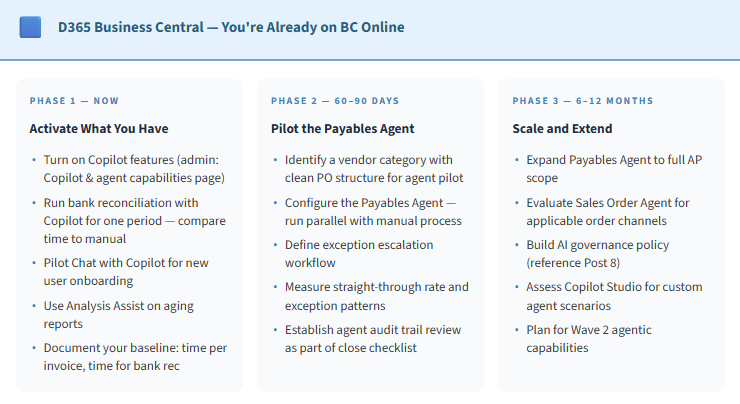
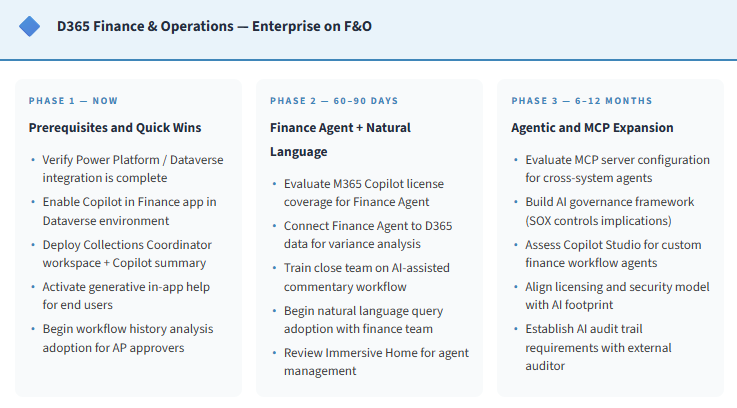
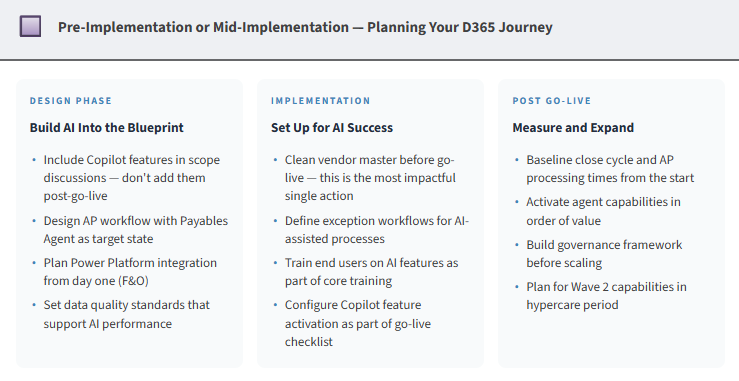
Roadmap by Platform and Starting Point
Here are practical phased roadmaps based on where you are. I’ve kept these concrete — specific features, not just categories:

The Five Principles I’d Like To Leave You With
1. Start with what you have.
- BC customers especially — you have more AI capability available today than you’re using. Activation doesn’t require a project. It requires an admin with 30 minutes and a team willing to try something new.
2. Clean data before agentic AI.
- AI agents surface process problems faster than humans do. If your data is messy, you’ll spend Phase 1 fixing root causes that were there before the agent. That’s okay — but go in knowing that’s what’s ahead.
3. Governance before scale.
- The organizations that get burned by AI implementations are usually the ones that scaled before they had controls in place. A simple policy and a clear approval design before you expand agent scope is an insurance policy worth having.
4. Measure what changes.
- Close cycle time, invoice exception rate, AR collection time, user productivity. Pick two or three metrics before you start. The data will tell you where AI is working and where it isn’t — and it will build the case for continued investment.
5. This is continuous, not a project.
- The Microsoft AI feature cadence is relentless. Wave 1 becomes Wave 2. Features that are preview today will be GA by the end of the year. Build a rhythm for staying current — whether that’s a quarterly release review, a community membership, or someone on your team who owns it.
The Bigger Picture
We started this series by acknowledging that there’s a lot of noise about AI right now. I hope what you’ve found here is signal — practical, grounded, honest signal about what Copilot and AI agents actually do in D365, where they add value, and what you need to have in place to get that value.
The organizations that will look back on this period as a turning point are the ones that engaged thoughtfully — not the ones who moved fastest or the ones who waited longest. They asked the right questions, started with real use cases, built appropriate governance, and made steady progress. That’s the model I’d recommend.
Thank you for reading this series. I’m always interested in what you’re seeing in your own organizations — what’s working, what isn’t, what questions this has raised. The conversation continues.
📚 The Full Series — AI at Work in D365
All Ten Posts
- Post 1: AI in Your ERP — What Finance Teams Need to Know
- Post 2: Copilot in D365 F&O — What It Does Today
- Post 3: Copilot in D365 BC — AI for the Mid-Market
- Post 4: AI-Powered AP — Invoice to Payment
- Post 5: Period Close and AI
- Post 6: Using Claude Alongside Copilot
- Post 7: Agentic ERP — The 2026 Push
- Post 8: AI Governance in ERP
- Post 9: What AI Means for the ERP Consultant
- Post 10: Your AI ERP Roadmap (you are here)
📚 Master Resource List — The Whole Series
- Agents & Copilot Across All D365 Apps — the master overview
- Copilot in D365 Finance & Operations
- Copilot in Business Central — FAQ & Overview
- BC 2026 Wave 1 Release Plan
- D365 2026 Release Wave 1 — Microsoft Blog
- Copilot Control System — Governance Tools
- Microsoft Purview for AI Governance
BB
Bobbi Bricker
ERP Capability Lead and D365 Functional Architect at Centric Consulting. Former controller. This series reflects ten years in ERP and a genuine belief that AI, used thoughtfully, makes finance and operations teams more capable — not less. Reach out with questions, pushback, or war stories from your own organizations.
Thank you for reading!
If you are interested in learning more, below are some of my latest posts:

Leave a Reply