

Which fields Finance must own and validate on every vendor and customer record in BC, the workflow controls that prevent payment fraud and posting errors, the periodic review cadences that keep master data accurate as the organization changes, and the five master data failures that Finance traces back to a single field set incorrectly at record creation.
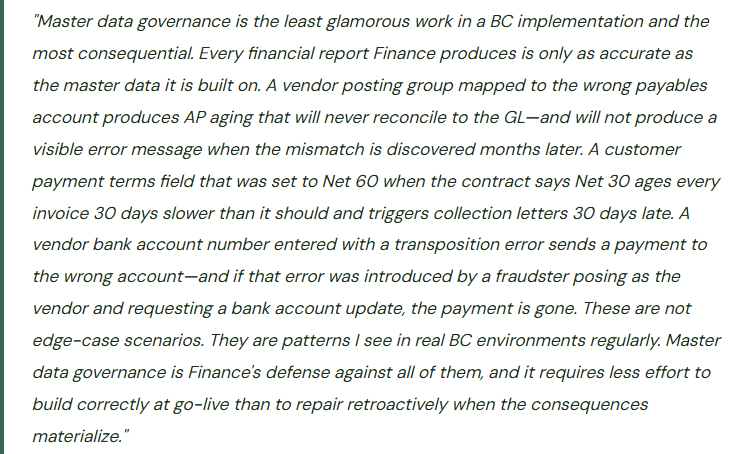
The Vendor Master Fields That Finance Must Own
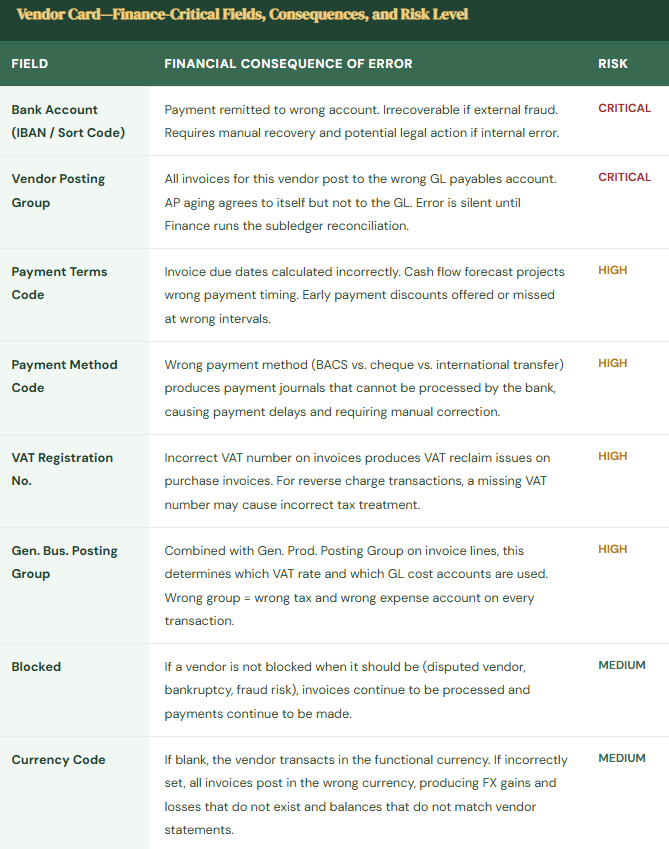
The vendor card in Business Central carries dozens of fields. Finance needs to own a specific subset—the fields whose incorrect values produce financial statement errors, payment failures, or control bypasses that propagate silently until a reconciliation or an audit exposes them.
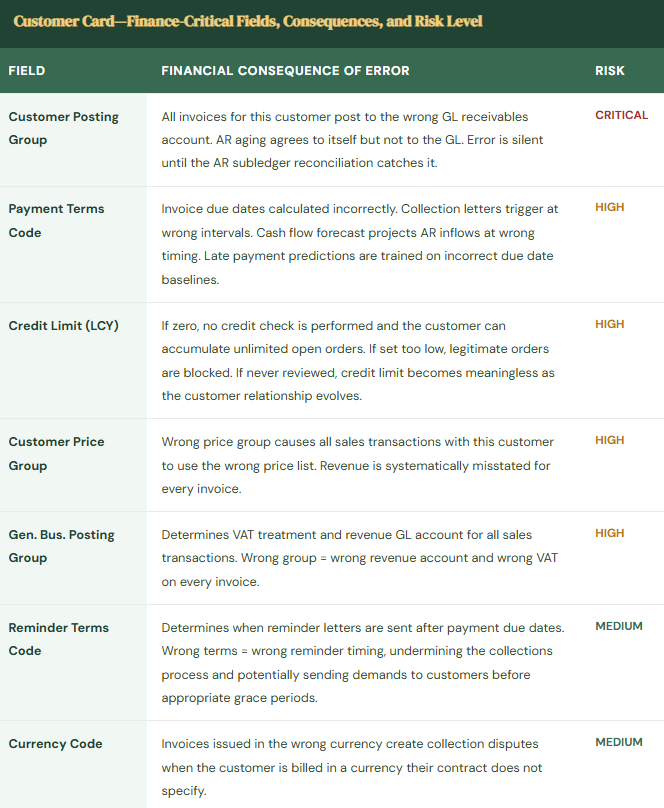
The Customer Master Fields Finance Must Own
The Master Data Governance Framework Finance Must Build in BC
Four-Pillar Master Data Governance Framework for BC
- New Record Creation Controls—Finance Approval Before Activation
- Every new vendor and customer must pass through a Finance review before being used in any transaction. BC’s approval workflow capability (Workflow → Vendor Approval Workflow or Customer Approval Workflow) routes new vendor and customer records to a Finance approver before the record is released. The Finance approver validates the Finance-critical fields: vendor posting group, payment terms, payment method, and bank account entry for vendors; customer posting group, credit limit, payment terms, and VAT registration for customers. For vendors, Finance also confirms the vendor is not a duplicate of an existing record (searching BC by name and payment details before approving). For US organizations, Finance verifies the vendor’s tax identification number before approval and confirms the 1099 classification is correct. The workflow approval step takes two to three minutes per record and prevents weeks of retroactive correction.
- Change Controls for High-Risk Fields—BC Workflow Enforcement
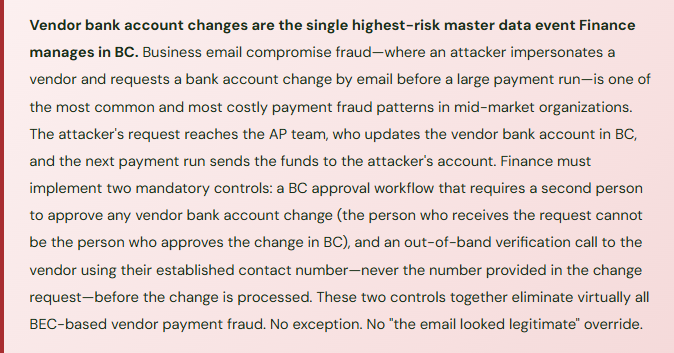
- Changes to Finance-critical fields on existing vendor and customer records require a separate, higher-authority approval than the original record creation. Finance configures BC’s vendor and customer change approval workflows with specific field triggers: any change to vendor bank account, vendor posting group, or payment terms triggers a Controller approval request. Any change to customer posting group or credit limit triggers an AR Manager approval request. Any change to vendor bank account additionally triggers the out-of-band call-back verification procedure before the approval can be granted. These are not informal email approvals—they are BC workflow approvals that prevent the field from being saved with the new value until the workflow is complete. A field-level change that bypasses the workflow is not possible for any user without System Administrator access, and the System Administrator role should not be assigned to any Finance or AP team member.
- Quarterly Master Data Audit—Finance Reviews and Cleans
- Every quarter, Finance runs a master data quality review. For the vendor master: pull the vendor list and identify vendors with no transactions in the trailing 12 months (candidates for blocking or archiving to prevent use), vendors whose payment terms in BC differ from the terms on the most recent vendor invoice, and vendors with bank accounts that have not been verified in the trailing 18 months (trigger a re-verification call). For the customer master: pull the customer list and identify customers with credit limits that have not been reviewed in the trailing 12 months, customers whose payment terms in BC differ significantly from their actual payment behavior (if a customer consistently pays in 45 days but the terms say Net 30, the terms should reflect the negotiated reality or Finance should be actively working to enforce contract terms), and customers with zero activity in 24 months (candidates for archiving). Document the quarterly review and the actions taken. The quarterly audit is the ongoing control that prevents master data from drifting away from accuracy as the organization changes.
- Named Ownership and Accountability
- Finance assigns named owners for each master data domain. The Vendor Master Owner (AP Manager or Controller) is accountable for posting group accuracy, bank account verification, payment terms accuracy, and duplicate vendor prevention. The Customer Master Owner (AR Manager or Credit Manager) is accountable for posting group accuracy, credit limit currency, payment terms accuracy, and customer data completeness. Ownership means the owner’s name is on the quarterly audit, their sign-off is required for high-risk field changes, and they are the escalation point when a master data error is discovered. The quarterly audit is presented to the Controller with each owner’s sign-off. This accountability structure ensures master data governance is a defined Finance responsibility with named owners—not a background task that everyone assumes someone else is doing.
Five Master Data Failures That Finance Traces to a Single Wrong Field
⚠️ Vendor Posting Group Wrong Since Go-Live—14 Months of Invoices in the Wrong Payables Account
A significant services vendor was assigned the “Goods” vendor posting group during data migration rather than the “Services” posting group. The Goods posting group maps to Trade Payable (GL 2100); the Services posting group maps to Services Payable (GL 2200). For 14 months, every invoice from this vendor posted to GL 2100. The AP aging reconciliation balanced every month because the AP subledger correctly mapped each invoice to the vendor’s posting group—both the subledger and the GL posted to 2100, just not the right account. The error was discovered when Finance built a vendor-type analysis for year-end audit preparation and noticed that a known services vendor was appearing in the goods payables category. Correcting 14 months of misclassified payables required a single journal entry for the current balance (moving the vendor’s outstanding balance from 2100 to 2200) plus a disclosure to the auditors explaining the historical misclassification. The historical period financial statements did not require restatement because the total AP balance was correct—only the sub-account classification was wrong. But the correction conversation with the auditors took two hours that Finance would not have needed if the posting group had been validated at record creation.
Fix: Vendor posting group validation is a required step in the new vendor approval workflow. The Finance approver, before releasing any new vendor record, opens the Vendor Posting Groups page in BC, finds the posting group assigned to the new vendor, confirms the GL accounts mapped in that posting group are correct for the vendor’s category, and documents the review in the approval notes. For organizations with a small number of vendor categories (goods, services, employee reimbursements, intercompany), the mapping is simple enough that Finance can validate it in 90 seconds. A posting group validation step in the workflow is the difference between a 90-second check at record creation and a two-hour auditor conversation 14 months later.
⚠️ Duplicate Vendor Record Created—Invoice Posted to New Record With No Bank Account
An AP coordinator receives an invoice from a regular vendor whose name on the invoice is slightly different from the name in BC (the vendor recently changed their trading name and the invoice uses the new name). The coordinator searches BC for the vendor using the new name, finds no match, and creates a new vendor record. The new record has no bank account and defaults to cheque payment. Three invoices are posted against the new duplicate record before Finance notices during the bank reconciliation that cheques are being generated for a vendor Finance has always paid by BACS. Investigation reveals the duplicate. The original record with the BACS bank account is the correct record; the three invoices must be moved from the duplicate to the original. Because the invoices have already been posted, moving them requires credit memos against the duplicate and new invoices on the original—creating six transactions to correct what should not have been three. If any of the cheques had already been mailed to the vendor, the correction would be even more complex.
Fix: Duplicate vendor detection is a mandatory step in the new vendor creation workflow—it must occur before the record is created, not after. Before creating any new vendor, Finance searches BC’s vendor list by: the vendor’s name (including common name variations), the vendor’s address, and the vendor’s VAT registration number or tax identification number. If any existing vendor matches on two or more of these criteria, the new record request is held pending investigation of whether it is a genuine new vendor or a variant of an existing one. BC’s vendor search functionality (the search box on the Vendor List page) allows Finance to search by name fragment—searching for the first three words of the vendor name is usually sufficient to surface any existing record for the same vendor. This takes 30 seconds and prevents the duplicate correction process that takes hours.
⚠️ Customer Credit Limit Not Reviewed for Three Years—Failing Customer Accumulates $180,000 Balance
A customer’s credit limit was set at £200,000 at go-live based on their initial credit application and their payment history at the time. Three years later, the customer’s payment behavior has deteriorated significantly: they have been paying 45–60 days late for the past eight months and their outstanding balance has grown from their typical £40,000 to £180,000. BC’s credit check still shows £20,000 of available credit (outstanding balance of £180,000 against a £200,000 limit) so the sales team continues booking orders. Finance has not reviewed the credit limit because the process for triggering a review was never documented and there is no calendar reminder. When the customer files for insolvency, Finance has £180,000 of receivables that are substantially uncollectible against a reserve that was calculated at 1% of total AR—approximately £1,800 for this account. The write-off hits the income statement as a £178,200 bad debt expense that Finance cannot explain to the CFO as anything other than a risk that should have been identified and managed much earlier.
Fix: Credit limit reviews require two triggers—an annual calendar trigger and an event-based trigger. Annual trigger: every customer credit limit has a review date set in BC’s customer card (Customer card → Credit & Collections FastTab → Credit Limit Review Date field, which BC does not provide natively but can be captured in a custom field or managed in a separate tracking document). Finance reviews every significant customer credit limit annually before the review date. Event trigger: any customer whose payment behavior meets a deterioration threshold receives an immediate review: three consecutive months of payment more than 30 days late, a single payment more than 60 days late on a balance exceeding the materiality threshold, or any public report of the customer’s financial distress. The deterioration trigger review is added to the monthly AR review meeting agenda: Finance reviews the AR aging for customers who have shifted aging buckets compared to prior months and flags any for credit limit review. A credit limit reduced from £200,000 to £60,000 at month six of the deterioration period would have capped the exposure at £60,000—not eliminated the loss, but reduced its magnitude by two-thirds.
⚠️ Customer Posting Group Changed Without Approval—Six Months of Revenue to the Wrong Account
A power user with customer card edit access changes a customer’s Gen. Business Posting Group from “Domestic” to “Export” at the request of the sales team, who believe the customer’s new contract structure qualifies them as an export customer for VAT purposes. The change is made without Finance approval and without a VAT review of whether export treatment is actually correct for this customer. For six months, all invoices to this customer apply zero-rated VAT (export treatment) rather than the standard rate that should apply—the customer is technically a UK company with delivery in the UK, and zero-rating was not appropriate regardless of the sales team’s belief. When Finance identifies the error during a VAT return preparation, six months of VAT at 20% on this customer’s revenue must be recalculated, a VAT adjustment invoice issued, and a corrected VAT return submitted. The customer’s Finance team disputes the retroactive VAT charge. The resolution takes six weeks and involves both Finance teams’ management.
Fix: Changes to a customer’s Gen. Business Posting Group require Controller approval in BC’s workflow and a VAT compliance review before the change is made. Finance configures the customer change approval workflow to trigger on any change to the Gen. Business Posting Group field. The approval request routes to the Controller with the current and proposed values and a prompt to confirm that the VAT treatment change has been reviewed and is correct. The Controller does not approve the change without confirming: what is the VAT basis for the new posting group? Has the customer’s VAT registration number been validated for export treatment? Is the delivery location outside the VAT jurisdiction? If the answer to any of these questions is uncertain, Finance engages the tax advisor before approving the change. A five-minute Controller review prevents the six-week dispute resolution.
⚠️ No Quarterly Master Data Audit—72 Inactive Vendors Active in BC Including 3 With Open Balances
Finance has never conducted a formal vendor master audit. Four years post-go-live, the vendor list in BC has 847 active vendor records. A compliance review for a new banking relationship requires Finance to produce a complete vendor list with payment activity. Finance pulls the list and discovers: 72 vendors marked as active have had no transactions in four years, including three that have open credit balances in AP (debit balances from credit memos that were posted but never applied to invoices). The 72 inactive vendors represent payment fraud risk—an attacker who gains access to BC could generate a payment journal entry to any of these vendors, and if the vendor name is familiar from years past, it might not trigger scrutiny in a payment approval workflow. The three vendors with open debit balances represent £8,400 of AP that appears on the balance sheet as a liability that Finance has not investigated or resolved. None of this was caught because there was no process to catch it.
Fix: The quarterly vendor master audit is a Finance governance procedure with a documented output. Procedure: (1) Export the active vendor list from BC and identify all vendors with zero transactions in the trailing 12 months. (2) For each inactive vendor, confirm with the relevant department whether the vendor relationship is truly ended or whether activity is expected to resume. (3) Block any vendor confirmed as inactive (Vendor card → Blocked = All) to prevent future transactions. (4) Identify any inactive vendor with a non-zero outstanding balance and resolve it: investigate the balance, apply or write off credit memos, and clear the balance before blocking. (5) Document the review and the actions taken. The quarterly audit is completed in two to three hours for a vendor list of 800 records and prevents the compliance and fraud risk exposure that an unmanaged vendor master accumulates over years.
Do This / Don’t Do This
Do This
- Require BC workflow approval for all new vendor and customer records before activation
- Validate posting group GL account mappings in the new record approval workflow—every time
- Enforce two-person approval plus out-of-band call-back for every vendor bank account change
- Search for duplicate vendors before creating any new vendor record
- Set annual credit limit review dates and event-triggered review thresholds for customer payment deterioration
- Configure BC change approval workflows for posting group changes on both vendor and customer cards
- Run the quarterly vendor master audit and document the results with named owner sign-off
Don’t Do This
- Allow vendor bank account changes through email request without BC workflow approval and call-back verification
- Create new vendor records without searching for existing duplicates first
- Set customer credit limits at go-live and consider the task permanently complete
- Allow posting group changes on vendor or customer records without Finance workflow approval
- Leave inactive vendors as Active in BC—they represent payment fraud risk and balance sheet clutter
- Treat master data governance as a go-live task rather than an ongoing Finance governance cadence
- Accept verbal or email confirmation of vendor bank account changes—always verify by calling the vendor at an established number
Up Next:
Master data governance applies to every type of organization using BC. The next post addresses a Finance context where BC’s capabilities require a specific configuration approach that differs meaningfully from the commercial settings most posts have focused on: BC for Nonprofits and Grant Accounting—how Business Central handles restricted fund accounting, grant budget tracking and spending compliance, donor and grantor reporting, the period-end grant reconciliation Finance must complete before releasing grant-funded expenses, and the five grant accounting failures that produce funder audit findings and jeopardize future funding.
— Bobbi
D365 Functional Architect · Recovering Controller
Thank you for reading!
If this post helped you solve a real problem, share it with a Finance colleague who is in the middle of an ERP implementation or a post-go-live optimization. If you have a topic that I haven’t covered, please reach out. There is always one more post worth writing.
If you are interested in learning more, below are some of my latest posts:
Leave a Reply