
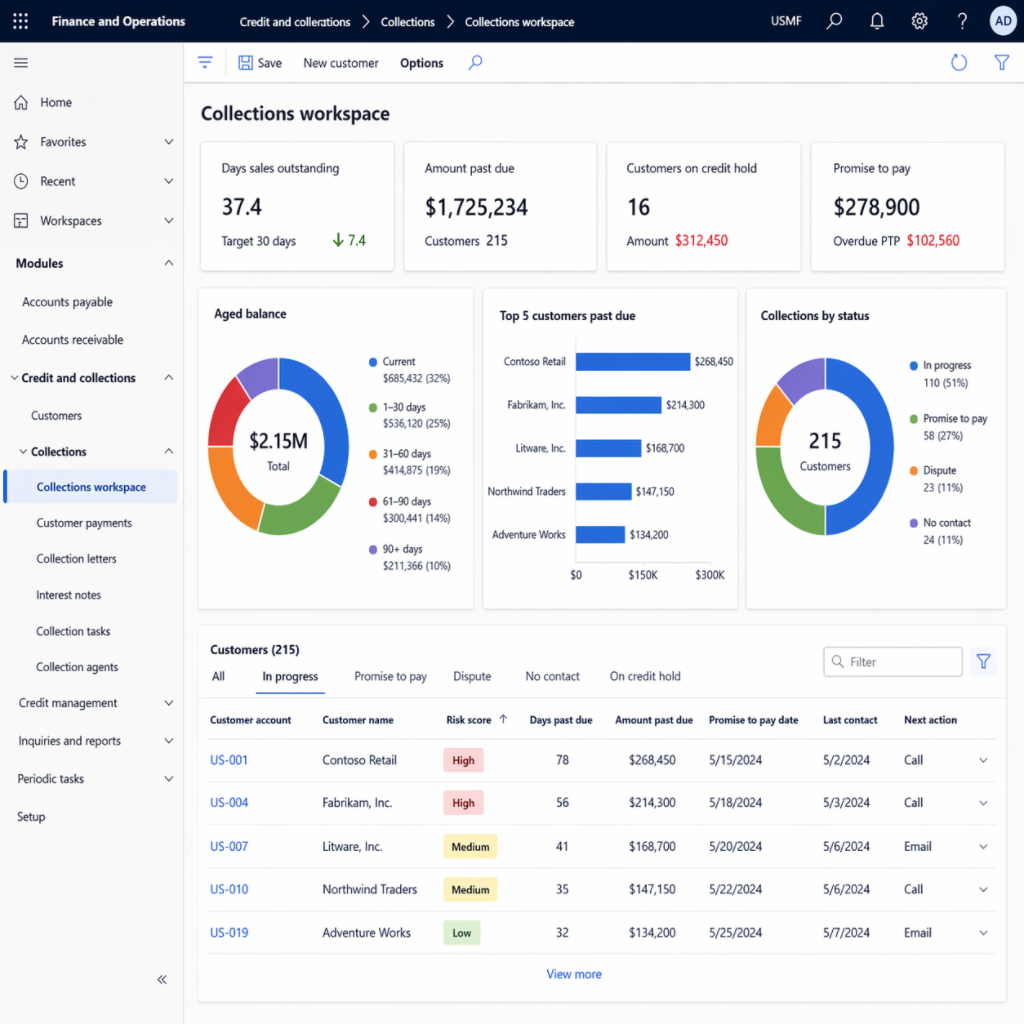
How D365 F&O’s credit management and collections workspace give Finance a receivables management capability beyond a static AR aging report, the credit limit and hold configuration Finance must own before any customer order is processed, the collections workspace capabilities that reduce days sales outstanding, and the five credit and collections configuration failures that leave Finance managing receivables the same way it did before D365 F&O was implemented.
“Credit and collections is the Finance process where the gap between D365 F&O’s capability and the typical Finance team’s actual usage is most economically consequential. The days sales outstanding for most Finance teams I work with is 5 to 12 days longer than it could be if Finance were using D365 F&O’s credit management and collections workspace properly. At $20 million of annual revenue, one day of DSO improvement is approximately $55,000 of working capital released. The credit management module prevents Finance from extending credit to customers whose payment behavior does not support the credit limit they have been granted. The collections workspace gives the AR team customer-prioritized work queues, AI-assisted payment predictions, activity tracking, and automated reminder letter generation—tools that the spreadsheet-based collections process cannot match for efficiency or consistency. The organizations using D365 F&O’s collections workspace have AR coordinators who contact more past-due customers per day, follow up more consistently, and close overdue balances faster than teams working from a static aging report. The configuration investment is real and it pays back in working capital. Finance that configures the credit module with default credit limits and ignores the collections workspace is leaving working capital on the table every close cycle.”
The Four Credit and Collections Capabilities Finance Must Configure
Customer Credit Limits and Credit Management
D365 F&O’s credit management module (Credit and collections → Setup → Credit management setup) allows Finance to assign a credit limit to each customer and configure rules that automatically block or release orders based on the customer’s current exposure relative to their credit limit. When a sales order would cause a customer’s total open orders plus outstanding AR to exceed their credit limit, D365 F&O places the order on credit hold—preventing it from being released for fulfillment until Finance reviews and releases the hold.
Finance owns: The credit limit for every customer, the criteria Finance uses to set and review limits, and the rules that determine when a credit hold is applied (D365 F&O allows Finance to define the hold trigger: at order entry, at order confirmation, or at packing slip). Finance also owns the credit hold release workflow—the process for reviewing on-hold orders and deciding whether to release, require payment, or reject the order.
Critical configuration: The credit management blocking rules determine which credit limit calculation method D365 F&O uses. Finance must choose whether the credit exposure calculation includes open sales orders only, open sales orders plus outstanding AR invoices, or all open transactions including uninvoiced order amounts. The most conservative calculation prevents Finance from inadvertently shipping to a customer who has already reached their limit in unpaid invoices before the current order is counted.
Customer Aging Periods and Aging Report Configuration
D365 F&O’s customer aging report is the primary AR visibility tool Finance uses for both collections prioritization and period-end reconciliation. Finance configures the aging period definitions (Credit and collections → Setup → Aging period definitions) that determine how the aging report categorizes open balances: Current, 1–30 days, 31–60 days, 61–90 days, 90+ days is the standard configuration, but Finance can define any period structure that matches its collections management approach.
Finance owns: The aging period definition must be consistent across all uses of the aging report: the period-end AR subledger reconciliation, the collections workspace, the credit review, and the allowance for doubtful accounts estimation. Finance should not have multiple aging period definitions in use for different purposes—the aging bucket categorization should be the same for all Finance and collections uses so that the numbers Finance presents to management, the credit review committee, and the external auditor are consistent.
Collections Workspace—The AR Coordinator’s Primary Daily Tool
D365 F&O’s Collections workspace (Credit and collections → Collections → Collections) is the daily working environment for the AR coordinator or collections manager. It surfaces customers with overdue balances prioritized by the financial risk they represent, provides a complete view of each customer’s outstanding invoices and payment history, enables the AR coordinator to log collection activities (call notes, promise-to-pay dates, dispute flags), and generates collection emails and reminder letters directly from the workspace.
Finance owns: The collections pool configuration that determines which customers each AR coordinator is responsible for, the customer disposition codes that Finance uses to categorize collection activities and outcomes, and the promise-to-pay tracking that Finance uses to monitor whether customers who committed to a payment date actually pay. Finance also configures Finance Insights customer payment predictions in the workspace if the data threshold has been met (Post 56 of this series).
Reminder Letters and Collection Correspondence
D365 F&O generates customer reminder letters (Credit and collections → Reminder letters) on a configured escalation schedule: a first reminder at 7 days past due, a second reminder at 21 days past due, a formal demand letter at 45 days past due. Finance configures the reminder letter sequence, the text of each letter, the escalation rules, and the minimum balance threshold below which reminder letters are not generated (Finance should not send a formal demand letter for a £12 balance).
Finance owns: The reminder letter text must be reviewed by Finance and Legal before letters are sent to customers. A reminder letter that is legally non-compliant (using language that is not permitted in the jurisdiction, making claims that are not accurate, or threatening remedies that Finance cannot actually pursue) creates legal risk. Finance also owns the decision of whether collection emails generated by Copilot (Post 56) are reviewed before sending or auto-sent based on workflow configuration.
The Credit Limit Review Process Finance Must Own
Credit Limit Review—Finance-Owned Procedures at Each Review Trigger
- New Customer—Credit Limit Set Before First Order Is Accepted
- Before any sales order is entered for a new customer, Finance establishes the customer’s credit limit in D365 F&O. The credit limit determination process: Finance reviews the customer’s credit application (or the sales team’s customer onboarding information), assesses the credit risk based on available payment history or credit reference information, and sets the initial credit limit consistent with the risk assessment. Finance documents the basis for the credit limit in the customer record’s internal notes.
- Finance configures D365 F&O’s credit management rules so that new customers with no credit limit assigned are placed on credit hold for all orders until Finance explicitly sets a limit. The alternative—new customers defaulting to an unlimited credit limit—allows Finance to ship to new customers on any credit terms before any credit assessment has occurred.
- Annual Review—Credit Limits Reviewed for All Active Customers
- Finance conducts an annual review of the credit limit for every customer with activity in the trailing 12 months. The annual review confirms the credit limit is consistent with the customer’s current financial position and payment behavior. Customers whose payment behavior has deteriorated (increase in average days to pay, recent partial payments, dispute history) receive a credit limit reduction or are placed on special terms. Customers whose payment behavior has improved and whose volume has grown may receive a credit limit increase.
- Finance documents the outcome of each annual credit review in the customer record and retains the documentation as evidence of the credit management process. The external auditor may ask Finance to demonstrate that credit limits are actively managed rather than set once and forgotten—the annual review documentation is the evidence Finance provides.
- Event-Triggered Review—Material Change in Customer Risk Profile
- Between annual reviews, Finance conducts an immediate credit limit review when any of the following occurs: a customer places on credit hold for the first time (Finance reviews whether the limit should be reduced or the order should be released based on the customer’s overall payment behavior), a customer misses a payment that is more than 30 days past due, the sales team reports a material change in the customer’s business (ownership change, significant management turnover, market sector deterioration), or Finance receives information suggesting the customer’s financial position has changed materially since the last review.
- Event-triggered reviews are Finance’s earliest warning system for customers whose credit exposure is increasing at the same time their ability to pay is declining. The combination is the profile of the bad debt Finance is trying to prevent before the receivable is uncollectable.
- Credit Hold Release—Finance Documents the Decision Before Releasing
- When a sales order is placed on credit hold, Finance reviews the hold and makes one of three decisions: release the order (the hold was triggered by a temporary timing issue and the customer’s credit is sound), require payment before release (the hold is appropriate and Finance requires the customer to reduce their outstanding balance before the order proceeds), or reject the order (the credit risk is too high and Finance will not extend further credit). Finance documents the decision in D365 F&O’s credit hold release notes before releasing the hold. The release note becomes the audit trail for the credit decision.
Five Credit and Collections Failures That Leave Working Capital on the Table
⚠️ Credit Limits Set Once at Go-Live and Never Reviewed—$280,000 Bad Debt on a Customer Whose Risk Escalated Unnoticed
Finance set credit limits for all customers during the D365 F&O implementation based on the prior year’s customer history. The credit limits were never reviewed after go-live. A customer in the retail sector was assigned a $120,000 credit limit based on their payment history at the time of implementation—when the retail sector was performing well. Over 30 months, the customer’s payment behavior deteriorated progressively: average days to pay increased from 35 to 62 days, two invoices were disputed and not paid for six months, and two partial payments were received on large invoices. Throughout this period, the sales team continued accepting orders up to the credit limit—and Finance continued releasing credit holds when they arose, because Finance was not tracking the customer’s payment behavior trend, only the individual hold event. When the customer entered administration with $280,000 outstanding to Finance, no Finance team member had reviewed the customer’s credit limit since go-live.
Fix: Annual credit limit reviews are not optional for active customers. Finance schedules the credit limit review as an annual Finance calendar event, assigns a named owner (the AR Manager or Controller), and produces a documented output for every customer reviewed. For customers whose payment days have increased by more than 15 days year-over-year, Finance reduces the credit limit to the current outstanding balance until the payment behavior improves. Finance also configures a D365 F&O alert: when a customer’s average payment days calculated from the Customer Ledger Entries exceeds a defined threshold, Finance receives an automatic notification. The alert does not replace the annual review—it supplements it by surfacing deteriorating customers between annual review cycles.
⚠️ Credit Hold Released Without Documentation—Audit Cannot Trace the Credit Decision
D365 F&O places a sales order on credit hold because the customer’s total exposure (open invoices plus open orders) exceeds their credit limit. The Finance Manager reviews the hold and releases it verbally with a note to the AP coordinator to “just this once” approve the order. No release note is entered in D365 F&O. The order ships. The invoice is issued. The invoice is not paid. Finance eventually writes it off as a bad debt. When the external auditor reviews the accounts receivable write-off and asks Finance to produce the credit decision documentation for the order that generated the bad debt, Finance cannot produce it. The auditor identifies the absence of credit hold release documentation as a control weakness in the credit management process.
Fix: Finance configures the credit hold release workflow to require a written release note before any hold can be released. D365 F&O’s credit management module allows Finance to add mandatory notes to the hold release process—the release cannot be completed without Finance entering the reason for the release and the basis for the credit decision. Finance trains all Finance staff with credit hold release authority that every release requires a documented rationale: “Customer has paid invoices totaling $X since the hold was placed; order released based on improved position” or “Release approved by Controller with required payment due within 14 days.” The release note is Finance’s credit decision evidence for every hold that is released.
⚠️ Collections Workspace Not Configured—AR Coordinator Works From a Static Aging Report Export
D365 F&O’s Collections workspace is available but was not configured during implementation because the implementation team designated it as a “Phase 2” item that Finance would set up post-go-live. Two years post-go-live, the AR coordinator still manages collections from a monthly aging report exported to Excel, sorted manually, and supplemented with a personal call log maintained in a notebook. She contacts approximately 18 past-due customers per week using this process. The Collections workspace, properly configured with customer pools, AI payment predictions, and activity tracking, would allow the same AR coordinator to contact 30–35 customers per week with better targeting (contacting the highest-risk and highest-value customers first) and better documentation (all activity recorded in D365 F&O, visible to Finance management). The DSO impact of the manual process relative to the workspace process has been estimated at 4 days—at £15 million annual revenue, 4 days of DSO is approximately £165,000 of working capital Finance is consistently holding longer than necessary.
Fix: Collections workspace configuration is a Finance AR operations investment, not a Phase 2 aspiration. Finance configures the minimum viable collections workspace in a one-day effort: create customer pools (assign customers to AR coordinators based on customer category or alphabet range), configure the aging period definition that drives the workspace view, enable the collections activity recording (call notes, promise-to-pay dates, dispute flags), and generate one reminder letter template for the AR coordinator to use as a starting point. The workspace is ready for productive use after this configuration. Finance revisits AI payment predictions once the training data threshold is confirmed (Post 56) and adds them as a workspace capability at that point rather than waiting for full AI readiness to use the workspace at all.
⚠️ New Customers Default to Unlimited Credit—Sales Ships Before Finance Conducts Any Credit Assessment
Finance did not configure a default credit limit for new customers at go-live. In D365 F&O, when no credit limit is configured for a customer and the credit management module is active, the behavior depends on the blocking rules Finance has configured—or has not configured. In this implementation, the blocking rules were not configured, so new customers effectively have unlimited credit. Sales enters orders for new customers, the orders are confirmed and released without any credit check, goods are shipped, and invoices are issued. For three new customers onboarded in the past six months, Finance has not conducted a credit assessment because the workflow to trigger one was never established. Two of the three customers are paying reliably; one is 65 days past due on $42,000 of invoices and Finance is discovering for the first time that the customer was a startup with no trading history that the sales team onboarded without Finance’s knowledge.
Fix: Finance configures D365 F&O’s credit management blocking rules to automatically place new customers (customers with no credit limit assigned) on credit hold for all orders. The hold is the trigger for Finance to conduct the credit assessment. Until Finance assigns a credit limit to the new customer, no order can be released for fulfillment. Finance communicates this process to the sales team: the process for onboarding a new customer includes a Finance credit assessment, and Finance establishes a defined turnaround time (24 or 48 hours) for the credit review so the sales team knows how quickly Finance will process the assessment and release the hold. The credit management blocking rule for new customers is the control that ensures Finance is involved in every new customer relationship before the first shipment is made.
⚠️ Reminder Letters Sent Without Finance or Legal Review—Non-Compliant Letter Language Creates Legal Exposure
Finance configures D365 F&O’s reminder letter templates and enables automatic generation and sending through the workflow: when a customer reaches the defined aging threshold, D365 F&O generates and sends the reminder letter automatically without Finance review. One template contains language that the UK Debt Collection regulations do not permit in a first-contact reminder: it implies legal proceedings are imminent when Finance has not in fact instructed solicitors. A customer’s solicitor receives the letter and writes to Finance alleging non-compliance with the Consumer Credit Act and FCA debt collection regulations. Finance investigates and discovers the automated letter was sent to 40 customers using the non-compliant template before the legal issue was identified. Finance must write to all 40 customers correcting the implication. One customer uses the letter to dispute a payment obligation and the dispute takes six months to resolve.
Fix: Reminder letter templates must be reviewed by Finance and Legal before they are activated in the workflow. Finance submits each template to Legal for review, obtains written approval for each template, and archives the approval with the template record. Finance also configures the reminder letter workflow with a Finance review step—rather than automatic generation and sending, D365 F&O generates the letter as a draft that Finance reviews and approves before sending. The review step adds one working day to the reminder letter process and prevents the legal exposure that automatic sending without review creates. For high-volume reminder programs where manual review of every letter is impractical, Finance reviews a sample of each template’s generated letters monthly and confirms the letters are being generated correctly with the approved content.
Do This / Don’t Do This
Do This
- Conduct annual credit limit reviews for all active customers with documentation of the basis for each limit decision
- Require a written release note in D365 F&O for every credit hold release before the hold can be cleared
- Configure the Collections workspace as a Day 1 AR operations tool, not a Phase 2 aspiration
- Configure blocking rules so new customers with no credit limit are automatically held until Finance completes a credit assessment
- Review reminder letter templates with Legal before activating and include a Finance review step in the letter generation workflow
- Track promise-to-pay dates in the Collections workspace and follow up systematically when promised payments are not received
Don’t Do This
- Set credit limits at go-live and never review them—payment behavior changes, and Finance’s credit exposure should change with it
- Release credit holds verbally without entering a release note in D365 F&O
- Manage AR from a static aging report exported to Excel when D365 F&O’s Collections workspace is available and configurable
- Allow new customers to default to unlimited credit because no credit limit has been assigned
- Enable automatic reminder letter sending without Finance and Legal review of the letter content
What’s Next:
Credit and collections addresses the receivables side of Finance’s working capital management. The series continues with a Finance governance topic that affects every entity Finance operates across: Legal Entity Design in D365 F&O—What Finance Must Own Before the First Configuration Decision—how legal entity structure in D365 F&O determines what Finance can and cannot consolidate, allocate, and report across entities, the Finance-owned decisions that precede every legal entity configuration, and the five legal entity design failures that Finance is still working around five years after go-live because the foundational structure was wrong.
— Bobbi
D365 Functional Architect · Recovering Controller
Thank you for reading!
If a post helped you solve a real problem, share it with a Finance colleague who is in the middle of a D365 Finance and Operations implementation or a post-go-live optimization. If you have a topic the series did not cover, please reach out. There is always one more subject worth exploring.
Interested in learning more? Below are some of my latest posts:


Leave a Reply