
Post #012 – AI In Microsoft ERP
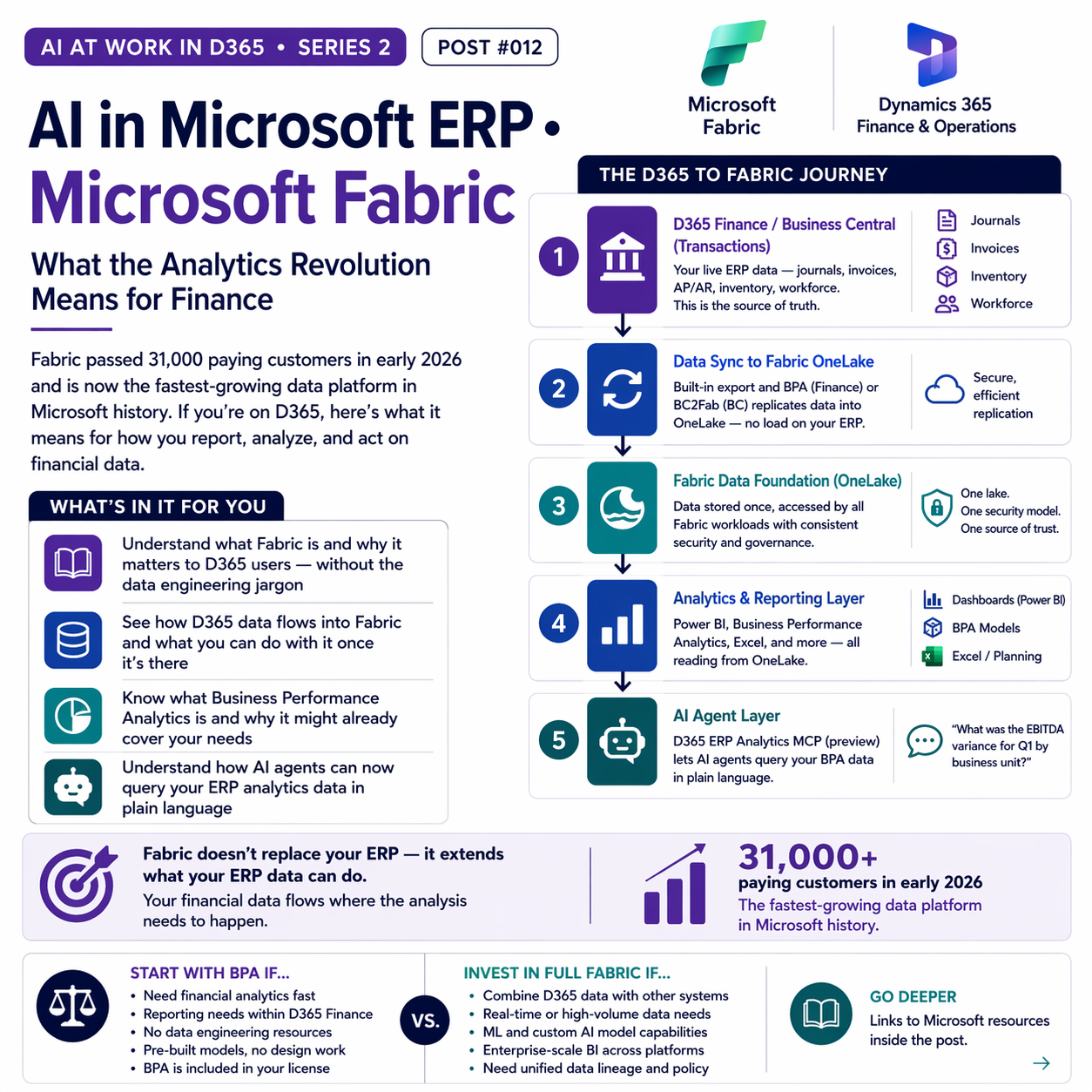
Fabric passed 31,000 paying customers in early 2026 and is now the fastest-growing data platform in Microsoft history. If you’re on D365, here’s what it means for how you report, analyze, and act on financial data.


What Microsoft Fabric Actually Is
Microsoft Fabric is a unified software-as-a-service analytics platform that brings together data engineering, data warehousing, real-time analytics, business intelligence, and AI into one environment built on a shared data foundation called OneLake. Think of OneLake as a single, governed data lake where all your organizational data — from D365, from SharePoint, from external sources — lives in one place, with consistent security and no duplication.
Where this matters for finance teams: historically, getting D365 data into a state where you could do real analytics required data exports, data warehouse builds, ETL pipelines, and a data engineering team to maintain all of it. Fabric dramatically reduces that friction. D365 Finance data can now sync directly into Fabric’s OneLake, where it becomes available for Power BI reports, AI agents, machine learning models, and custom analytics — without the heavy plumbing work.
The D365-to-Fabric Data Flow
Here’s how the layers connect, from your ERP transactions to your analytics outputs:
🏦 D365 Finance / Business Central (Transactions)
Your live ERP data — journals, invoices, AP/AR, inventory, workforce. This is the source of truth; all AI and analytics derive from it.
🔄 Data Sync to Fabric OneLake
D365 Finance uses built-in export-to-data-lake and Business Performance Analytics to surface data to Fabric. For BC, the BC2Fab workload (generally available) replicates data into OneLake using an Open Mirroring architecture that doesn’t create load on your production ERP.
🗄️ Fabric Data Foundation (OneLake)
Data stored once, accessed by all Fabric workloads — Power BI, notebooks, AI agents, Data Warehouse. Security from D365 (legal entity access, role-based) carries through via Microsoft Entra.
📊 Analytics and Reporting Layer
Power BI reads from OneLake for dashboards and financial reports. Business Performance Analytics adds pre-built dimensional data models (no warehouse design required). Excel connects for familiar pivot and planning workflows.
🤖 AI Agent Layer
The D365 ERP Analytics MCP server (in preview) enables AI agents to query BPA data in plain language — “what was the EBITDA variance for Q1 by business unit?” — generating DAX queries dynamically and returning data-driven answers.
BPA vs. Full Fabric: Which Do You Need?
For many D365 Finance organizations, the answer to “do we need to build out a full Fabric environment?” is: not yet. Business Performance Analytics (BPA) is included in your D365 Finance license and provides pre-built dimensional models for financial analytics without requiring you to stand up a separate data warehouse. It’s a strong starting point.
Start With BPA If…
- You need financial analytics fast with minimal setup
- Your reporting needs are primarily within D365 Finance
- You don’t have dedicated data engineering resources
- You want pre-built models without custom design work
- Cost is a constraint (BPA is included in your license)
Invest in Full Fabric If…
- You need to combine D365 data with data from other systems
- You have real-time analytics or high-volume data requirements
- Your analytics team wants ML and custom AI model capabilities
- You’re building enterprise-scale BI across multiple ERPs or platforms
- Your governance requirements need unified data lineage and policy

The AI Agent Angle on Analytics
The development I’m watching most closely in the Fabric-D365 story is the Dynamics 365 ERP Analytics MCP server — currently in preview. This allows AI agents to access your Business Performance Analytics data through natural language, dynamically generating DAX queries and returning analytical answers. The implications for finance are real: instead of running a report, drilling into a pivot, and writing a variance narrative manually, you ask a question and get an answer grounded in your actual data.
This is early-stage — it’s preview, not GA, and natural language query over complex financial data has limitations. But the direction is clear. The gap between “I have data in my ERP” and “I can ask questions of my data in plain language” is closing fast.

📚 Go Deeper — Microsoft Resources
- Business Performance Analytics — D365 Finance — what BPA is and how to use it
- D365 ERP Analytics MCP — Preview — natural language queries over BPA data
- Integrating D365 BC with Microsoft Fabric (BC2Fab — GA)
- D365 Finance 2026 Wave 1 Planned Features — analytics and BPA releases
Microsoft Fabric’s integration with D365 is not a future-state story — it’s a current-state one, with meaningful capabilities available today and a fast-moving roadmap. Whether you start with BPA’s built-in models or invest in a full Fabric analytics layer depends on your organization’s data ambition and resources. Either way, the D365-Fabric connection is worth understanding now, because it’s where AI-powered financial analytics is heading.
BB
Bobbi Bricker
ERP Capability Lead and D365 Functional Architect at Centric Consulting. Former controller. This series reflects ten years in ERP and a genuine belief that AI, used thoughtfully, makes finance and operations teams more capable — not less. Reach out with questions, pushback, or war stories from your own organizations.
Thank you for reading!
If you are interested in learning more, below are some of my latest posts:



Leave a Reply