
Post #013 – AI In Microsoft ERP
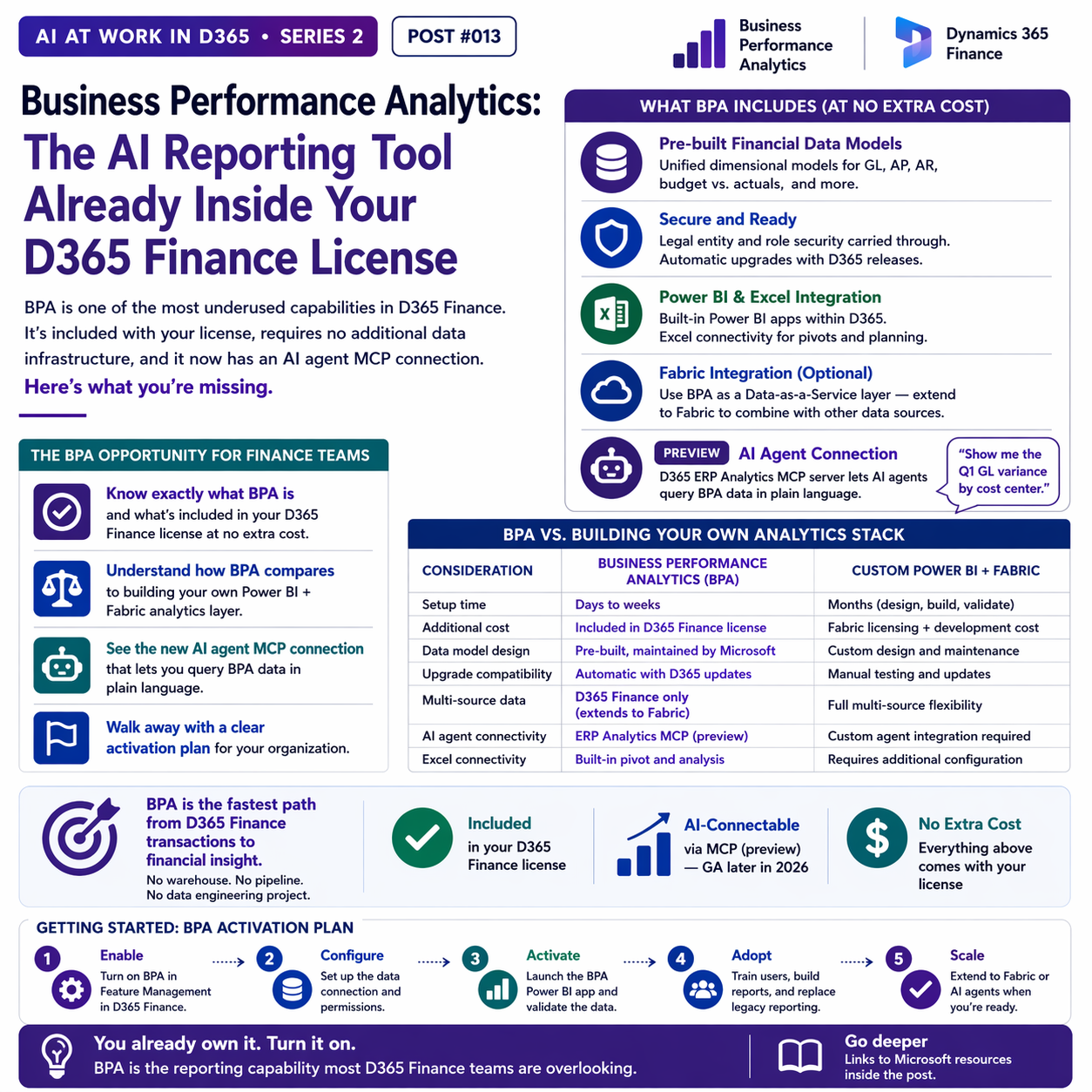
BPA is one of the most underused capabilities in D365 Finance. It’s included with your license, requires no additional data infrastructure, and it now has an AI agent MCP connection.

What Business Performance Analytics Is
Business Performance Analytics is a built-in analytics platform inside D365 Finance. It provides pre-built, business-ready dimensional data models — think fact tables and dimension tables organized around financial reporting — without requiring you to design a data warehouse schema, build ETL pipelines, or hire a data engineering team. You activate it, and the data model is there.
The design philosophy behind BPA is to get finance teams from raw ERP data to meaningful analytics as quickly as possible, without a technology project in between. The trade-off is that BPA’s scope is defined within D365 Finance — it doesn’t natively combine ERP data with data from other systems the way a full Fabric solution does. For organizations whose primary analytics need is understanding their own financial data, that trade-off is very favorable.
What BPA Includes — And What It Doesn’t Cost Extra
Included With D365 Finance License
Unified financial data models, pre-built dimensional structure (GL, AP, AR, budget vs. actuals), Power BI integration within D365, legal entity and role security carried through, automatic upgrades with D365 releases, Excel connectivity for pivots and planning.
Record-to-Report Data Model (Wave 1 2026)
New dimensional model for the full record-to-report process — allowing finance teams to slice and analyze across entities, dimensions, and periods efficiently. This is the specific model that enables meaningful multi-entity financial consolidation analytics without custom development.
Fabric Integration (Optional Extension)
BPA can be used as a Data-as-a-Service layer — exposing its data models to Fabric for organizations that want to combine BPA data with external data sources or build more advanced analytics on top. This extends BPA’s value without replacing it.
AI Agent Connection (Preview)
The D365 ERP Analytics MCP server connects AI agents to BPA data through natural language. Ask an agent “show me the Q1 GL variance by cost center” and it generates the DAX query dynamically and returns the answer. Currently in preview; GA expected later in 2026.
BPA vs. Building Your Own Analytics Stack
| Consideration | Business Performance Analytics | Custom Power BI + Fabric |
|---|---|---|
| Setup time | Days to weeks | Months (design, build, validate) |
| Additional cost | Included in D365 Finance license | Fabric licensing + development cost |
| Data model design | Pre-built, maintained by Microsoft | Custom design and maintenance |
| Upgrade compatibility | Automatic with D365 updates | Manual testing and updates required |
| Multi-source data | D365 Finance only (extends to Fabric) | Full multi-source flexibility |
| AI agent connectivity | ERP Analytics MCP (preview) | Custom agent integration required |
| Excel connectivity | Built-in pivot and analysis | Requires additional configuration |

The Management Reporter Migration Question
If your organization is still using Management Reporter (MR) for financial statements, BPA is a central part of the transition story. Management Reporter is being deprecated — not immediately, but the roadmap direction is clear, and Business Performance Analytics is the Microsoft-designated path forward for financial statement reporting in D365 Finance.
The migration from MR to BPA isn’t trivial — row and column structures in MR don’t map directly to BPA’s dimensional model. But organizations that start the evaluation now, rather than when deprecation is imminent, have time to do it thoughtfully rather than under pressure. If you’re on D365 Finance and still running MR, this is worth a dedicated conversation with your implementation partner.

Getting Started: An Activation Plan
BPA activation involves a few admin steps in D365 Finance — enabling the feature in Feature Management, configuring the data connection, and setting up the initial Power BI app. Microsoft’s setup documentation is clear and this is not a multi-week project. A competent admin can complete activation in a day or two.
Where you’ll spend more time is in the adoption side: training finance users to work with BPA’s dimensional model rather than their existing MR report layouts, building the Power BI reports that replace their current management reporting, and validating that BPA’s numbers tie to their existing financial statements. That’s the real work — and it’s worth doing right.

📚 Go Deeper — Microsoft Resources
- Business Performance Analytics — Overview and Setup
- D365 ERP Analytics MCP — Natural Language Queries Over BPA Data (Preview)
- D365 Finance 2026 Wave 1 — BPA and Analytics Features
- BPA, Fabric, and Power BI — Practical Guide (Stoneridge Software)
Business Performance Analytics is one of those capabilities that deserves more attention than it gets in D365 conversations. It’s included, it’s AI-connectable via MCP (soon), and it directly addresses the management reporting problem that most D365 Finance organizations are still solving with manual Excel exports. If you’re not using it, the first question to answer is why not — and the second is to book time with your admin to turn it on.
BB
Bobbi Bricker
ERP Capability Lead and D365 Functional Architect at Centric Consulting. Former controller. This series reflects ten years in ERP and a genuine belief that AI, used thoughtfully, makes finance and operations teams more capable — not less. Reach out with questions, pushback, or war stories from your own organizations.
Thank you for reading!
Interested in learning more? Below are some of my latest posts:




Leave a Reply